Launch posts bad, good and great: teaser, countdown and launch day side by side, with the Claude and ChatGPT prompts
One fictional serum, three launch moments, three ways each. Claude Code laid out all nine posts in HTML, ChatGPT made the photos. Prompts included.
Watch the reel on InstagramComment #預告 to get this guide
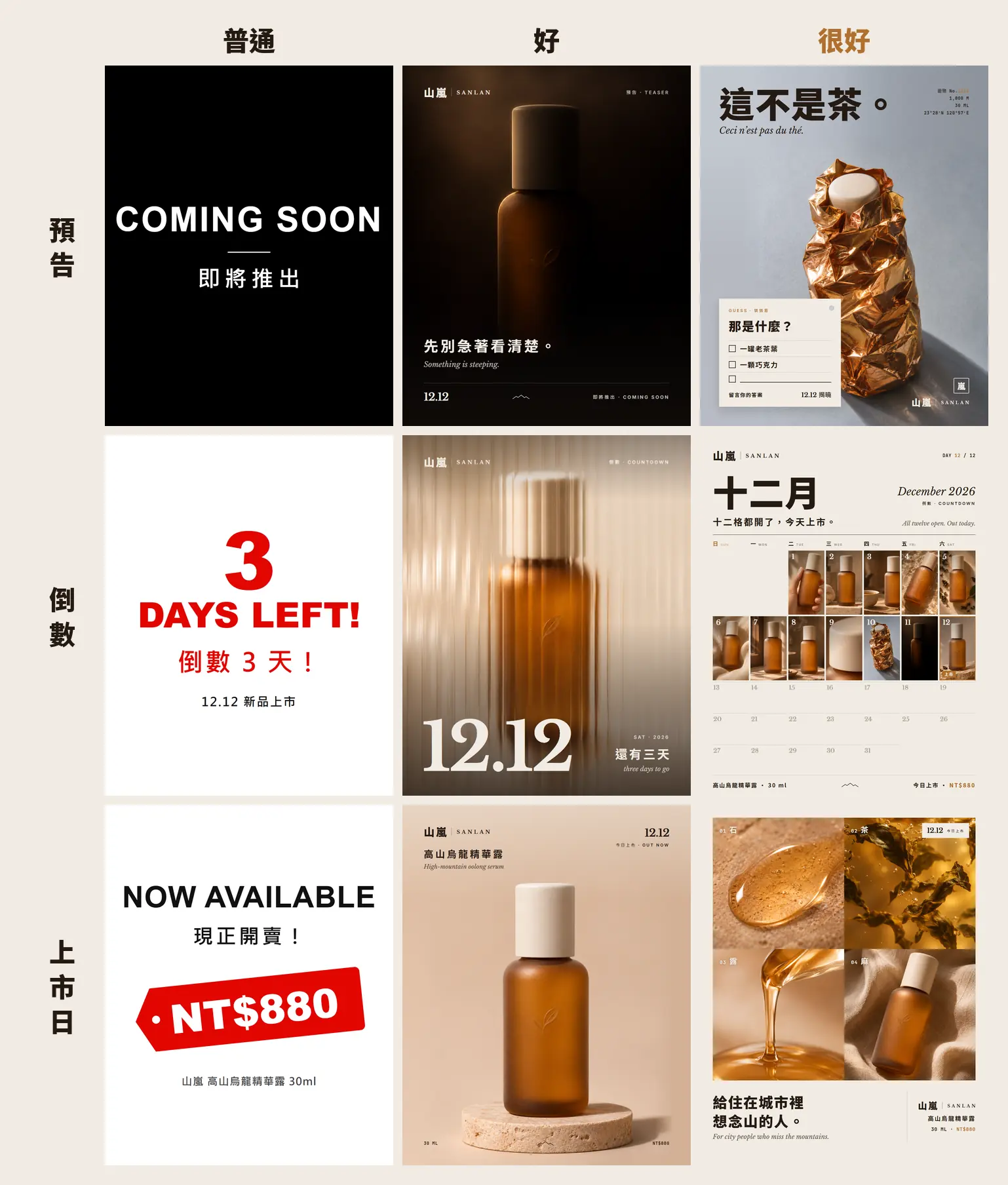
Is your launch teaser a black card that says "coming soon"? It isn't ugly. It just gives nobody a reason to stop. Following the game in the reel, we made launch posts for a fictional Taiwanese skincare product, SANLAN High-Mountain Oolong Serum: a teaser, a countdown and a launch-day post, each done three ways (bad, good, great), nine posts in all. Claude Code laid out all nine as HTML, and the product photos are AI images from ChatGPT. Every image below is the real result.
01The game: 3 moments × 3 ways
Same product, same price, same launch day (12.12, NT$880, both demo values). The three versions don't differ in layout skill. They differ in what each post wants people to do.
- Teaser: you can't say much yet. The goal is to make people screenshot and guess.
- Countdown: the goal is to bring people back every day, not just once.
- Launch day: the goal is to show at a glance who it is for. The price can be small.
- Bad: information only, like the posts everyone makes. Good: quiet, tasteful, a beautiful product shot. Great: one idea that invites people to act; the one a designer saves.
02Post 1: the teaser that makes people screenshot and guess
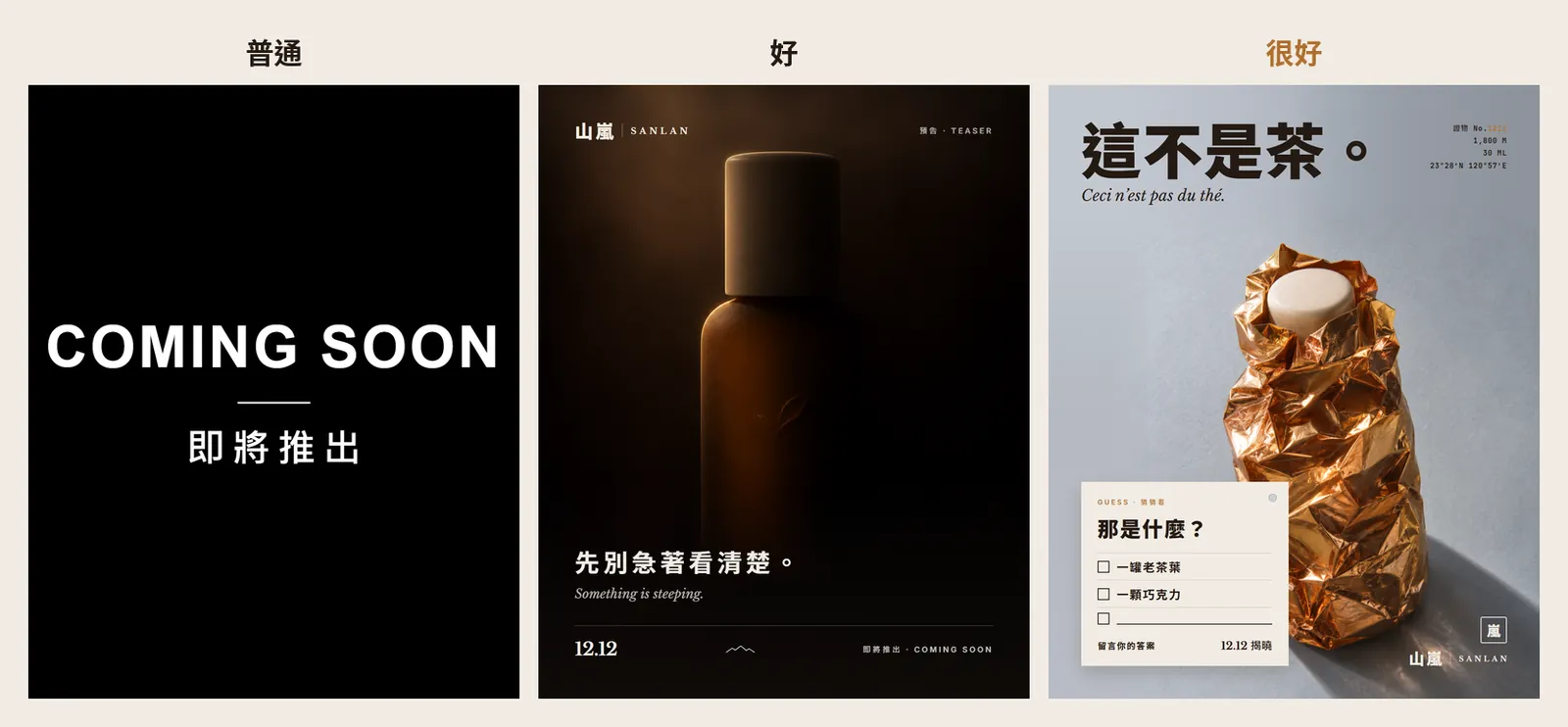
- Bad: white COMING SOON on black. Neat, and forgotten the moment you scroll past.
- Good: the product hidden in shadow with one rim of warm light, the headline "Don't rush to see it clearly." and the launch date 12.12 underneath. Mood plus a date.
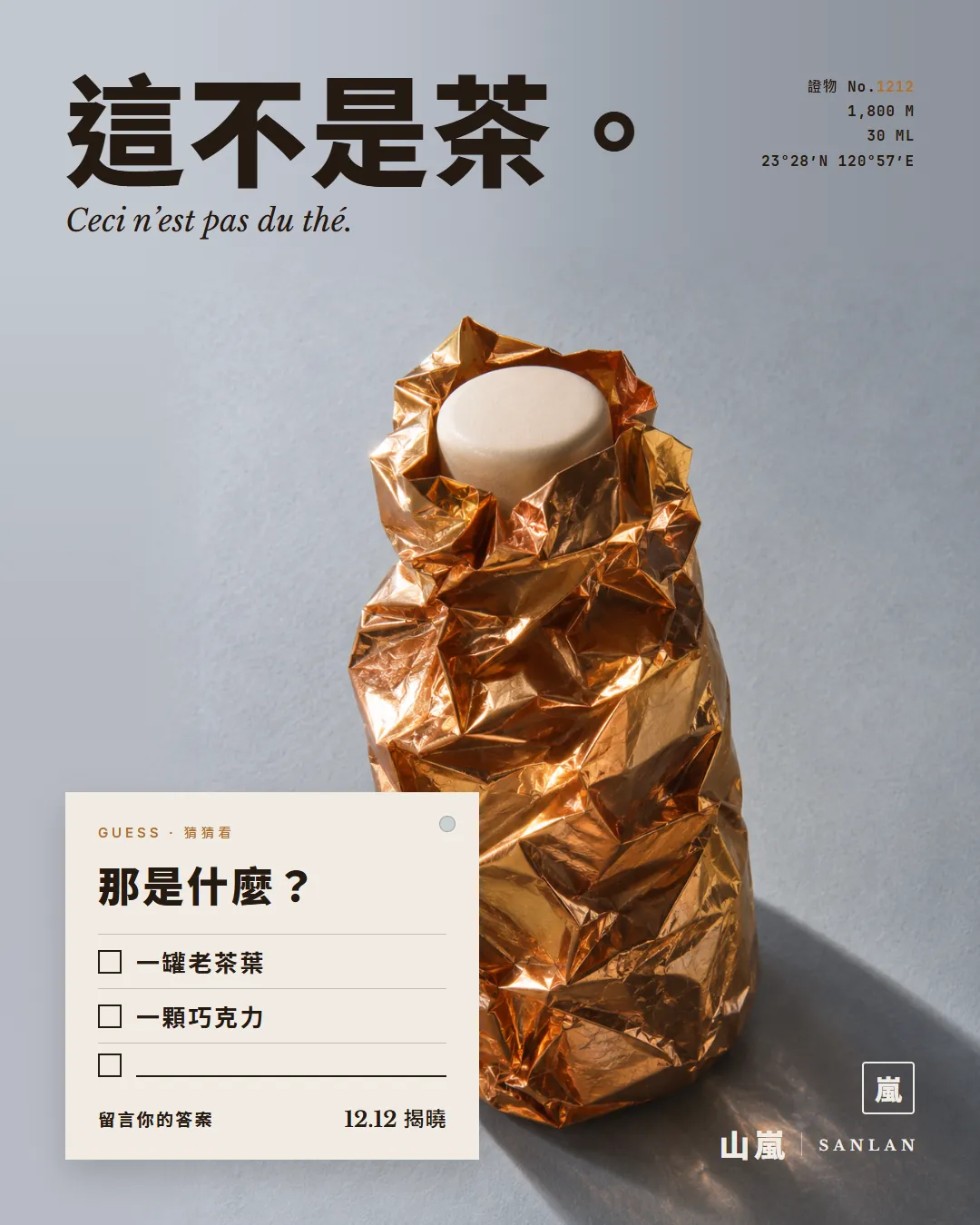
- Great: the bottle wrapped in crinkled gold-copper foil like the lining of a tea tin, only the white cap showing. The headline says "This is not tea." and a small card asks "So what is it?" with two options, a blank line, "comment your answer" and "revealed 12.12".
03Post 2: the countdown that changes every day
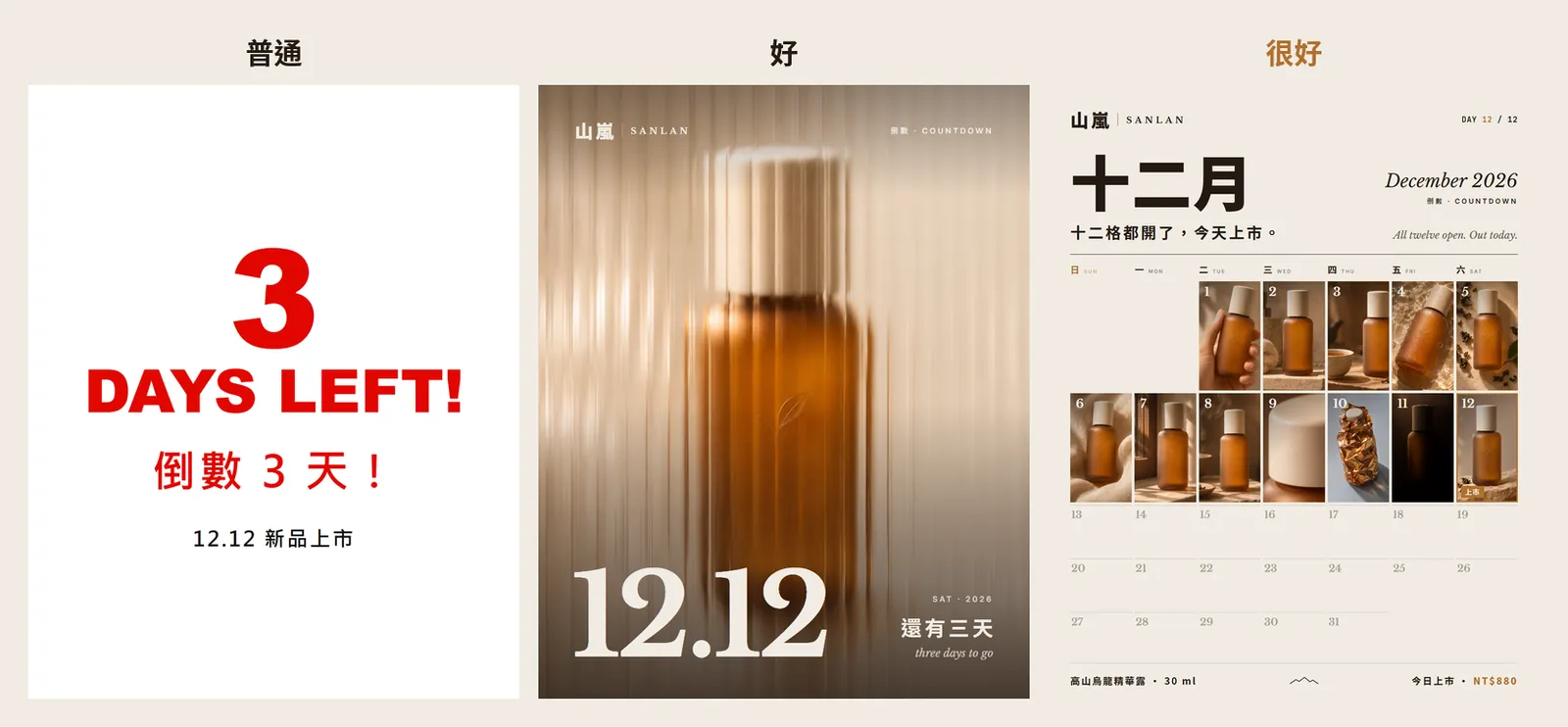
- Bad: "3 DAYS LEFT!" in huge bold red on white. Loud, and everyone has posted it.
- Good: the bottle seen through fluted glass, smeared into warm streaks, with a huge 12.12 and "three days to go". The date becomes the hero.
- Great: a December calendar. From 12.1 one square opens each day with a different product photo; the 12.12 square is launch day.
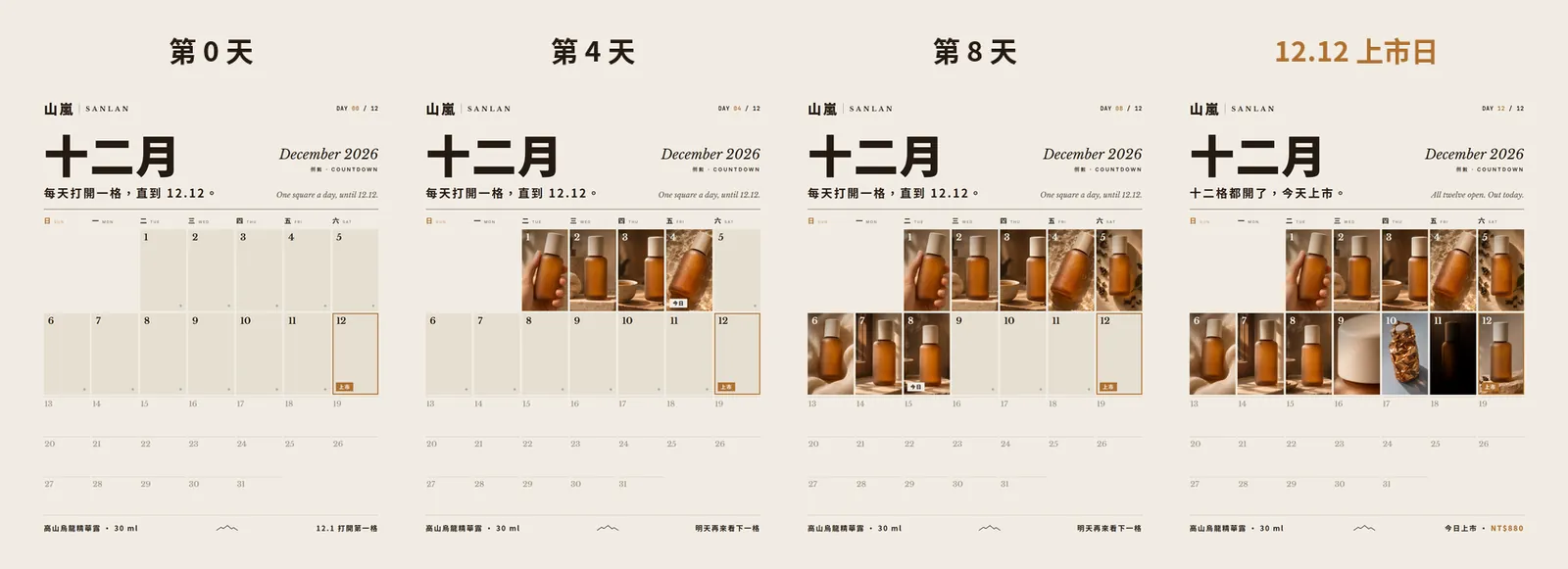
- One photo per day: the first 9 days are 9 product photos in different scenes (in a hand, next to a tea cup, on linen…).
- The last days bring back the foil and shadow photos from the teasers, so followers recognise them; the 12.12 square is tagged "launch".
- Post a new one every day (feed or Stories), with DAY 04 / 12 in the corner so people see the progress.
- On the day it is full, the line changes to "All twelve open. Out today." and only then does the price appear.
04Post 3: launch day with the brand's whole world in one frame
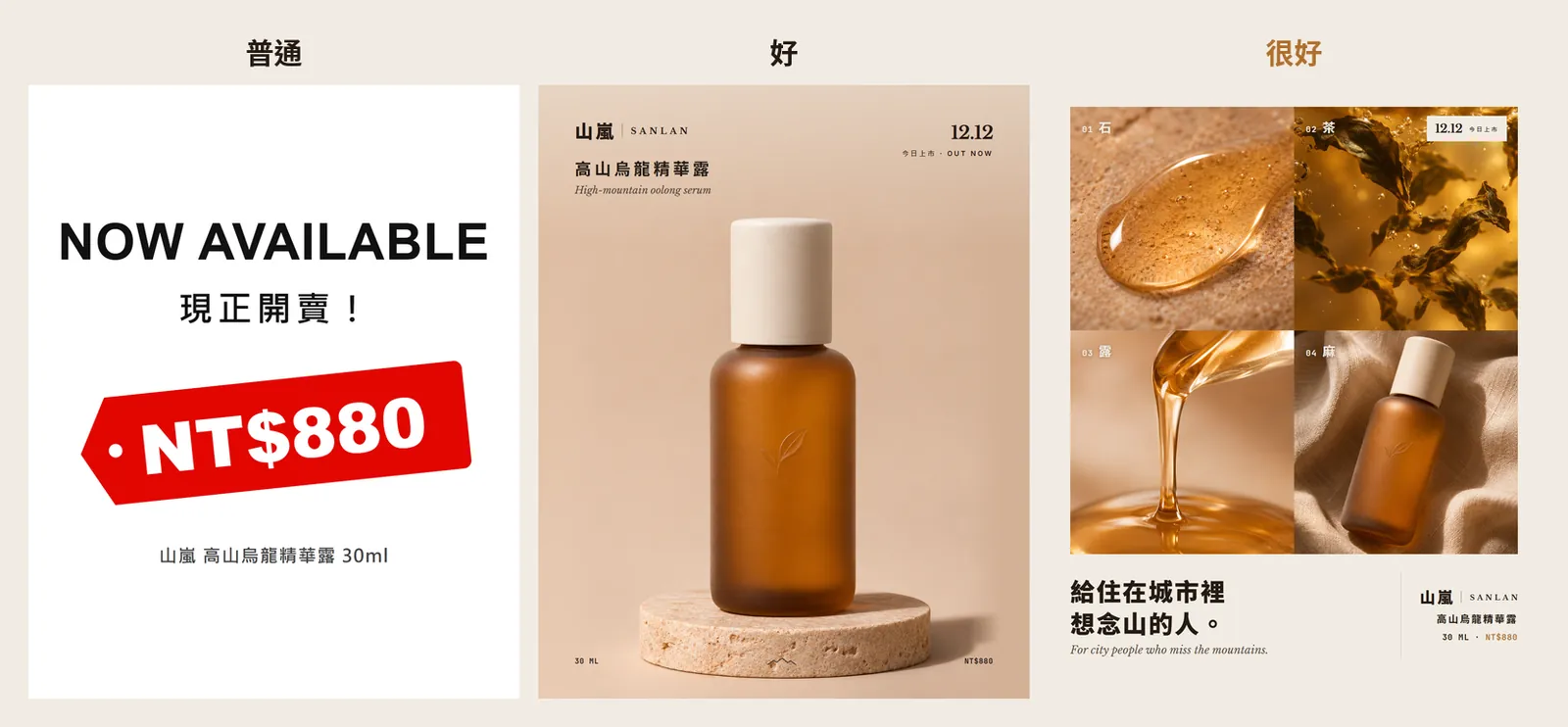
- Bad: NOW AVAILABLE plus a red NT$880 price tag. All the facts, no reason to buy.
- Good: the bottle on a travertine plinth, a clean catalogue shot with the product name and "out now 12.12". Beautiful, but you still don't know who it is for.
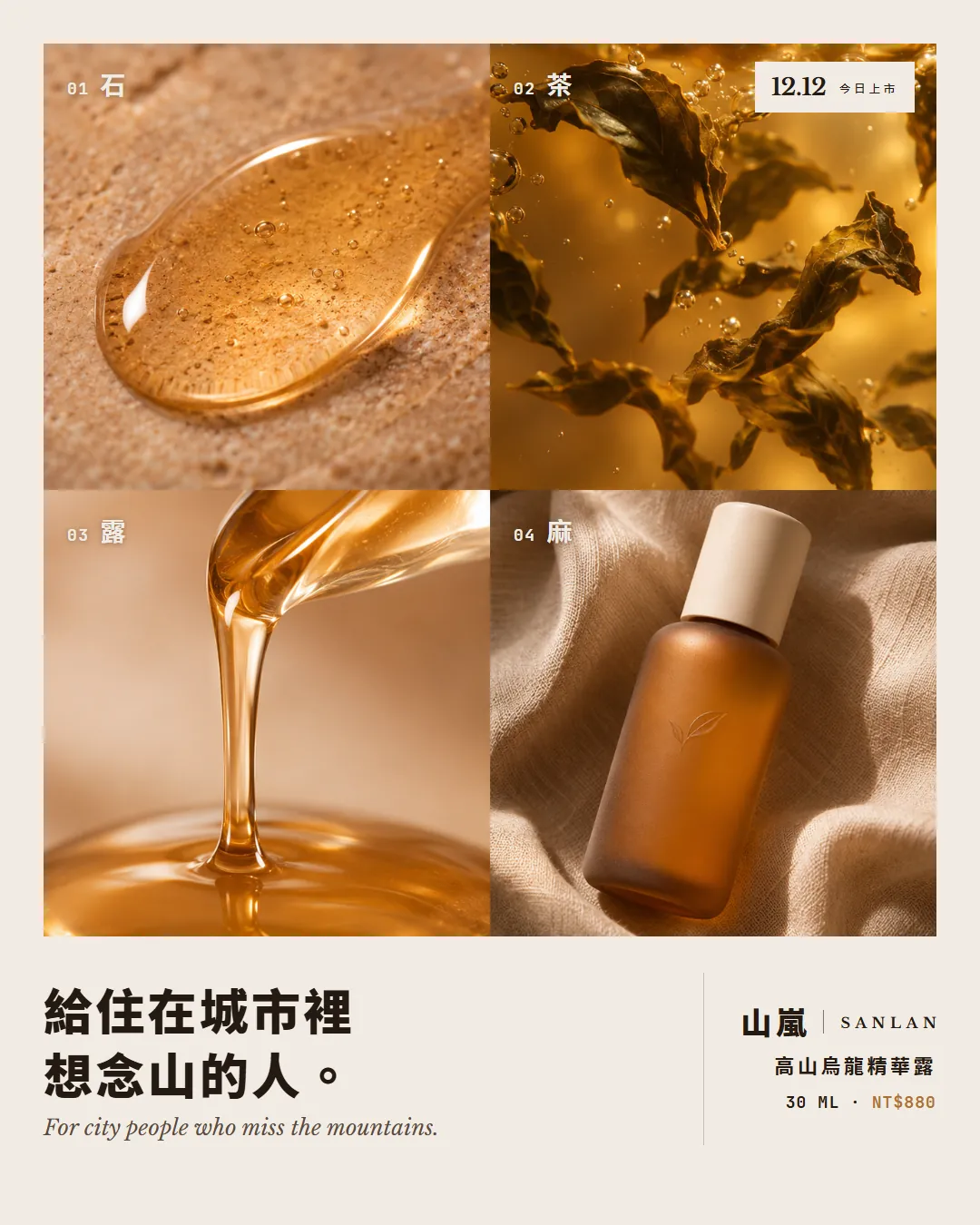
- Great: four macro shots (stone, tea, dew, linen: serum on stone, tea leaves opening in golden liquid, a ribbon of serum, the bottle on linen) above one line, "For city people who miss the mountains." The price shrinks to small type in the corner.
05Lay out the nine posts with Claude Code
These nine posts weren't dragged together in Canva. We gave a fresh Claude Code session only the prompt below. It designed a brand system, wrote each post as 1080×1350 HTML, and wrote a small script that screenshots them to PNG.
- Make a new folder and put the product photos in photos/, named as the prompt says (shadow.png, days-1.png…).
- Open Claude Code in that folder, paste the prompt below and replace the [ ] parts with your product.
- It produces the 9 HTML files in posts/, system.md, shoot.js, and in png/ the 9 posts plus 13 calendar frames.
- Once the real photos are in, use the second prompt to have it check the whole set.
Design nine Instagram launch posts for one product, as a game of "bad, good, great".

The product (fictional): [brand name] [product name], [size], [what it looks like: bottle material, colour, cap]. Launch day is [date] ([weekday]). Price [price].

Three moments of a launch, each done three ways:
Teaser | bad: a black card that says COMING SOON. Nothing else. | good: the product hidden in shadow (photo shadow.png) | great: a clue so strange that people screenshot it and guess (photo [clue photo.png])
Countdown | bad: "3 DAYS LEFT!" in big bold red letters on white | good: the product with the launch date on it (photo [countdown photo.png]) | great: something that changes every day so people come back to check: a [month] calendar where each day until launch is filled with a different product photo (photos days-1.png … days-9.png, plus the others)
Launch day | bad: NOW AVAILABLE and the price ([price]) in a red price tag | good: a clean photo of the product (photo [plinth photo.png]) | great: the whole world of the brand in one frame, so you know exactly who it is for (photo world.png, a 2×2 of macro textures)

The bad ones must look like the generic posts everyone makes (default sans, centred, loud), but still neat: bad, not broken. The good ones are tasteful and quiet. The great ones are the ones a designer would save. All good and great posts share one brand system (wordmark, type, colours, small details) that you design. Text in [language] with small English.

Deliver:
- one HTML file per post in posts/ (1080×1350 each): t-bad, t-good, t-great, c-bad, c-good, c-great, l-bad, l-good, l-great
- c-great.html takes ?filled=N and shows the calendar with the first N photo days filled (N = 0 shows the empty month)
- a PNG of each post in png/ (exactly 1080×1350), and for the calendar a frame per fill step: png/cal/cal-00.png (empty) up to the last step (all days to launch filled, the same as png/c-great.png)
- a system.md with the brand system you chose (colours, type, wordmark) in a few lines
- a shoot.js that screenshots every post and every calendar step with headless Chrome
The brand system it chose for SANLAN, from system.md:
- Colours: mist paper #F1ECE3, tea ink #241A13, oolong amber #B0702F (taken from the bottle, used only for accents, prices and the launch day).
- Type: Chinese headlines in Noto Sans TC Black; numbers and dates in Libre Baskerville Bold (12.12); small English in Libre Baskerville Italic.
- Wordmark: "山嵐 | SANLAN" with a thin vertical bar, always top-left.
- Details: a three-peak ridge hairline as a divider, and an amber 嵐 seal on the great posts.
- The three bad posts deliberately use Arial, Arial Black and Microsoft JhengHei, centred, in pure black, white and red.
The first pass was built before the photos were ready. With the real photos two things collided: the white cap on the foil post sat right behind "This is not tea.", and the launch-day headline ended a line with a comma. One more message in the same session fixed it:
The real photos are now in photos/. Two fixes please:
1. [t-great]: [the white cap lands right behind the headline; move the bottle down or scale it so the cap clears the headline]
2. [l-great]: [a comma must not end a line of the Chinese headline]
Look at the other seven with the real photos too and fix anything that now collides.
Claude Code needs a Pro plan or higher (or a Claude Console account). Without one, paste the same prompt into a claude.ai chat and have it build the posts in HTML one at a time; the carousel guide shows how to do that and download them.
06Generate 8 photos of the same bottle in ChatGPT
Every product photo in the nine posts came from one ChatGPT chat: a hero shot, the shadow, the foil, the fluted glass, the plinth, a 2×2 brand world, a 3×3 sheet of calendar photos, plus a room backdrop for the reel. The bottle was drawn by AI and doesn't exist.
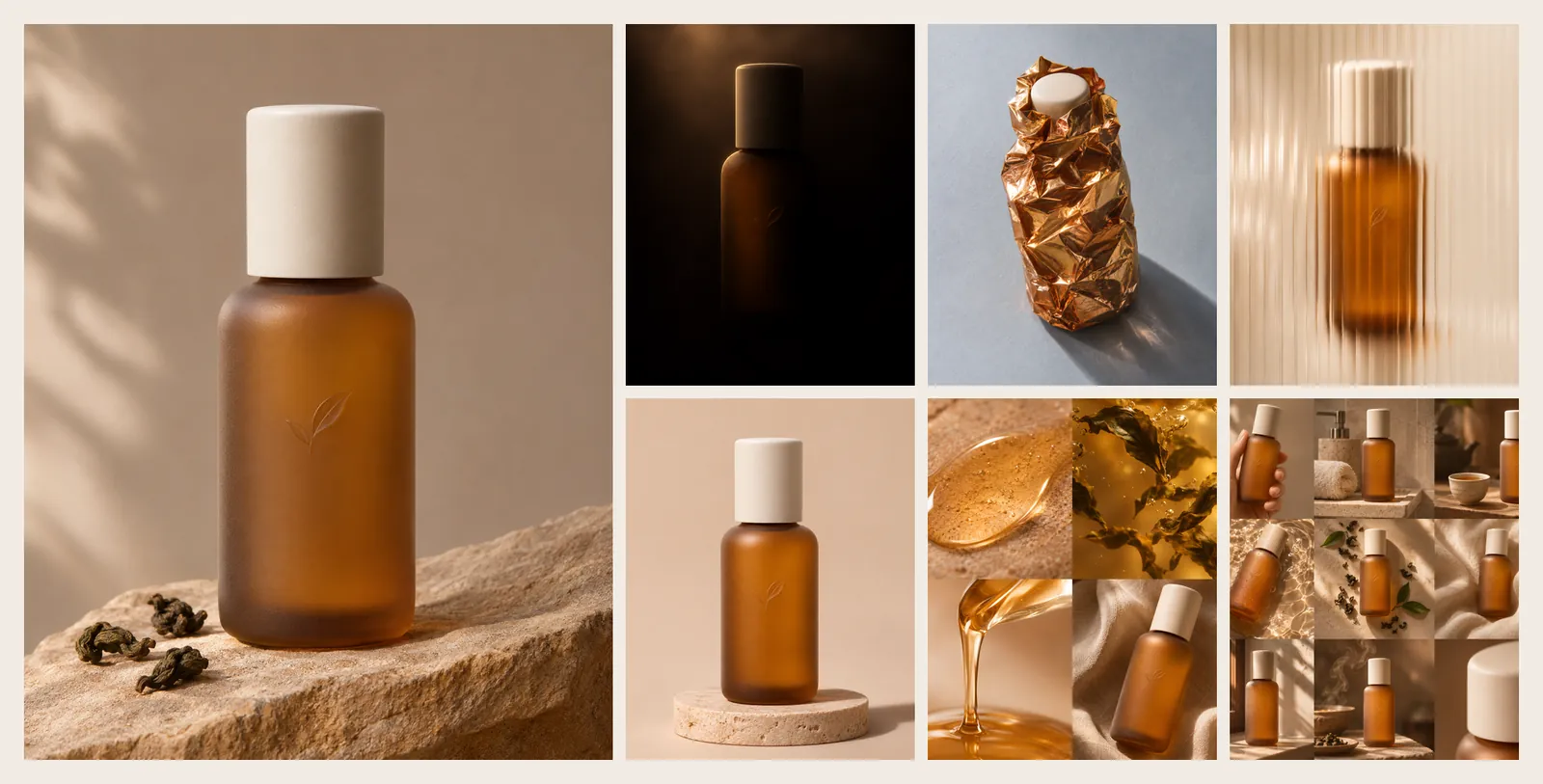
Create ONE single full-frame photograph, vertical 4:5, no panels. A studio product photo of a fictional skincare product: a [size] [bottle material and colour] bottle, [shape], a [cap material and colour] cap, a tiny blind-embossed [motif] on the glass, no text, no logos, no label. It stands on [surface] with [small props that fit the brand, e.g. three dried oolong tea leaves] beside it, soft daylight from the left, [background colour] background, high-end editorial skincare photography, realistic. No text anywhere.
(Same chat, one at a time)
Shadow: Keep the EXACT same bottle. Create ONE single full-frame photo, vertical 4:5: the bottle almost hidden in deep shadow, only a thin rim of warm light along its shoulder and cap, the rest falls into a dark brown-black background, a soft haze of light at the top, mysterious low-key product teaser. No text.
Clue: Same bottle. ONE single full-frame photo, vertical 4:5: a strange, tactile close-up. The bottle is tightly wrapped in [a wrapping people want to guess, e.g. crinkled gold-copper foil like the lining of a Taiwanese tea tin], only the [cap] peeks out, on [backdrop], 3/4 top-down angle. Odd and intriguing. No text.
Countdown: Same bottle. ONE single full-frame photo, vertical 4:5: the bottle seen through vertical fluted reeded glass, so it smears into soft vertical streaks of [main colour], the cap still slightly readable, [backdrop], calm editorial mood. No text.
Launch: Same bottle. ONE single full-frame photo, vertical 4:5: the bottle alone on [a plinth, e.g. a round travertine plinth], [colour] seamless backdrop, one soft shadow to the right, minimalist, crisp, clean catalogue look. No text.
World: ONE single square image made of a 2×2 grid of four macro photos with no gutters, same [main colour] palette: top-left [texture 1]; top-right [an element of the brand's story]; bottom-left [texture 2]; bottom-right the same bottle lying on [fabric]. No text.
Calendar: ONE single square image made of a 3×3 grid of nine different square photos of the same bottle, no gutters: [nine everyday scenes, e.g. in a hand, on a bathroom shelf, next to a tea cup, in water ripples, top-down among tea leaves, on linen, against window light, with rising steam, an extreme close-up of the cap]. Consistent warm palette. No text.
- Cut the 3×3 sheet into 9 squares: those are days-1 to days-9 for the calendar.
- Use the 2×2 image as world.png as it is; its four frames are 01 to 04 on the post.
- ChatGPT — Used for the product photos
07Good to know
- SANLAN High-Mountain Oolong Serum is a fictional brand and product; 12.12 and NT$880 are demo values.
- All product photos are AI images from ChatGPT. For a real launch, use real photos of your own product: an AI bottle won't match the real thing.
- Check the AI tool's terms of use for generated images, and consider labelling them as AI-generated when you post.
- Don't make medical claims in skincare copy, and check the cosmetics advertising rules where you sell before launch.
- Free Google Fonts like Noto Sans TC and Libre Baskerville work well; still check the licence before commercial use.
- Use reference reels to learn the game only. Don't copy other people's posts or put their photos in yours.