One poster, 10 styles with Claude: Anthropic's Theme Factory skill swaps colours and fonts, never the layout
Anthropic's free Theme Factory skill: build one strong poster, then restyle it into 10 preset themes plus a custom one. Same layout, new colours and fonts.
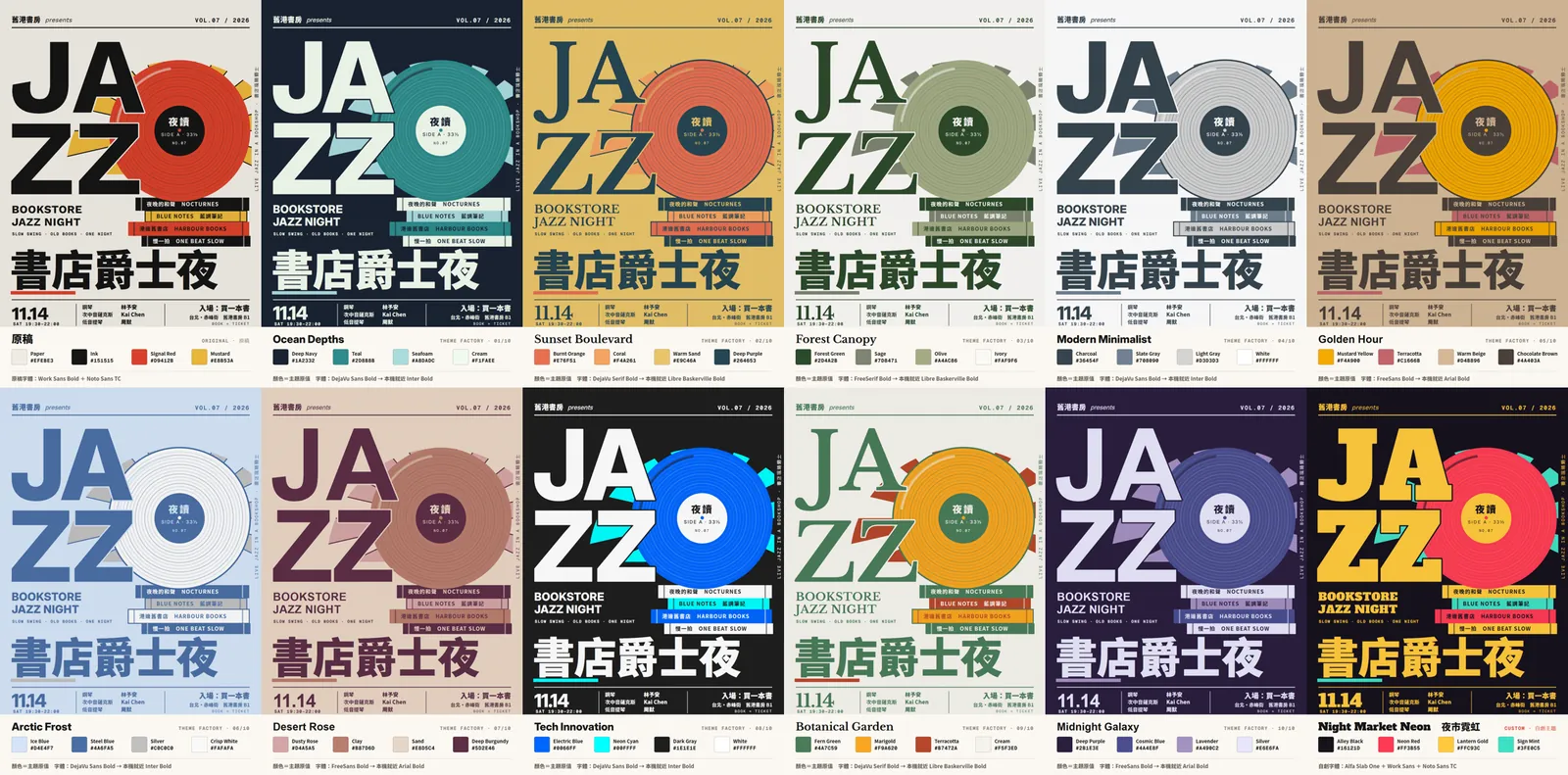
Why can someone else restyle one poster 10 ways with Claude while you redo yours 10 times? Most people think a new style means a new layout. It doesn't. Keep the layout and swap only the colours and fonts. In this guide we used Anthropic's open-source Theme Factory skill to build a poster for a fictional event, Old Harbour Books' Bookstore Jazz Night, swap it into the 10 preset themes with one line each, and finally ask Claude to invent an 11th: Night Market Neon. Every image below was made by Claude in Claude Code with this skill. No photos, no AI-generated pictures; the whole poster is code-drawn SVG.
01Install the Theme Factory skill (3 minutes)
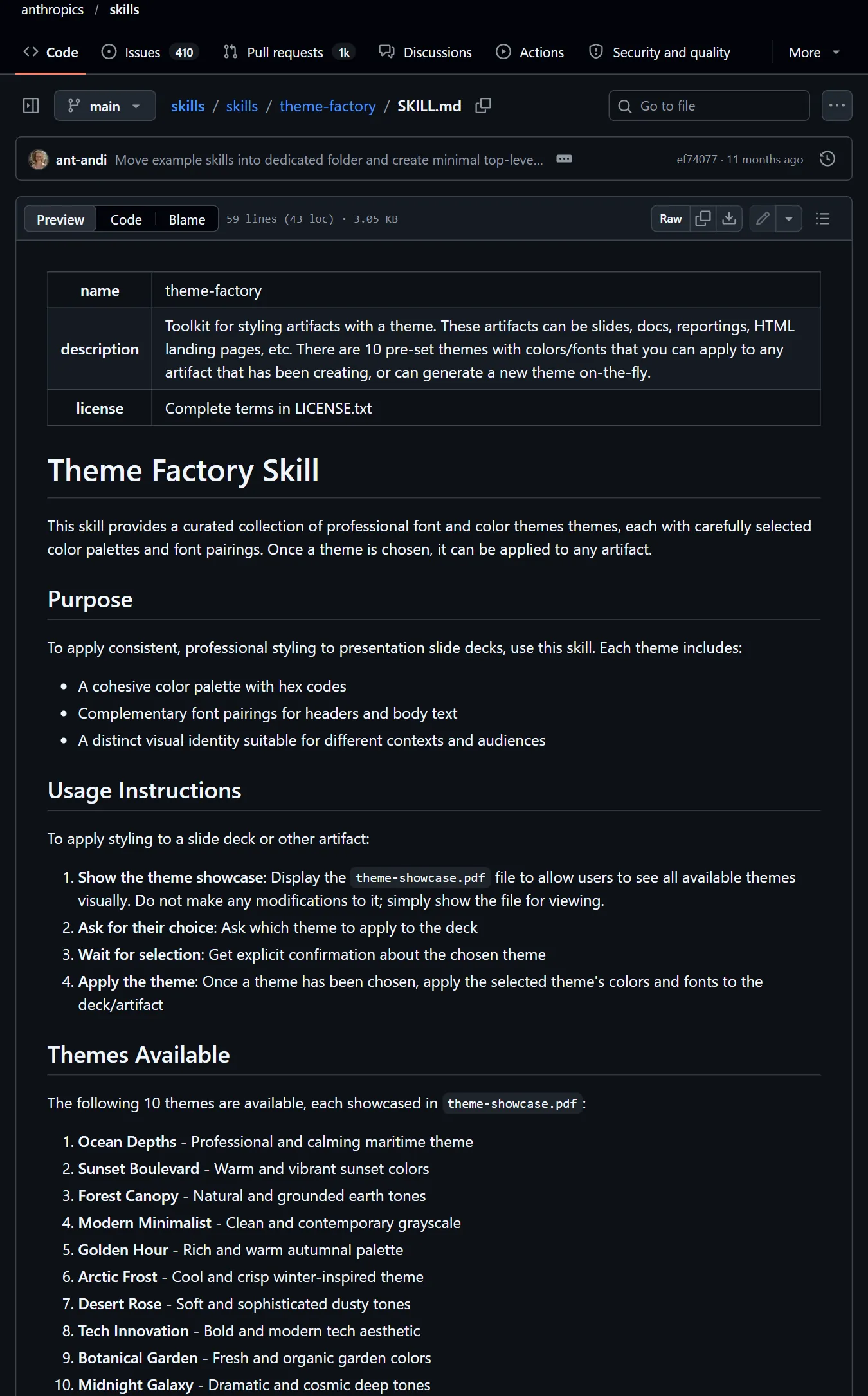
Theme Factory is one of the example skills Anthropic publishes on GitHub. Its description is blunt: 10 preset themes, each a colour palette plus a font pairing, that can be applied to anything you have already made, or it can generate a new theme on the fly. It was written for slide decks, but posters, fliers and web pages take a theme just as well.
- Open Claude Code.
- Type: /plugin marketplace add anthropics/skills
- Then type: /plugin install example-skills@anthropic-agent-skills (Theme Factory ships in the same example-skills plugin as canvas-design, frontend-design and the other example skills).
- Tell Claude: "Use the theme-factory skill to…". It starts by showing you the showcase of all 10 themes.
On claude.ai, the README says these example skills are already available on paid plans, so you can simply ask for theme-factory in a chat. The README does not say anything about the Free plan; check Anthropic's help page on using skills.
- Theme Factory skill (GitHub, anthropics/skills) — SKILL.md, the 10 theme files and theme-showcase.pdf live here
02Step 1: build one strong original first
Whether the theme swaps look good is 90% decided by the original. The layout has to be strong enough to work in plain black and white; only then does any palette look finished. Our original uses 4 flat colours: paper, ink, signal red and mustard.
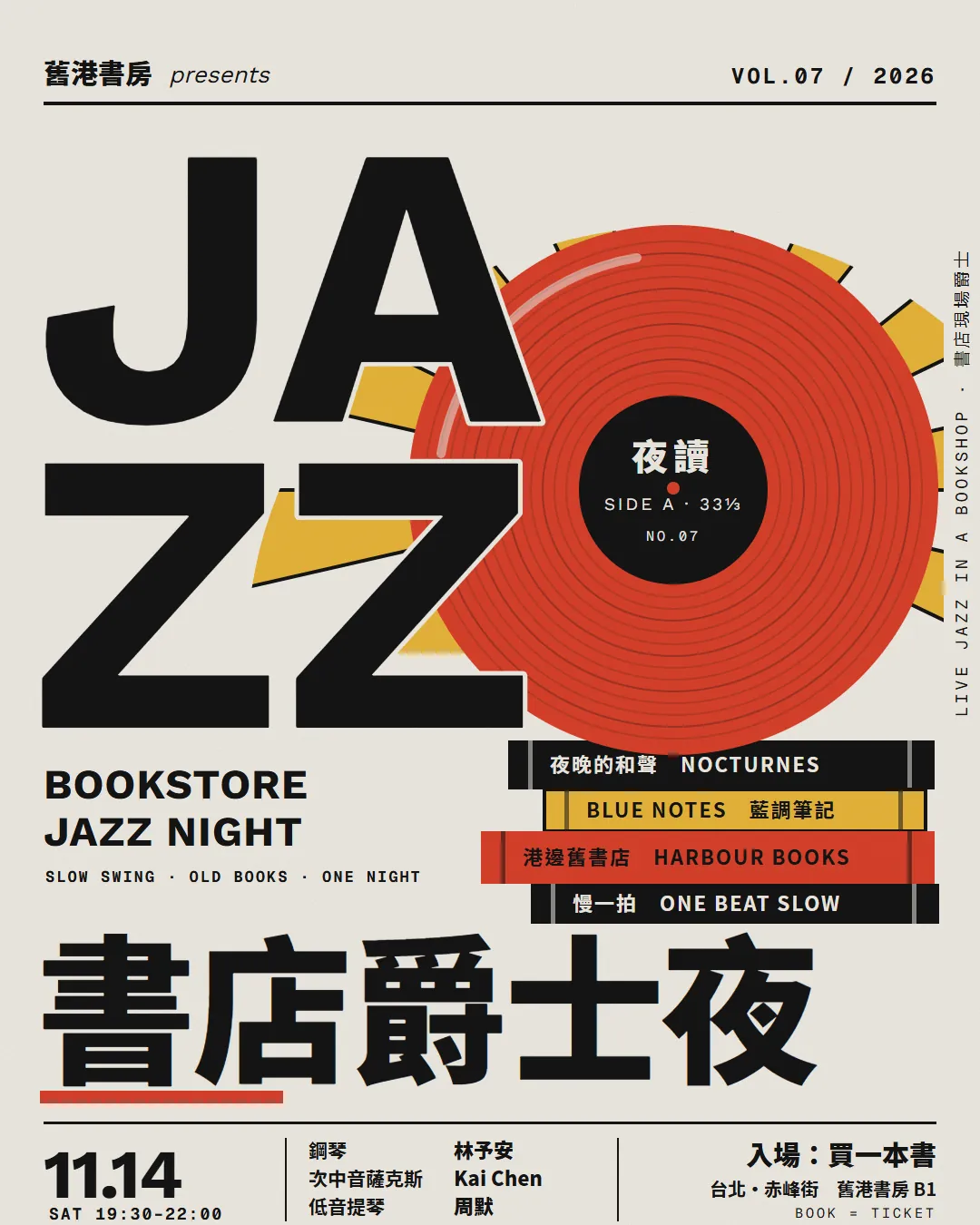
- A giant English word broken over two lines on the left (JA / ZZ), big enough to fill half the poster.
- One big round object tied to the event as the hero on the right: for a jazz night, a vinyl record, with sunburst rays behind it.
- The Chinese title, bold and large, as the second hero of the page.
- Date, time and line-up in a tidy info grid at the bottom.
- Only 4 flat colours. This rule matters most: each colour has a role (ground, text, hero, support), and swapping a theme simply maps those 4 roles to the new theme's 4 hex codes.
Use the theme-factory skill to make an event poster, then switch its theme in one step.
Event: [event name + English name], [date / time / venue], [line-up or stalls]. Size 1080×1350 (4:5).
First build a strong original: a giant English word broken over two lines on the left, big enough to fill half the poster; a geometric collage on the right with one big round object related to [the event theme] as the hero and sunburst rays behind it; a bold, large Chinese title as the second hero; date, time and line-up in a tidy info grid at the bottom. Only 4 flat colours. When the theme changes, not a single element may move; only colours and fonts change.
Then show me the theme showcase first, and apply [theme names, e.g. Midnight Galaxy, Golden Hour] one by one, using the hex codes from the theme files.
Finally create a custom theme for me: [the feeling you want, e.g. neon signs of a Taipei night market]. Show it to me before applying it.
Always use [Chinese font] for Chinese. If a theme's Latin font is not installed, pick the closest match and tell me. Every version must look finished and still read at phone size.
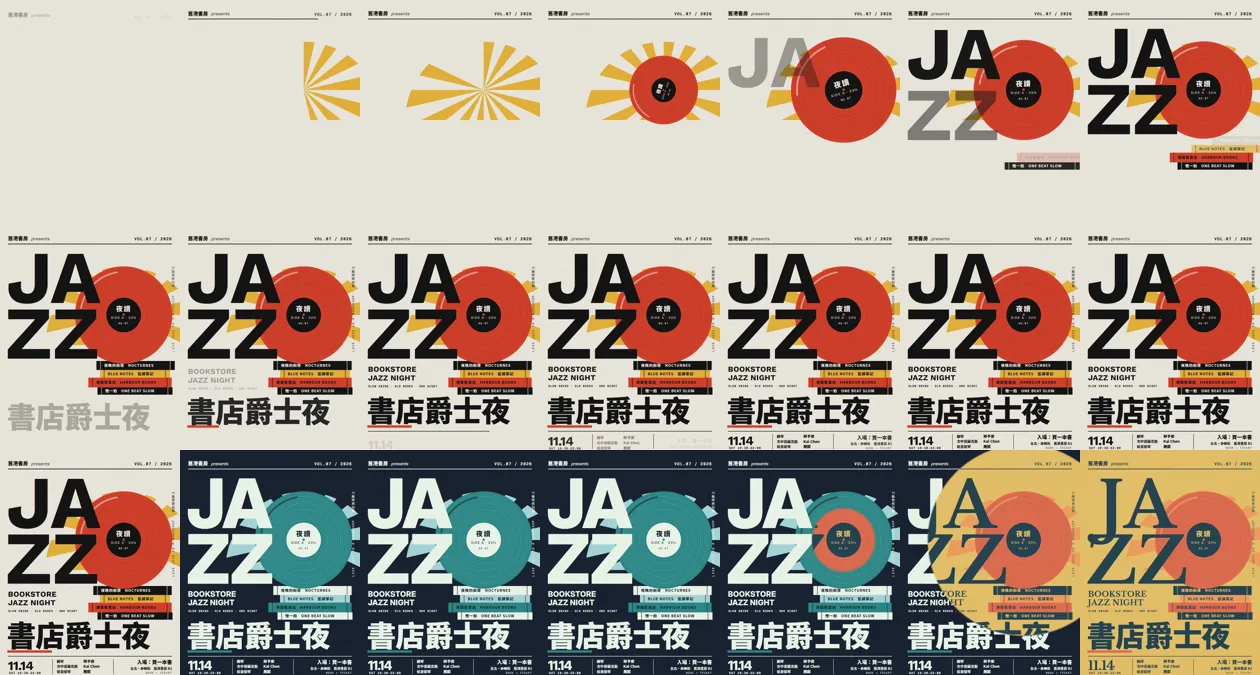
03Step 2: look at the showcase, then swap a theme with one line
The skill's own rule is to show theme-showcase.pdf first, ask which theme you want, wait for confirmation, then apply. So Claude first shows you the showcase pages for all 10: Ocean Depths, Sunset Boulevard, Forest Canopy, Modern Minimalist, Golden Hour, Arctic Frost, Desert Rose, Tech Innovation, Botanical Garden and Midnight Galaxy.
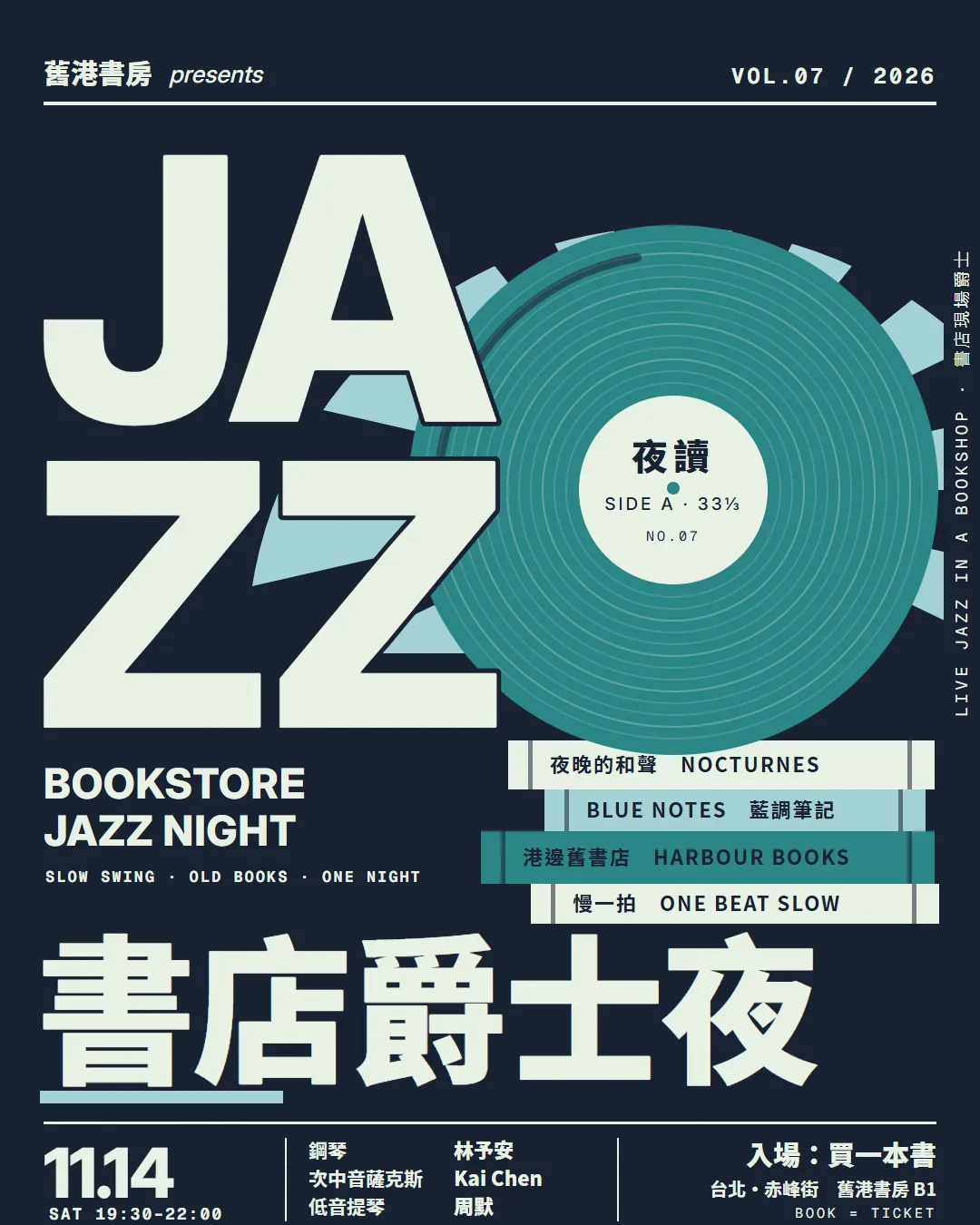
Once you have picked, one line does the swap: "Apply Ocean Depths, use the hex codes from the theme file, don't move the layout." It reads themes/ocean-depths.md and maps the 4 roles to Deep Navy #1A2332, Teal #2D8B8B, Seafoam #A8DADC and Cream #F1FAEE.
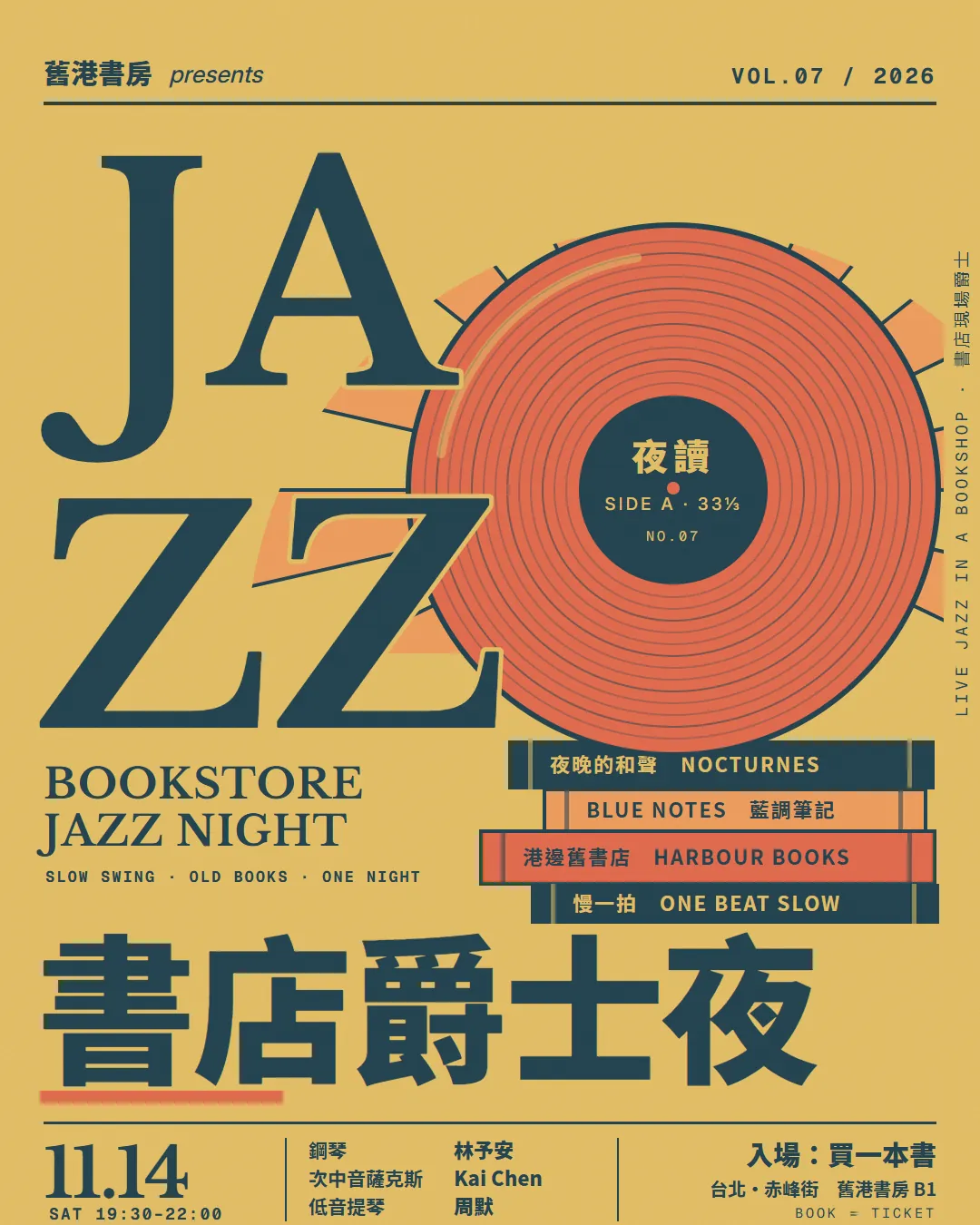
A theme swap is not only colour; the font follows the theme too. Sunset Boulevard specifies a serif header font, so JA / ZZ changes from sans to serif and the whole poster changes character, on exactly the same layout.
04Step 3: when a theme is too pale, ask for outlines and re-apply
Not all 10 themes land perfectly. We opened a second Claude chat as a reviewer and handed it all 12 posters. Round one scored 7 out of 10 and caught 3 problems:
- The serif J's tail dropped into the row below and hit the Z, which looked like a bug (Sunset Boulevard, Forest Canopy and Botanical Garden all had it).
- The light themes had too little contrast: Arctic Frost put a white record on pale blue, Modern Minimalist a grey record on white, Desert Rose a pink record on sand; at phone size they almost vanished.
- The sunburst rays ran through the small vertical text on the right edge, making it hard to read.
The fixes were simple: keep the J's tail inside its own row; give any fill with less than 2:1 contrast against the ground an automatic ink outline; switch the Desert Rose record to the theme's darker Clay; put a ground-colour band behind the vertical text. It passed on round three.
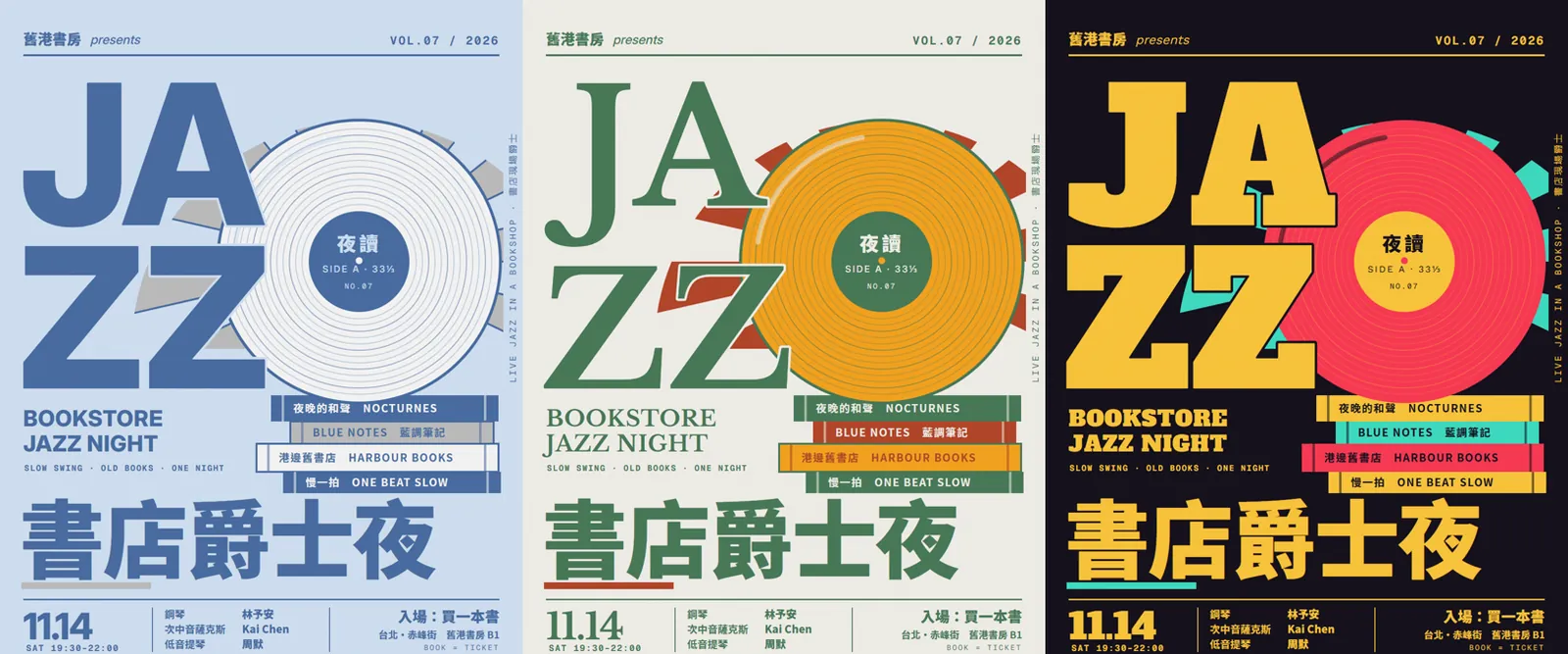
The [Arctic Frost] version has too little contrast; the [record] doesn't separate from the ground. Keep the layout and the hex codes as they are. Add a dark outline to every fill with less than 2:1 contrast against the ground, using the darkest colour in the theme, and apply it again so I can see.
05Step 4: ten aren't enough? Ask it to invent one
The last section of the skill is called "Create your Own Theme": when none of the presets fit, it generates a new theme from your description, names it the way the presets are named, shows it for review and applies it only after you confirm. Our whole brief was one line: "the neon signs of a Taipei night market".
Following theme-factory's Create your Own Theme section, invent a theme for me: "[the feeling you want, e.g. the neon signs of a Taipei night market]". Same format: 4 colours plus a font pairing, each colour with a name and a hex code. Show it to me first; apply it to the poster only after I confirm.
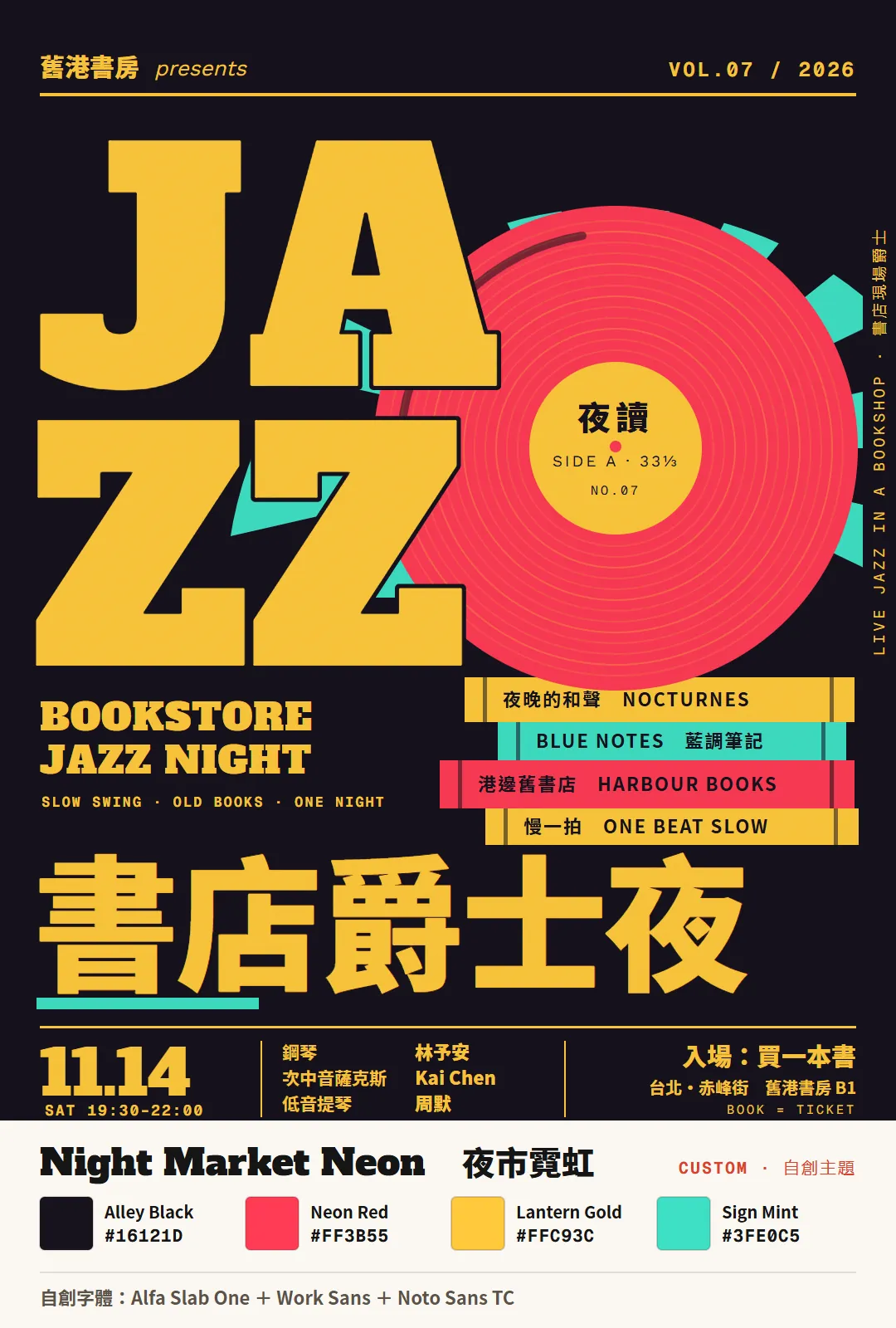
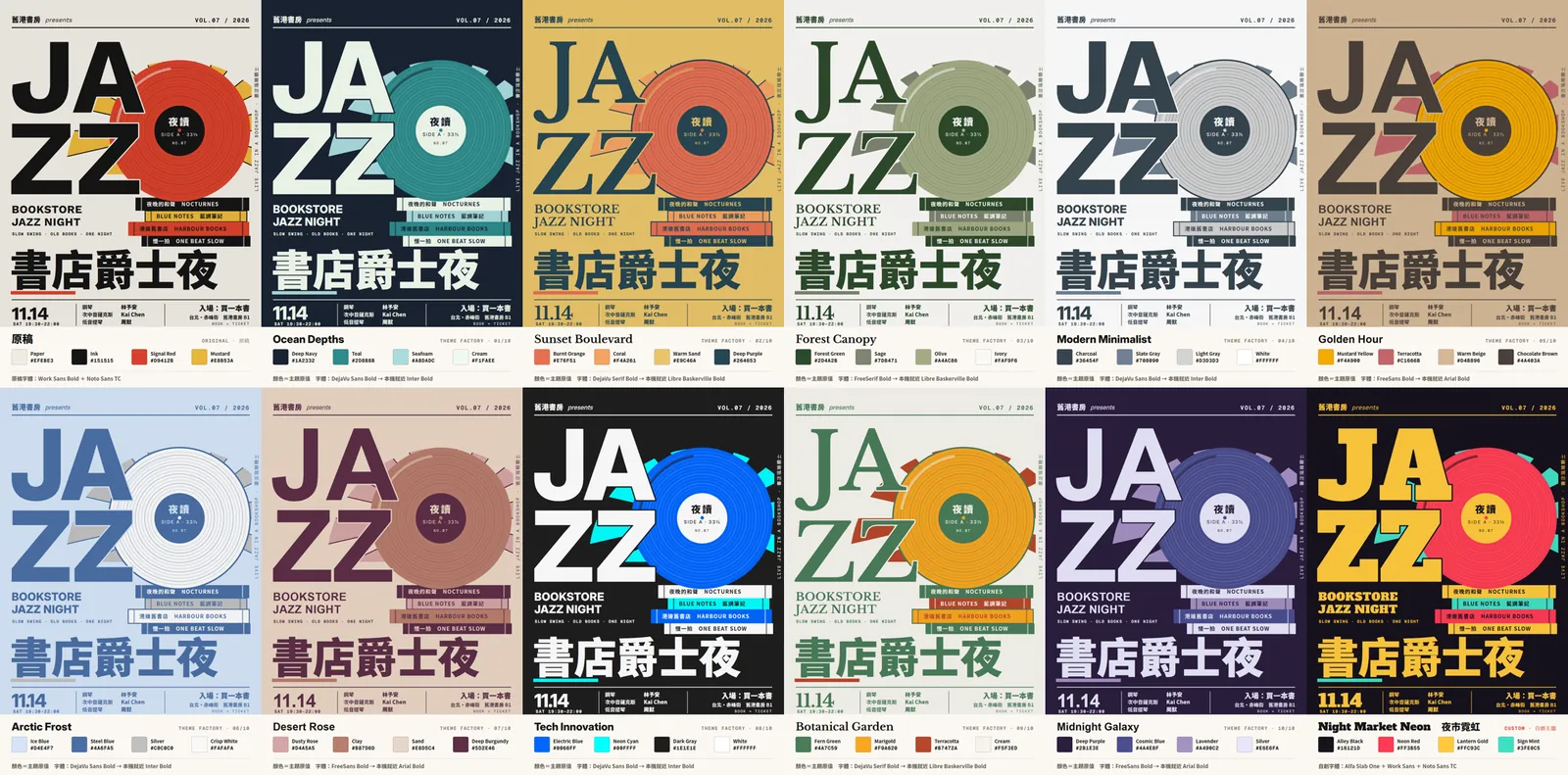
Only when all 11 sit side by side does the point of the method show: JA / ZZ, the record, the spines, the title and the info grid are in the same place on every one. The only differences are 4 colours and one Latin font.
06Colours are the theme's exact values; fonts are local stand-ins
One honest note. The theme files specify DejaVu Sans, DejaVu Serif, FreeSans and FreeSerif for Latin text. None of those were installed on our machine, so Claude did what the prompt asked, picked the closest local font and wrote it on each version's spec strip. The hex codes were not touched; every one is the theme file's exact value:
- Ocean Depths: Deep Navy #1A2332, Teal #2D8B8B, Seafoam #A8DADC, Cream #F1FAEE. Header DejaVu Sans Bold → local Inter Bold.
- Sunset Boulevard: Burnt Orange #E76F51, Coral #F4A261, Warm Sand #E9C46A, Deep Purple #264653. DejaVu Serif Bold → Libre Baskerville Bold.
- Forest Canopy: Forest Green #2D4A2B, Sage #7D8471, Olive #A4AC86, Ivory #FAF9F6. FreeSerif Bold → Libre Baskerville Bold.
- Modern Minimalist: Charcoal #36454F, Slate Gray #708090, Light Gray #D3D3D3, White #FFFFFF. DejaVu Sans Bold → Inter Bold.
- Golden Hour: Mustard Yellow #F4A900, Terracotta #C1666B, Warm Beige #D4B896, Chocolate Brown #4A403A. FreeSans Bold → Arial Bold.
- Arctic Frost: Ice Blue #D4E4F7, Steel Blue #4A6FA5, Silver #C0C0C0, Crisp White #FAFAFA. DejaVu Sans Bold → Inter Bold.
- Desert Rose: Dusty Rose #D4A5A5, Clay #B87D6D, Sand #E8D5C4, Deep Burgundy #5D2E46. FreeSans Bold → Arial Bold.
- Tech Innovation: Electric Blue #0066FF, Neon Cyan #00FFFF, Dark Gray #1E1E1E, White #FFFFFF. DejaVu Sans Bold → Inter Bold.
- Botanical Garden: Fern Green #4A7C59, Marigold #F9A620, Terracotta #B7472A, Cream #F5F3ED. DejaVu Serif Bold → Libre Baskerville Bold.
- Midnight Galaxy: Deep Purple #2B1E3E, Cosmic Blue #4A4E8F, Lavender #A490C2, Silver #E6E6FA. FreeSans Bold → Arial Bold.
- Night Market Neon (custom): Alley Black #16121D, Neon Red #FF3B55, Lantern Gold #FFC93C, Sign Mint #3FE0C5. Alfa Slab One + Work Sans.
- Chinese is always Noto Sans TC. Keeping the Chinese font fixed across themes is what makes all 11 versions read as the same event.
07Good to know
- Old Harbour Books, Bookstore Jazz Night, the Chifeng Street venue, the 11.14 date and the three performers are all fictional; the posters were generated by Claude with the Theme Factory skill as a demo.
- Theme Factory's SKILL.md says 10 preset themes; the names and hex codes above come from the themes folder on GitHub, and Anthropic may change the count or the colours in a later update.
- The light themes (Arctic Frost, Modern Minimalist, Desert Rose) are too pale straight out of the box; check them before use and add outlines if needed. Text contrast is free to check with WebAIM's Contrast Checker.
- Hex codes are screen colours. For print, have the printer proof in CMYK or spot colour; fluorescent values like Tech Innovation's #00FFFF and Night Market Neon's #3FE0C5 will print darker than they look on screen.
- Check font licences. Noto Sans TC, Inter, Libre Baskerville, Work Sans and Alfa Slab One are SIL OFL; Arial is a commercial font bundled with Windows, used under the system licence.