灰灰的風景照,一段 prompt 變黃金時刻:用 ChatGPT「只改光線,不改構圖」重新打光(4 組前後對照)
把照片上傳 ChatGPT,貼一段寫明「構圖一樣都不能動、只改光線和天空」的 prompt,陰天就變成日落前的暖光。附完整 prompt、填空版,和台北101、稻田、九份、茶園 4 組對照。
在 Instagram 看這支 Reels留言關鍵字 #夕陽 就會收到這篇
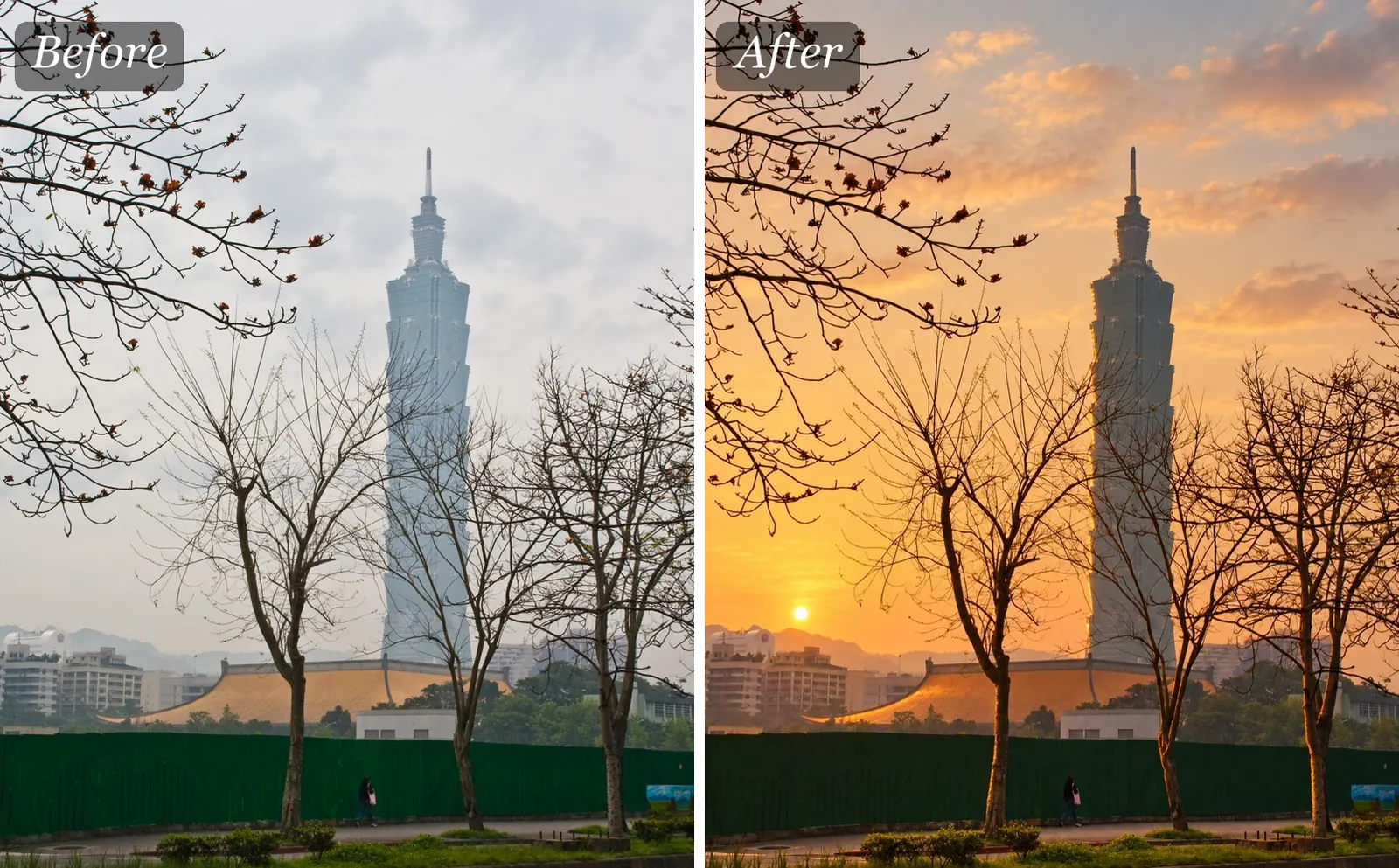
為什麼你拍的風景,總是灰灰的?很多時候不是構圖不好,是那天的光不好。這篇教你用 ChatGPT 把同一張照片重新打光成「黃金時刻」,也就是日落前那段又低又暖的光:建築、樹、構圖都不動,只改光線和天空。我們拿 4 張台灣的照片實際做過,前後對照都在下面。先說清楚:這 4 張原圖不是我們拍的,是 Wikimedia Commons 上以 CC BY 授權分享的照片,每一張的作者、授權和連結都標在圖的正下方。右邊的夕陽版,是我們把原圖裁成 4:5、丟進 ChatGPT 重新打光的結果。
01先看結果:只改光線,不改構圖
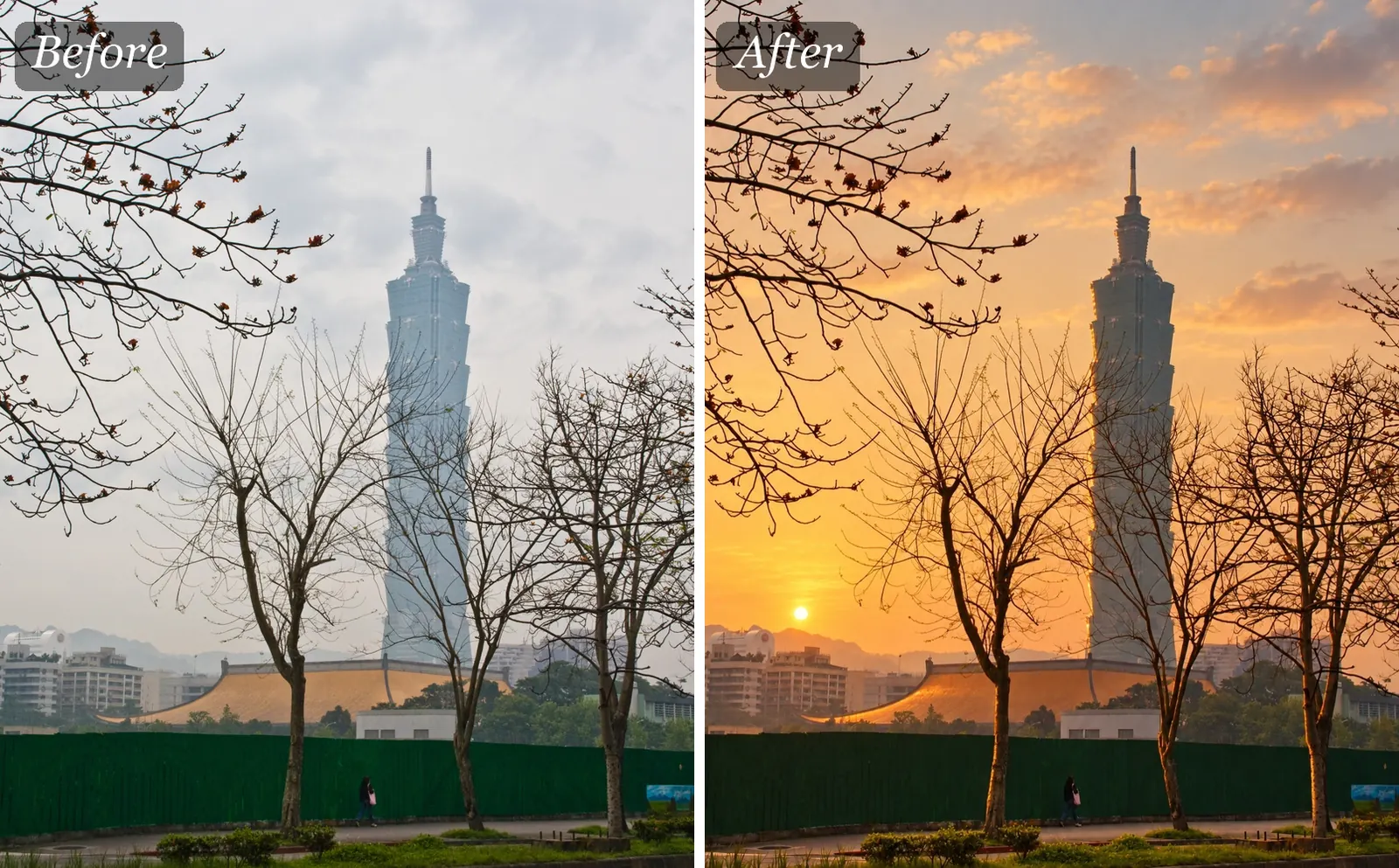
- 原圖:「Taipei 101 (3430279748).jpg」,攝影 Pedro Angelini from São Paulo, Brasil — CC BY 2.0,Wikimedia Commons。我們裁成 4:5,並用 ChatGPT 重新打光。
- CC BY 2.0 授權條款
這就是整個技巧的重點:不是套濾鏡。濾鏡只會把整張圖調暖,灰白的天空還是灰白的;這段 prompt 是叫 AI 把光線重畫一次:太陽放低、天空換成橘到粉桃色、建築和樹枝的邊緣加一圈暖光、影子拉長。
- 保留構圖:畫面裡的建築、樹、人和每一樣東西都不能動,不加也不減。
- 低角度暖光:太陽放在地平線附近、偏一邊,光從側面打過來。
- 自然、不過飽和:要像手機真的拍到的夕陽,不要 HDR,也不要貼上去的鏡頭光暈。
02第 1 步:挑照片、裁成 4:5
- 挑一張構圖好、但天空灰白或光線很平的照片。陰天拍的最適合,前後差最多。
- 先裁成 4:5(IG 直式貼文的比例)。我們的原圖都先裁成 1200×1500。
- 一次處理一張。我們是一張一張上傳、一張一張改的。
- 用別人的照片,先確認授權。我們用的都是 CC BY:可以修改,但要標明作者、授權、連結,並說明改了什麼。
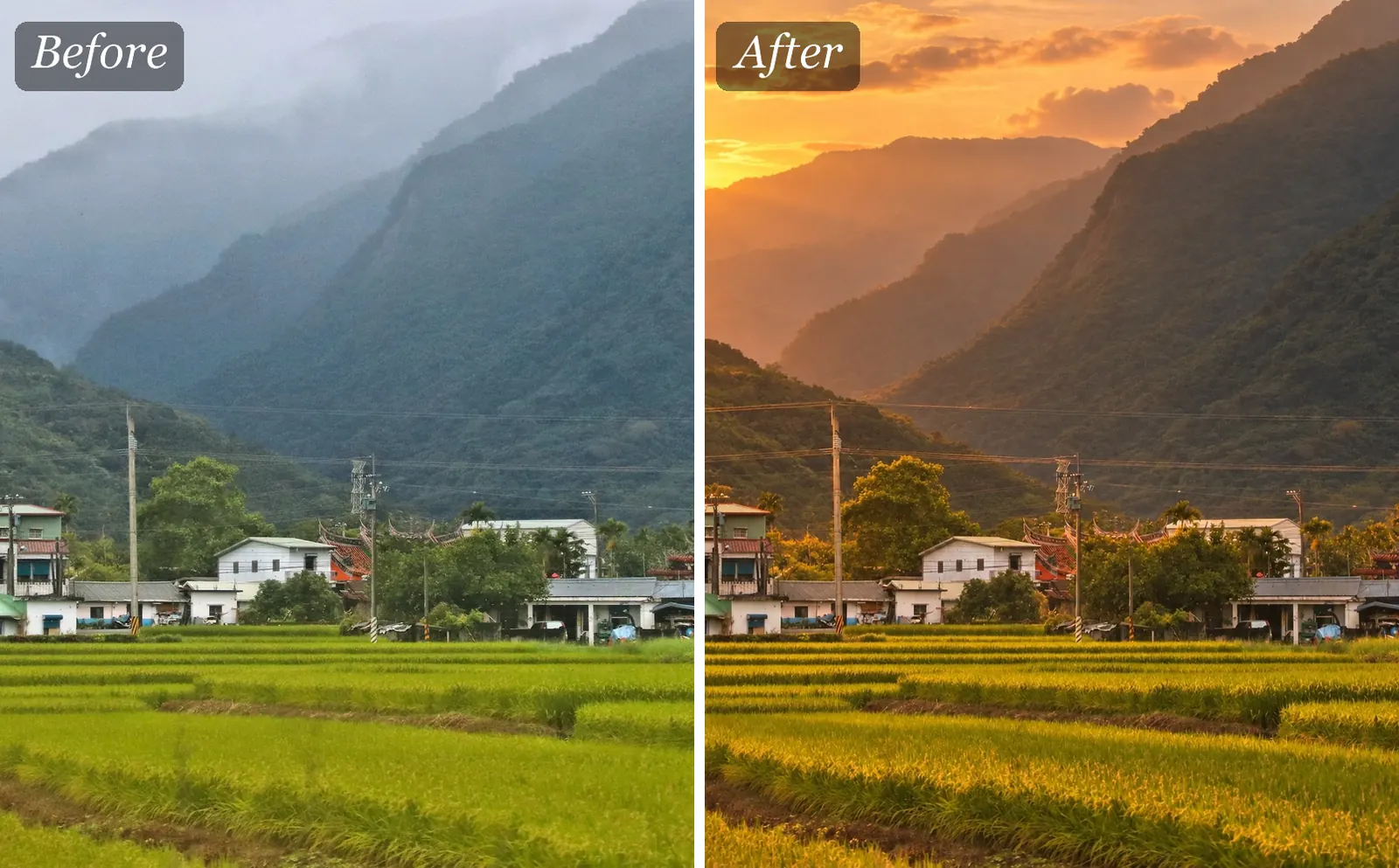
- 原圖:「05 Countryside of Taiwan - rice fields and mountains in Ruisui….jpg」,攝影 Marek Ślusarczyk (Tupungato) — CC BY 3.0,Wikimedia Commons。我們裁成 4:5,並用 ChatGPT 重新打光。
- CC BY 3.0 授權條款
03第 2 步:上傳照片,貼上 prompt
打開 ChatGPT(chatgpt.com),上傳你要改的照片,貼上這段,把[]換成你照片的情況:
Edit this photo, same [4:5] size. Keep the exact same composition, framing, buildings, trees, people and every object, nothing added or removed. Change only the light and sky: golden hour just before sunset, a low warm sun near the horizon off to [the left / the right], the sky glowing soft orange to peach with a few lit-up clouds, warm rim light on the edges of [buildings and branches], long soft shadows, gentle atmospheric haze in the distance. [One line for your scene, e.g. soft haze between the mountain ridges / warm rim light on the rooftops / side light raking across the tea rows]. Keep it a believable real photograph taken on a phone, natural colours, not oversaturated, no HDR look, no lens-flare stickers, no text.
我們第一張(台北101)貼的是下面這段,一字不差。它還沒有分「太陽在左或右」和場景句,是最基本的版本:
Edit this photo, same 4:5 size. Keep the exact same composition, framing, buildings, trees, people and every object, nothing added or removed. Change only the light and sky: golden hour just before sunset, a low warm sun near the horizon off to one side, the sky glowing soft orange to peach with a few lit-up clouds, warm rim light on the edges of buildings and branches, long soft shadows, gentle atmospheric haze in the distance. Keep it a believable real photograph taken on a phone, natural colours, not oversaturated, no HDR look, no lens-flare stickers, no text.
- Keep the exact same composition … nothing added or removed:鎖住構圖,不准加東西,也不准拿掉東西。
- Change only the light and sky:只准動光線和天空。
- not oversaturated, no HDR look, no lens-flare stickers:不要過飽和、不要 HDR、不要貼上去的鏡頭光暈,看起來才像真的拍到的。
04第 3 步:同一個對話做下一張,加一句場景描述
第二張起,在同一個對話上傳下一張照片,開頭說「Same edit for this photo, same 4:5 size」,再加一句只屬於這張照片的場景描述。我們第 2 到第 4 張都是這樣做的,三張的場景句重點分別是:山稜之間的薄霧、屋頂邊緣的暖色輪廓光、側光掃過一排排茶樹。
Same edit for this photo, same 4:5 size. Keep the exact same composition, change only the light and sky to golden hour just before sunset. [這張的場景句,例如 side light raking across the tea rows]
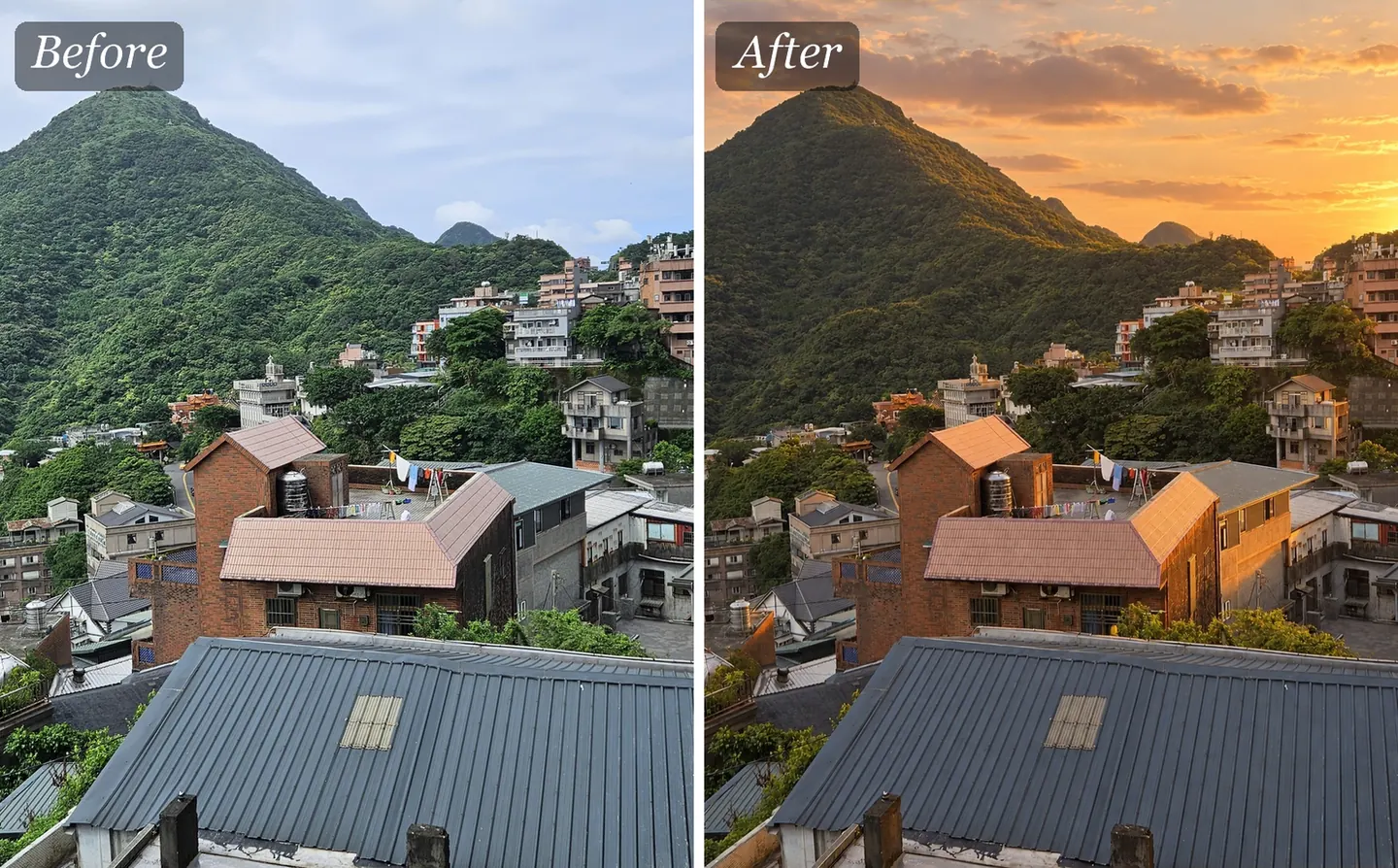
- 原圖:「Jiufen Buildings and Keelung Mountain.jpg」,攝影 Ganmatthew — CC BY 4.0,Wikimedia Commons。我們裁成 4:5,並用 ChatGPT 重新打光。
- CC BY 4.0 授權條款
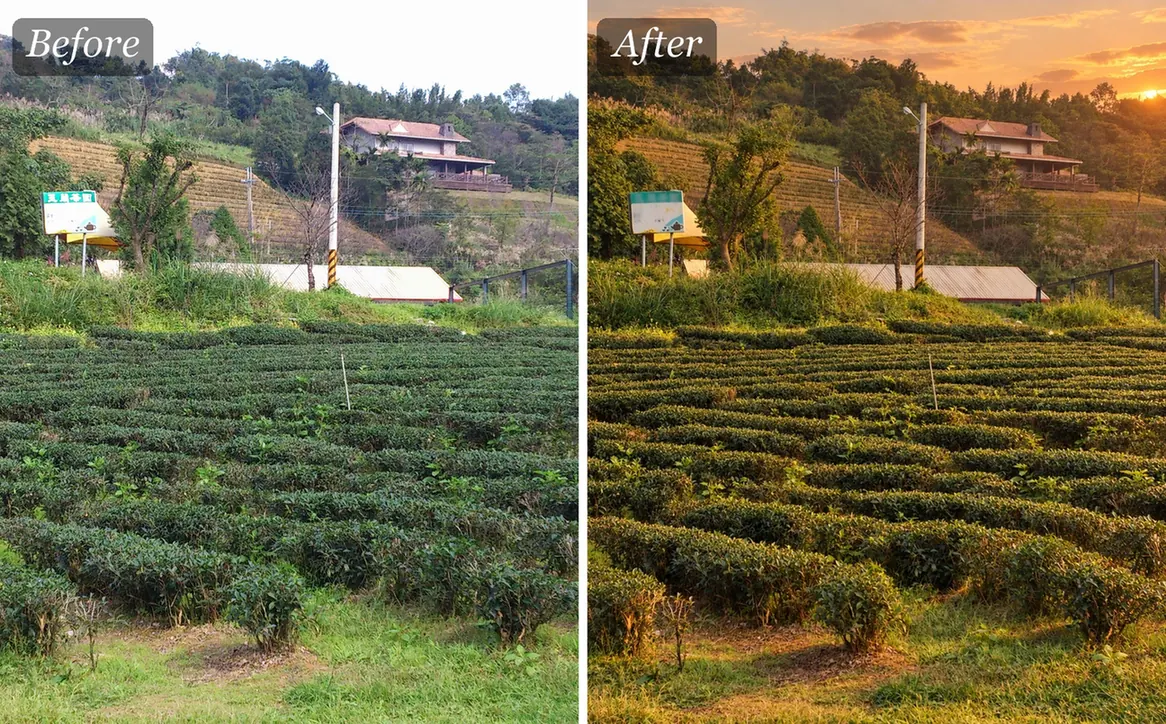
- 原圖:「玉蘭茶園 Yulan Tea Plantation - panoramio.jpg」,攝影 lienyuan lee — CC BY 3.0,Wikimedia Commons。我們裁成 4:5,並用 ChatGPT 重新打光。
- CC BY 3.0 授權條款
場景句不知道怎麼寫?把照片丟給 Claude(claude.ai),請它看照片幫你寫:
看這張照片,用一句英文幫我寫黃金時刻的場景描述:光從哪一邊來、照在哪裡(例如屋頂、山稜、樹葉、水面)。我要貼進 ChatGPT 的修圖 prompt,只要那一句就好。
05檢查:真的只改了光線嗎?
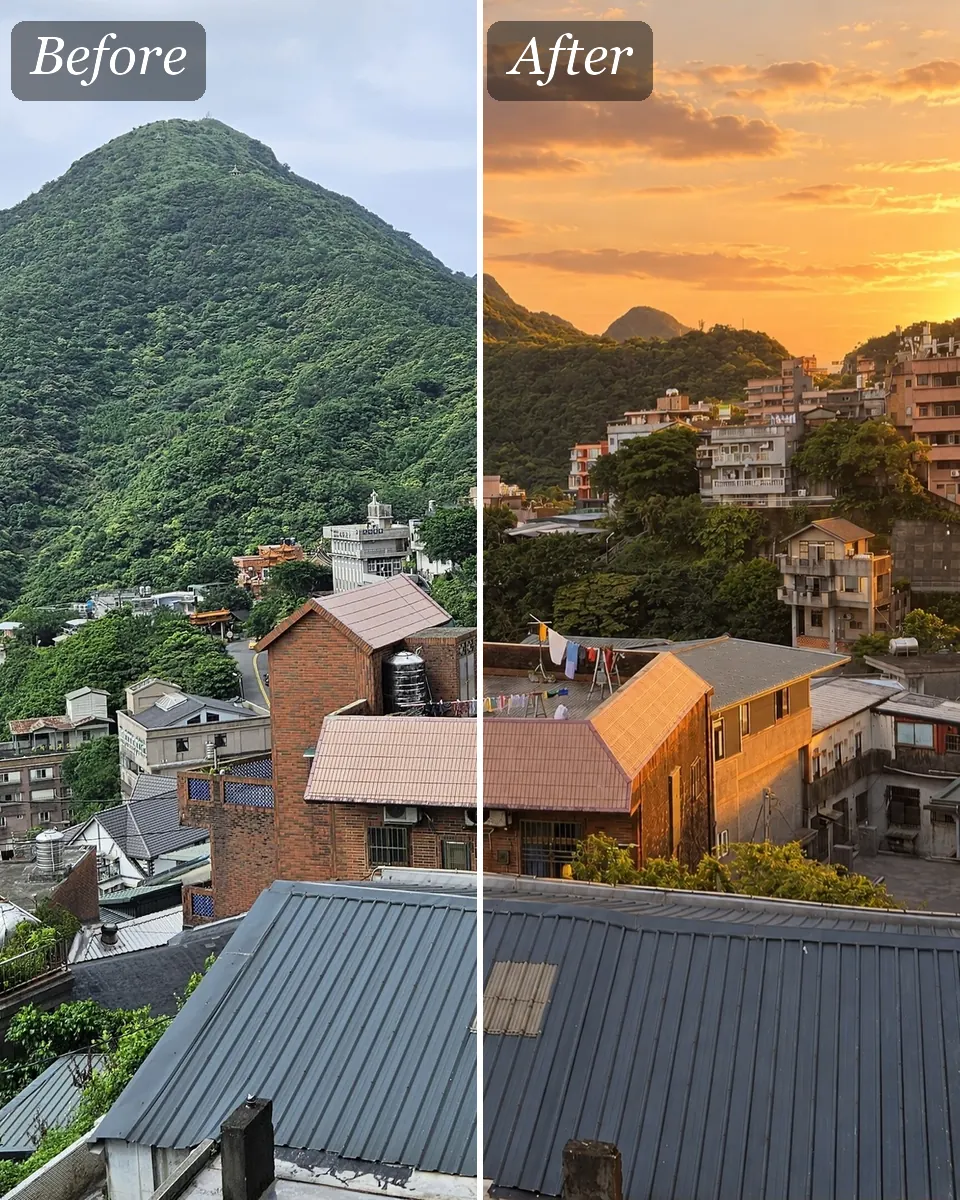
- 原圖:「Jiufen Buildings and Keelung Mountain.jpg」,攝影 Ganmatthew — CC BY 4.0,Wikimedia Commons。我們裁成 4:5,並用 ChatGPT 重新打光。
- CC BY 4.0 授權條款
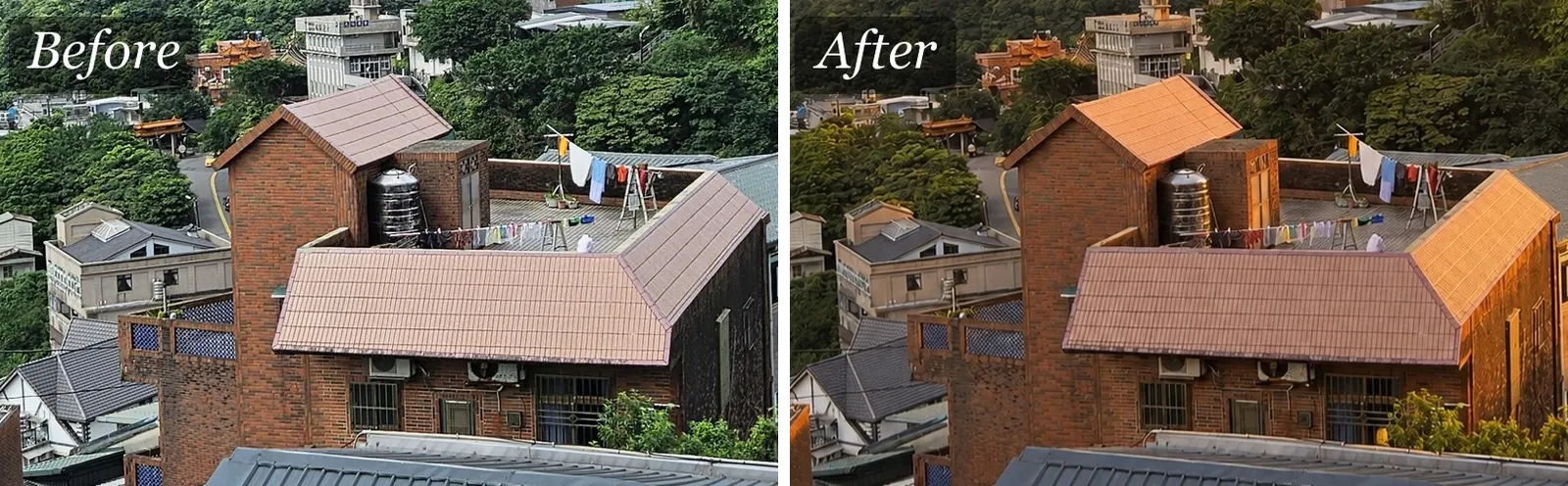
- 把原圖和新圖並排,或疊在一起來回切換,看建築、電線桿、樹有沒有移位或不見。
- 看小字。ChatGPT 是把整張圖重新畫一次,招牌上的字可能變糊或變成別的字。我們茶園那張,路邊看板上的字就糊掉了。
- 看顏色。草地和樹葉如果變得太螢光,就回去補一句 more natural colours, less saturation。
- 哪裡不對就直接說哪裡,例如「天空保留,建築的顏色改回原圖」,不用整段重貼。
06要注意
- 這 4 張原圖不是我們拍的。它們來自 Wikimedia Commons,授權是 CC BY 2.0、3.0、4.0;我們做的修改是裁成 4:5、用 ChatGPT 重新打光。作者、授權和連結都標在每張圖的正下方,你要轉貼,也要一樣標註。
- 夕陽版是 AI 重畫的光線,不是那一刻真的拍到的照片。用在新聞、房地產、旅遊介紹這種讀者會當真的地方,要寫清楚是 AI 修圖。
- 用別人的照片來改,先確認授權允許修改:CC BY 可以,標了 ND(禁止改作)的不行。用自己拍的照片最單純。
- 這組是 2026 年 10 月 21 日在我們自己的 ChatGPT 做的,出圖是 1122×1404,比原圖小一點。AI 每次結果都不同,ChatGPT 的介面、額度和功能以 OpenAI 當下的說明為準。