Grey landscape photo to golden hour with one prompt: relight it in ChatGPT, light only, framing untouched
Upload a photo to ChatGPT, paste a prompt that locks the composition and changes only the light and sky: a grey day turns golden. Prompt plus 4 before/afters.
Watch the reel on InstagramComment #夕陽 to get this guide
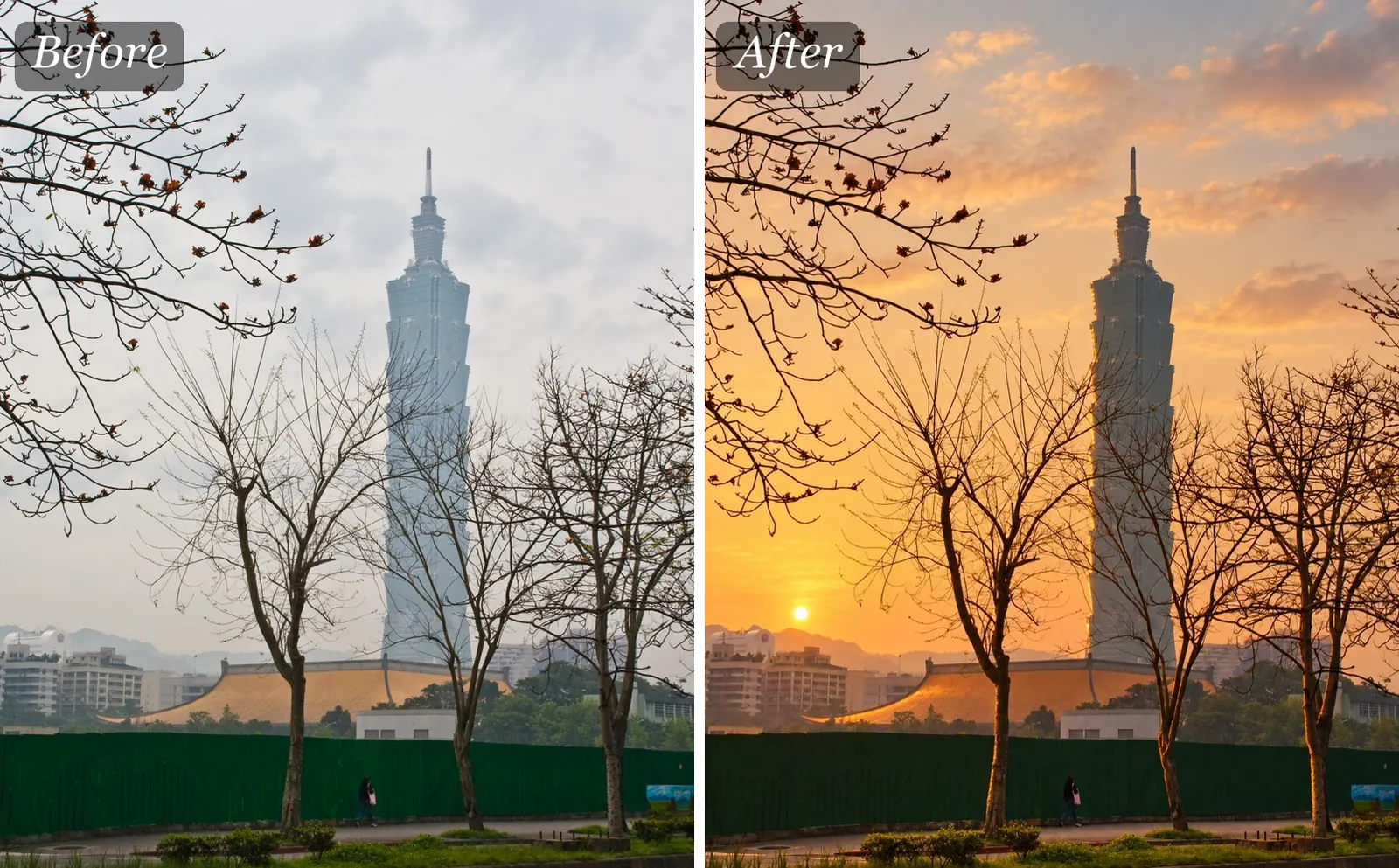
Why do your landscape photos always look grey? Often the composition is fine and the light was not. This guide shows how to relight the same photo in ChatGPT to golden hour, the low, warm light just before sunset: buildings, trees and framing stay put, and only the light and sky change. We tried it on 4 photos of Taiwan, and every before and after is below. To be clear: the 4 originals are not ours. They are photos shared on Wikimedia Commons under CC BY licences, and each one's author, licence and link sit right under the image. The sunset versions on the right are ours: we cropped each original to 4:5 and relit it in ChatGPT.
01The result first: light changed, composition not
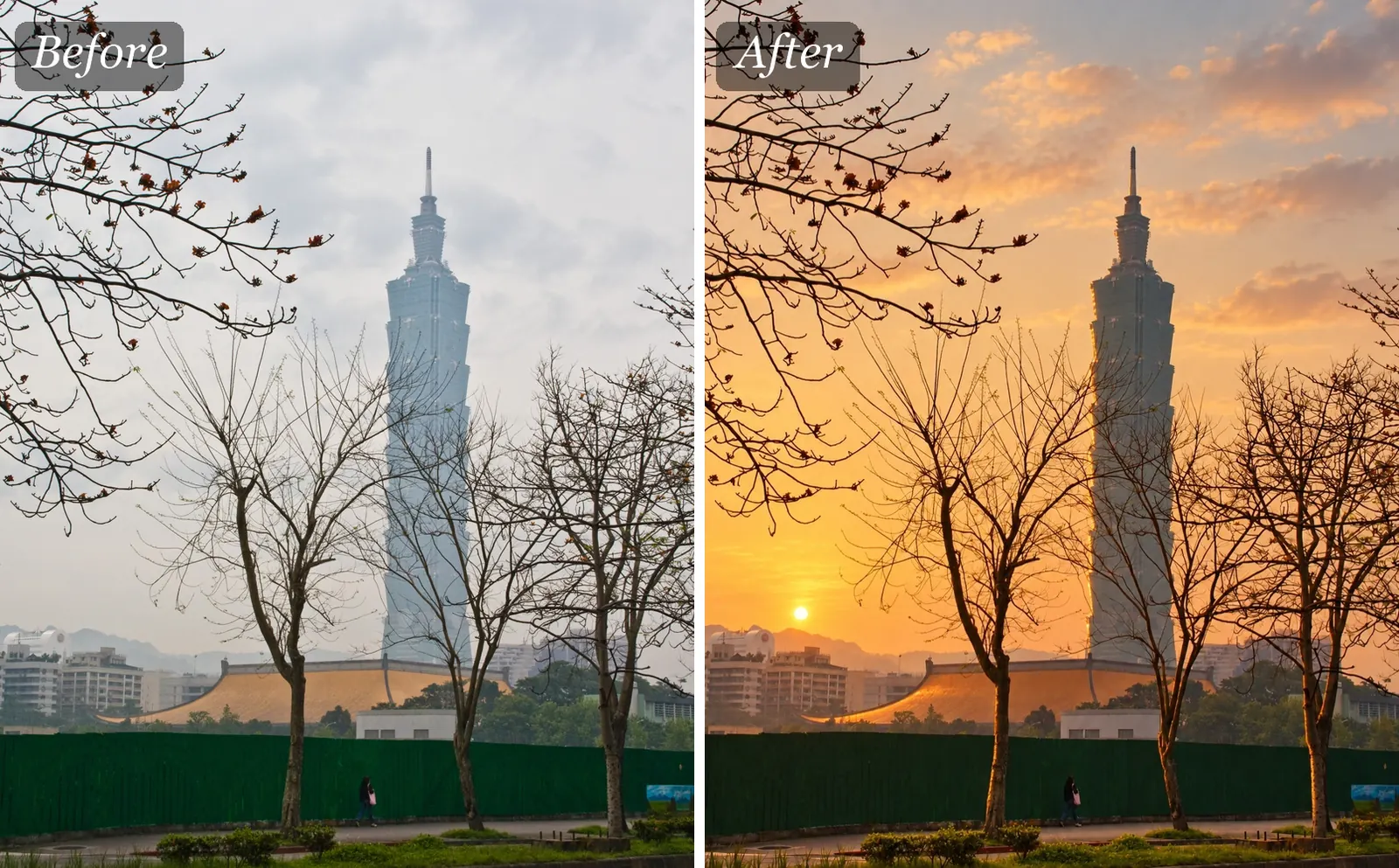
- Original photo: "Taipei 101 (3430279748).jpg" by Pedro Angelini from São Paulo, Brasil — CC BY 2.0, Wikimedia Commons. We cropped it to 4:5 and relit it with ChatGPT.
- CC BY 2.0 licence
That is the whole trick: it is not a filter. A filter warms the whole picture and the grey sky stays grey. This prompt asks the AI to redraw the light: a low sun, a sky from orange to peach, warm rim light on the edges of buildings and branches, longer shadows.
- Keep the composition: the buildings, trees, people and every object stay; nothing added, nothing removed.
- Low, warm light: the sun sits near the horizon, off to one side, with light coming in from the side.
- Natural, not oversaturated: it should look like a sunset a phone really caught, with no HDR look and no pasted-on lens flare.
02Step 1: pick a photo and crop it to 4:5
- Pick a photo with good composition but a grey sky or flat light. Overcast shots work best; the difference is biggest.
- Crop to 4:5 (Instagram's portrait post size). We cropped every original to 1200×1500 first.
- Do one photo at a time. We uploaded and edited them one by one.
- Using someone else's photo? Check the licence first. Ours are all CC BY: you may modify them, but you must credit the author, licence and link, and say what you changed.
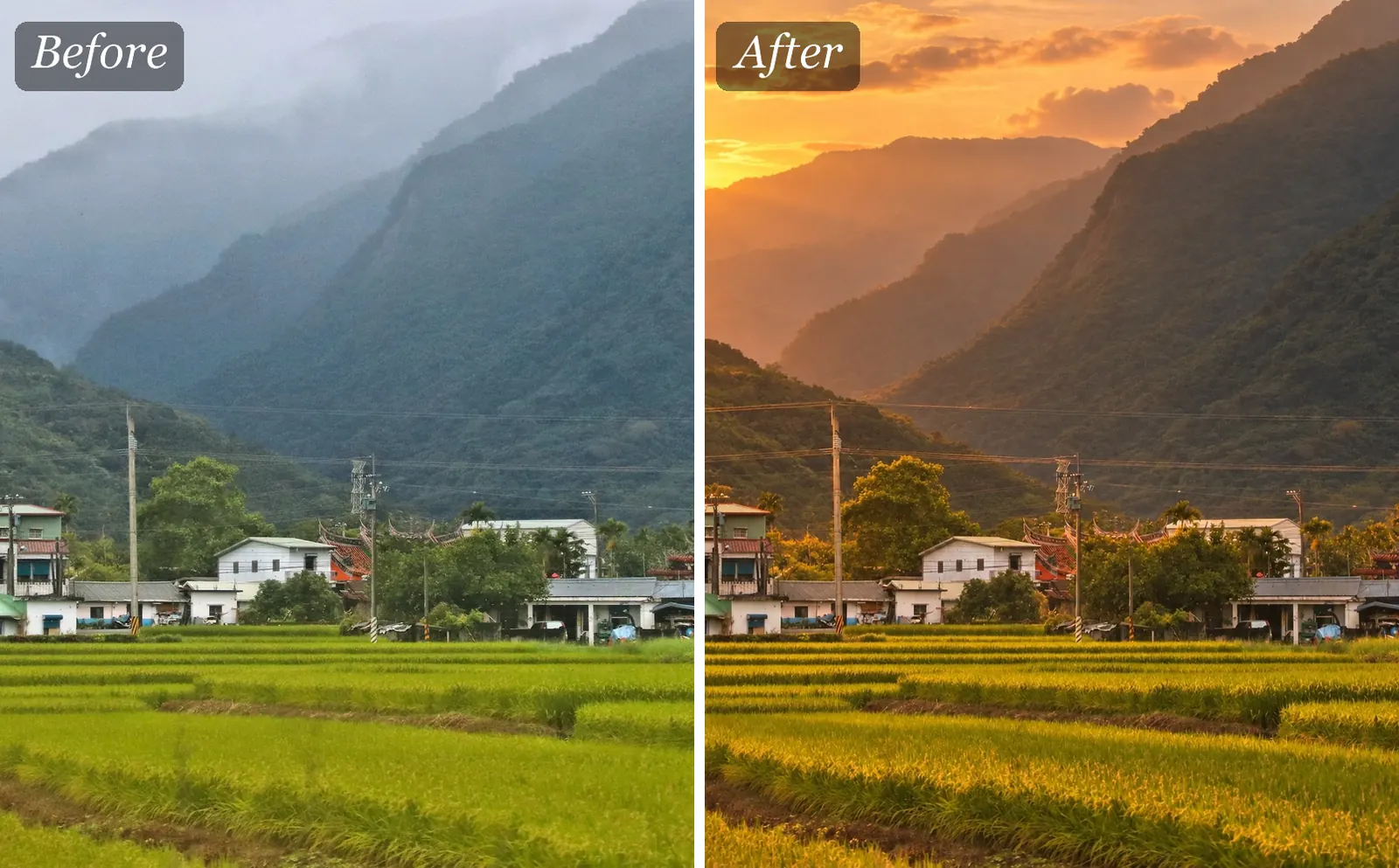
- Original photo: "05 Countryside of Taiwan - rice fields and mountains in Ruisui….jpg" by Marek Ślusarczyk (Tupungato) — CC BY 3.0, Wikimedia Commons. We cropped it to 4:5 and relit it with ChatGPT.
- CC BY 3.0 licence
03Step 2: upload the photo and paste the prompt
Open ChatGPT (chatgpt.com), upload the photo you want to change, paste this, and replace the [ ] parts to match your photo:
Edit this photo, same [4:5] size. Keep the exact same composition, framing, buildings, trees, people and every object, nothing added or removed. Change only the light and sky: golden hour just before sunset, a low warm sun near the horizon off to [the left / the right], the sky glowing soft orange to peach with a few lit-up clouds, warm rim light on the edges of [buildings and branches], long soft shadows, gentle atmospheric haze in the distance. [One line for your scene, e.g. soft haze between the mountain ridges / warm rim light on the rooftops / side light raking across the tea rows]. Keep it a believable real photograph taken on a phone, natural colours, not oversaturated, no HDR look, no lens-flare stickers, no text.
For our first photo (Taipei 101) we pasted this, word for word. It is the basic version, without the left/right sun choice or a scene line:
Edit this photo, same 4:5 size. Keep the exact same composition, framing, buildings, trees, people and every object, nothing added or removed. Change only the light and sky: golden hour just before sunset, a low warm sun near the horizon off to one side, the sky glowing soft orange to peach with a few lit-up clouds, warm rim light on the edges of buildings and branches, long soft shadows, gentle atmospheric haze in the distance. Keep it a believable real photograph taken on a phone, natural colours, not oversaturated, no HDR look, no lens-flare stickers, no text.
- "Keep the exact same composition … nothing added or removed": locks the framing; nothing may be added or taken away.
- "Change only the light and sky": only the light and the sky may change.
- "not oversaturated, no HDR look, no lens-flare stickers": no oversaturation, no HDR, no pasted-on flare, so it looks like a real photo.
04Step 3: next photo in the same chat, plus one scene line
From the second photo on, upload it in the same chat and start with "Same edit for this photo, same 4:5 size", then add one line that belongs to this photo only. That is how we did photos 2 to 4. Their scene lines were about haze between the mountain ridges, warm rim light on the rooftops, and side light raking across the tea rows.
Same edit for this photo, same 4:5 size. Keep the exact same composition, change only the light and sky to golden hour just before sunset. [This photo's scene line, e.g. side light raking across the tea rows]
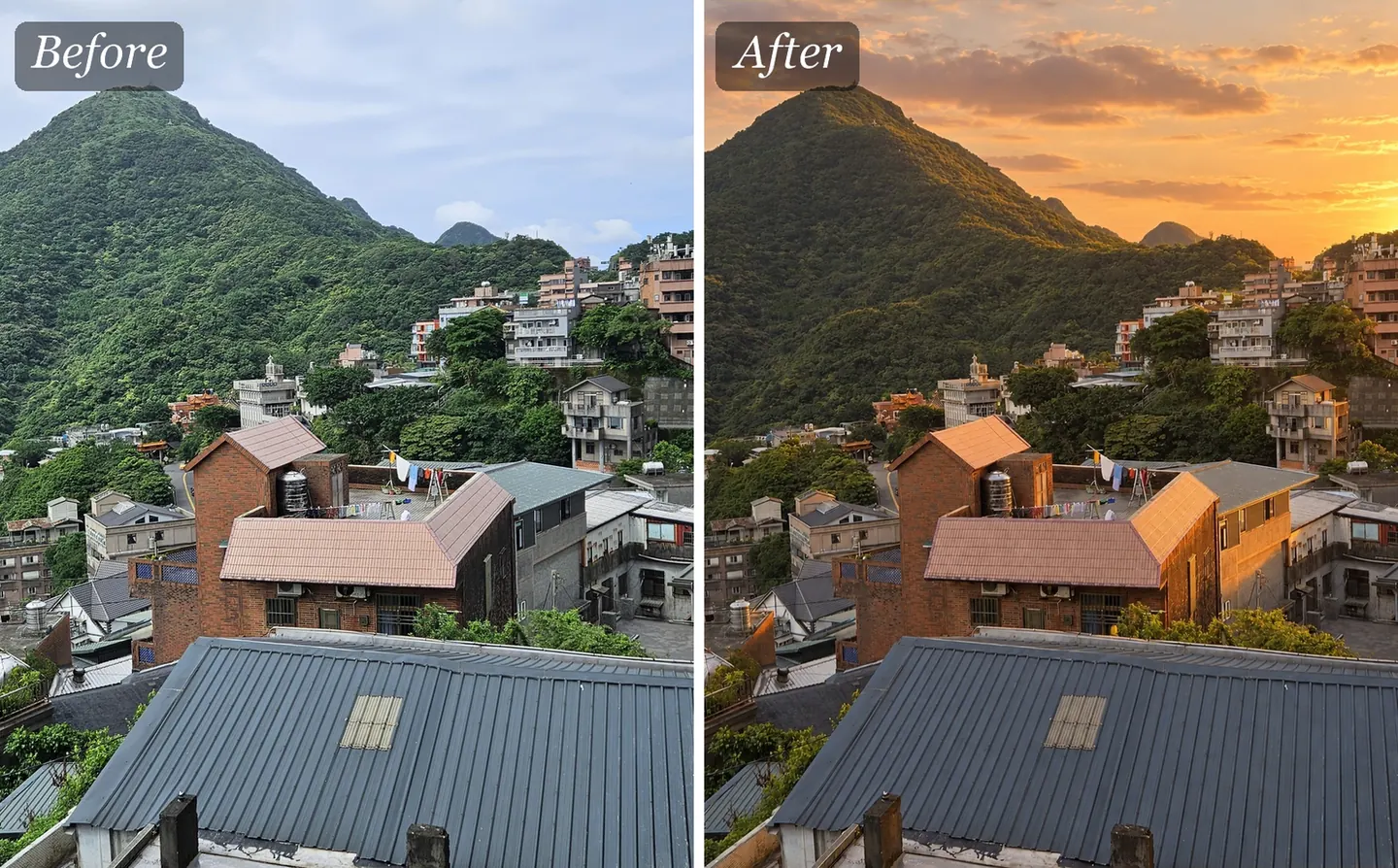
- Original photo: "Jiufen Buildings and Keelung Mountain.jpg" by Ganmatthew — CC BY 4.0, Wikimedia Commons. We cropped it to 4:5 and relit it with ChatGPT.
- CC BY 4.0 licence
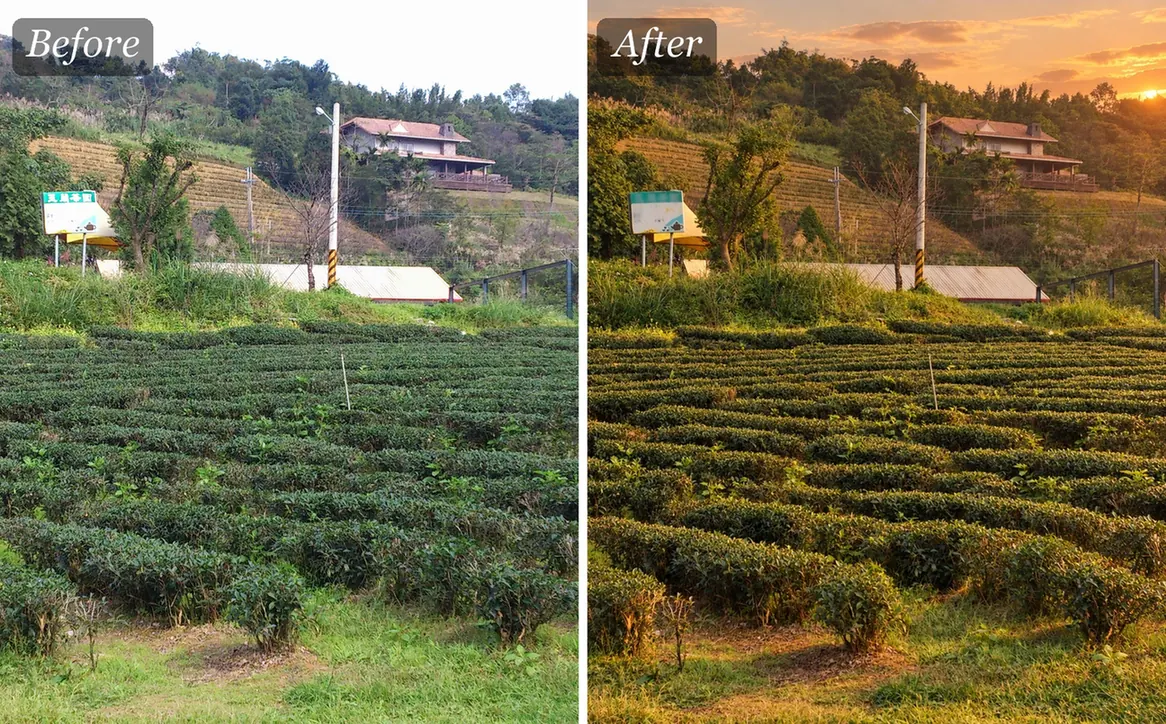
- Original photo: "玉蘭茶園 Yulan Tea Plantation - panoramio.jpg" by lienyuan lee — CC BY 3.0, Wikimedia Commons. We cropped it to 4:5 and relit it with ChatGPT.
- CC BY 3.0 licence
Not sure how to write the scene line? Give the photo to Claude (claude.ai) and ask:
Look at this photo and write one English sentence describing it at golden hour: which side the light comes from and what it hits (rooftops, ridges, leaves, water). I will paste it into a ChatGPT photo-edit prompt, so give me just that one sentence.
05Check: did only the light change?
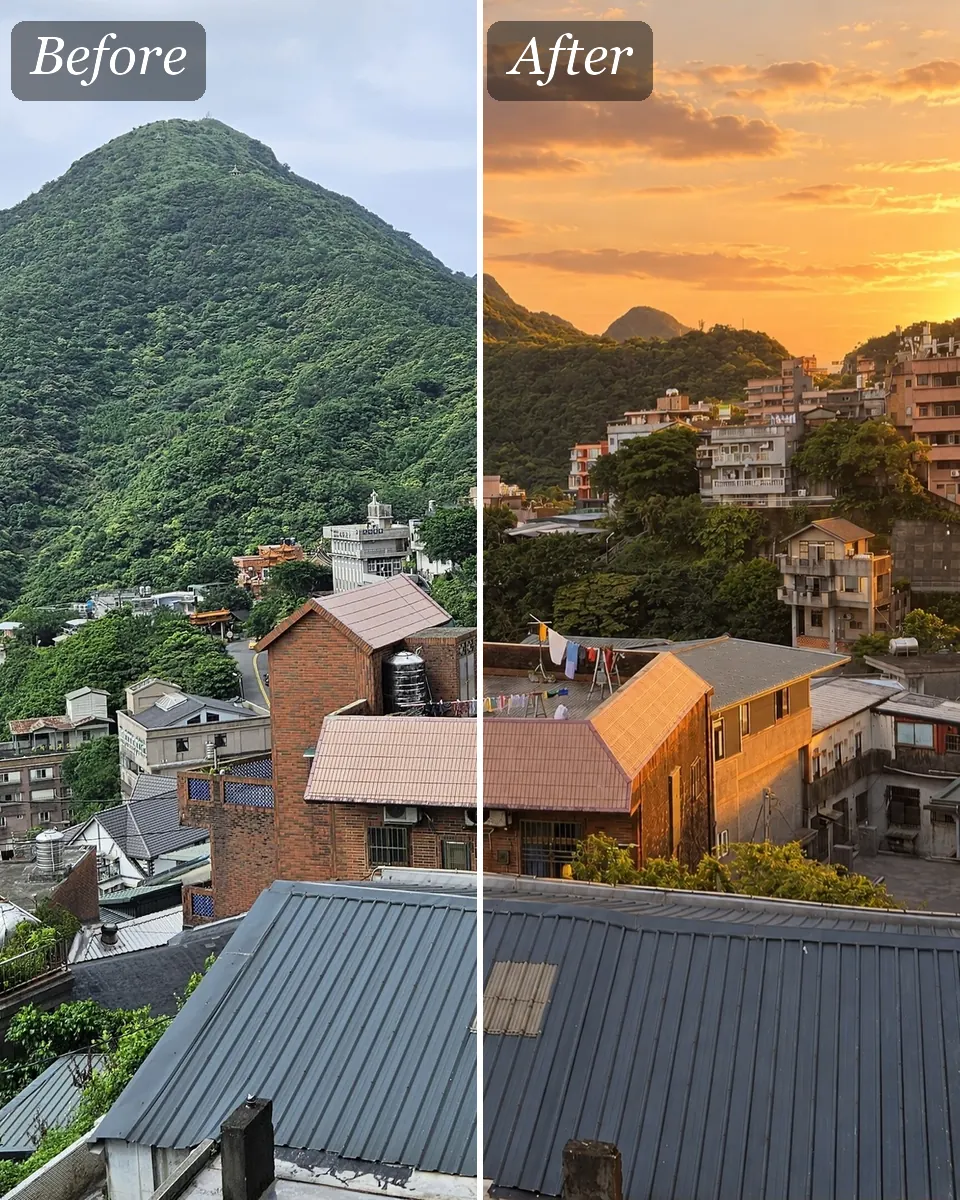
- Original photo: "Jiufen Buildings and Keelung Mountain.jpg" by Ganmatthew — CC BY 4.0, Wikimedia Commons. We cropped it to 4:5 and relit it with ChatGPT.
- CC BY 4.0 licence
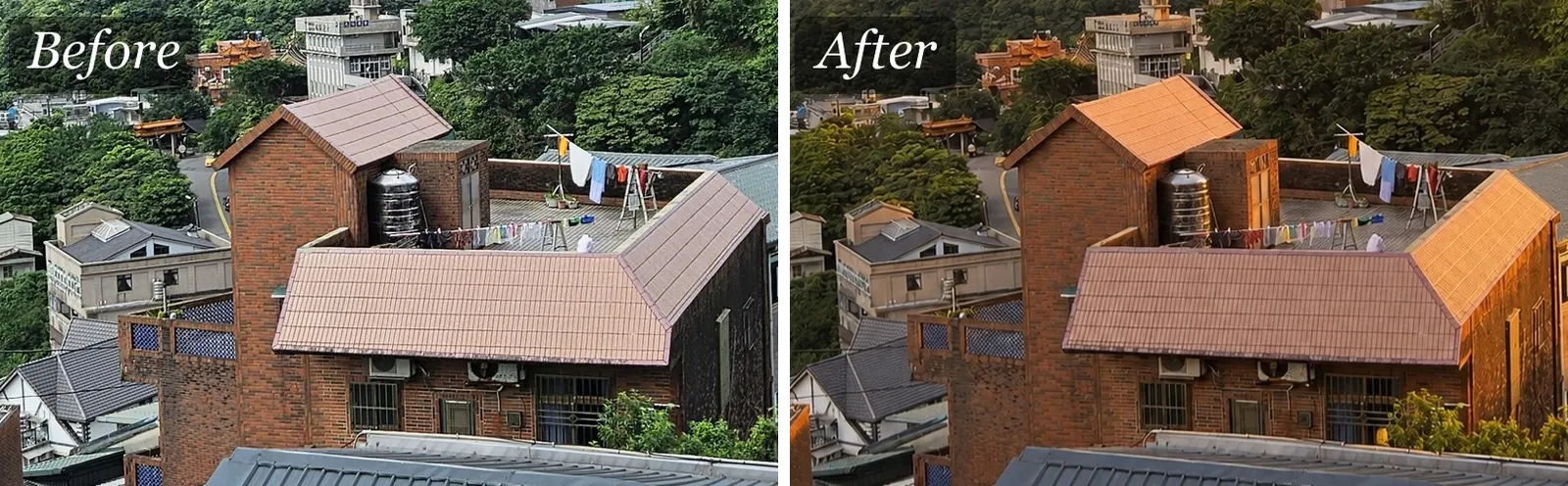
- Put the original and the new image side by side, or stack them and flick between them. Check that buildings, poles and trees have not moved or vanished.
- Check small text. ChatGPT redraws the whole image, so text on signs can blur or change. On our tea garden photo, the roadside sign text came out blurred.
- Check colour. If grass and leaves turn neon, add "more natural colours, less saturation".
- Say exactly what is wrong, e.g. "keep the sky, put the buildings back to their original colours", instead of pasting the whole prompt again.
06Good to know
- The 4 originals are not our photos. They come from Wikimedia Commons under CC BY 2.0, 3.0 and 4.0. Our changes: cropped to 4:5 and relit with ChatGPT. Author, licence and link are right under each image; credit them the same way if you repost.
- The sunset versions are AI-redrawn light, not photos of a real moment. Where readers will take them at face value (news, real estate, travel guides), say they are AI-edited.
- Editing someone else's photo? Check the licence allows changes: CC BY does, anything marked ND (no derivatives) does not. Your own photos are simplest.
- We made these in our own ChatGPT on 21 October 2026; the output was 1122×1404, slightly smaller than the original. AI results differ every time, and ChatGPT's interface, limits and features follow OpenAI's current help pages.
Sources
- Wikimedia Commons: Taipei 101 (3430279748).jpg
- Wikimedia Commons: rice fields and mountains in Ruisui, Hualien
- Wikimedia Commons: Jiufen Buildings and Keelung Mountain.jpg
- Wikimedia Commons: 玉蘭茶園 Yulan Tea Plantation
- Creative Commons: CC BY 2.0
- Creative Commons: CC BY 3.0
- Creative Commons: CC BY 4.0
- OpenAI Help Center: Images in ChatGPT
- ChatGPT
- Claude