An ice-cream flavour slider with Claude Code: switch flavours and the whole page changes colour (prompts + live demo)
Click a thumbnail and the new colour ripples out while the cone sinks and rises. Five matching ChatGPT cones, a site by Claude Code. All prompts + a live demo.
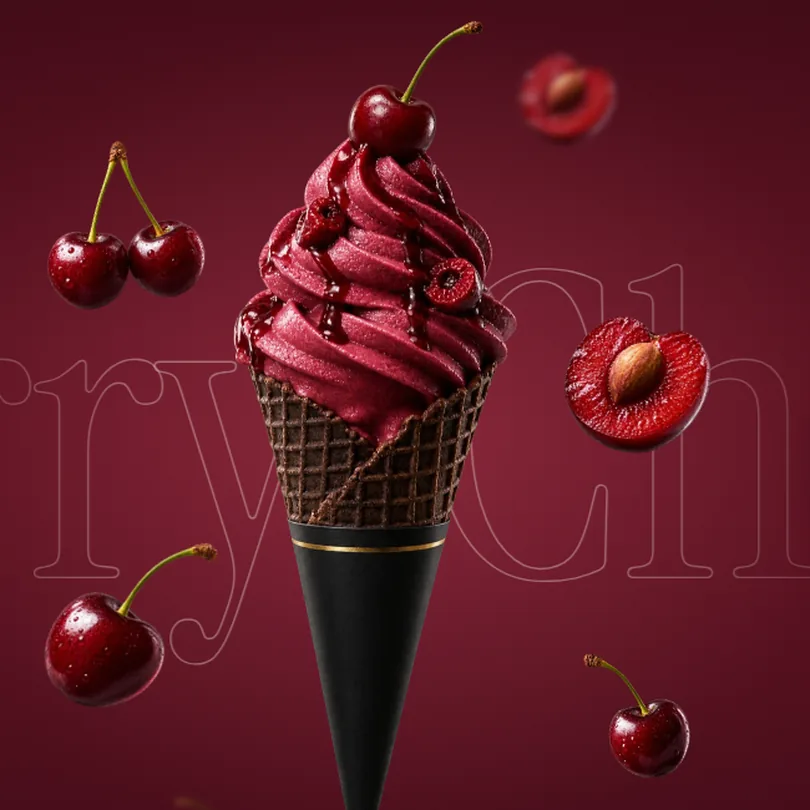
Have you seen product pages where picking another flavour doesn't just swap the photo, but the colour of the whole page changes too? That's what we built here. For a fictional gelato shop called Shuang Gelato (霜) we made a flavour slider: cherry, fig, caramel lemon, blueberry and oolong, five cones in five colours. Click a thumbnail and the new colour spreads out from it like a water ripple, while the old cone sinks and the new one rises from below.
The site was written by a fresh Claude Code agent; the cones and fruit were made in ChatGPT. In this guide you get: a live demo you can play with, the ChatGPT prompts for "the same cone, the same angle, the same light", the fruit-sheet prompt, the 2 prompts for Claude Code (the first builds the site, the second makes the colour switch look good; replace the [ ] parts), and how to swap in your own products. Every image below is our real output.
01The result: switch flavours and the whole page changes colour
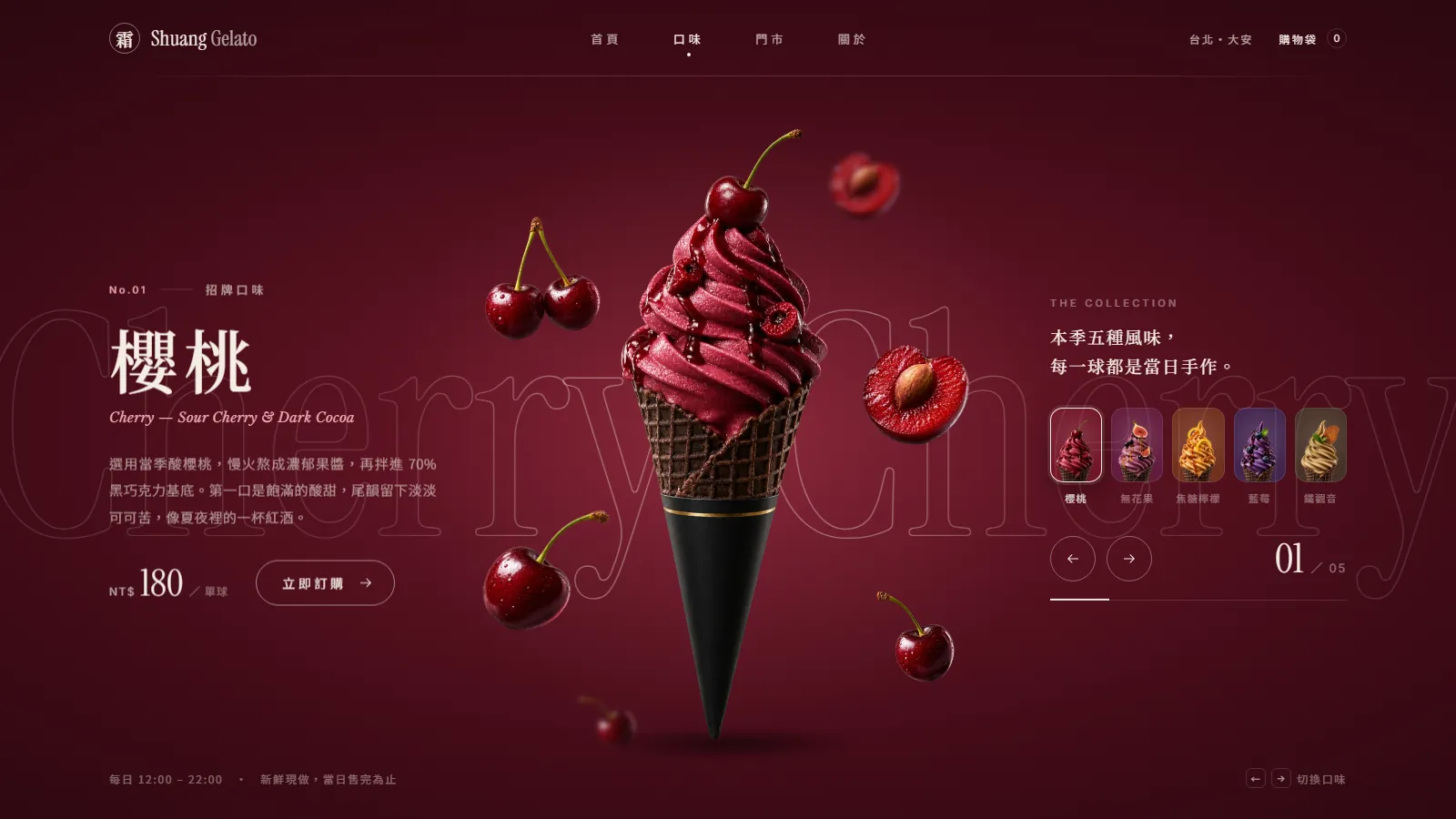
The whole site is just index.html, style.css and main.js, plus the cone and fruit images and the font files. A big cone in the middle with a row of huge outlined English words behind it; on the left the flavour name in Chinese, one English line, a few lines of description, the price and an "Order now" button (立即訂購); on the right five flavour thumbnails, two arrows and a 01 / 05 counter. The fruit around the cone floats slowly.
- Play with it: the Shuang Gelato flavour slider — On a computer click the thumbnails or arrows, or press ← →; on a phone swipe left / right
- Open the demo and click the 4th thumbnail on the right (blueberry): the blue spreads out from that thumbnail like a ripple and covers the page.
- Watch the cone in the middle: the old one sinks, the new one rises from below and ends with a small bounce. The fruit scatters and the new fruit flies in; the outlined word behind slides across too.
- Press the → key: this time the colour spreads out from the arrow on the right.
02Five flavours, five colours
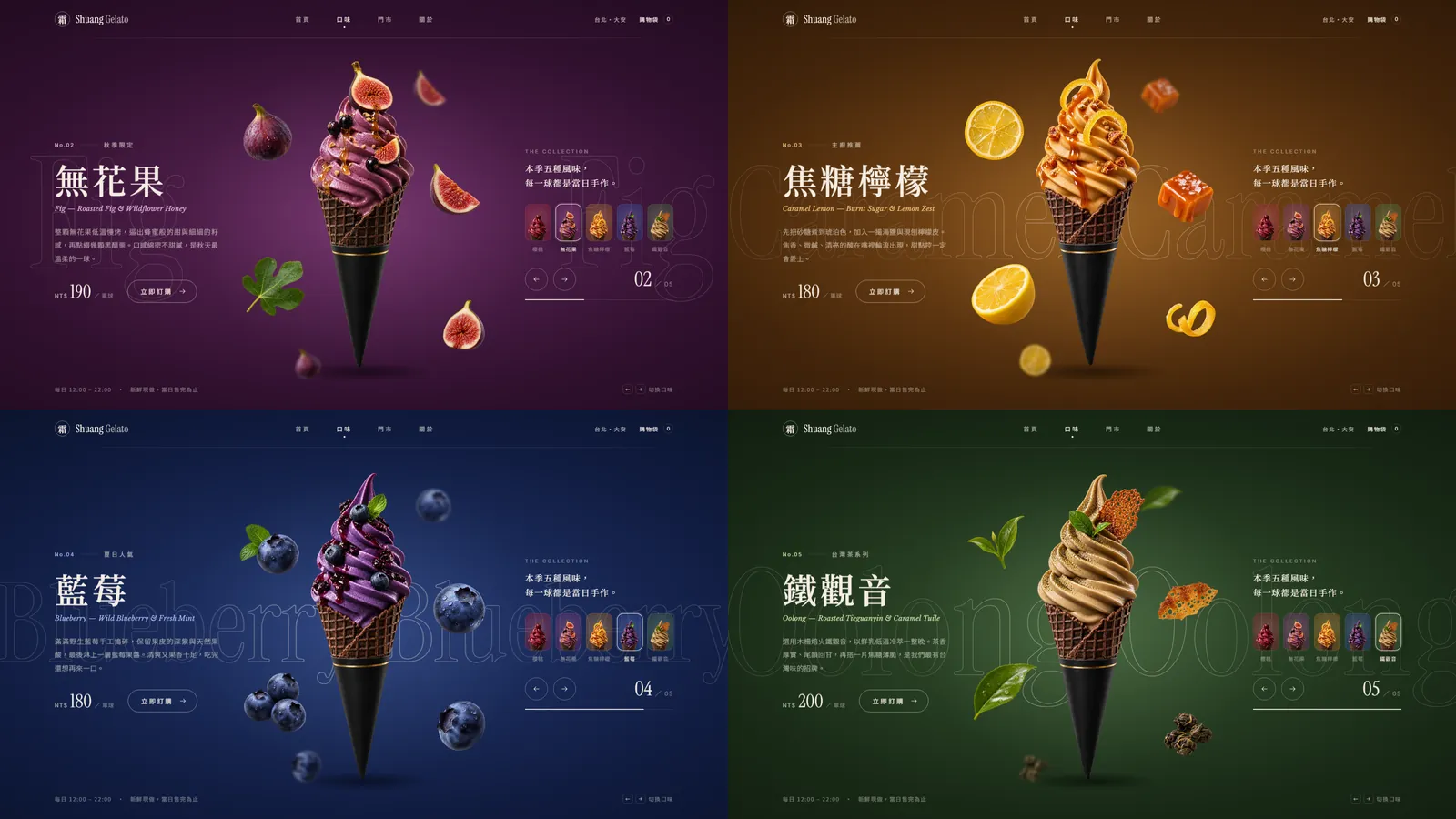
We set each flavour's colour in the prompt: deep wine red, deep plum purple, amber caramel, midnight blue, deep tea green. The background gets darker from the centre outwards, so it is always a little brighter behind the cone, as if a lamp were on it.
Claude Code added these on its own; they are not in the prompt: the description and English subtitle for each flavour (e.g. Sour Cherry & Dark Cocoa), prices from NT$180 to 200, a round 霜 logo, "台北・大安" (Taipei, Da'an) and a shopping bag in the nav, a progress bar under the counter, opening hours at the bottom, a few blurred fruit pieces behind the cone for depth, and a switch animation already in the first version: old fruit scatters, new fruit flies in, the outlined word slides across.
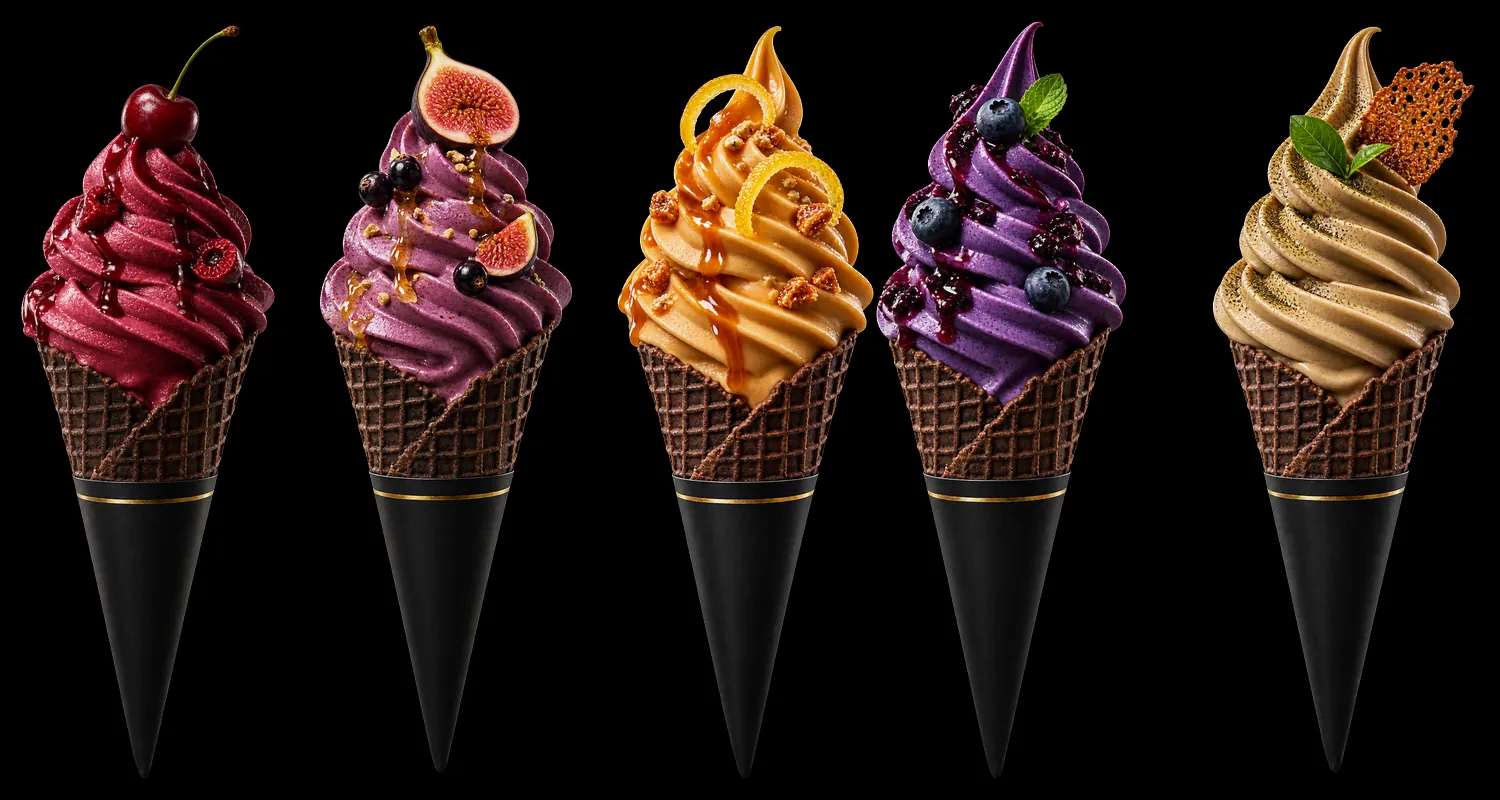
03Step 1: shoot the cones in ChatGPT, same cone, same angle, same light
Whether the switch feels smooth depends mostly on the photos. If the angle, size or light of the five photos is even a little off, the cone "jumps" on every switch. So make all five cones in one ChatGPT chat: spell out everything in the first prompt, and start every later one with "same cone, same angle, size and light".
- Open a new ChatGPT chat, paste the prompt for photo 1 and replace the [ ] parts with your product.
- Once you like it, send the messages below one at a time in the same chat, changing only the flavour and toppings.
- When you download, make sure each one is a PNG with a transparent background, and save it under the name the site will use: cone-cherry.png, cone-fig.png…
Create an image. I'm making a dark, premium product-slider website for a fictional [gelato] brand. I need a matching set of 5 [ice-cream cone] product shots: the SAME [cone], the SAME camera angle (straight on, at eye level), the SAME size in the frame and the SAME dramatic studio lighting (soft key light from the upper left, a thin rim light from the right) in every shot. Photo 1: [CHERRY]. [A tall dark chocolate waffle cone wrapped in a plain matte black paper sleeve with one thin gold band (no text, no logo on it), filled with a tall glossy swirl of deep ruby-red cherry soft serve, a drizzle of dark cherry sauce and a few cherry pieces on the swirl, one fresh cherry with its stem on top.] Hyper-real premium editorial food photography. The [cone] is centred, upright, and fills about 85% of the frame height. Transparent background (a real PNG with alpha), no floor, no shadow. Portrait 2:3. No text, no logos, no people, no hands.
Perfect. Photo 2, same [cone], same [black sleeve with the gold band], same angle, size and light: [FIG. A tall swirl of violet-purple fig and blackcurrant soft serve, a drizzle of honey, topped with a fresh fig cut in half showing its pink seedy inside.] Transparent background (PNG with alpha), no floor, no shadow. Portrait 2:3. No text, no logos, no people, no hands.

Photo 3, same [cone], same sleeve, same angle, size and light: [CARAMEL LEMON. A tall swirl of golden amber salted-caramel soft serve with a caramel drizzle, a few crunchy caramel bits and two curls of candied lemon peel.] Transparent background (PNG with alpha), no floor, no shadow. Portrait 2:3. No text, no logos, no people, no hands.

Photo 4, same [cone], same sleeve, same angle, size and light: [BLUEBERRY. A tall swirl of deep indigo-blue blueberry soft serve with crushed blueberry sauce, topped with fresh blueberries and one small mint leaf.] Transparent background (PNG with alpha), no floor, no shadow. Portrait 2:3. No text, no logos, no people, no hands.

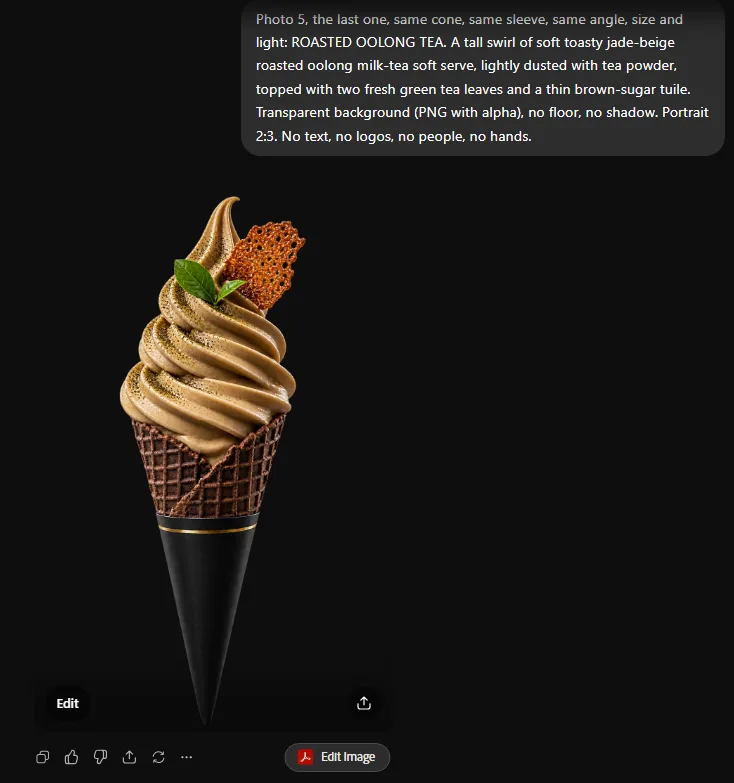
Photo 5, the last one, same [cone], same sleeve, same angle, size and light: [ROASTED OOLONG TEA. A tall swirl of soft toasty jade-beige roasted oolong milk-tea soft serve, lightly dusted with tea powder, topped with two fresh green tea leaves and a thin brown-sugar tuile.] Transparent background (PNG with alpha), no floor, no shadow. Portrait 2:3. No text, no logos, no people, no hands.
04Step 2: make one fruit sheet per flavour
The fruit floating around the cone comes from one "sheet" per flavour: 4 separate pieces on one image with a transparent background. You don't need to cut anything out yourself; Claude Code cuts each sheet into 4 small images.
Create an image. Floating ingredient pieces for a premium [gelato] product website, as a sprite sheet: FOUR separate [cherry] pieces, spread far apart in a 2x2 layout with lots of empty space between them so each one can be cut out: [a whole fresh dark-red cherry with its stem, a cherry cut in half showing the pit, a pair of cherries joined at the stems, a single cherry tilted]. Dramatic studio light from the upper left with a thin rim light from the right, hyper-real food photography. Transparent background (a real PNG with alpha). Square 1:1. No text, no shadows, nothing touching, no people, no hands.

(Same chat, one message per flavour)
Same style and light, same 2x2 layout with lots of space between the pieces, transparent background: FOUR separate [fig] pieces: [a whole purple fig, a fig cut in half showing the pink seedy inside, a fig quarter, one green fig leaf]. Square 1:1. No text, no shadows, nothing touching.
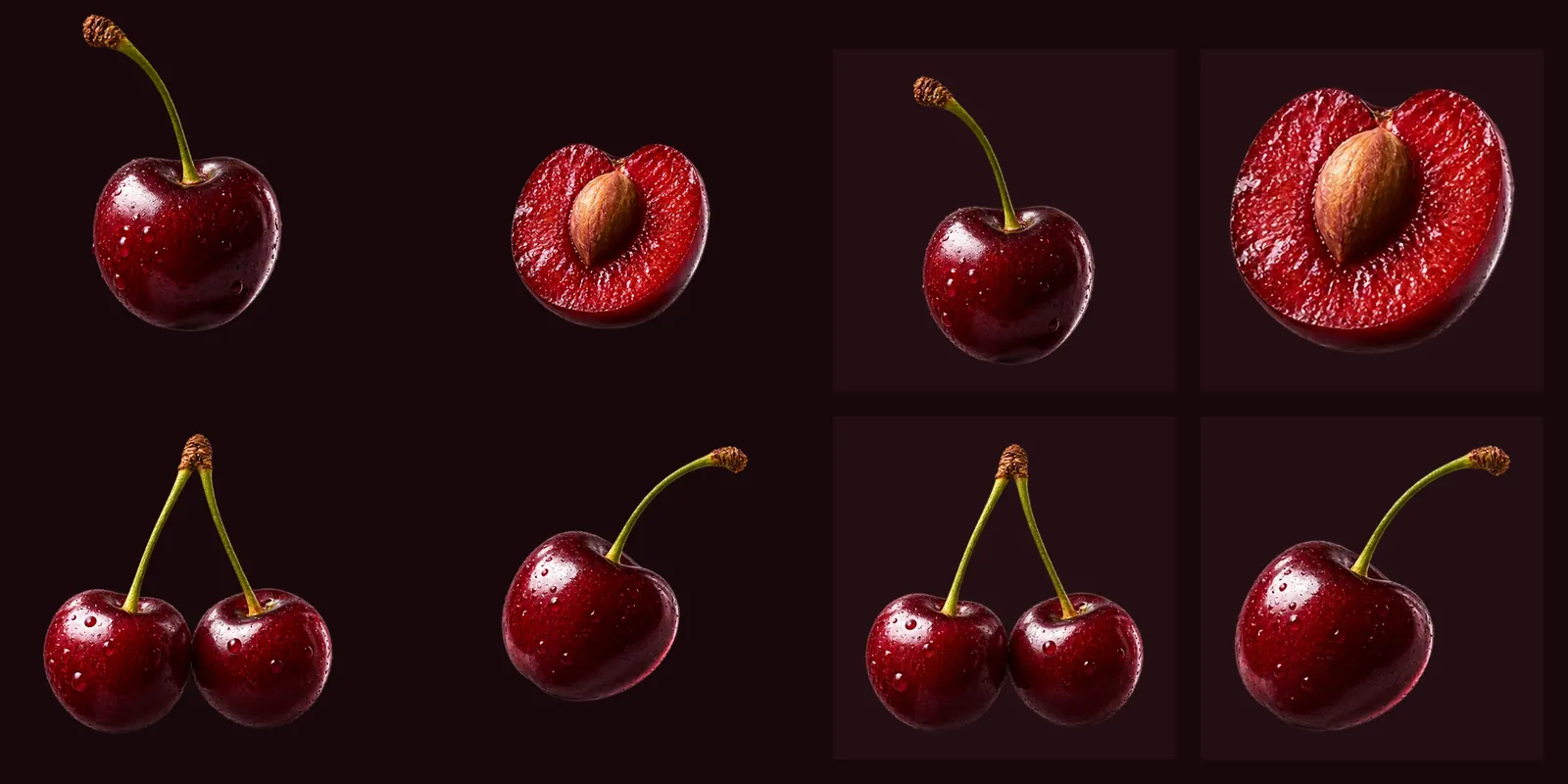
The caramel lemon sheet first came back on a grey background instead of a transparent one. One more message in the same chat fixed it:
The [caramel and lemon] sheet came out on a grey background. Please make that one again exactly the same ([salted-caramel cube, thin lemon wheel slice, half a lemon, curl of candied lemon peel], 2x2 with lots of space), but with a fully transparent background (real PNG alpha, no grey, no backdrop). Square 1:1. No text, no shadows.
05Step 3: give the photos and one prompt to Claude Code
- Make an empty folder with an img/ folder inside, and put the 5 cones and 5 fruit sheets in it.
- Open Claude Code in that folder.
- Paste the prompt below, replace the [ ] parts with your brand, product names and colours, and press Enter.
- When it has written index.html (and style.css, main.js), run npx serve (or any local server) in the folder, open the address it gives you in a browser and click around.
Build a "flavour slider" product page for a [gelato] brand: dark, premium, like the website of a [luxury dessert shop].
Brand: "[Shuang Gelato]" (fictional).
Five flavours, all photos are in img/: for each flavour one [cone] (cone-*.png, transparent background) and one fruit sheet (fruit-*.png, transparent background, with 4 separate fruit pieces that you can cut into small images).
1. [Cherry]: cone-[cherry] / fruit-[cherry], [deep wine red]
2. [Fig]: cone-[fig] / fruit-[fig], [deep plum purple]
3. [Caramel Lemon]: cone-[caramel] / fruit-[caramel], [amber caramel]
4. [Blueberry]: cone-[blueberry] / fruit-[blueberry], [midnight blue]
5. [Oolong]: cone-[oolong] / fruit-[oolong], [deep tea green]

Layout (one screen, designed mainly for a 1600x900 desktop):
- A thin nav bar at the top: brand name on the left, [Home / Flavours / Shops / About] in the middle.
- Background: the whole page is the flavour's dark colour, getting darker from the centre outwards.
- Centre: a big photo of the [cone].
- Behind the [cone]: a huge OUTLINED serif English flavour name (outline only, semi-transparent) across the whole screen, repeated twice, like "[Cherry Cherry]".
- Left: the flavour name (big, serif), one small English line, two or three lines of product description (you write it, in a [Taiwanese] voice), the price and an outlined "[Order now]" button.
- Right: a short heading, small thumbnails of the five flavours (rounded cards with the small [cone] image), the current one with a bright border; under them previous / next arrows and a 01 / 05 counter.
- A few pieces of the flavour's fruit scattered around the [cone], floating slowly.

Interaction:
- Clicking a thumbnail, clicking an arrow or pressing the left / right arrow keys all switch the flavour.
- On a switch: the background colour changes smoothly to the new flavour's colour; the [cone] is replaced by the new one; the fruit changes to the new flavour's fruit; the outlined word and the text on the left change with it.
- [Traditional Chinese (Taiwan)].
Claude Code built the whole site from this: it cut each fruit sheet into 4 small WebP images, saved the cones as smaller WebP copies, made the thumbnail images, and cut the Chinese fonts down to only the characters on the page. The descriptions, prices and the small extras above are all its own.
06The first version: it switches, but the colour change isn't impressive yet
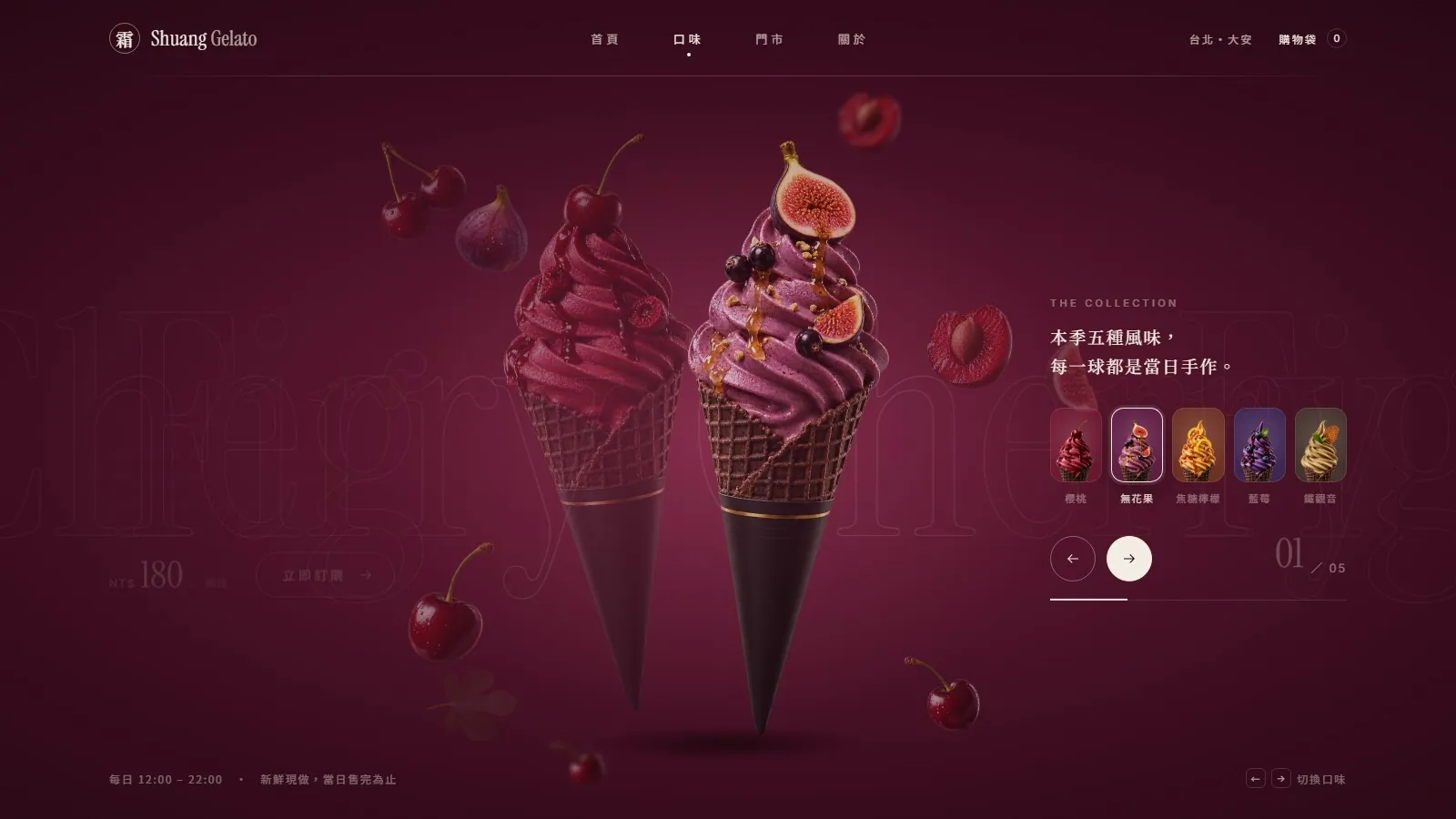
The first version got everything right: five flavours, and thumbnails, arrows and keys all switch; the fruit and the outlined word move too. The problem is the moment of the switch: the whole background changes colour slowly all at once, and the cones cross-fade side by side. On a computer it's fine; at phone size it just reads as "the picture changed", with no feeling that you clicked something.
07Step 4: one more message, and the colour spreads from the thumbnail
In the same Claude Code chat, send this next. It changes only two things: where the colour change starts, and how the cones swap.
The flavour switch isn't impressive enough yet. Please change two things:
- The new flavour's colour spreads out like a water ripple, in a circle, from the thumbnail that was clicked (when switching with the arrows or the keyboard, from the arrow's position), covers the whole page, and then the background stays the new colour.
- Don't cross-fade the [cones] side by side: the old one sinks down and disappears, the new one rises up from below and ends with a small bounce.
Change nothing else (keep the fruit and outlined-word motion). When you're done, test it yourself in headless Chrome again (including frames in the middle of a switch), then tell me briefly what you changed.
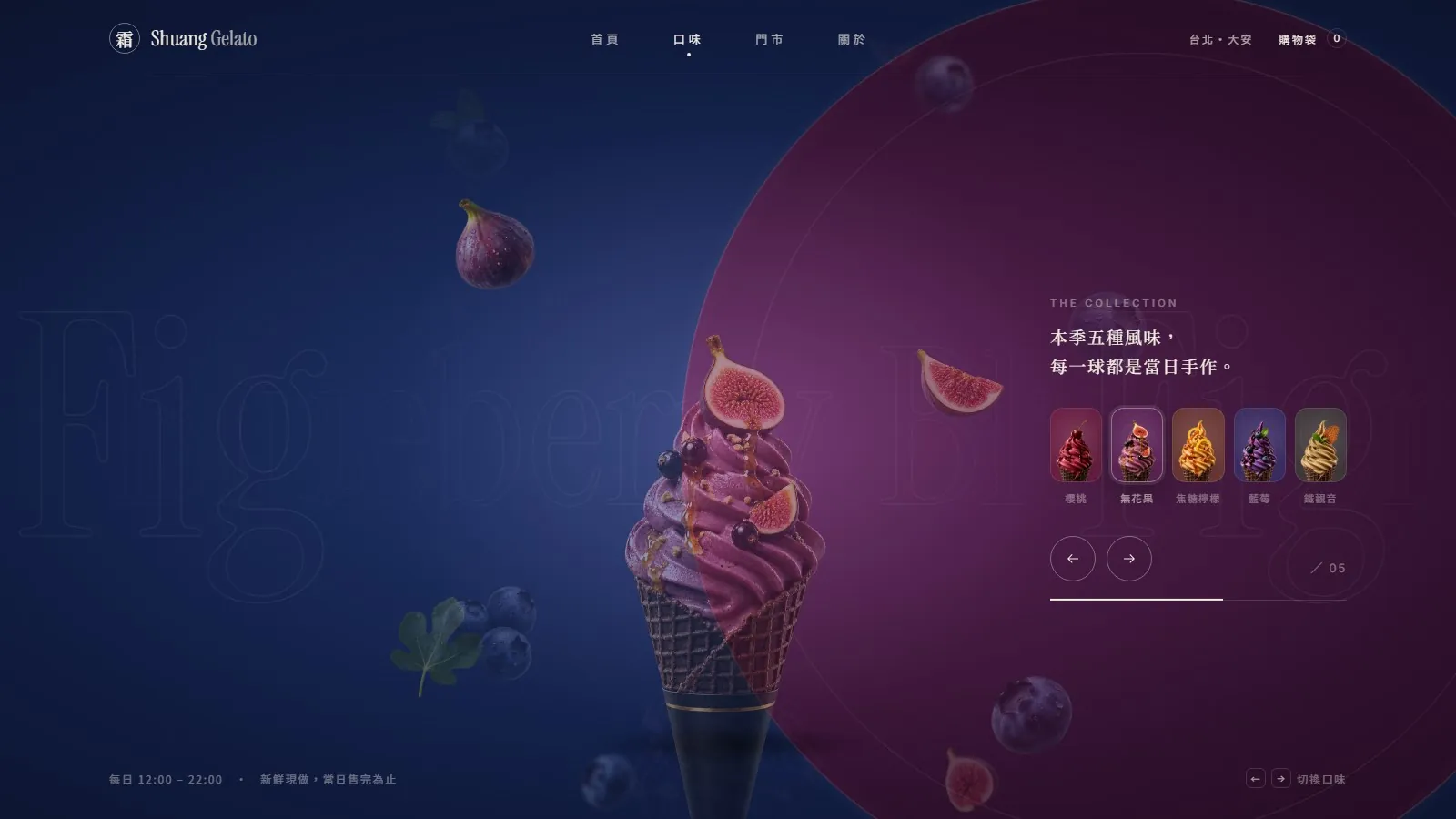
- Colour like a ripple: Claude Code added a layer of the new flavour's colour above the background, revealed by a circular mask that grows from the centre of the thumbnail and covers the page in about 1.25 seconds, with two very faint thin rings at its edge like a ripple. Once it covers everything, the background becomes the new colour.
- Where it starts: a click on a thumbnail starts it at that thumbnail's centre; an arrow click or key press starts it at that arrow, so it spreads from a different place each time.
- The cone sinks and rises: the old cone sinks and fades in about 0.6 seconds; 0.4 seconds in, the new one rises from below for about 1 second, overshooting a little and settling back, which is the "small bounce".
- Nothing else changed: fruit, outlined word, text and layout are still the first version. It also made buttons drop their focus ring after a mouse click.
08Swap in your own products
- Product photos: use the step 1 prompt with your product instead of the cone (drinks, perfume, sneakers all work). Spell out angle, light and transparent background in the first one, then say "same angle, size and light" for every next one.
- Sheets: make one transparent sheet of 3–4 accent pieces per product (coffee beans, petals, citrus slices…), again spread far apart.
- Prompt: change the brand, the five product lines and colours in prompt 1, plus the nav and button text.
- Colours: pick a "dark version" of each product's colour, e.g. write deep matcha green for matcha, not bright green.
- When the first version is in, add the motion with prompt 2 straight away.
09Good to know
- Shuang Gelato (霜) is a fictional brand. The flavour descriptions, English subtitles, NT$180–200 prices, "台北・大安" and the opening hours are demo content Claude Code wrote itself, not a real shop.
- The cones and fruit are all generated in ChatGPT, not real photos. A real shop should use its own photos, or label them as illustrations on the site.
- Every run is different. With the same prompt, your layout details, copy and first-version animation may differ; if it isn't pretty enough, add one more message in the same chat.
- The demo's Chinese fonts only contain the characters on the page. If you download the demo and change the text, switch back to the full fonts, or the new characters fall back to a system font.
- Double-clicking index.html sometimes fails to load the fonts or images; open it through a local server (npx serve) instead.
- The Claude Code screens in the video are shortened, re-typeset replays of our real prompts, not terminal recordings; the full prompts are the two above.
- Another guide: "Claude can't build this"? A cinematic bakery website in 3 steps — Also ChatGPT photos in one light + a site written by Claude Code