A wedding invitation website with Claude Code: guests RSVP and get a check-in QR code (prompts + live demo)
One prompt, a whole wedding site: hands under a flower arch, a film strip of photos, an RSVP on deckled paper that returns a check-in QR code, a countdown.
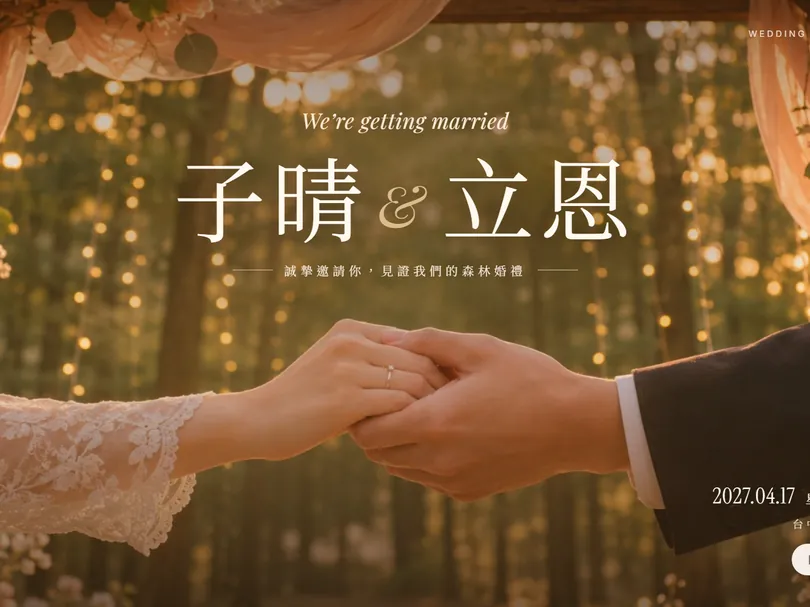
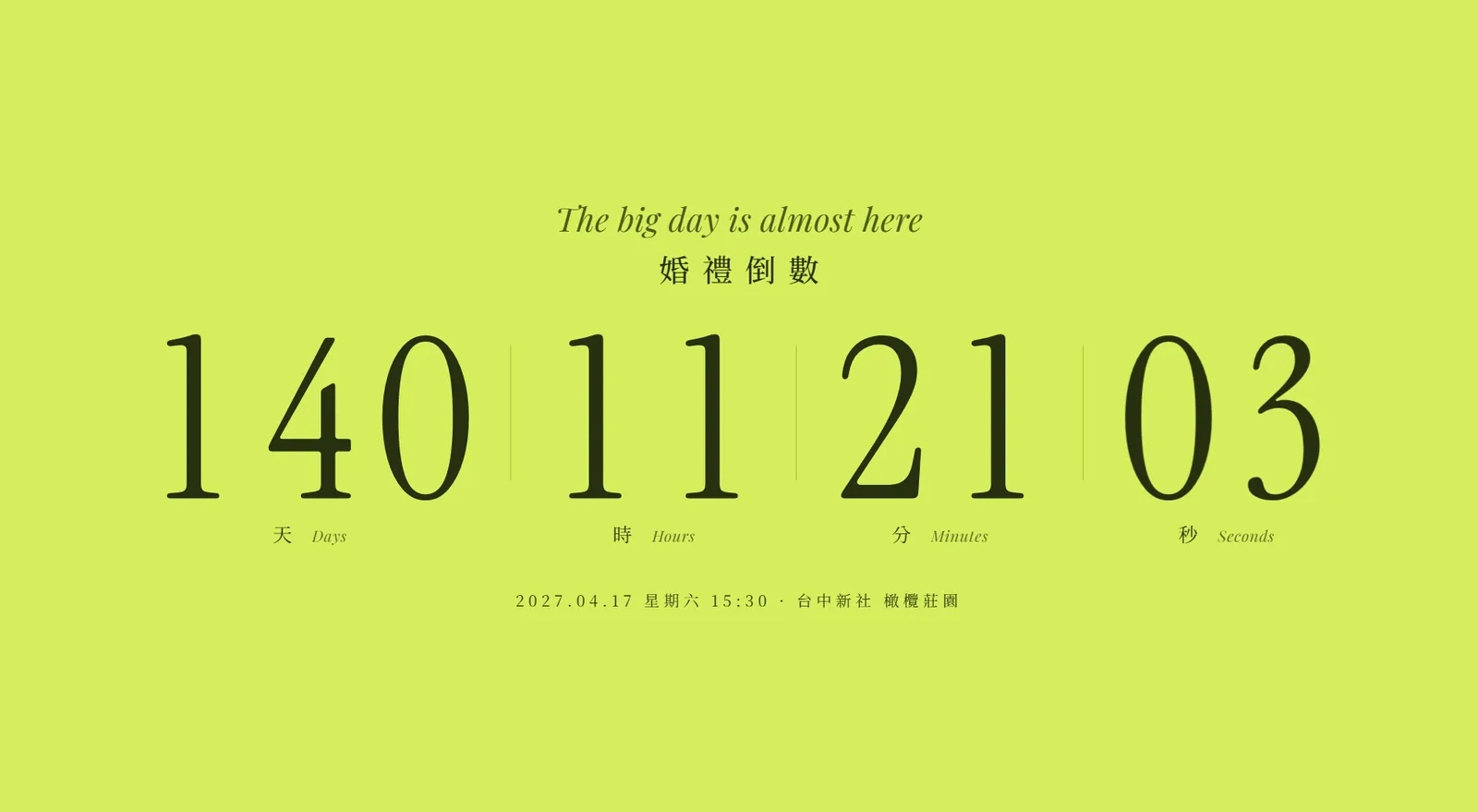
A wedding invitation doesn't have to be printed. This guide builds a wedding invitation website: it opens on two hands joined under a flower arch while the names rise one character at a time; scroll down and five story photos slide past like a roll of film; further down, an RSVP form printed on handmade deckled paper turns into a "Thank you" card with a check-in QR code the moment it is sent; and it ends with a venue map, the day's schedule and a full screen of lime-green countdown.
The couple "子晴 & 立恩" (Ziqing & Li'en) and the venue "Olive Manor" are fictional. A fresh Claude Code agent wrote the site from one prompt, and we didn't change the code; the photos were generated in ChatGPT, the people in them are AI-generated, and only hands or backs are shown. You get: a live demo, the ChatGPT prompts for all 9 photos, the full Claude Code prompt ([ ] = yours), and one thing most people miss: where the guests' replies actually end up. Every image below is a real screen of this site.
01The result: one link instead of a printed invitation
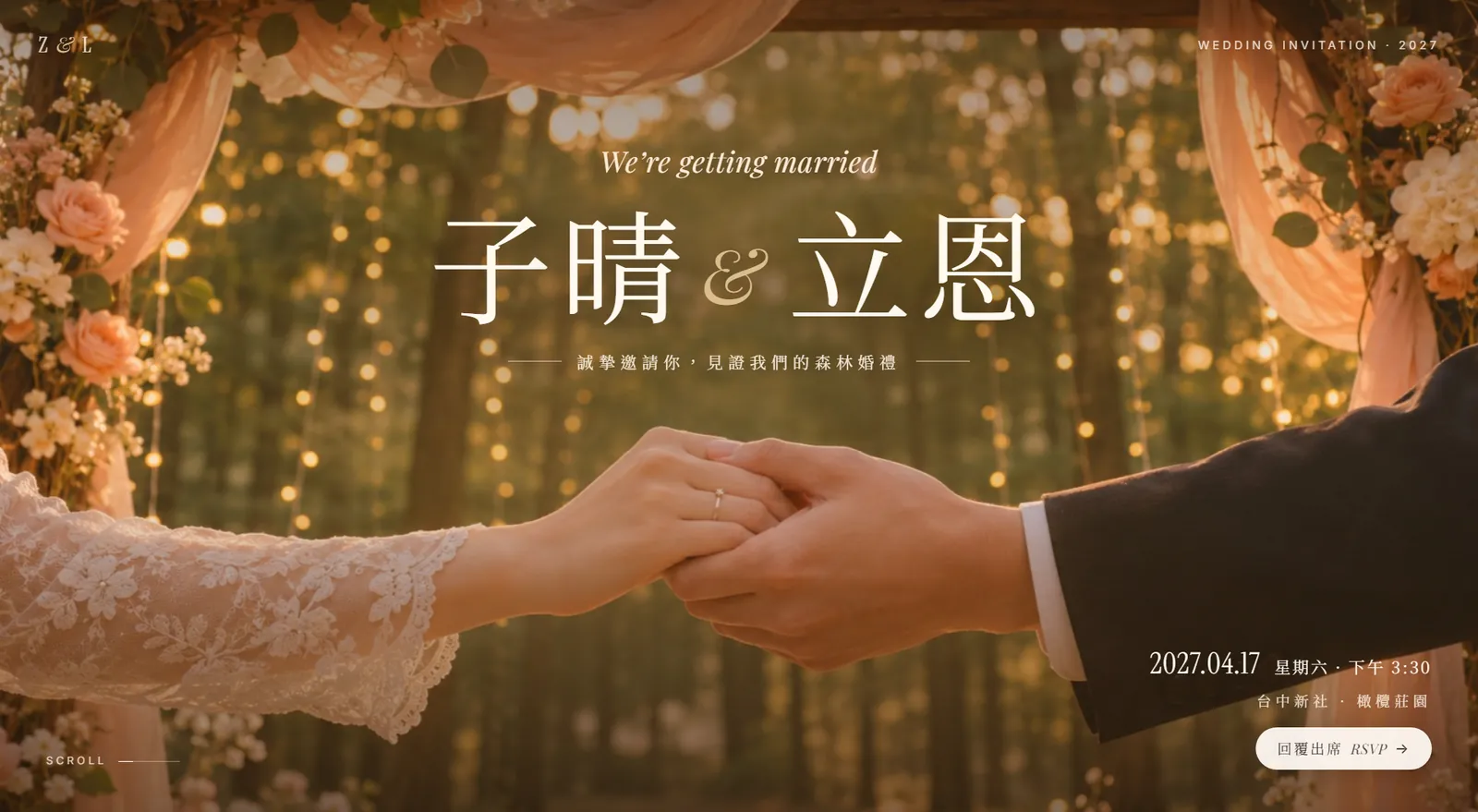
The whole site is three files, index.html, style.css and main.js, plus the photos in img/ and the fonts in fonts/. Top to bottom it has 8 sections: opening, flower arch, our story, RSVP, the check-in QR code after sending, venue and schedule, countdown, ending. It works on desktop and phone; on a phone the layout turns vertical.
- Try it: Ziqing & Li'en's wedding invitation site — Desktop or phone; the QR library loads from a CDN, so you need to be online
- Open the demo and scroll slowly: the flower arch first shows in a small arched window, then opens to full screen, then the five photos slide past in a row.
- At the RSVP, press "送出回覆" (Send RSVP) without filling anything in: name, email and attendance show red messages and the fields shake.
- Type a name and a test email (for example [email protected]), pick "一定到" (I'll be there) and send: the card becomes "謝謝你,___!" (Thank you) with a QR code your phone camera can read.
- Keep scrolling to the lime-green screen: the seconds really count down.
028 sections, top to bottom
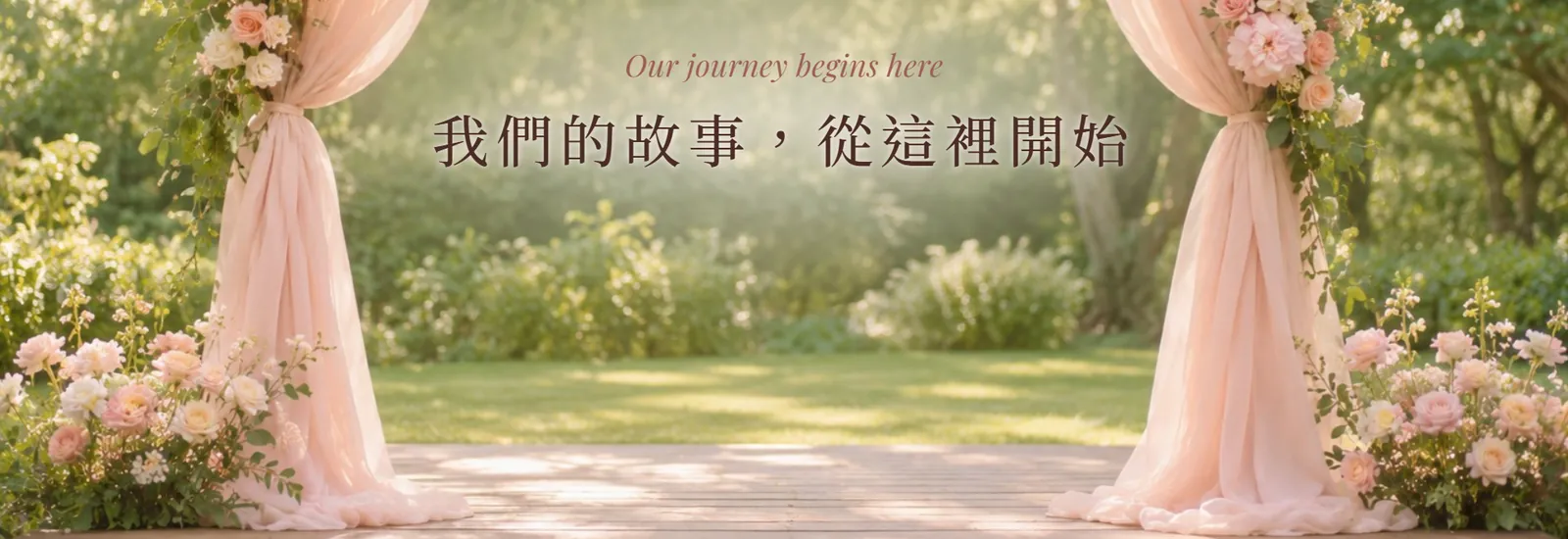
The prompt is written "top to bottom, section by section", and each section says only three things: which photo, what text sits on it, and how it moves. Claude Code built the sections in exactly that order and didn't rearrange them.
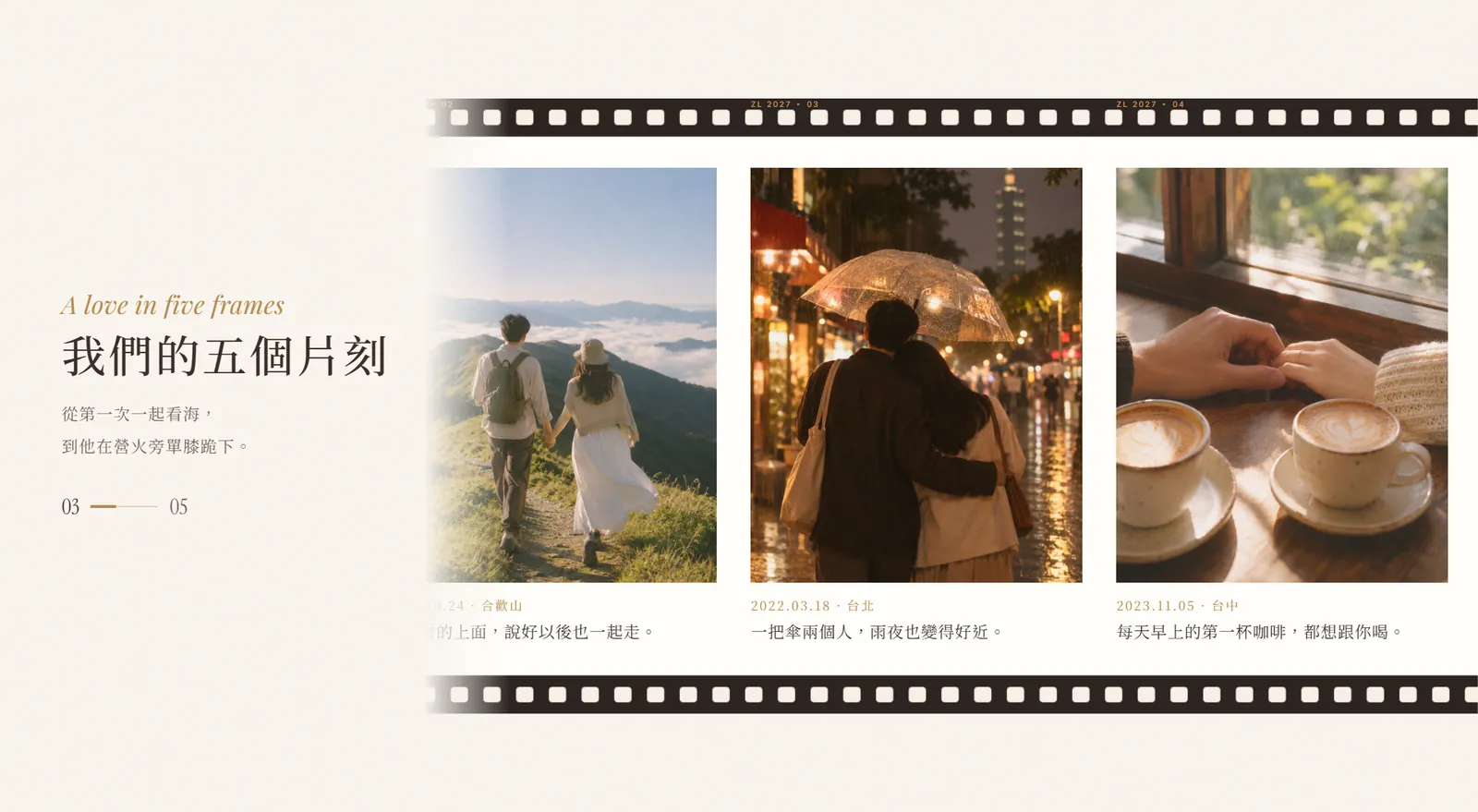
For the story captions the prompt only said "under each photo a date and one short sentence"; Claude Code wrote the words itself, for example "2022.03.18 · 台北 一把傘兩個人,雨夜也變得好近。" (one umbrella for two, and the rainy night felt close). It also added these on its own: a sixth frame at the end of the film, "下一個片刻 有你在" (the next moment, with you), saved for the wedding day; the "Z & L" monogram; the subtitle "誠摯邀請你,見證我們的森林婚禮" (we invite you to our forest wedding); the RSVP deadline "please reply by 1 March 2027"; and the RSVP section's background colour, which it samples from the table in the paper photo.
03Step 1: 9 matching photos from ChatGPT
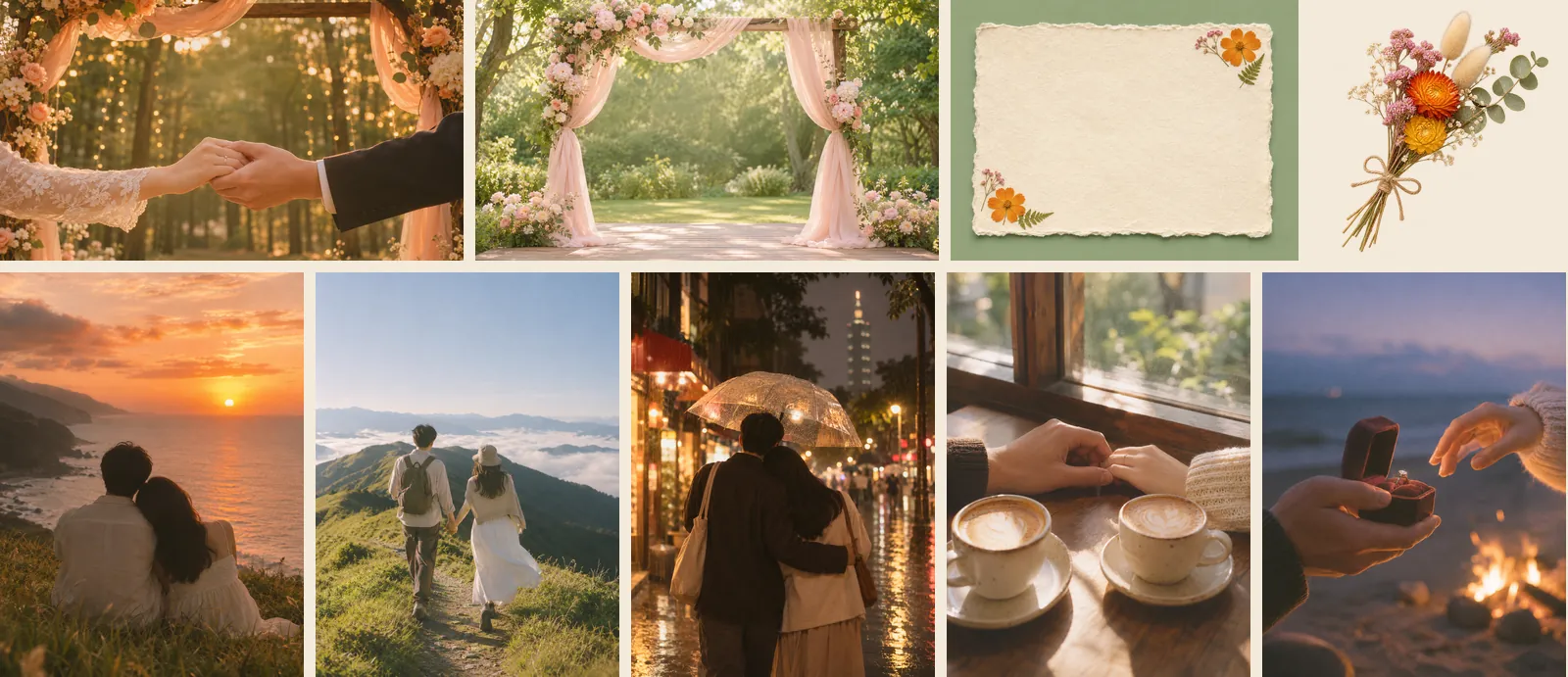
The site needs 9 photos: the opening hero, the flower arch, five story photos story-1 to story-5, the deckled paper rsvp-paper for the RSVP, and the bouquet for the paper's corner. To make them look like one set, every prompt says "same series, same film look".
- Open a new ChatGPT chat and send the opening photo; when you like it, send photo 2 (the arch) in the same chat.
- Start a new chat for the story photos: describe the whole series in the first one, then start every next one with "same series, same film look" and change only the scene.
- Make the paper and bouquet in another chat. The bouquet should be a transparent PNG; a white background is fine too, because the site Claude Code wrote checks for it and blends the white away.
- Save them with the names the site expects: hero, arch, story-1 to story-5, rsvp-paper, bouquet, in the folder's img/.
Create an image. I'm making a wedding invitation website for a fictional [Taiwanese] couple, and I need a matching photo series: warm, romantic, soft film look. Photo 1 (hero): a cinematic close-up of a couple's hands joining in the centre of the frame (the bride's hand with a delicate thin ring and a lace sleeve, the groom's hand in a dark suit sleeve), under a wooden wedding arch in a forest. The arch is wrapped in [peach and blush flowers] and soft draped peach fabric, and hundreds of warm fairy lights hang from the trees behind it. Golden-hour backlight, shallow depth of field, warm amber tones. Only hands and forearms are visible, no faces. Landscape 16:9, with calm space in the upper middle for a title. No text, no logos.

(next message, same chat)
Photo 2, same series: the empty wedding ceremony arch in a lush garden. A tall arch covered in [blush-pink roses and peonies] with flowing pink chiffon curtains tied back at both sides, a light wooden deck in front, green trees and soft sunlight behind. Dreamy, soft, bright. Landscape 16:9, a calm centre for one line of text. No people, no text, no logos.
Create an image. I'm making a wedding invitation website for a fictional [Taiwanese] couple and need a matching series of story photos, warm, romantic, soft film look with a little grain. Photo 1, portrait 3:4: [the couple seen from behind, sitting close together on a grassy cliff above the sea at sunset on Taiwan's east coast, warm orange sky]. No faces visible. No text.

(same chat, one photo per message)
Lovely. Create the next image in the same series and the same film look: Photo [4], portrait 3:4: [a close-up of two coffee cups on a wooden cafe table by a window in the morning, the couple's hands touching between the cups]. Only hands. Cosy, soft film look. No text, no logos.

The other photos use the same pattern with a different scene in [ ]. Ours were:
[Photo 2: the couple seen from behind, holding hands on a mountain trail along a ridge of green alpine grass, a sea of clouds below, clear morning light]
[Photo 3: the couple seen from behind sharing one umbrella on a rainy city street at night in Taipei, blurred warm shop lights (no readable signs or text), reflections on the wet street, cinematic]
[Photo 5, the proposal: a close-up of a man's hand holding an open small velvet ring box with a simple ring, the woman's hand reaching towards it, on a beach at blue hour with the warm glow of a small campfire]
Create an image. A blank sheet of thick handmade cotton paper with rough deckled (torn, feathered) edges, warm off-white with visible fibres. A few small pressed flowers ([dried orange cosmos, a tiny sprig of pink wildflowers, a small fern leaf]) are placed at the top-right corner and the bottom-left corner; the middle of the sheet is completely empty (it will hold a form). Shot straight from above, evenly lit, a soft natural shadow under the paper, lying on a flat plain [sage-green] background. Landscape 4:3, the paper filling about 70% of the frame. No text, no writing.

(a new chat is fine)
A small hand-tied bouquet of dried and pressed flowers ([orange and yellow strawflowers, pink statice, bunny-tail grass, a eucalyptus sprig]) lying diagonally, seen from above, on a transparent background (PNG). If transparency isn't possible, a pure white background. Square. No text.
04Step 2: one prompt for Claude Code
- Make an empty folder and put the 9 photos in its img/.
- Open Claude Code in that folder.
- Paste the prompt below, replace the [ ] parts with your names, date, venue and story, and press Enter.
- When it has written index.html, style.css and main.js, run npx serve (or any local server) in the folder, open the address it prints, scroll from top to bottom and fill in the form once.
Build me a wedding invitation website to replace the printed invitation: we just send guests the link.
Couple: [Ziqing & Li'en]. Wedding: [Saturday 17 April 2027, 3:30 pm], [an outdoor forest wedding at "Olive Manor" in Xinshe, Taichung].
All photos are in img/: hero ([the two of us holding hands under a flower arch]), arch ([a blush-pink fabric arch]), story-1 to story-5 (five photos of our story: [sunset by the sea, a mountain trail, a rainy night in Taipei, a cafe, the proposal]), rsvp-paper (handmade deckled paper with pressed flowers), bouquet (a small bunch of dried flowers).

Top to bottom, section by section:
1. Opening: hero full screen. A small line of English script slowly appears on the photo, "We're getting married", then the two names "[Ziqing & Li'en]", large, in an elegant serif; date and place in the bottom-right corner, plus a small "RSVP" button.
2. Scroll down and the screen changes to the pink arch photo, with one line in the middle: "Our story starts here" (plus a line of English script: Our journey begins here).
3. Story: like a roll of film with sprocket holes top and bottom, a title on the left "Our five moments" (English: A love in five frames), the five photos in one row that slides sideways as you scroll; under each photo a date and one short sentence.
4. RSVP (the part I want most): title "Will you come to our wedding?" (English: Will you be our guest?), the whole form sits on the deckled rsvp-paper, with the bouquet in a corner of the paper. Fields: name, email, attending (two pill buttons: "I'll be there" / "Celebrating from afar"), number of guests, meat or vegetarian, a note for us, and a "Send RSVP" button at the bottom. The form must really work and really send.
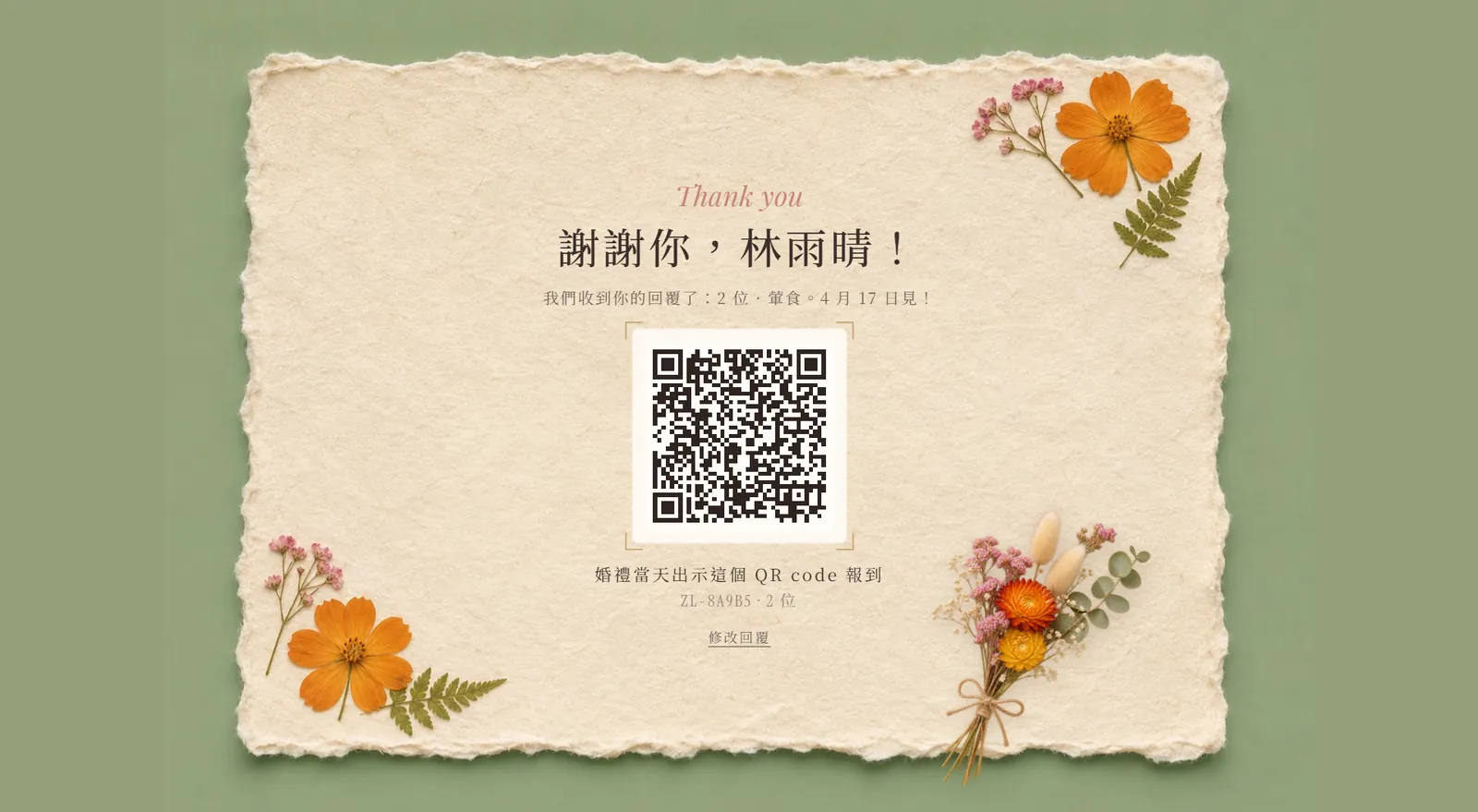
5. After sending: the paper card changes to "Thank you, ___!" and shows a QR code (made from the name and head count, for check-in on the day), with one line under it: "Show this QR code to check in on the day".
6. Venue and schedule: on the left a simple hand-drawn venue map ([entrance, car park, ceremony lawn, dinner tent, photo spot]), on the right the day's timeline ([14:30 arrival, 15:30 ceremony, 16:30 afternoon tea and photos, 18:00 dinner, 21:00 farewell]), plus the address and how to get there.
7. Countdown: a full screen of bright [lime green], "Wedding countdown" (English: The big day is almost here), huge numbers for days / hours / minutes / seconds that really count down.
8. Ending: one line "[Ziqing & Li'en]", one line "[2027.04.17 · Xinshe, Taichung]".

Style: romantic, light, airy, like an expensive printed invitation: [off-white, blush pink, cream, a touch of gold], with [lime green] for the countdown. Headings in an elegant serif, English in a thin italic or script face.
Motion: photos and text fade in, scale and shift as you scroll; the row of story photos slides sideways with the scroll.
Mainly Traditional Chinese (Taiwan) with some English.
Claude Code wrote the whole site from this: no framework, every scroll effect calculated in its own JavaScript; the QR code comes from a small library called qrcode-generator, loaded from jsDelivr; it cut the Chinese fonts down to the characters on the page. The map is an SVG it drew itself, with no map service.
05My favourite part: the RSVP and the check-in QR code
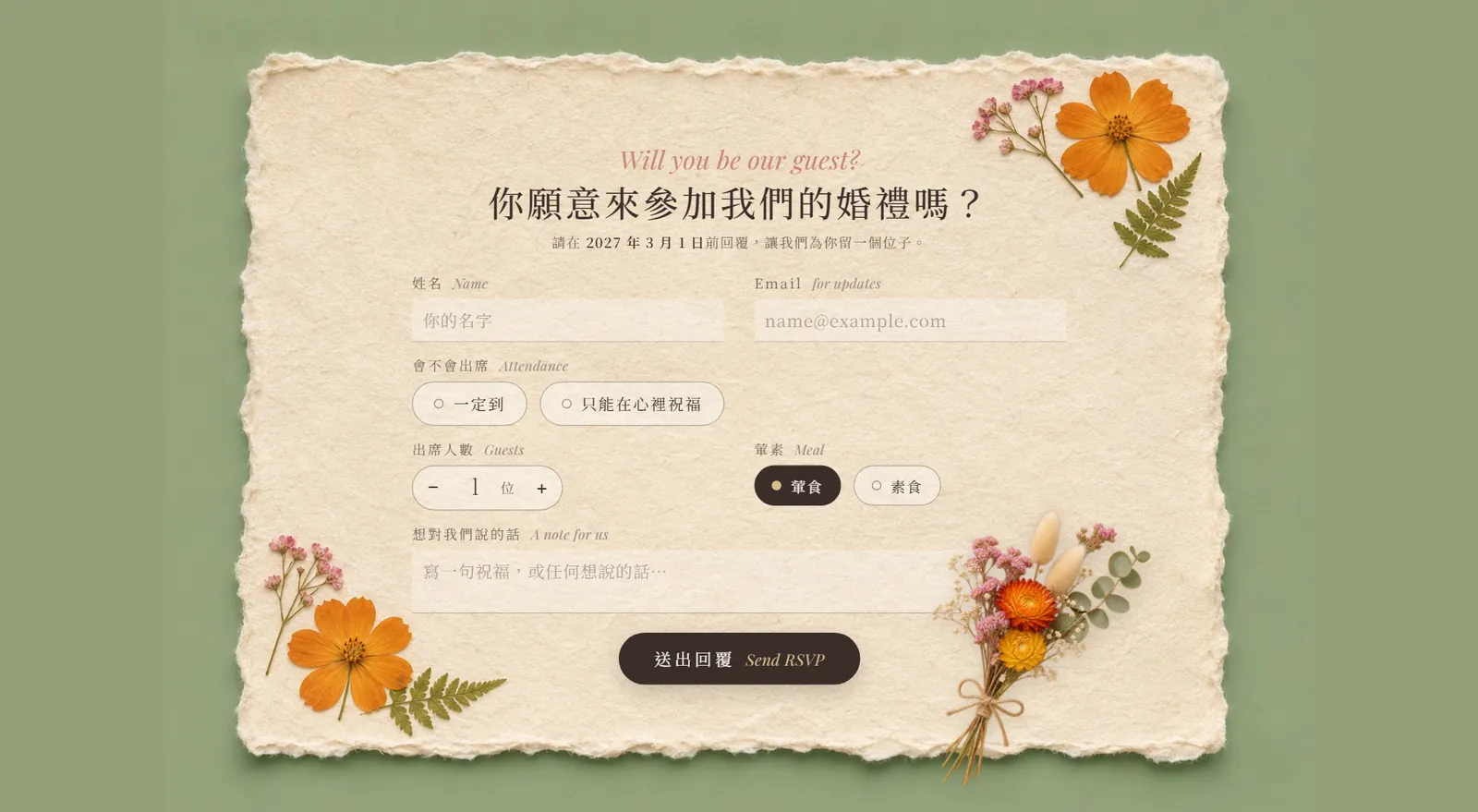
- Name, email and attendance are required: if one is missing or the email looks wrong, a red message appears under it and the field shakes.
- Only "一定到" (I'll be there) counts guests and meals; the − and + buttons set 1 to 6 guests. "只能在心裡祝福" (celebrating from afar) shows a different thank-you line and no QR code.
- Press "送出回覆" (Send RSVP): the form fades up and away, the card becomes "謝謝你,___!" with the head count and meal you chose, and the QR code grows in square by square from the top-left.
- The QR code holds plain text: the couple's names, the wedding date, the guest's name, head count, meal and a check-in code (for example ZL-8A9B5). Any phone camera can read it.
- A "修改回覆" (edit reply) link takes the guest back to the form.
06Where do the replies go? The honest answer
We read the main.js Claude Code wrote: when a guest presses send, the reply is saved only in that guest's own browser (localStorage). The couple receives nothing, and there is no page anywhere that shows who replied. So if you send the link out as it is, guests get their QR code, but you have no guest list, and scanning the QR code on the day has nothing to check against.
The code does keep an empty RSVP_ENDPOINT: put a URL in it and each reply is also sent there. But the format it sends (JSON as plain text, in no-cors mode, so it can't tell whether it arrived) may not be what your service expects. The safe way is to ask Claude Code to connect it following that service's docs, then send a test reply yourself.
- Formspree: sign up and create a form, and it gives you a form endpoint. The site sends each reply there; every reply is emailed to you and listed in its dashboard. The free plan has a monthly submission limit, so check its plans if you have many guests.
- Tally: build the RSVP form in Tally and embed it in the site. The simplest option, with every reply in Tally's dashboard; but the form will look like Tally, so the paper-card design and the QR code need separate work.
- Your own backend: if you or a friend can code, ask Claude Code to add a small API and database, so the replies live somewhere you own, plus a guest-list page only the couple can open.
Right now the RSVPs are only saved in each guest's own browser (localStorage), so I never receive them. Please connect the form to [Formspree]:
- My form endpoint is [https://formspree.io/f/your-form-id].
- When a guest presses "Send RSVP", send the name, email, attending, head count, meal, note and check-in code to that endpoint, in the format the [Formspree] docs ask for (no no-cors mode: I need to know whether it was sent).
- Only show the "Thank you" card and QR code after it was sent; if it fails, show "It didn't go through, please try again" above the button and keep what they typed.
- Don't change any other design or motion. When you're done, tell me how to test one reply myself.
07Venue, schedule and countdown
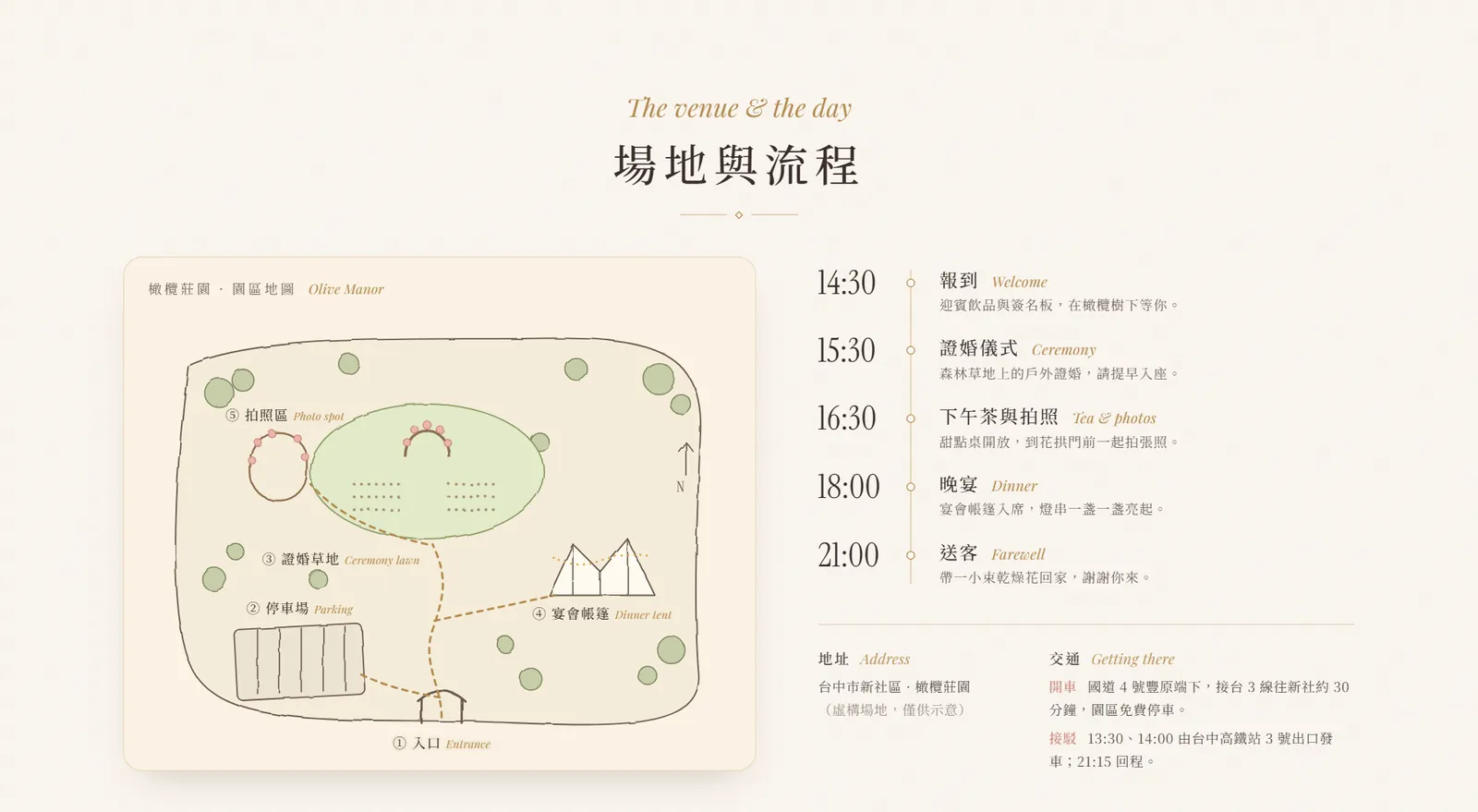
The prompt gave only the 5 places on the map and the 5 times. The line under each time, the address and the directions (the driving route and the shuttle times from the high-speed rail station) are demo content Claude Code wrote itself. The venue is fictional, and the page says so: "虛構場地,僅供示意" (fictional venue, for illustration only).
08Make it yours
- Photos: make them with the Step 1 prompts, or use your own with the same file names (hero and arch landscape 16:9, story photos portrait 3:4). Swapping photos needs no code change.
- Names, date, venue: the easiest way is to paste the message below in the same Claude Code chat; it changes the opening, ending, countdown and the text inside the QR code together.
- Replies: connect Formspree, Tally or your own backend as in the section above, and test one before you share the link.
- Put it online: drag the whole folder into Netlify Drop, or put it on a free host like GitHub Pages, and you get an address to send to guests.
Don't change anything else, only this:
- Change the couple's names to [___ & ___] in the opening, the ending, the page title and inside the QR code.
- Change the wedding date and time to [___ 2027, __:__], and the countdown with it.
- Change the venue to [___], the address to [___], and the directions to [driving / shuttle details].
- Change the RSVP deadline to [date].
- Change the date and sentence under the five story photos to: [1. date · place · one line … 5. …].
09Good to know
- Ziqing & Li'en, their story, Olive Manor, the address and the directions are fictional demo content; the RSVP deadline, the story lines and the schedule notes were written by Claude Code.
- All photos were generated in ChatGPT. The people in them are AI-generated, not real, and no faces are shown.
- As built, the site saves replies only in each guest's own browser, so the couple never receives them. To actually collect replies, connect Formspree, Tally or your own backend, and test one first.
- Guests' names and emails are personal data: use them only for wedding updates, delete them afterwards, and never publish the list.
- The QR library loads from the jsDelivr CDN, so without a connection no QR code appears. Double-clicking index.html sometimes fails to load the fonts or photos; open it through a local server instead.
- The demo's Chinese fonts contain only the characters on the page, so a name typed into the form may show in a system font. If you download the demo and change the text, switch back to the full fonts.
- Every run is different. With the same prompt your layout details, copy and motion may differ; if something isn't pretty enough, add one more message in the same chat.
- The Claude Code screen in the video is a shortened, re-typeset excerpt of our real prompt, not a terminal recording; the full prompt is the one above.
- Another guide: why does your Claude-made wedding invitation look AI-made? — A 1080×1350 invitation image: one prompt, 5 settings, before and after
- Another guide: "Claude can't build this"? A cinematic bakery website in 3 steps — Also ChatGPT photos + a site written by Claude Code