One photo, and Claude builds a working 3D machine: the free Teardown skill takes apart an engine and Taipei 101's damper
Teardown, a free Claude Code skill, turns one sentence and one real photo into a 3D machine simulator you can spin and cut open. We ran it on 5 machines.
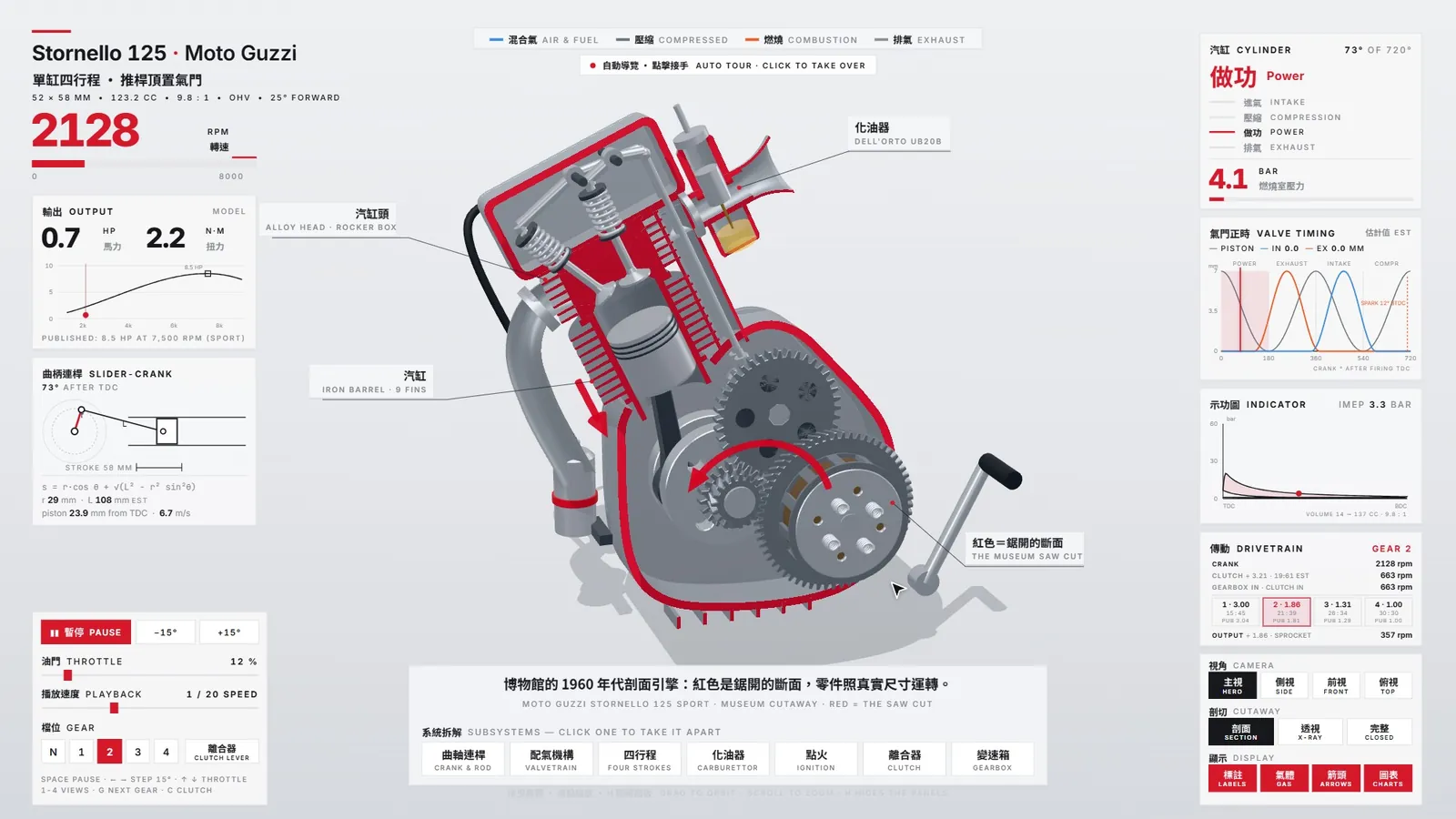
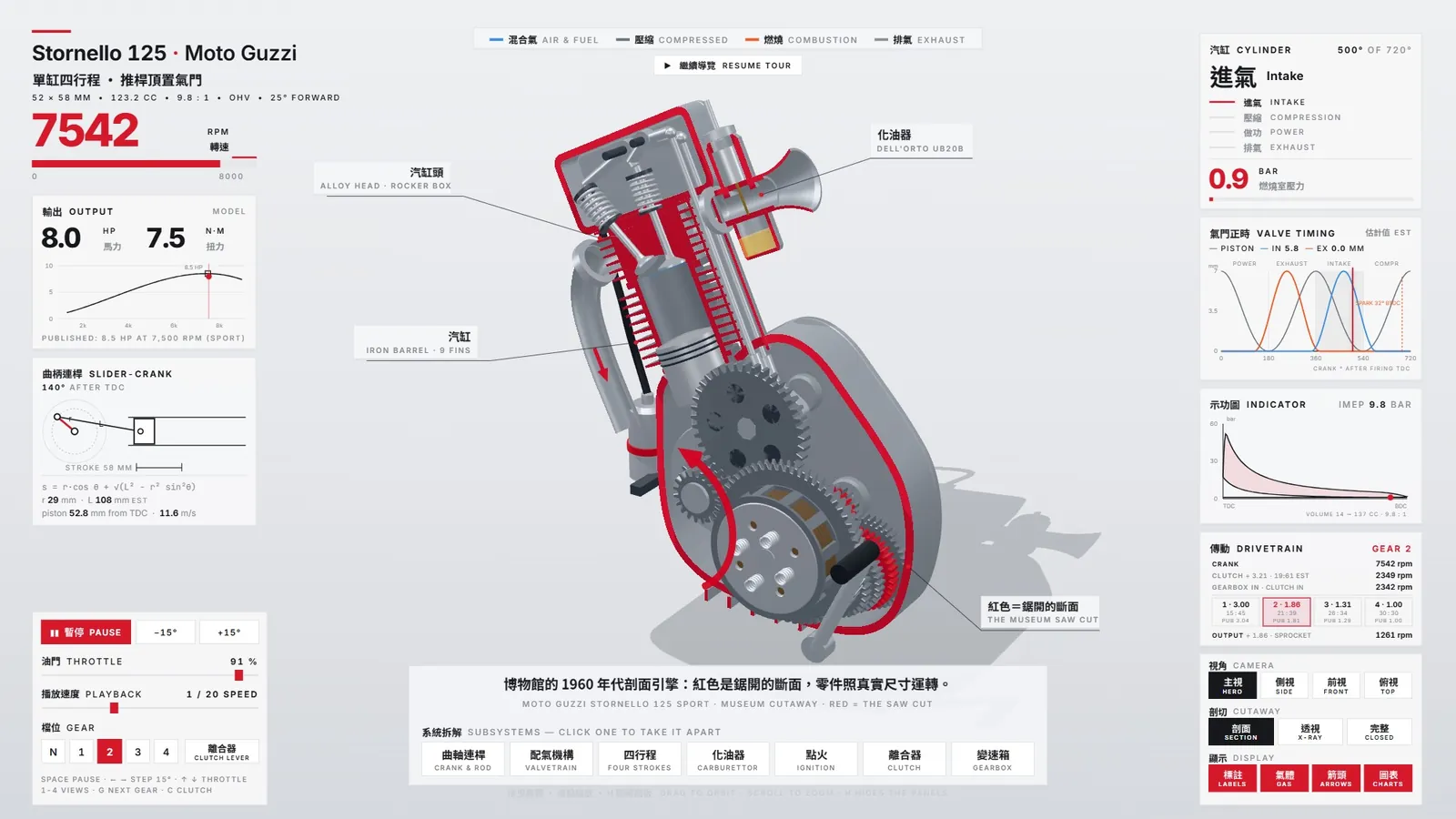
This is not a video. It is a web page: a 125cc motorcycle engine runs in the middle, and when you pull the throttle the revs climb past 7,500 rpm while the horsepower, torque and cylinder pressure around it move with them. It was built by Teardown, a free, open-source Claude Code skill, from one sentence and one photo.
This time we really installed Teardown and ran it on 5 machines: a motorcycle engine, two sewing machines (one with a photo, one without), a bicycle rear derailleur and Taipei 101's tuned mass damper. Every image below is a real screenshot of those 5 pages, and we changed nothing in them. You get the install command, a prompt you can copy, and the one trick that matters most: why you should always attach a real photo.
01The result first: a 125cc engine that fires
From the photo, Claude identified the engine as a museum cutaway of a Moto Guzzi Stornello 125, and the page names it. The bore × stroke of 52 × 58 mm (123.2 cc), 8.5 hp at 7,500 rpm and the four-speed gear ratios were all looked up online by Claude itself. What it could not find, such as valve timing and rod length, is marked “EST” (estimate) on the page.
- Centre: the engine runs at real dimensions, with crank, piston, valves and gears all moving together.
- Left: rpm, the power and torque curve, the crank and rod position, plus throttle, playback speed, gear and clutch.
- Right: which stroke the cylinder is on, a valve timing chart, an indicator diagram (cylinder pressure) and the speed in every gear.
- Bottom: 7 subsystem buttons (crank and rod, valvetrain, four strokes, carburettor, ignition, clutch, gearbox). Press one to take that part apart.
- Leave it alone and it tours itself; click anywhere and you take over.
02Install Teardown (about 5 minutes)
Teardown is a Claude Code skill by GitHub user elvarofficial, MIT licensed and free. It turns a machine into one offline HTML page: the machine runs in the middle, the panels around it read real numbers, and every subsystem has a button that opens it up.
- Make sure you have Node.js 20 or newer and Claude Code (terminal or desktop app).
- Open a terminal and paste the install command from the README: npx skills add elvarofficial/teardown -g -a claude-code
- The first time, run this once in the installed skill folder: npm install && npx playwright install chromium
- Open Claude Code and type /teardown followed by the machine you want.
-g means “install for every project on this computer”. Our install was run by a Claude Code agent, which dropped the -g and installed it into one project folder only, so the skill sits in that folder's .claude/skills/teardown. If you just want to try it, that keeps things tidy.
- Teardown (GitHub) — MIT licence, free and open source
- skills CLI: teardown — The installer the README uses
03Step 1: find one real photo
Rule 1 in Teardown's SKILL.md is to start from a reference, not from imagination. Machines invented from a sentence come out generic every time; give it something to match and it rebuilds the real thing closely. A photo, a cutaway drawing from a manual or a clip of the real machine all count.
- Get the whole machine in the frame. A three-quarter front view works best, because it shows where the parts sit.
- A cutaway drawing or a museum cutaway is best, because it shows the inside too. Our engine came from a photo of a museum cutaway.
- Your own photo is the safest. If you use one from the web, pick a CC-licensed image and credit the author.
- One is enough. Each of our 4 machines got a single photo.
- Engine photo: Moto Guzzi Stornello Sport 125 engine cutaway — CheminduCret, CC0, Wikimedia Commons
- Sewing machine photo: Gritzner Sewing Machine "R" — David Krotz, CC BY-SA 4.0, Wikimedia Commons
- Derailleur photo: Rear Derailleur Neos — AKK, CC BY-SA 4.0, Wikimedia Commons
- Damper photo: Tuned Mass Damper atop Taipei 101 — travelwayoflife, CC BY-SA 2.0, Wikimedia Commons
- No photo? Real numbers work too (our earlier guide) — The same rule, with a spec sheet instead of a photo
04Step 2: one sentence plus the photo, into Claude Code
- Open Claude Code in an empty folder.
- Drag the photo into the Claude Code window (or paste it) so it is attached to your message.
- Type the sentence below, swap the [ ] part for your machine, and press Enter.
- Wait. It reads SKILL.md, looks up the real dimensions, builds the machine, then takes screenshots in a headless browser to check its own work.
- The finished page is in the teardown-out/dist/ folder: one offline HTML file you open in a browser.
/teardown Build a simulator of a [125cc single-cylinder four-stroke motorcycle engine], based on this photo.
All 4 of our photo machines used this sentence with only the machine changed: [sewing machine], [bicycle rear derailleur], [Taipei 101 damper]. Each one takes a while: the engine about 50 minutes, the sewing machine about 70, the derailleur about 55, and Taipei 101's damper the longest at about 2 hours 15 minutes.
05The comparison: without a photo, you get a toy
How much does the photo matter? We ran the sewing machine again with the same sentence, but no photo, and asked it not to look up images or specs online:
/teardown Build a simulator of a sewing machine.
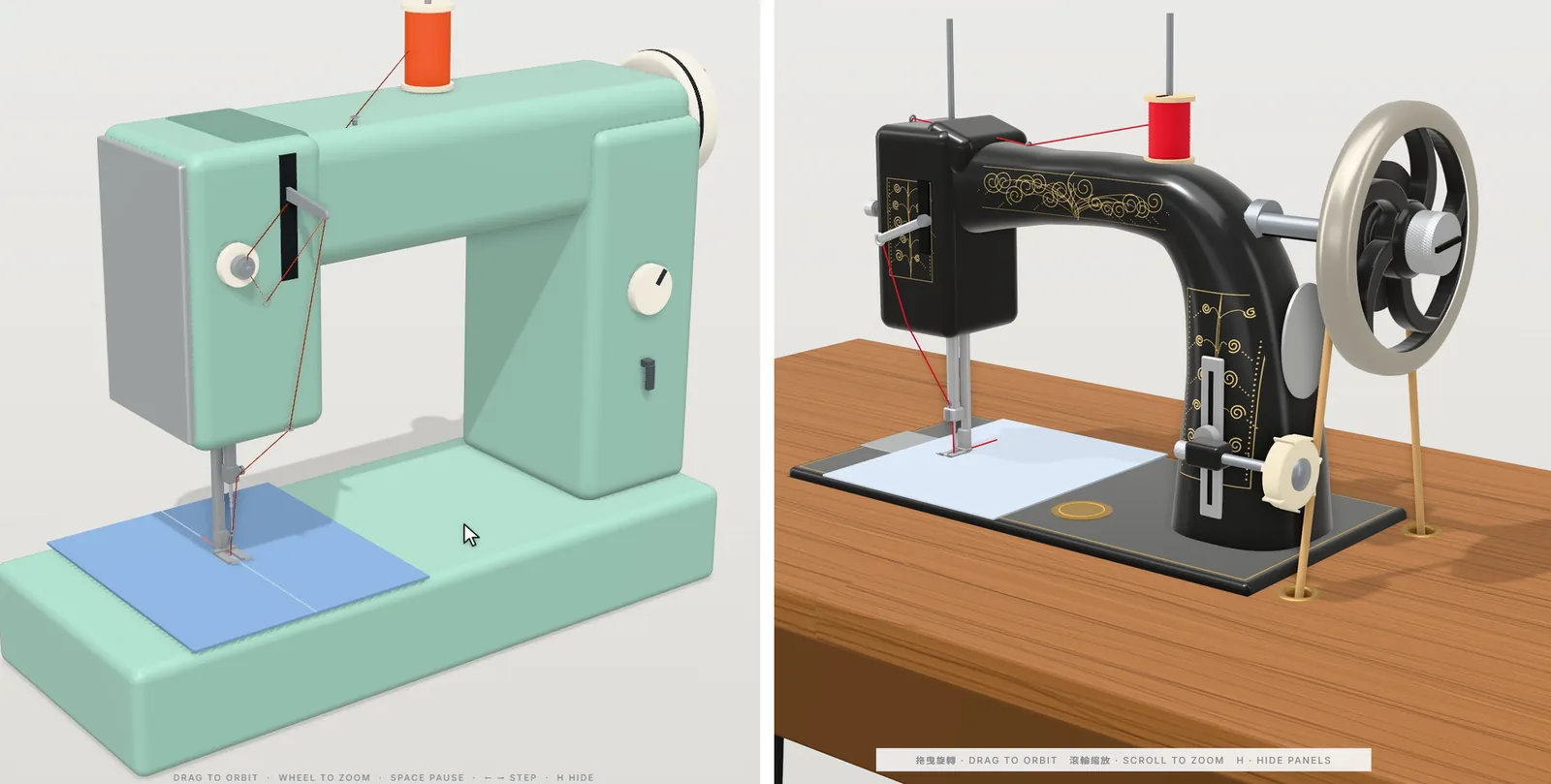
The no-photo machine isn't broken. It still sews: the needle goes up and down, the hook catches the thread, the cloth feeds, and there are timing charts beside it. But it is an average: a sewing machine you have never seen and can't name, with proportions and shapes that are all guesses.
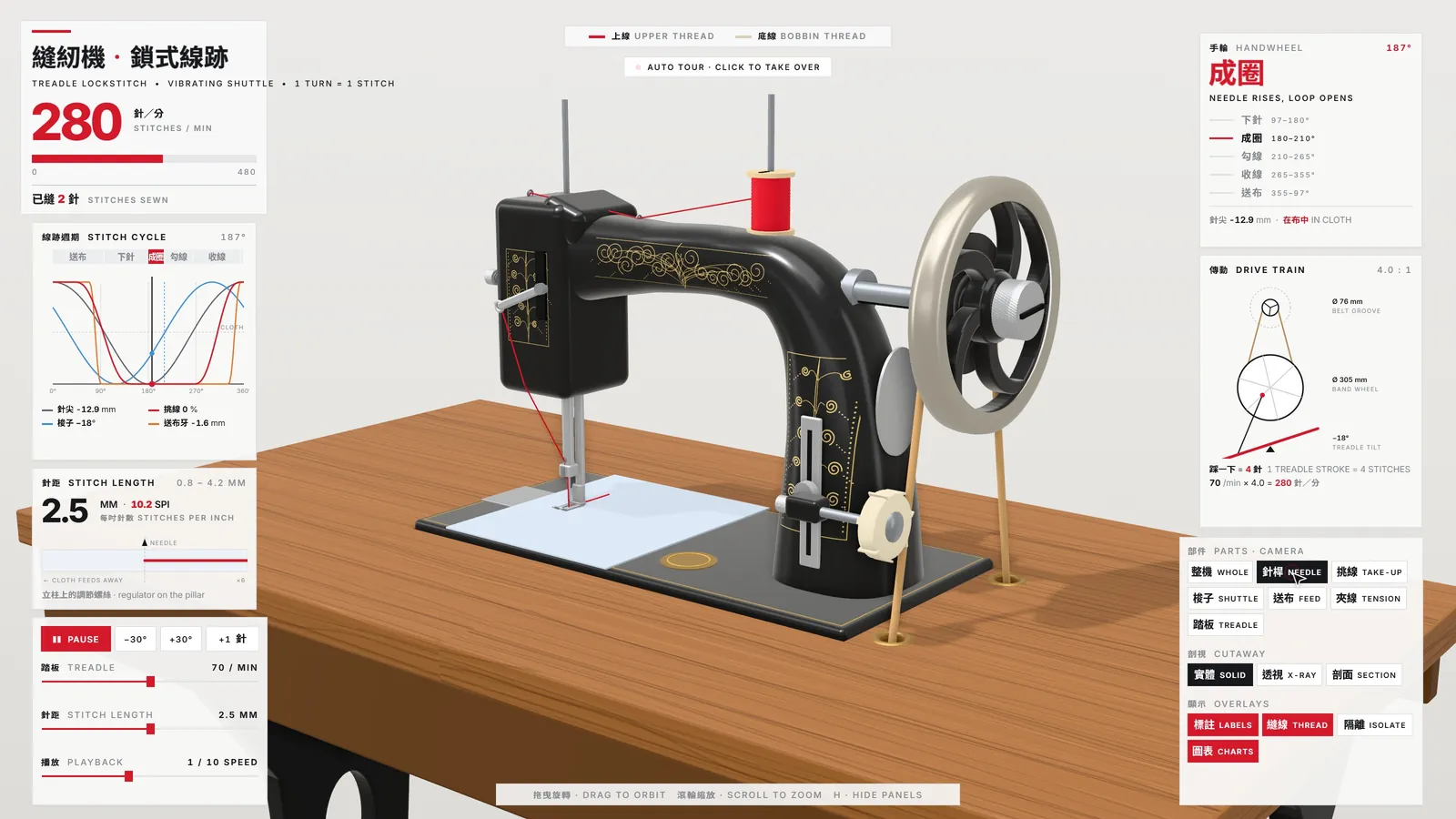
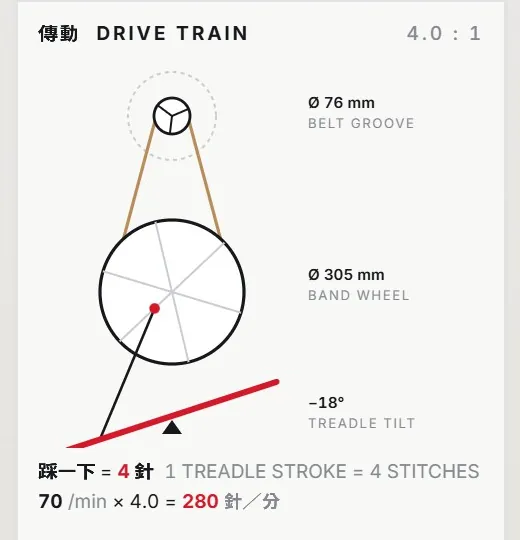
For the photo version, the page calls it a treadle lockstitch machine with a vibrating shuttle. Claude then found real numbers for this kind of machine: a 305 mm band wheel below and a 76 mm belt groove on the handwheel, so the drive ratio is 4.0 : 1.
06Step 3: cut it open, x-ray it, check one number yourself
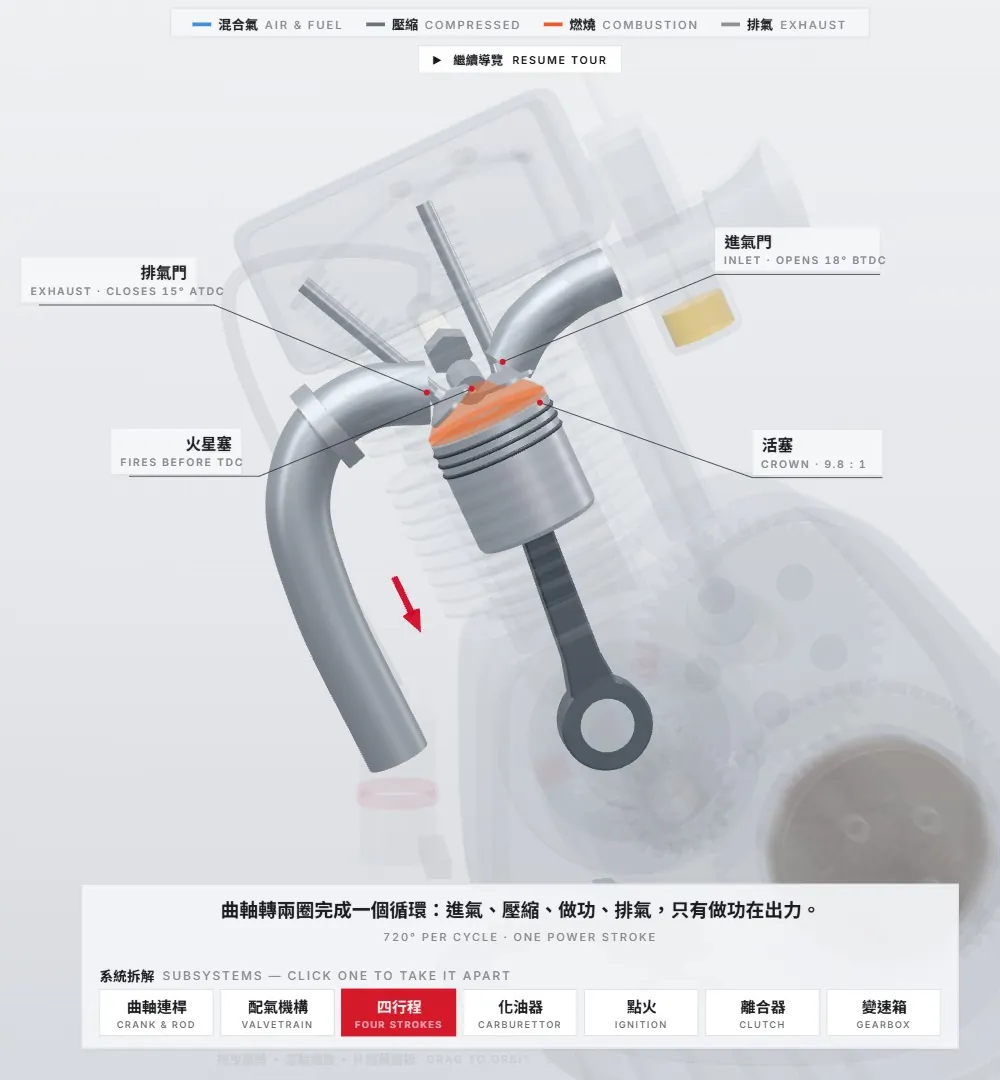
The page isn't just for looking; you can take it apart. Back to the engine: press “four strokes” at the bottom and switch the cutaway on the right to “x-ray”. The casing turns see-through, leaving the piston, rod, valves and spark plug. Set playback to 1/60 and you can watch the burning charge (orange) push the piston down.
- Drag to orbit, scroll to zoom, press H to hide every panel.
- Views: four cameras, hero, side, front and top.
- Cutaway: section (cut open), x-ray (see-through) and closed (casing on).
- Space pauses, and the left and right arrow keys step 15° at a time so you can go frame by frame.
SKILL.md also says to check at least one number by hand. We checked the engine's displacement: a 5.2 cm bore and 5.8 cm stroke give π ÷ 4 × 5.2² × 5.8 ≈ 123.2 cc, the same as the page.
Some numbers don't quite match, and the page says so itself: for first gear Claude worked out 3.00 from the tooth counts (15:45), and the small print next to it gives the published figure (PUB) as 3.04. A small gap, but it isn't hidden.
07It works on almost anything: a bike derailleur and Taipei 101's damper
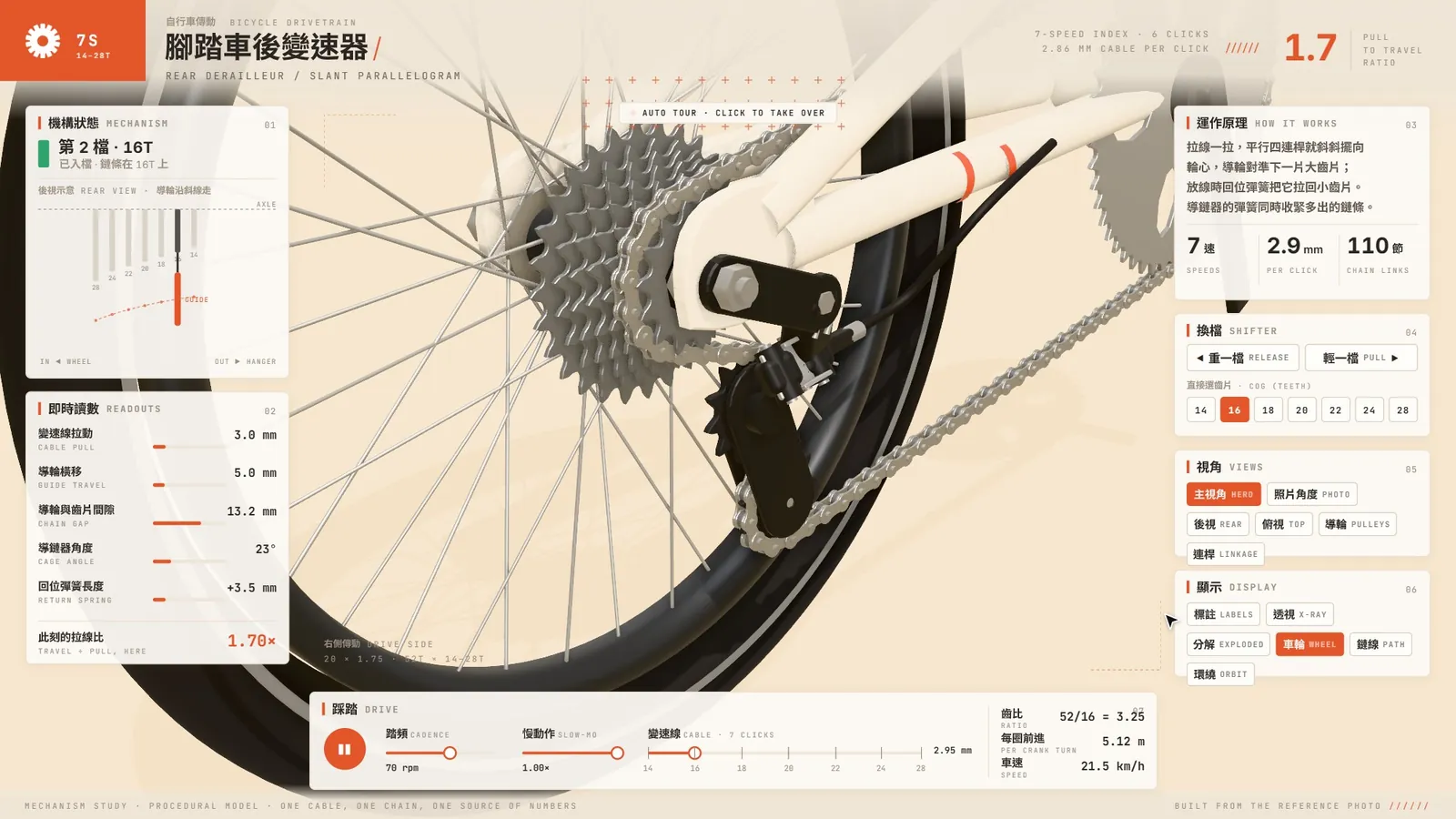
On the derailleur page you click a cog to shift and watch the guide pulley slant across to it. At a 70 rpm cadence on 52/16 it works out 21.5 km/h. There is also a “photo angle” view button on the right that you can use to compare against the original photo.
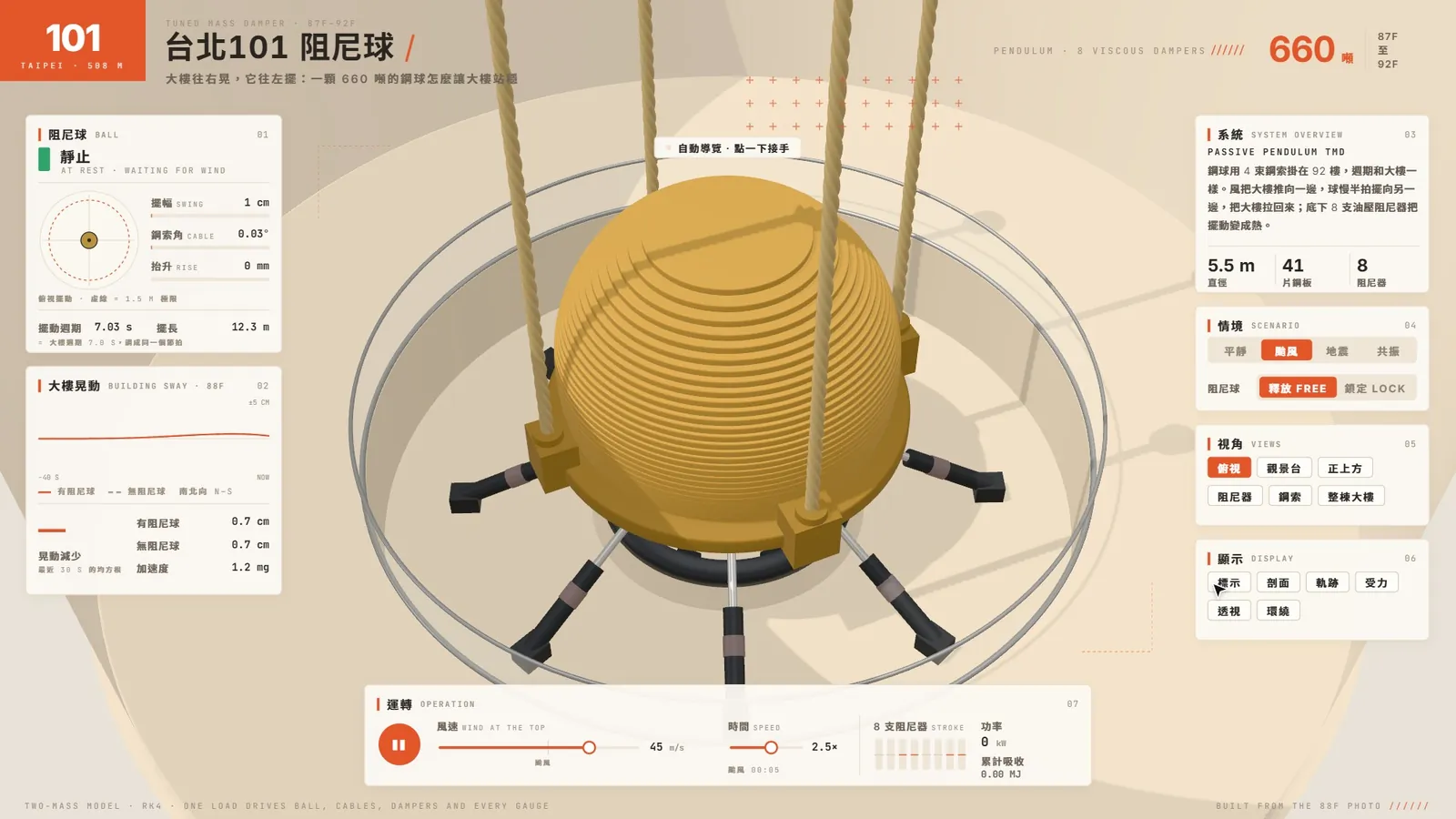
On the damper page you can turn the wind up to typhoon strength and watch the tower sway one way while the ball swings the other, or press “lock” to hold the ball still and compare how far the tower sways with and without it. The page gives the ball a swing period of 7.03 seconds, tuned to the tower's own period of about 7.0 seconds.
/teardown Build a simulator of a [mechanical watch movement], based on this photo.
When you finish, take screenshots and check it yourself, then tell me which numbers you looked up (with sources) and which are estimates.
08Good to know
- All 5 simulators were really built by Claude Code with Teardown, and we changed nothing in the pages. Each one was given to a fresh Claude Code agent that got only the sentence above, the photo and our environment notes (where the skill was installed, which folder to work in, self-test in a headless browser, a local Chinese font it could use, and animation timing that fits our screen recorder).
- For the no-photo sewing machine we also told it not to look up images or specs online. So the comparison is “photo plus research” against “neither”, not just one photo.
- Bore and stroke, horsepower and the damper's weight and size are public figures Claude looked up itself; valve timing, rod length and the sewing machine's needle-bar stroke are estimates. Use them to understand how things work, not as repair data.
- “Moto Guzzi Stornello 125” on the engine page is the model Claude identified from the photo. This is a practice piece, not official, and there is no logo on the model. Teardown is a third-party open-source project, not affiliated with Anthropic, Moto Guzzi or Taipei 101, so read its README before installing.
- The reference photos come from Wikimedia Commons (CC0 and CC BY-SA), with authors credited in the Step 1 links. Every image in this article is a screenshot of a simulator page; the original photos are not included.
- Each machine took 50 minutes to 2 hours 15 minutes and uses a fair amount of your Claude usage. Claude Code needs a paid Claude plan (such as Pro or Max) or an API account.
- These pages are heavy on the graphics card. SKILL.md itself warns that a page running at 60 fps on a desktop card can drop to 15 fps on a laptop's built-in graphics, so older computers will feel slower.
- We made this in November 2026. The same sentence never gives exactly the same shapes and panels twice, and the GitHub README has the current install command.