One portrait, a website that changes outfits: edit only the clothes in ChatGPT, 2 Claude Code prompts (live demo)
Make an illustrated portrait in ChatGPT, change only the clothes for 4 looks, then 2 Claude Code prompts build a site that swaps outfits on hover.
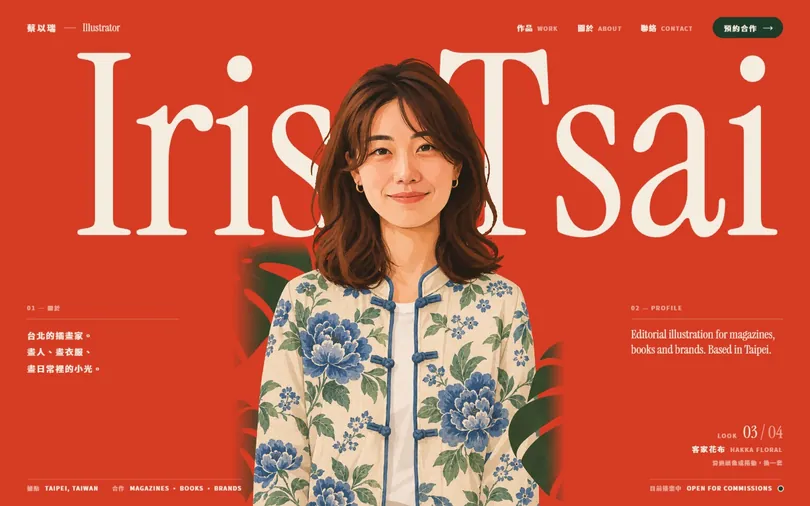
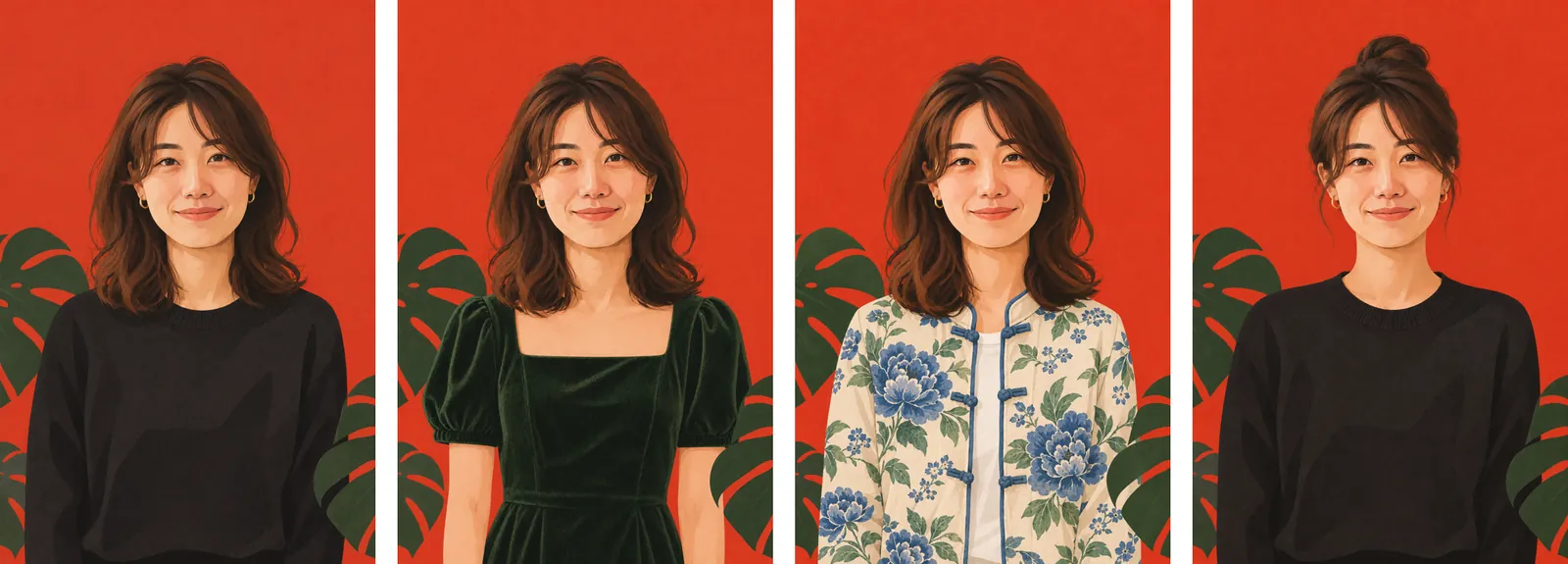
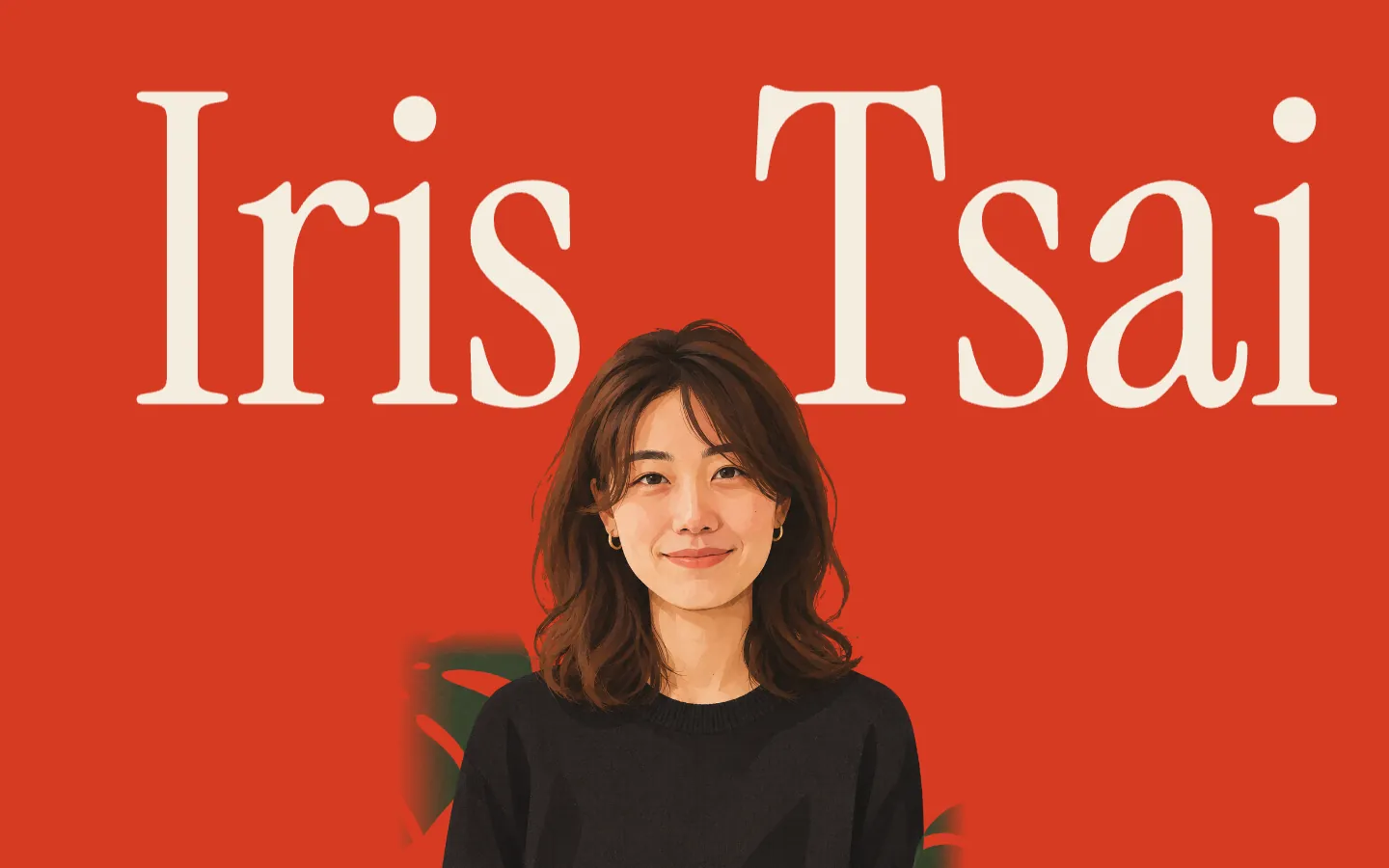
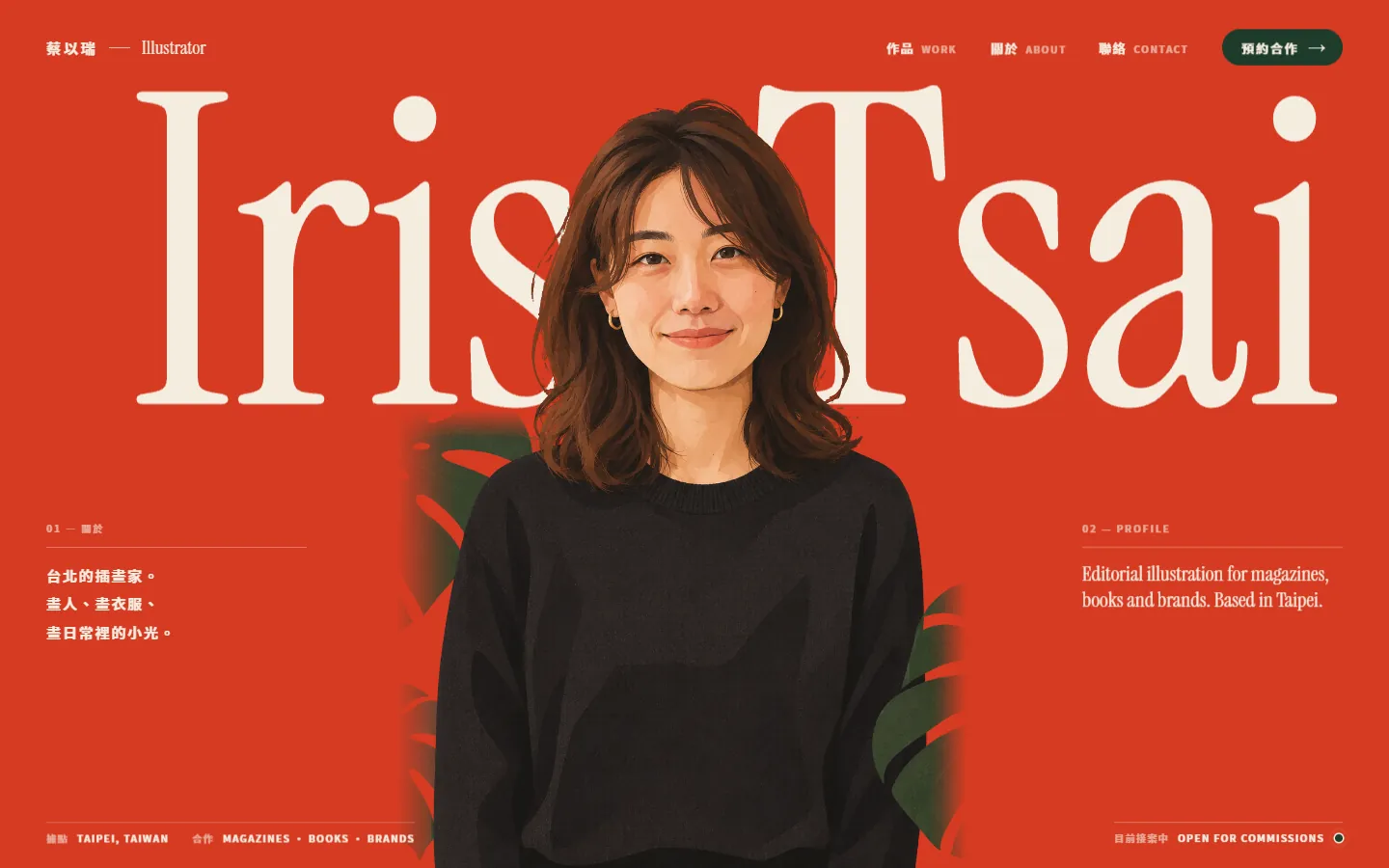
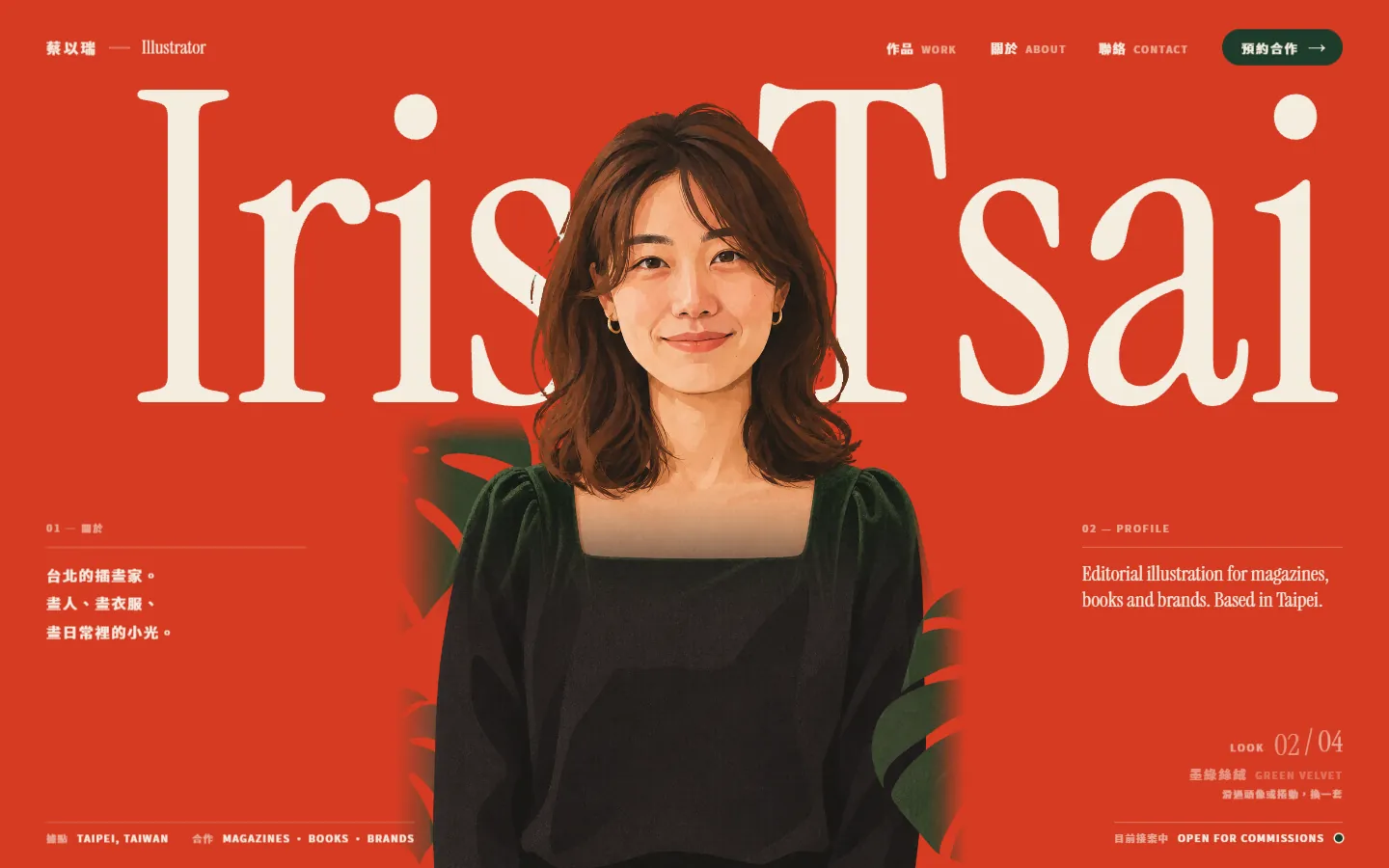
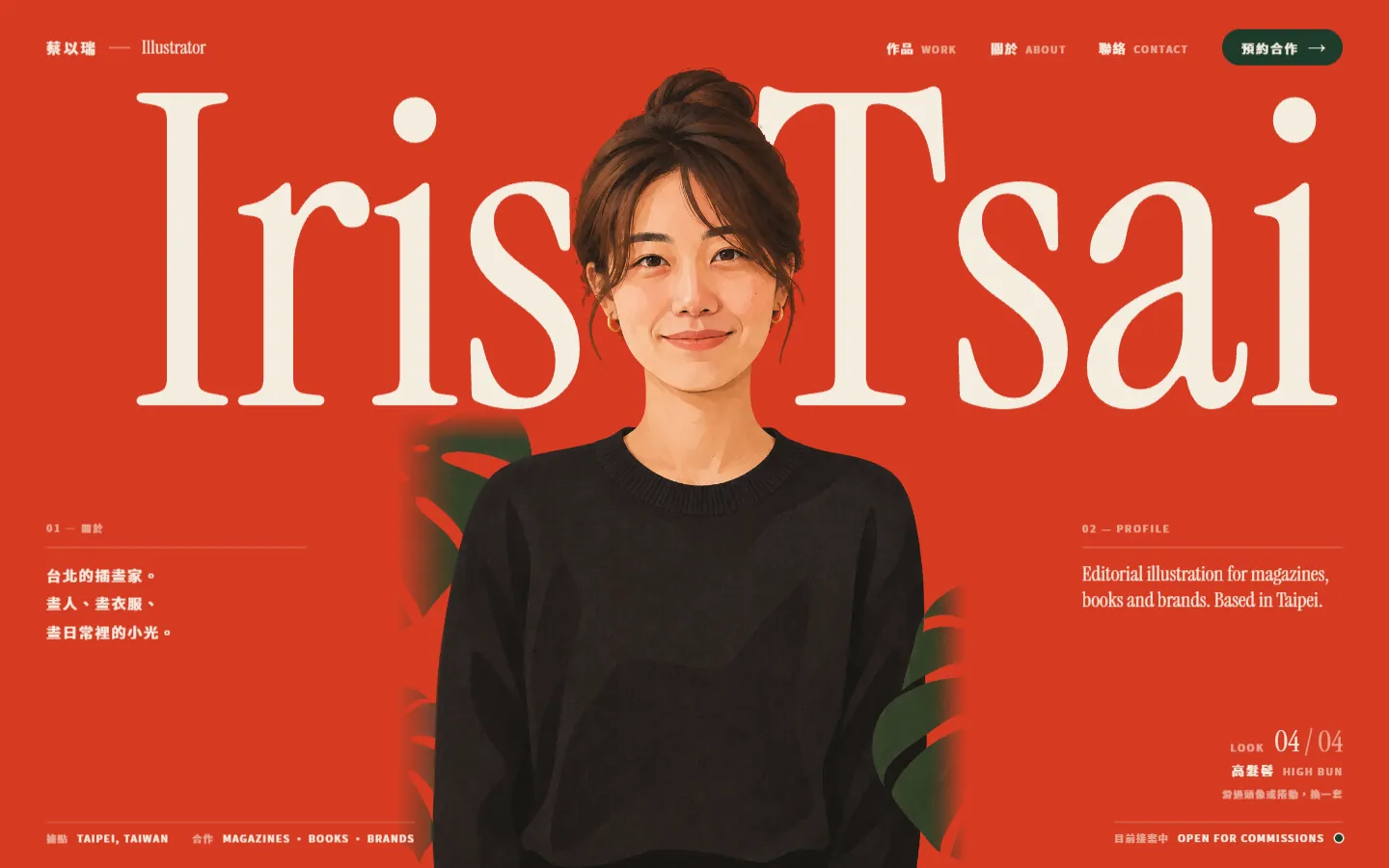
A tomato-red personal website: the huge serif name "Iris Tsai" is split in two by the head of an illustrated portrait, and when your mouse moves onto her, the outfit wipes from top to bottom into the next look: black knit, green velvet, Hakka floral, then her hair put up in a bun. The face, the name and the background never move.
The illustrator, Iris Tsai (蔡以瑞), is fictional. Her photo and all 4 illustrations were made in ChatGPT, and Claude Code wrote the website from 2 prompts; we didn't change a single line of its code. Below are the prompt for every image (replace the [] parts), the "click only the clothes" edit that keeps the face the same, how we cut the looks into 4 layers, the 2 Claude Code prompts, and a live version you can play with.
01The result: hover the portrait and the outfit wipes away
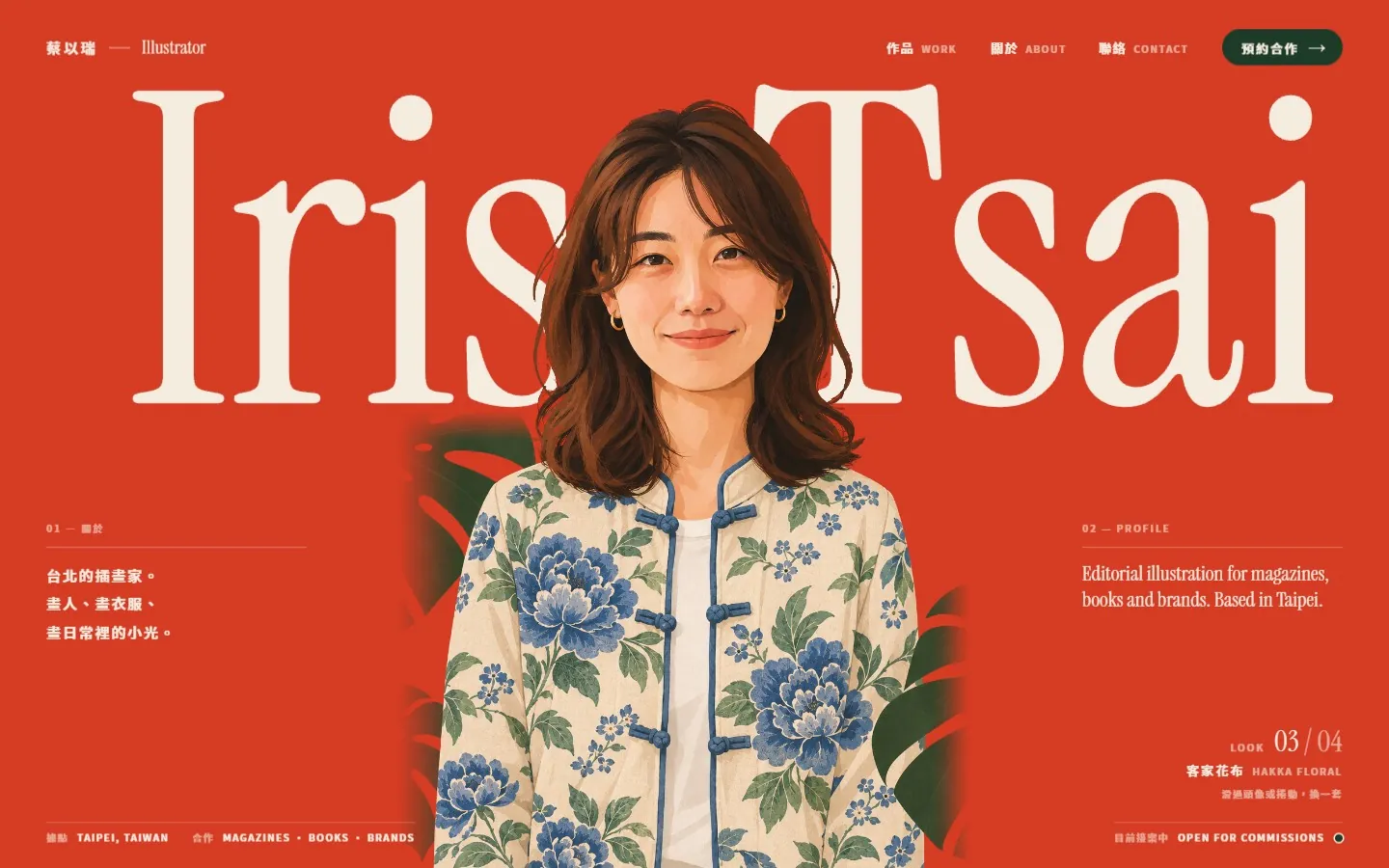
The whole site is static files: index.html, style.css and main.js, plus 4 cut-out PNGs in img/ and two fonts in fonts/. Nothing to install and no database.
- Live demo: Iris Tsai's outfit-swap homepage — Open it on a computer, wait for the intro, then move your mouse onto her or use the mouse wheel
The demo is the site exactly as Claude Code left it after prompt 2. The original Chinese font file was 17 MB, so we cut it down to the characters the page uses (about 0.1 MB); the code and the images are untouched, byte for byte. The 4 illustration PNGs add up to about 10 MB, so on a slow connection it takes a few seconds to start. The page text is in Traditional Chinese and English.
02The whole process: 4 images, cut-outs, 2 prompts
- ChatGPT: make a portrait photo first, as the "identity anchor" (step 1).
- ChatGPT: in the same chat, turn her into a flat illustration with a detailed prompt (step 2).
- ChatGPT's image editor: click the clothes or the hair and change only that part, for 3 more looks (step 3).
- Cut out the 4 images and save them as 4 aligned transparent PNG layers (step 4).
- Claude Code prompt 1: the homepage with the name split around the portrait.
- Claude Code prompt 2: hover or scroll to change outfits.
Step 3 is the one that matters most: apart from the clothes or the hair, every pixel of the 4 images has to be the same, so the site can "wipe" only the clothes layer. If you ask ChatGPT to redraw the whole picture, the face easily turns into someone else.
03Step 1: make a portrait photo in ChatGPT (the identity anchor)
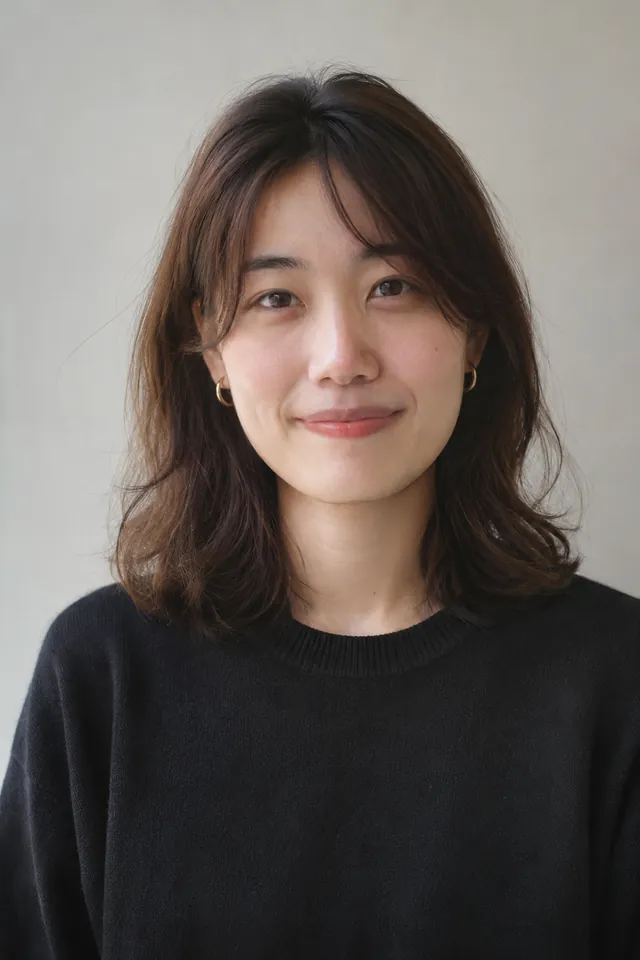
Start with a realistic portrait photo; every illustration after it follows the face in this photo. Ours is a fictional woman; you can also upload your own photo and skip this prompt.
Create an image: a natural portrait photo for a personal website. A fictional [Taiwanese woman, about 28, an illustrator]; [dark brown, shoulder-length, slightly wavy hair worn loose, light make-up, small gold hoop earrings], wearing a [plain black crew-neck knit top]. Chest-up, facing the camera, a slight smile, soft natural window light, plain light-grey wall behind her. Portrait 2:3, real photo look. Not any celebrity, no text, no logo.
04Step 2: turn her into a flat illustration with a detailed prompt
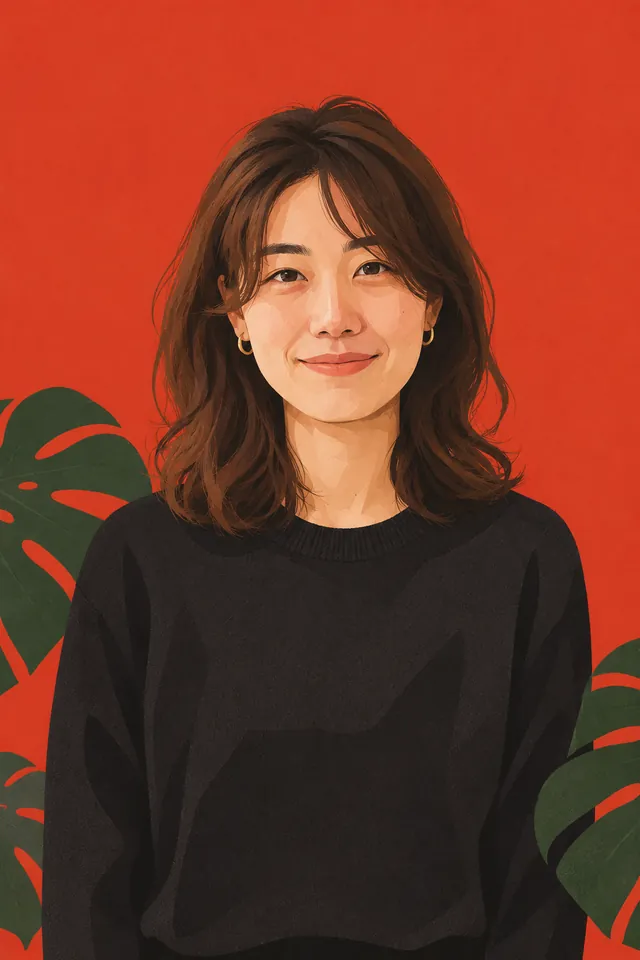
Paste this next, in the same chat. The "identity anchor" sentences at the start tell ChatGPT to draw her face only from the photo above, without beautifying her.
Identity anchor: use only the photo above as the reference for how she looks. Keep her face shape, proportions, eye shape, nose, lips, hairstyle, hair colour and [black knit top]; don't beautify her or change how she looks. Draw her as a flat editorial vector illustration: crisp faceted colour blocks, two to three tones per area, clean edges, a little fine grain, like a modern magazine-cover illustration. Composition: head to waist, centred, facing the viewer, arms relaxed at her sides, some space above her head. Background: one flat, solid [tomato red (#D9472B)], with a few large flat [dark green monstera leaves] in the lower left and lower right corners. Portrait 2:3, no text, no logo.
05Step 3: click only the clothes, and the face won't drift
Don't ask ChatGPT to "change her outfit and redraw it"; a full redraw easily changes the face. Use Comment in ChatGPT's image editor instead, and click only the one spot you want to change.
- Open the base illustration in ChatGPT and click "Edit".
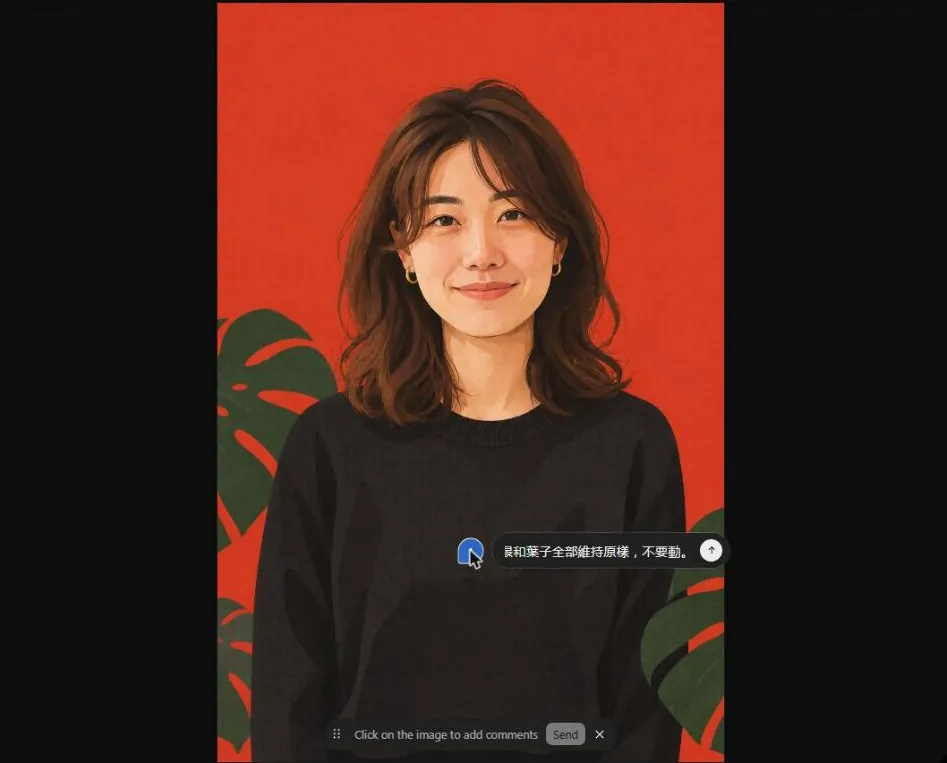
- Choose "Comment" and click once on the clothes: a small pin and a text box appear.
- Type a line like the ones below ("Change only the clothes: … keep everything else exactly as it is") and click Send.
- ChatGPT turns the pin into a message like "Image 1: 1. (x: 49.9%, y: 72.1%) Change only the clothes: …" and draws a new image.
- Go back to the same base image every time and click only one spot: we clicked the clothes twice (velvet dress, floral jacket) and the hair once (bun).
Change only the clothes: make it a [dark green velvet dress with a square neckline and short puff sleeves]. Keep the face, hair, pose, background and leaves exactly as they are; don't touch them.
Change only the clothes: make it a [Hakka floral jacket (off-white with blue-green peonies) over a white top]. Keep the face, hair, pose, background and leaves exactly as they are; don't touch them.
Change only the hair: [put all of it up in a neat high bun, showing her neck and gold earrings, with two small loose strands by her face]. Keep the face, clothes, pose, background and leaves exactly as they are; don't touch them.
06Step 4: cut out each look and save it as a layer
Download the 4 images, remove the tomato-red background and save them as 4 PNGs with transparent backgrounds. ChatGPT has no "download as layers" button, but a solid background is easy to remove: we used a small script that turns the tomato red transparent and also removes the red fringe on the hair edges. You can use any background-removal tool, or ask Claude Code to make the solid background transparent.
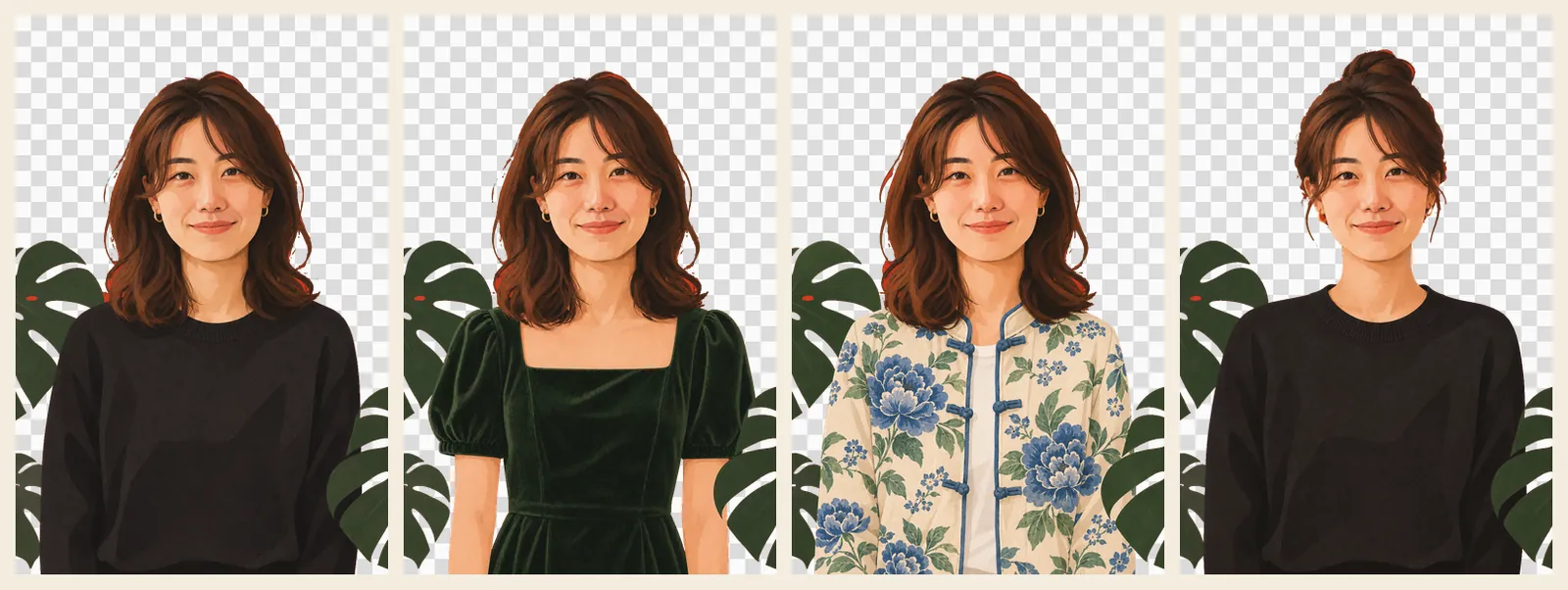
- Don't crop or resize any of them: all 4 must be exactly the same size (ours are 1024×1536), or the swap won't line up.
- Name them look-1.png (the original), look-2.png, look-3.png and look-4.png.
- Make a new folder: images go in img/, fonts in fonts/ (we used Instrument Serif and Noto Sans TC Bold).
07Claude Code prompt 1: the name split around the portrait
- Open Claude Code in that folder.
- Paste prompt 1 below (replace the [] parts), then the technical rules after it, and press Enter.
Build the homepage of a personal website for the illustrator "[Iris Tsai (蔡以瑞)]". One page only; the star is her illustrated portrait.

Asset: img/look-1.png, her illustrated half-length portrait (an already cut-out transparent PNG, [1024×1536]; its original background was [tomato red #D63B23]).

Layout (first screen, 1440×900):
- A full [tomato red] background, the same as the illustration's original background.
- Her name "[Iris Tsai]" in a huge serif, placed BEHIND the portrait: the portrait stands in the centre and her head covers the middle of the name, splitting it into a left and a right half. Use fonts/[InstrumentSerif-Regular.ttf], in [off-white].
- A small wordmark top left; navigation top right: [Work / About / Contact], plus a small pill button "[Book a project]".
- A short self-introduction in small type on each side of the portrait: on the left "[An illustrator in Taipei. I draw people, clothes and the small lights of everyday life.]", on the right "[Editorial illustration for magazines, books and brands. Based in Taipei.]"
- A thin row of small info text along the bottom ([location, type of work, open for commissions ●]).
- The portrait's waist sits on the bottom edge of the screen, as if she is standing in the website.
- Intro animation: the letters of the name float up from below one by one, then the portrait rises from the bottom and settles, and finally the small text fades in.

Overall: bold and clean, like a fashion magazine cover: [tomato red and off-white, with a touch of dark green].
Technical rules: plain HTML/CSS/JS, no build step, no CDN, relative paths only. Use the images and fonts in the folder and do not change the images. Drive every animation with requestAnimationFrame, no CSS transitions or @keyframes. Design for 1440×900, and it should not break at other sizes. When you're done, open it with a local server and take a few screenshots to check: is the name split in two by her head, and does her waist sit on the bottom edge?
Claude Code wrote index.html, style.css and main.js. The name is ordinary text and the portrait is drawn on a canvas in front of it. In the intro the letters rise one by one between 0.15 and 1.63 s, the portrait rises between 1.05 and 2.55 s, and all the small text is in by about 3.4 s. When the mouse moves, the name and the portrait shift slightly in parallax.
08Claude Code prompt 2: hover to change outfits
Paste this next in the same conversation. It adds to the files from prompt 1 instead of starting over.
Add an interaction: make the portrait change outfits.

- img/look-2.png ([dark green velvet dress]), img/look-3.png ([Hakka floral jacket]) and img/look-4.png ([hair put up]) are the same picture as look-1; only the clothes or the hair differ, and they are aligned exactly.
- When the mouse moves onto the portrait, switch to the next look; scrolling down (mouse wheel) shows the next look, scrolling up the previous one.
- Use a soft wipe for the change: the new look is revealed from top to bottom by a mask with a feathered edge (about 0.9 seconds). Because only the clothes differ, it should look as if only the clothes layer changes while the face and the name stay still.
- Bottom right, in small type, show which look this is (01 / 04) and its name: [Black Knit, Green Velvet, Hakka Floral, High Bun].
- While the portrait is idle, give it a very light breathing motion (2–3 px up and down).
The rules it built: moving the mouse onto a drawn part of the portrait (not the transparent parts) switches to the next look; scrolling down shows the next look, up the previous one. The new look is revealed from top to bottom by a feathered mask in about 0.9 s, the number and name bottom right change with it, and while idle the portrait floats up and down by about 2.8 px.
09Opening the site: use a local server
- Run npx serve (or any local server) in the folder and open the address it prints in your browser.
- Double-clicking index.html also opens it, but hovering won't swap outfits, only the wheel works. The page reads the portrait's pixels to tell whether the mouse is on her, and browsers don't allow that for files opened directly from disk.
- On a web host (like our demo) everything works.
10Make it your own
- The person: upload your own photo as the identity anchor and skip the first ChatGPT prompt.
- The looks: change the [] in the three lines in step 3: clothes, hair, glasses, hats all work, one spot at a time.
- The colour: if you swap tomato red for your own colour, change it in both the ChatGPT background and the Claude Code background.
- The name and text: change the [] in prompt 1. With a long name (more than about 10 letters), the two halves get crowded once the head covers the middle.
- Already built and only want a different outfit: make a new look-2.png and overwrite the old file with the same name; no code changes needed.
11Good to know
- Iris Tsai (蔡以瑞) is a fictional illustrator; the photo and illustrations show a fictional person generated by ChatGPT. Claude Code wrote the page code and we didn't change it; the demo only has a smaller Chinese font.
- The ChatGPT chat, image editor and terminal screens in the video are re-typeset, not screen recordings; the prompt text in this article is the reference. The website footage is a real recording, and the photo of the desk and screens was generated by ChatGPT.
- The site was only built and checked for a 1440×900 desktop screen. A tap on the portrait swaps outfits on a phone, but we didn't test it on a real phone, and the 4 PNGs are large. For phones, add "it must also look good on a phone in portrait, and a tap on the portrait changes the outfit" to the prompt, and compress the images.
- ChatGPT's edits are not always this well aligned; stack the 4 images and check that the face doesn't move before you build.
- The fonts, Instrument Serif and Noto Sans TC, are free under the SIL OFL.
- Before you use AI-generated images commercially, check the terms of the tool you used.
- Claude Code gives a slightly different result every time, so go by the files you get.