A 3D brand site in 3 steps: Pinterest for inspiration, 21st.dev for the animation, Claude Code builds it (live demo)
Pinterest for inspiration, a 3D component from 21st.dev, both into Claude Code: a brand site with a dot intro, cursor tilt and glasses that fly out.
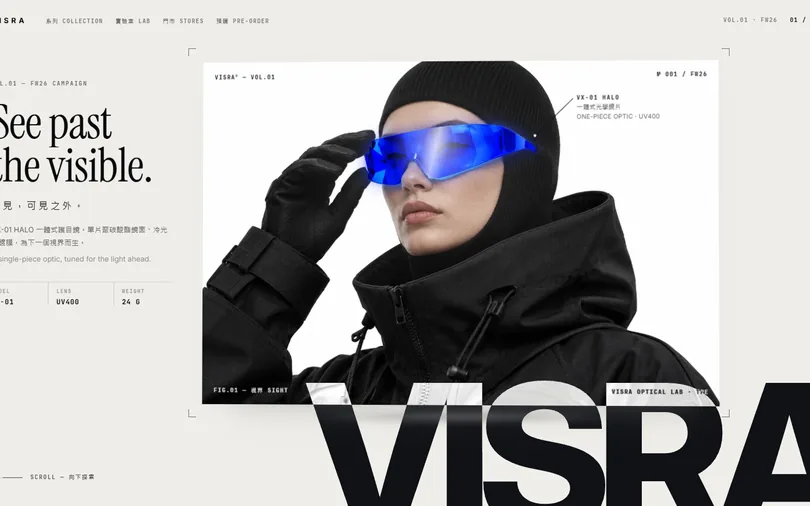
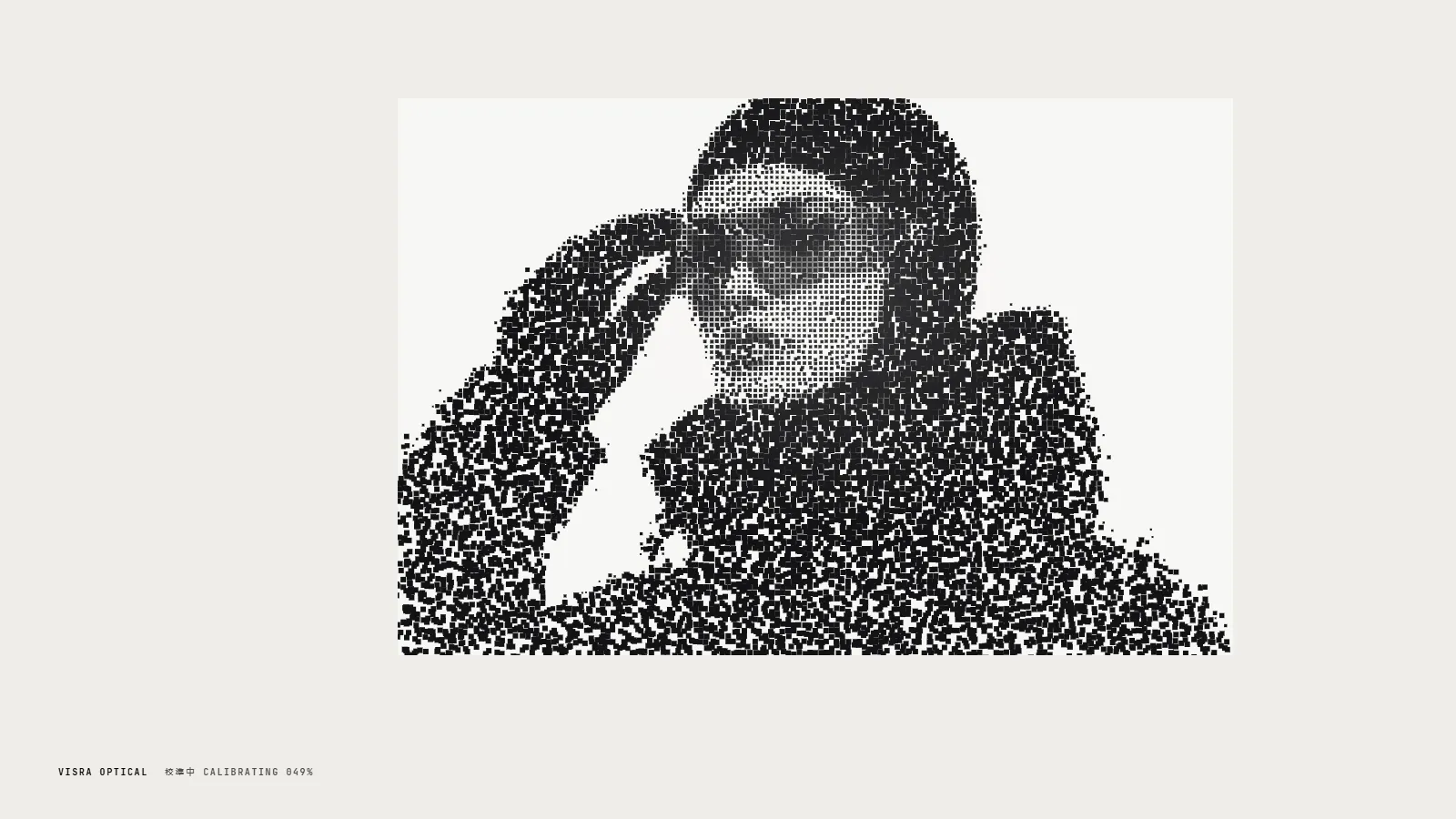
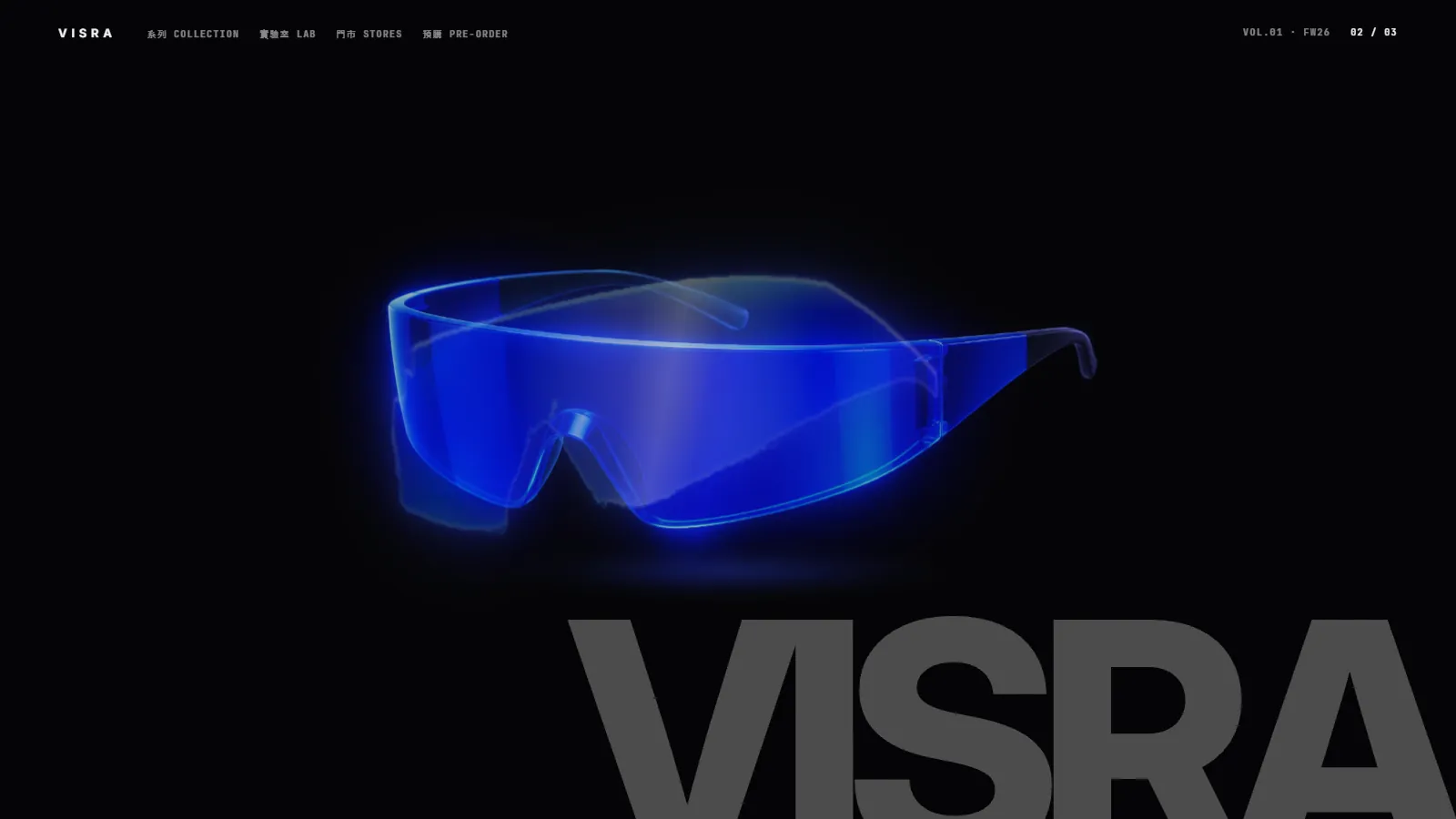
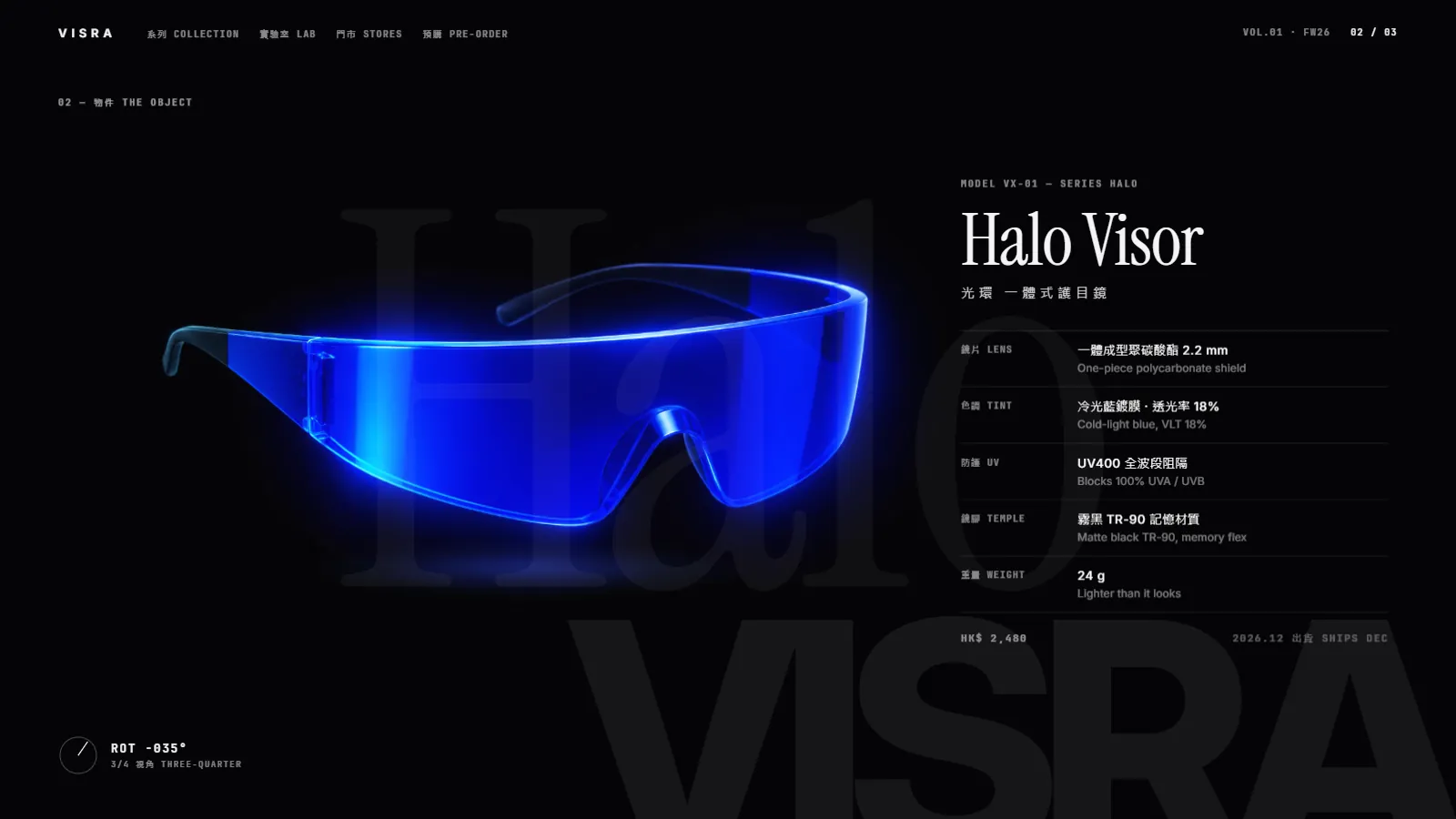
The homepage of a fictional eyewear brand, "VISRA": when it opens, a model slowly gathers out of a fine dot pattern into a photo and the blue light of her visor flicks on; move the mouse and the whole photo tilts like a card while a sheen on the lens follows the cursor; scroll down and the glasses fly off her face, the page turns from off-white to black, the glasses slowly turn in the middle with the specs beside them, and it ends on a pre-order button.
It takes three steps: find inspiration on Pinterest, pick a 3D animation component on 21st.dev, and write both into one prompt for Claude Code. Claude Code wrote the site from 1 prompt and we didn't change a single line of its code; the model and glasses photos were generated in ChatGPT. Below are the full prompt (replace the [] parts), the 4 ChatGPT image prompts, what to do on 21st.dev without an account, and a live version you can play with.
01The result: glasses that assemble, tilt and fly out
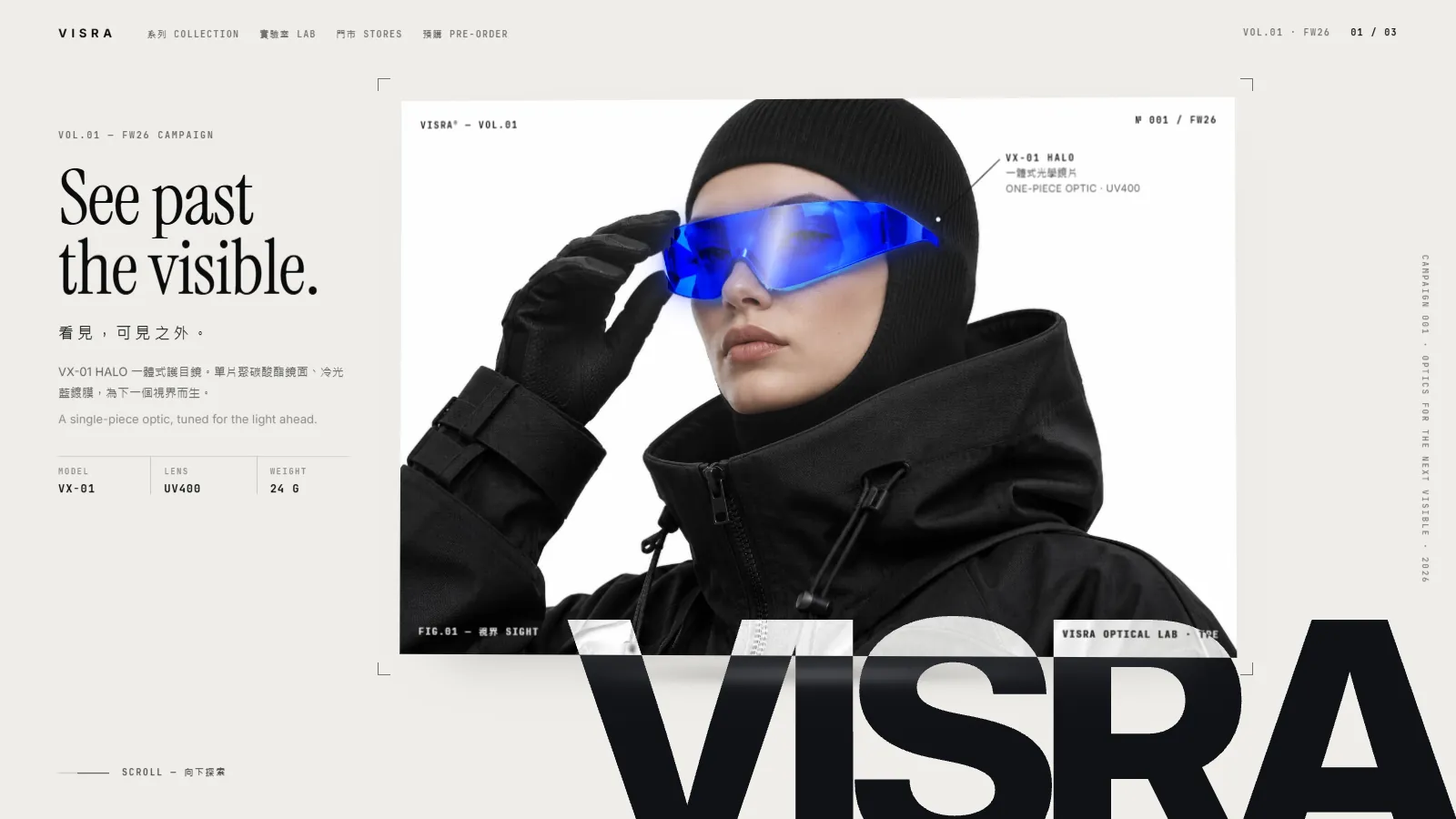
The whole site is static files: index.html, style.css and main.js, plus 4 JPGs in assets/ and 3 fonts in fonts/. Nothing to install, no database.
- Live demo: the VISRA eyewear homepage — Open it on a computer, let the opening play, move your mouse around, then scroll down with the wheel
The demo is exactly the site Claude Code made. Its two Latin fonts (Inter and JetBrains Mono) were about 1.1 MB together; we only cut them down to the characters the page uses (about 0.27 MB, about 0.9 MB for the whole demo). The code and images are byte-for-byte unchanged.
02The whole process: three steps plus a little prep
- Pinterest: search your topic, pick your 3–5 favourites and write what they have in common in one sentence (step 1).
- Prepare the images: one hero photo of a person (pure white background) and the product from the front, three-quarter and side (pure black background). We generated ours in ChatGPT.
- 21st.dev: pick an animation component under Components → 3D, then click Copy prompt, or note down its link and effect description (step 2).
- Claude Code: write the inspiration sentence, the component and the 5 effects you want into one prompt and paste it (step 3).
- Open the folder with a local server, move the mouse and scroll.
The video we took the idea from says "5 minutes". We don't: Claude Code worked for about 28 minutes on its own, because after writing the code it opened a browser, took screenshots and fixed what it saw. Your part (saving inspiration, preparing images, writing the prompt) is actually what takes longer.
03Step 1: find inspiration on Pinterest and sum it up in one sentence
Search your topic on Pinterest. We searched futuristic eyewear campaign; only a dozen or so pins loaded, and that was enough.
- Pick your 3–5 favourites.
- Don't describe "which one"; find what they share: the background, how the person is dressed, where the only colour is, how big the type is and where it sits, whether there are small labels.
- Write it as one sentence that goes straight into the prompt.
[white ground, a model dressed in black, the lens is the only colour in the whole picture; a huge brand word pressed against the edge of the screen; tiny monospace labels and numbers (VOL.01, model codes); a clean magazine layout]
- Our Pinterest search: futuristic eyewear campaign — Swap in your own topic
04Prepare the images: one model, the product from three angles
The site uses 4 images: 1 hero photo of a person (pure white background) and the same product from the front, three-quarter and side (pure black background). We generated them in ChatGPT; if you have your own product photos, skip this part.
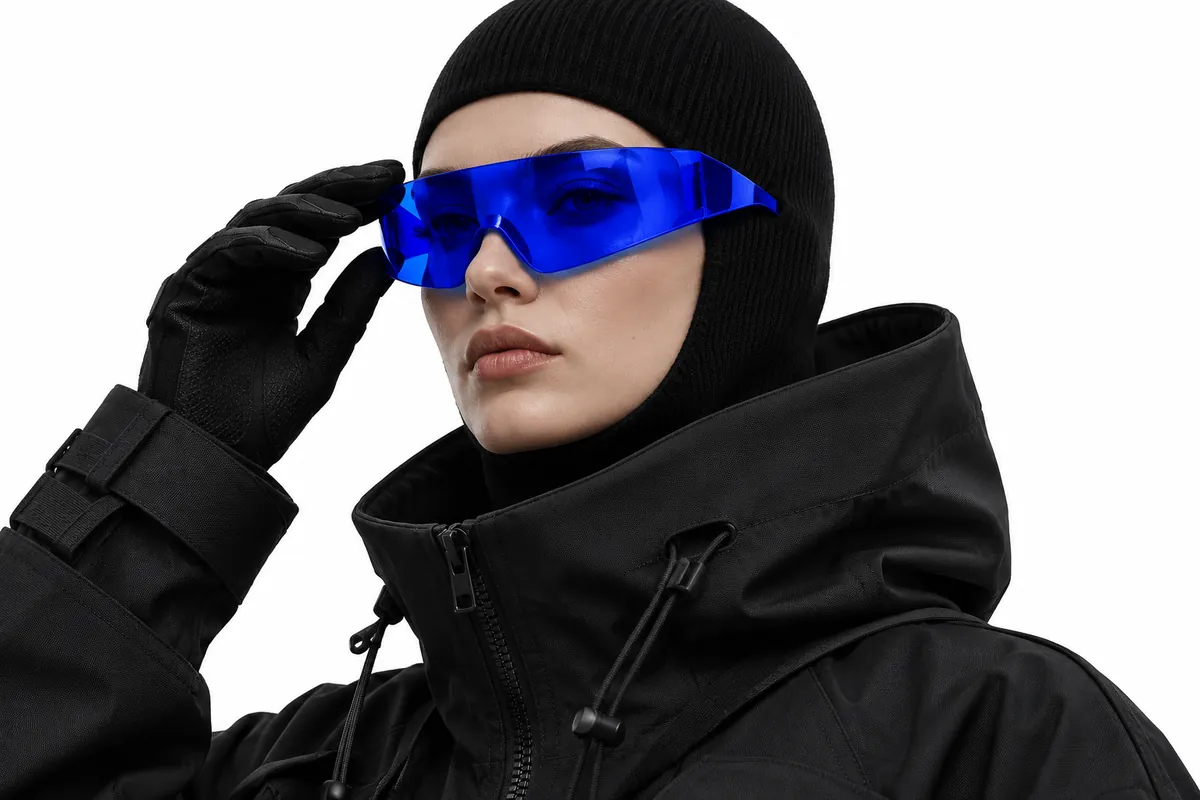
A studio fashion photo for a fictional [futuristic eyewear] brand: a fictional model, seen from the chest up, turned slightly to the left, wearing [a black oversized high-collar technical coat and a black knit balaclava], and [futuristic one-piece wraparound shield sunglasses with a translucent glowing cobalt-blue lens]. One gloved hand lifts the side of the glasses. Pure flat white (#FFFFFF) seamless background, no shadow on the background, crisp high-key light, the black clothes rich and detailed, the [blue lens] the only colour in the picture. Horizontal 3:2. No text, no logos, no brand marks.
Now the same sunglasses alone, exactly the same design ([one-piece wraparound shield, translucent glowing cobalt-blue lens, thin temples]), floating, three-quarter view from the front left, on a pure black (#000000) background, a soft [blue] glow from the lens, crisp product-render lighting with a thin highlight along the top edge. Horizontal 3:2, the glasses filling about 70% of the width. No text, no logos, no reflections of people.
Same sunglasses, same black background and lighting, seen straight from the front, symmetrical. Horizontal 3:2, glasses about 70% of the width. No text, no logos.

Same sunglasses, same black background and lighting, seen from the side in profile (the long temple pointing right, the curved lens on the left). Horizontal 3:2, about 70% of the width. No text, no logos.
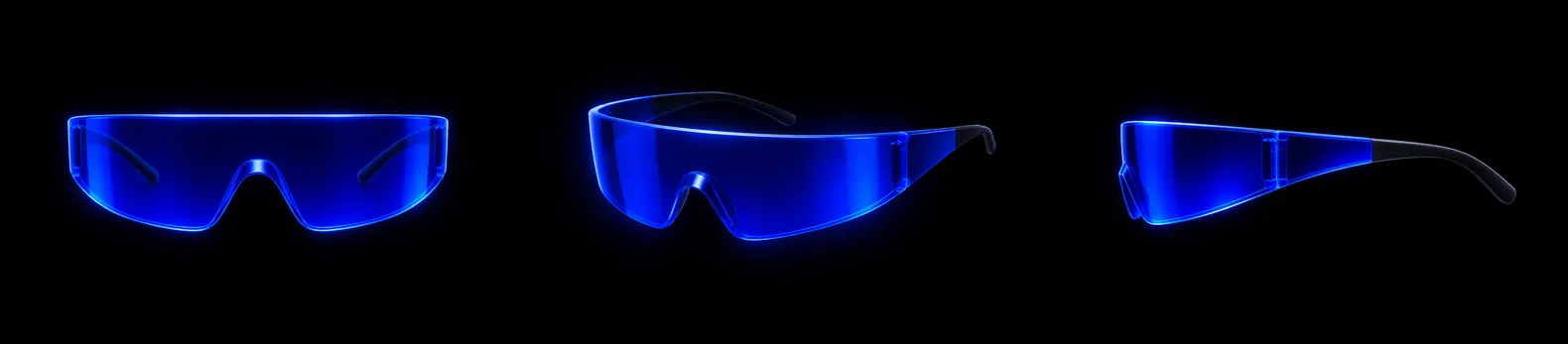
- Save the 4 images as JPGs (much smaller than PNGs) with the names the prompt uses: hero-figure.jpg, glasses-34.jpg, glasses-front.jpg, glasses-side.jpg, in assets/ inside a new folder.
- Put the fonts in fonts/: Inter, Instrument Serif and JetBrains Mono Bold, all free fonts.
- The product images must show the same product with the same background and light, or the site can't join the 3 into what looks like a turn.
05Step 2: pick a 3D animation component on 21st.dev
- Open 21st.dev, go to Components → 3D and scroll through the previews.
- Pick one whose feel is what you want. We chose Holo Card (by Mehi): a cursor-driven 3D tilt on a spring, a rainbow sheen that travels with the light, and a shadow that leans with the card; exactly the feel we wanted for the model photo.
- With a 21st.dev account: click Copy prompt on the component page and put the copied text into the step 3 prompt (in place of the "For the animation" part).
- Without an account: note down the component's URL and the effect description on its page (word for word) and put those in the prompt instead. That's what we did.
- 3D components on 21st.dev — Scroll down to see each component's preview
- Holo Card (21st.dev, by Mehi) — The component we used as the reference
06Step 3: give Claude Code the inspiration and the component together
- Make a new folder with assets/ (the 4 images) and fonts/ (the 3 fonts) inside.
- Open Claude Code in that folder.
- Paste the prompt below (replace the [] with your brand, product, inspiration and component), then the technical notes after it, and press Enter.
Build a one-page 3D homepage for a fictional eyewear brand, "[VISRA]" (index.html + style.css + main.js, plain HTML/CSS/JS, no framework).

Assets in assets/:
- hero-figure.jpg: [a model in a black high-collar coat and a black balaclava, wearing glowing blue one-piece shield glasses], pure white background (a fictional, AI-generated person).
- glasses-34.jpg, glasses-front.jpg, glasses-side.jpg: the same [glasses] in three-quarter, front and side view, pure black background.
Fonts in fonts/: Inter.ttf, InstrumentSerif-Regular.ttf, JetBrainsMono-Bold.ttf.

Inspiration (the [eyewear ads] I saved on Pinterest searching "[futuristic eyewear campaign]"): [white ground, a model dressed in black, the lens is the only colour in the whole picture; a huge brand word pressed against the edge of the screen; tiny monospace labels and numbers (VOL.01, model codes); a clean magazine layout].

For the animation, use the [Holo Card] component on 21st.dev ([https://21st.dev/@rmahammad/components/holo-card]):
"[pointer-driven 3D tilt with a spring, a rainbow foil sheet whose hue travels with the light, and a contact shadow that leans with the card.]"
Give [the model and the glasses] that same feel.

The effects I want:
1. Opening: [the model] slowly gathers from a fine dot pattern (dither / particles) into a sharp photo, and at the end [the blue light of the lens] switches on.
2. When the cursor moves, the whole [model] picture tilts in 3D on a spring, a sheen on [the lens] follows the cursor, and the shadow underneath leans with it.
3. On scroll: [the glasses] "fly off" [the model's face] and grow to the centre of the screen while the background turns from white to black; then [the glasses] turn as you scroll (use the three angle images to fake a 3D turn), with the product name, model number and a few lines of specs beside them (Traditional Chinese + English).
4. At the end, a short closing section: one tagline + a pre-order button.
5. A huge [VISRA] word in the bottom-right corner, a small navigation bar in the top-left.

The whole page should feel like a luxury brand's official site and look complete at first glance.
Technical notes: work only in this folder; the assets and fonts are already there. No CDN, relative paths only. Drive every animation with requestAnimationFrame + performance.now(), reading window.scrollY and pointer events; don't use CSS transitions / @keyframes or setTimeout as the animation clock. Design for a 1600×900 desktop screen, and it must also work on a phone. When you're done, serve the folder with a local server, take screenshots in headless Chrome (puppeteer) of the opening, a cursor tilt and several scroll positions, and fix anything that looks wrong.
Claude Code wrote index.html, style.css and main.js (main.js alone is about 34 KB) in about 28 minutes. Along the way it opened headless Chrome, took screenshots of the opening, a cursor tilt, several scroll positions and a phone-size screen, and fixed what it saw. We gave it only this 1 prompt, no second one.
07What it built: the opening, the cursor, the scroll
Opening: about ten thousand halftone dots fly in and form the model, then an 8×8 Bayer dither slowly turns them into the photo; the lens lights up with a flicker and a streak of light, then the text and the giant VISRA slide in.
Cursor: the photo card tilts on a spring and the shadow underneath leans with it; a glare spot, a light streak and a rainbow sheen masked to the lens follow the cursor. Those are the three things in Holo Card's effect description.
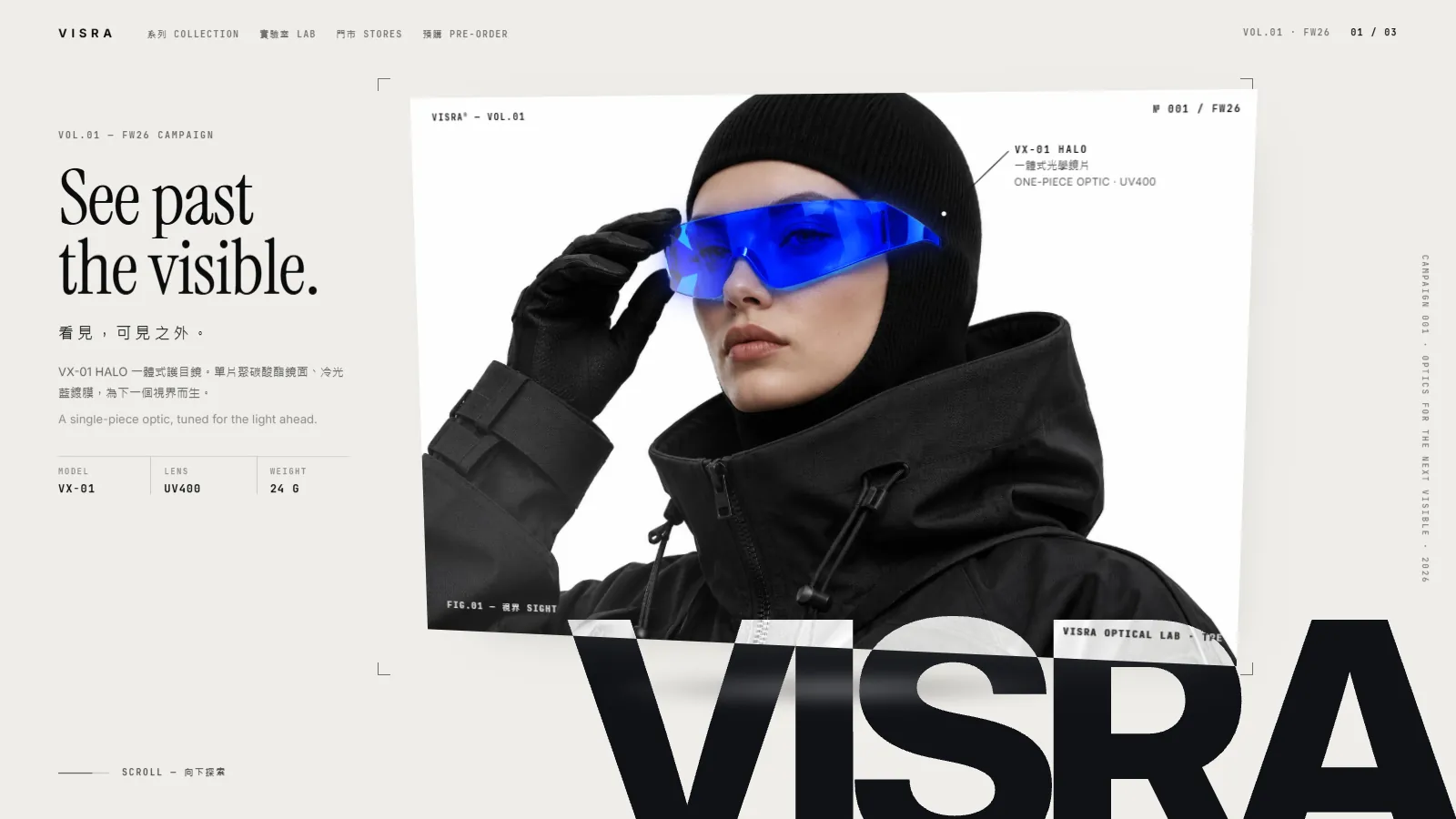
Scroll: the lens lifts off the face, the page turns from off-white to black, the lens becomes the product shot and grows to the centre, then turns from +45° to −90° as you scroll. It uses our 3 angle images, crossfaded with a small 3D rotation, so it looks like a turn.
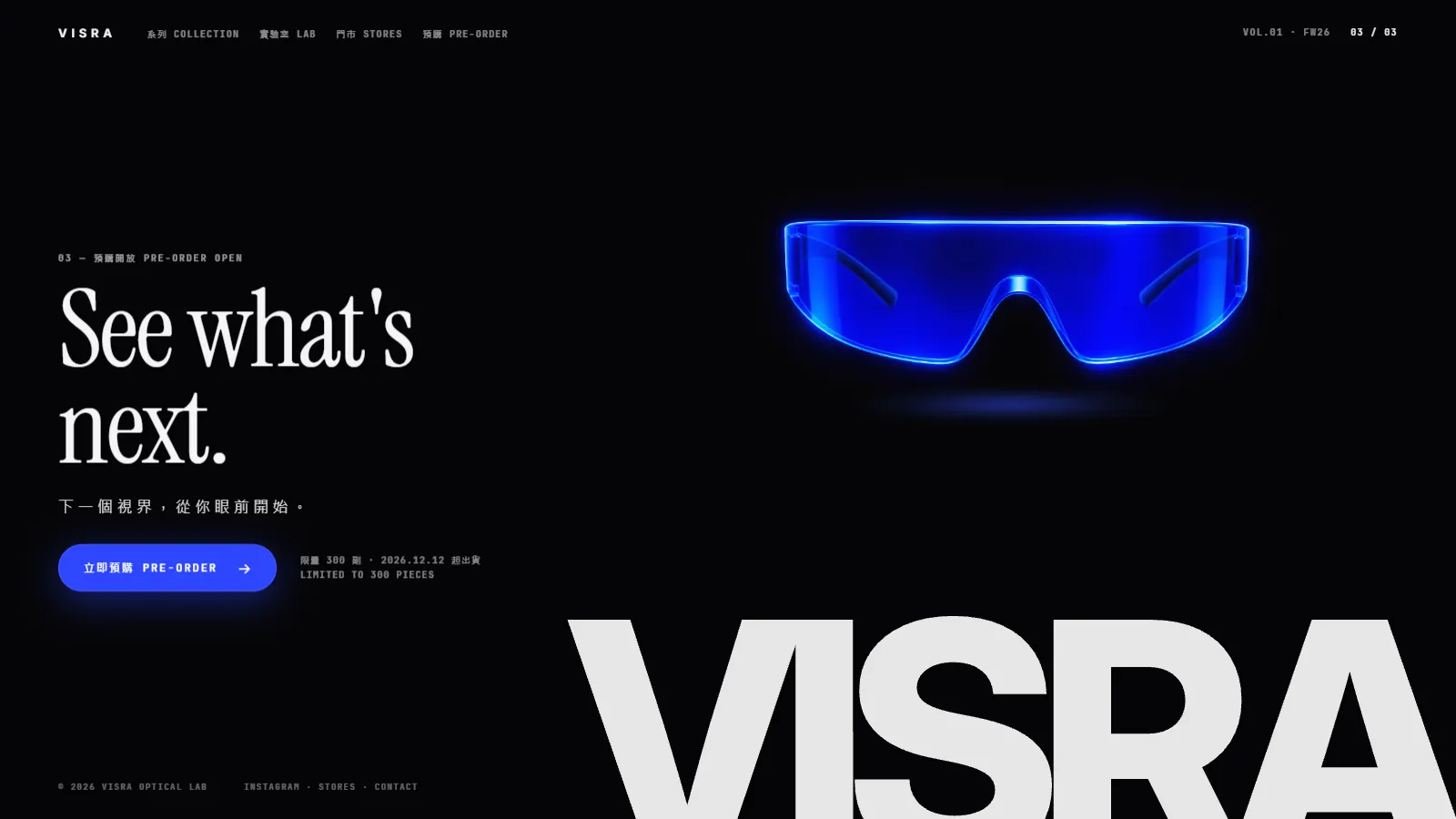
08Opening the site: use a local server
- Run npx serve (or any local server) in the folder and open the address it gives you in a browser.
- Don't double-click index.html: the dot opening reads the photo's pixels, browsers don't allow that for files opened directly, and the opening breaks.
- On a web host (like our demo) everything works.
09Make it yours
- Product: swap the glasses for headphones, a watch or sneakers. Replace the [] in the ChatGPT prompts and the Claude Code prompt, and prepare the product from the front, three-quarter and side again.
- Style: use a different Pinterest search and rewrite the inspiration sentence. The more specific you are about colour, type size and labels, the better.
- Animation: pick a different 21st.dev component, swap its link and effect description (or the Copy prompt text) into the "For the animation" part, then change "The effects I want" to say clearly what it applies to.
- Brand name and copy: replace [VISRA] in the prompt; write the specs, price and tagline into the prompt yourself, or Claude will make them up.
10Good to know
- VISRA is a fictional brand; the model is a fictional person generated by ChatGPT, and the glasses photos were generated by ChatGPT too. The prices, specs, limited-run numbers and shipping dates on the page were all made up by Claude, and the pre-order button does nothing.
- Claude Code wrote the page code and we didn't change it; the demo only has two smaller Latin fonts.
- The Claude Code screen in the Reel is a re-typeset replay, not a terminal recording, and the prompt there is shortened; this article has the exact prompt. The website and 21st.dev footage was really recorded; the laptop and desk photos were generated by ChatGPT.
- We didn't use Copy prompt (we weren't signed in to 21st.dev); the prompt holds Holo Card's link and the public effect description from its page. Holo Card is a component by Mehi on 21st.dev.
- The site was built for a 1600×900 desktop screen. Claude checked it with phone-size screenshots itself (the layout turns vertical), and in our demo test it tilted and scrolled on an emulated phone, but we haven't tried it on a real phone.
- Inter, Instrument Serif and JetBrains Mono are all free fonts under the SIL OFL.
- Before using AI-generated images commercially, check the terms of the tool you used.
- Every Claude Code run comes out a little different; go by the files you get.