Unreleased designs as a walk-through gallery: Claude sorts the archive, Claude Code builds it in three.js (live demo)
Claude turns messy notes, quotes and photos into one archive; Claude Code builds a three.js hallway you can walk. All 7 prompts + a live demo.
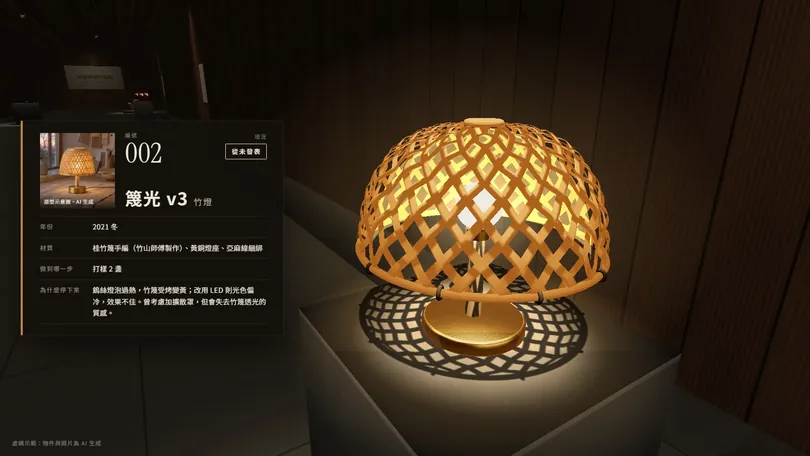
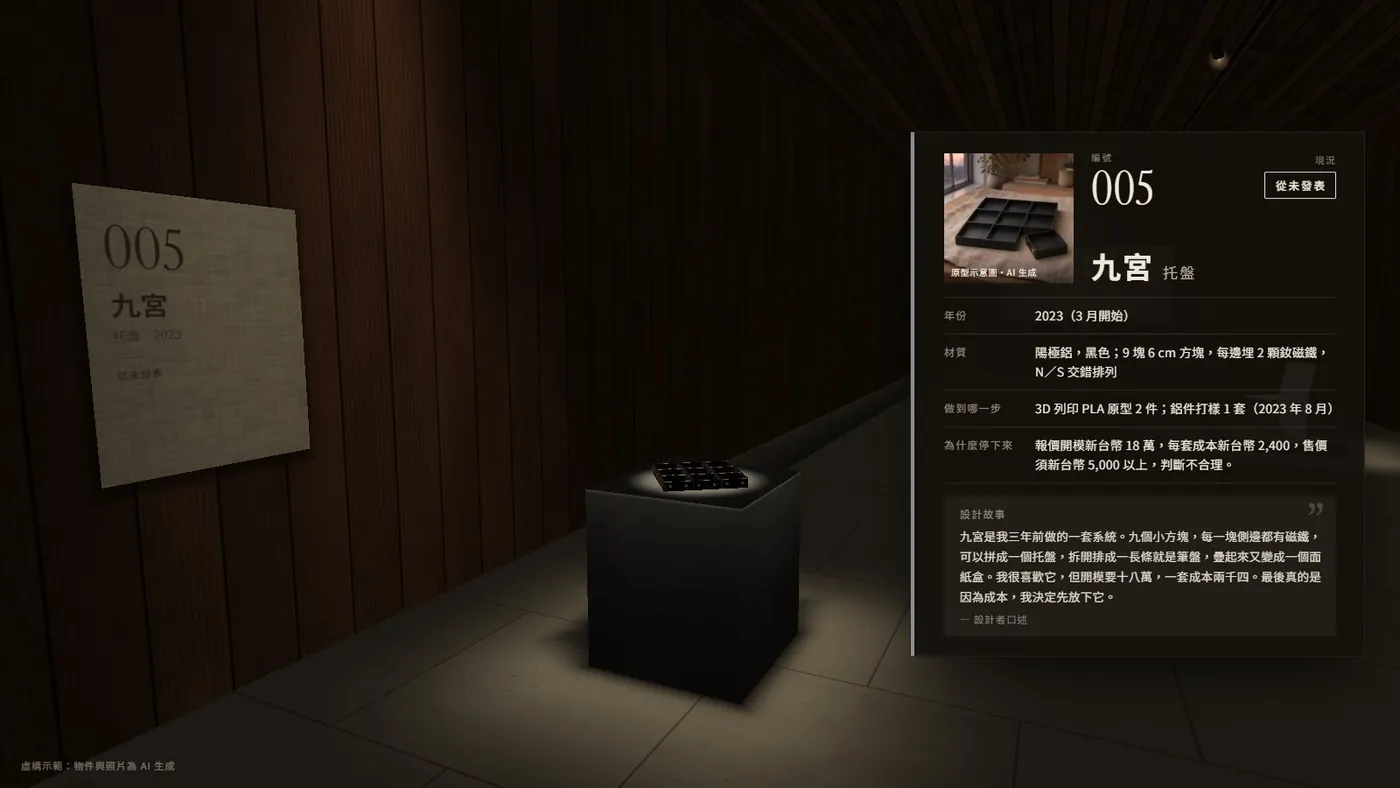
A dark gallery hallway with walnut walls and dark stone plinths, and six objects that were never released, each under its own warm spotlight: a magnetic nine-block tray, a woven bamboo lamp, a cement aroma stone, ceramic wall hooks, aluminium bookends and a chair folded from one aluminium sheet. Walk forward with the arrow keys; when you get close to an object, its record opens beside it: year, materials, how far it got and why it stopped. Click an object and the camera glides in so you can look around it.
Claude sorted the archive out of a pile of messy notes, Claude Code wrote the gallery in three.js, and we did not change a single character of the page's code. Below are the 3 prompts that build the archive, the 4 prompts that build the gallery (replace the [] parts) and a live version you can walk into. The designer and the six objects are a fictional demo; the prototype photos and reference images were generated in ChatGPT.
01The result: six unreleased objects, one gallery you can walk into
The whole site is static files: index.html, style.css, 4 JS files (the gallery, the object data, the 3D models and the textures), three.js in lib/, 4 fonts in fonts/ and the 6 prototype images in photos/. The walnut, stone and linen are drawn by code. No packages to install, no database.
- Try it live: the unreleased objects gallery — Best on a computer: arrow keys to walk, click an object for a close-up
The demo is exactly the page Claude Code had after prompt 4: not one byte of its code was changed, and three.js is the same file (r160). We only cut the 4 fonts down to the characters the page uses (the Chinese font, Noto Sans TC, went from 11.9 MB to 435 KB), so the whole demo is about 2.8 MB. There is no sound.
02The whole flow: a pile of notes, 3 archive prompts, 4 gallery prompts
- Put everything about your unreleased work in one folder: notes, quotes, prototype photos; messy file names are fine (step 1).
- Claude, prompt 1: sort it into one consistent "unreleased objects archive" (step 2).
- Claude, prompts 2 and 3: tell one object's story, then match the photos to the objects (step 3).
- Claude Code, prompt 1: build a gallery hallway in three.js (step 4).
- The first version looks like a show flat: make 3 reference images of real exhibitions in ChatGPT, and Claude Code prompt 2 adds real materials and spotlights (step 5).
- Prompts 3 and 4: label what is AI-generated, push the lighting contrast, add click-to-inspect (step 6).
The slowest part is really step 1, gathering what is scattered around. Sorting the archive and building the gallery take Claude and Claude Code only a few prompts each.
03Step 1: put all the messy material in one folder
Our demo used 7 notes from a fictional designer (we wrote them ourselves), with file names like 托盤_磁鐵測試.txt (tray magnet test) and 雜記_2020-2024.txt (misc notes), full of quick jotted lines such as "quote: mould 180k, 2,400 per set → would need to sell for 5,000+, doesn't make sense → park it". The prototype photos sit in photos/ with deliberately messy names (IMG_2207.jpg, DSC0193.jpg, 竹燈_final.jpg).
- For each piece you want at least: a name, a rough year, the materials, how far it got (model, sample, how many produced) and why it stopped.
- Keep details like quotes, load tests and kiln logs: the gallery's info panels use them.
- Put the photos in a photos/ folder next to the notes, and don't rename them yet: in step 3 Claude matches them itself.
04Step 2: Claude, prompt 1: one consistent archive
Upload the notes to Claude (or open the folder in Claude Code) and paste this prompt.
These are the notes left over from the [product designs] I made over the past few years but never released; the file names and the writing are a mess. Turn them into one consistent "unreleased objects archive": one section per object, and every section uses the same fields: name, year, materials, how far it got (model / sample / how many were produced), why it stopped, and its status now (discontinued, or never released). Add a summary table at the end so I can see every object at a glance. Keep it concise, like a museum collection record. Do not make up anything the notes don't say; if you are not sure, write "not in the notes".
It wrote one archive.md: six objects, 001–006, in year order, every one in the same table (name, year, materials, progress, why it stopped, status, notes, sources), plus a summary table at the end. Where the notes were silent it really wrote "not in the notes", and it listed what needed confirming, such as 「三月」 possibly being a month rather than a name, and the tray quote having no currency.
- 001 立 (Stand): extruded aluminium bookends, 2020, 300 made and sold out; the factory closed and the mould was lost; discontinued.
- 002 篾光 v3 (Bamboo Light): hand-woven bamboo table lamp, winter 2021, 2 samples; tungsten bulbs scorched the bamboo yellow and LEDs were too cold; never released.
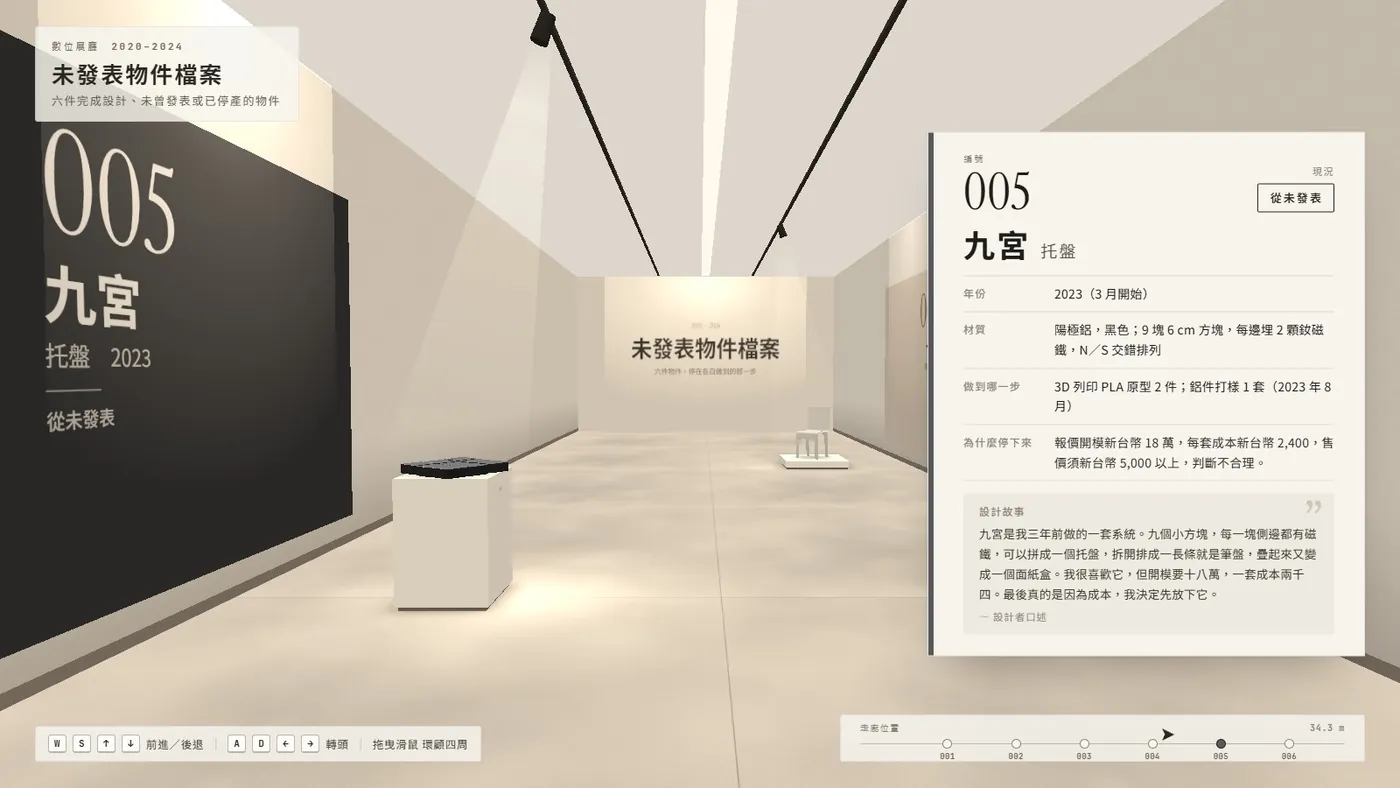
- 005 九宮 (Nine Squares): a tray of 9 magnetic anodised aluminium blocks, 2023; a 180,000 mould and 2,400 per set; never released.
- The other three: a cement aroma stone, ceramic wall hooks and a chair folded from one aluminium sheet.
05Step 3: tell one piece's story, then match the photos
The archive only says what the objects are. In the same chat, paste prompt 2 and tell it the story of the piece you care about most, out loud (your phone's voice typing is fine, no need to tidy it up).
Round two: the archive only says what the objects ARE, not the story behind them. Below is the story of "[object name]" as I told it out loud (speech to text, unedited). Put it into the [object name] section of archive.md as a new "design story" field; keep my own words but make it read smoothly. Also update anything you marked "to confirm" last time if this story settles it.

"[the story as you said it: what it is, why you love it, why you stopped]"
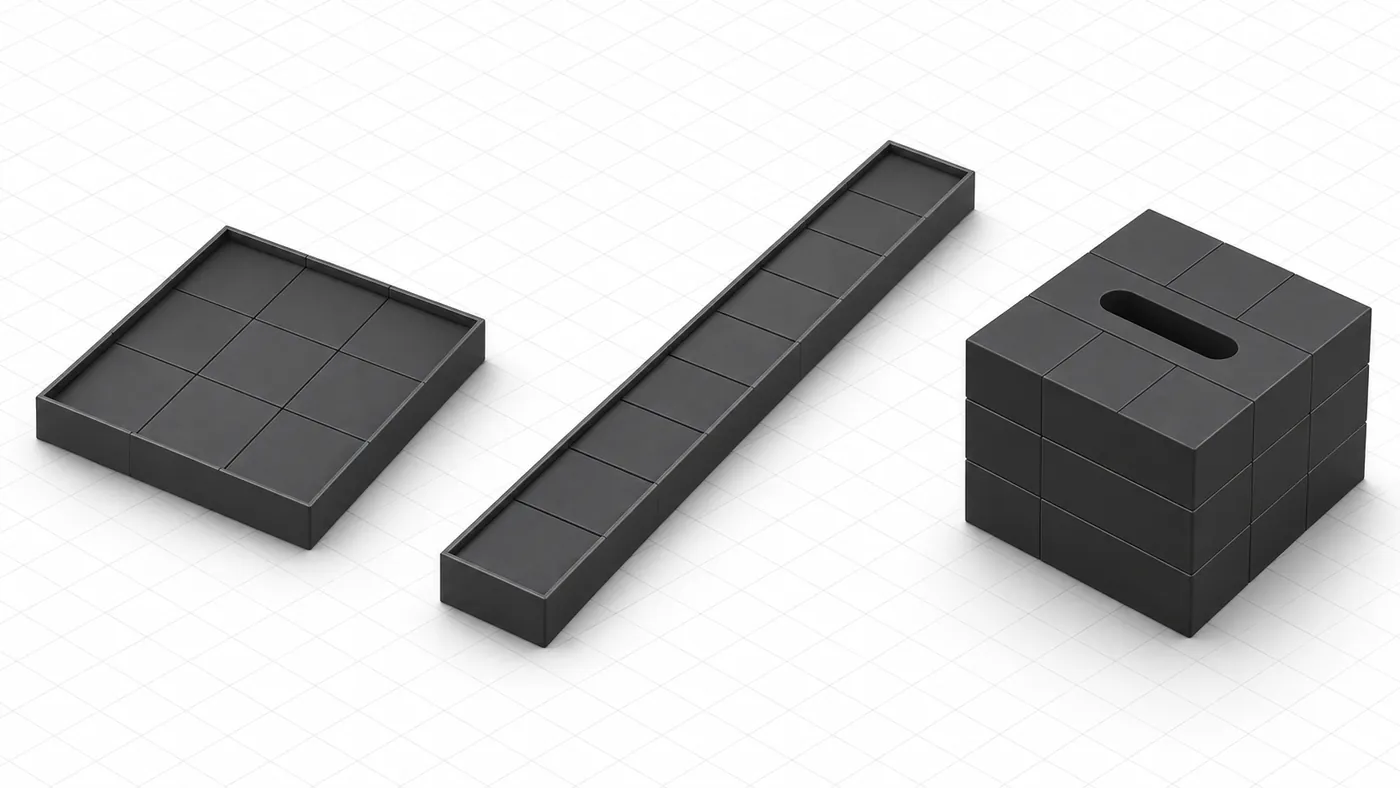
Ours was the tray: "nine small blocks, each with magnets in its sides; you can put them together as a tray, line them up as a pen tray, or stack them into a tissue box… in the end it really was the cost, so I decided to set it aside." Claude added it to the tray's section as a "design story", marked the amounts as New Taiwan dollars and added "the designer, spoken" to the sources. That story later shows up in the gallery's info panel.
Round three: I found the prototype photos, in [photos/] ([6] of them, messy file names). Look at the photos, match each one to an object in the archive, and add a "prototype photo" field to every section with the file name and a short description of what is visible in the photo (only what you can see, no guessing). Update the note that says the archive has no photos as well.
It matched the 6 badly named photos to the objects one by one and gave every section a "prototype photo" field that only describes what is visible, for example "the photo doesn't show whether this is the PLA prototype or the aluminium sample". It also pointed out on its own that all six share one setting and look more like a styled shoot or a render. It was right: we generated them in ChatGPT.
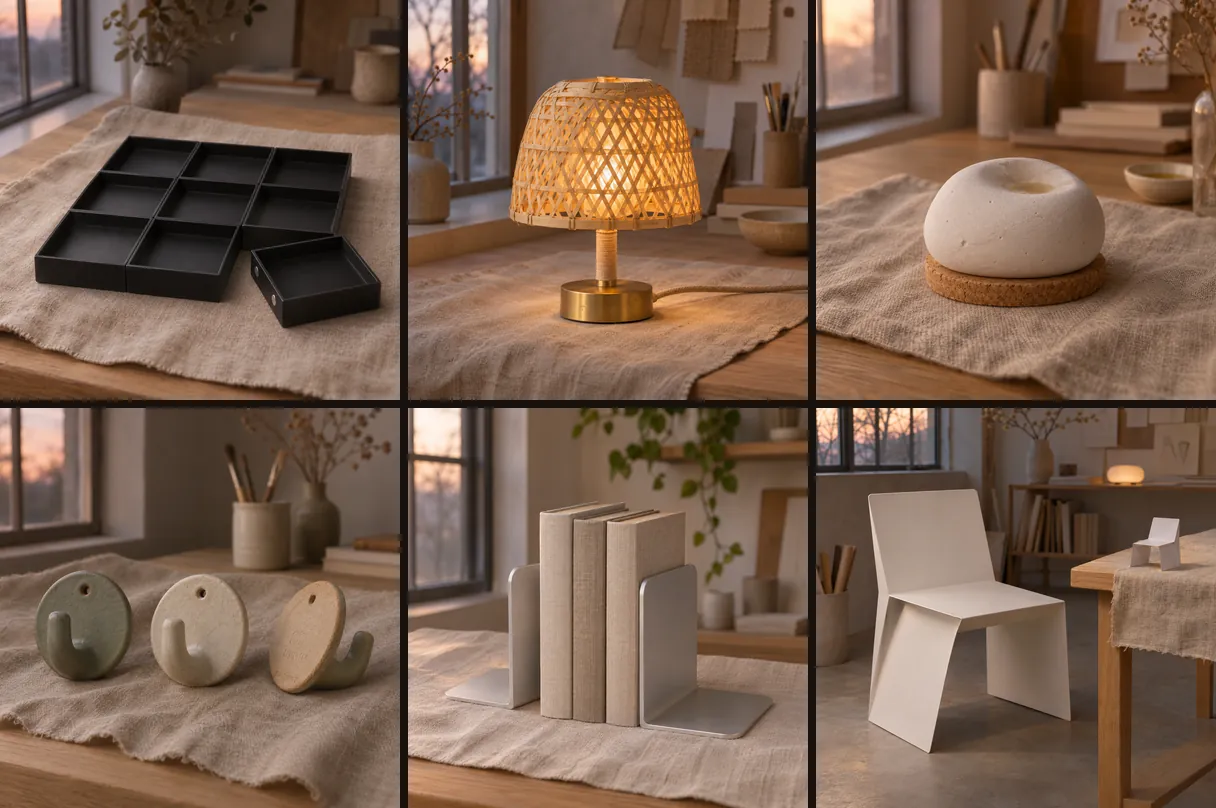
Square product photo of a handmade design prototype in a designer's studio: on raw oatmeal linen over a light-oak table, soft window light from the left at dusk, warm and quiet, shallow depth of field, a prototype with honest small imperfections. No text, no logos, no people, no hands. The object: [name], [materials, shape and size, as in your notes].
06Step 4: Claude Code, prompt 1: a gallery hallway in three.js
- Make a new folder and put archive.md and photos/ in it.
- Make a lib/ folder with three.js's three.module.js in it (from threejs.org or the three package on npm; we used r160).
- Make a fonts/ folder with the fonts you want (we used Noto Sans TC, Inter, Instrument Serif and JetBrains Mono, all free).
- Open Claude Code in the folder, paste prompt 1 and the technical conditions right after it.
This is the archive of my unreleased objects (archive.md, [six] objects). Turn it into a digital gallery I can walk into, as a web page built with three.js.

- One long gallery hallway where every object has its own place: one plinth per object, lined up along the hallway in the archive's numbering order.
- For each object, build a simple 3D model on its plinth from the materials and shape in the archive (for example [the tray is 9 small black blocks put together]).
- I can walk the hallway: W / S or the up / down arrows to move forward and back, A / D or the left / right arrows to turn, and dragging the mouse looks around too.
- When I walk up to an object, its info panel opens beside it: number, name, year, materials, how far it got, status (discontinued / never released), why it stopped; add the design story where there is one. It closes when I walk away.
- I start at the entrance of the hallway and can see the whole length of it.
- All text in [English].
Technical conditions: plain HTML / CSS / JS, no build step, nothing loaded from the internet, relative paths only. three.js is at lib/three.module.js (ES module, import it with a relative path); no three.js add-ons and no other libraries, write anything else yourself. Fonts are in fonts/, load them with @font-face (no Google Fonts): [your font file names]. The whole page fits one screen, no scrolling. When you are done, open it on a local server, walk the hallway yourself, open an info panel, and look at your screenshots to fix problems.
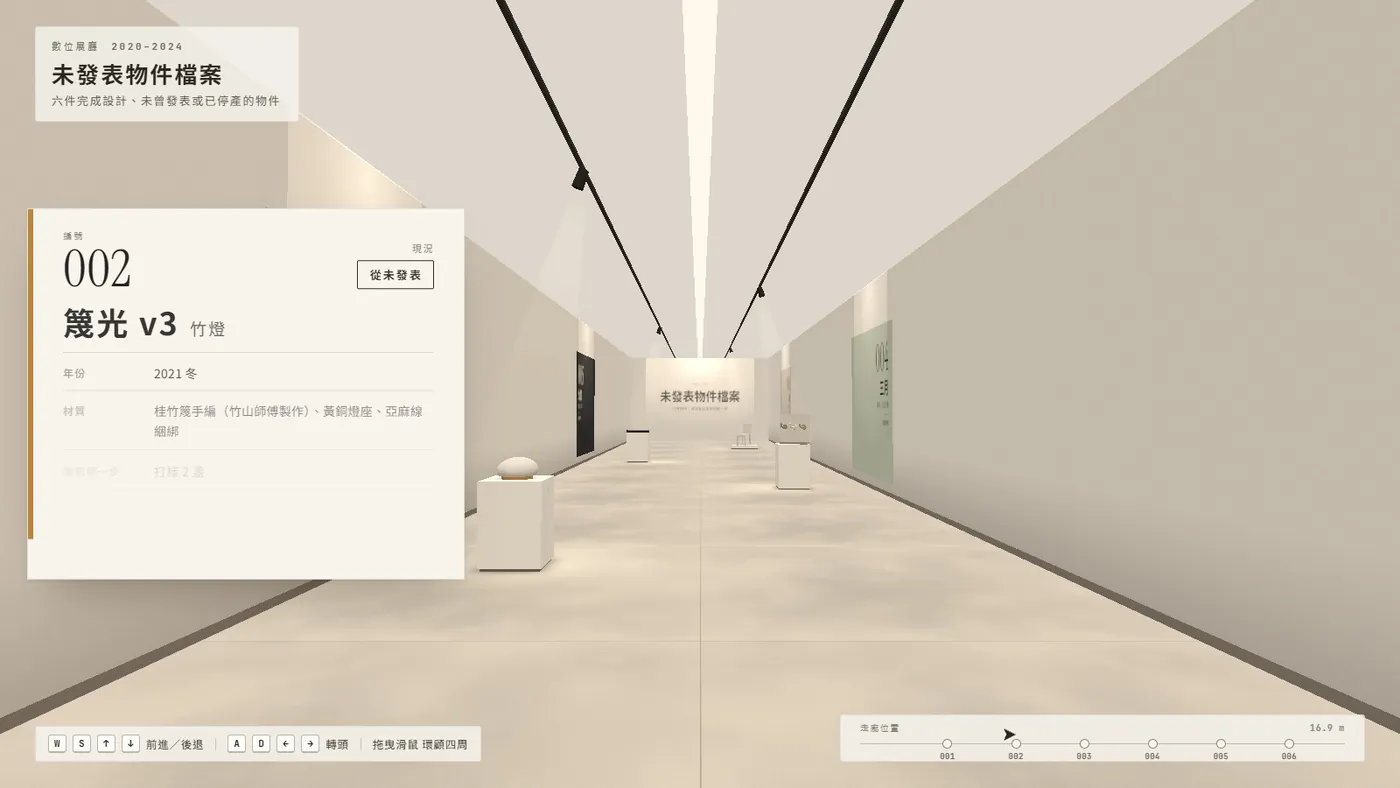
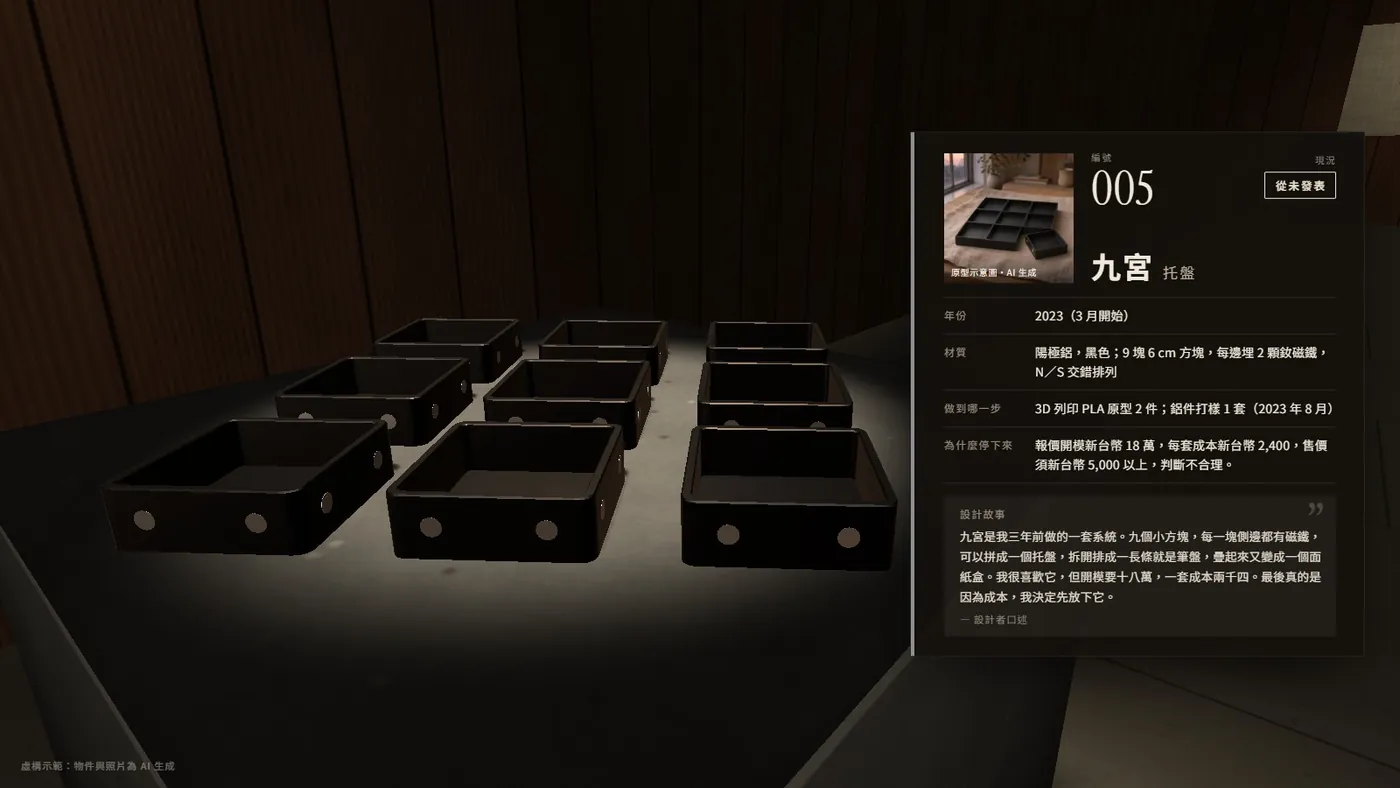
Version 1: a 57-metre white hallway, six plinths alternating left and right, a coloured wall panel behind each object, and 3D models built from the archive (bookends holding books, the bamboo lamp, the cement stone on cork, three hooks, the nine-block tray that pulls apart to show its magnets, a folded white chair). Walking eases to a stop when you let go of the keys, panels open as you get close, and a mini map at the bottom shows where you are in the hallway.
07Step 5: version 1 looks like a show flat? Give it reference images
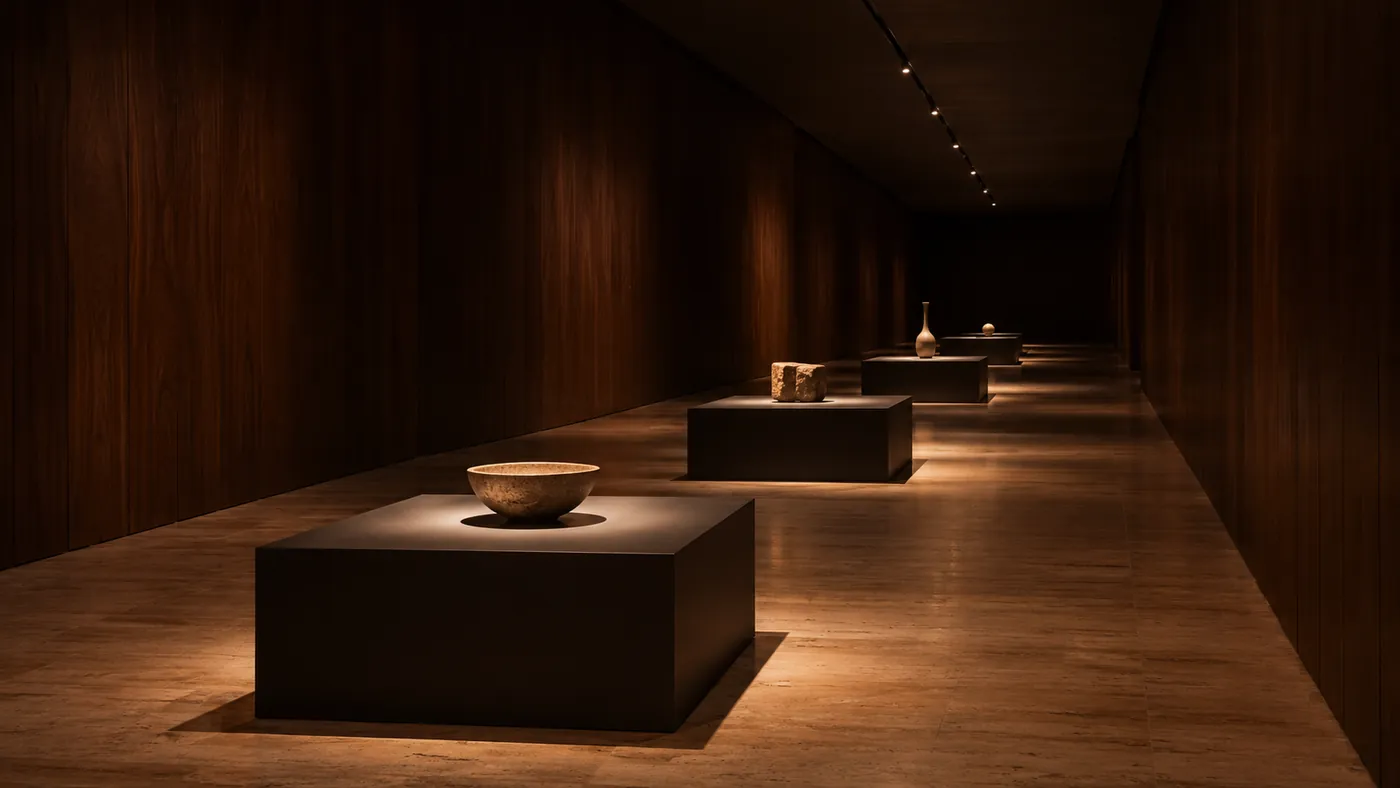
"Make it look more like an exhibition" doesn't tell it what the exhibition in your head looks like. It is quicker to make 2–3 reference images of real exhibitions in ChatGPT, put them in a refs/ folder and ask Claude Code to follow them. We made 3: a long dark hallway, a spotlit close-up of one object, and a room with linen walls.
Photo of a minimalist design exhibition at night: a long, dark gallery hallway with a honed warm travertine floor and dark-stained walnut wall panels, a row of low matte plinths down the middle, each holding one small object lit by a single narrow warm spotlight from the ceiling, soft pools of light on the floor, deep shadows between them. Real museum lighting, calm, premium. 16:9. No people, no text, no logos.
Round two: the first version works, but it still looks too much like [a basic video game]. I made [3] reference images of real exhibitions in ChatGPT ([refs/ref-gallery-1.png, 2, 3]); change it to follow them:
- Real materials on the objects and plinths: [the fine metal of aluminium, bamboo strips, white cement, the matte glaze of ceramics, powder coat]; plinths and walls in the [stone, walnut and linen] of the reference images.
- Exhibition lighting: the whole hall goes dark, one narrow warm spotlight above each object, soft pools of light and shadows on the floor, the object is the brightest thing in the frame.
- Add each object's prototype photo to its info panel ([the file names in photos/]).
- Keep walking, turning and the panel opening as you get close exactly as they are.
Walking through it should feel like visiting a real exhibition, not a low-poly game.
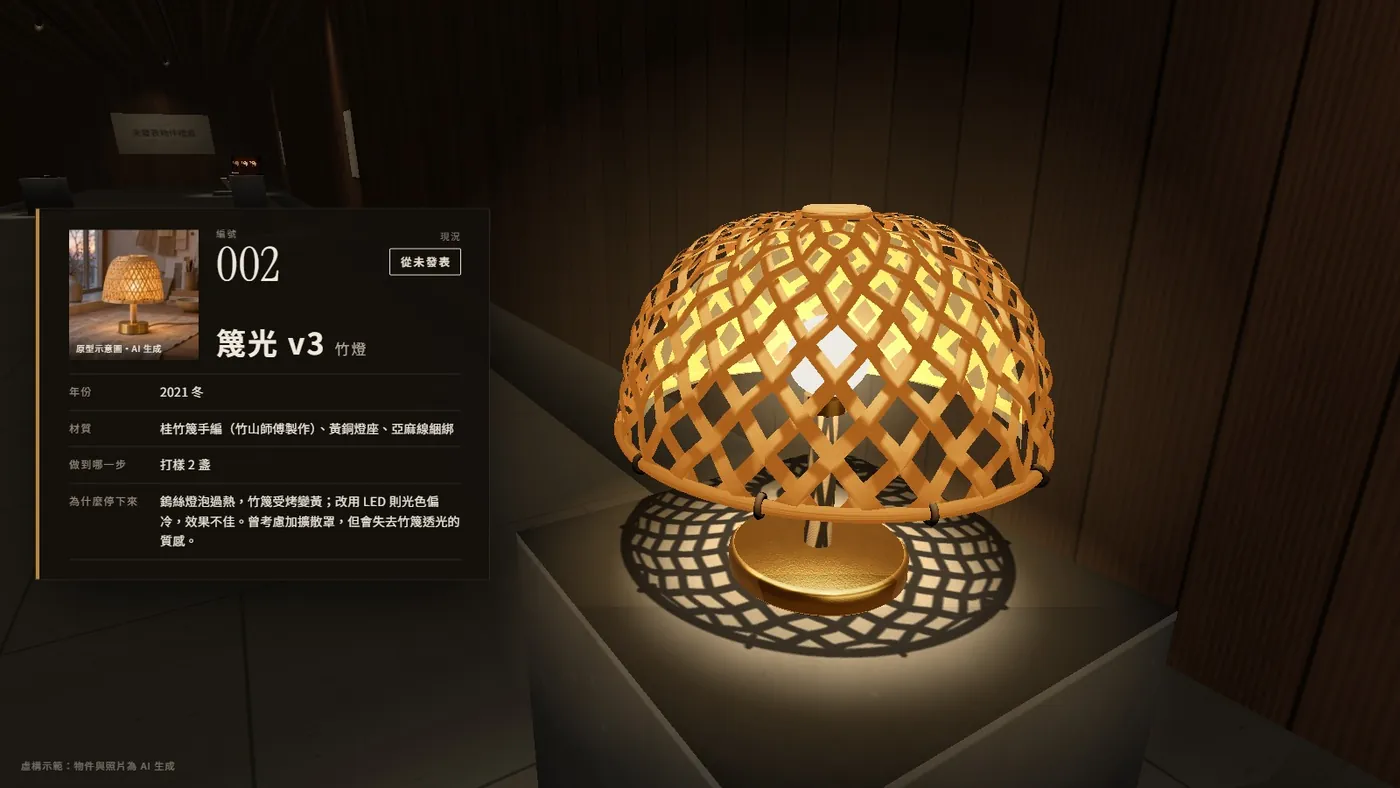
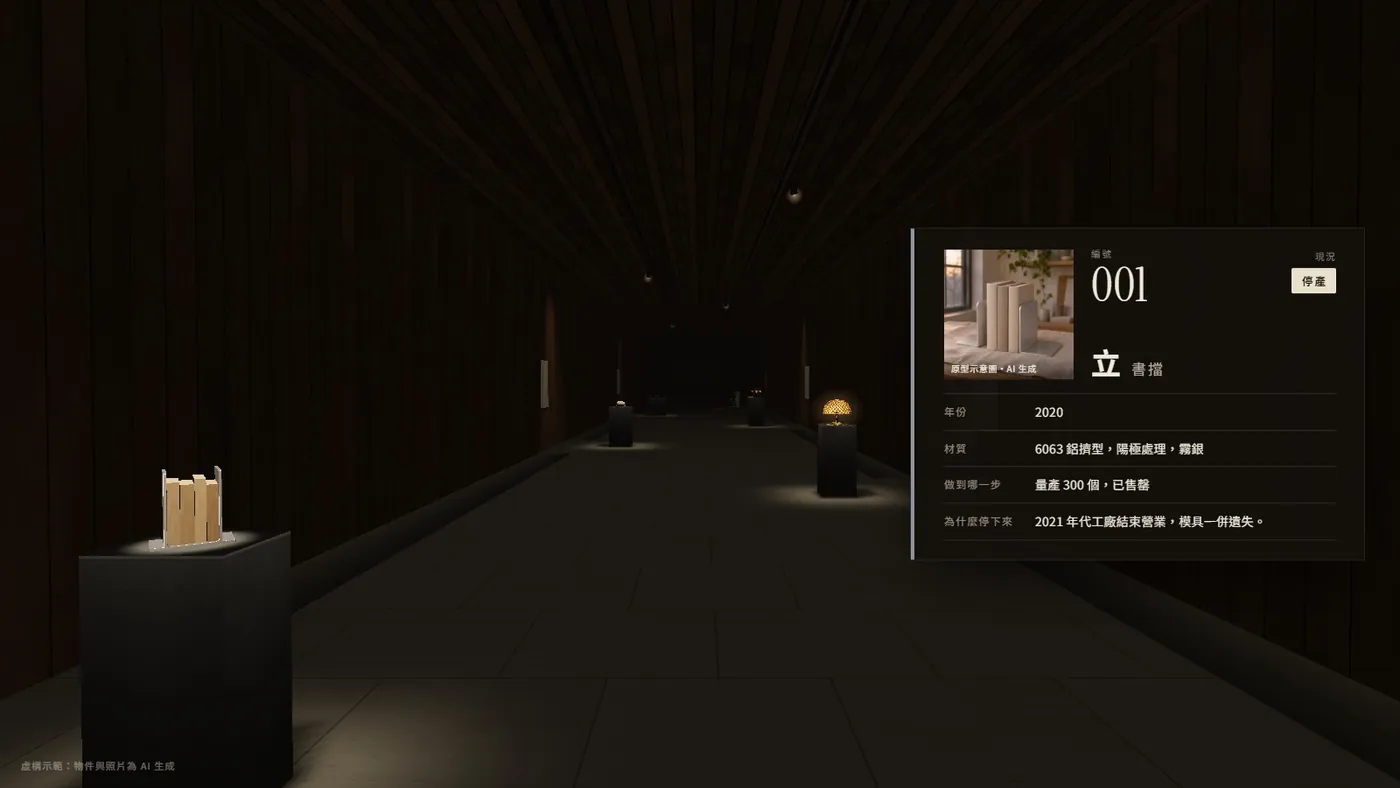
It turned the hall dark: vertical walnut panels, a travertine floor, linen wall labels, a track spotlight above each object, real shadows on the plinths (the lamp even throws the shadow of its weave), the six 3D models reshaped to match the photos with their own surface finishes, and a dark info panel with the prototype image at the top left. It also warned us on its own that the photos look AI-generated and captioning them "prototype photos" would mislead people.
08Step 6: label what is AI-generated, then add contrast and close-ups
Round three (small fix): you are right, these [6] are images generated in ChatGPT, not real prototype photos, and the objects and the designer are a fictional demo. Change the photo label on the panel to "Prototype illustration · AI-generated", and add one small line to the entrance text (or under the title at the top left): "Fictional demo: objects and photos are AI-generated". Leave everything else alone.
Checking it ourselves, we found a few more things: not enough lighting contrast, stretched wood grain on the walls, a ceiling that looked like a hole, and the title box getting in the way of recordings. So prompt 4 fixes all of it at once and adds click-to-inspect.
Round four: a few more fixes to make it feel like a real exhibition:
1. More lighting contrast: ambient light almost fully dark, each object lit only by the spotlight above it, the edge of the light cone soft but visible, the object and the top of its plinth the brightest things in the frame, everything around them falling slowly into darkness.
2. [The wood grain on the walls is stretched and fans out into the distance; repeat the texture along the length of the wall so the slats stay the same width. Make the plinths matte dark stone.]
3. [The ceiling is one big area of pure black and looks like something is missing; make it read as a ceiling (dark wooden slats or a flat dark grey), with the track lights mounted on it.]
4. Add a presentation mode: with ?hud=0 in the URL, hide the title box at the top left, the controls hint at the bottom and the mini map (the info panel still appears), for screen recording or projecting.
5. Click an object on a plinth and the camera glides in close in front of it (the object fills about a third to half of the screen width); dragging the mouse orbits slowly around it, and the info panel stays beside it as usual. Click empty space or press Esc and the camera goes back to where it was in the hallway.
Don't change anything else.
The final version: ambient light almost black, only the spotlight above each object; 30 cm walnut slats repeated along the walls, matte dark stone plinths and a dark slatted ceiling. Click an object to glide in, drag to orbit, Esc to step back. We only asked ?hud=0 to hide the title box; it kept one small line, "fictional demo: objects and photos are AI-generated", at the bottom left on its own so recordings still show it.
09Make it your own
- Open the site: run npx serve (or any local server) in the folder and open the address it gives you. Double-clicking index.html won't work, because three.js is an ES module and needs a server.
- Swap the work: sort your notes into archive.md with steps 2 and 3, then tell Claude Code "update the gallery from the new archive.md, with as many plinths as there are objects".
- Change the mood: make a new set of reference images and paste step 5's prompt again, for example a white plaster gallery or an outdoor sculpture park.
- For a pitch or portfolio: add ?hud=0 and record a walk down the hallway, or put the whole folder on any static web host.
10Good to know
- The designer and the six objects are a fictional demo (we wrote the notes); the prototype photos, the reference images and the tray's CAD-style sheet were all generated in ChatGPT, not real photos.
- The 3D objects on the plinths are simple models Claude Code made in code, not photos or CAD files; the photos appear only inside the info panels.
- Claude Code wrote all of the page's code and we did not change it; the demo only has smaller fonts. We ran the 3 archive prompts with Claude inside Claude Code; uploading the files to claude.ai works the same way.
- The "voice input" in the reel was a transcript we typed and sent as prompt 2; the archive and chat cards are re-typeset from the real answers. The gallery footage is the real page, recorded frame by frame in headless Chrome.
- We tested walking, the info panels, click-to-inspect and Esc in a desktop browser (1440×900 and 1600×900); not on a real phone.
- three.js is MIT-licensed; the fonts Noto Sans TC, Inter, Instrument Serif and JetBrains Mono are free fonts under the SIL OFL.
- Claude Code builds something a little different every time; go by the files you get.