One prompt, a playable 3D mini world from Claude: the 5-part structure (world, life, interaction, dashboard, extras)
One prompt and Claude builds a living 3D airport: planes take off, boards update live. Learn the 5-part structure, swap in any world. 5 prompts + a live demo.
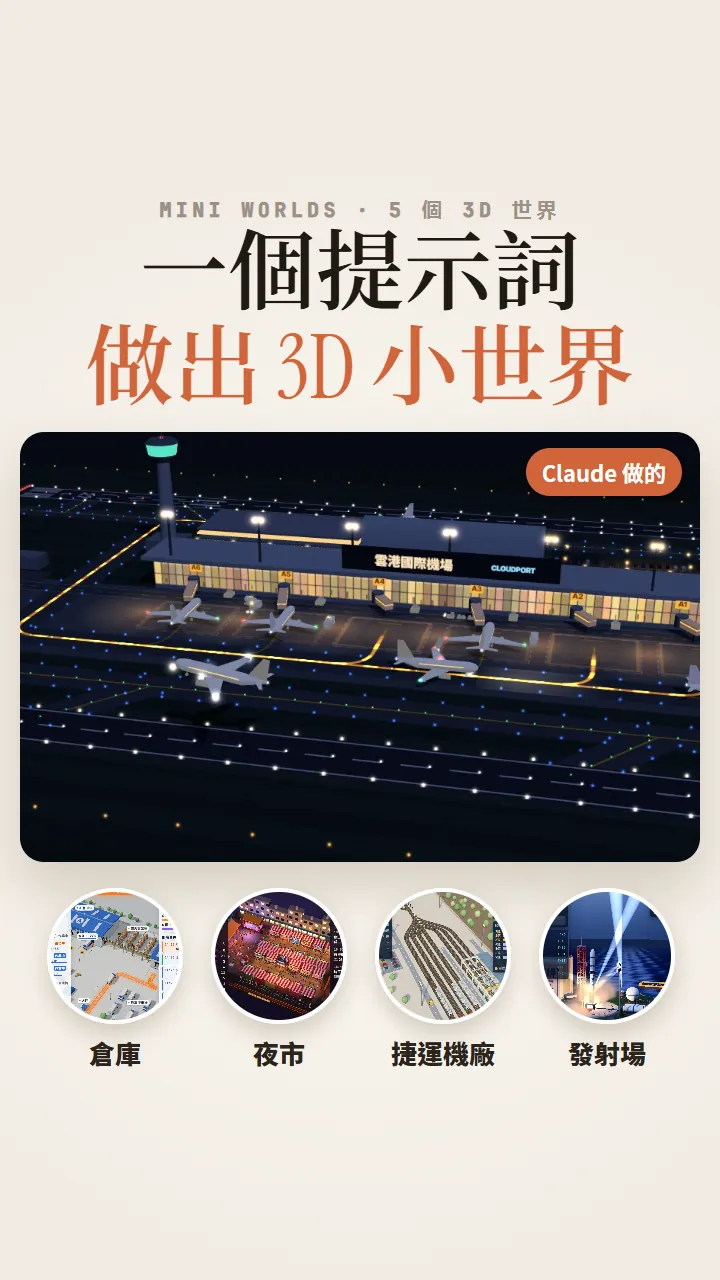
Those viral 3D mini-world animations take just one prompt. We had Claude build 5 of them: an airport that runs itself, a logistics warehouse, a Taiwanese night market, a metro depot and a space launch site. Each one is a single index.html file: open it in a browser and you can drag, zoom and click around.
In this guide: a playable airport demo, the 5-part prompt structure (world, life, interaction, dashboard, extras), the full airport prompt (replace the [ ] parts with yours), the prompts for the other 4 worlds, and how to swap in your own world. Every image below is what Claude actually built, and all names and numbers are fictional.
01The result: a 3D airport from one prompt
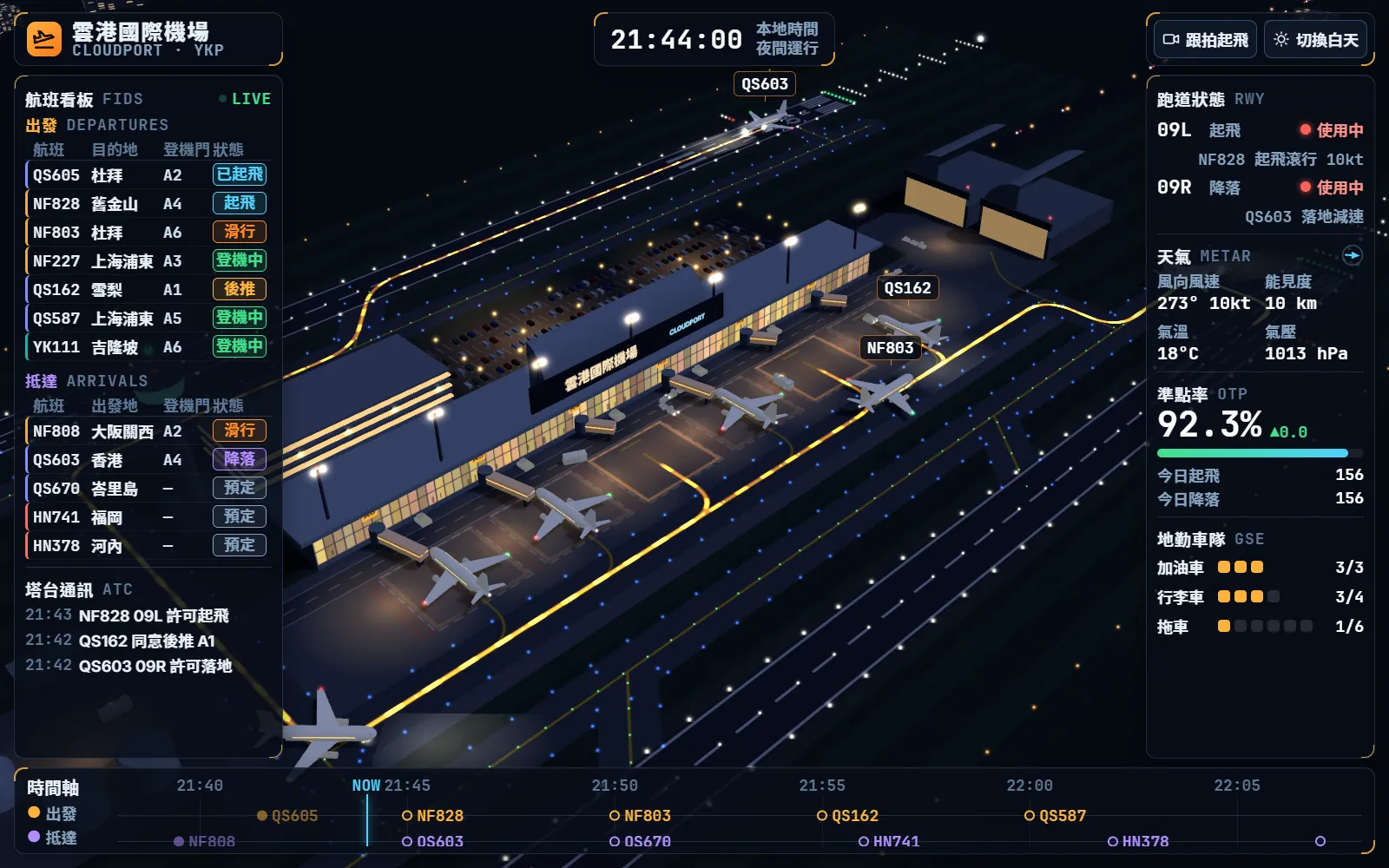
This is one index.html file. Open it and you get a miniature airport that runs by itself: planes push back from their gates, taxi and take off, others come in to land; each plane's route is a glowing orange line flowing along the ground. A flight board on the left, runways, weather and on-time rate on the right, a timeline at the bottom, and the numbers all change with the simulation.
A fresh Claude Code agent built it from one prompt (plus some technical notes we needed for recording), in a single turn, and we fixed nothing. The demo below is that file, so you can play with it right away:
- Play it: Cloudport International Airport — Best on a computer; needs internet (Three.js loads from a CDN)
- Drag to rotate, scroll to zoom, right-drag to pan.
- Click a plane to see its flight number, destination and status.
- Press 跟拍起飛 (follow takeoff) at the top right and the camera follows the next plane taking off.
- Press 切換白天 (switch to day) to turn the airport to daytime.
02The 5-part structure: world, life, interaction, dashboard, extras
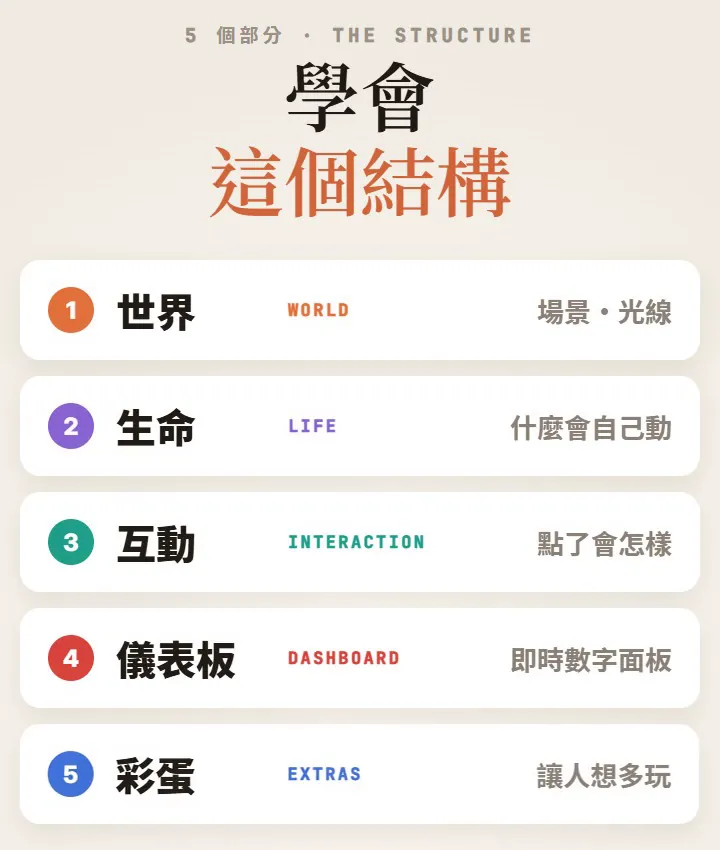
All 5 worlds start with the same opening sentence, followed by 5 parts. Each part answers one question:
- 1. World (the scene): Where is it? Which buildings, terrain and objects? What time of day, what light, what materials?
- 2. Life (the simulation): What moves on its own? Who goes from where to where? What does one full cycle look like? This part decides whether you get a living world or a static model.
- 3. Interaction (the game feel): How do you rotate and zoom? What happens when you click something? What feedback on hover?
- 4. Dashboard (the interface): Which panels on the sides and along the bottom? Which numbers change live with the simulation?
- 5. Extras (the surprise): One button, one camera move or one small event that makes people want to keep playing.
Build a single-file interactive web page (HTML, CSS and JS in one file, Three.js loaded from a CDN): a real-time 3D "[theme]" operations dashboard called "[name]" (fictional) that feels like a strategy game. Interface in English.

1. World (the scene): [Where is it? Which buildings, terrain and objects? What time of day, what light, what materials?]
2. Life (the simulation): [What moves on its own? Who goes from where to where? What does one full cycle look like?]
3. Interaction (the game feel): [How do you rotate and zoom? What happens when you click something? What feedback on hover?]
4. Dashboard (the interface): [Which panels on the sides and along the bottom? Which numbers change live with the simulation?]
5. Extras (the surprise): [One button, one camera move or one small event that makes people want to keep playing.]
03The full prompt: Cloudport International Airport
This is the prompt we used for the airport, translated. The [ ] parts are the ones you can change; copy the rest as it is:
Build a single-file interactive web page (HTML, CSS and JS in one file, Three.js loaded from a CDN): a real-time 3D [airport] operations dashboard called "[Cloudport International Airport]" (fictional) that feels like a strategy game. Interface in English.

1. World: a miniature airport at [night] on dark ground: two runways with runway lights and numbers, taxiways, a long terminal with jet bridges (warm light in the windows), a control tower, an apron, a hangar, fuel trucks and baggage carts, city lights in the distance. Like a finely made scale model.
2. Life: planes push back from their gates, taxi along the taxiways, speed down the runway, take off and climb away; other planes come in from far away, land and taxi to a free gate; baggage carts and fuel trucks drive back and forth on the apron. Each plane's current route is drawn on the ground as a glowing [orange] line that flows. The whole airport keeps running on its own.
3. Interaction: drag to rotate, scroll to zoom, right-drag to pan; click a plane to show its flight number, destination and status; gates light up on hover.
4. Dashboard: in the style of a control-tower panel: a flight board on the left (flight, destination, gate, status: boarding / pushback / taxiing / takeoff / landing), runway status, weather, on-time rate and the ground fleet on the right; a timeline along the bottom. Numbers and statuses update live with the simulation.
5. Extras: a "Follow" button that makes the camera follow the next plane taking off; a day / night switch.
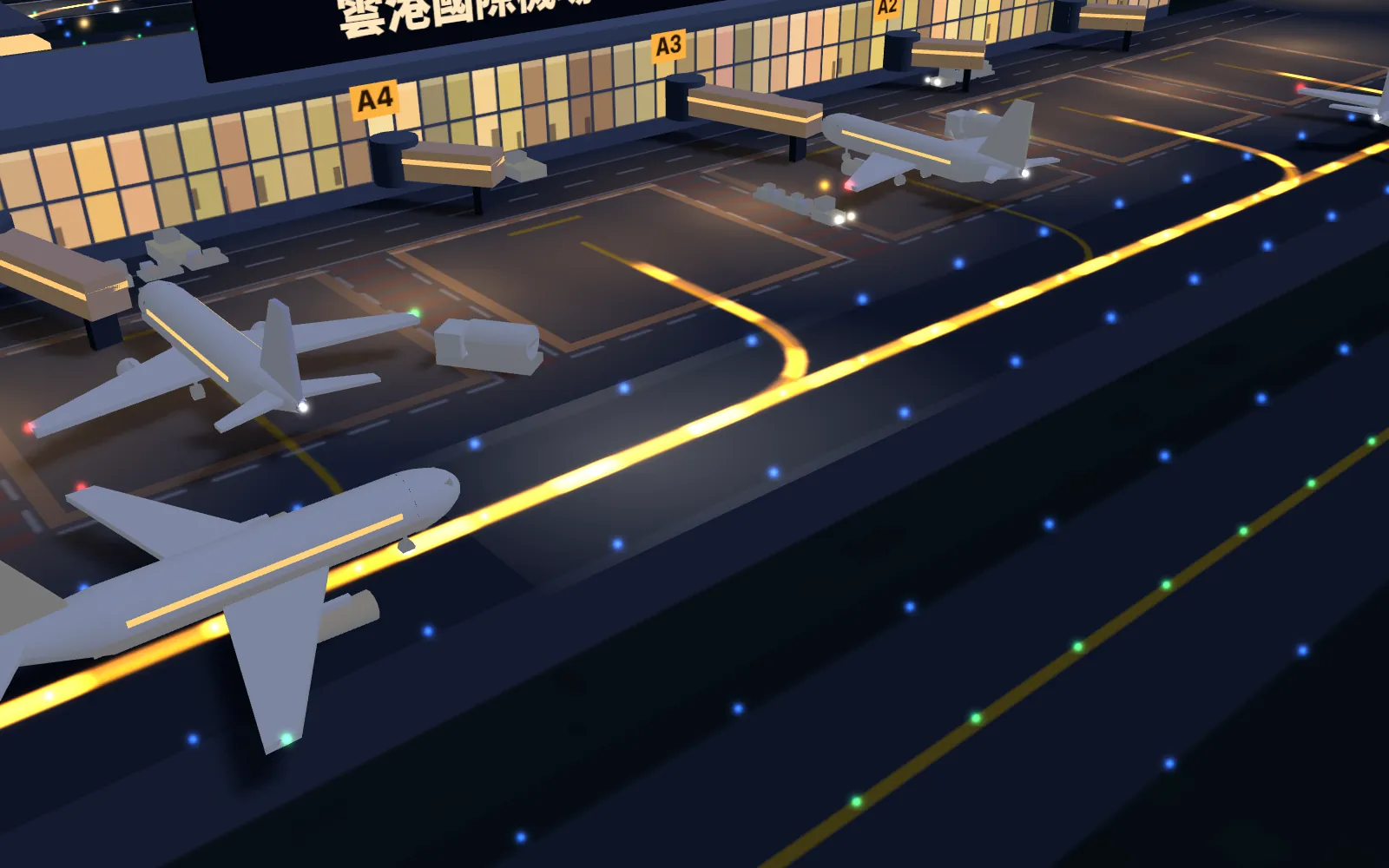
Claude also added plenty that the prompt never asked for: the airport code CLOUDPORT · YKP, every flight number and destination, the tower radio log at the bottom left (e.g. "NF828 09L cleared for takeoff"), and every flight marker on the timeline. It made all of these up; they are all fictional.
04Same structure, 4 more worlds
The other 4 worlds were made the same way: each by a fresh Claude Code agent that got only one prompt, in one turn, with no fixes. Same opening sentence, same 5 parts, different content.
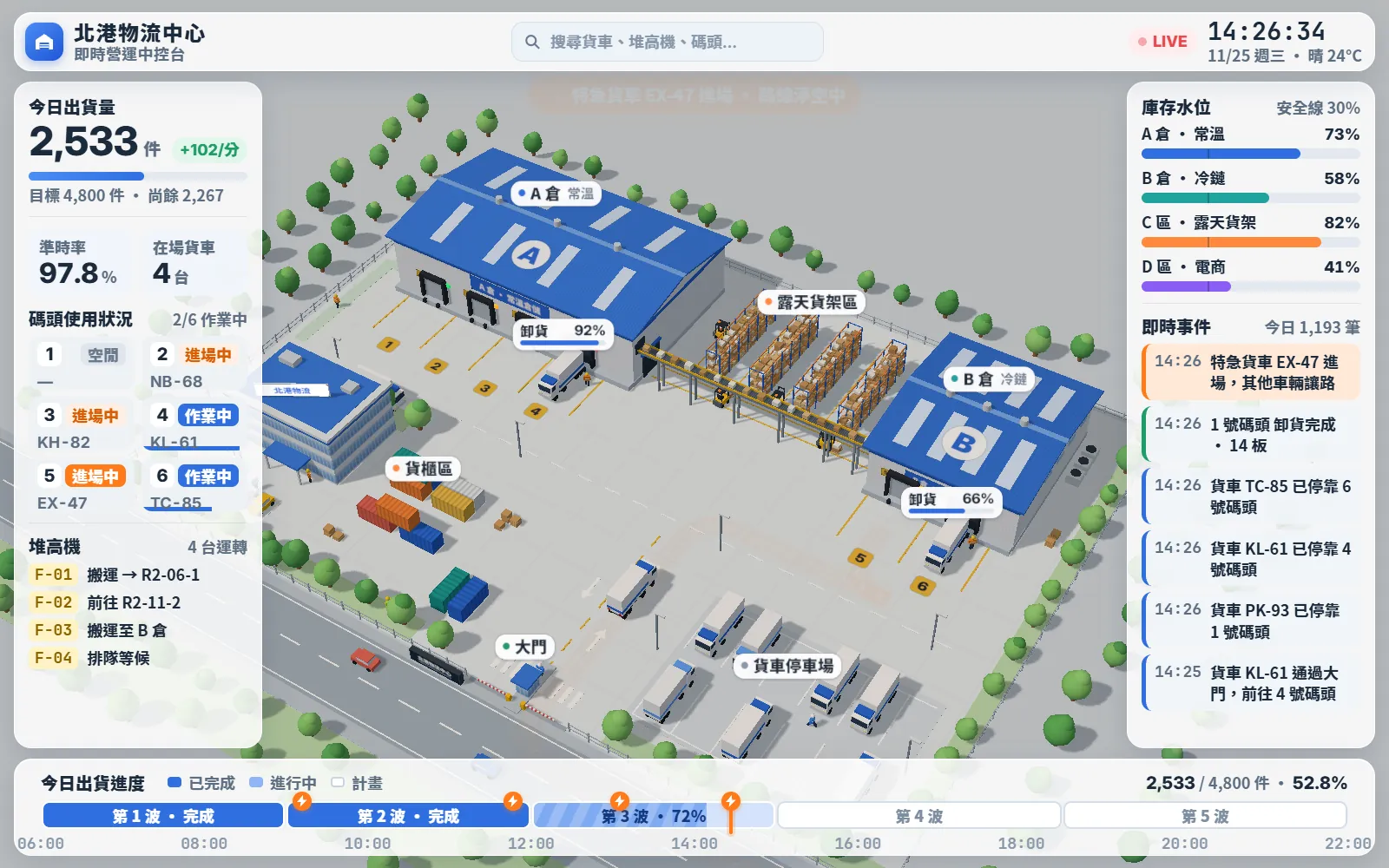
Build a single-file interactive web page (HTML, CSS and JS in one file, Three.js loaded from a CDN): a real-time 3D warehouse and logistics operations dashboard called "Beigang Logistics Center" (fictional) that feels like a strategy game. Interface in English.

1. World: a bright isometric miniature logistics center, like a finely made model toy: two or three warehouses with blue roofs, loading docks with roller doors, racks stacked with cardboard boxes, pallets, white trucks in the parking lot, a fence, roads and small green trees. Light grey-blue ground, soft shadows.
2. Life: trucks drive in through the gate, reverse up to a dock, unload and drive off; forklifts carry pallets between the racks and the docks; boxes move along conveyor belts; tiny workers walk around. The whole center keeps running on its own and never stops.
3. Interaction: drag to rotate, scroll to zoom; click a truck or forklift to show its ID, status and current route; buildings glow slightly on hover.
4. Dashboard: semi-transparent white panels on the left and right: today's shipments, on-time rate, dock status (each dock free / in use), stock level bars, a live event list (e.g. "Truck KL-08 has docked at dock 3"); the numbers change live with the simulation. A search bar and a clock at the top.
5. Extras: a "today's shipping progress" timeline along the bottom; now and then an express truck arrives, an orange route lights up on the ground and the other vehicles make way.
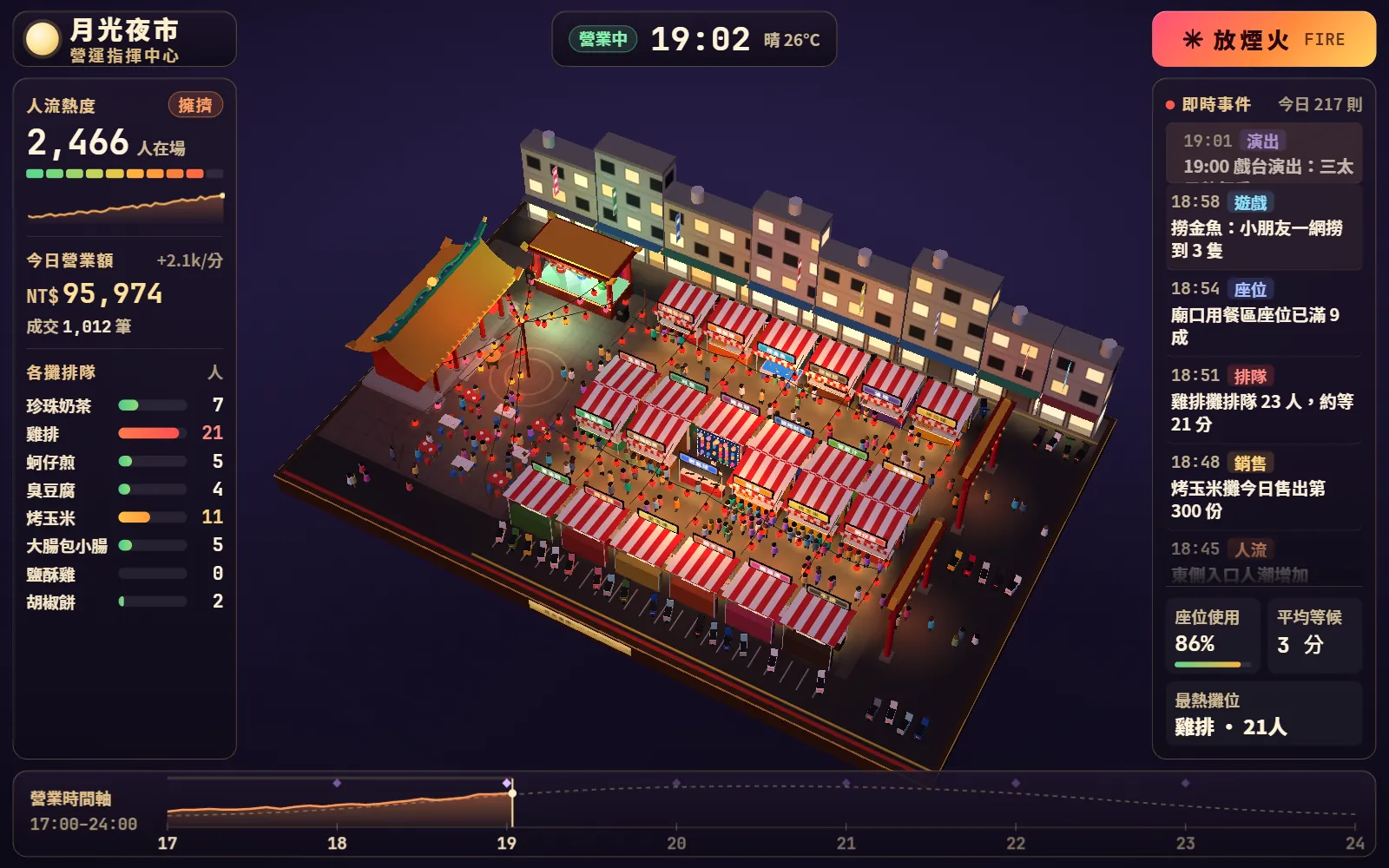
Build a single-file interactive web page (HTML, CSS and JS in one file, Three.js loaded from a CDN): a real-time 3D night market operations dashboard called "Moonlight Night Market" (fictional) that feels like a strategy game. Interface in English.

1. World: an isometric little world of a Taiwanese night market: a few streets of stalls, red-and-white striped awnings, glowing signs, strings of lanterns, folding tables and chairs, a small square in front of a temple with a stage, scooters parked along the road. A night in warm yellow light, like a finely made model.
2. Life: tiny visitors walk between the stalls, queue at stalls, sit down to eat what they bought; stalls give off steam and smoke; each stall's queue grows and shrinks; people play at the balloon-shooting stall. The whole night market keeps running on its own.
3. Interaction: drag to rotate, scroll to zoom; click a stall to show its name (fried chicken cutlet, bubble tea, oyster omelette, stinky tofu, grilled corn...), queue length and waiting time; stalls light up on hover.
4. Dashboard: on the left, crowd level, a queue-length bar per stall and today's takings; on the right, live events (e.g. "More than 20 people queuing at the bubble tea stall"); along the bottom, an opening-hours timeline 17:00-24:00. The numbers change live with the simulation.
5. Extras: a "Fireworks" button; on the hour, the temple stage lights up for a show.
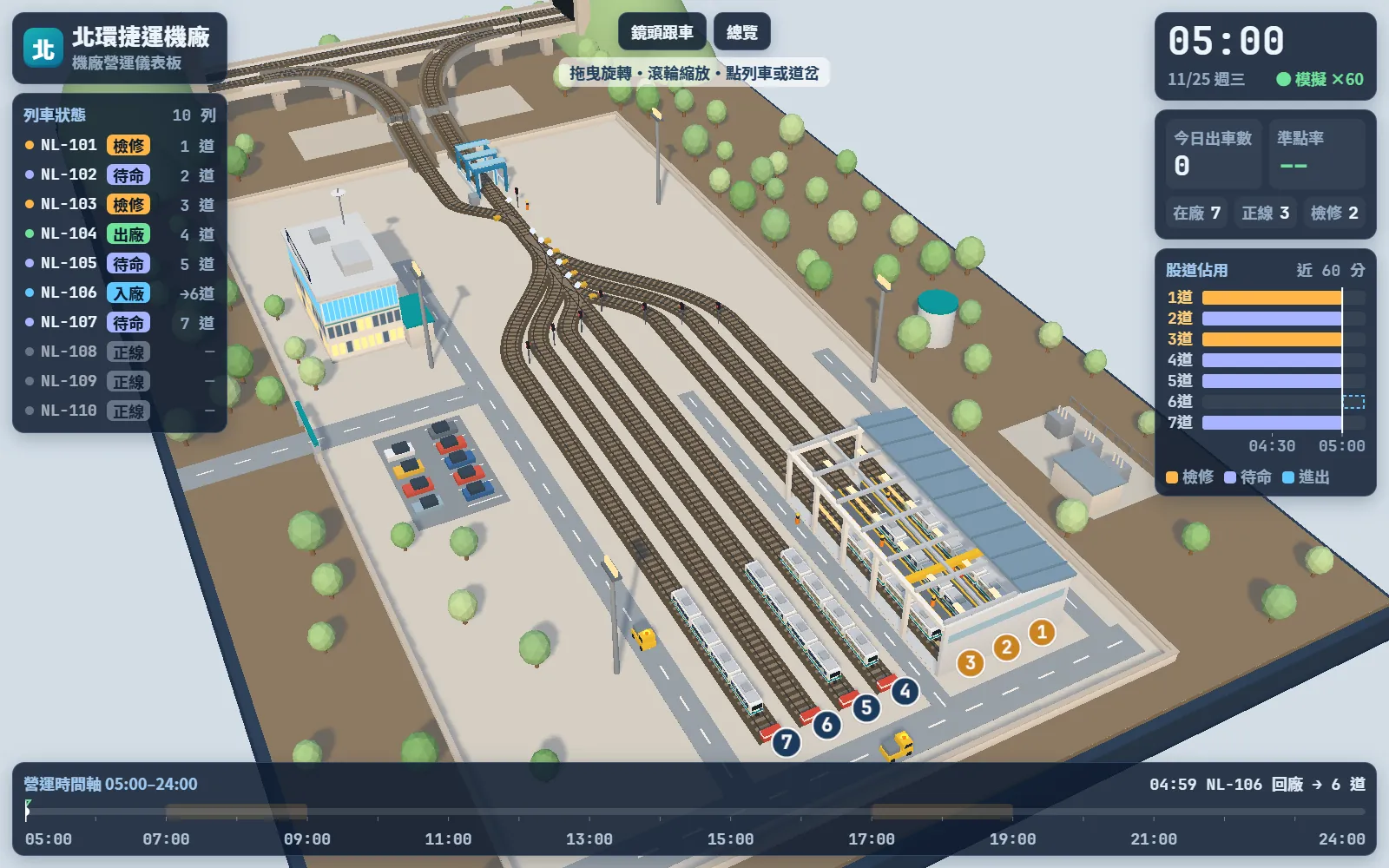
Build a single-file interactive web page (HTML, CSS and JS in one file, Three.js loaded from a CDN): a real-time 3D metro depot operations dashboard called "North Ring MRT Depot" (fictional) that feels like a strategy game. Interface in English.

1. World: a metro depot seen from above: several parallel tracks, a fan of switches, a train wash, a maintenance shed (roof half open so you can see the trains inside), a control center building, a fence, and an elevated section of track joining the main line. Pale blue early-morning sky, like a finely made model.
2. Life: trains come in from the main line, pass through the train wash (with water spray) and turn onto a maintenance track to stop; serviced trains switch on their lights and leave the depot; switches change and signal lights change color; small maintenance vehicles move between the tracks. The whole depot keeps running on its own.
3. Interaction: drag to rotate, scroll to zoom; click a train to show its number, status (arriving / washing / maintenance / standby / leaving) and mileage; click a switch to change it.
4. Dashboard: a train status list on the left; on the right, a track occupancy chart (like a small timetable), trains sent out today and on-time rate; a timeline 05:00-24:00 along the bottom. The numbers update live with the simulation.
5. Extras: when the first train of the day leaves, a "First train departing" message pops up; plus a camera button that follows a train.
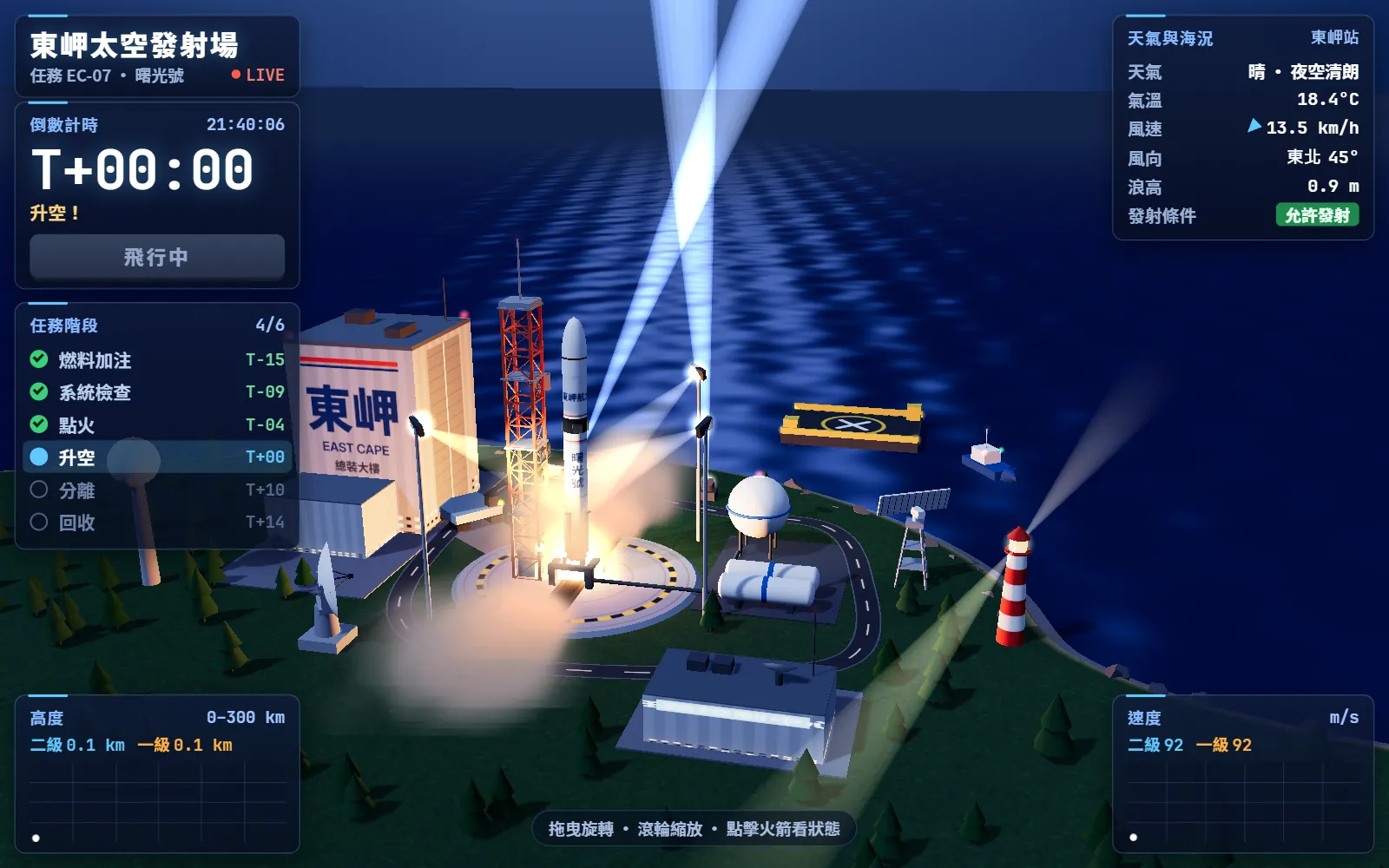
Build a single-file interactive web page (HTML, CSS and JS in one file, Three.js loaded from a CDN): a real-time 3D space launch mission dashboard called "East Cape Space Launch Site" (fictional) that feels like a strategy game. Interface in English.

1. World: a miniature space launch site on a coast at night: a launch pad and umbilical tower, a rocket standing upright, an assembly building, fuel tanks, a tracking radar dish, a control center, the sea, searchlights. Deep blue night sky with stars, like a finely made model.
2. Life: the countdown runs out, the rocket ignites with flames and smoke, the tower arms swing away, and the rocket lifts off with its exhaust trail and flies out of view; then the first stage comes back and lands upright on a platform at sea; ground vehicles move and the radar keeps turning. After one round it resets and goes again.
3. Interaction: drag to rotate, scroll to zoom; a "Launch" button to launch early; click the rocket to show the status of each stage.
4. Dashboard: in the style of mission control: a big countdown, a phase list (fueling -> systems check -> ignition -> liftoff -> separation -> recovery), live altitude and speed curves, weather and wind speed.
5. Extras: the camera shakes slightly at launch; when the booster lands safely, "Recovery successful" pops up.
05How to open, save and run it
We used Claude Code. It writes index.html straight into your folder:
- Make an empty folder and open Claude Code in it.
- Paste one world's prompt and send it.
- Wait until it has written index.html.
- Open index.html in your browser: drag to rotate, scroll to zoom, click things to see their status.
claude.ai works too; paste the same prompt:
- Start a new chat on claude.ai and paste the prompt.
- When it is done, download or copy the whole file and save it as index.html.
- Open it in your browser.
06Swap in your own world
The 5 worlds are really one prompt. Change the theme and you have a new world:
- Pick a place that runs by itself: things come in, get handled and go out. Those are the easiest. For example a container port, a ski resort or a coffee roastery.
- Copy the 5-part template above. Keep the opening sentence; change only [theme] and [name].
- Answer the 5 questions in order: what the scene looks like, what moves on its own, what a click does, which numbers go on the panels, and one extra that makes people keep playing.
- Be as concrete as you can in part 2 (life): who goes from where to where, and how one cycle ends. If this part is vague, the world will not move much.
- Give it to Claude and open index.html. Want more? Ask for it in the same chat.
07Good to know
- Claude made every world in one turn and we left its small flaws in. For example, in the warehouse a dock progress bar runs through the plate number and some event lines wrap. In your own run, just ask Claude to fix what you see.
- Results differ every run. The same prompt may give you a world that looks a bit different, with buttons and panels in other places.
- You need to be online: Three.js loads from a CDN, and web fonts (if Claude uses any) only show when you are online.
- All names, flights, plates, stalls and numbers are fictional, made up by Claude from the prompts. Cloudport International Airport, Beigang Logistics Center, Moonlight Night Market, North Ring MRT Depot and East Cape Space Launch Site do not exist.
- Our demo was built for a computer screen. On a phone you can drag and pinch to zoom, but the panels get very small, so it is best played on a computer.
- The Claude Code chat box typing the prompt in the reel is a re-typeset replay of the real prompt, not a screen capture.
- Earlier guide: turn your shop into a clickable 3D dashboard — Want to plug in your own shop's data? See its 3 prompts