"Claude can't build this"? A cinematic one-bread bakery site in 3 steps, with scroll-driven motion (prompts inside)
One bread, 7 screens, one line each. ChatGPT macro photos in one morning light, then a story-sections prompt for Claude Code. Prompts and a live demo inside.
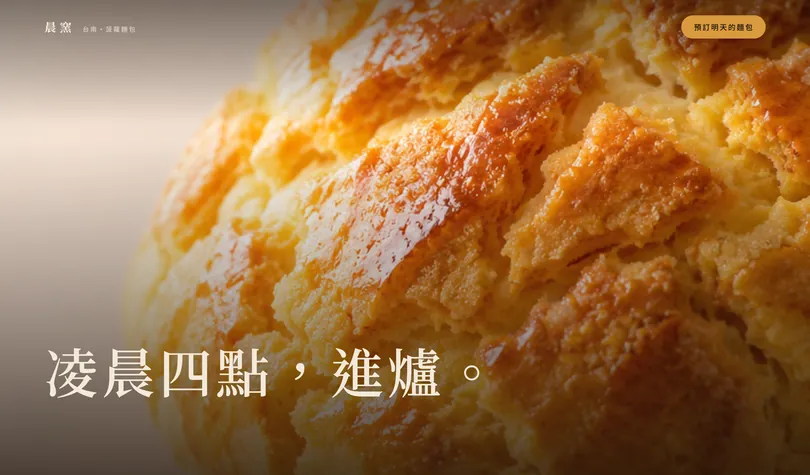
People say Claude can't build a cinematic website like this. It can, in three steps. We made a site for a fictional bakery in Tainan, Taiwan, called Chen Yao (晨窯), that only sells pineapple buns: as you scroll, the macro photo grows, a spotlight slowly opens, the bun is cut and then torn open, and it ends on "Come early."
In this guide you get: the 7-screen structure, the ChatGPT prompts for "the same bun in the same morning light", the "story sections" prompt for Claude Code (replace the [ ] parts), a plain-words explanation of the scroll-driven motion, and a live demo you can scroll. The site was built by a fresh Claude Code agent; the photos are generated by ChatGPT.
01The result: the further you scroll, the further it moves
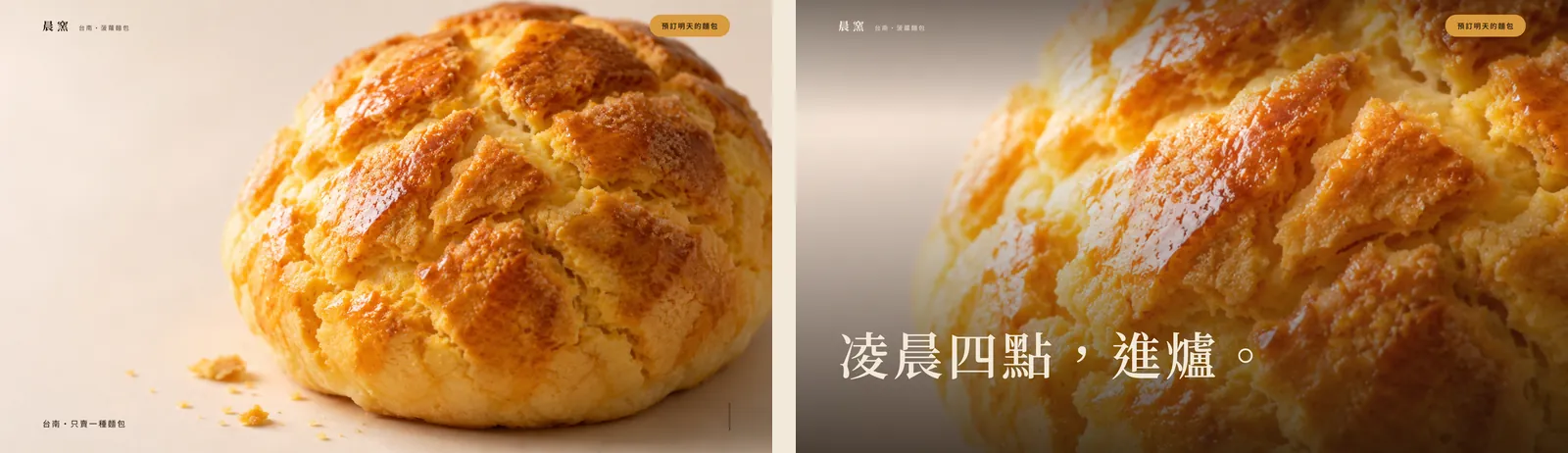
The whole site is index.html, style.css and main.js, plus 8 photos and the font files. Nothing to install, no database and no video: everything that moves is a photo or a line of text changing with your scroll.
- Live demo: the Chen Yao site — Open it on a computer or phone, scroll down slowly, then scroll back up
027 screens, one idea per screen
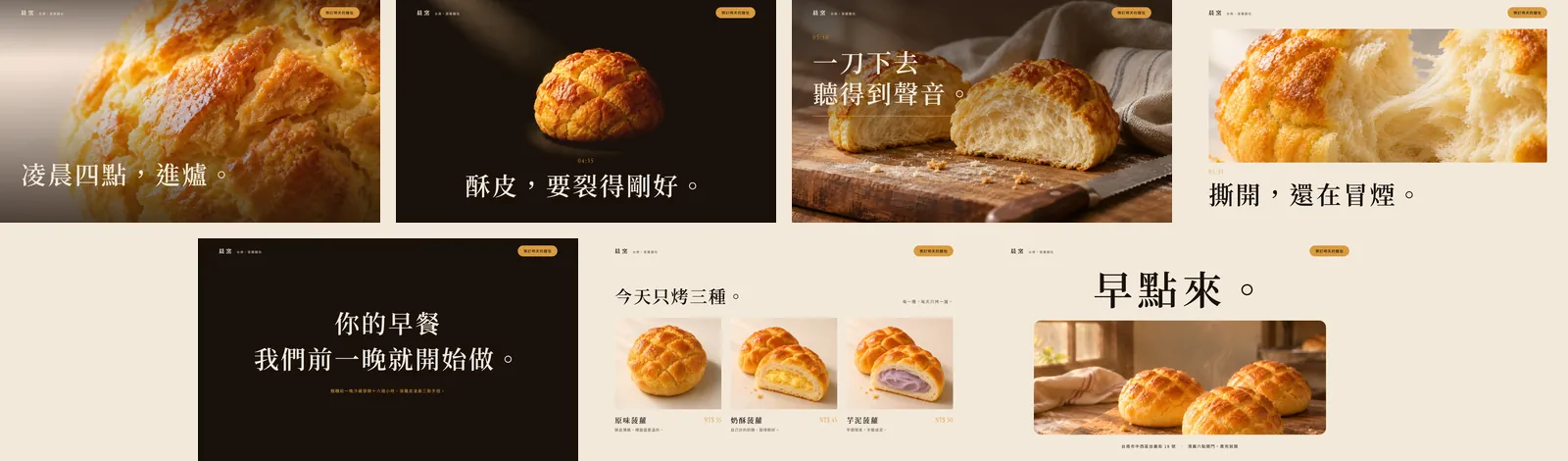
The backbone of the site is one bun's story, from the oven to being cut, torn open and taken home, split into 7 screens. Each screen has one photo and one line (the site's lines are in Chinese; English shown here):
- Opening: a full-screen macro photo that grows as you scroll, then "Into the oven at 4 a.m."
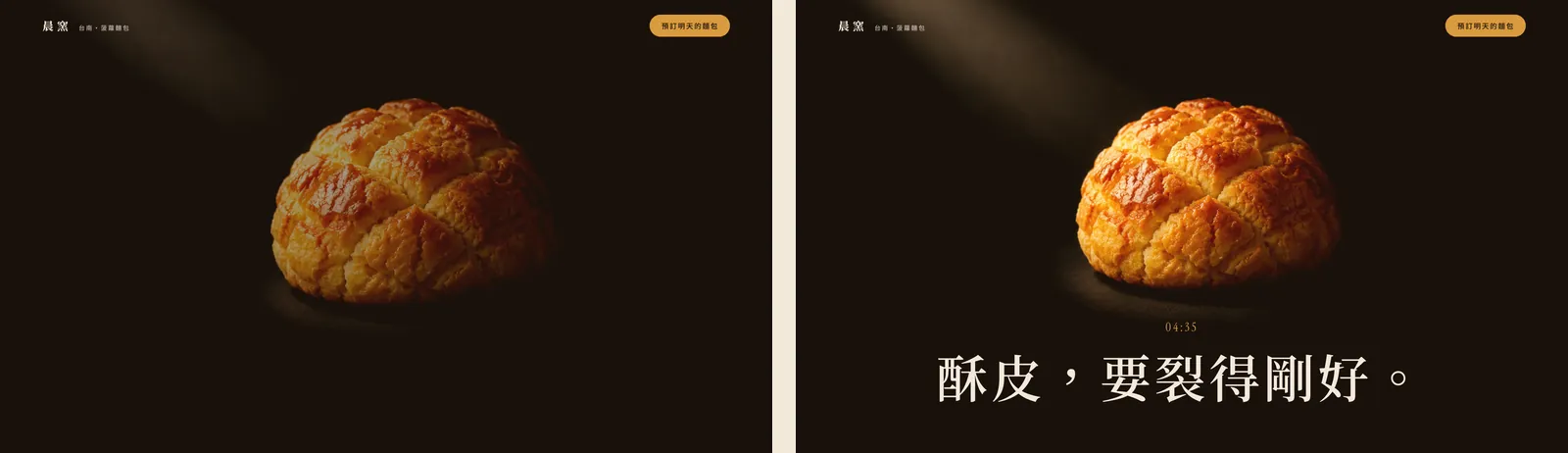
- Blackout: the screen goes black, one bun under a spotlight, "The crust has to crack just right."
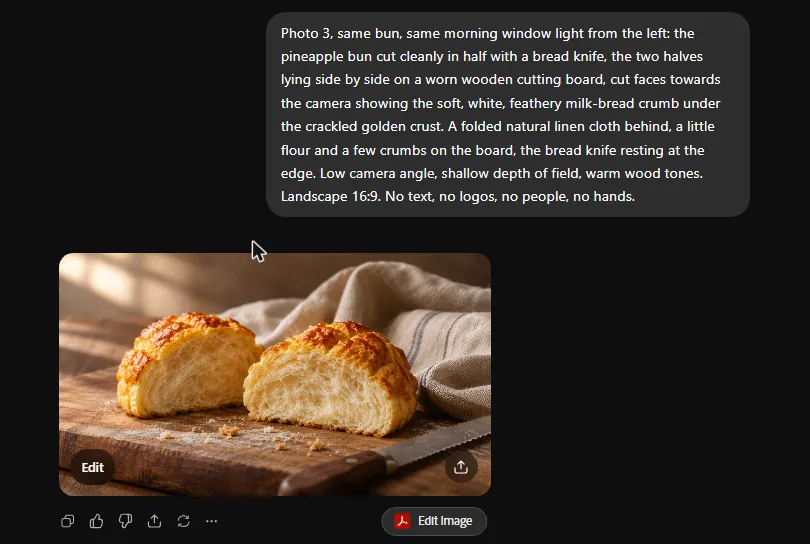
- The cut: halved on a wooden board, "One cut, and you can hear it."
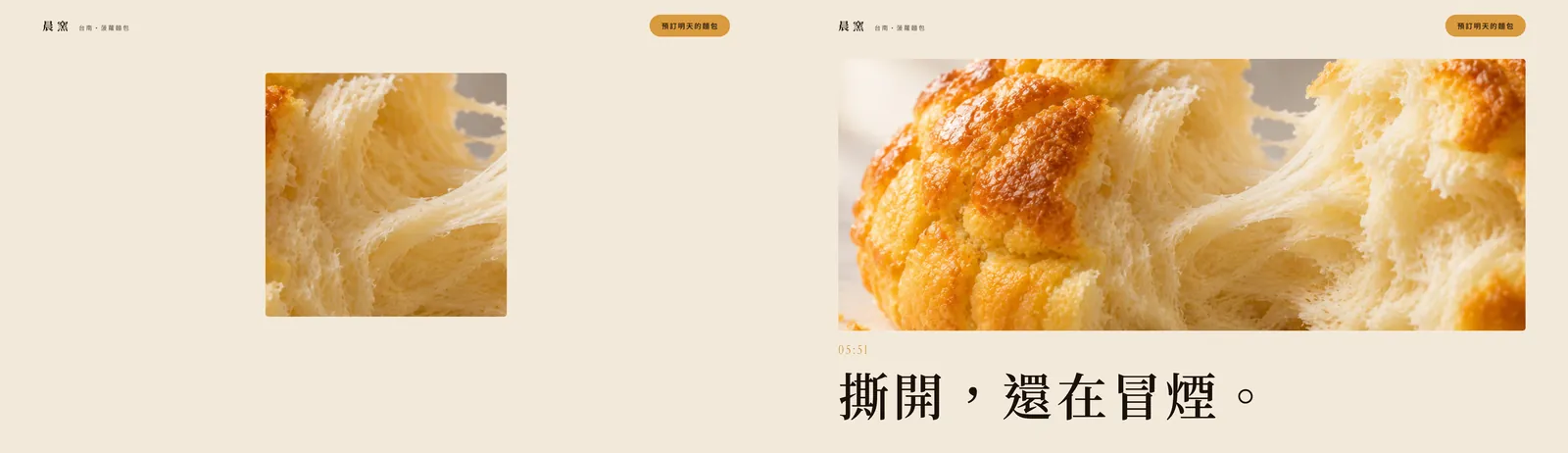
- White close-up: the bun torn open, "Torn open, still steaming."
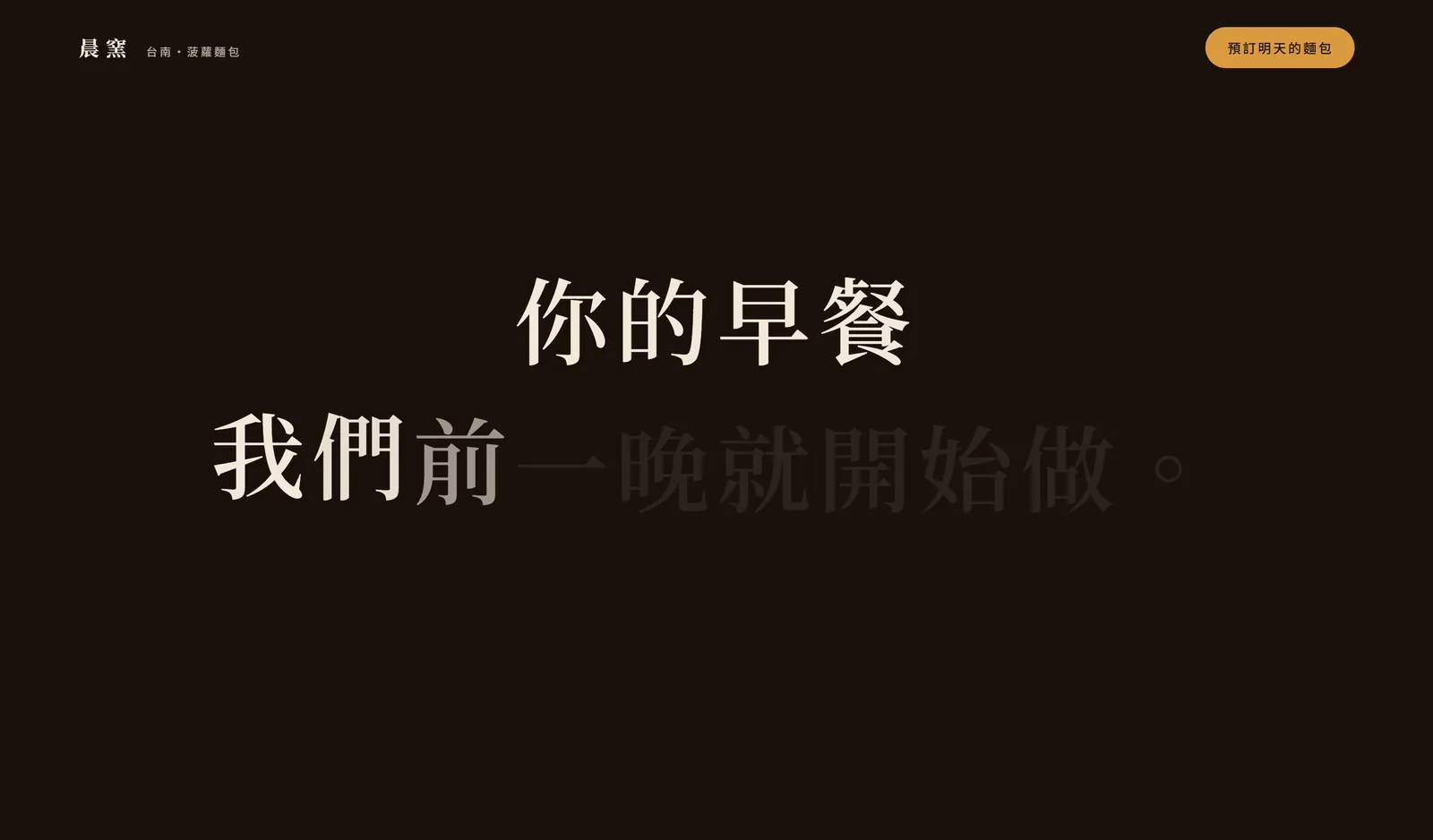
- Quiet text screen: no photo, "Your breakfast starts the night before."
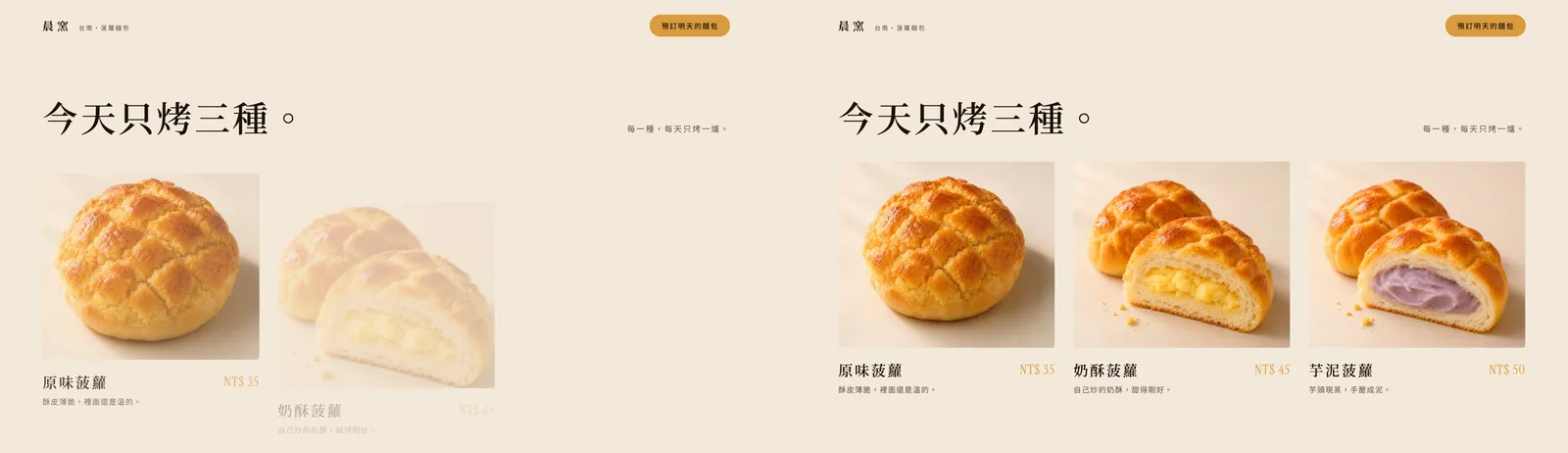
- Menu: three square photos in a row, each with a name, a one-line description and a price.
- Ending: a big "Come early.", one rounded photo card, and one line with the address and hours.
03Step 1: one bread, one line per screen
Don't open any AI yet. Take a sheet of paper and write down your hero product and 7 lines.
- Pick ONE hero: one bread, one signature drink, one product. The whole site is about it.
- Write 7 headlines, each short, in this order: out of the oven → in the light → cut → torn open → one quiet line → menu → invite people in.
- Add at most one small line per screen, with one real detail (ours: the dough proofs in the fridge for sixteen hours overnight).
- Pick only three colours: the hero's colour, one dark and one light. Ours are bread gold, dark coffee black and rice white.
04Step 2: ChatGPT macro photos, same bun, same morning light
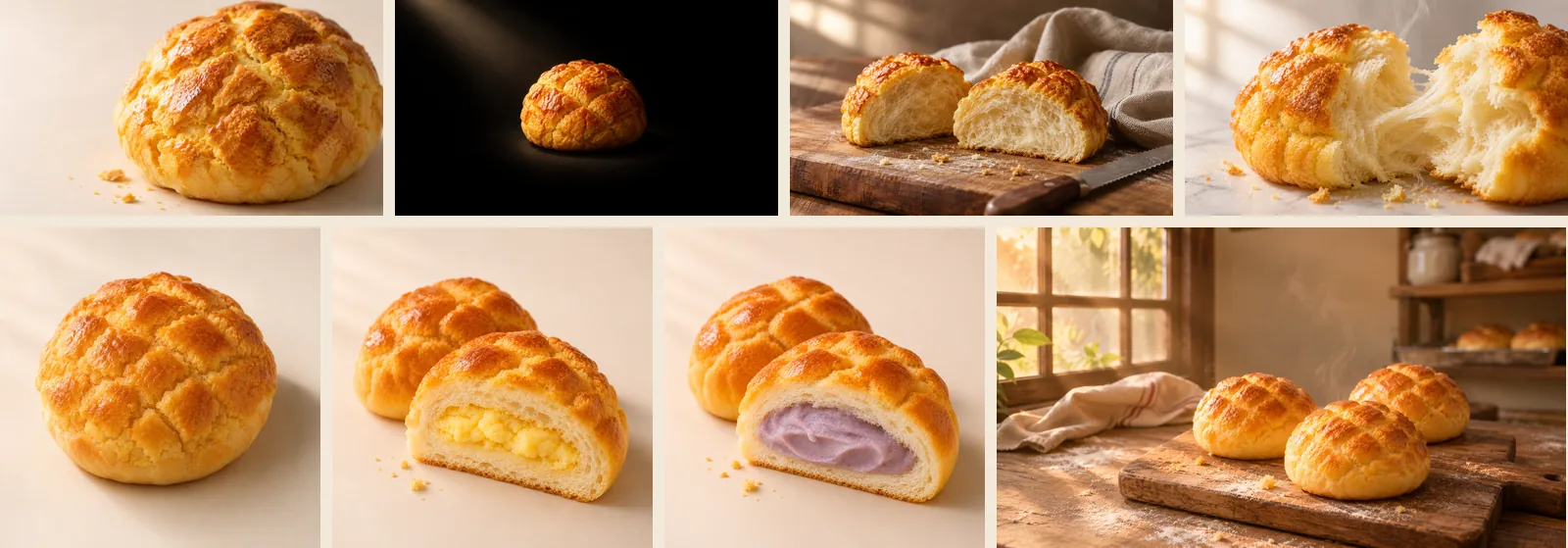
The secret of the cinematic feel is that it looks like one photo shoot. So every photo shows the same bun in the same early-morning window light from the left.
- Start a new ChatGPT chat, paste the prompt for photo 1 and replace the [ ] parts.
- Once you like it, send the lines below one at a time in the same chat; each one starts with "same bun, same light".
- Save the files with the names the site uses: hero, spotlight, cut, torn, menu-1, menu-2, menu-3, close.
Create an image. I'm making a cinematic one-product website for a small fictional bakery in [city] that only sells [one bread, e.g. Taiwanese pineapple buns]. I need a matching photo series: the SAME [bread], the SAME soft early-morning window light from the left in every shot.
Photo 1 (hero): an extreme close-up macro product photograph of one freshly baked [bread] on a seamless warm off-white background. [Look: e.g. golden, glossy, crackled crust in an irregular diamond pattern], a few crumbs on the surface below. Soft early-morning window light from the left, gentle shadow to the right, shallow depth of field, hyper-real premium editorial food photography. The [bread] sits right of centre and fills most of the frame height, calm empty space on the left. Landscape 16:9. No text, no logos, no people, no hands.
Photo 2, same [bread], same series: alone on a pure black background, lit by one narrow soft spotlight from above-left, the [crust] glowing amber and everything around it falling into deep black. Centred and medium-small, with a lot of black space around it (room for one line of text under it). Landscape 16:9. No text, no logos, no people, no hands.

Photo 3, same [bread], same morning window light from the left: cut cleanly in half with a bread knife, the two halves side by side on a worn wooden cutting board, cut faces towards the camera showing [the crumb]. A folded linen cloth behind, a little flour and a few crumbs on the board, the knife resting at the edge. Low camera angle, shallow depth of field. Landscape 16:9. No text, no logos, no people, no hands.

Photo 4, same [bread], same light: an extreme close-up of it freshly torn open (no hands visible), the soft crumb stretching into fine strands, a thin wisp of steam rising, on a pale white marble surface. Bright, airy, high-key. Landscape 16:9. No text, no logos, no people, no hands.

Menu set of 3: same warm off-white background, same light from the left, same camera height (slightly above, 30 degrees), same distance. One at a time: A, the plain one, whole; B, cut in half showing [filling 1]; C, cut in half showing [filling 2]. Square 1:1. No text, no logos, no people, no hands.

Closing photo: three of the same [bread] on a worn wooden board by a window at dawn, low golden light from the left, a thin curl of steam, a soft out-of-focus bakery behind, a little empty space above. Landscape 16:9. No text, no logos, no people, no hands.
05Step 3: hand the "story sections" prompt to Claude Code
- Make an empty folder with an img/ folder inside and put the 8 photos in it.
- Open Claude Code in that folder.
- Paste the prompt below and replace the [ ] parts with your shop, your bread and the 7 lines from step 1.
- Wait for it to write index.html, style.css and main.js.
- In the terminal type npx serve (or any local server), open the page in your browser and scroll slowly.
Build a cinematic website for a shop that sells only one kind of [bread].
Shop: "[Chen Yao]", a small [bakery] in [Tainan] (fictional). It only sells [pineapple buns] and [opens at 6 a.m. every day, closing when they sell out].
The photos are in img/: hero, spotlight, cut, torn, menu-1, menu-2, menu-3, close. They all show the same [bun] in the same early-morning window light.

Lay it out as "story sections": one screen says one thing, and scrolling down feels like walking into the shop step by step.
1. Opening: the hero macro photo, full screen. The shop name small in the top left, a "[Reserve tomorrow's bread]" button in the top right. As you scroll, the photo slowly grows and pushes in on [the cracks in the crust], and one big line floats up: "[Into the oven at 4 a.m.]"
2. Blackout: the whole screen goes black, the spotlight [bun] under a spotlight, one line below it: "[The crust has to crack just right.]"
3. The cut: cut full screen, one line: "[One cut, and you can hear it.]"
4. White close-up: the torn close-up, one line: "[Torn open, still steaming.]"
5. Quiet text screen: no photo, just words: "[Your breakfast starts the night before.]" One small line below: [The dough proofs in the fridge for sixteen hours overnight; the crust is shaped by hand at 3 a.m.]
6. Menu: three photos in a row (menu-1 [classic], menu-2 [custard], menu-3 [taro]), each with a name, a one-line description and a price.
7. Ending: a big "[Come early.]", the close photo below it as a large rounded card, then one line with the address and opening hours ([opens at 6 a.m., closes when sold out]).

Rules:
- Few words: at most one headline and one small line per screen. Headlines in a serif, big, with room to breathe.
- Only three colours: [bread gold, dark coffee black, rice white].
- All motion follows the scroll (scroll-scrubbed): photos grow and move with the scroll, text fades in and rises with the scroll, the blackout darkens with the scroll. The further you scroll, the further it moves; no autoplay.
- [English].
We gave it only this prompt plus some technical notes. Everything below Claude Code added on its own: the time stamps 04:35, 05:50 and 05:51, the menu heading "Only three today." (今天只烤三種。), the descriptions and prices of the three buns, the spotlight circle opening, a gold knife line on the cut screen, the photo frame on the torn screen opening like bread being torn, and the quiet line lighting up character by character. It also cut the Chinese fonts down to only the characters the page uses.
Always look through every screen when it's done. Our first version had two headlines that wrapped right after a comma, leaving an ugly comma at the end of the line. One more message in the same Claude Code chat fixed it:
When a headline wraps, don't leave a comma at the end of the line. Change "[One cut, / and you can hear it.]" to "[One cut / and you can hear it.]" (drop the comma where the line breaks). Do the same for any headline on the phone layout that breaks after a comma. Change nothing else. Take a screenshot of that screen to check, then tell me briefly which files you changed.
06How the scroll-driven motion works (in plain words)
The site has no video and no autoplay. Each screen "pins" for a while: as you scroll, the screen stays put and the things inside it move. In our version each screen takes about 1.6 to 2.5 screen heights of scrolling before the next one arrives.
- The page keeps reading how far you have scrolled.
- It turns that into progress through the current screen: 0% when it arrives, 100% when it is about to leave.
- Every effect is tied to a stretch of that progress. On the opening screen, for example, the photo grows from its normal size to about 2× between 0% and 86%, the headline fades in and rises between 26% and 48%, and from 76% to 97% the screen darkens into the blackout screen.
- Stop and it stops; scroll back and it plays in reverse. There are no timers, so scrolling faster makes it move faster.
07Good to know
- Chen Yao (晨窯) is a fictional bakery. The address on the site (No. 18, Xinyi Street, West Central District, Tainan) was made up by Claude (the street is real, the number is invented), and so were the menu prices NT$35, 45 and 50. For your own site, put the real address and prices in the prompt.
- All photos were generated by ChatGPT; they are not real buns. For a real shop, use your own photos or label them as illustrations on the site.
- No customer reviews. The site we took as a reference has a customer-quote screen, but reviews for a fictional shop would be made up, so we left it out on purpose. Don't let AI invent reviews for you.
- Check every screen when it's done: headline line breaks, and whether any text is covered on phones. A second turn fixed our two line-end commas.
- Scroll-driven motion takes more processing power, and some people turn motion effects off. Before going live, you can ask Claude Code to add a still version for the reduced-motion setting (prefers-reduced-motion); this version doesn't have one.
- Claude Code gives a slightly different result every run. For another take on a bakery website (one prompt, 5 settings, before and after), see our earlier guide.
- Earlier guide: why does your Claude-made bakery website look AI-made? — One prompt, 5 settings, before and after