A hand-controlled website with Claude Code: open your hand and the portrait folds into paper (MediaPipe, all prompts)
A fist shows the photo; open your hand and it folds into kraft paper. ChatGPT draws the four fold states, Claude Code builds the page with MediaPipe Hands.
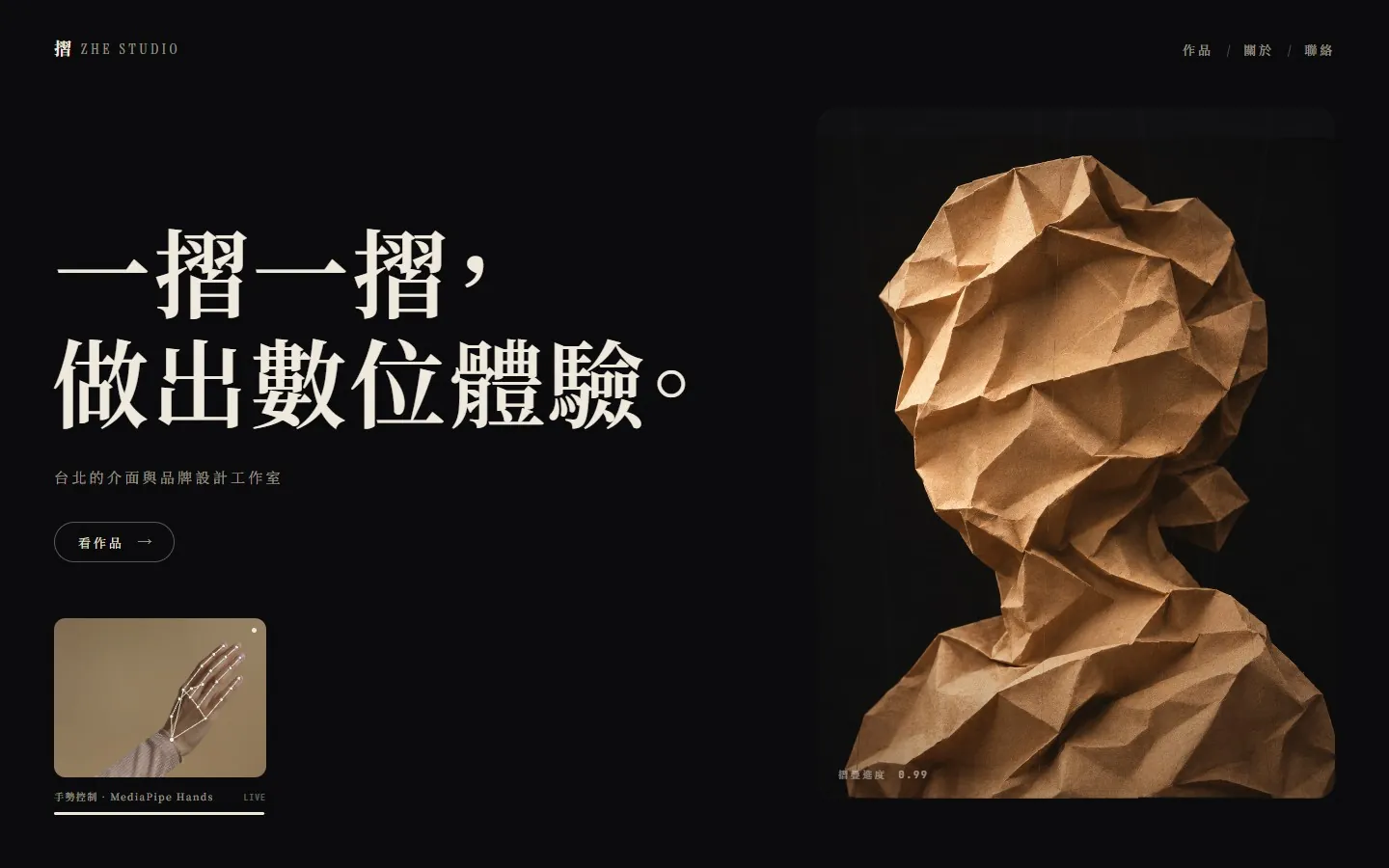
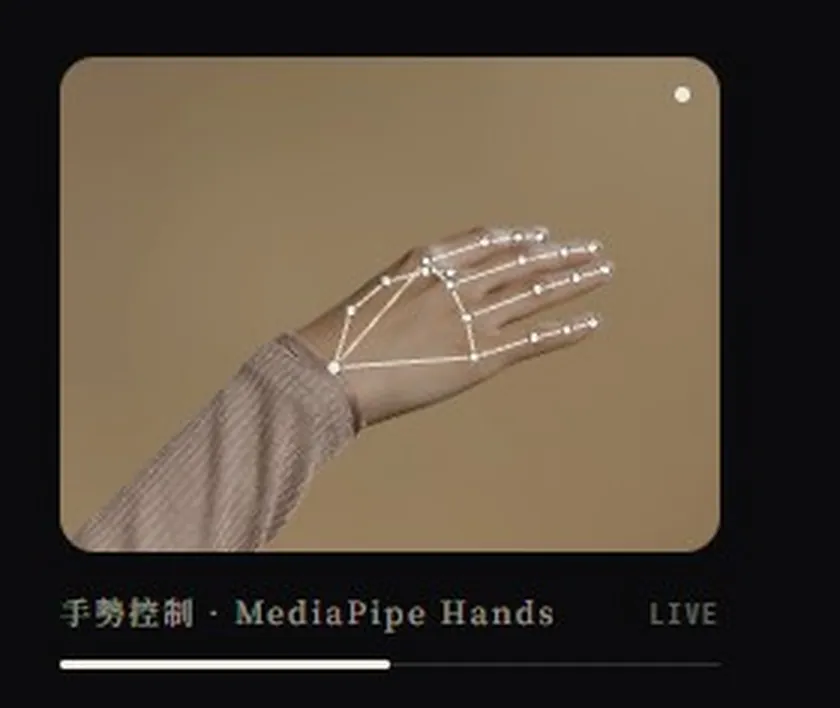
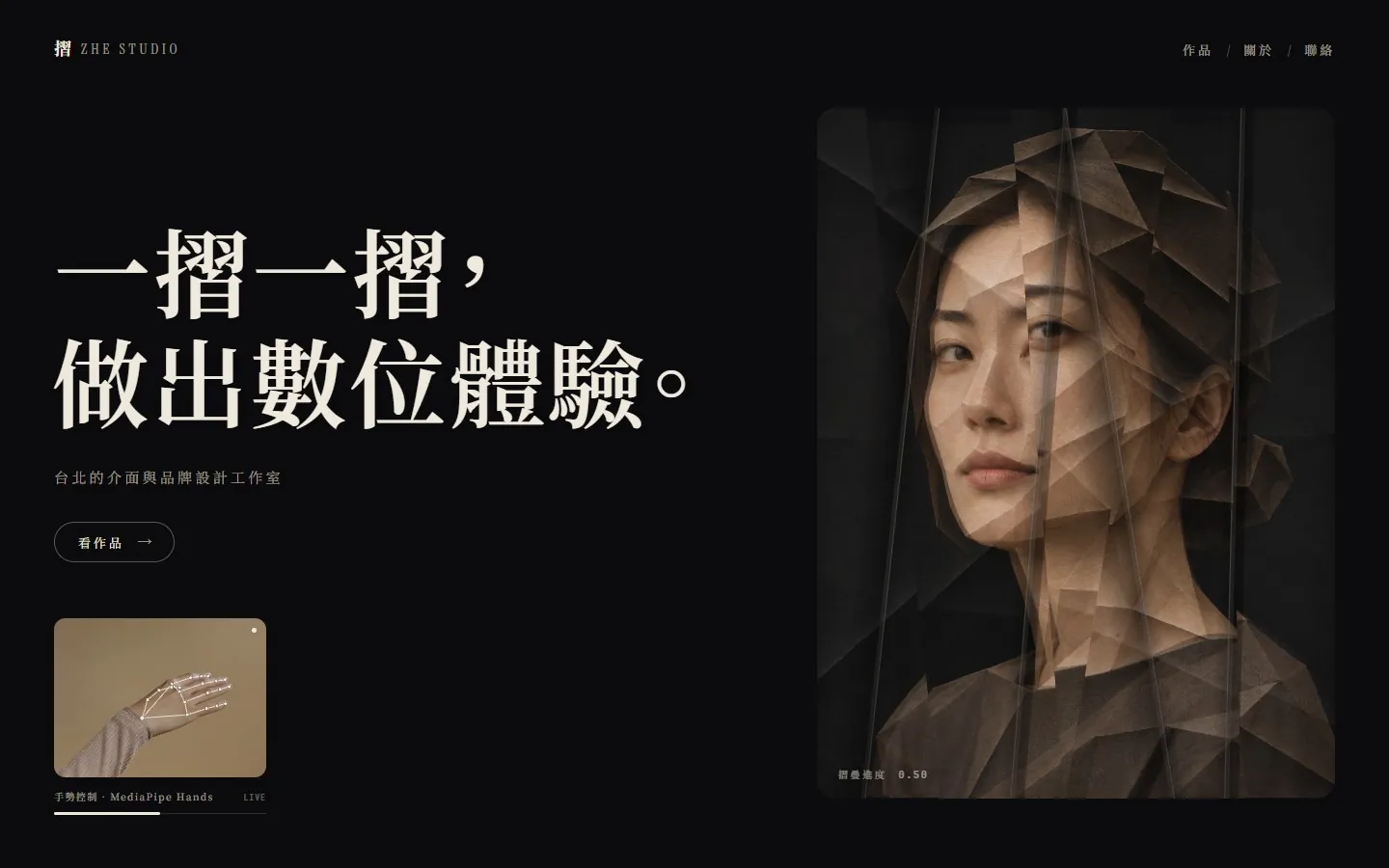
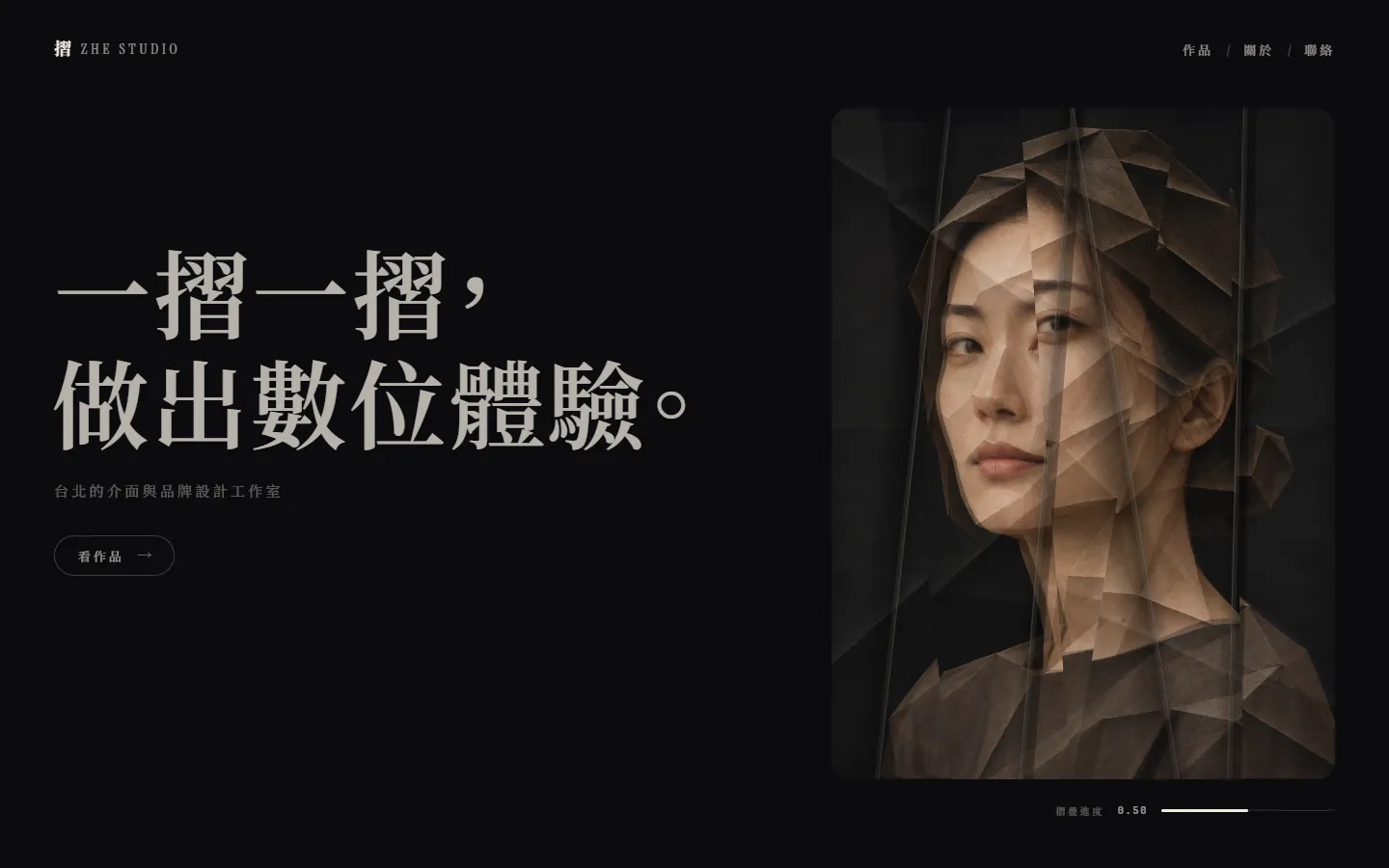
Make a fist in front of the camera and the right side shows a portrait photo. Open your hand slowly and the photo folds, crease by crease, into a crumpled kraft-paper sculpture. A small tile bottom left draws the skeleton of your hand, 21 joints moving with it.
Claude Code wrote this homepage; the camera and the gesture come from Google's MediaPipe Hand Landmarker, and the portrait's four fold states were drawn by ChatGPT. The studio, ZHE STUDIO, is fictional, the person in the portrait is AI-generated, and we didn't change a single line of the code.
Below are the exact prompts we gave Claude Code (replace the [] parts), the ChatGPT asset prompts, what each step produced, and the things to watch out for at the end.
01The result: a fist is the photo, an open hand is the paper sculpture
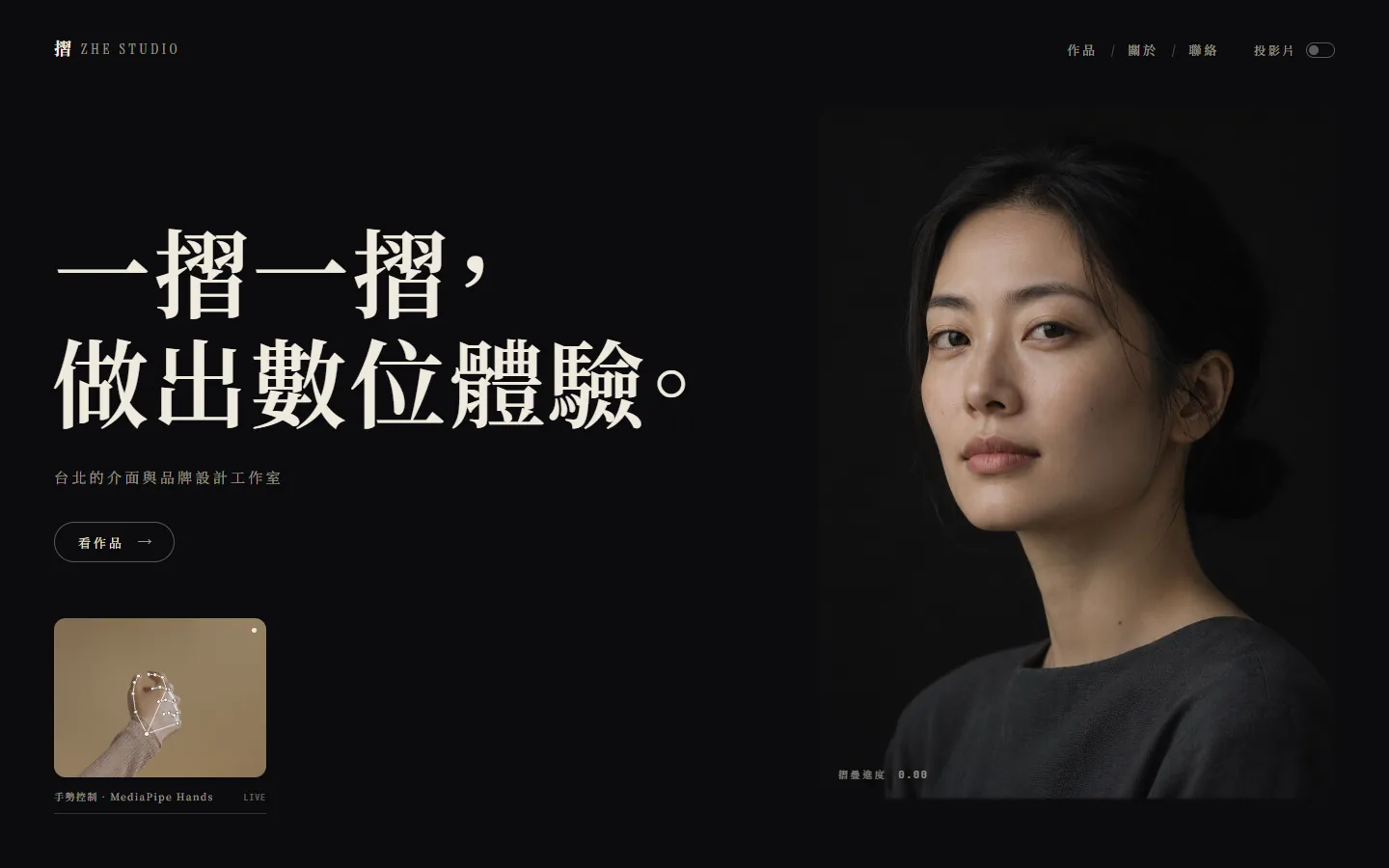
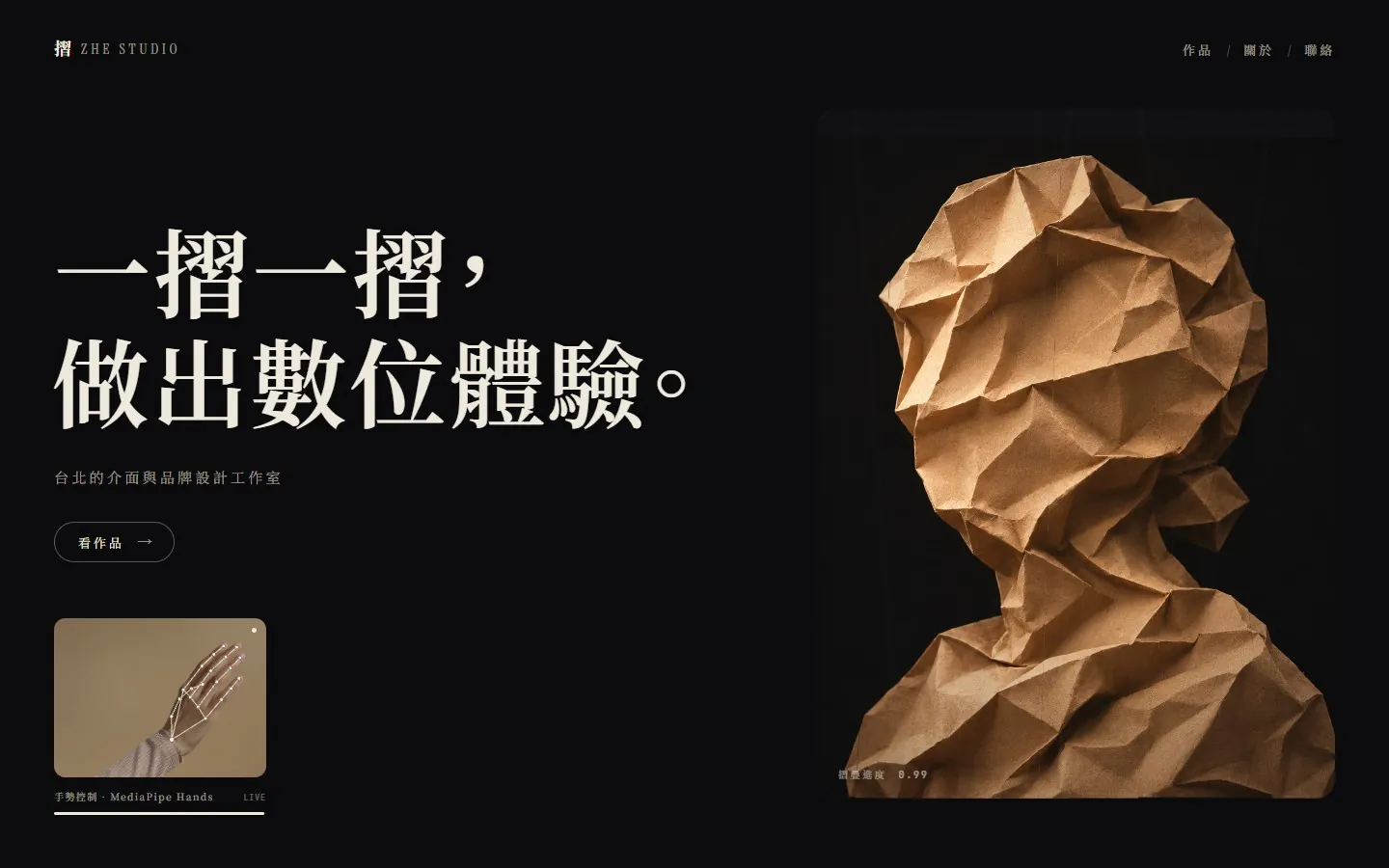
The whole site is static files: index.html, style.css and app.js, plus the four portrait images in img/, the MediaPipe files in mp/ and the fonts. Nothing to install and no backend. Open it with a local server and it works; put it on any static host and it is live.
In this guide you get: the ChatGPT asset prompts (one portrait plus three fold states), Claude Code prompt 1 (the hand-controlled homepage), the follow-up prompt that fixed the fold transition, prompt 2 (slide mode), prompt 3 (no camera, scroll-transform instead), and how to swap the portrait for a flower.
02Assets: four portraits from ChatGPT, each more folded than the last
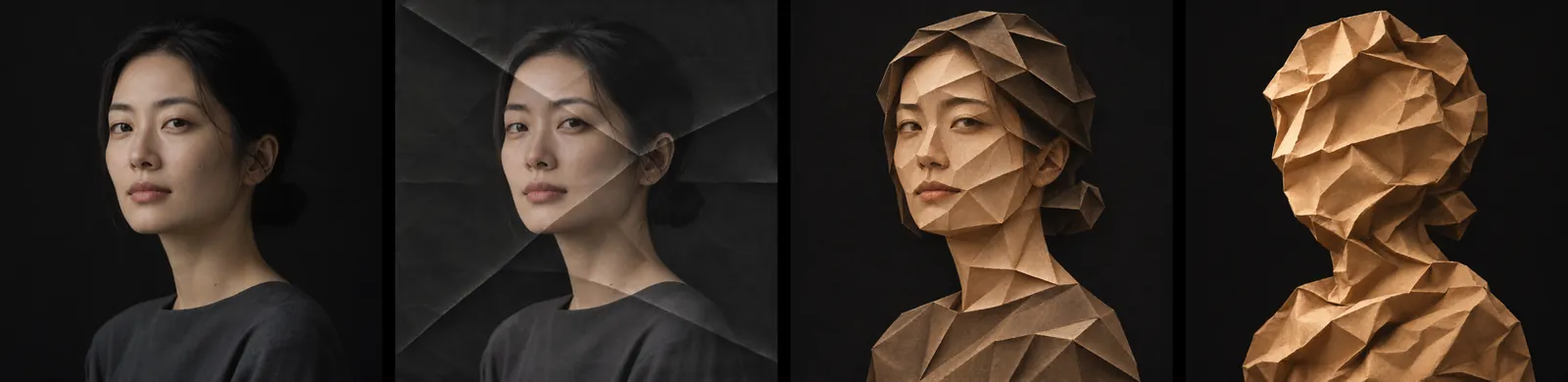
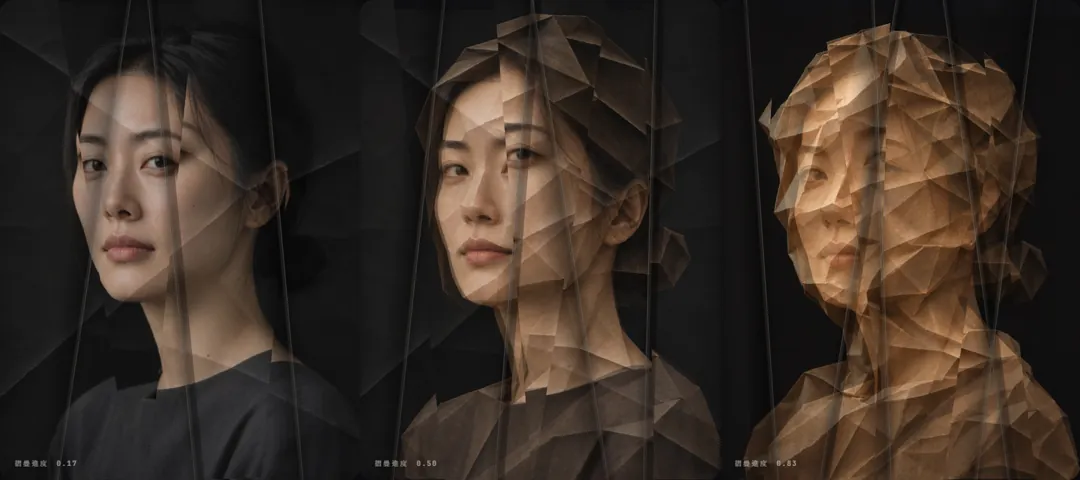
The page doesn't really fold a photo. It blends continuously between four images: the original photo, 30% folded, 70% folded, and a full paper sculpture. Make all four in one ChatGPT chat with the same framing, position, size and lighting, or Claude can't join them into one continuous fold.
- Open ChatGPT and paste the prompt for image 1 to make the portrait (a fictional person, never a real person's photo).
- In the same chat ask for images 2, 3 and 4, each time saying "same person, same pose, same framing, same background".
- Save all four as square PNGs named p1.png to p4.png in img/portrait/ inside a new project folder.
Message 1:
A high-end studio portrait photo of a fictional [woman in her early thirties, East Asian, hair pulled back into a low bun], calm neutral expression, head and shoulders, three-quarter view turned slightly to her left, on a plain near-black background, one soft directional key light from the left, matte skin, [muted dark grey top], editorial look like a design-studio website hero image. Square 1:1, no text, no logo.

Message 2:
Same person, same pose, same framing, same lighting and same near-black background, but the photo itself now looks folded like paper: about 30% folded. A few large straight triangular creases cross the face, hair and shoulders, with matte paper texture and soft shadows along the folds. The photo is still clearly readable. Keep the position and size in the frame exactly the same. Square 1:1, no text.

Message 3:
Same person, same framing and background, now about 70% folded: the head and shoulders have become a faceted low-poly paper sculpture, many angular folded facets, warm brown kraft-paper tones taking over the photo colours, only a hint of the face left. Same silhouette, position and size. Square 1:1, no text.

Message 4:
Same framing and background, fully folded: where the head and shoulders were there is now an abstract crumpled, folded paper sculpture in warm brown kraft paper, no facial features at all, dense creases and facets catching the same key light from the left, casting soft shadows on the black. Same size and position in the frame. Square 1:1, no text.
03Prompt 1: the hand-controlled homepage
- Open Claude Code in the folder that holds img/portrait/.
- Paste the prompt below (replace the [] parts) and press Enter.
- When it is done, run npx http-server in the folder, open the address it prints and allow the camera. If you just double-click index.html, the browser blocks the modules and the camera.
Build the hero section of a design-studio homepage (a single page) for "[ZHE STUDIO]", a [UI and brand design studio] in [Taipei] (fictional).

Layout (dark version):
- A full-bleed near-black background (around #0b0b0d) with a row of very small navigation on top: the "[ZHE STUDIO]" wordmark top left, "Work / About / Contact" top right.
- On the left a huge serif title in two lines: "[One fold at a time,]" "[we make digital experiences.]", filling the left half. Under it one small line "[A UI and brand design studio in Taipei]", then a small thin-outlined button "[See work]".
- On the right a portrait in a tall rounded panel that takes most of the height of the right half. The portrait has four states in img/portrait/ (p1.png is the original photo; p2, p3 and p4 are each more folded, and p4 is already a crumpled paper sculpture). Turn these four into one continuous "fold progress" from 0 to 1: no hard cuts, use cross-fades plus a little displacement or crease distortion, so it looks like the photo is really folding slowly.
- Bottom left a small webcam tile (rounded, 4:3, about 220px wide) showing the camera image (mirrored, like a normal video call) with the hand skeleton drawn on top by MediaPipe Hands: 21 joints and their connections, in thin light lines and small dots. Under the tile one line of very small text "手勢控制 · MediaPipe Hands" and a tiny progress bar.

Interaction (the important part):
- Read the camera with MediaPipe hand tracking (HandLandmarker from @mediapipe/tasks-vision).
- How open the hand is controls the fold progress of the portrait: fist = original photo (0), fully open hand = paper sculpture (1). Compute openness from the distance of the five fingertips to the wrist (relative to palm size), smoothed (low-pass), no jitter.
- When no hand is detected, the progress slowly returns to 0.

Overall it should feel like an award-winning design studio site: clean, bold, generous white space, careful letter-spacing and line-height, with only near-black, off-white and the portrait itself as colours.
Claude Code wrote three files: index.html, style.css and app.js. It runs HandLandmarker in VIDEO mode and calls detectForVideo on every frame, trying the GPU first and falling back to the CPU. Openness is the average fingertip-to-wrist distance divided by palm size, then low-passed, so a slightly shaky hand doesn't make the progress jump.
We also gave it a few technical conditions: the three MediaPipe files (vision_bundle.mjs, the wasm folder and hand_landmarker.task) were already in mp/, the fonts in fonts/, everything local; ?cam=clip.mp4 in the URL uses that video instead of the camera; and it had to check its own work with headless Chrome screenshots. If you haven't downloaded anything, just add "load @mediapipe/tasks-vision from a CDN" to the prompt.
- Claude Code
- MediaPipe Hand Landmarker guide for Web — npm package @mediapipe/tasks-vision; the official sample reads the camera with detectForVideo
04Fold transition wrong? Say what it looks like and what it should look like
The first transition was fifteen to twenty thin vertical strips, like a blind or a video wipe, and it read as noise when small. We didn't say "make it nicer". We said what it looks like now, what it should look like, and what must not change. This is the follow-up, pasted in the same chat:
Change the fold transition: right now the effect between two states is thin vertical strips (fifteen to twenty narrow bars, like a blind or a video wipe), which looks like noise when small, not like paper folding. Make the transition look like a photo really being folded:
- Between two neighbouring states use mainly a cross-fade, with displacement as a secondary effect; for the displacement use a few (4 to 6) large slanted or vertical facets (like the big fold lines of origami), each slightly tilted/compressed along its fold line, with a soft shadow and a thin highlight along the fold, strongest in the middle of the transition and back to the plain image at both ends.
- Use this one transition style throughout (p1→p2, p2→p3, p3→p4 all the same); no more thin stripes.
- Change nothing else: the interaction, camera, skeleton, slide mode, scroll mode and the exposed window variables stay as they are.
05Prompt 2: slide mode, move your hand to turn the page
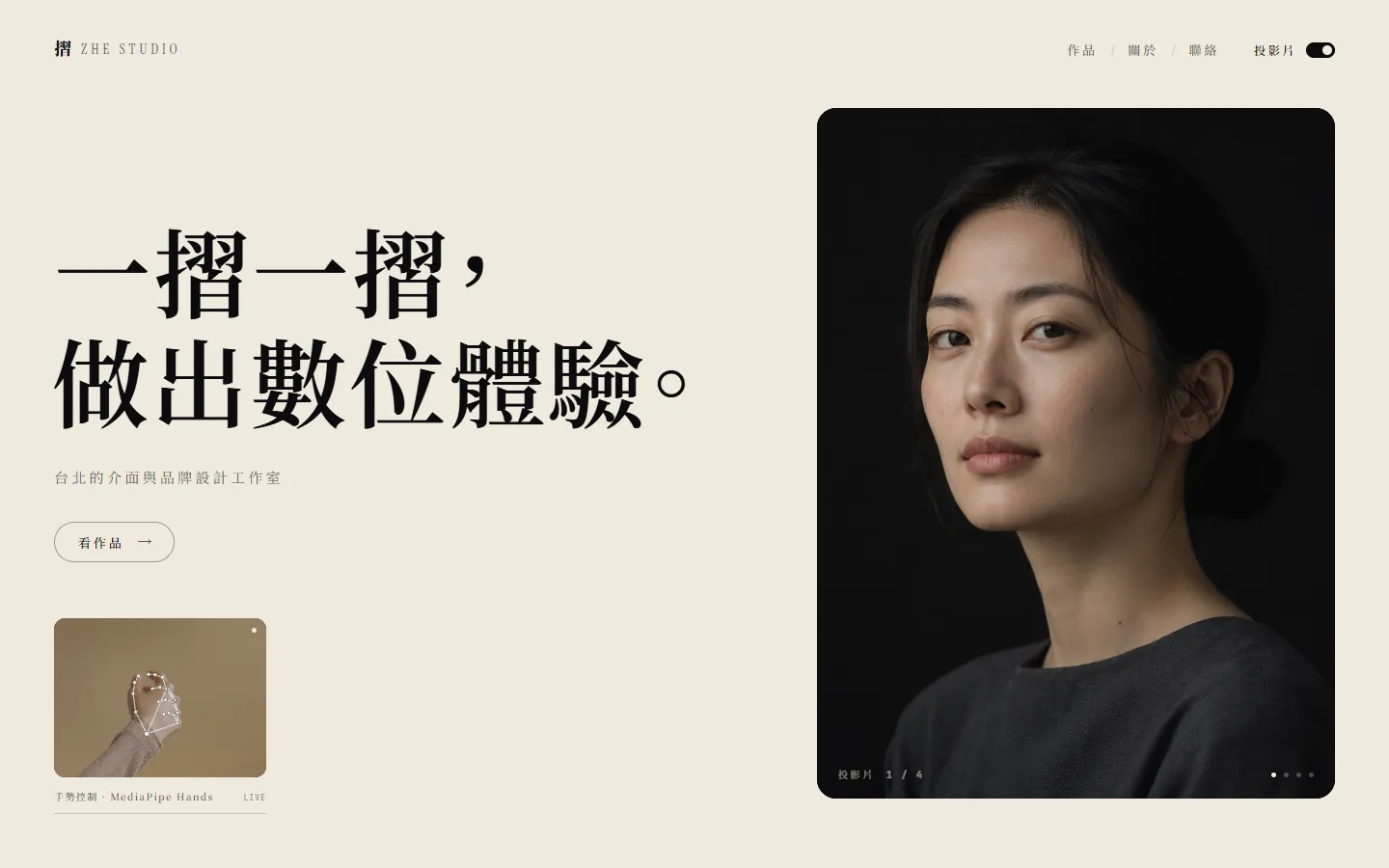
Add a "slide mode" to the same page: a small switch labelled "投影片" next to the navigation top right (it can also be turned on with ?mode=slides in the URL). When it is on, the whole page becomes a light version (off-white background, near-black text) and the portrait on the right no longer morphs continuously but steps like slides: the four states are four slides, and how open the hand is picks the current slide (fist = slide 1, fully open = slide 4, evenly spaced in between, with a little hysteresis so it doesn't flicker). Changing slides needs a smooth sliding animation, and four small dots bottom right of the panel show which slide is on. The camera tile and the skeleton stay as they are.
It added the 投影片 switch to the navigation, swaps the page colours through CSS variables, splits openness into four bands where a band edge must be crossed by a margin before the slide changes (that is the hysteresis), slides over 0.6 seconds, and shows four dots bottom right.
06Prompt 3: remove the camera and fold with the scroll instead
Not every visitor wants to turn on a camera. In the same chat we asked for a version with no camera, where the fold follows the scroll.
Remove the camera tile and don't open the camera. Replace the whole gesture interaction with a "scroll-transform": make the page scrollable (about three screens tall), keep the hero section sticky on screen, and drive the portrait's fold progress from the scroll position: fully folded into the paper sculpture at the bottom (progress 1), unfolded again when scrolling back up (progress 0). Scrolling must feel smooth (apply the same low-pass to the progress, no stepping). The title and the small text should also drift up a little and fade as you scroll. Keep a thin progress bar bottom right showing the fold progress. The slide-mode switch can go; the dark version is enough.
It turned index.html into a 300vh page with the hero held by position: sticky, the scroll position low-passed into fold progress, and the title drifting up and fading as you scroll. It didn't delete the gesture version: it kept it as hand.html, so both versions are there.
07Swap the portrait for anything: a set of flowers
The code only knows four images, so a new subject needs no new prompt to Claude. In ChatGPT we made the four states of a pink dahlia the same way, put them in img/flower/, and ?set=flower in the URL switches over.
A studio photo of a single large [pink dahlia flower], seen from the front, filling most of the frame, on a plain near-black background, soft directional light from the left, editorial look. Square 1:1, no text.
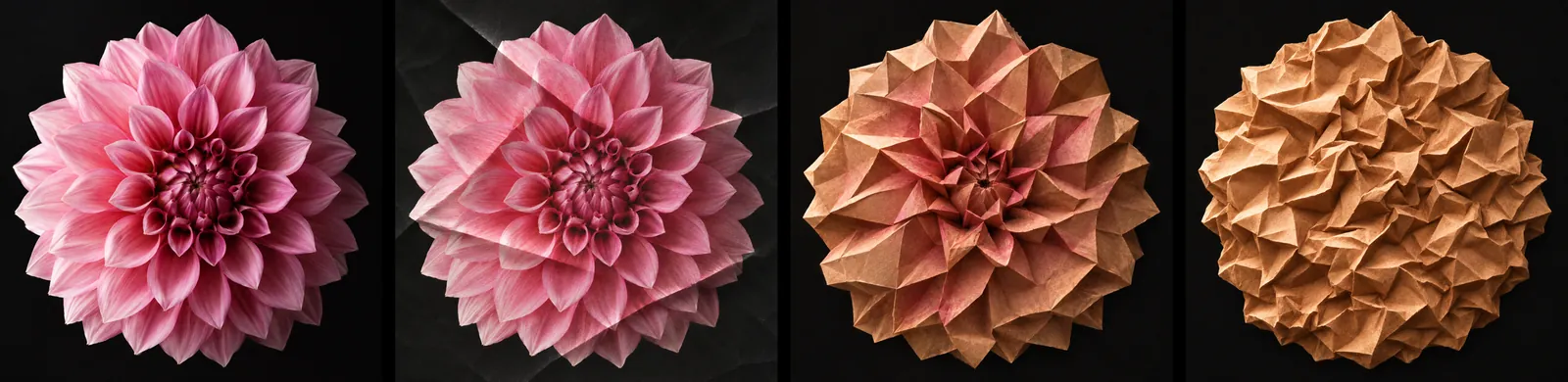
- You can add one line to prompt 1 from the start: "if the URL has ?set=flower, read the four images from img/flower/ instead, same code". That is what we did.
- Already built? Tell Claude Code: "add a ?set= parameter that switches the folder inside img/ and change nothing else".
- A product, a building, a letter or your logo all work, as long as the four images share one framing and get more folded each time.
08Make it your own brand
- Studio name, city, the two title lines, the small line and the button text: just replace the [] parts in prompt 1.
- Colours: prompt 1 asks for near-black and off-white. To change them, replace "#0b0b0d" and "near-black, off-white" with your own swatches.
- The portrait: change the description of the person in the ChatGPT prompt, but keep the wording of the four states.
- No camera wanted: start from the scroll version in prompt 3, delete the webcam-tile paragraph from prompt 1, then paste prompt 3.
09Good to know
- The camera only opens after the visitor clicks Allow, and browsers only allow the camera on https:// or localhost. npx http-server on localhost is fine for testing; a live site needs HTTPS.
- MediaPipe needs three things: vision_bundle.mjs, the wasm folder and the hand_landmarker.task model (about 7.8 MB). We downloaded them into mp/; the official sample loads the wasm from a CDN and the model from a Google URL. Both work, but visitors wait for the model on first load.
- The four images must share one framing, one position and one size. That is the whole effect, and it matters more than any prompt.
- Hand detection can run on the GPU or the CPU: our page tries the GPU first and falls back to the CPU. In our headless Chrome test (a software-emulated GPU) one detection took about 65 ms on the CPU and about 250 ms on the GPU, so the recording used ?delegate=cpu. Try both on your own machine and keep the smoother one.
- The hand in the camera tile isn't ours: this PC has no camera, so we fed MediaPipe the free Pexels clip "Studio Shot of Hand of Woman" by cottonbro studio (Pexels License: free to use, no attribution required) through ?cam=. The detection, the skeleton and the portrait's reaction are real.
- The site was only built and checked for a 1440×900 desktop screen; there is no phone layout. For phones, add "it must also look good on a phone in portrait" to the prompt, or use the scroll version.
- ZHE STUDIO is a fictional studio. The portrait and the flower were generated by ChatGPT and the person is not real; the page code was written by Claude Code, and we didn't change it.
- The chat cards in the reel are re-typeset, not terminal recordings; the prompts in this guide are the full ones. Claude Code gives a slightly different result every time, so go by the files you get.