Build a scratch-off art gallery with Claude Code: scratch the sky to reveal oil paintings, in 4 prompts (live demo)
A sky covers each gold frame; drag to scratch it off and find an oil painting. ChatGPT paints, Claude Code builds. 4 full prompts and a live demo.
Watch the reel on InstagramComment #刮刮 to get this guide
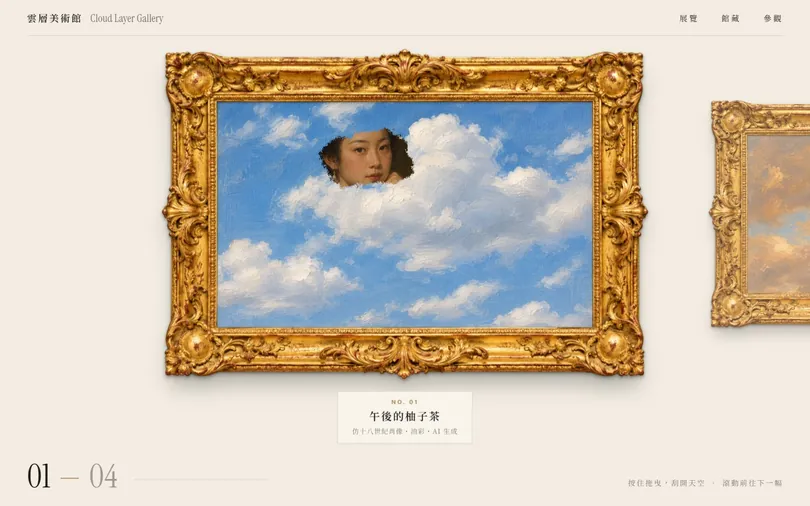
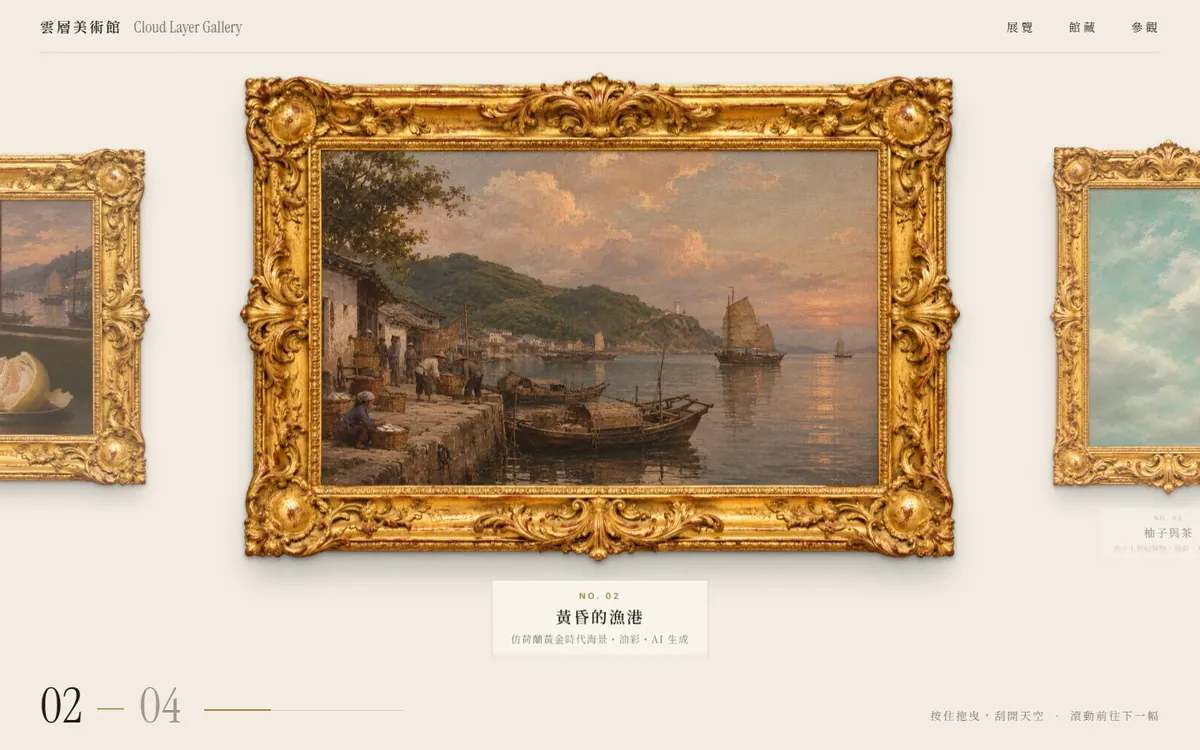
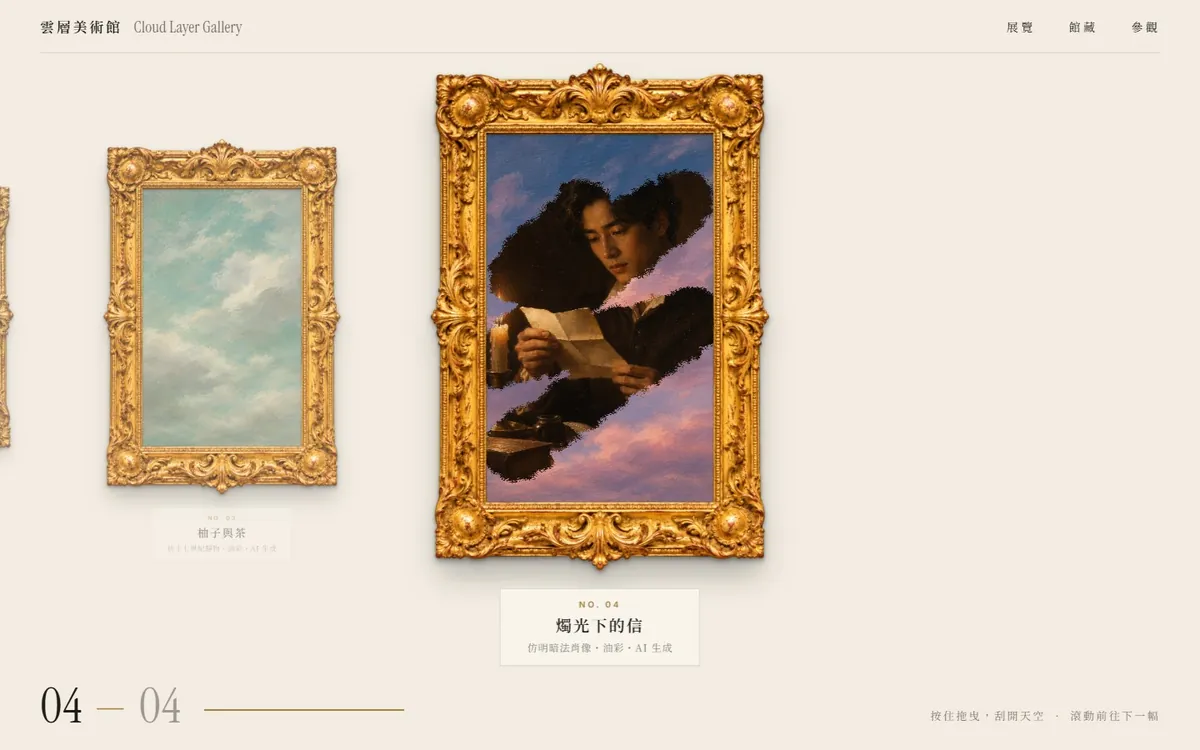
Inside a gold frame there is a blue sky with white clouds. Press and drag, and the sky comes off like the silver coating on a scratch card, revealing an oil painting underneath; scratch most of it and the rest of the sky fades away while the painting brightens, as if a gallery light came on. Scroll, and you walk to the next painting.
This gallery site was written by Claude Code in 4 prompts; the paintings and gold frames are original images painted by ChatGPT (AI-generated, not copies of famous works). The "Cloud Layer Gallery" is fictional, and we didn't change a single character of the code. Below: 3 ChatGPT asset prompts, the 4 full Claude Code prompts (replace the [] with yours), what each one produced, and a live version you can play with.
01The result: scratch off the sky, the painting is underneath
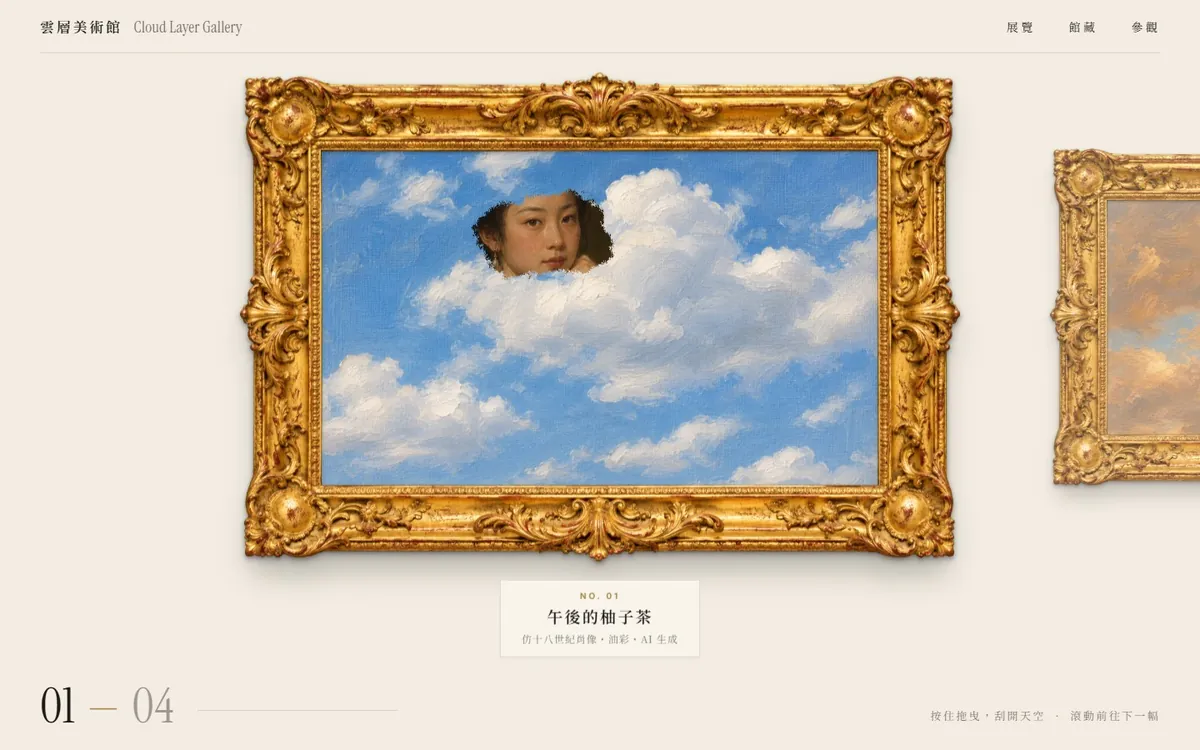
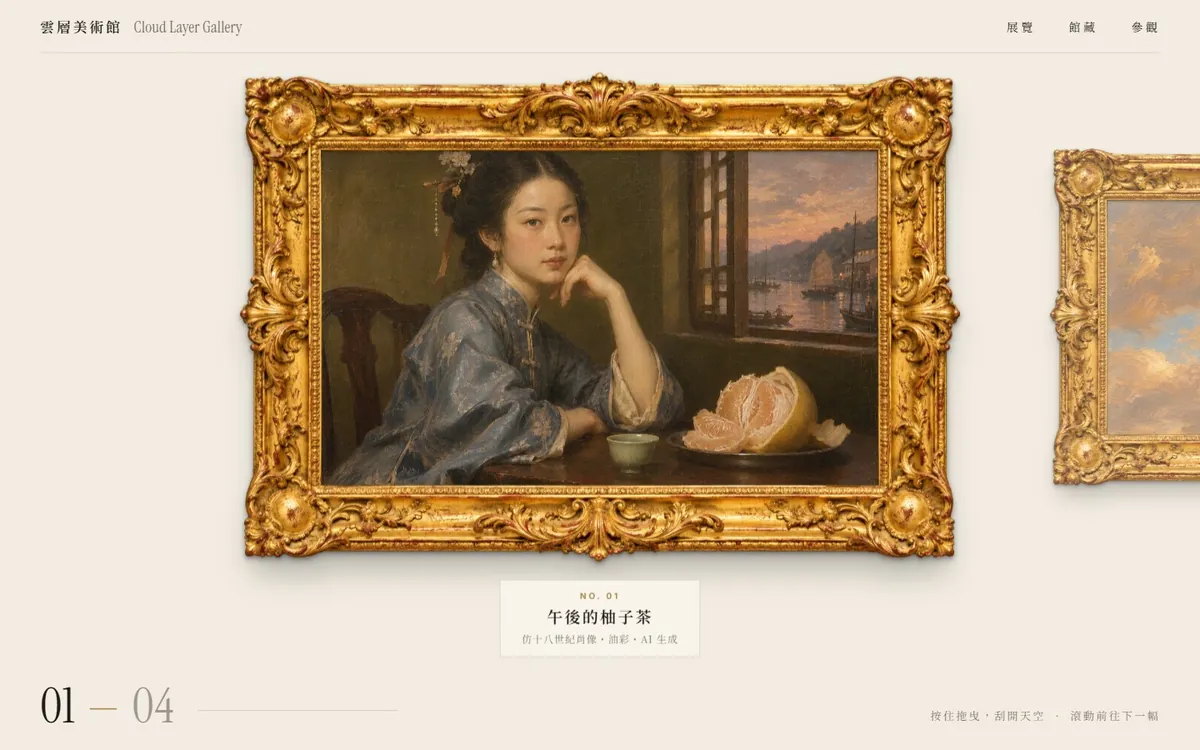
This "Cloud Layer Gallery" was written by Claude Code in 4 prompts: first a reusable scratch-off component, then a whole gallery wall built with it, then smoother scrolling and scratching, and finally a real scratch-card edge on the brush. The site is static files only: index.html, demo.html and scratch-reveal.js, plus the images in img/ and the fonts in fonts/. Nothing to install and no database; put it on any static host and it is live.
- Live demo: the Cloud Layer Gallery — Open it on a computer, press and drag to scratch, scroll down for the next painting
- Live demo: the single scratch-off component (demo page) — The demo page from prompt 1, with a Reset button
The demo is the site exactly as Claude Code left it after prompt 4. To make it load faster we only compressed the assets: the images became WebP and the fonts keep only the characters the pages use, about 2.7 MB in all. The only code change is the image extension, .jpg / .png to .webp.
02The assets: original oil paintings, skies and gold frames from ChatGPT
You need 3 kinds of image: the paintings hidden underneath, the skies on top and the gold frames. We drew them all in ChatGPT, one chat per kind, so the style stays consistent.
- Paintings: 4 in one chat, 2 landscape (3:2) and 2 portrait (2:3). For each one say clearly "in the manner of a period style, original, not a copy of any existing painting".
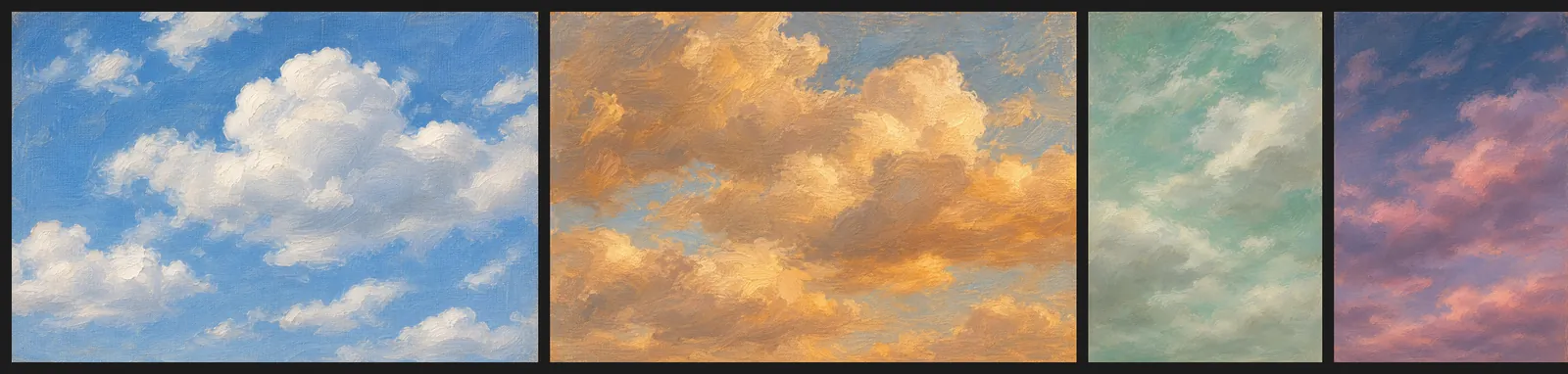
- Skies: in a new chat, 4 "sky only" oil studies in the same sizes as their paintings (landscape with landscape, portrait with portrait). The colours should contrast with the painting underneath, so the scratch reads.
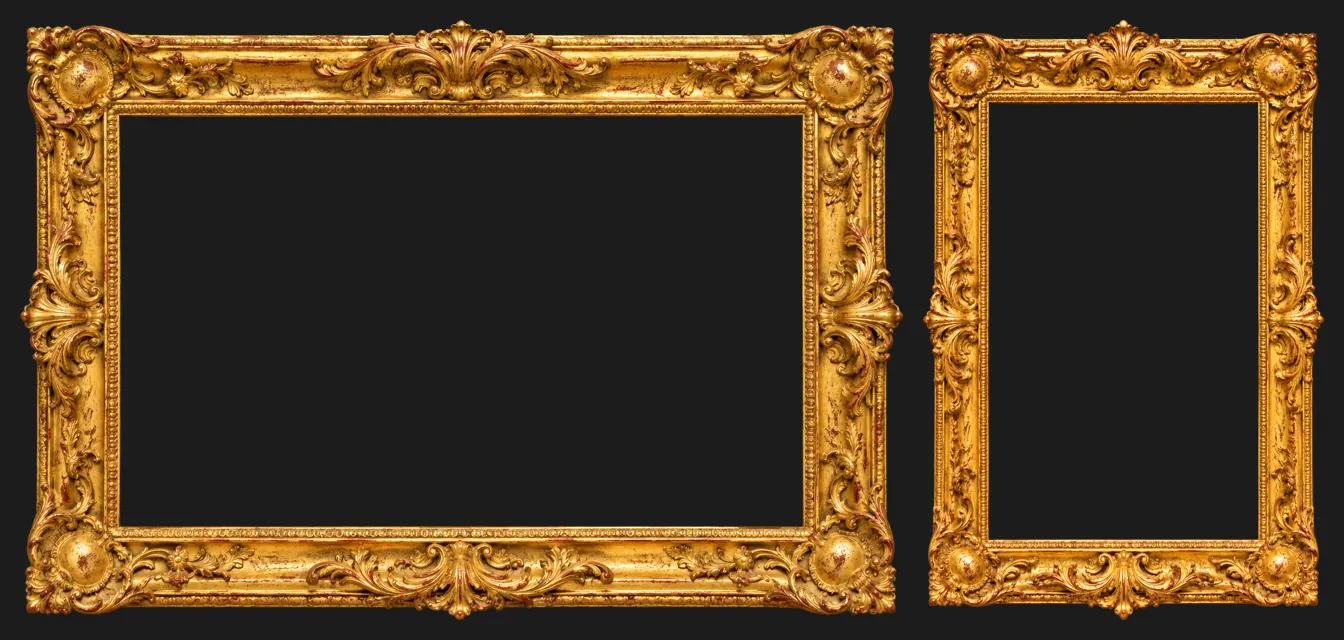
- Frames: in another chat, one landscape and one portrait gold frame, with the opening and the background painted pure green #00FF00, to be keyed out later.
- Put the files in one folder: img/paintings/ (a.jpg to d.jpg), img/sky/ (sky-1.jpg to sky-4.jpg), img/frames/ (frame-land.png, frame-port.png).
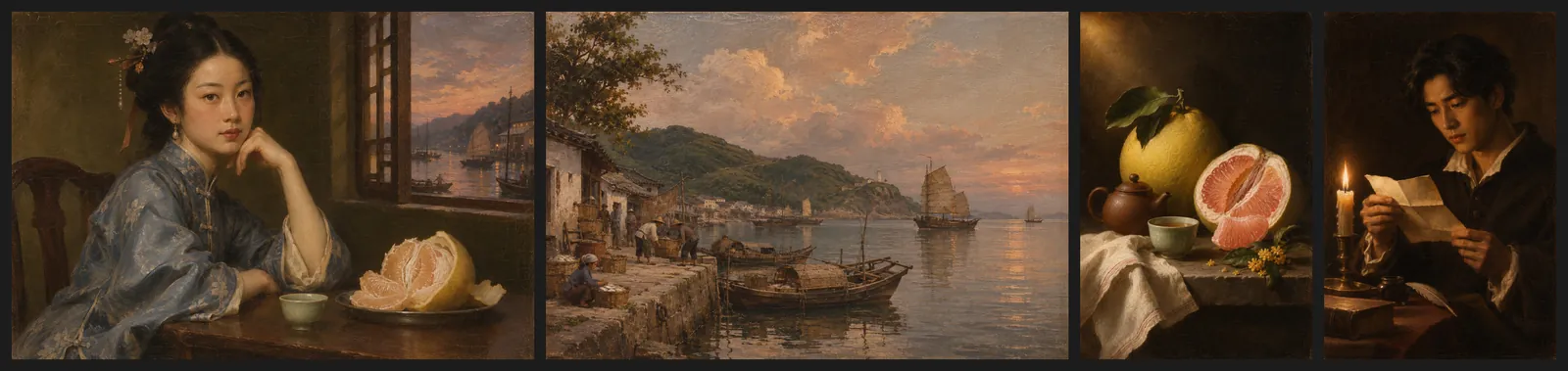
Create an image: an ORIGINAL oil painting in the manner of [an 18th-century European portrait] (not a copy of any existing painting). [A fictional young East Asian woman in a muted blue silk jacket, seated at a dark wooden table, half-length, turned three-quarters toward the viewer with a calm, direct gaze. On the table a peeled pomelo on a pewter plate and a small celadon tea cup. Behind her an open window with a small harbour at dusk.] Warm soft light from the left, dark olive background, visible brushwork, fine craquelure, a museum varnish glow. [Landscape 3:2], the painted canvas fills the whole image edge to edge: no frame, no wall, no text, no signature.
For the next 3, in the same chat, write "same painterly quality, a NEW original painting in the manner of [a period style] (not a copy of any existing painting)" and then describe the scene. Ours: an 18th-century-style portrait "Afternoon Pomelo Tea", a Taiwanese fishing harbour in the manner of a Dutch Golden Age seascape "Fishing Harbour at Dusk", a 17th-century-style still life "Pomelo and Tea" and a chiaroscuro-style portrait "A Letter by Candlelight".
Create an image: an original oil sketch of a SKY ONLY, like a 19th-century plein-air cloud study on canvas: [a bright blue summer sky with soft white cumulus clouds], loose visible brushstrokes, canvas texture, even daylight. No ground, no horizon, no birds, no people. [Landscape 3:2], the painted canvas fills the whole image edge to edge: no frame, no text, no signature.
Create an image: a photo-real ornate antique gilded picture frame, carved baroque gold leaf with acanthus scrolls and corner cartouches, slightly worn gilding, seen perfectly straight on (no perspective), [LANDSCAPE orientation with an outer ratio of 3:2], the moulding about 11% of the frame width on every side. The empty opening inside the frame AND the whole background around the frame must be flat, uniform pure green (#00FF00): no shadow, no wall, no reflections, no canvas. Nothing else in the image, no text. [Landscape 3:2].
03Prompt 1: a scratch-off component first
- Open Claude Code in the folder that holds img/.
- Paste the prompt below (replace the [] with yours) and press Enter.
- When it's done, run npx http-server in the folder, open the address it prints in your browser, then open demo.html. Double-clicking the HTML file may make the browser block the local images.
Build me a "scratch-off" web component (Scratch Reveal) that I can lay over any image later.

- Two images stacked: the top one is the "cover" (for example [a sky]), the bottom one is the "hidden image".
- Press and drag with the mouse (a finger on phones) to scratch the top layer away like a scratch card and reveal the image underneath.
- The brush should have a soft edge, like gently rubbing paint off with an eraser, not hard-edged dots; default size about [70]px; the stroke must not break up when you drag fast.
- Once more than about [60]% is scratched, fade out the rest of the cover automatically so the whole image shows.
- Settings: cover image, hidden image, brush size, edge softness, auto-complete fraction.
- Make a demo page: a [warm off-white] background, one 3:2 component in the middle, cover [img/sky/sky-1.jpg (blue sky, white clouds)], hidden image [img/paintings/a.jpg (an oil painting)], under it one line of small text "[Press and drag to scratch off the sky]" and a thin-outlined "Reset" button. Clean overall, like a museum website.
Claude Code wrote two files: scratch-reveal.js, a reusable ScratchReveal component (the cover is drawn on a canvas, it measures how much is scratched as you go, fades out past 60%, and can reset or reveal everything), and demo.html, the demo page. While testing it caught and fixed two bugs on its own: a screenshot briefly gave the component zero size, which read as "100% scratched", and a late mouse-up could cut the next stroke short.
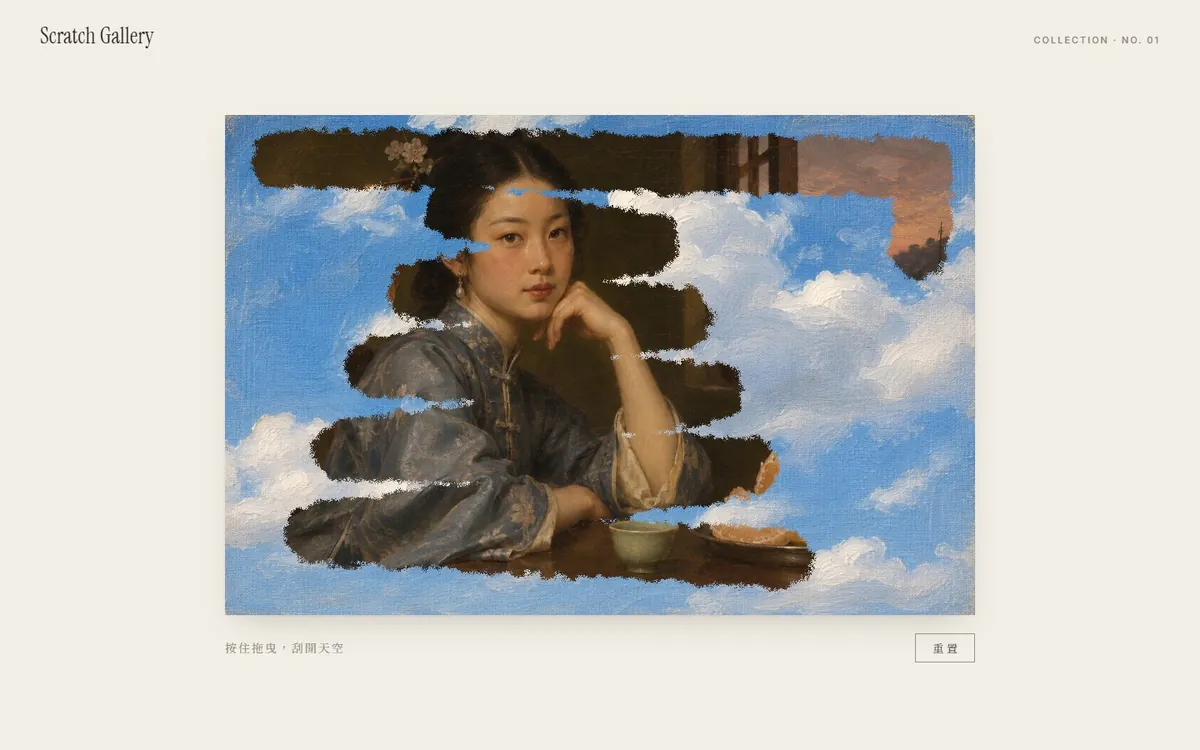
We also gave it a few technical notes: local files only (no CDN), plain HTML/CSS/JS with no build step, the images' real sizes and the frame openings' pixel boxes, and a self-test in headless Chrome that drags a few strokes and checks the screenshots. You can end your prompt with "when you're done, check it yourself with screenshots and fix what's wrong".
04Prompt 2: the whole gallery wall from the component
Paste this in the same chat. It already knows the component, so this prompt only describes the page.
Great. Now use this scratch-off component to build an online gallery page (index.html; keep demo.html):

- A fictional museum, "[Cloud Layer Gallery]". The page looks like a museum's white wall ([warm off-white]), with a very thin nav bar on top: the museum name on the left, "[Exhibitions Collection Visit]" on the right.
- One row of gold frames on the wall, side by side, that scrolls left and right (mouse wheel down = walk right; a trackpad side swipe works too). The painting in the centre of the screen is the biggest (about 60% of the screen width); the ones either side are smaller and only partly visible, like walking through a gallery hall.
- Inside each frame is a scratch-off: the top layer is a painted sky, the bottom layer is an oil painting, and you have to scratch off the sky to see the painting; past 60% the whole painting shows.
- Use the two gold frames in img/frames/ (landscape paintings get frame-land.png, portrait ones frame-port.png), with the painting filling the frame's opening exactly. Give each frame a little realistic shadow underneath, as if it hangs on the wall.
- Under each painting a small plaque: number, title (serif) and one line of small text.
- [Four] paintings, in order:
  1. [Afternoon Pomelo Tea]: [img/paintings/a.jpg], cover [img/sky/sky-1.jpg (blue sky, white clouds)], small text "[After an 18th-century portrait · oil · AI-generated]"
  2. [Fishing Harbour at Dusk]: [b.jpg], cover [sky-2.jpg (golden clouds)], small text "[After a Dutch Golden Age seascape · oil · AI-generated]"
  3. [Pomelo and Tea]: [c.jpg], cover [sky-3.jpg], small text "[After a 17th-century still life · oil · AI-generated]"
  4. [A Letter by Candlelight]: [d.jpg], cover [sky-4.jpg], small text "[After a chiaroscuro portrait · oil · AI-generated]"
- Under the paintings, one line of large serif numbers showing which painting you are at (like "01 — 04"), with a thin progress line next to it.
- Overall it should feel like an award-winning museum website: quiet, lots of white space, big serif type, colours only [off-white, near-black and gold].
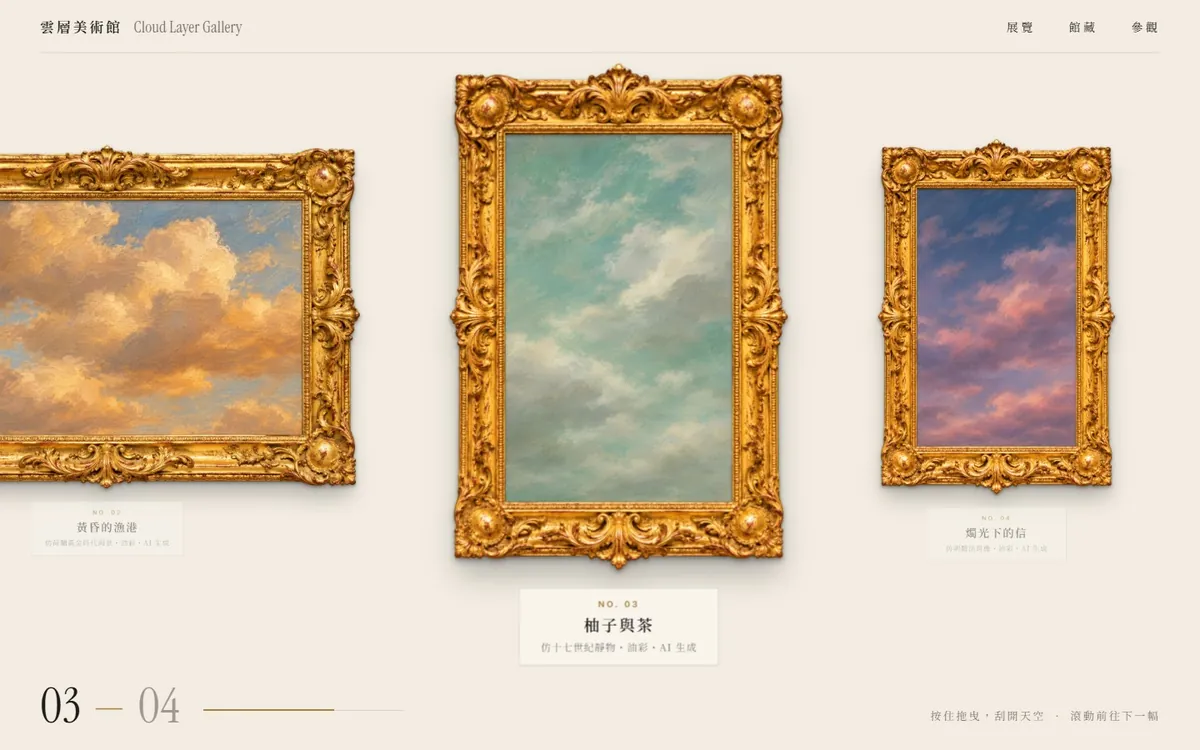
It built index.html: an off-white wall, a thin nav bar and a row of 4 gold frames, the centre one 864 px wide (60% of the screen). The mouse wheel, the arrow keys, clicking a neighbouring painting and a side swipe on phones all walk to the next one. The frame shadows are a blurred copy of the frame, and each painting is cropped exactly to its opening. The hint bottom right, "press and drag to scratch the sky · scroll for the next painting", is its own addition.
05Prompt 3: smoother scrolling and scratching
Make all the interactions smoother:
- Add a little inertia to scrolling: when the wheel stops, the gallery should glide a bit further as if it had weight, then settle gently on the centre of the nearest painting (slowing down like a spring, not snapping).
- The paintings on the sides should scale and fade continuously with their "distance from the centre", the plaques too, not just two states (big and small).
- Join the mouse points of a scratch stroke with a curve, so turns are round, not a chain of straight segments.
- When a painting passes 60% and the sky fades out, the painting itself should brighten slightly (very subtle), like a gallery light coming on.
After this: the wheel gives the gallery some speed, it glides on a little after you stop, then settles like a spring on the centre of the nearest painting without overshooting. The side paintings shrink continuously with distance, to 70% and 55%, and fade too. Strokes are joined with a smooth curve. When the sky fades, the painting brightens by at most 7%, very subtle.
06Prompt 4: a real scratch-card edge
In prompt 1 we asked for a soft edge. Shrunk to phone size, those soft edges looked like a blurred censor bar, not like scratching. So we added this prompt.
The scratched edge is too soft and too clean now; zoomed out it looks like a blurred censor bar, not like scratching. Please change the brush to feel like a real scratch card:
- The edge should be a bit rough and irregular, grainy (like silver paint scraped off with a fingernail, with tiny chips along the edge), not a neat soft-focus glow; make the soft edge much narrower.
- The stroke edge must not darken or get a dark halo; where you scratch, the painting underneath simply shows, clean.
- The rough shape must be fixed (the same mouse path gives the same result); a fixed-seed random or noise is fine.
- Leave everything else alone: curved strokes, the 60% auto fade, the light, the scroll inertia[, all the window variables] stay as they are.
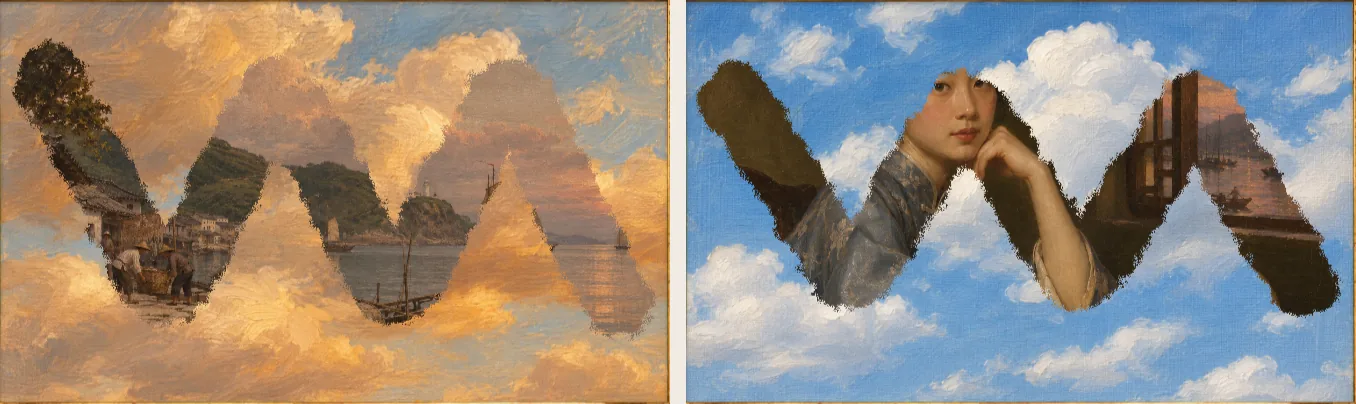
It made the edge wander in and out by up to about 6 px along a fixed noise pattern, with small chips and grain; the soft ramp went from about 23 px to about 2 px, with no dark halo. The same mouse path always scratches exactly the same shape. The component gained a roughness setting, default 6.
07Make it your own exhibition
- Museum name, nav text, colours: change the [] in prompt 2.
- Paintings: change the period style and the scene in the ChatGPT prompt; keep "ORIGINAL" and "not a copy of any existing painting".
- The cover doesn't have to be a sky: fog, silver paint or wrapping paper work too, as long as it contrasts with the image underneath.
- Number of paintings: prepare one "painting + sky" pair per painting you list in prompt 2; landscape paintings get the landscape frame, portrait ones the portrait frame.
- Not just galleries: the same component can scratch to reveal a discount, a before/after of your work or an event poster.
08Good to know
- "Cloud Layer Gallery" is a fictional museum. The 4 paintings, 4 skies and 2 gold frames are original images generated with ChatGPT, not copies of any famous painting; the people in them are fictional, drawn by AI. The site's code was written by Claude Code; we didn't change it.
- Ask the AI for "a new painting in the style of a period", never for a copy of a famous work. Even when the original is in the public domain, a copy of someone else's painting isn't your work.
- The site was only built and checked for desktop at 1440×900. Shrunk to phone width (390 px) in headless Chrome, the nav wraps onto two lines and the hint bottom right is squeezed into a narrow column. For phones, add "it must look good in portrait on a phone too" to the prompt.
- Scratching with a finger worked in headless Chrome's touch emulation; we haven't tested it on a real phone.
- The 4 prompts were given word for word to one fresh Claude Code conversation. Every run turns out a little different; go by the files you get.
- Fonts: Noto Serif TC, Instrument Serif and Inter (all SIL OFL licensed, free for commercial use).
- Before using AI-generated images commercially, check the terms of the tool you used.