Scroll and walk through a window into the hills: a walk-through website in 7 Claude Code prompts (live demo)
The arch wall zooms 12x and the mountains only 1.35x, so scrolling feels like walking through. 5 ChatGPT images, 7 Claude Code prompts and a live demo.
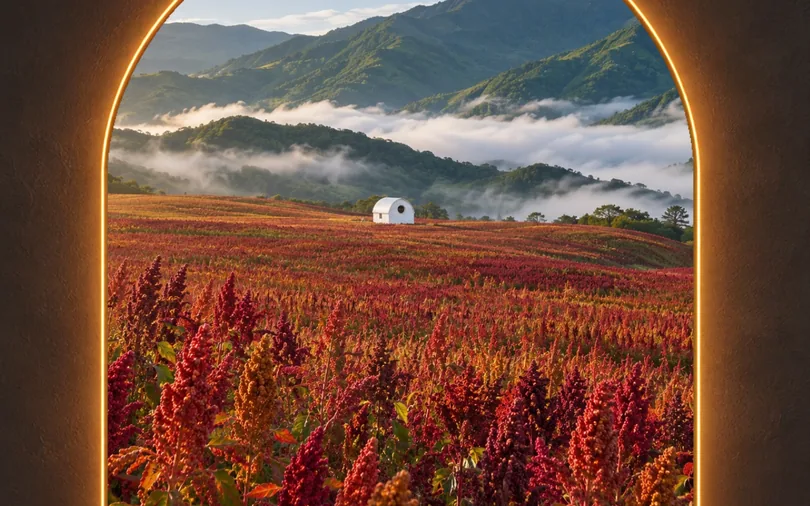
Scroll down and the glowing arched window in the wall keeps growing until the camera passes through it into a red quinoa field and a sea of clouds. Further down, a line of text appears character by character out of a blur, photo cards pop up when you hover over the cabin, and one click turns the last section from day into a lamp-lit evening.
Claude Code built this page step by step over 7 messages, and ChatGPT generated the 5 images. The retreat, Shanlan Cabin, is fictional, and we didn't change a single line of the code. Below are all 7 prompts and the ChatGPT prompts (replace the [] parts), what each step produced, and a live version you can play with.
01The result: scroll down and the camera walks through the arch into the hills
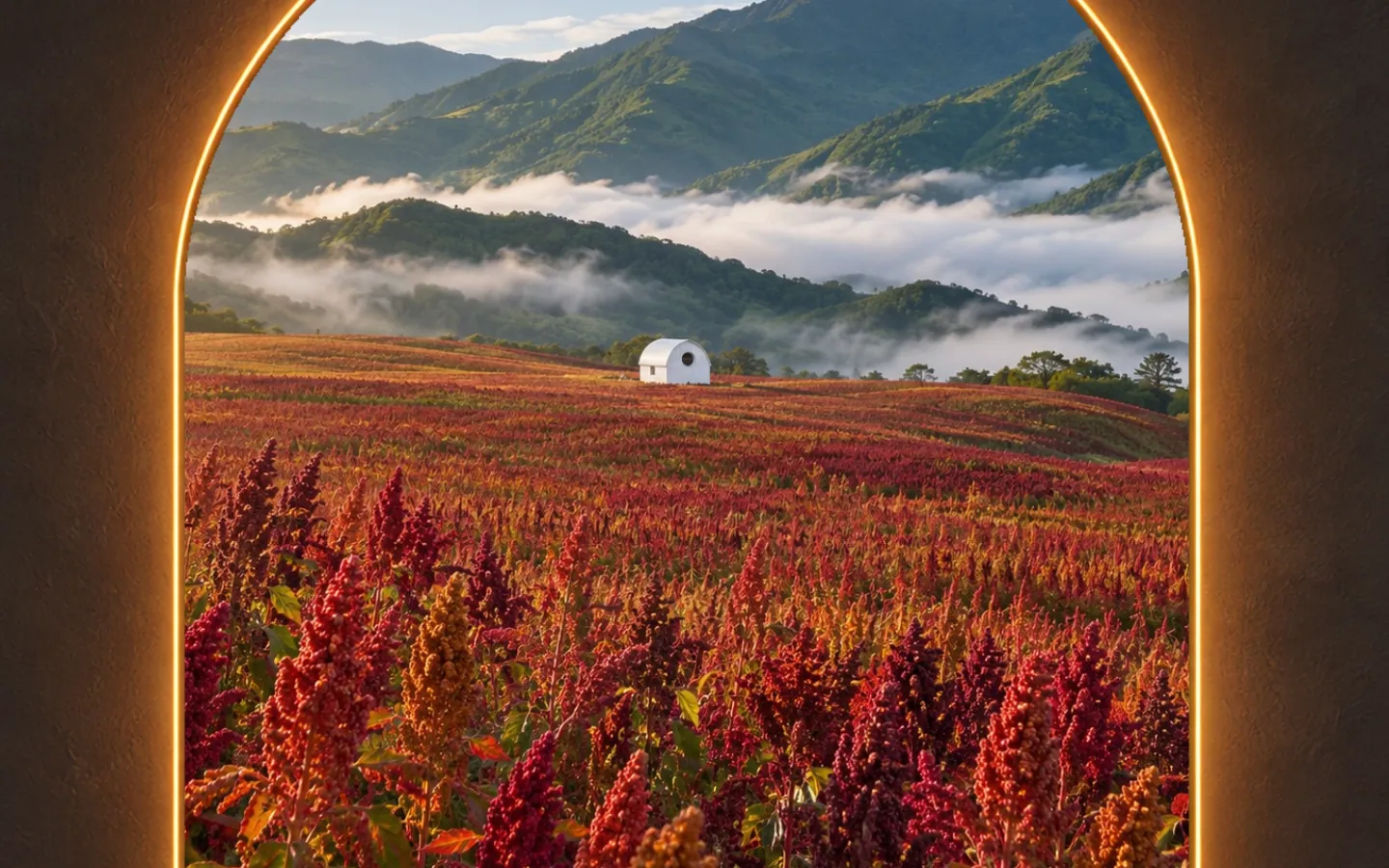
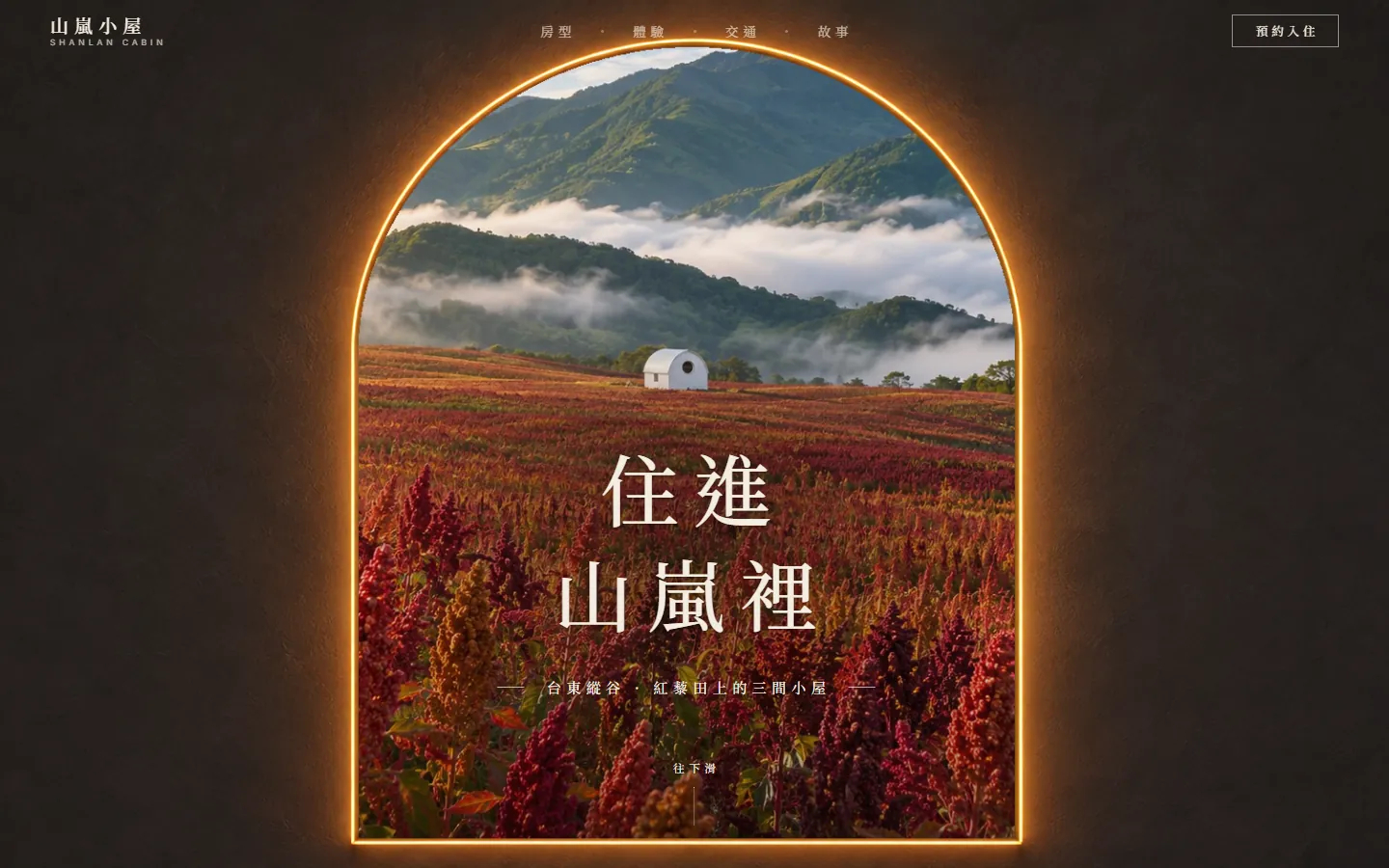
The page has four parts. It opens on a charcoal wall with one glowing arched window and a red field and mountains outside; as you scroll, the wall keeps growing, the camera goes through the arch, and 歡迎回到山裡 ("welcome back to the mountains") fades in. Then comes a tagline that appears character by character, a cabin photo with points that open photo cards, and finally a bedroom you can switch between day and night.
- Live demo: the Shanlan Cabin walk-through homepage — Open it on a computer and scroll with the mouse wheel
The demo is the site exactly as Claude Code left it after prompt 7: just index.html, style.css, main.js, images and fonts, nothing to install. To make it load faster we only compressed the assets: the images became WebP and the fonts keep only the characters the page uses, from about 21 MB down to about 1.3 MB. The only code change is the image extensions, now .webp.
02How it works: two stacked images that grow at different speeds
The whole walk-through uses only two images: a full-bleed landscape at the back and a wall with a cut-out window in front. As you scroll, the view stays fixed and only the two images grow:
- The foreground wall scales from 1x to 12x, centred on the arch, so it looks like the camera goes through the window.
- Over the same scroll, the background mountains only scale from 1x to 1.35x.
- Near things change a lot and far things change a little, so your eye reads it as moving forward. Zoom only the wall and the landscape looks like a flat photo.
Below is the full method: 5 images from ChatGPT, then 7 messages to Claude Code, each adding one thing. For each step you get the exact prompt we pasted (replace the [] parts) and what that step produced.
03The assets: 5 images from ChatGPT
- The landscape (16:9): the foreground is zoomed a lot, so the landscape needs to be sharp and layered (a near field, far mountains and clouds).
- The arch wall (16:9): make the window opening pure green #00FF00 first, then key it out to transparent.
- A close-up of the cabin plus the same room by day and by night: 3 images used by the last two steps.
- Download them into an img/ folder in a new project folder and name them bg-landscape, fg-arch, cabin, room-day and room-night.
A wide cinematic landscape photo, 16:9 horizontal, early morning: a vast field of [red quinoa (Taiwanese red quinoa, deep crimson and orange seed heads)] rolling over gentle hills in [Taitung's East Rift Valley, Taiwan]. Behind it [the green Central Mountain Range rises in layers, with soft white mist and a sea of clouds in the valleys]. Far away in the middle of the field stands one tiny [white minimal cabin with a curved arched roof and a round window]. Soft golden side light from the left, rich saturated colours, editorial travel photography, very sharp detail, calm and quiet. No people, no text, no logo.
A 16:9 horizontal image, seen straight on: the inside wall of a [dark, minimal modern cabin] fills the whole frame, [matte charcoal plaster with a subtle texture]. In the centre is ONE large arched window opening with a rounded top (about 42% of the frame width and 78% of the frame height, centred, the bottom of the arch near the bottom of the frame). A thin [warm amber LED line] glows along the inner edge of the arch and softly lights the plaster around it. The window opening itself must be a perfectly flat, uniform pure green (#00FF00) area: no glass, no reflection, no view, no gradient. No people, no text, no logo.
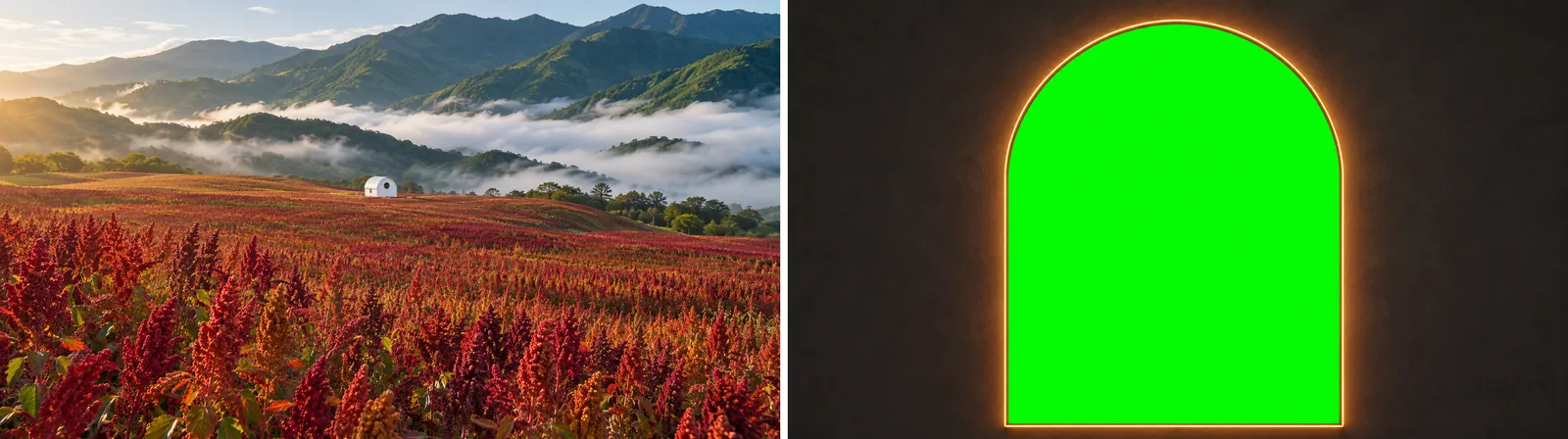
We removed the green opening with a small script (pure green becomes transparent, and the green spill on the edge goes too) and saved it as fg-arch.png with transparency. Any background-removal tool works, or ask Claude Code to make the green window opening transparent.
Same place as the first image, now much closer: the small white minimal cabin with the curved arched roof and one big round window sits in the middle of the red quinoa field, filling about a third of the frame width, slightly right of centre, seen from a low angle. Red quinoa in the foreground slightly out of focus, the green mountains and soft mist behind, the same golden morning light. 16:9 horizontal, editorial photography, no people, no text.
Create an image. The inside of a small minimal cabin in [the mountains of Taitung, Taiwan]: a calm minimal bedroom in [warm light wood and white plaster], a low bed with natural linen bedding, a small wooden side table, and one big ROUND window on the back wall looking out over [a field of red quinoa (deep crimson) and green misty mountains]. Soft cool daylight, all lamps off. Camera straight on, the round window centred in the upper half. 16:9 horizontal, interior photography, no people, no text.

(second message, same chat)
Exactly the same room, same camera position, same framing and same furniture, but now in the blue hour of the evening: a warm amber LED line glows around the round window, two small bedside lamps are on, the whole room is lit in warm golden light, and outside the window the field and mountains are deep dusk blue. 16:9 horizontal, no people, no text.

04Prompt 1: stack the two layers
- Open Claude Code in the folder that holds img/.
- Paste the prompt below (replace the [] parts) and press Enter.
- When it is done, run npx http-server in the folder and open the address it prints. We tested everything through a local server.
Build the homepage of an interactive website for "[山嵐小屋 Shanlan Cabin]" (fictional), a [mountain cabin retreat] in [Taitung's East Rift Valley]. We'll build it step by step today; this step is only the two image layers of the hero:
- Background layer: img/bg-landscape.jpg ([a red quinoa field, mountains and a sea of clouds]), full-bleed, filling the screen.
- Foreground layer: img/fg-arch.png ([a dark wall with one arched window in the middle]; the window opening is transparent), full-bleed on top of the background, so the landscape is what you see through the arch.
- Both layers centred and filling the whole window, not stretched.
No text, buttons or navigation yet.
It wrote index.html, style.css and main.js. Both images are cropped the same way to fill the screen, so whatever the window size, the arch always frames the same patch of landscape.
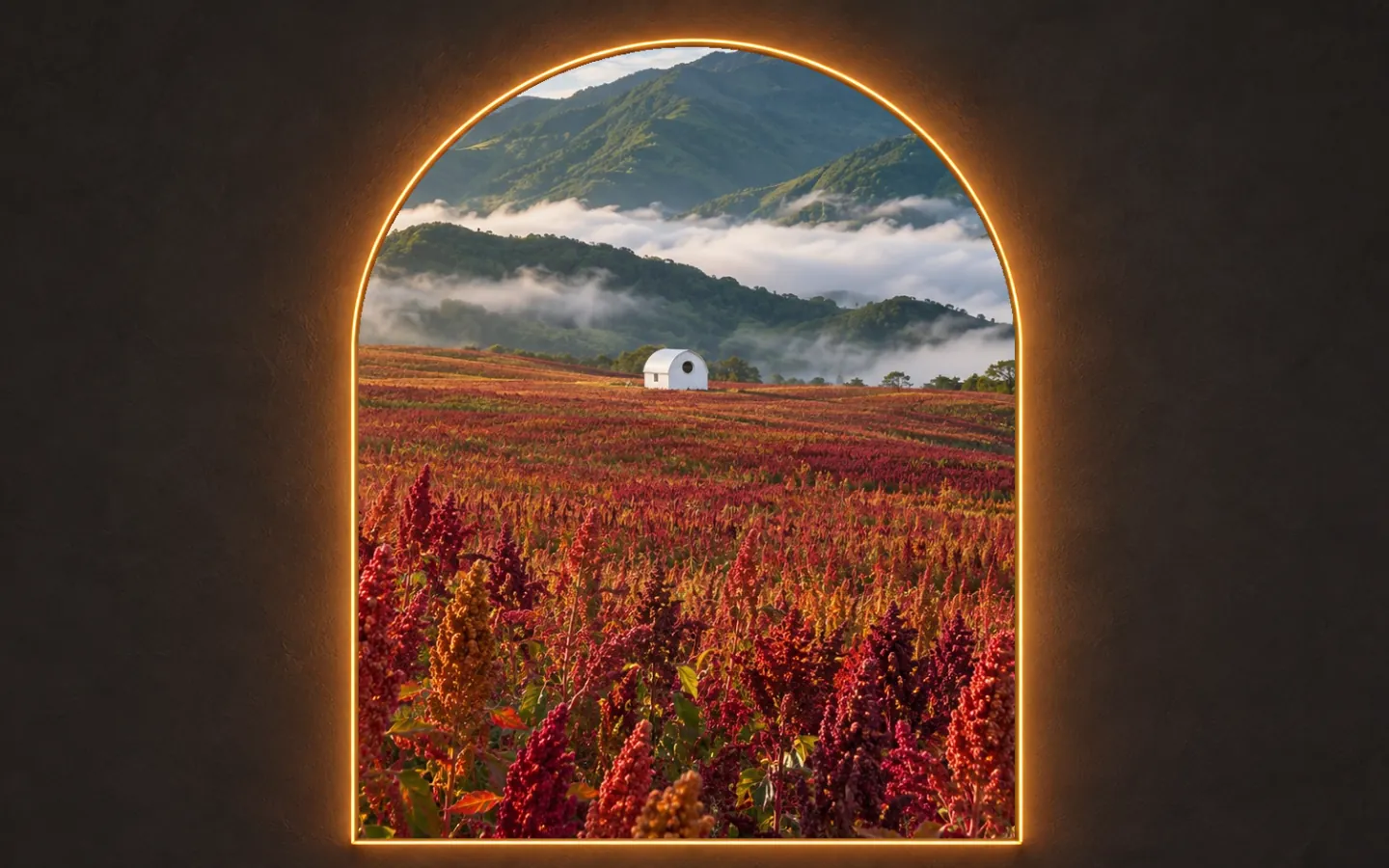
With prompt 1 we also gave technical notes: the images and fonts are in the folder and nothing loads from the internet, the size of every image (1672×941), and test your own work with screenshots in headless Chrome. A few lines were only there for our frame-by-frame recording (every animation runs on requestAnimationFrame). For your own build, the two useful lines are "smooth any value that follows the scroll inside requestAnimationFrame" and "check your own screenshots when you're done and fix what's wrong". Prompts 2 to 7 each ended with: "Same environment notes as before. Self-test in headless Chrome and look at your screenshots. Do not touch anything outside site/."
- Claude Code — Official page
- ChatGPT — Used for the 5 images
05Prompt 2: navigation and title
Next step: add the navigation and the content.
- A thin navigation row at the top: on the left the wordmark "[山嵐小屋]" with a very small English line [SHANLAN CABIN], in the middle "[房型・體驗・交通・故事]" (rooms, experiences, getting here, story), on the right a small outlined button "[預約入住]" (book a stay).
- The main title in the middle of the arch, a little low, on two lines: "[住進]" "[山嵐裡]" (a Chinese serif, big and quiet), with a small line under it: "[台東縱谷 · 紅藜田上的三間小屋]".
- A small "scroll down" hint at the bottom centre.
- Text in [off-white]; it should feel like a [boutique hotel] site: careful letter and line spacing, nothing cramped, and the text must stay readable on top of the landscape.
It measured where the arch opening sits in the image and centred the title on the window. To keep the off-white text readable on the landscape, it added a faint dark gradient between the landscape and the wall, so only what you see through the window is darkened.
06Prompt 3: the foreground zooms as you scroll
Next step: add a scroll transform to the foreground.
- Turn the hero into a tall scroll section (about [4] screens tall) whose view stays fixed (sticky).
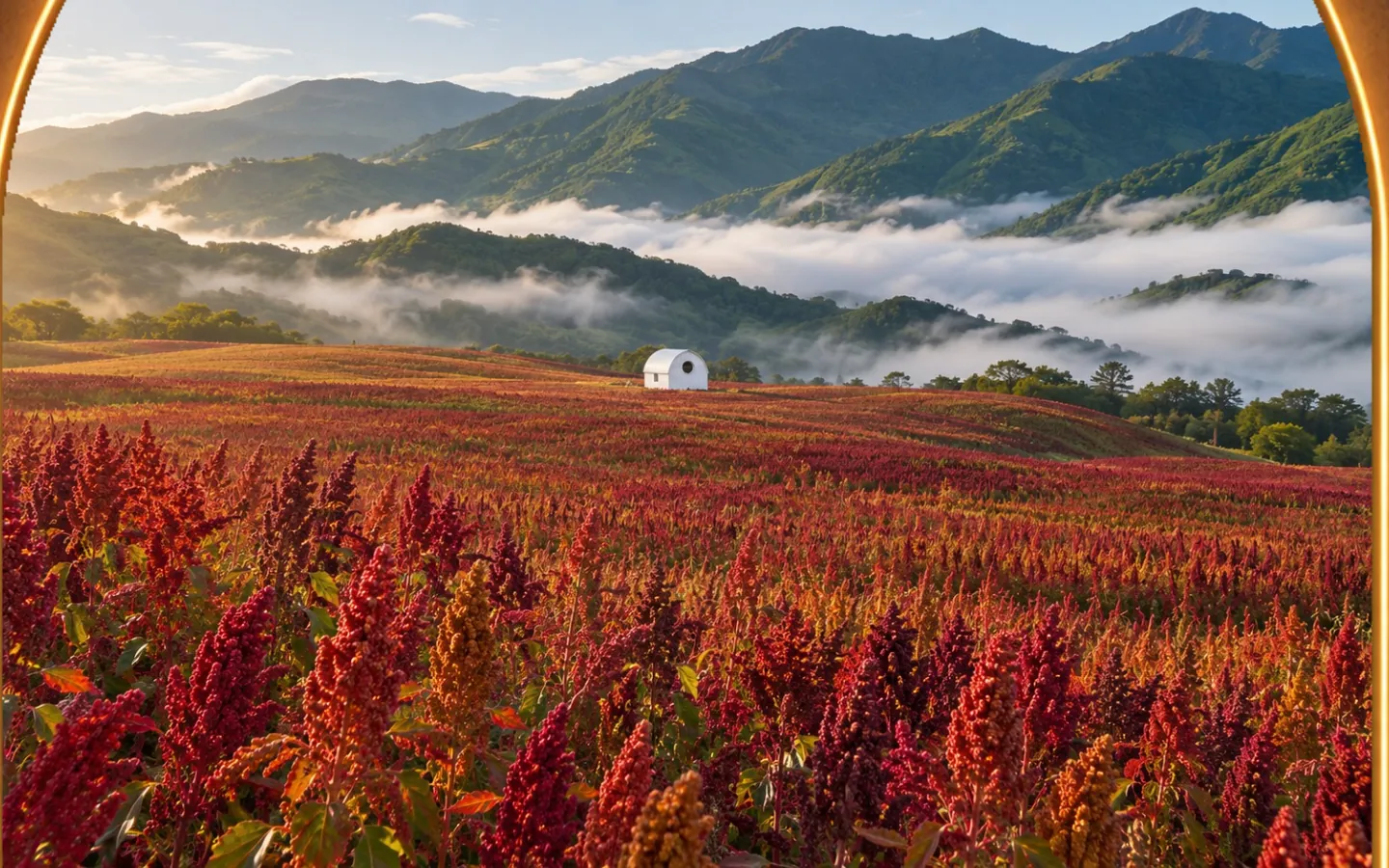
- As you scroll down, the foreground wall scales from 1x to [12]x, centred on the middle of the arch, so it looks like the camera goes out through the window; at full size the wall has left the screen and only the landscape remains.
- The navigation and the title fade out as soon as scrolling starts.
- Don't move the background yet.
The hero becomes 4 screens tall with a fixed view inside. The wall scales around the arch centre (it measured 49.46% of the image width and 50.96% of its height). Because the arch is big, the wall is already off screen at about 2.3x, so it made the zoom start slowly and speed up, giving most of the scroll to the pass through the window. The nav and title fade over the first ~290 px of scrolling.
07Prompt 4: the background zooms too, just much slower
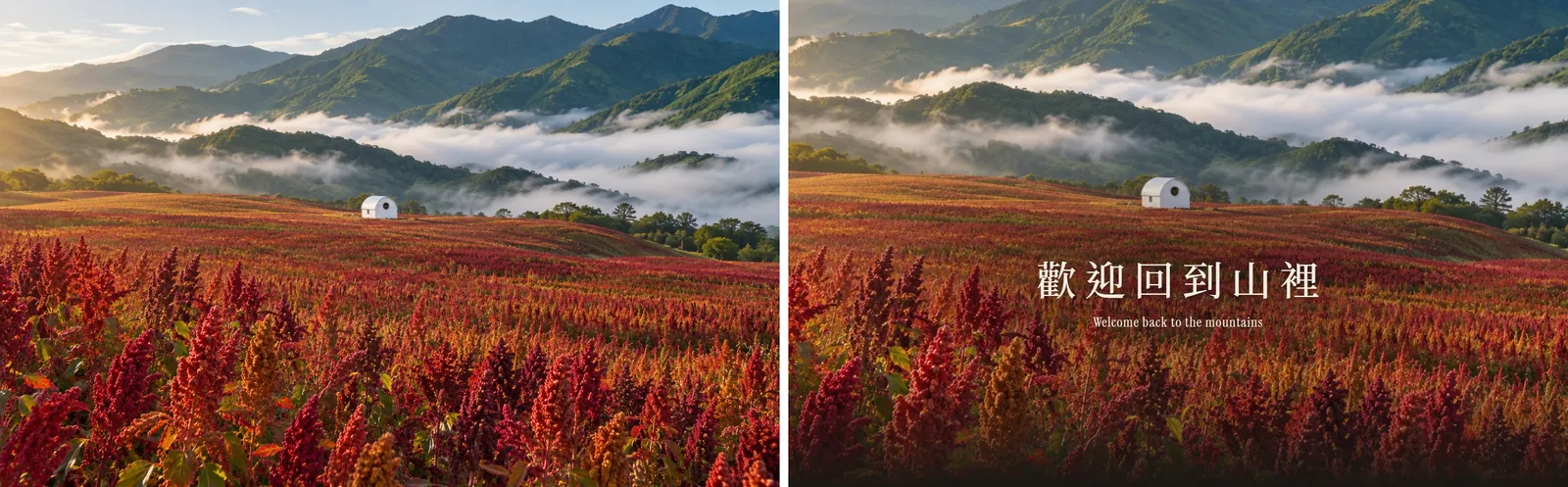
Next step: add a scroll transform to the background too. The background follows the same scroll and slowly scales from 1x to [1.35]x, much slower than the foreground, to create parallax, as if you really walk through that window and get closer to the mountains. After passing through the arch, fade in a big line "[歡迎回到山裡]" and a small line "[Welcome back to the mountains]" over the landscape.
At first it gave the background its own easing curve; in its own test it saw the mountains grow ahead of the wall, so it replaced that with one camera moving forward past a near wall and far mountains, both layers driven by the same position. When the wall is at 1.13 → 1.53 → 2.38 → 12x, the mountains are at 1.035 → 1.11 → 1.20 → 1.35x. After the arch, 歡迎回到山裡 and the small English line rise in over a soft dark oval.
08Prompt 5: characters that appear out of a blur
Next step: add a small section under the hero.
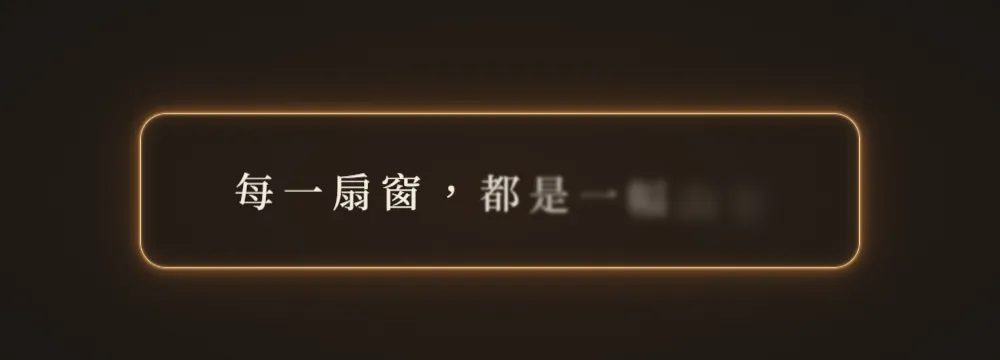
- A dark background (close to the charcoal of the wall) with a thin glowing rounded frame in the middle (the colour of the warm light line around the arch) holding one line: "[每一扇窗,都是一幅山景]".
- A text-appear animation: when this section scrolls into view, the characters appear one by one, from blurred and a little lower to sharp and back in place.
- A very small line under the frame: "[// 三間小屋,三種看山的方式]".
It split the line into single characters. Once the line is inside about 72% of the screen, each character goes from 12 px blur, 18 px lower and transparent to sharp over 1 s, 0.095 s apart. To keep the page smooth when the mouse wheel scrolls in steps, it moved the whole page into a fixed layer that eases toward the real scroll position every frame.
09Prompt 6: interactive points in the landscape
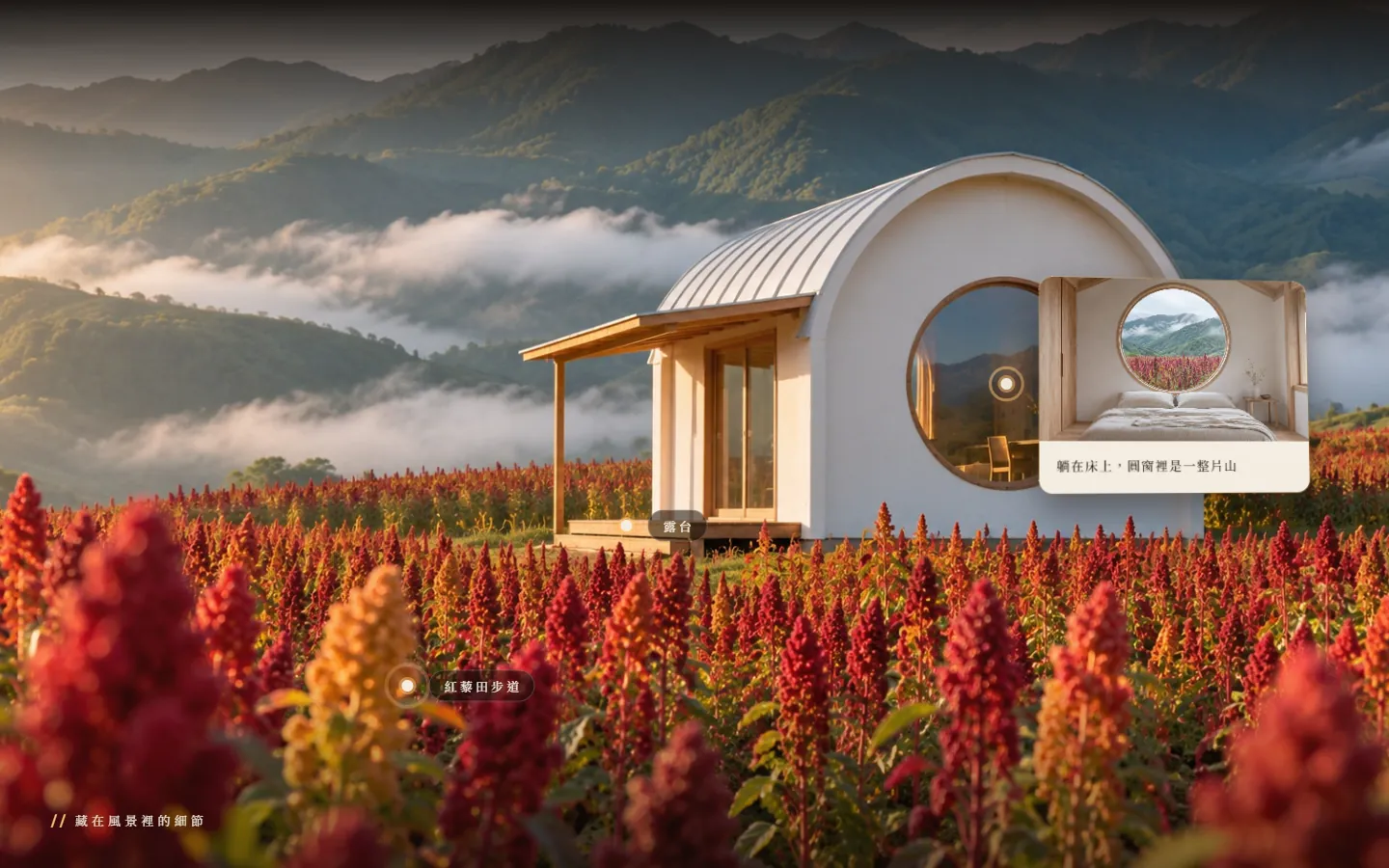
Next step: one more section, the full-bleed cabin photo img/cabin.jpg, with interactive tooltips.
- Three points on the photo: "[露台]" (deck) on [the wooden deck], "[圓窗臥室]" (round-window bedroom) on [the round window], "[紅藜田步道]" (quinoa field trail) on [the red quinoa in the foreground] (look at the image to place them). Each point is a small dot with a slowly spreading glow ring and a small label beside it.
- On mouse-over a small card pops up next to it: a photo on the top half ([a crop of cabin.jpg for the deck, room-day.jpg for the bedroom, a crop of bg-landscape.jpg for the trail]) and one line of description below. The card appears with a slight 3D tilt and turns gently with the mouse position over the card.
- A small line bottom left: "[// 藏在風景裡的細節]".
It placed the three points itself by looking at the photo (the deck, the round window, the quinoa in front). Each point has a warm glow ring that spreads every 2.6 s; on mouse-over a cream card flips out at an angle, then turns with the mouse position over the card, up to about 9 degrees.
10Prompt 7: a day state and a night state
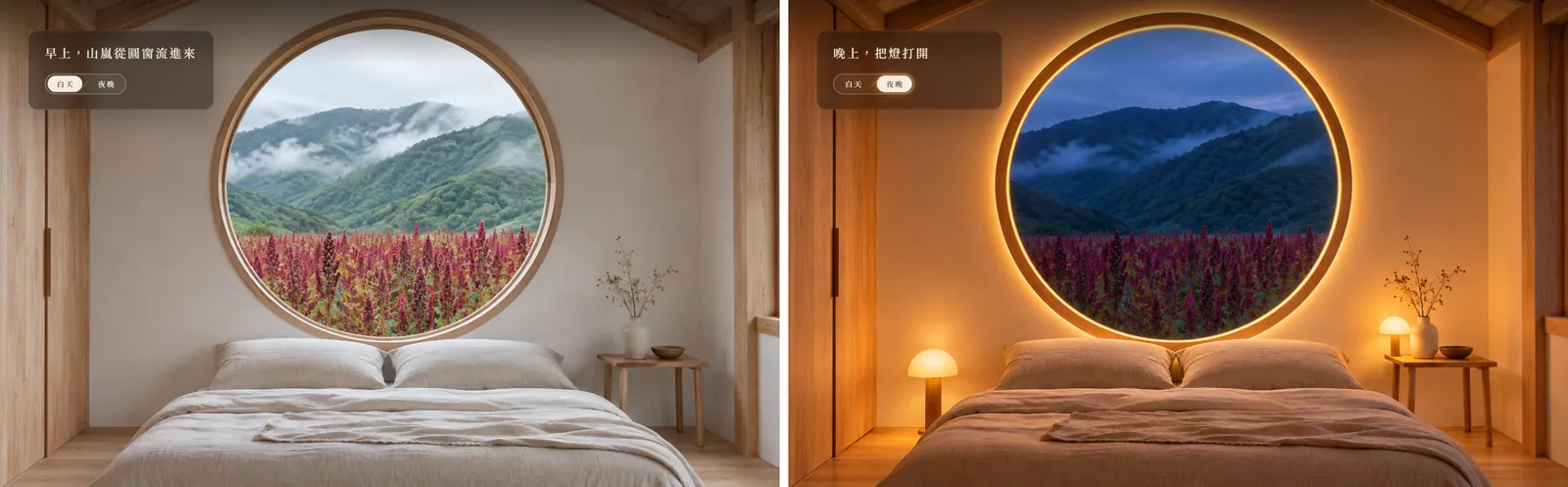
Last step: make the last section a component with two states: [day / night].
- Stack img/room-day.jpg and img/room-night.jpg in the same place, full-bleed.
- One line of caption top left: in day "[早上,山嵐從圓窗流進來]", at night "[晚上,把燈打開]", with a small switch "[白天 / 夜晚]" under it.
- Clicking the switch changes smoothly between the two states (the photos cross-fade over about 0.8 s and the caption changes with them), and the switch itself slides.
- End the page with a simple footer: "[山嵐小屋 · 台東縱谷]" and "虛構的品牌,示範用" (fictional brand, for demonstration).
The two room photos are stacked, and one 0.8 s animation drives the cross-fade, the caption and the sliding switch; click again halfway and it eases back. It saw that the pale wood made the cream text hard to read and added a frosted dark panel top left on its own. The footer reads 山嵐小屋 · 台東縱谷 and 虛構的品牌,示範用 (fictional brand, for demonstration).
11Make it your own brand
- The foreground doesn't have to be an arch: a door, a round window, a cave or a picture frame all work, as long as the middle is cut out and the edges are close to the camera. Just make the opening pure green in the ChatGPT prompt.
- The background needs depth: something near (a field, flowers, trees) and something far (mountains or a city), or the layers won't show when it zooms.
- Brand name, place, title and captions: replace the [] parts in the 7 prompts.
- You can tune the zoom: the bigger the wall zoom, the longer the pass through; raise the background zoom for a stronger effect, but keep it far from the foreground's or the parallax disappears.
- One thing per message. Scroll through after each step before the next one, so problems are easy to find.
12Good to know
- Shanlan Cabin (山嵐小屋) is a fictional retreat. All images were generated by ChatGPT and the page code was written by Claude Code; we didn't change the code (we only deleted 4 unused font files and its test folder).
- The terminal screens in the video are re-typeset, not recordings, and the prompts there are shortened; the full text in this article is the reference.
- The site was only built and checked for a 1440×900 desktop screen, with a mouse wheel and a mouse. The cards only open on mouse-over, and we didn't test it on a real phone; for phones, add "it must also look good on a phone in portrait, and the points open with a tap" to the prompt.
- The fonts are Noto Serif TC, Instrument Serif, Inter and JetBrains Mono, all free under the SIL OFL.
- Before you use AI-generated images commercially, check the terms of the tool you used.
- Claude Code gives a slightly different result every time, so go by the files you get.