Turn 8 sketches into a 3D map navigation animation with Claude Code: roundabout, turn cards, café sheet (prompts + demo)
One sketch per screen, handed to Claude Code: three.js builds a fictional city of 789 blocks and 1,746 trees, and a blue route draws itself to a café.
Want a 3D navigation animation like a map app's promo video, without Blender or After Effects? Here is the method: draw each screen as one sketch, put them in order like a storyboard, and hand the whole set to Claude Code. We prepared 8 phone-screen sketches, and Claude Code used three.js to build a whole fictional city: the roundabout 光復圓環 (Guangfu Roundabout) in the middle, a blue route that draws itself, turn cards, a café info sheet, street view and an arrival screen, all the way to 晨光咖啡 (Morning Light Café), ending on the end card of our app 走走 (Zouzou, "let's walk"). The places, the café and the app are all fictional.
To be clear: the 8 sketches were generated in ChatGPT in a hand-drawn wireframe style; they are not real hand drawings. You can draw and photograph your own instead. This guide gives you the live result, the prompts for the 8 sketches, the full prompt we gave Claude Code (swap the [ ] parts for yours), a side-by-side of every sketch and its result, and the one line that makes it easy to time to a voice-over or recut later.
01The result: 8 sketches, a 35-second 3D navigation animation
The result is one index.html file that plays by itself, about 35 seconds per loop. On a computer or a phone it is a 9:16 portrait phone screen in the middle of the window. The 11 beats: the app icon shrinks into the blue dot, the roundabout from above, a turn card, the 3D street and route, the café info sheet, around the roundabout, a second turn, street view, arrived, a pull-back over the whole city, and the app icon end card.
- Try it: the 3D navigation animation (plays and loops by itself) — Phone or desktop; needs a connection (three.js loads from a CDN); the 3D scene takes a few seconds
- Jump straight to the café sheet (beat 5) — Change the number after ?beat= to 1–11 to start at that beat
- Play once and stop on the end card — ?loop=0 stops on the last frame
02Step 1: sketch first, one sketch per screen
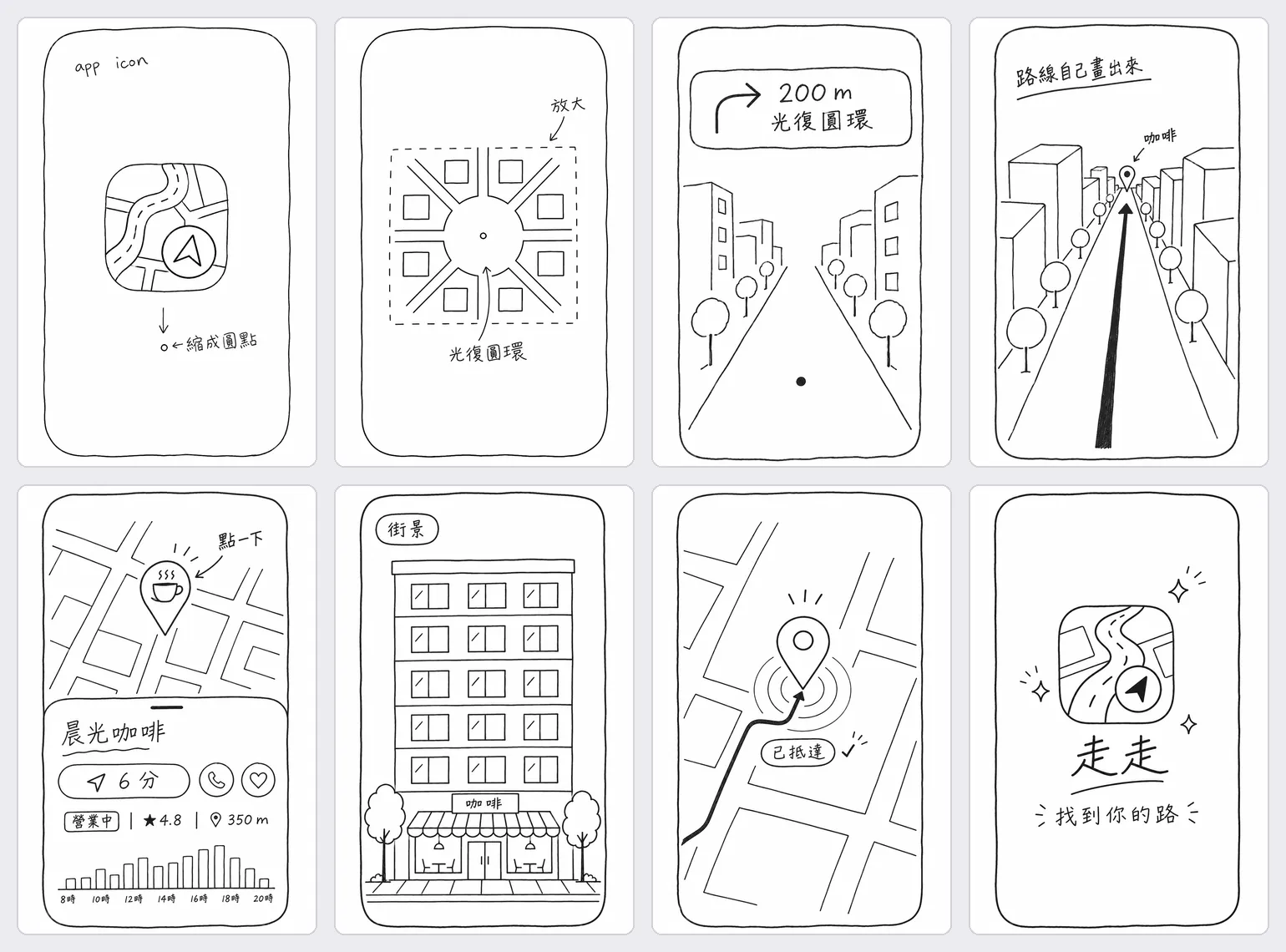
The sketches are the storyboard. One sketch is one screen, and their order is the order of the animation. The tiny notes matter: 「縮成圓點」 (shrink to a dot), 「放大」 (zoom in), 「路線自己畫出來」 (the route draws itself), 「點一下」 (tap). They tell Claude how each beat should move. Our 8 were:
- App icon: a little map and a navigation arrow in a rounded square, with the note "shrink to a dot" under it.
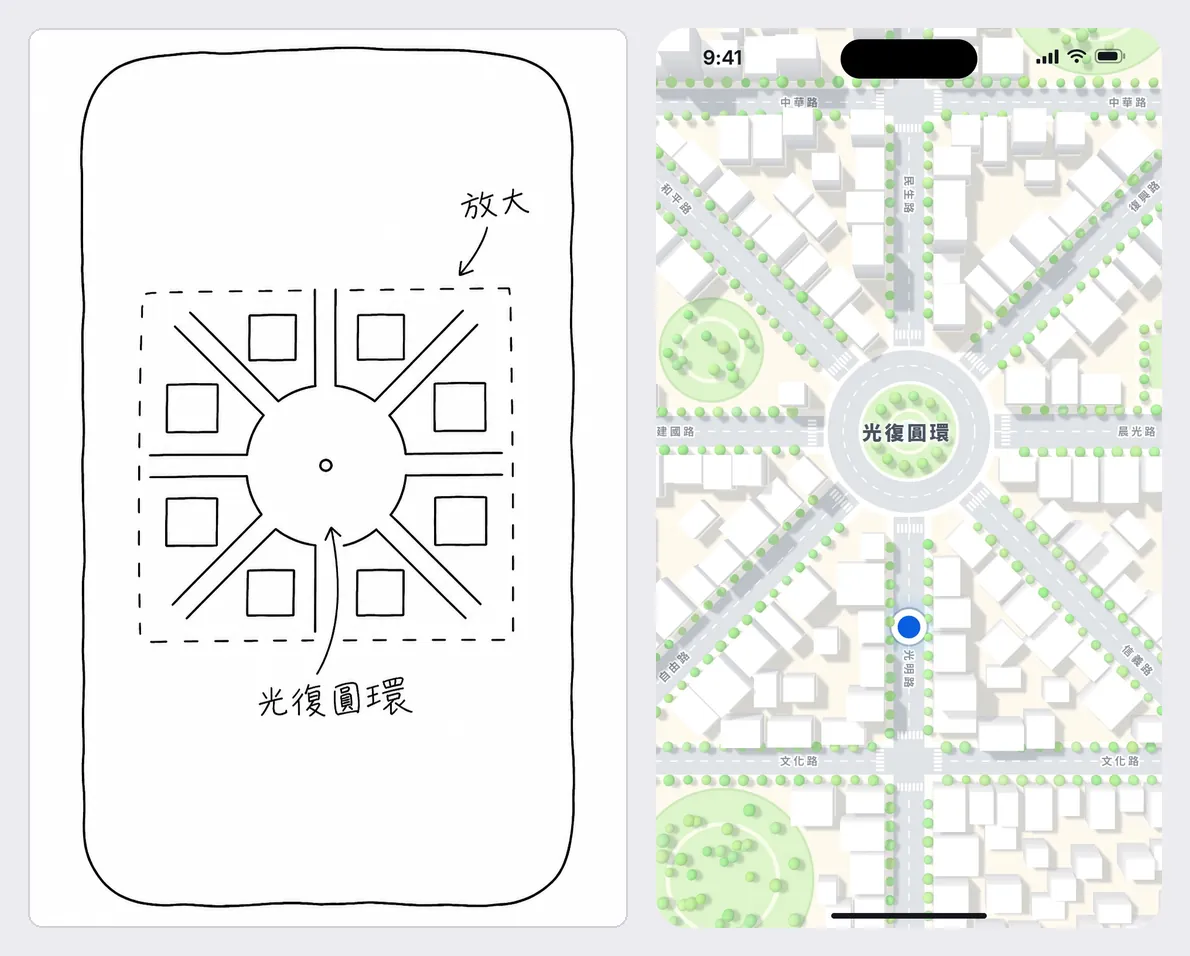
- Roundabout from above: a big circle with 8 streets radiating out like a star, square blocks between them, labelled 光復圓環 and "zoom in".
- Turn card: a banner at the top with "200 m 光復圓環" and a right-turn arrow, a street in perspective below, and a small black dot for "me".
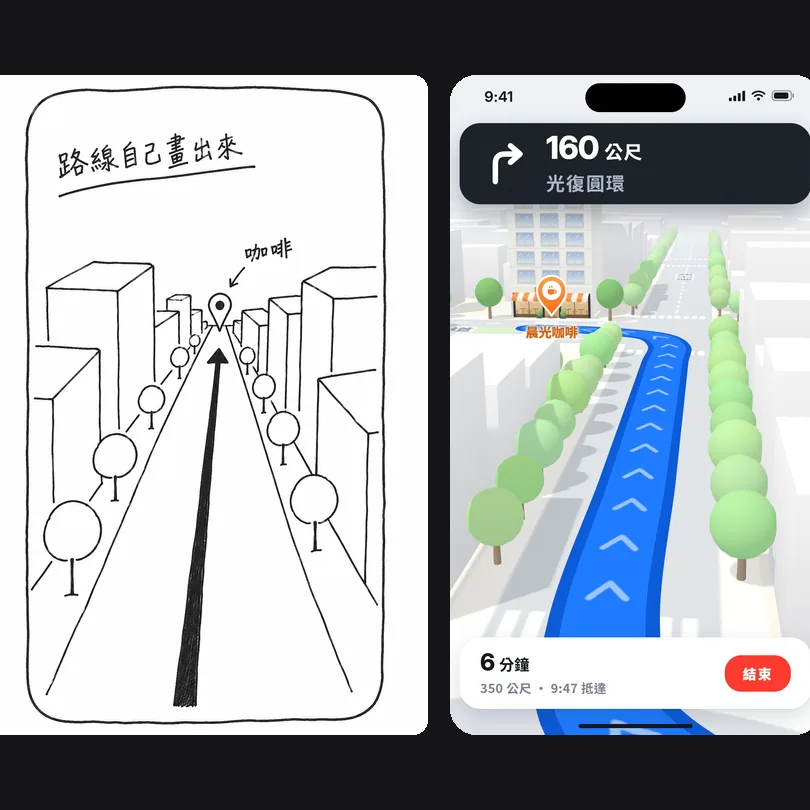
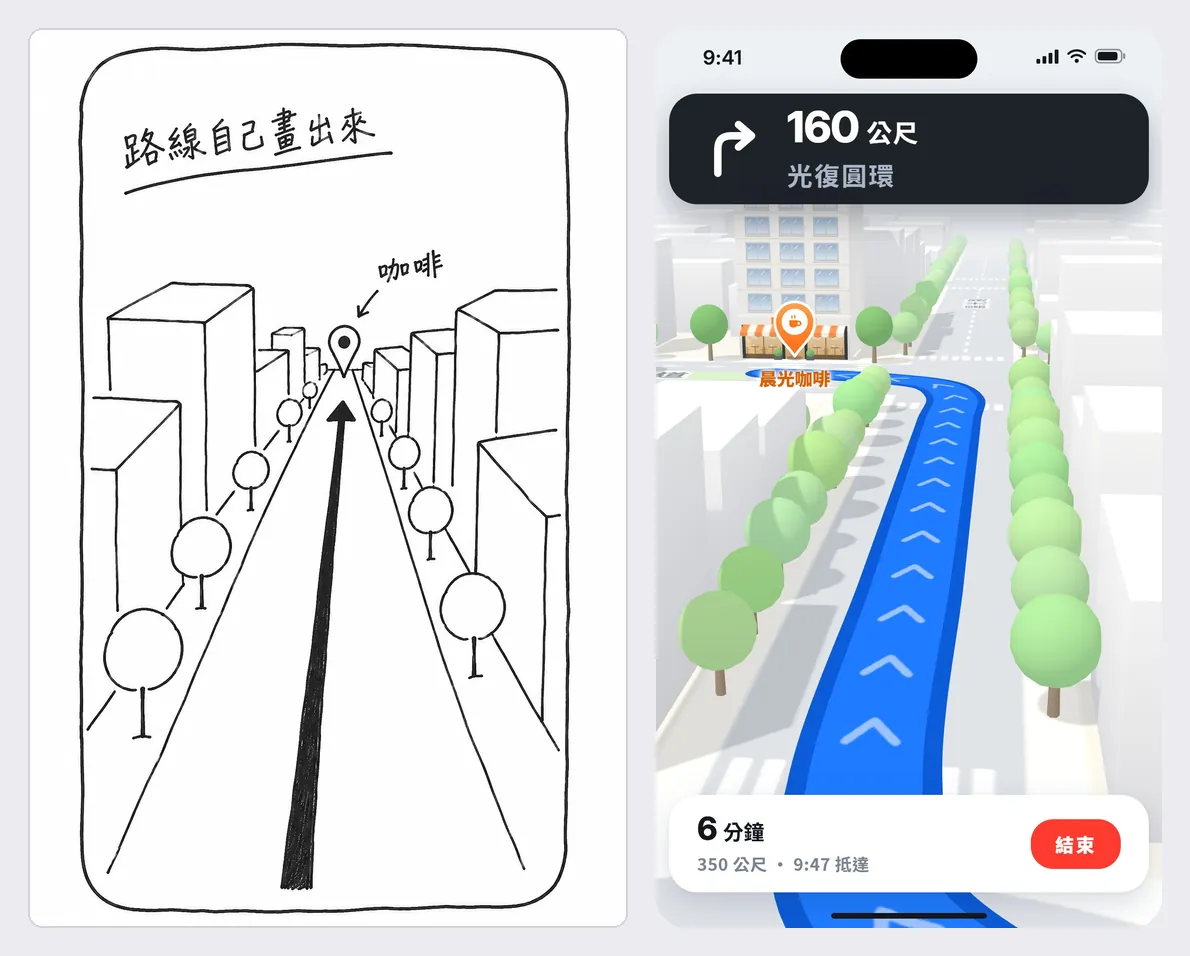
- 3D street with the route: a long avenue with a thick line down the middle (the route), a pin labelled "coffee" far ahead, and "the route draws itself" at the top.
- Café info sheet: a cup pin labelled "tap" on top, a card below: 晨光咖啡, 6 min, open, ★4.8, 350 m and a busy-hours bar chart.
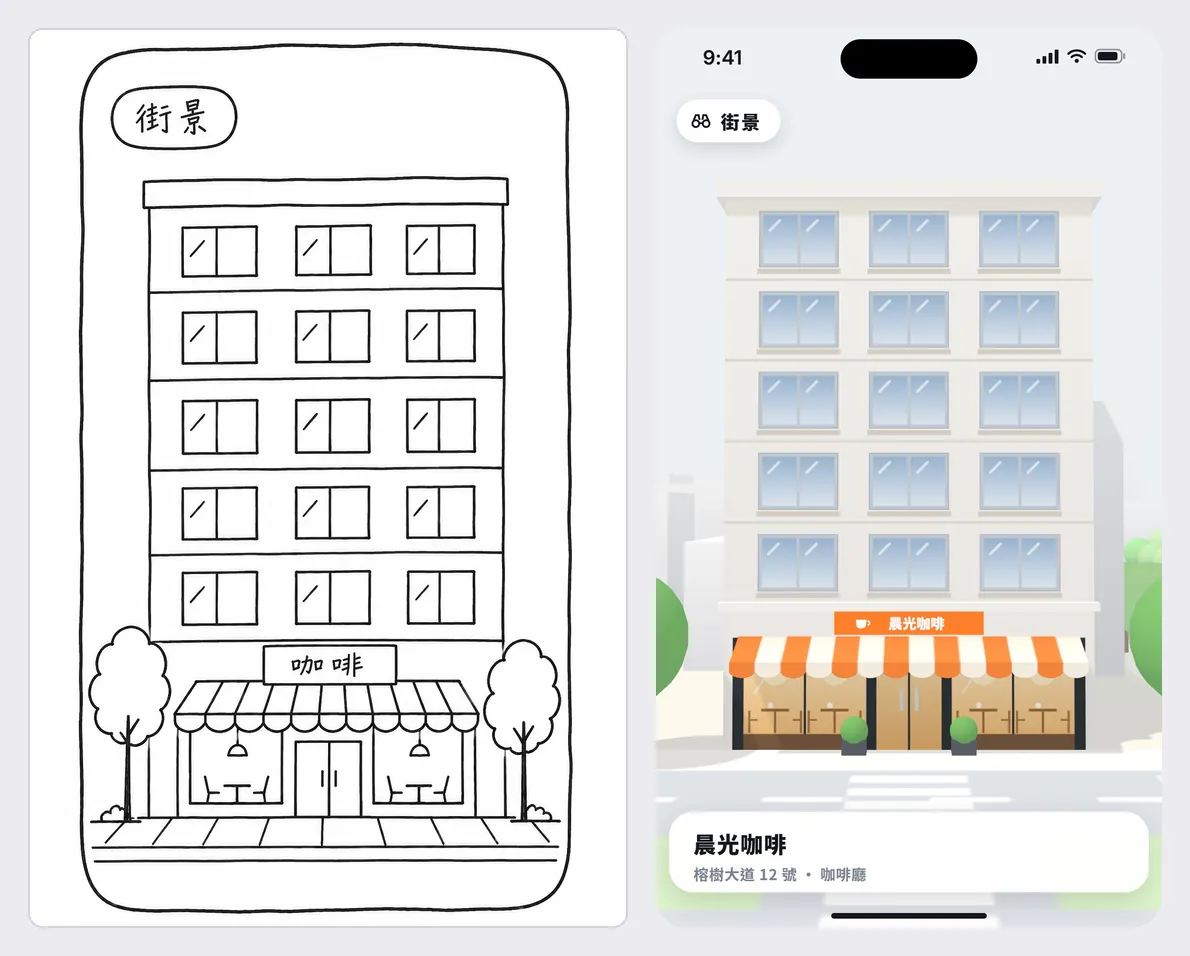
- Street view: a five-storey building seen straight on, a café with a striped awning on the ground floor, a 街景 (street view) label in the corner.
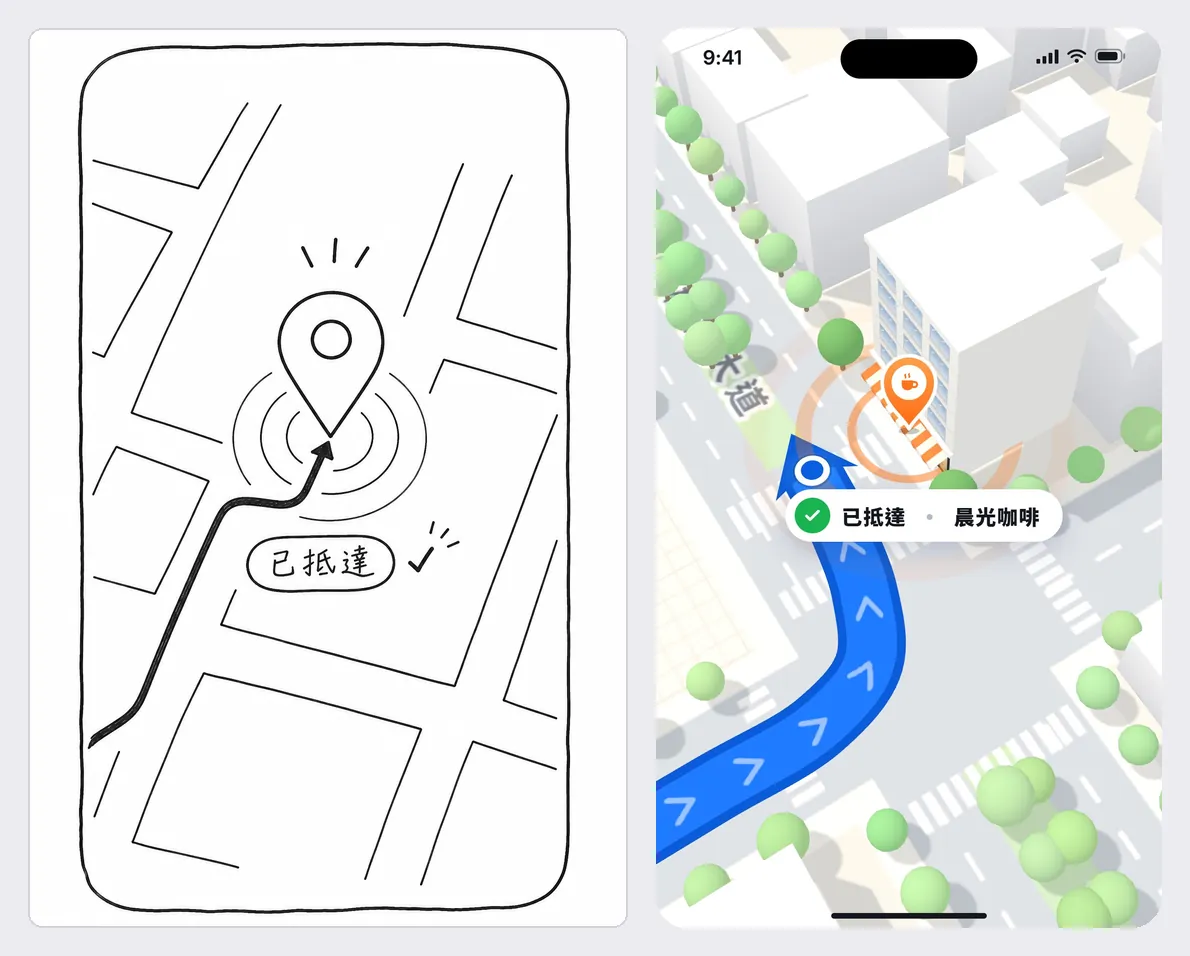
- Arrived: a big pin with three pulse rings at its tip, the route coming in from the bottom left, and 已抵達 (arrived) under it.
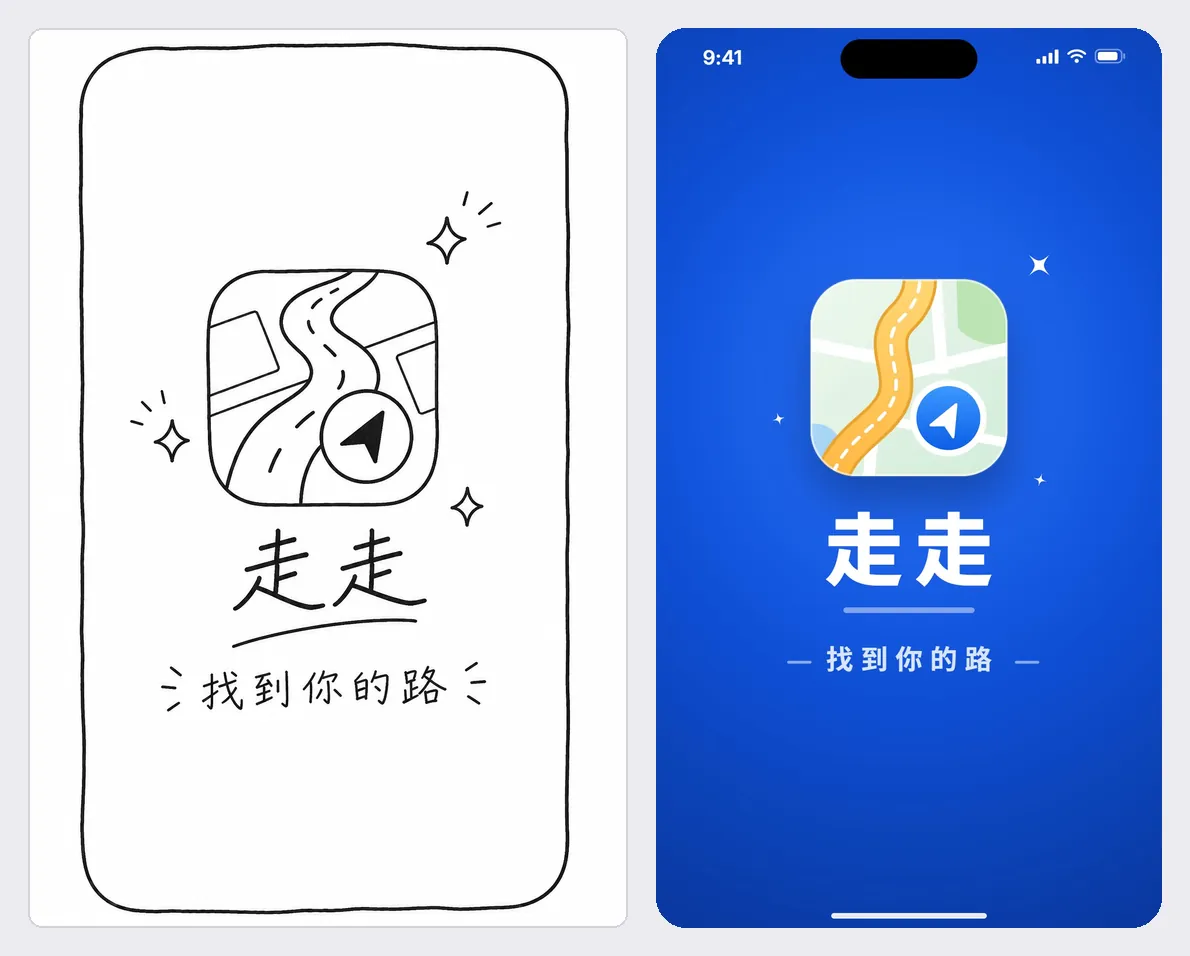
- End card: the same app icon with 走走 and 找到你的路 (find your way) hand-lettered under it.
We made them in one ChatGPT chat, one image per message. The first message sets the style; every message after it only says which sketch it is, "same style", and what is on the screen. These are the exact messages we sent:
I'm sketching the screens of a phone map-navigation app before I build it. Please generate each screen as its own image, one image per message, all in exactly the same style. STYLE (for every image): a quick hand-drawn UX wireframe sketch on plain white paper, black fine-liner pen only, loose doodle lines that wobble a little, no shading, no grey, no colour, lots of white space. Portrait 2:3. The drawing is one phone screen: a thin hand-drawn tall rounded rectangle almost filling the page. Flat, straight-on scan of the paper: pure white background, no desk, no hands, no pen, no shadows. Only a few tiny handwritten notes (short [Traditional Chinese] words or numbers), messy designer handwriting. Sketch 1 of [8], [APP ICON]: [in the middle of the screen a rounded-square app icon doodle: inside it a curvy road on a little map and a bold arrow-head navigation pointer in a circle. Under the icon a small arrow pointing down to a tiny dot, with the note 「縮成圓點」. Tiny note at the top: 「app icon」.]
Sketch [2] of [8], same style, [ROUNDABOUT MAP (top-down)]: [what is on this screen, and the tiny handwritten notes in 「」].
- ChatGPT — what we used to generate the 8 sketches
03Step 2: hand the whole set to Claude Code
- Make an empty folder with a sketches/ folder inside, and save the sketches in order as 01.png, 02.png … 08.png.
- If you want your own Chinese fonts, add a fonts/ folder too (we used Noto Sans TC and Inter).
- Open Claude Code in that folder.
- Paste the whole prompt below (swap the [ ] parts for yours) and press Enter.
- When it has written site/index.html, run npx serve (or any local server) in the folder and open site/index.html in your browser.
Turn these [8] sketches into a 3D map navigation animation in a phone frame.

The sketches are in sketches/01.png … 08.png (one per screen, in order). Look at each one and follow its layout.

Build it as a single file site/index.html with three.js: a portrait phone screen (9:16, fills the window) that plays the whole animation by itself, about [35] seconds, one beat per sketch:

1. App icon (sketch 1): the icon of our own map app 「[走走]」 (a rounded square with a little map, a curvy road and an arrow-head pointer in a circle; our own design, not Apple's) on a light screen. It shrinks down into the blue location dot.
2. Roundabout, top-down (sketch 2): a fictional [Taiwanese district] around 「[光復圓環]」: one big roundabout with 8 straight streets radiating out like a star, city blocks between them, the blue dot near the circle. Seen from straight above.
3. Turn card (sketch 3): a dark rounded banner at the top: a right-turn arrow, 「[200 公尺]」, 「[光復圓環]」. The camera tilts down from the top view into a 3D follow view behind the blue dot.
4. 3D street with the route (sketch 4): a bright blue route line draws itself down the avenue; white extruded buildings on both sides, rows of round green trees, an orange café pin 「[晨光咖啡]」 up ahead.
5. Café pin + place sheet (sketch 5): the camera settles on the pin and a bottom sheet slides up: [晨光咖啡 · 咖啡廳], a blue 「[6 分鐘]」 button and two small buttons ([撥打], [網站]), three stats [營業中 / ★4.8 / 350 公尺], and a small busy-hours bar chart.
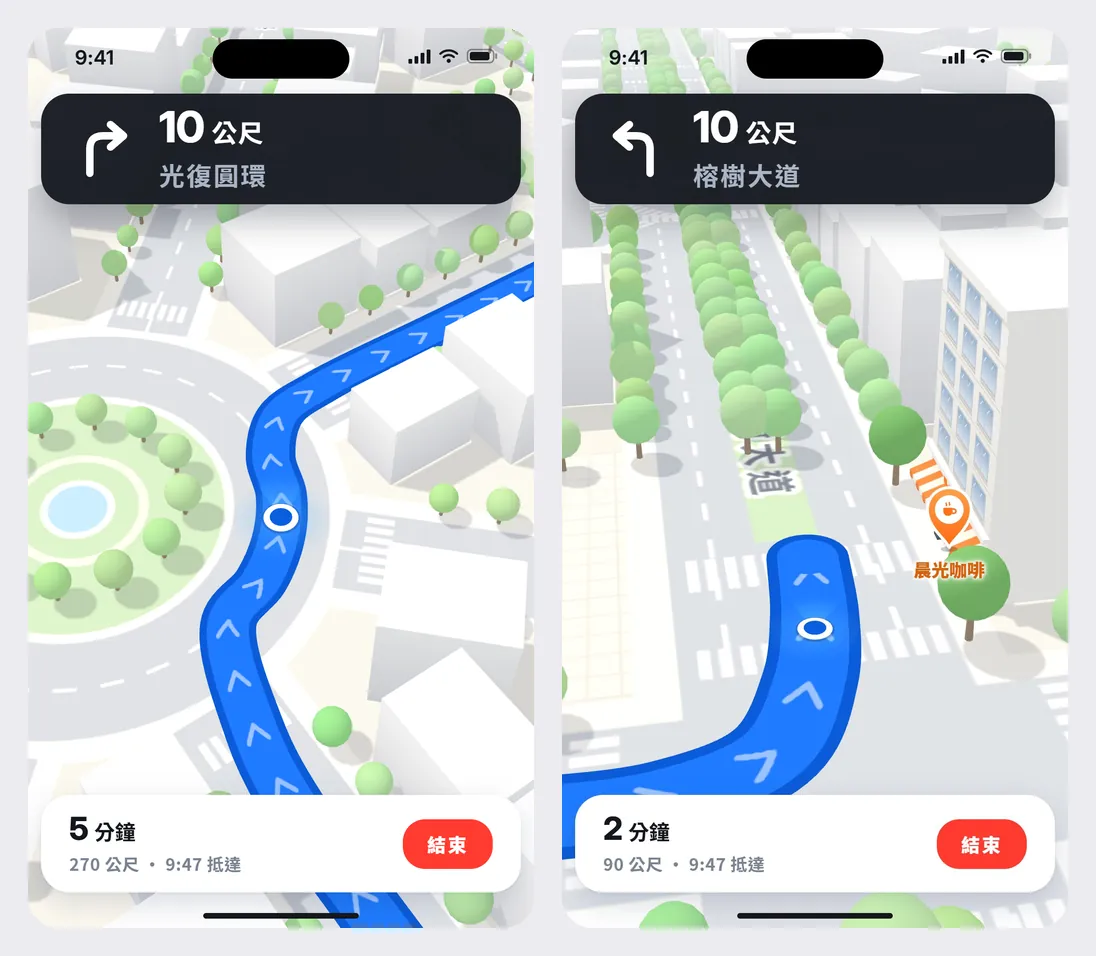
6. Around the roundabout (sketch 2 again): the camera swings round while the route curves around the roundabout.
7. Second turn: a dark banner 「↰ [80 公尺 · 榕樹大道]」 and a tree-lined boulevard (lots of round trees).
8. Street view (sketch 6): a 「街景」 pill at the top; street-level view of the café's building front: a grid of tall windows over five floors and a café shop front with an awning.
9. Arrived (sketch 7): the pin with pulse rings and 「已抵達 · [晨光咖啡]」.
10. The camera pulls up and back over the whole radial city around the roundabout.
11. End card (sketch 8): the [走走] icon with 「[走走]」 and 「[找到你的路]」 under it, on a deep blue screen.

Look: clean, bright and polished like a premium map app: soft white buildings with gentle shadows, light grey roads, pale green parks, round trees, a bright blue route, smooth eased camera moves between beats. The UI text is Traditional Chinese in a clean sans-serif. All places are fictional.
How we ran it: a fresh Claude Code agent (Claude Opus) got only the 8 sketches, this prompt and a short technical note, finished in one turn, and we did not change its code. It wrote one site/index.html: three.js r160 loaded from jsDelivr, no other library, and no images or 3D model files. The whole city, the app icon and the cards are all drawn in code.
Two or three lines of that technical note are worth adding to the end of your own prompt:
Keep the beats in one data array with a duration per beat, and support URL params: ?beat=N (start at beat N, 1-based, with that beat's start state), ?d=3.2,2.8,... (override beat durations in seconds, in order) and ?loop=0 (stop on the last frame instead of looping).
Fonts: local files only (in site/fonts/), no Google Fonts.
When done, check it in headless Chrome: save a screenshot of each beat and fix anything that looks wrong or throws console errors.
- Claude Code
- three.js — the only library used
04One sketch, one beat: from the app icon to the café
In each pair below, the sketch is on the left and the beat Claude Code made from it is on the right (beat 4 is the pair at the top of this guide). It doesn't just trace: it reads the circle as a roundabout, the lines as roads, the arrow as a turn card, and it fills in things the sketches never drew.
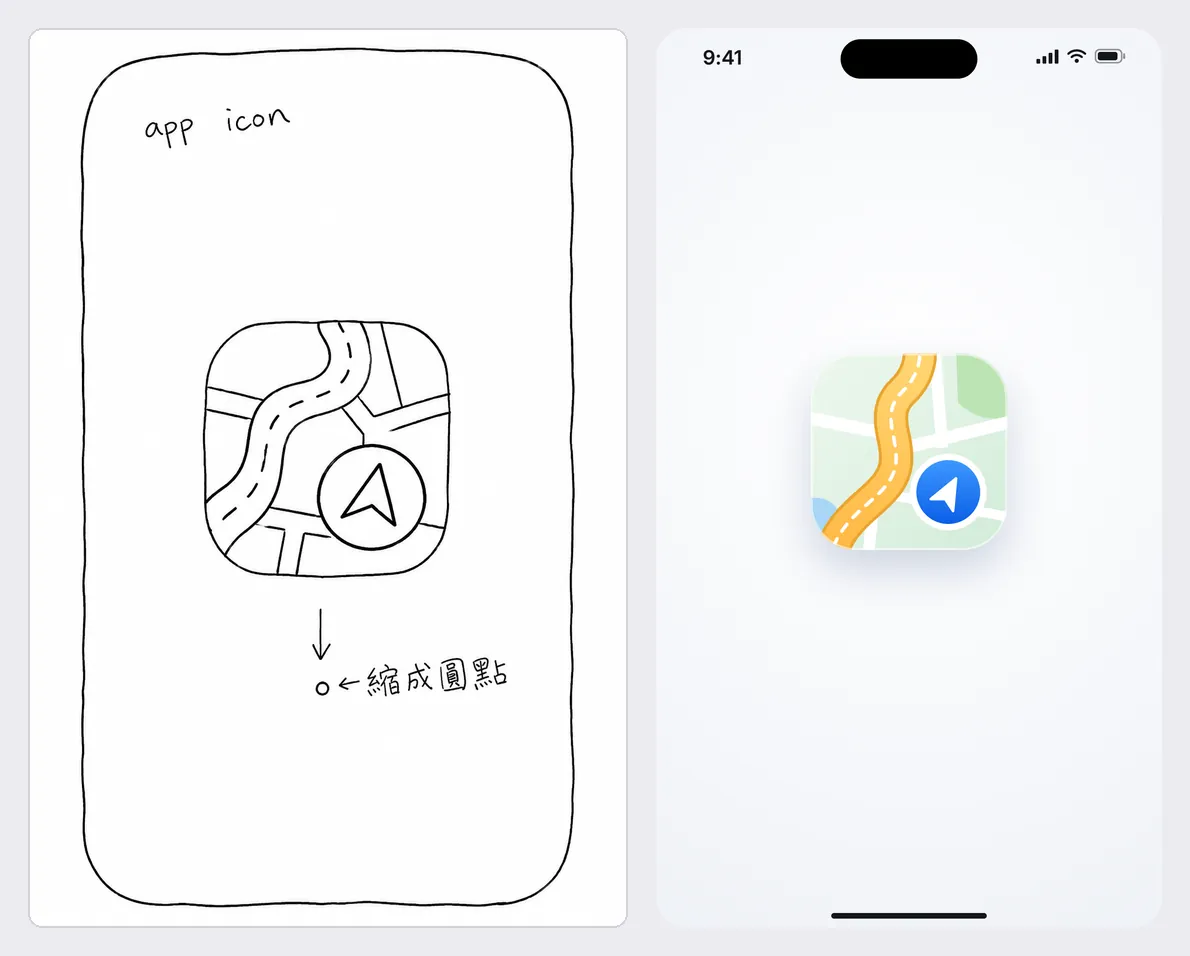
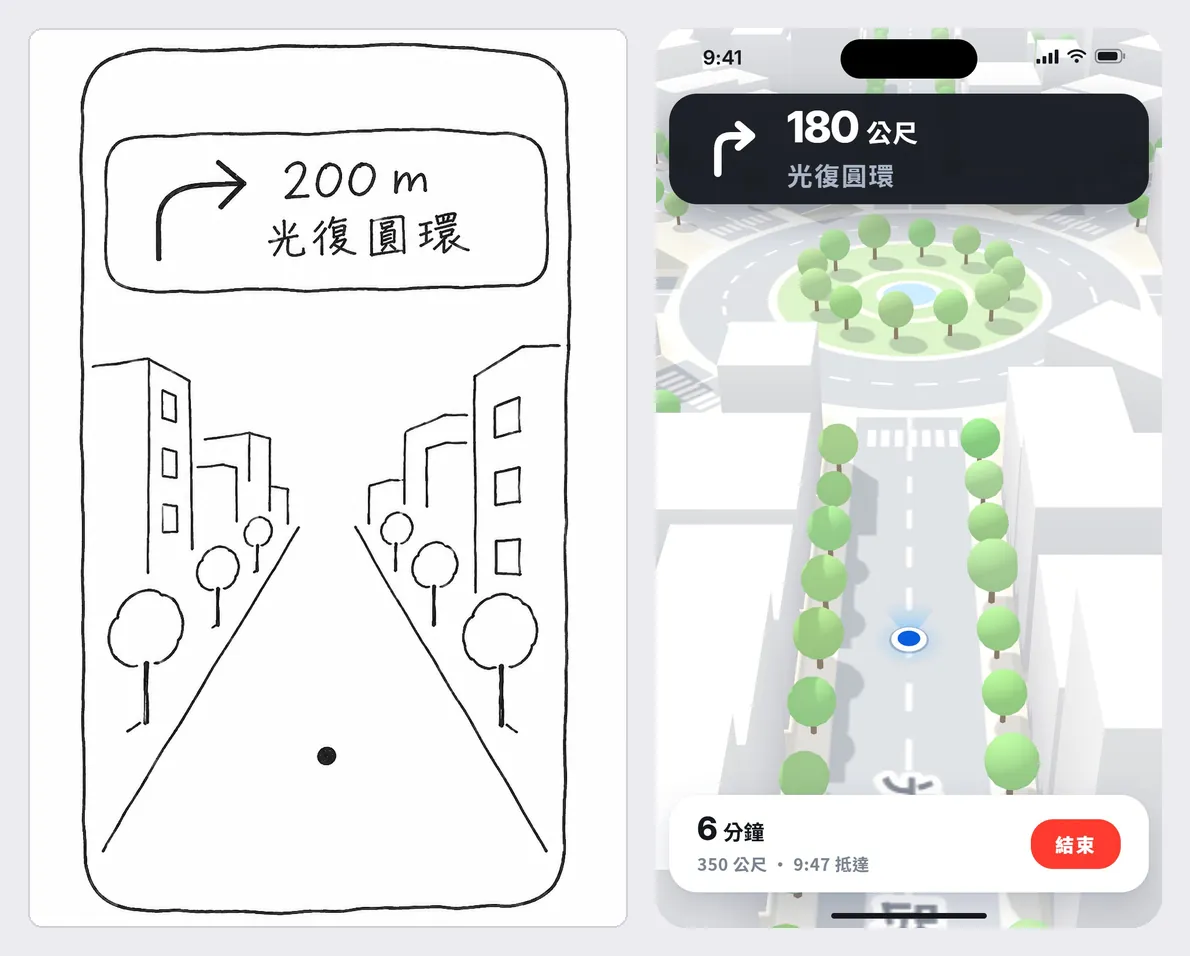
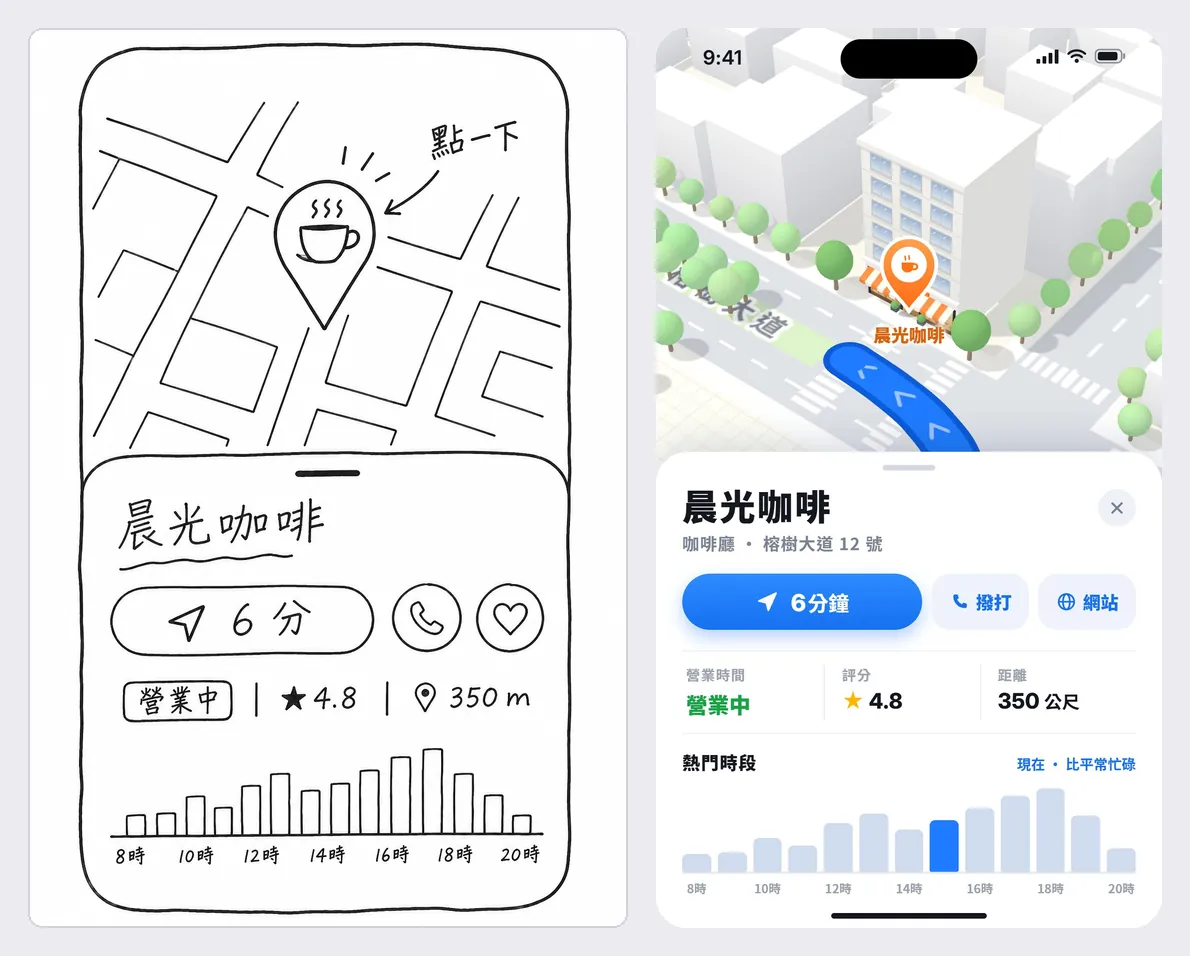
What it added on its own: the turn-banner distance counts down (200, 180, 160 m…), an ETA card stays at the bottom (6 min, 350 m, arrive 9:47, with a red "End" button), a status bar at the top of the phone, and the address 12 Banyan Boulevard on the sheet. None of these were in the prompt; they looked like a real navigation app, so we kept them.
05Around the roundabout, street view, arrival, end card
06The key line: every beat has its own duration
The most useful part of this animation comes from the line we added at the end: "keep the beats in one data array with a duration per beat". Claude Code wrote the 11 beats as one list with a default duration each (2.6, 2.8, 3.4, 3.6, 3.8, 3.6, 3.4, 3.4, 3.0, 3.0 and 2.4 s, 35 s in total), and the camera eases from one beat to the next.
So to add a voice-over or cut a short video later, you change the URL instead of rebuilding:
- ?beat=5: start at beat 5, with the camera and screen exactly as that beat begins.
- ?d=2,2,3,3,3,3,3,3,3,3,2: set the 11 durations in order. For the reel we used this to land every beat on its voice-over line and recorded the whole run (about 26 s) in one take.
- ?loop=0: play once and stop on the last frame.
- ?t=12: a debug parameter it added on its own; it freezes the page at second 12, handy for screenshots.
07How the city is "built"
The city uses no 3D models at all; it is all computed in code, so the file stays small. Open index.html and you can see how:
- Roads: one big roundabout with a fountain park in the middle, 8 radiating avenues and a grid of smaller streets, one of them Banyan Boulevard. Plus lane markings and zebra crossings.
- Buildings: 789 white boxes of different heights with soft shadows, all drawn from one repeated box (InstancedMesh), which keeps it fast.
- Trees: 1,746 round trees, again one tree repeated with different positions and sizes.
- The route: a blue ribbon with white chevrons that draws a little more each frame, so it looks like it grows by itself.
- The camera: each beat has a target, distance, tilt and heading, and the camera eases between them; in the turn beats it follows behind the blue dot.
08Make it your own city
- Names: swap 光復圓環, 晨光咖啡, 榕樹大道 and 走走 in the prompt for yours (fictional names are best).
- Screens: redraw or regenerate those sketches, and change the matching beat in the prompt.
- Streets: not every city has a roundabout. Draw a grid-street sketch, or use the line below in the chat where it is already built.
- Mood: say "switch to night mode: deep blue sky, lit windows, a glowing route".
- More beats: add one at the end of the list, e.g. "12. Before the end card, the camera flies past the shop front", and give it a duration.
Don't change anything else; only [replace the roundabout with a grid of streets]. Keep the sketch order and every beat's duration as they are.
09Good to know
- The 8 sketches are hand-drawn-style wireframes generated in ChatGPT, not drawn by us. Your own drawings, photographed, work too.
- Claude Code wrote the animation and we didn't change its code; we only shrank the Chinese fonts. The small extras the prompt didn't ask for (the countdown, the ETA card, the address) were its own choices.
- Every run is different. With the same prompt your city layout, icon and camera moves may differ, and the extras may not appear.
- It needs a connection: three.js loads from the jsDelivr CDN. Double-clicking index.html can give a blank screen or the wrong fonts; open it through a local server.
- The demo's Chinese fonts contain only the characters on screen. If you download the demo and change the text, put the full fonts back, or new characters fall back to a system font.
- 光復圓環, 晨光咖啡, 榕樹大道, the app 走走 and its icon, and the ratings, distances and times are all fictional.
- Also: turn hand-drawn sketches into an animated app UI — also from sketches, a 2D animated UI made in claude.ai
- Also: one prompt for a playable 3D mini world — also three.js, a self-running little world in one file