Build a wind-chime text website with Claude Code: every character hangs on a string that sways, parts and scatters
A curtain of characters hangs under a roof and sways like a wind chime; the mouse parts it, a click scatters it. ChatGPT roofs, Claude Code page, 2 prompts.
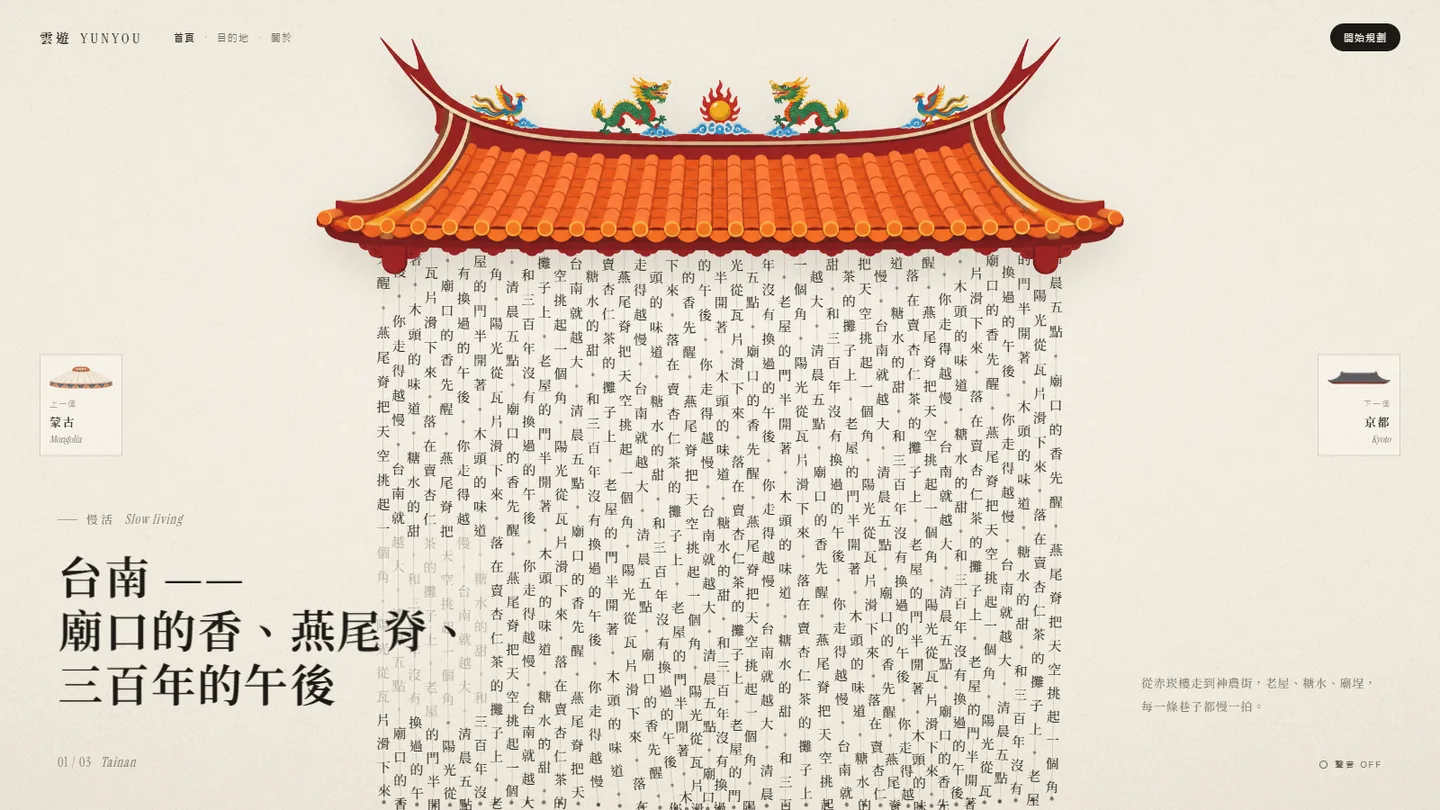
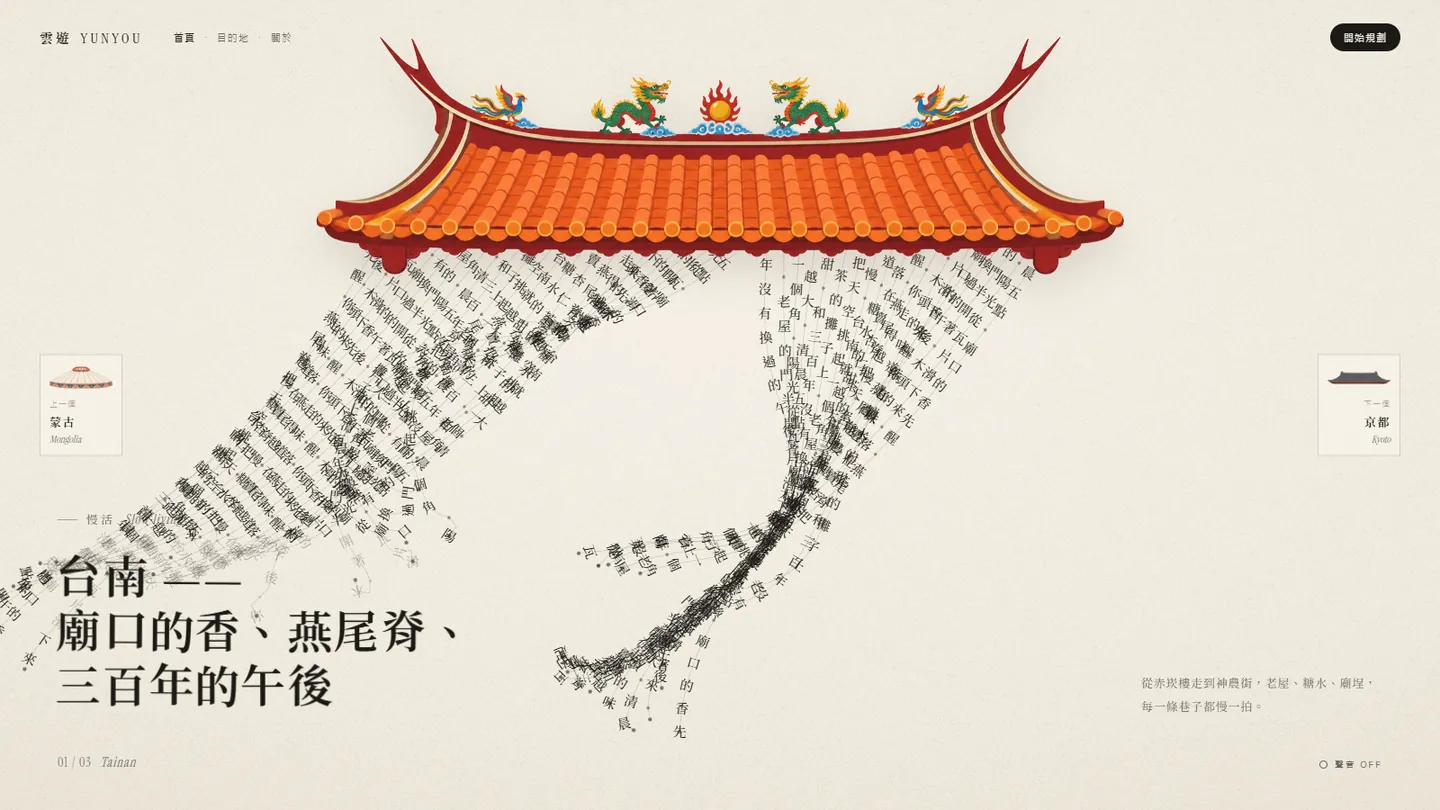
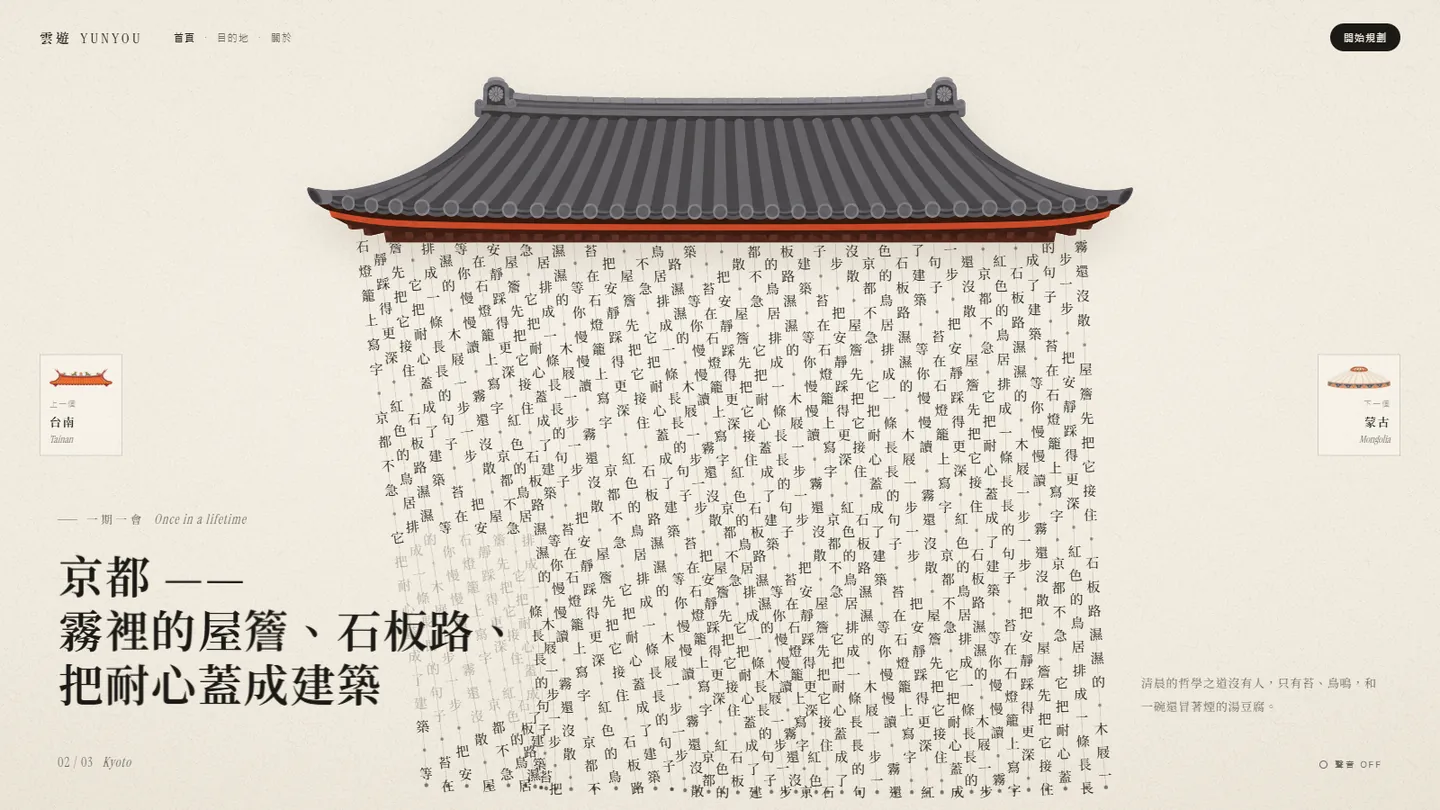
The words on this travel site aren't laid out on the page; they hang under the eave. Dozens of thin strings drop from the roof, each carrying a column of small characters; the wind comes in gusts and the whole curtain sways like a wind chime. Bring the mouse close and the strings near it part; click, and the whole curtain scatters, then slowly swings back into sentences.
Claude Code wrote this homepage over 2 messages, and ChatGPT drew the three roofs. The studio, YUNYOU, is fictional, and we didn't change a single line of the code. Below are the full ChatGPT and Claude Code prompts (replace the [ ] parts), what each one produced, and the one sentence that matters most: hang every character on a string.
01The result: words hanging under the eave, swaying in the wind
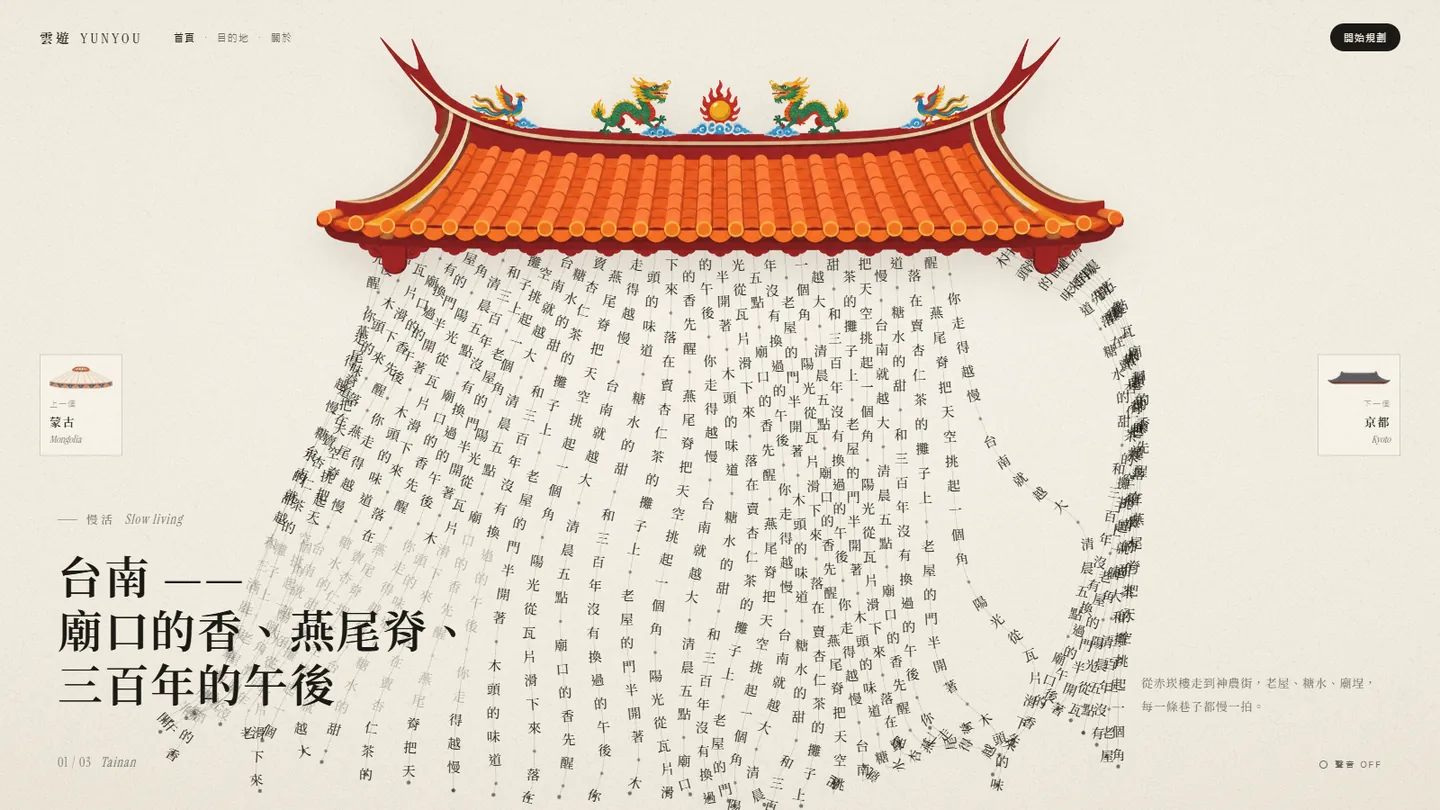
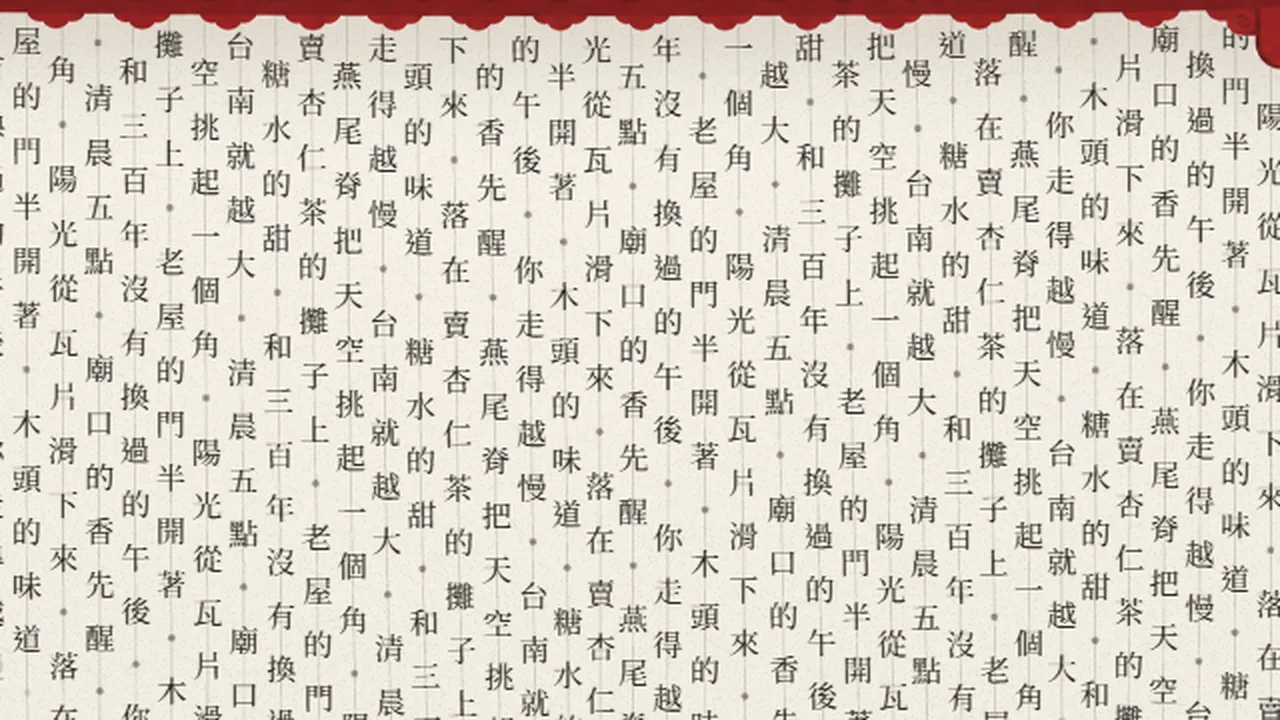
The whole page uses three colours: cream paper, ink-black text and the roof's own colours. The roof is pinned top-centre and never moves; under its eave hang 43 thin strings, each carrying a column of small characters, which is Tainan's own introduction. With no wind the characters line up and each column reads top to bottom; when a gust comes through, the whole curtain sways together with a slight offset between strings, like a real wind chime.
In this guide you get: the ChatGPT prompt for the roofs, the 2 full Claude Code prompts (replace the [ ] parts), the one sentence that stops it from building "text particles", how the three-place wipe and the chime sound were made, and a list of things to watch out for.
The whole site is static files: index.html, style.css, main.js and synth.js, plus the three roofs in img/ and the fonts in fonts/. Nothing to install, no database; open it with a local server and play.
02Assets: write the copy first, then draw three roofs with ChatGPT
Words are the hero of this site, so write the copy first. For each place prepare 4 things:
- A small label line, a few words, for example "慢活 Slow living".
- A big serif headline that will break into two or three lines, for example "台南 —— 廟口的香、燕尾脊、三百年的午後" (Tainan: temple incense, swallowtail ridges, a three-hundred-year afternoon).
- A short description, one or two sentences, for the bottom-right corner.
- An 80-to-100-character "chime text". It gets split into single characters and hung on the strings, so write something visual that reads smoothly, with little punctuation (each punctuation mark becomes a bead on the string).
Then open ChatGPT and draw the roofs. Draw all three in one chat; for images 2 and 3 just say "same style, same background, now the roof of…" so the style stays consistent.
Flat vector illustration of ONLY the roof of a [traditional Tainan (Taiwan) temple: a 燕尾脊 swallowtail-ridge roof. The main ridge sweeps up at both ends into thin forked swallowtail tips, glazed orange-red tiles with a darker red ridge, a few small ceramic figures along the ridge], seen straight from the front at eye level, perfectly symmetrical. No walls, no pillars, no building below the eaves, nothing else. Plain flat cream background (#F2EDE3), no ground shadow, no texture, no text. Clean flat shapes, limited palette, like a modern editorial travel illustration. Wide landscape image, the roof centred and filling about 80% of the width.

(Images 2 and 3, same chat)
Same flat vector style, same plain cream background (#F2EDE3), same framing and the same front eye-level view: now ONLY the roof of a [Kyoto temple hall. Deep overhanging eaves with a gentle upward lift at the two corners, dark charcoal-grey ceramic kawara tiles with a slightly lighter rounded ridge, a thin band of dark wood and a hint of vermilion on the beam just under the eaves, a small ridge-end ornament at each end]. No walls, no pillars, no building below the eaves, no ground, no shadow, no text.
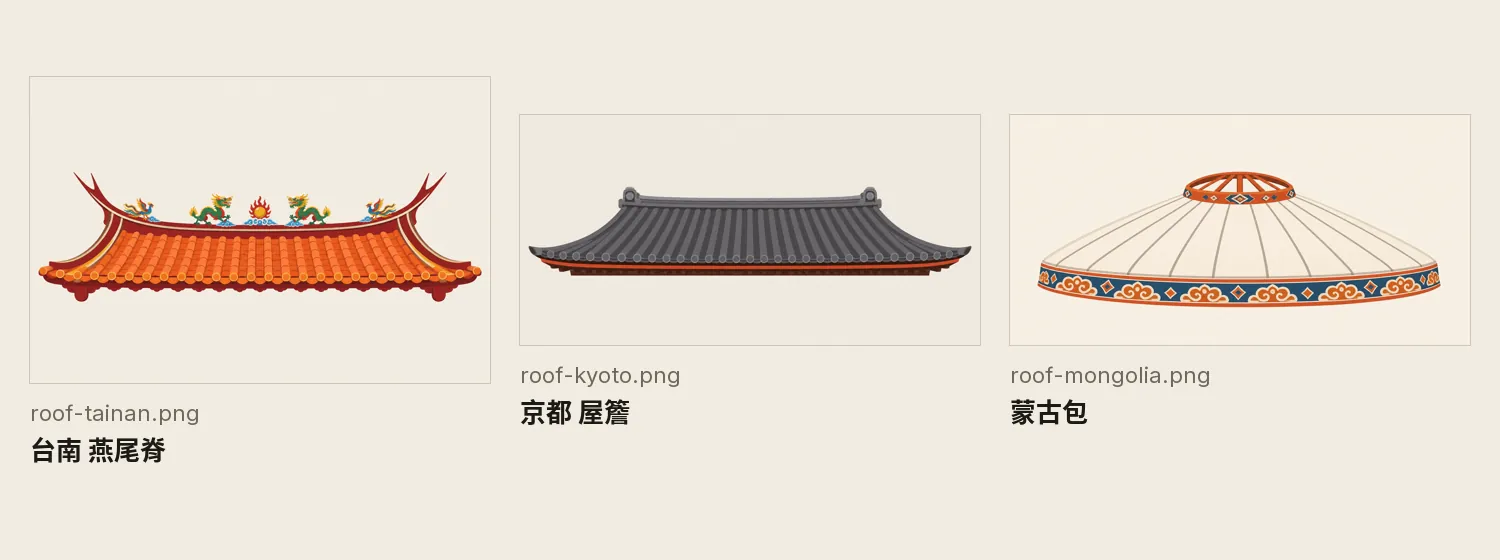
Remove the cream background, save transparent PNGs and put them in a new folder's img/, named like roof-tainan.png. We keyed them out by colour with a tiny script (all four corners are the same cream, so it's easy); you can also hand the three images to Claude Code and ask it to cut them out.
- ChatGPT — for the roofs
03Prompt 1: build the swaying homepage
- Open Claude Code in the folder that holds img/.
- Paste the whole prompt below (replace the [ ] parts) and press Enter.
- When it's done, run npx http-server in the folder, open the address it prints in a browser, move the mouse and click. If you double-click index.html instead, the browser may block the local fonts and images.
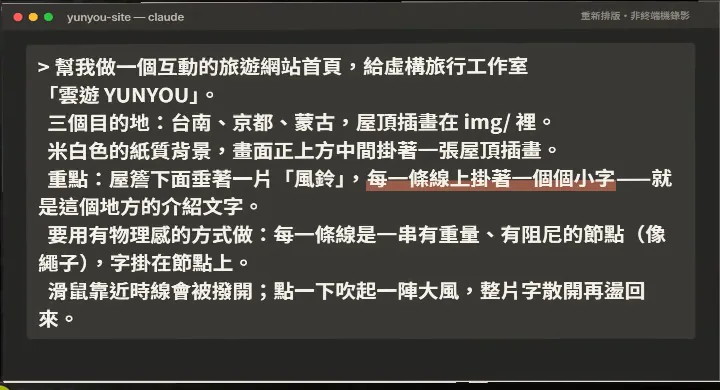
Build me an interactive travel-website homepage (one page, 1440×900, no scrolling) for a fictional travel studio in [Taipei] called "[雲遊 YUNYOU]". Three destinations: [Tainan, Kyoto, Mongolia]. The roof illustrations are in img/, use them as they are.

Layout:
- A cream paper background (like slightly fibrous beige paper, not pure white). Top left, a small wordmark "[雲遊 YUNYOU]" and three tiny nav words "首頁・目的地・關於" (Home · Destinations · About); top right, a small dark button "開始規劃" (Start planning).
- Top centre of the screen hangs a roof illustration (the roof only). The roof itself stays still, as if pinned to the wall.
- The key part: under the eave hangs a "wind chime". The chime is made of many thin strings, and every string carries a column of small characters, one character after another. Those characters are the destination's own text (below), one string per column, set vertically, like a bead curtain of words that hangs from the eave all the way down to the bottom of the screen.
- The strings must move like a real wind chime: wind comes in gusts (a wind field that changes slowly over time, with a bigger gust now and then), the whole curtain sways together with a slight offset between strings; when the mouse comes near, the strings around it are pushed apart and drift with the cursor; a click anywhere blows a big gust, the whole curtain of characters scatters outward and slowly swings back. When calm, the characters line up and the sentences can be read; when blown, they scatter into a moving field of dots. Do it in a physical way: every string is a chain of nodes with weight and damping (like a rope), the characters hang on the nodes; draw it on a canvas.
- Lower left: a small label line (for example "慢活 Slow living"), and under it a big serif headline split into two or three lines. The headline is alive too: in strong wind its characters drift slightly and a few of them fade, then come back when the wind stops.
- Bottom right, a short paragraph. At the left and right edges, two very small cards showing the previous / next destination's name with a tiny roof icon; clicking one switches the page.
- Switch between the three destinations with a "wipe": the whole page fades to cream, the new roof appears, then the strings drop down one by one.
- Sound: synthesise a wind-chime sound in real time with Web Audio. When a string is plucked or a big gust hits, play a few clear, ringing notes (pentatonic, like a metal tube chime); otherwise silence. Off by default, with a very small sound toggle in the bottom-right corner.
- Overall it should feel like an award-winning travel website: quiet, lots of white space, the texture of paper, and only three colours: cream, ink black and the roof's own colours.

Text content (replace with your three places):
[Tainan] | label: [慢活 Slow living] | headline: [台南 —— 廟口的香、燕尾脊、三百年的午後] | description: [From Chihkan Tower to Shennong Street: old houses, sweet soup, temple squares, every lane half a beat slower.] | chime text: [At five in the morning the temple incense wakes first. The swallowtail ridge lifts a corner of the sky, sunlight slides down the tiles onto the almond-tea stall. Old doors stand half open: the smell of wood, the sweetness of syrup, and an afternoon that hasn't changed in three hundred years. The slower you walk, the bigger Tainan gets.]
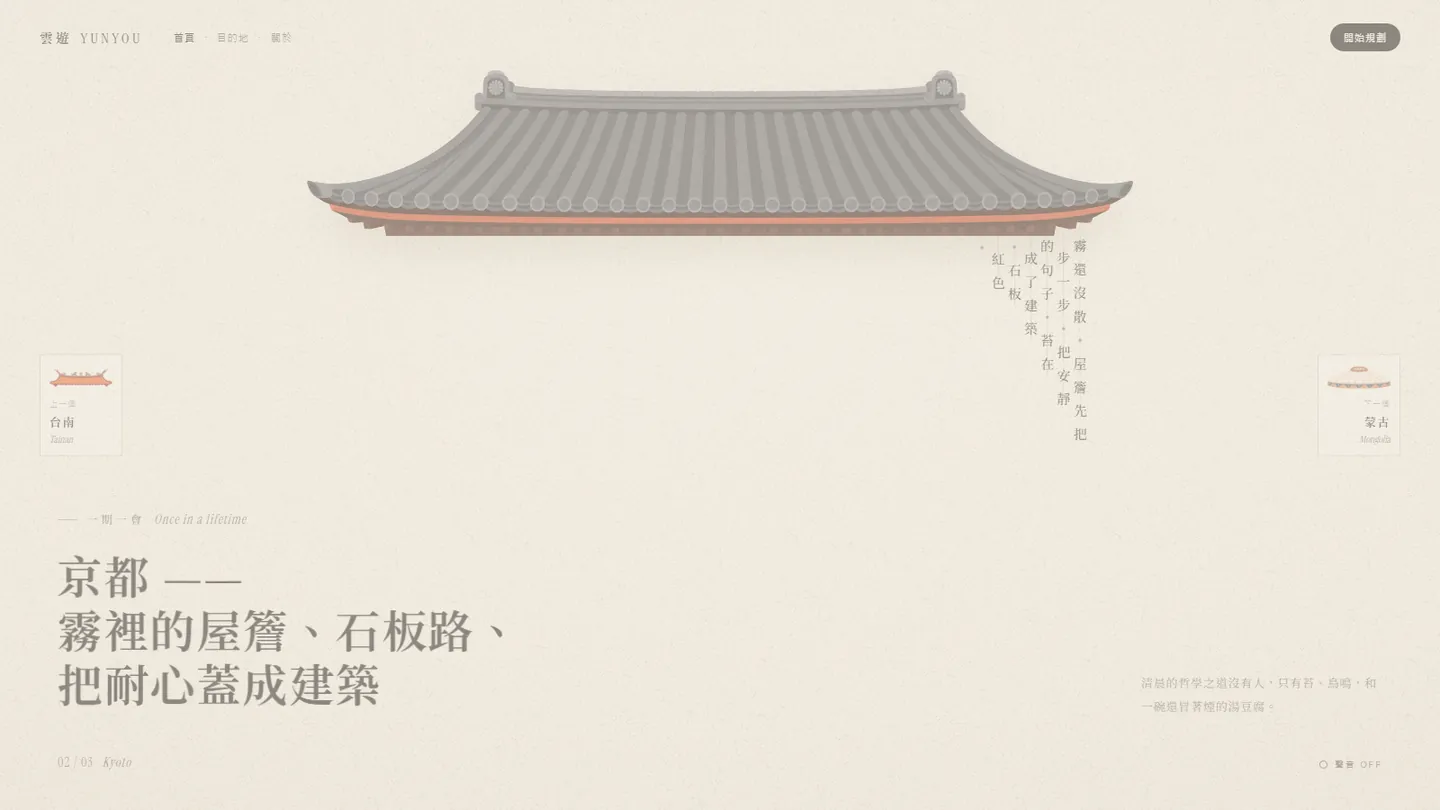
[Kyoto] | label: [一期一會 Once in a lifetime] | headline: [京都 —— 霧裡的屋簷、石板路、把耐心蓋成建築] | description: [The Philosopher's Path at dawn has nobody on it, only moss, birdsong and a bowl of yudofu still steaming.] | chime text: [Before the mist lifts, the eaves catch it. The stone path is wet; wooden sandals step by step press the quiet deeper. Red torii line up into one long sentence, moss writes on the stone lanterns. Kyoto is in no hurry: it built patience into architecture and waits for you to read it slowly.]
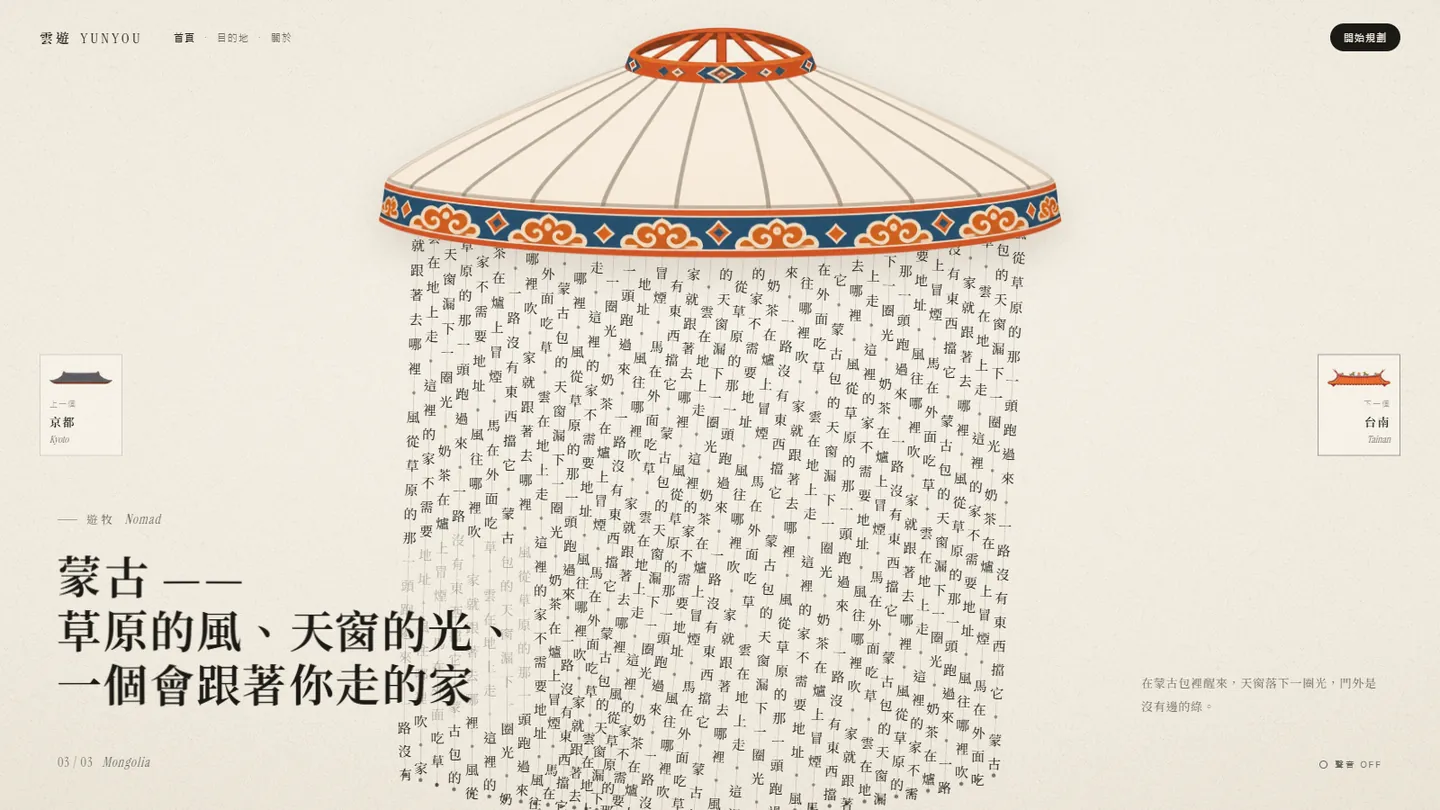
[Mongolia] | label: [遊牧 Nomad] | headline: [蒙古 —— 草原的風、天窗的光、一個會跟著你走的家] | description: [Wake up inside a ger: a ring of light falls through the roof window, and outside is green without an edge.] | chime text: [The wind runs in from the far end of the grassland with nothing to stop it. A ring of light leaks through the ger's roof window, milk tea steams on the stove. Horses graze outside, clouds walk on the ground. A home here needs no address: wherever the wind blows, the home goes with it.]
Claude Code wrote index.html, style.css, main.js and synth.js. Each string is a rope of 48 nodes 13 px apart, pinned under the eave; the characters hang on the nodes. The wind is a slowly changing field plus a gust that sweeps across the screen every few seconds; the mouse pushes and drags nodes within 120 px; a click is a radial burst from that point followed by a sweeping gust.
We also gave it a few technical conditions this time: drive every animation from requestAnimationFrame, no external libraries, font files already in fonts/, and take its own screenshots in headless Chrome to check the result. You don't need to copy those; just add one line at the end of the prompt: "When done, screenshot it yourself: the text must be readable when calm and visibly moving when blown."
04The key sentence: hang every character on a string
Our first instinct was to ask for "a field of text particles that drifts in the wind". But to the model a particle is a dot that floats on its own: a gust scatters it and it never comes back, so you get an effect, not a wind chime.
A chime sways and swings back because every character hangs on a string that has weight and damping. So the prompt has to make three things clear:
- The characters hang on strings, they don't float: "every string carries a column of small characters, one string per column, set vertically".
- The string is a physical rope: "every string is a chain of nodes with weight and damping (like a rope), the characters hang on the nodes". Weight makes the string hang down; damping makes it settle after a gust instead of jittering forever.
- Describe both states: "when calm the characters line up and the sentences can be read; when blown they scatter into a moving field of dots". If you don't say the calm state must be readable, you may get a decoration that never stops drifting.
05Prompt 2: fill the strings and make them 1.5× denser
Good. Two changes:

1. Fill every string with characters: right now only the top part of each string carries text and the rest is empty beads. I want a full bead curtain: characters from the eave all the way to the bottom of the screen, and when the passage ends it repeats from the start (you can leave one bead as a gap between sentences). Also add more strings, denser (about [1.5]× the current count); the characters can be slightly smaller but must still be readable when calm.
2. The layout must be correct at both [1440×900 and 1600×900] (roof and chime centred, side cards flush to the edges, headline and description in the same place).
It changed only main.js. The string pitch became 18 px, with 43 strings for Tainan, 45 for Kyoto and 38 for Mongolia; one character per node, punctuation turned into a bead, and the passage repeats once it ends; neighbouring strings are offset by one node so the curtain doesn't look like a grid. Characters behind the headline or description fade to 30%, so the headline stays readable.
06Three places, switched with a wipe
Click a side card and the whole page fades to cream, the roof swaps to the next place, the label, headline and description change together, then the strings drop from the eave one after another (0.04 s apart), like hanging a new chime.
07The chime sound: it synthesises it with Web Audio
We gave it no sound files. It wrote synth.js: a metal tube chime synthesised in real time with the Web Audio API. Each note stacks 5 partials that decay at different speeds, with a short striker tick in front and a reverb it generates itself. The pitches use only a G5-to-C7 pentatonic scale, so whichever strings get plucked, the notes never clash.
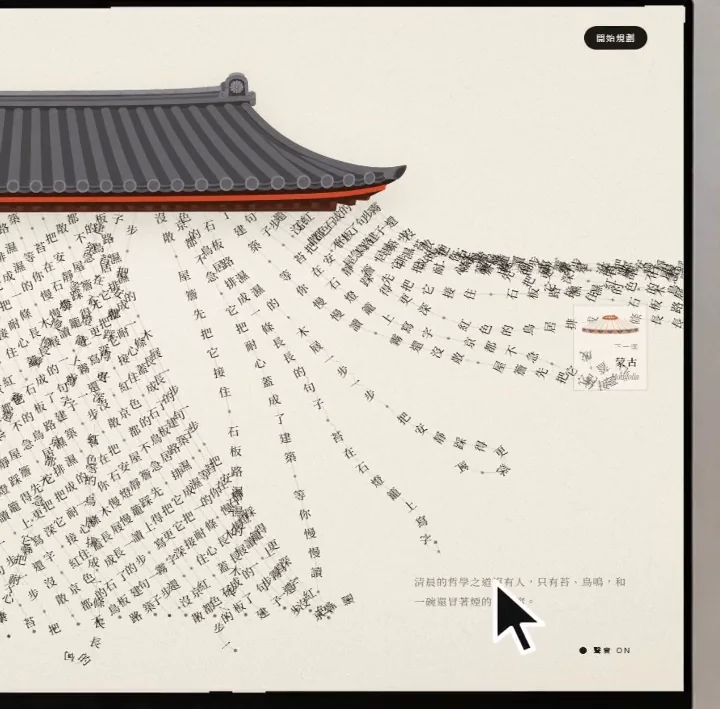
Sound is off by default, behind a tiny "聲音 OFF" (sound off) toggle in the bottom-right corner. Once on, a plucked string rings once or twice and a big gust plays a short run; otherwise it stays quiet.
- Web Audio API (MDN) — the browser API used for the synth
- Autoplay guide for media and Web Audio (MDN) — why sound needs a click first
08Make it your own brand
- Brand name, city, the three places and the copy: just replace the [ ] parts in prompt 1. It doesn't have to be travel: three projects, three collections or three branches all work, as long as each has a "roof only" image.
- The roof can be any other thing you hang from: a bamboo pole, an archway, a lamp. Same rule: that object only, front view, plain background.
- Already built and only want new content: paste the prompt below and it won't rewrite the physics.
Keep the current layout, the chime physics and every interaction; change only the content:
The studio is called "[brand name]" ([city]), the three places become [A, B, C], and the roof images are [roof-a.png, roof-b.png, roof-c.png] in img/.
Each place's label, headline, description and chime text are: [paste your copy].
Keep the colours cream and ink black; do not add new colours.
09Good to know
- YUNYOU is a fictional travel studio and the copy is ours. The three roofs were generated with ChatGPT, and the desk and monitor photo in the reel is AI-generated too; the page code and the chime sound were written by Claude Code, and we didn't change the code.
- The roof must be the roof only, front view, on a plain background. An image with walls or ground looks like a house floating in mid-air, and an uneven background leaves a fringe after the cut-out.
- The wipe leaves the screen blank for under a second; that's part of the design. If your version doesn't drop the strings one by one after a switch, say "after switching, the strings must drop again from the eave, not just appear".
- The page can only make sound after a click (a browser rule), so don't expect chimes the moment it opens, and don't remove the toggle.
- The site was built and checked for desktop at 1440×900 and 1600×900. With 48 nodes per string, 40-odd strings and 120 simulation steps a second it's fine on a desktop; we haven't tested it on phones, and a phone has no cursor to part the strings with, only taps. For phones, add "it must also work in portrait on a phone; halve the number of strings" to the prompt.
- The font is Noto Serif TC (SIL OFL, free for commercial use). Put it in fonts/ yourself, or say "use Noto Serif TC from Google Fonts" in the prompt.
- The Claude Code screen in the reel was re-typeset for legibility; it isn't a terminal recording. The prompts above are the full versions.
- Every Claude Code run comes out slightly different (number of strings, rhythm of the wind); what you get is in your own files.