Make a one-page designer résumé in Claude Design: giant name, cut-out photo and your work right on the page
Skip the Word template. Give Claude Design real details, a cut-out portrait and 3 portfolio images, and it lays out an A4 résumé like a portfolio cover.
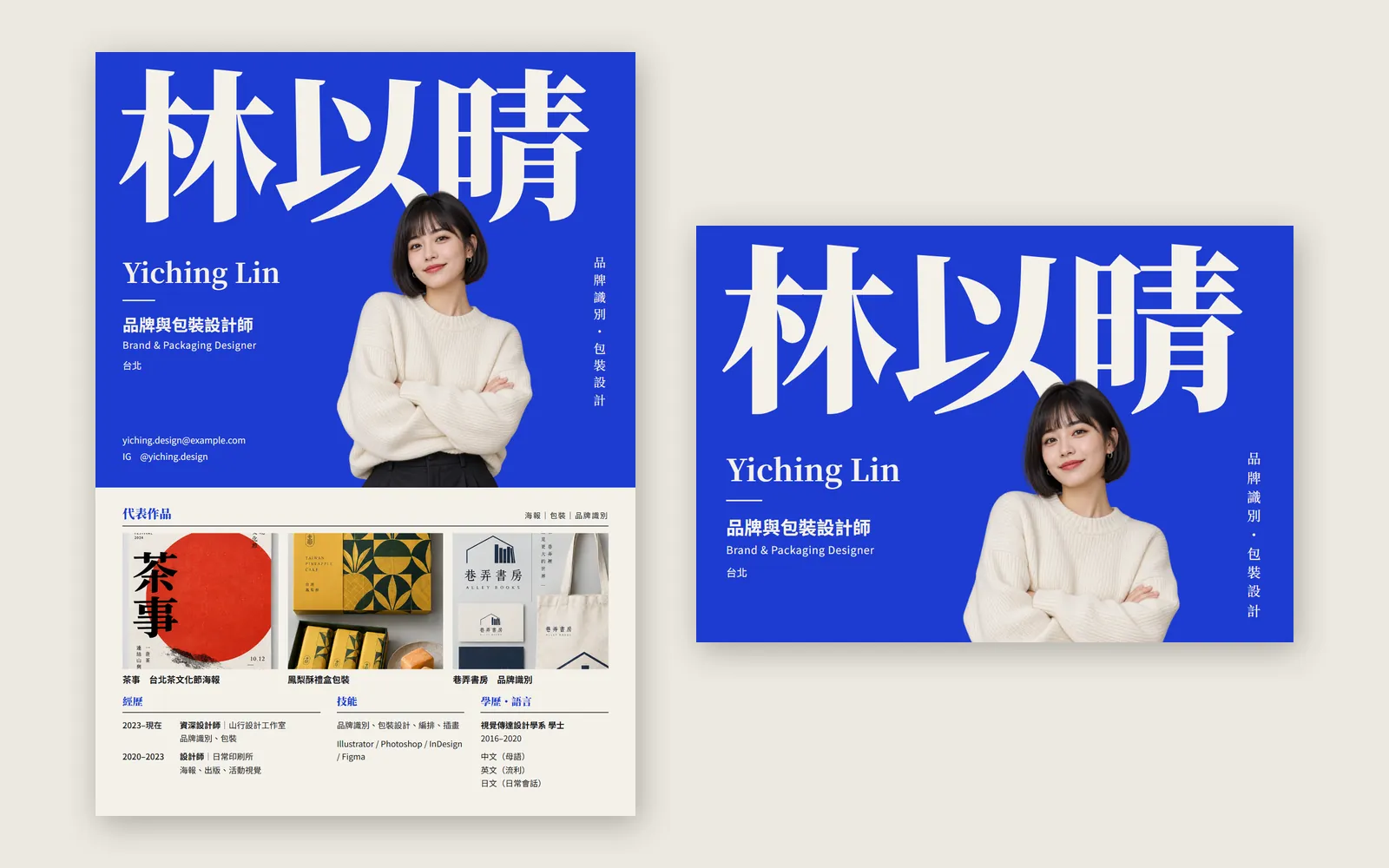
Why do other people's Claude résumés look like a portfolio cover while yours still looks like a Word template? You can lay things out fine. You just gave Claude too little to work with. In this guide we used Claude Design to make a one-page A4 résumé for a fictional Taipei designer, 林以晴 Yiching Lin. The person, photo and portfolio pieces are AI-generated for the demo; the résumé below is the first version Claude Design gave us, unedited.
01Open Claude Design (1 minute)
- Go to claude.ai/design and sign in with your Claude account, or call up Claude Design inside a normal Claude chat.
- Claude's official article of 8 October 2026 says Docs, Slides and Design are out of beta and on every plan, including Free.
- Start a new project and pick a résumé template. We picked “Résumé”. Official pages don't list template names, so the interface may change.
- Don't start typing yet. Get your photo and portfolio images ready first, in the order below.
- Claude Design (official page) — Plans; the standalone site stays open until 14 December 2026
02Step 1: prepare one cut-out portrait and 3 portfolio images
On a designer's résumé, the words matter less than what you look like and what you've made. Without a photo and work, Claude Design can only give you a tidy text résumé. So before you start, prepare two things: a cut-out portrait and 3 images of your best work.
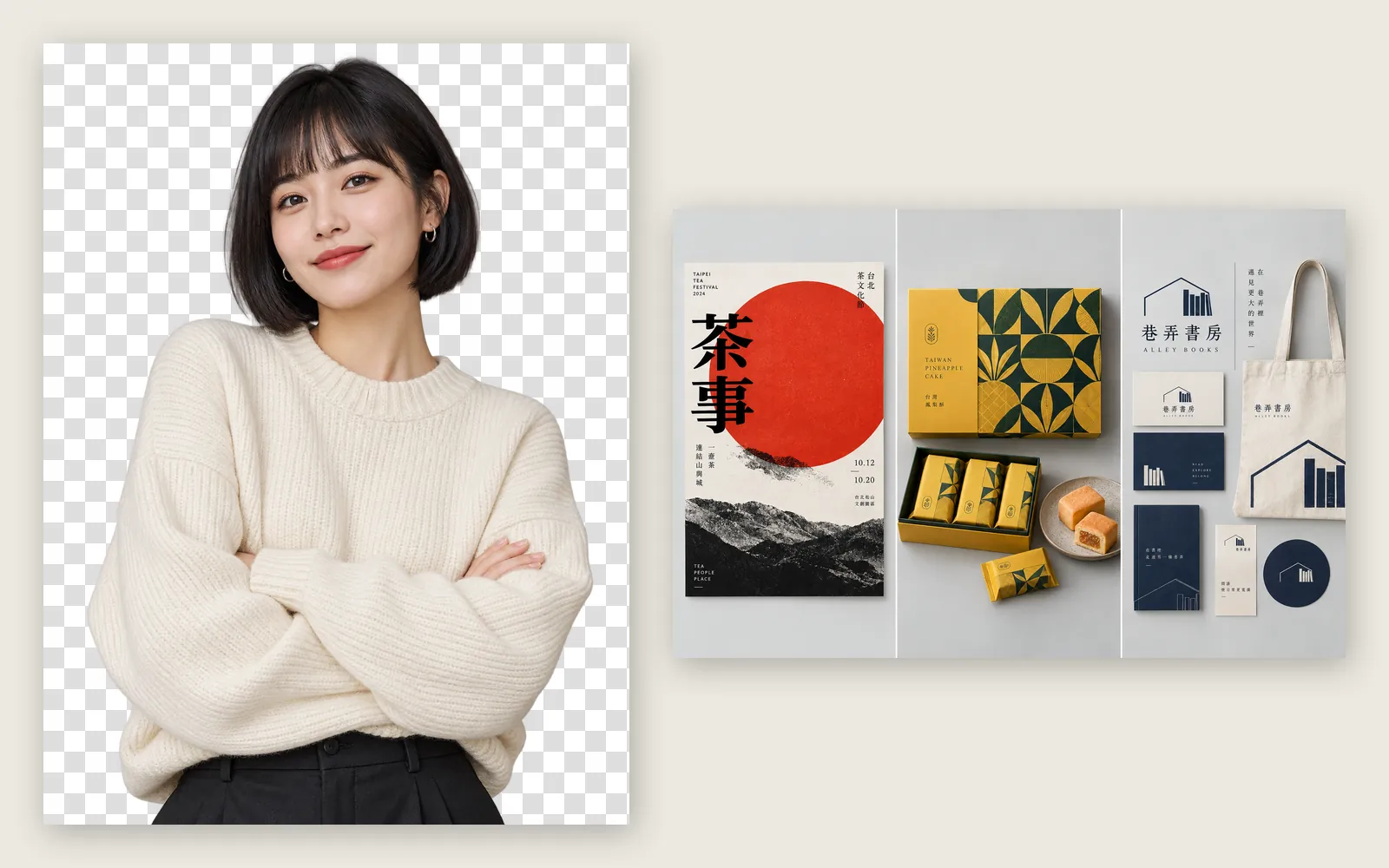
- Portrait: remove the background and save it as a transparent PNG. Upper body with hands in frame feels more like a portfolio cover than a headshot.
- Work: pick 3 pieces of different types, such as a poster, packaging and an identity, so people see at once what you can do.
- Save each piece as its own file with a clear name, such as work-poster.png. The prompt uses the file names to tell Claude which image is which piece.
03Step 2: attach the images, paste the prompt and give only real details
Back in Claude Design, attach the portrait and the 3 portfolio images first, then paste this prompt. The more complete your details, the better: it only lays out what you give it.
Make a one-page résumé (A4 portrait) for a [graphic designer]:
Name: [name in Chinese and English] | Title: [job title] | [city]
Education: [subject, degree (years)]
Experience:
- [years]  [job title] | [company] ([main work])
- [years]  [job title] | [company] ([main work])
Key work (attached): [file 1, piece name], [file 2, piece name], [file 3, piece name].
Skills: [skills, software]
Languages: [language (level)]
Contact: [email] | IG [@handle]
Reference direction: [describe the résumés you like in words, e.g. an oversized name, a cut-out portrait overlapping the name, one saturated main colour]
Make it as memorable as a portfolio cover: a big name, a big cut-out portrait ([portrait file name]), the portfolio images clearly on the page, and one bold main colour. Shrunk to phone size, it should still show at a glance who this is and what they do.
Use only the details above and don't invent any numbers. No grey placeholder boxes.
The details we actually gave: 林以晴 Yiching Lin, Brand & Packaging Designer, Taipei; a BA in Visual Communication Design; two jobs (山行設計工作室 and 日常印刷所); three pieces, the 茶事 Taipei tea-festival poster, a pineapple-cake gift box and the 巷弄書房 (Alley Books) identity; skills, three languages and contact details. We also described 4 résumé directions we'd found on Pinterest, in words.
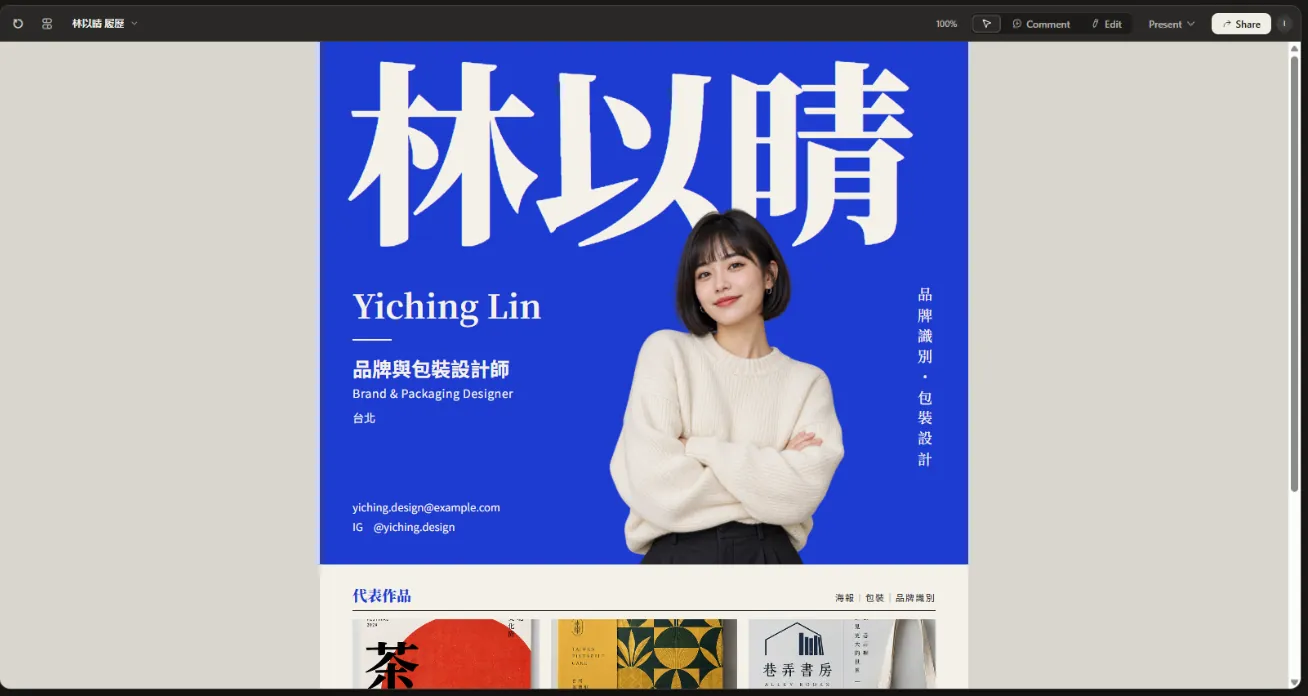
Its reply explained each decision. It didn't use the magenta from our references; it chose cobalt blue, because cobalt doesn't clash with the red poster, the yellow-green packaging or the navy identity, so all three pieces still stand out. It also said everything came only from our details, with no made-up numbers and no grey boxes.
04Step 3: make the name huge so it still reads at phone size
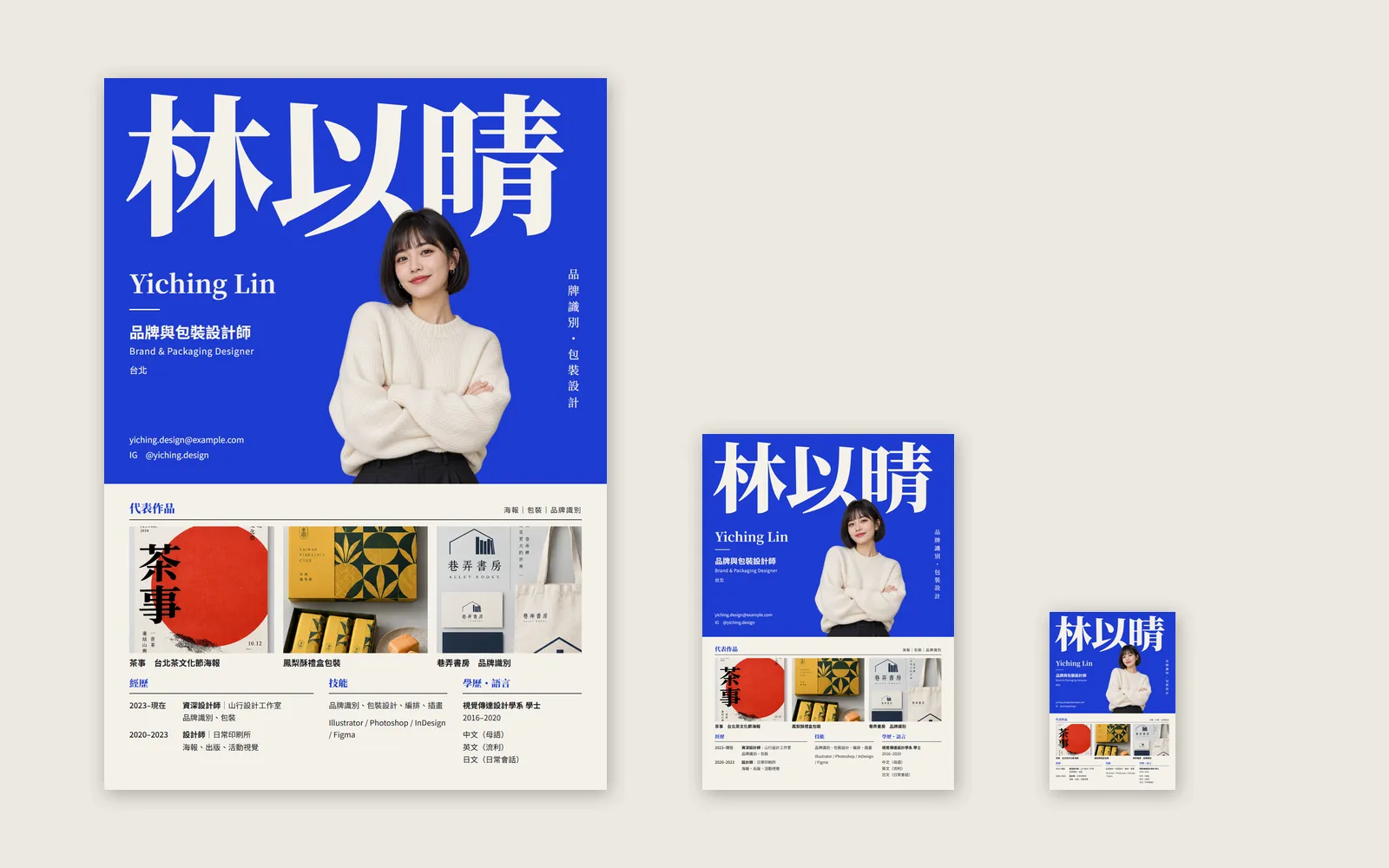
On a normal résumé the name is only a bit bigger than the body text. A portfolio-cover résumé does the opposite: the name is the headline. In ours, 林以晴 is set in a very heavy off-white serif that fills about the top fifth of the page, so you know who it is at first glance.
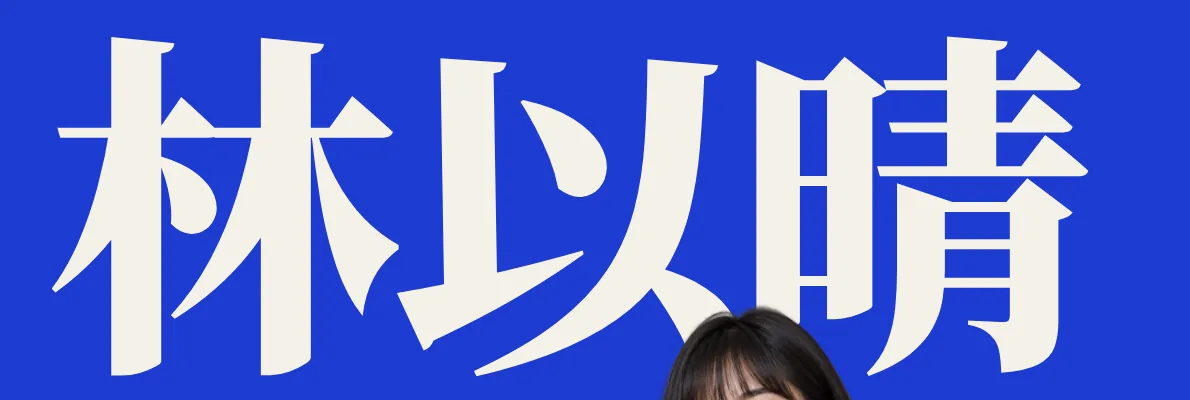
Résumés are often opened on a phone or picked out of a pile of thumbnails. We shrank the same page to three sizes to compare:
05Step 4: cut out the photo so the person stands in the main colour
A headshot with its own background turns into a box on the page. Cut out, the person stands right inside the blue block: the cream sweater against cobalt gives strong contrast and the layout gains depth.

To be honest, this part isn't quite what we asked for. The prompt said the portrait should overlap the name; in the result the hair only grazes the bottom of 以, which looks accidental rather than deliberate. If you want a real overlap, just tell it:
Move the portrait up so the head covers the bottom third of [the name], and put the name behind the portrait. Don't change anything else.
06Step 5: put your work on the résumé, no link to click
Many designers' résumés just say “portfolio at this link”. The reader may never click. Put 3 pieces right on the page and they know what you've made without an extra step.
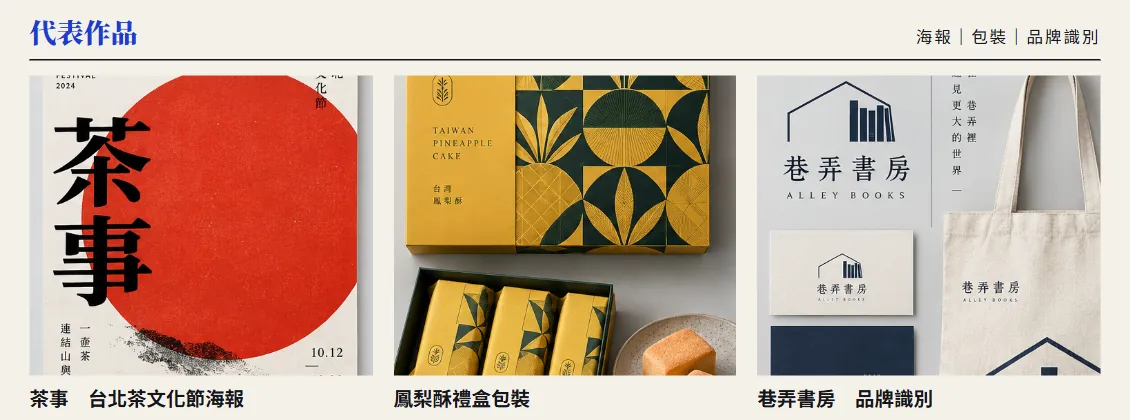
This row could be better too. All three images are cropped to the same ratio, so the poster loses “FESTIVAL 2024” and 文化節 at the top, and the identity's vertical text is cut in half. Compare it with the originals in Step 1 and you'll see the difference.
Change the key-work section: make [main piece] the hero at about half the width, with the other two stacked beside it. Show every piece in full, uncropped. Don't change anything else.
07Step 6: check the whole page, fix one thing at a time, then export
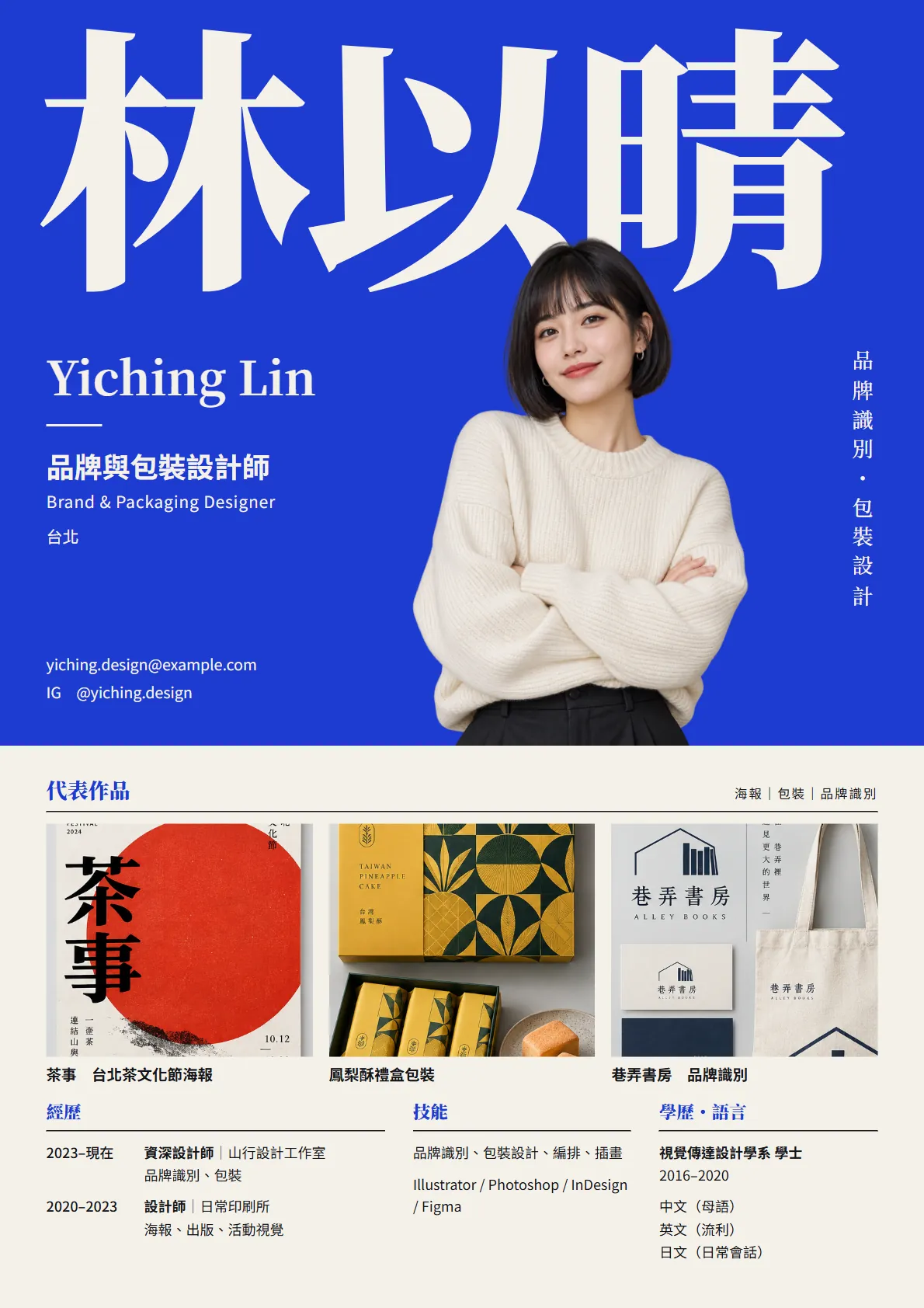
- Switch to Present and look at the whole page, rather than zooming into details in the editor.
- Check the facts: name, years, companies and email spelled right, and nothing you didn't give it.
- Check the layout: do the bottoms of the three columns line up, and is there a big empty patch? Ours has one at the bottom left.
- Ask for one change at a time and say “don't change anything else”, so it doesn't drift.
- When you're done, save it with the export options. The official formats are PDF, PPTX and standalone HTML, and you can also send it to Canva. Use PDF for applications.
Only change [the experience, skills and education columns at the bottom]: [line up the bottoms of the three columns and fill the empty space at the bottom left]. Don't touch the name, portrait or key-work section.
08Good to know
- 林以晴 Yiching Lin is fictional. The portrait and the three pieces are ChatGPT-made demo images, the two studios are fictional too, and the layout was made by Claude Design.
- [email protected] in the demo is a placeholder address. Use a real inbox you actually check.
- For a résumé you'll send, use your own photo and your own work, never an AI-generated portrait standing in for you.
- Some companies and job sites want a plain-text résumé. Treat this one as the cover and keep a plain-text version too.
- “Résumé” is the template we picked. Official pages don't list templates, so the name may change.
- The standalone claude.ai/design site stays open until 14 December 2026, and Claude Design already works inside normal Claude chats. Export important projects first.