Claude Code sites without the AI look: Hallmark, a free skill with 50 themes, no invented facts and a browser self-check
Together AI's free Hallmark skill deals 3 of 50 themes, never invents facts, checks 8 screen widths, then a fresh AI reviews. Without it: 66 issues. With it: 0.
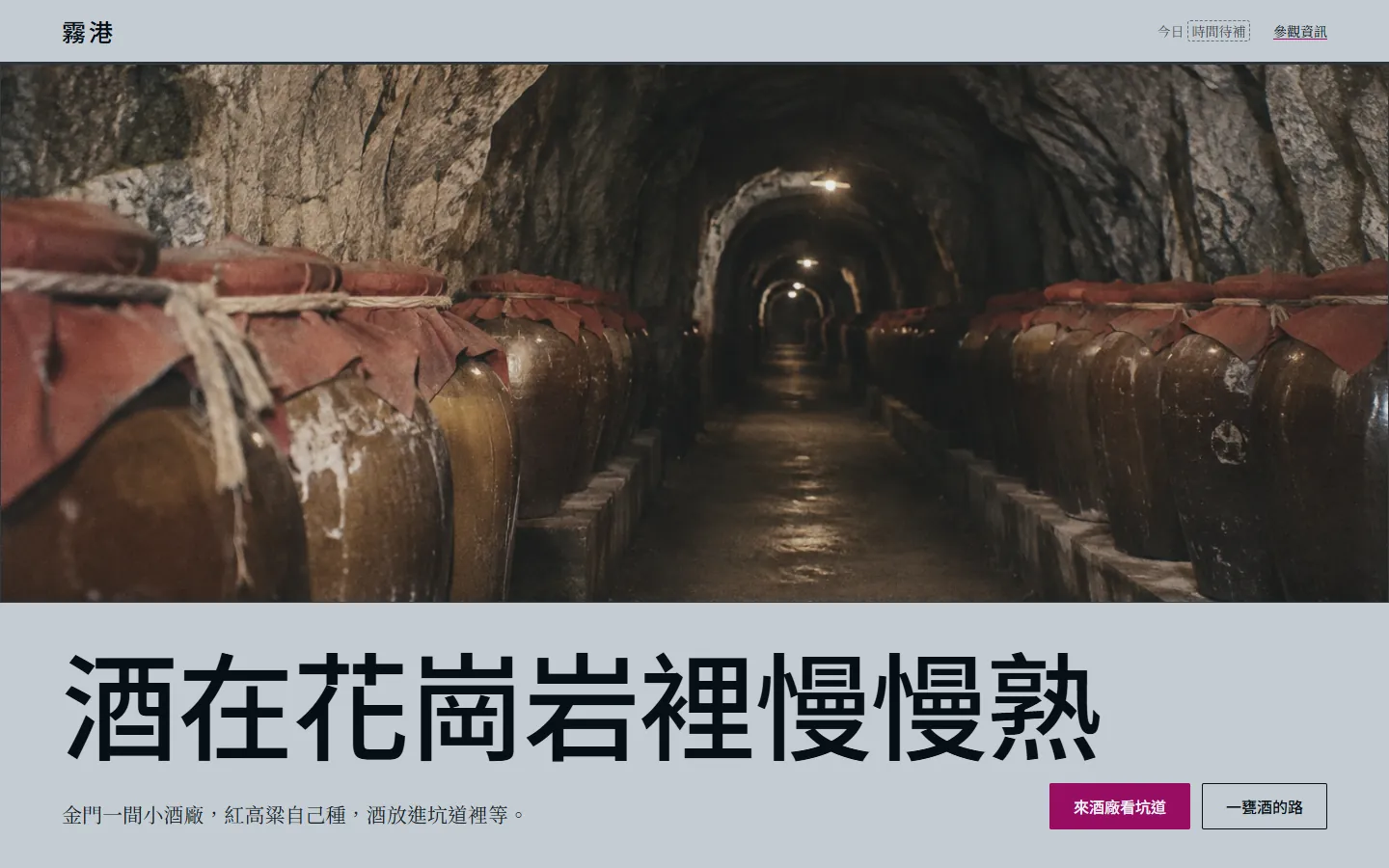
Does every site you get from Claude Code look AI-made? A small label above every heading, a neat row of numbers (that you never gave it), tiny letter-spaced capitals. In this guide we used Hallmark, a free, open-source Claude Code skill, to build a site for a fictional Kinmen sorghum-spirit distillery called 霧港 (Fog Harbour), then ran the same prompt again without the skill to compare. You get the install command, a prompt you can fill in with your own shop, and every step from picking a theme to checking its own work and handing it over. Every website screenshot below is a page we actually built.
01The comparison first: the same prompt without the skill
First, without Hallmark, we gave Claude Code one line and 4 photos: “Make a website for 霧港: a small sorghum-spirit distillery on Kinmen that grows its own red sorghum and ages the spirit in granite tunnels. Photos are in ./photos/.”

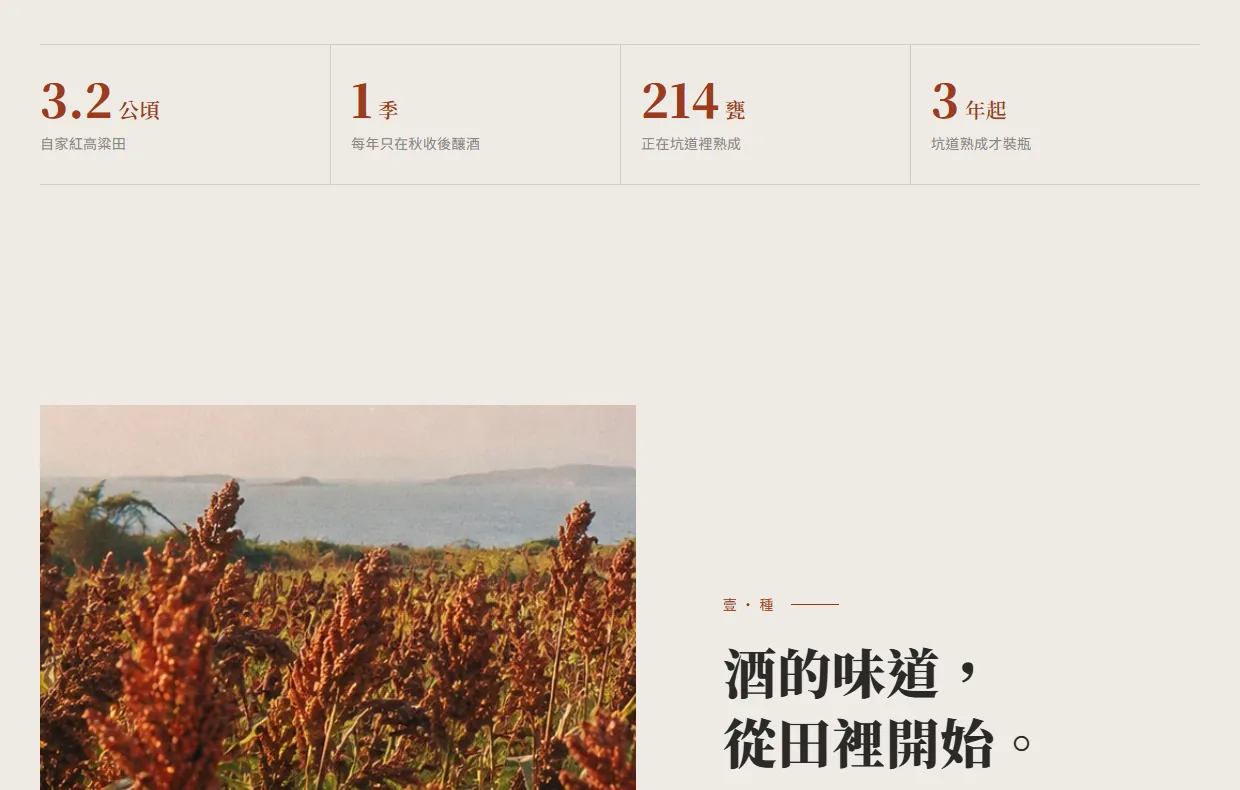
Scroll down and the problems start. The page says “3.2 hectares”, “214 jars” and “aged 3 years or more”, then 17°C, 80% humidity, prices for three bottles and an address. We gave it none of these: Claude made them all up. It also put a numbered label like “壹・種” (One · Grow) above every section heading.
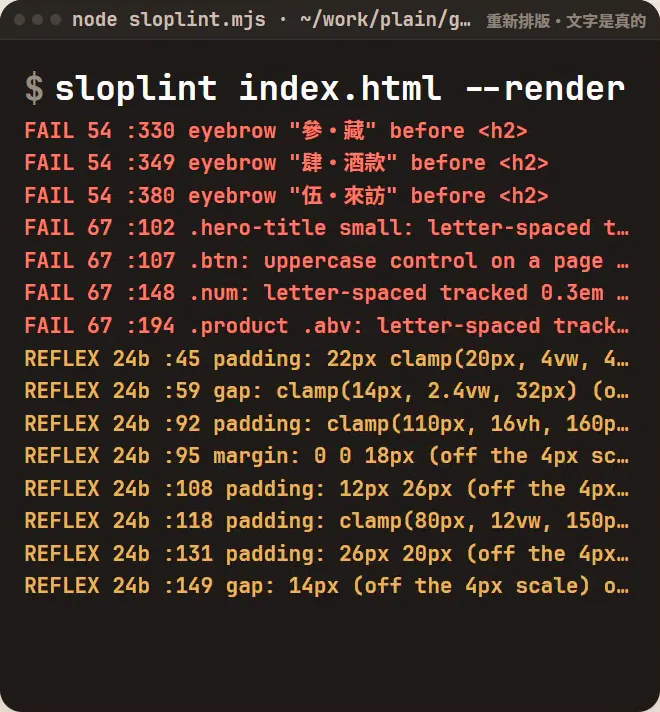
Then we ran Hallmark's own checker, sloplint, on that page: 44 FAIL, 21 REFLEX and 1 WARN, 66 issues in all. The same prompt with Hallmark installed came back with 0.
02What Hallmark is: a design skill built to block the “AI look”
Hallmark is a design skill made by Together AI, MIT licensed, free and open source, with more than 53,000 GitHub stars (November 2026). It works in Claude Code, Codex, Cursor and OpenCode. It ships 50 themes and a list of “AI tells” that it blocks one by one while it builds.
- A small label above every section heading (like “OUR STORY”).
- Tiny uppercase labels with wide letter spacing.
- One word in a heading set apart by colour or weight.
- Invented numbers, testimonials or logo walls.
- Purple-to-blue gradients, or a card inside a card.
- A form that says “Thank you” without sending anything.
- A broken phone layout, or a hero that misses its screen.
The rules come in three tiers. Floor never ships (low contrast, invented facts, a broken phone layout). Reflex covers the habits a model falls into, and a build may overrule one only with a stated reason. Finish is craft detail that never blocks the hand-off.
- Hallmark (GitHub) — MIT licence, free and open source
- usehallmark.com — Official site, all 50 themes
- The AI tells list, gates.md — The “The tell” column lists each one
03Install Hallmark (2 minutes)
- Check you have Node 18 or later (type node -v in a terminal).
- In the terminal, type: npx skills add nutlope/hallmark -g
- For the browser checks, also type: npm i -g puppeteer-core, and install Chrome. Without them only the checks that need no browser run.
- Open Claude Code and type /hallmark followed by what you want.
-g installs it for every project; leave it off to install it only in the current folder. You can also install it as a Claude Code plugin: /plugin marketplace add nutlope/hallmark, then /plugin install hallmark@hallmark, and call it with /hallmark:hallmark. In Codex, type $hallmark.
04Step 1: describe your shop in one line and add your photos
According to the official docs, it asks once for your material before it starts: photos, real numbers, screenshots of your app. It never makes them up. Our test ran with nobody answering questions, so it skipped asking, inferred the audience (visitors to Kinmen, people buying sorghum spirit as a gift) and left out whatever we hadn't given.
/hallmark Make a website for “霧港” (Fog Harbour): a small sorghum-spirit distillery on Kinmen that grows its own red sorghum and ages the spirit in granite tunnels. Photos are in ./photos/.
/hallmark Make a website for “[shop name]”: [where it is, what it sells, what makes it special, in one line]. Photos are in ./photos/.
Real details: [opening hours, address, prices]
I want visitors to: [book / order / visit / subscribe]
05Step 2: it deals 3 of its 50 themes and picks the best fit
It runs a small script that deals three of the 50 themes that suit your prompt. 霧港 got Grid, Almanac and Brutal. Claude picked Almanac because the other two print photos as one-colour duotones, which would turn the red sorghum blue-black or grey; Almanac keeps the photo colours, and its slate grey reads as the fog in the name.
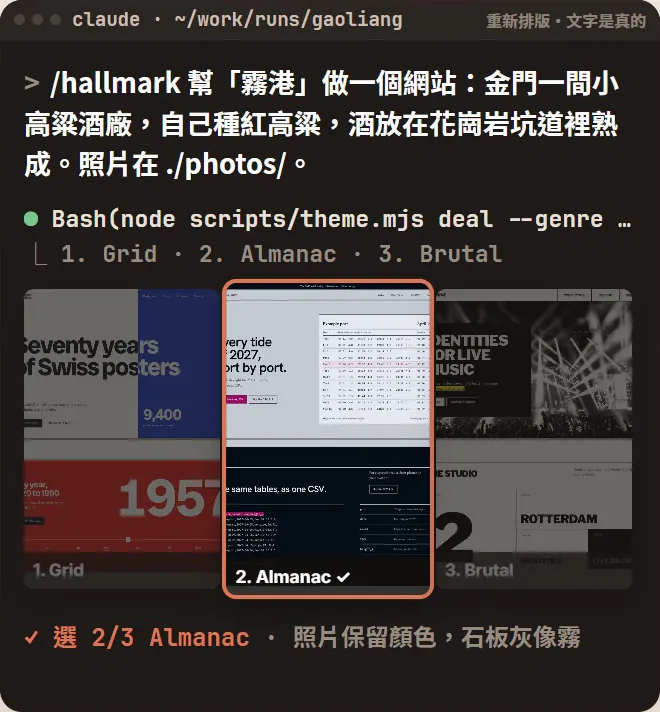
The theme's own fonts have no Chinese characters, so it swapped in Noto Sans TC for headings and Noto Serif TC for body text. Our two other fictional brands worked the same way: 鐵馬日常, an old bicycle workshop in Kaohsiung, got Carnival, Formwork and Editorial and picked Formwork (concrete grey with one safety orange); 午後書房, a second-hand bookshop in Tainan, got Hedgerow, Solstice and Broadside and picked the cream-paper Solstice.
06Step 3: the hero first, the rest of the page only after it passes
It doesn't build the whole page in one go. The hero is built alone, captured and handed to another AI that hasn't seen the process. 霧港's hero got 4 findings, such as about 170px of empty space under the phone hero and a tunnel photo that was too small. Only after 3 of them were fixed did it build the sections below.
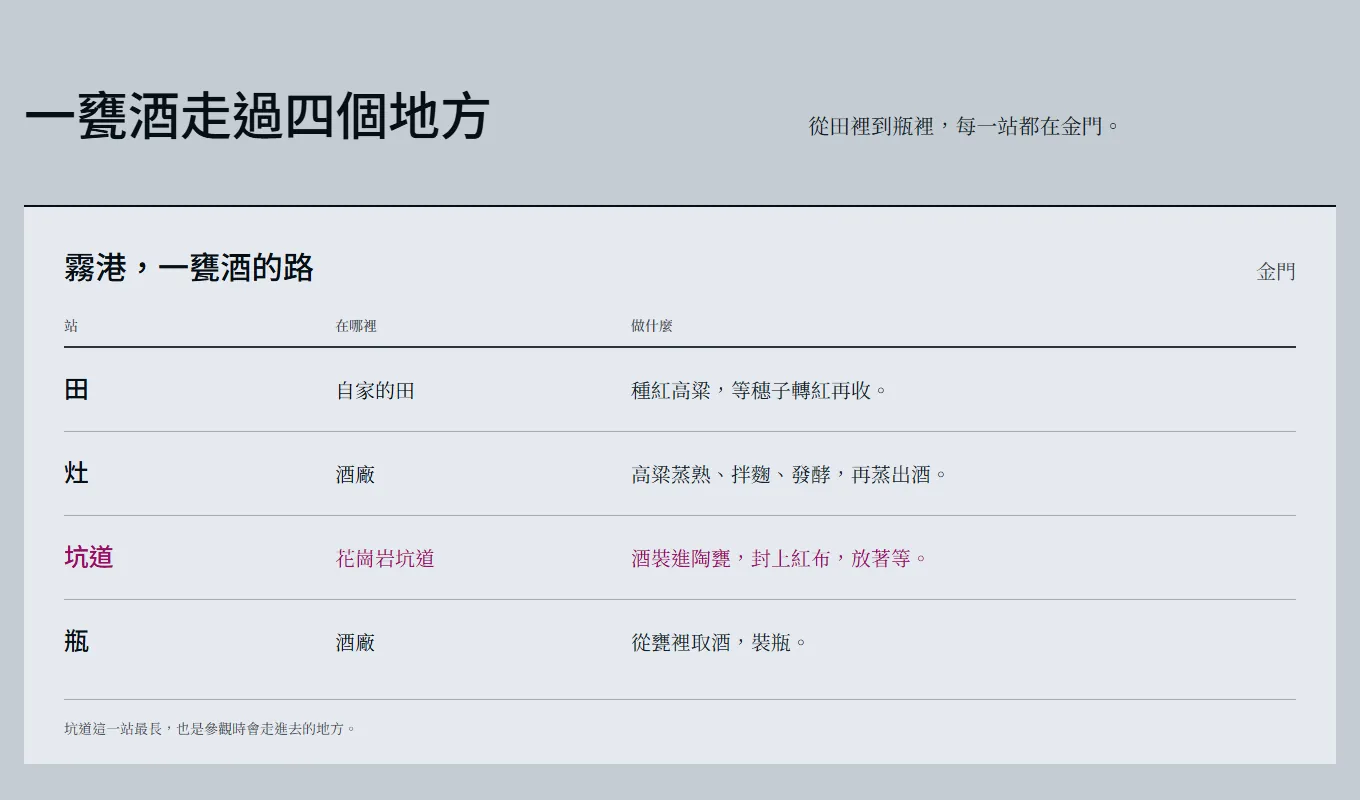
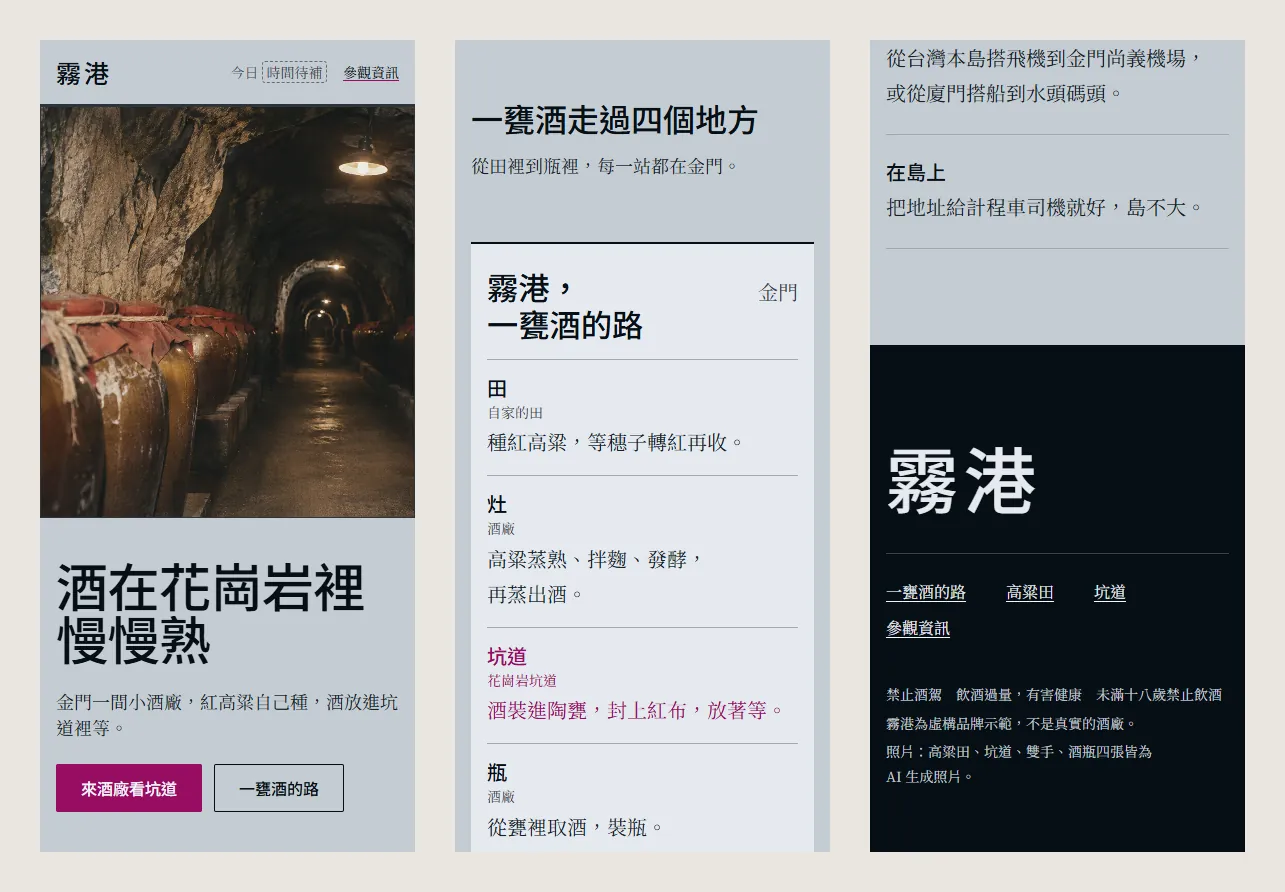
The sections are: the tunnel hero, the four places one jar passes through, the red sorghum we grow, back to the still after harvest, Rock / Dark / Wait, from the tunnel into this bottle, and a visit to the tunnel. We gave no address or opening hours, and it really didn't write any.

07Step 4: it checks itself in a real browser at 8 screen widths
When the page is done, sloplint opens it in a real browser and checks it at every size from a small phone to a big screen: 320, 375, 414, 768, 1024, 1280, 1440 and 1920 px. Every FAIL must be fixed before it counts as finished. 霧港 was checked 4 times, and every run came back 0 FAIL, 0 REFLEX, 0 WARN.
08Step 5: a brand-new AI reviews it one last time
Before the hand-off it calls a brand-new AI, one that never saw the build, to review the page from scratch. 霧港 got 6 findings: 5 fixed and 1 partly fixed.
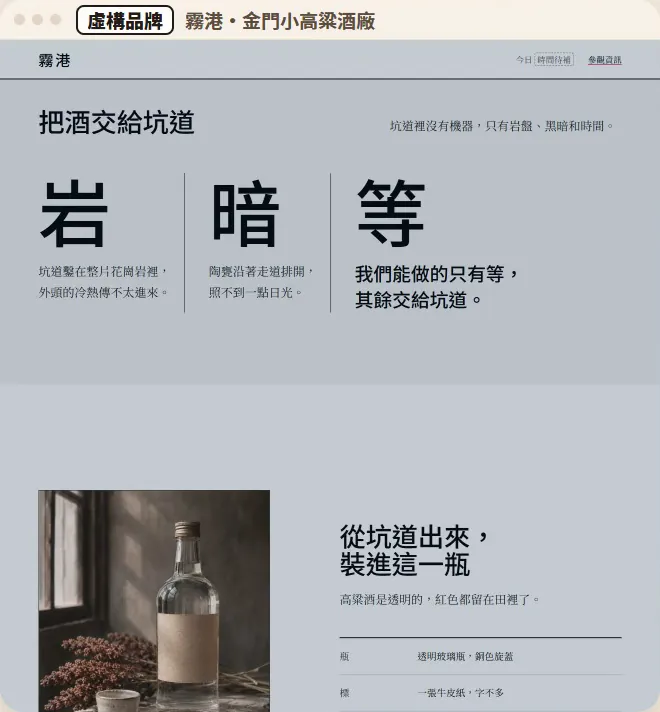
For example, Rock / Dark / Wait were three equal columns, each a big character over one line, like a row of icon tiles. After the review they became 3 / 3 / 6 wide: the “Wait” column grew and its line was set larger, as the point of the whole page.

09Already have a site? Redesign it, or just audit it
- Full rebuild: /hallmark redesign ./your-folder. Content and links stay; the design and layout change.
- New style, same layout: add keep the layout.
- Fix only the AI tells: add polish.
- A report only, no changes: /hallmark audit ./index.html
10Good to know
- 霧港, 鐵馬日常 and 午後書房 are fictional brands, and every footer says it is a fictional demo. 霧港's 4 photos were generated by us in ChatGPT.
- 鐵馬日常 and 午後書房 use stand-in photos Hallmark picked from its library of openly licensed Wikimedia Commons photos, credited on each page. Swap in your own photos before you go live.
- 66 issues is the result of our run; every run differs. usehallmark.com's own example goes from 26 issues to 0.
- Our test let Claude Code run the skill on its own with nobody answering, so it skipped the questions. When you use it, answer them properly and the result will fit your shop better.
- Fill the “to be added” slots with your real address and hours before you publish.