One prompt, and Claude Code builds a playful order page: toppings fly into the bowl, bottles squeeze, receipt updates
Draw cut-out toppings in ChatGPT, paste one prompt into Claude Code: a lid-lift intro, tap-or-drag toppings, squeeze-bottle sauces, a live receipt and a seal.
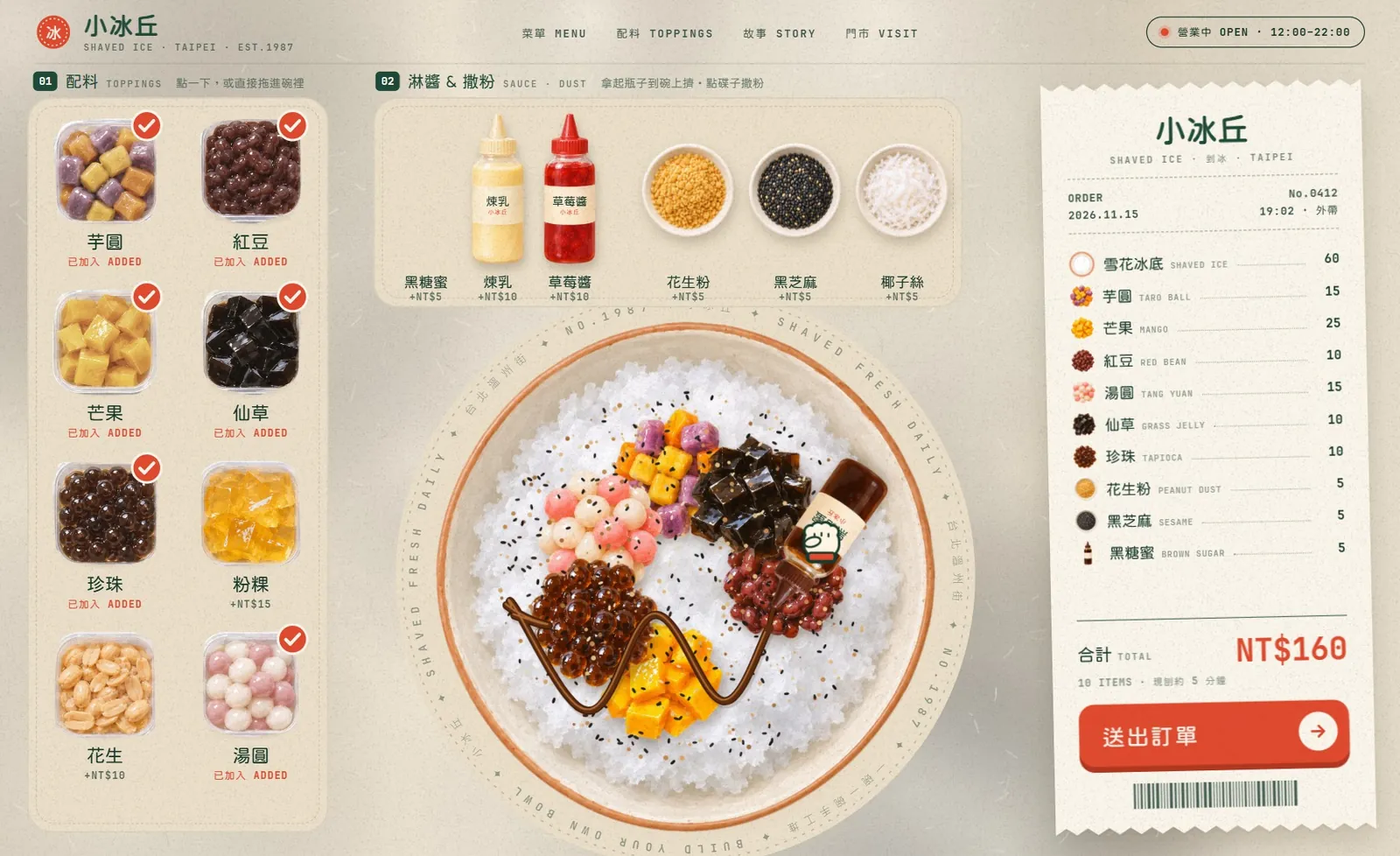
Ask an AI to "make an order page" and you usually get a form: tick boxes, quantities, a submit button. This guide shows another way. First draw every topping as a cut-out image in ChatGPT, then paste one prompt into Claude Code. We used it to build a playful "build your own bowl" order page for 小冰丘, a fictional shaved-ice shop in Taipei. Lift the lid, tap a topping and it flies into the bowl, pick up the brown-sugar syrup and it really squeezes, the receipt grows line by line, and sending the order stamps a "Sealed" seal on the lid. Every screenshot of the page below is what Claude Code built in this one run, unedited.
01The result: this bowl of shaved ice is a web page
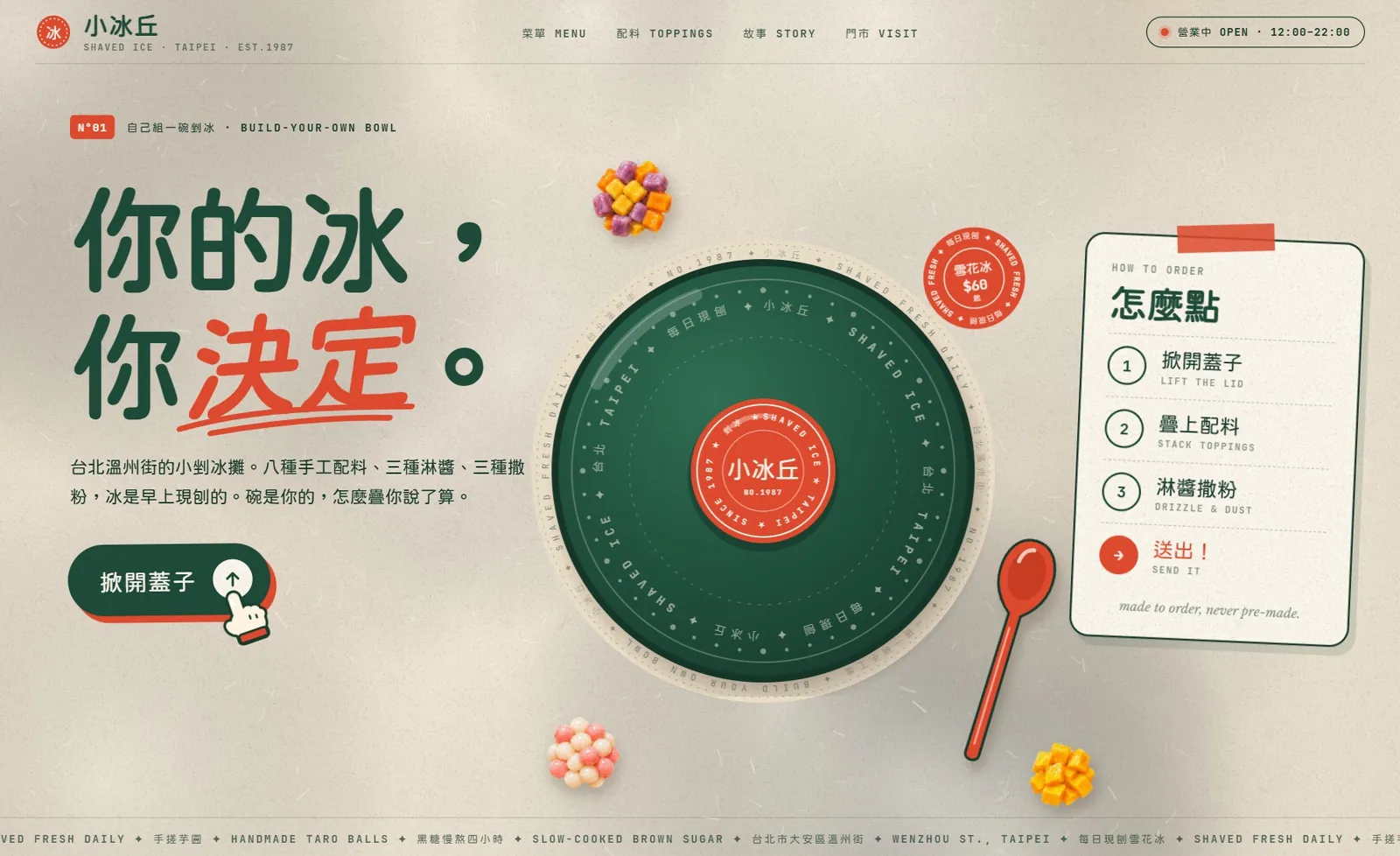
The whole page is 3 files: index.html, style.css and app.js, plain HTML, CSS and JavaScript with no libraries. The bowl, toppings, bottles and dishes are ChatGPT images. Everything else is Claude Code's: the layout, the lid, the shop seal, the hand cursor, the pile-up animation, the sauce line, the receipt and prices, the "Sealed" stamp, and even small copy like the street name and "EST.1987".
02Step 1: draw the topping images in ChatGPT (one chat)
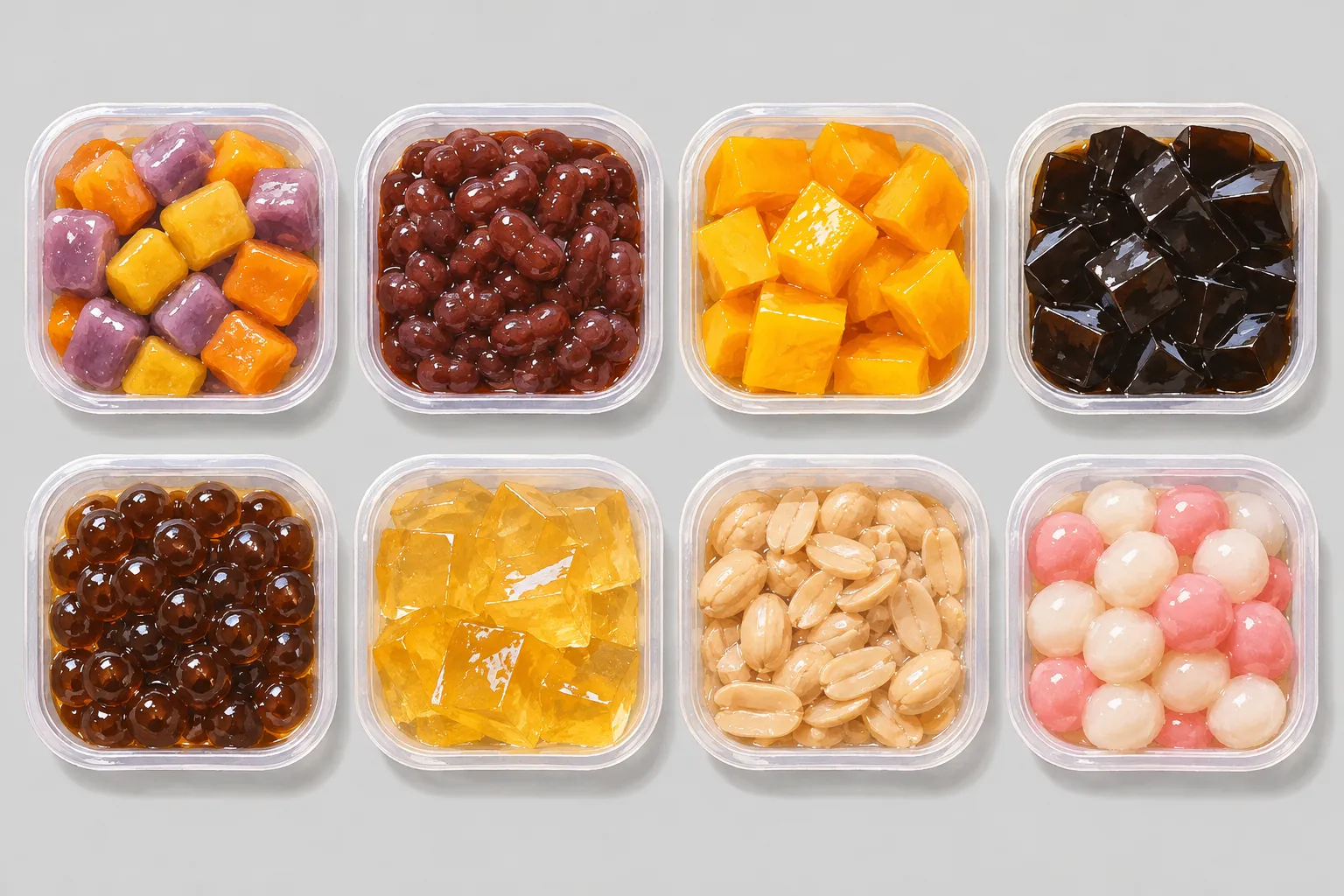
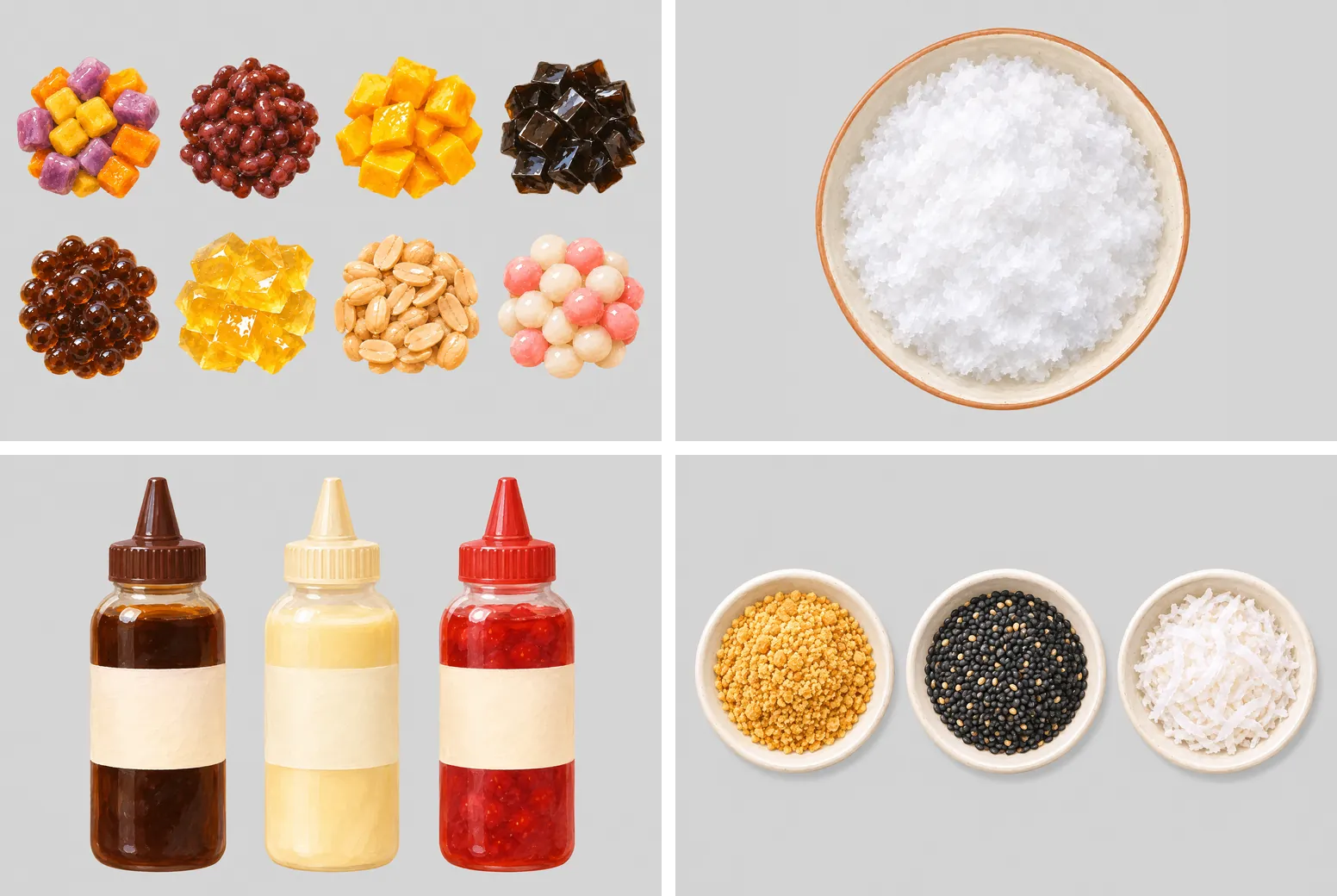
We made 5 images in one ChatGPT chat: topping tubs (top view), the same toppings as heaps (no tubs), a bowl of snow ice (top view), 3 squeeze bottles (blank labels) and 3 sprinkle dishes (top view). The first image sets the style and every later one says "same style", so the set looks like one shop.
Flat top-down illustration for a [dish, e.g. Taiwanese shaved-ice] ordering website. [number] square clear plastic deli tubs with rounded corners, arranged in a neat grid of [4 columns × 2 rows] with generous equal spacing, each tub filled to the brim with ONE topping, seen exactly from above: (1) [topping], (2) [topping], (3) [topping]…
Style: warm gouache illustration with a soft paper grain, crisp clean edges, a gentle soft shadow under each tub, vivid but natural colours, like the art on a premium food brand's website.
Plain flat light grey background (#D9D9D9). No text, no labels, no logos, no table, no other props.
(Same chat, one image at a time)
① Same style and the same [number] toppings in the same order, now as loose heaps with no container: each topping is a small irregular mound seen exactly from above, in a [4 × 2] grid with lots of empty space between the mounds. Plain flat light grey background (#D9D9D9). No text.
② Same style: one wide shallow bowl seen exactly from above, [bowl look, e.g. cream glaze with a thin terracotta rim], filled with [base, e.g. a fluffy, fairly flat mound of fine white snow ice], centred, nothing else. Plain light grey background. No text, no spoon.
③ Same style: [number] plastic squeeze bottles standing upright in a row, front view, each with a pointed nozzle cap: [sauces and cap colours]. Each bottle has a plain blank cream label band with NO text. Plain light grey background, even spacing.
④ Same style: [number] small round white ceramic dishes seen exactly from above in a row with even spacing: [sprinkles, e.g. peanut powder, black sesame, shredded coconut]. Plain light grey background. No text.
- Ask for every image "seen exactly from above" (except the bottles). The bowl on the page is top-down, and mixed angles look odd when they stack.
- Keep the same toppings in the same order for tubs and heaps, so the names line up after the cut-out.
- Leave the bottle labels blank. Let Claude Code add the names on the page, where they stay sharp and editable.
03Step 2: remove the background and save the files under fixed names in img
ChatGPT gives you one sheet on a grey background; the page needs separate transparent PNGs. We used a small script to remove the grey, split each sheet into its objects, drop the shadows and save them in img/ under the names below. You can ask Claude Code to write that script:
img/ has some images ChatGPT drew on a plain light grey background (#D9D9D9). Write me a small script that removes the background:
- cut each sheet into its separate objects and save each as a transparent PNG
- drop the soft grey shadows, but keep each object whole (including clear plastic and highlights)
- name them in this order: [sheet file] → [tub-taro.png, tub-redbean.png…]
When you're done, lay all the cut-outs out on one contact sheet so I can check them.
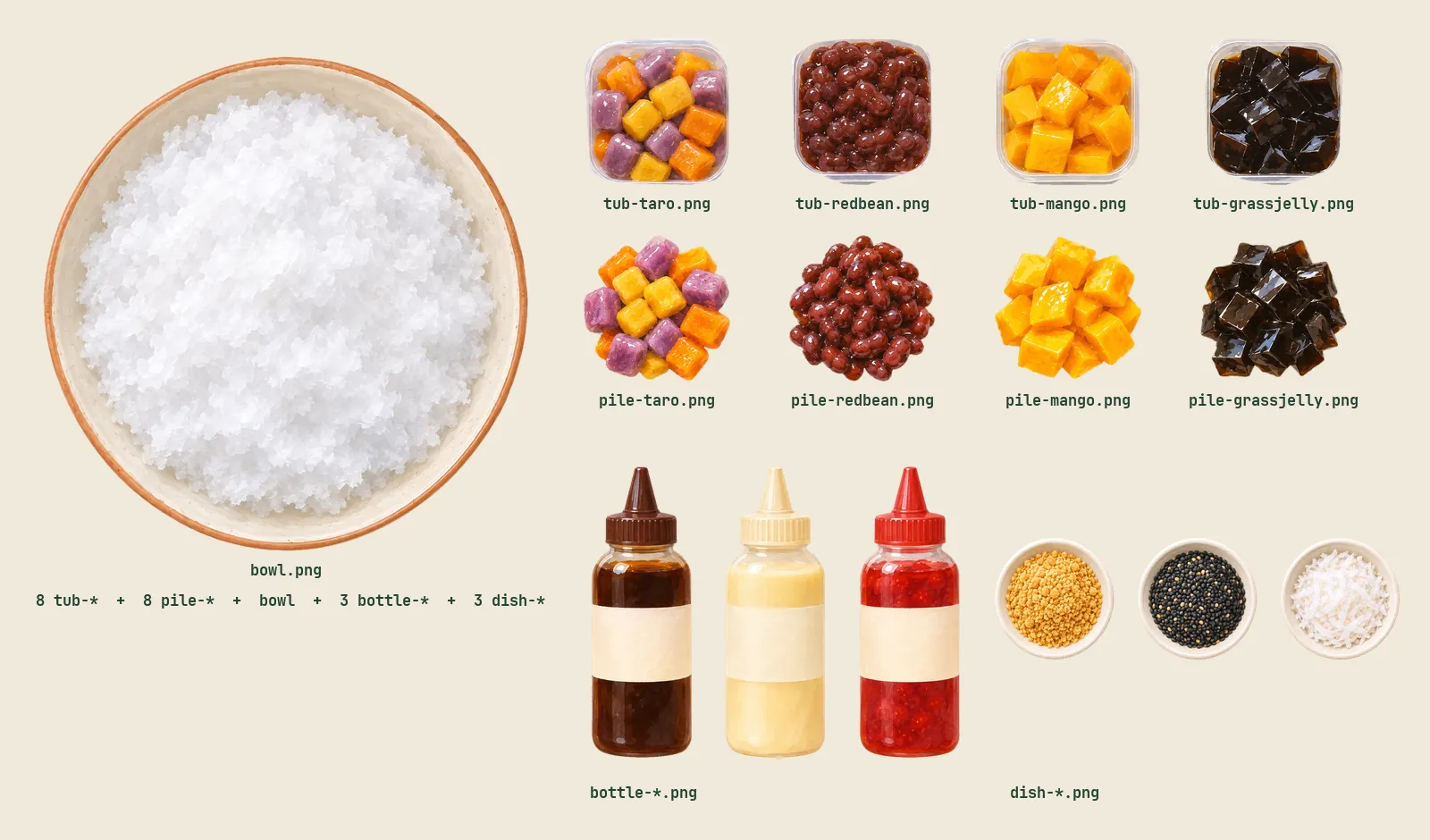
- tub-[id].png: the full tub on the order table, the thing people tap.
- pile-[id].png: a small heap of the same topping; this is what flies into the bowl and piles up.
- bowl.png: the bowl already filled with ice.
- bottle-[id].png and dish-[id].png: the squeeze bottles and sprinkle dishes.
04Step 3: open Claude Code in that folder and paste the prompt
- Make a new folder and put img/ in it. If you want specific fonts, add the font files in fonts/ (we used jf open huninn, Noto Sans TC, Inter, JetBrains Mono and Libre Baskerville).
- Open Claude Code in that folder.
- Paste the prompt below and replace the [ ] parts with your shop, toppings and prices.
Build me a one-page interactive "build your own [dish, e.g. shaved ice]" order page for a shop called "[shop name]" ([one line: where it is, what it sells]). The topping, bowl, sauce-bottle and sprinkle-dish images are in img/. Use them as they are:
- tub-[id].png is a tub full of a topping (top view); pile-[id].png is a small heap of the same topping with no tub
- bowl.png is the bowl already filled with [base, e.g. snow ice] (top view)
- bottle-[id].png is a squeeze bottle (front view); dish-[id].png is a small sprinkle dish (top view)
- ids: [taro = taro balls, redbean = red beans, mango = mango…]
- Prices: [item price, item price…]

1. Intro: [background, e.g. an off-white paper background], a huge headline on the left "[your headline]" (the last word in another colour, in a handwritten-style italic), one line of intro text and a "Lift the lid" button; in the middle a bowl of [dish] under a round lid (draw the lid in code, with a round shop seal in the middle) and a spoon beside it; on the right a small "How to order" card: 1 lift the lid, 2 stack toppings, 3 drizzle and dust, send.
2. "Lift the lid": the lid flies up and away and the screen becomes the order table. Two columns of topping tubs on the left (name and price under each), a row of sauce bottles and sprinkle dishes along the top, the bowl in the middle and a paper receipt on the right.
3. Toppings can be tapped or dragged into the bowl: a small heap flies from the tub into the bowl, drops and piles up, the bowl fills section by section, and used tubs get a tick.
4. Sauces: pick up a bottle and move it over the bowl, the bottle tilts and squeezes out a line of sauce that draws on top. Sprinkles: one tap and the powder falls from above.
5. The receipt updates live: every topping adds a line with its name and price, and the total jumps. A "Send order" button at the bottom.
6. Send: the lid closes over the bowl, a "Sealed" stamp lands on the lid (with an order number and pick-up time), and the right side becomes a confirmation card with a "Build another" button.
7. Custom cursor: a chubby cartoon hand, pointing normally and grabbing while you drag.
8. It should look like an award-winning brand site: paper texture, light grain, a good type pairing (a heavy rounded headline face plus small monospace text), only [3 colours] plus the toppings' own colours. Every action gets a springy animation.
When you're done, click through the whole flow in headless Chrome (lift the lid, tap a topping, drag a topping, squeeze a sauce, tap a sprinkle, send) and check the screenshots to confirm every step moves.
We gave this prompt to a fresh Claude Code session, plus only a list of the image files, the fonts and technical notes for recording (animations must be recordable frame by frame, dragging uses pointer events), with no design direction. It wrote the 3 files in about 32 minutes and 38 tool calls, then opened headless Chrome, clicked through the whole flow and checked its own screenshots.
- Claude Code quickstart (official) — Install and first run
- ChatGPT — Where we drew the topping images
05Step 4: open it and click through once
- Serve the folder locally, e.g. type npx serve in it and open the localhost address it gives you. Or just ask Claude Code to open it for you.
- Use a laptop-sized window (our page was built for 1440 × 880).
- Press the lift-the-lid button: the lid flies away and the order table appears.
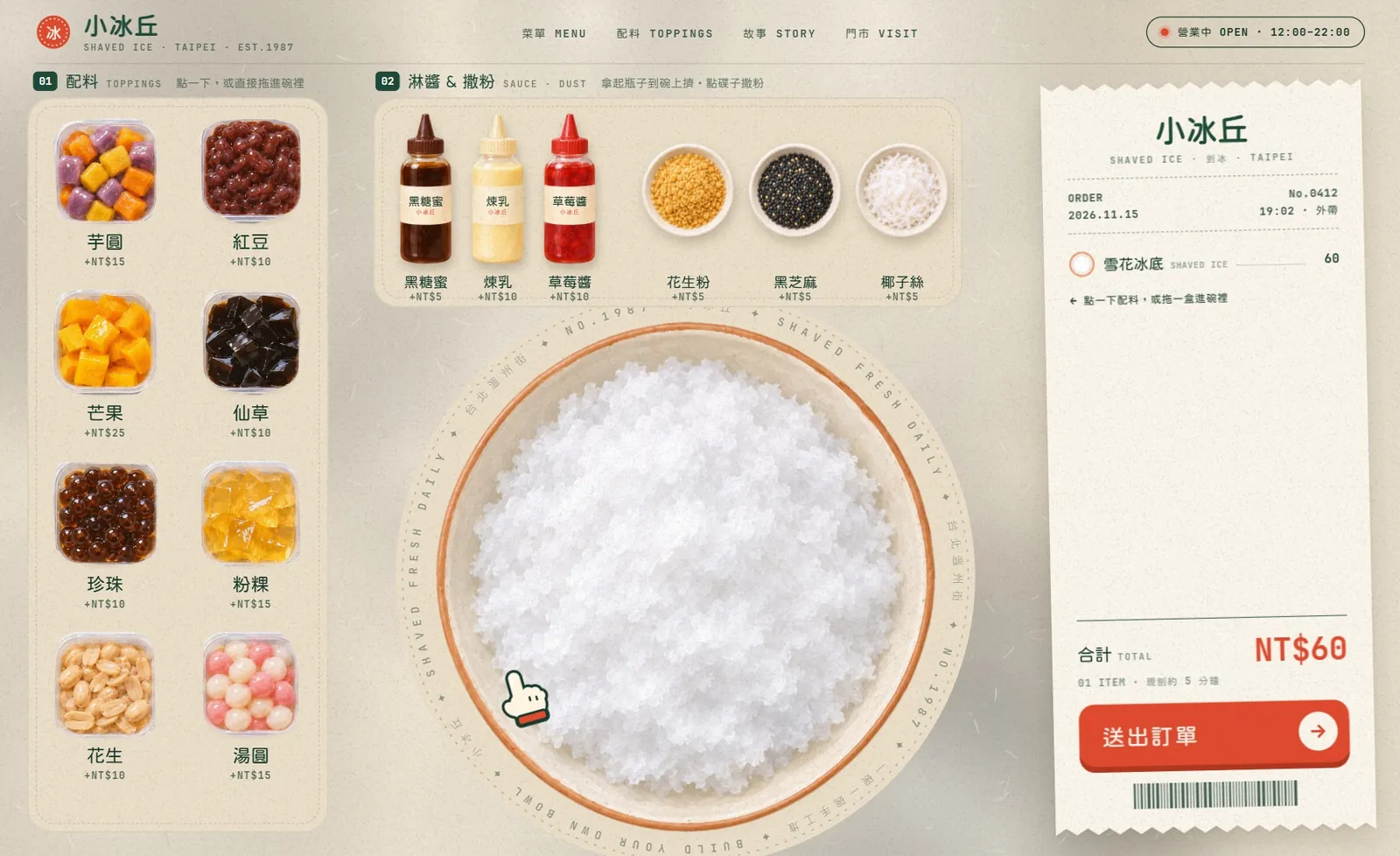
Claude set the prices itself: our prompt had none, so it chose NT$60 for the snow-ice base, +25 for mango, +15 for taro balls and tang yuan, +10 for the rest, and +5 to +10 for sauces and sprinkles. To use your own prices, write them in the prompt's "Prices" line.
06Tap or drag: toppings pile up heap by heap
There are two ways to add a topping: tap the tub and a small heap flies into the bowl on its own, or hold the tub and drag it over the bowl. While dragging, the cursor switches from pointing to grabbing, and a dashed rim and a DROP hint appear on the bowl.
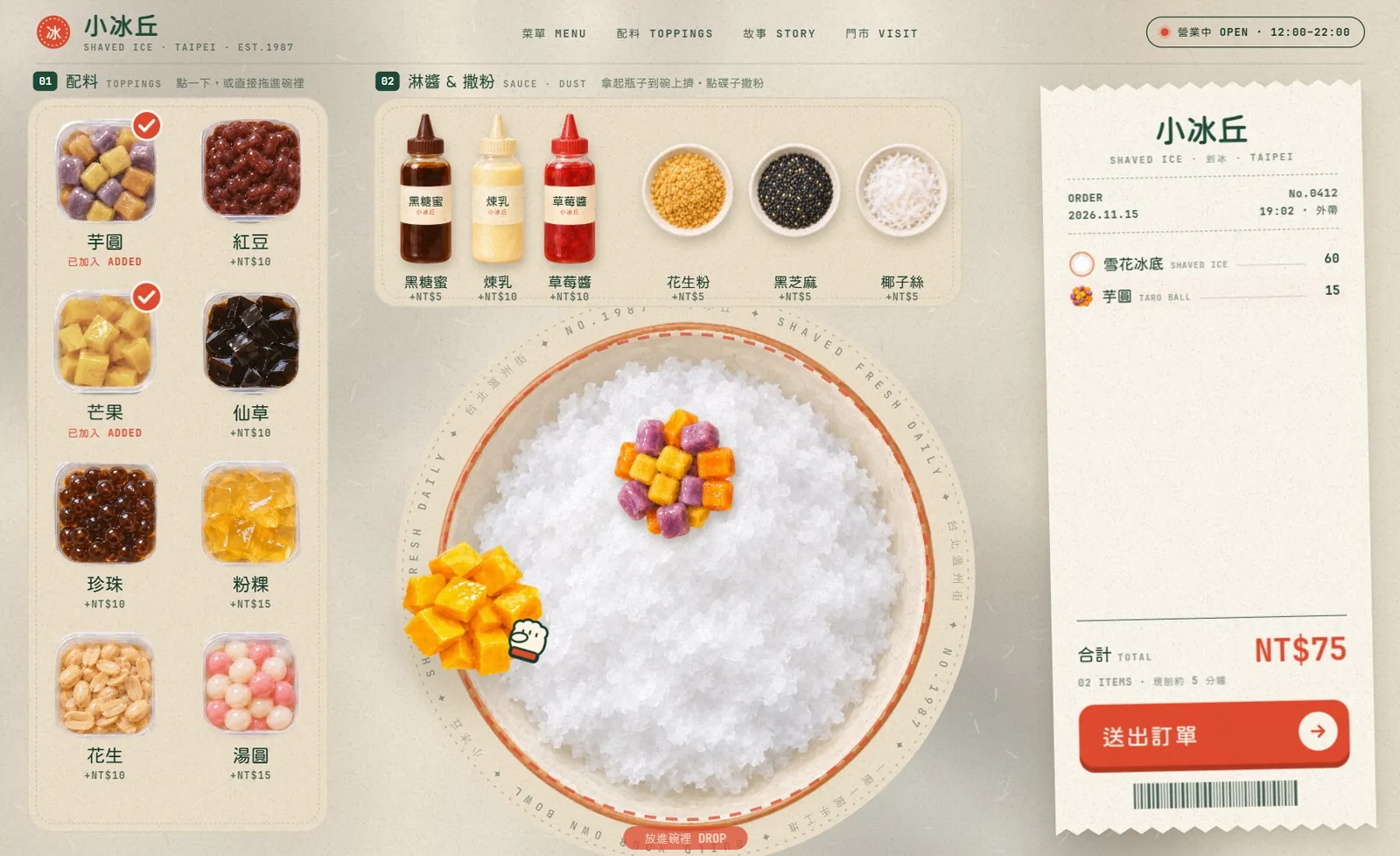
Every topping adds a line to the receipt with its name, an English label and the price, the total jumps, and the tub's price changes to a red "ADDED".
07Sauces and sprinkles: the bottle really squeezes
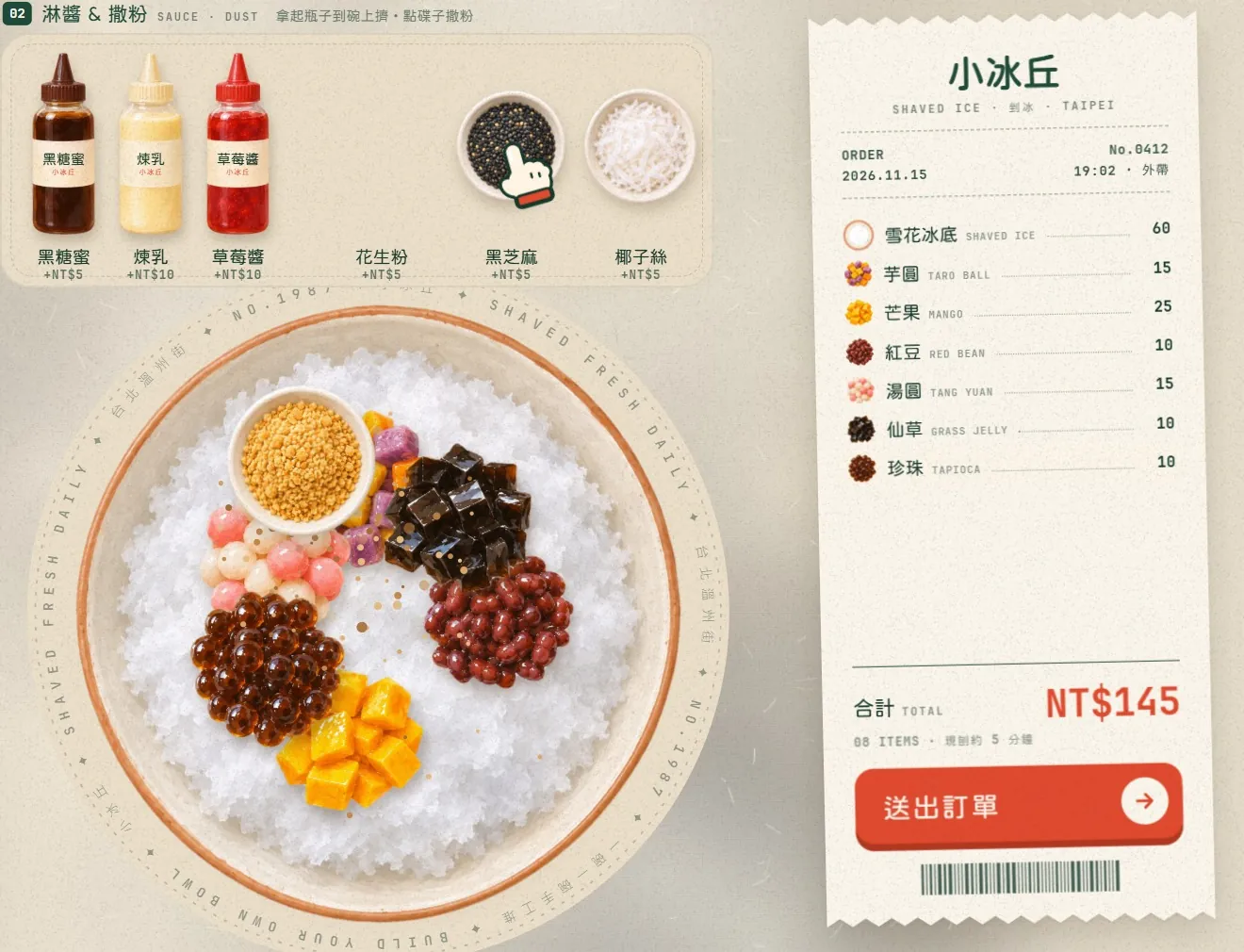
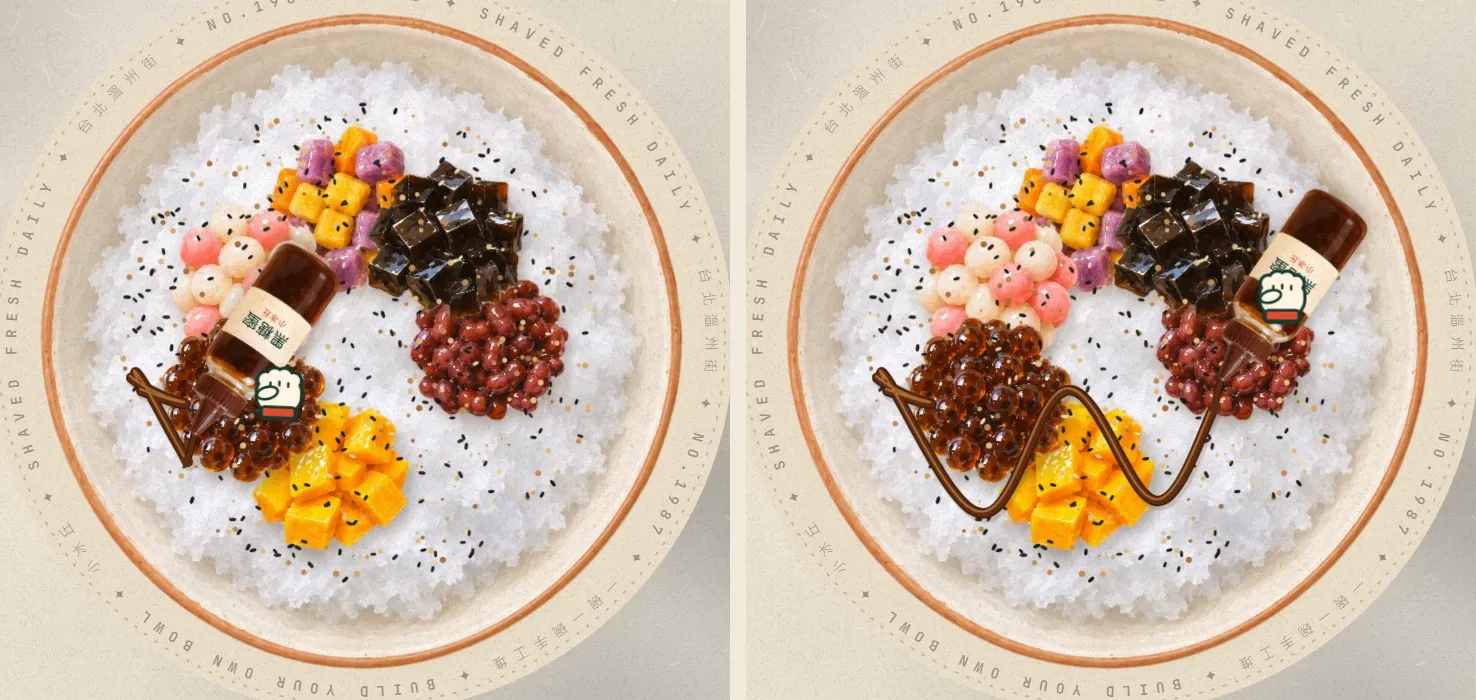
The sauce is the most fun. Hold the brown-sugar bottle and drag it over the bowl: it tilts, and the sauce follows your hand. Tap a bottle instead and it flies over and drizzles a line on its own. For sprinkles, tap a dish and the powder falls from above.
08Send: the lid closes and gets a "Sealed" stamp
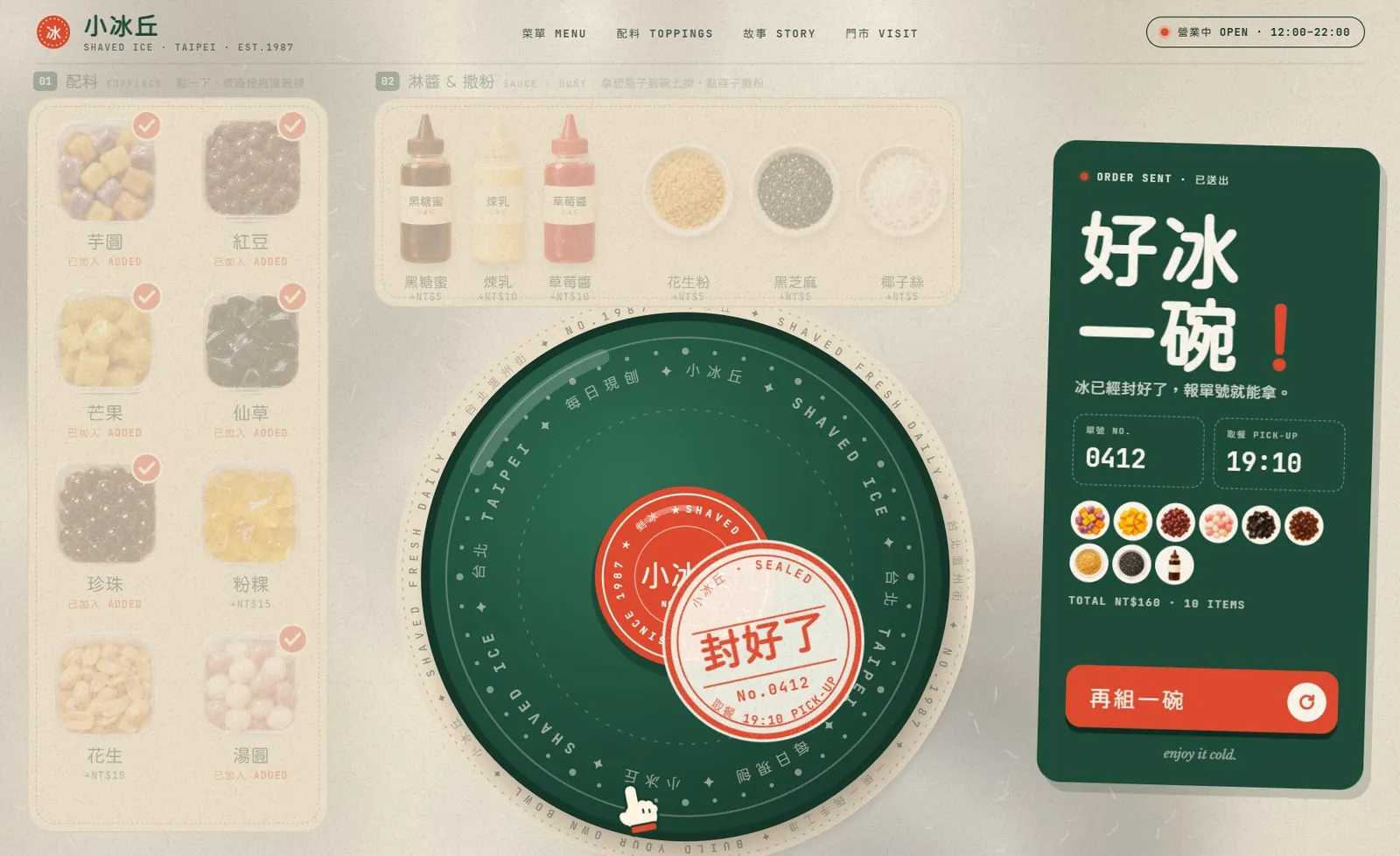
Press "Send order": the lid closes over the bowl and a "Sealed" stamp lands on it with an order number and pick-up time. The receipt turns into a dark green confirmation card listing everything you added and the total, with a "Build another" button.
To switch it to your shop, you don't need to start over. In the same Claude Code session, say:
Switch this order page to my shop. Don't touch the animations or the layout:
- Shop name, headline and intro: [your copy]
- Toppings and prices: [item price, item price…] (the images are already in img/ under the new ids)
- Address and opening hours: [your details]
Click through the whole flow afterwards and list what you changed.
09Good to know
- 小冰丘 is a fictional shop. Wenzhou Street is a real street in Taipei, but the address, EST.1987, opening hours, prices and order numbers on the page are demo copy Claude wrote itself.
- The toppings, bowl, squeeze bottles and sprinkle dishes are AI illustrations made in ChatGPT, not photos of real food. For a real business, swap in your own photos or clearly mark them as illustrations.
- This is a front-end demo: no back end and no payments, so "Send order" doesn't reach any shop. To take real orders you'd need to connect an ordering system.
- The page was built for a laptop screen (1440 × 880), with no mobile layout. If you want it to work on phones, add "it must also work for tapping, dragging and sending on a phone in portrait" to the prompt.
- Claude Code needs a paid Claude plan (Pro, Max, Team or Enterprise) or a Claude Console account.
- 32 minutes and 38 tool calls are this run's numbers; more toppings or more animation will take a different amount of time.