One prompt, and Claude Code turns sketchbooks into a moving bookshelf site: lift, pull out, 3D page turn, slide back
A fictional illustrator's 8 sketchbooks on a shelf that lift, pull out, turn pages in 3D and slide back. ChatGPT images, a Claude Code site, full prompt.
Watch the reel on InstagramComment #書架 to get this guide
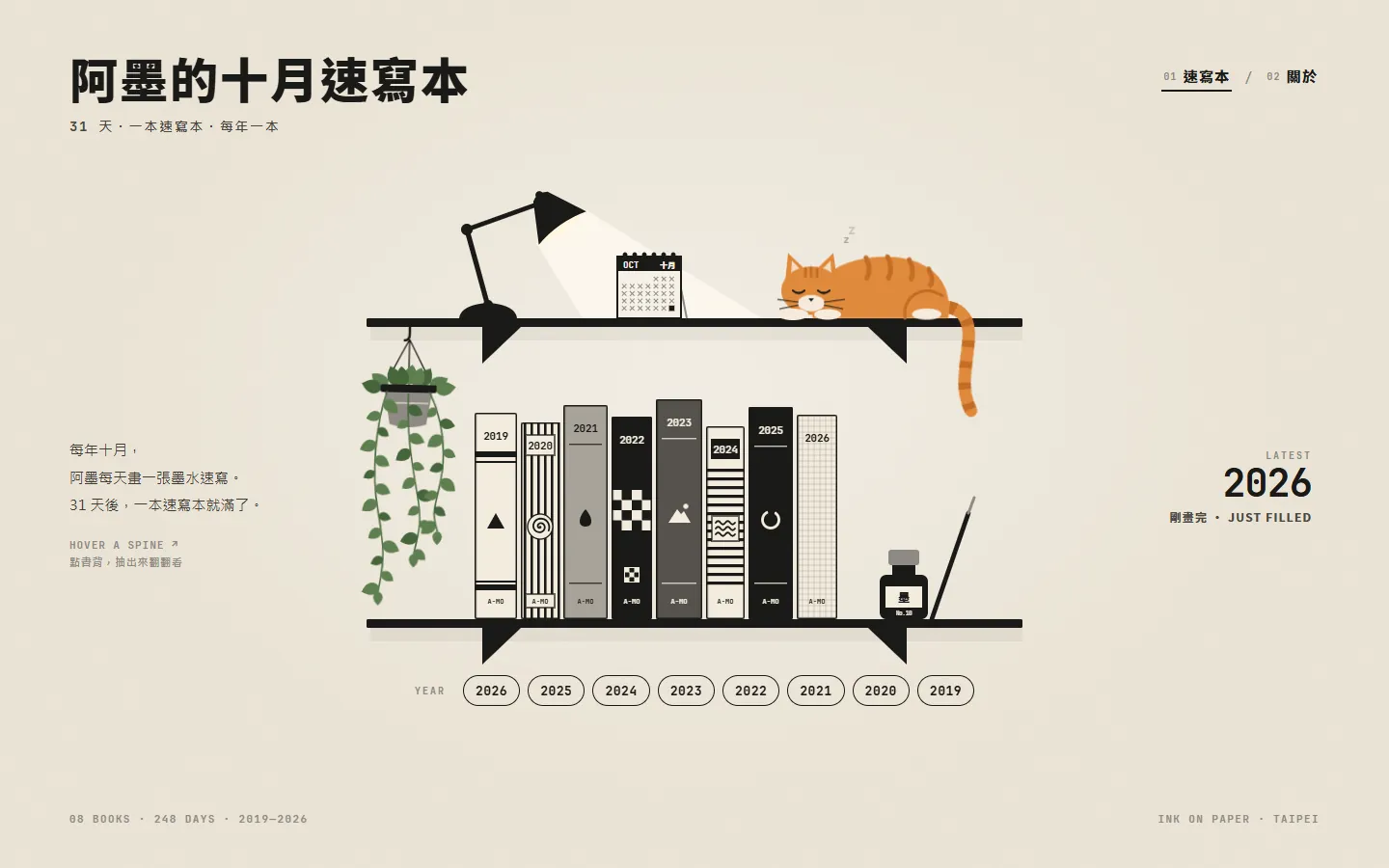
This bookshelf isn't an illustration, it's a website. Move the mouse over a spine and that book lifts up; click it and the whole book pulls out and turns to its cover; click again and it opens and turns its pages in 3D like real paper; press "Back to shelf" and it closes and slides back into place. "A-Mo" is a fictional illustrator, and the drawings and covers in the sketchbooks are AI images we generated in ChatGPT. Claude Code built the site from one prompt and we didn't change a word, so every screenshot below is the site itself. You get the two ChatGPT image prompts, the bookshelf prompt (replace the [ ] parts) and how to swap in your own work.
01The result: one book a year on a shelf that moves
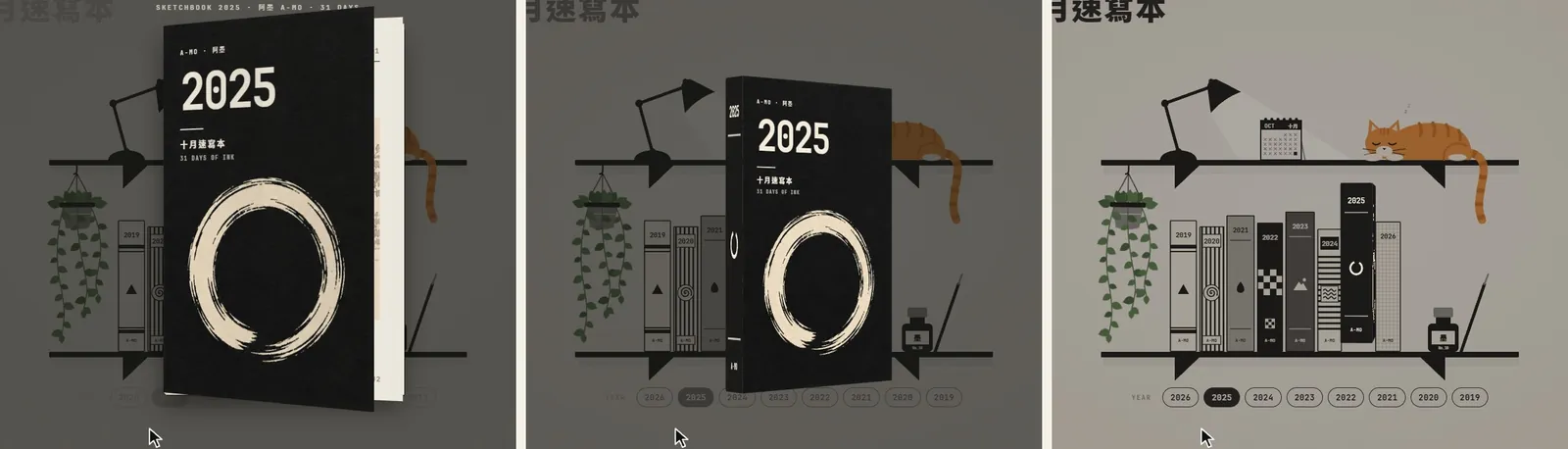
- The shelf: two black wall shelves holding 8 books from 2019 to 2026, each spine with its own colour, pattern and small symbol.
- The objects: a lit desk lamp, an October calendar, a trailing hanging plant, an ink bottle and an orange cat asleep on the top shelf with its tail hanging down (its body slowly rises and falls).
- 4 micro-animations: lift on hover, pull out on click, 3D page turn, close and slide back.
- A row of year buttons under the shelf; clicking a year pulls that book out too.
The whole site is 3 files, index.html, style.css and app.js, with no libraries. It is designed for 1440×900 (a 16:10 desktop screen). The page turn, the pull-out and the slide back are all CSS 3D and the browser's built-in animations.
02Step 1: make the inside drawings and covers in ChatGPT
Claude Code draws the shelf and the objects, but the "work" on each page has to come from you. We generated it in ChatGPT with 4 prompts: two 3×2 grids of inside drawings (2025 in grey wash, 2019 in bold black line, 6 each) and two 2×2 grids of covers (one per year, 8 in all).
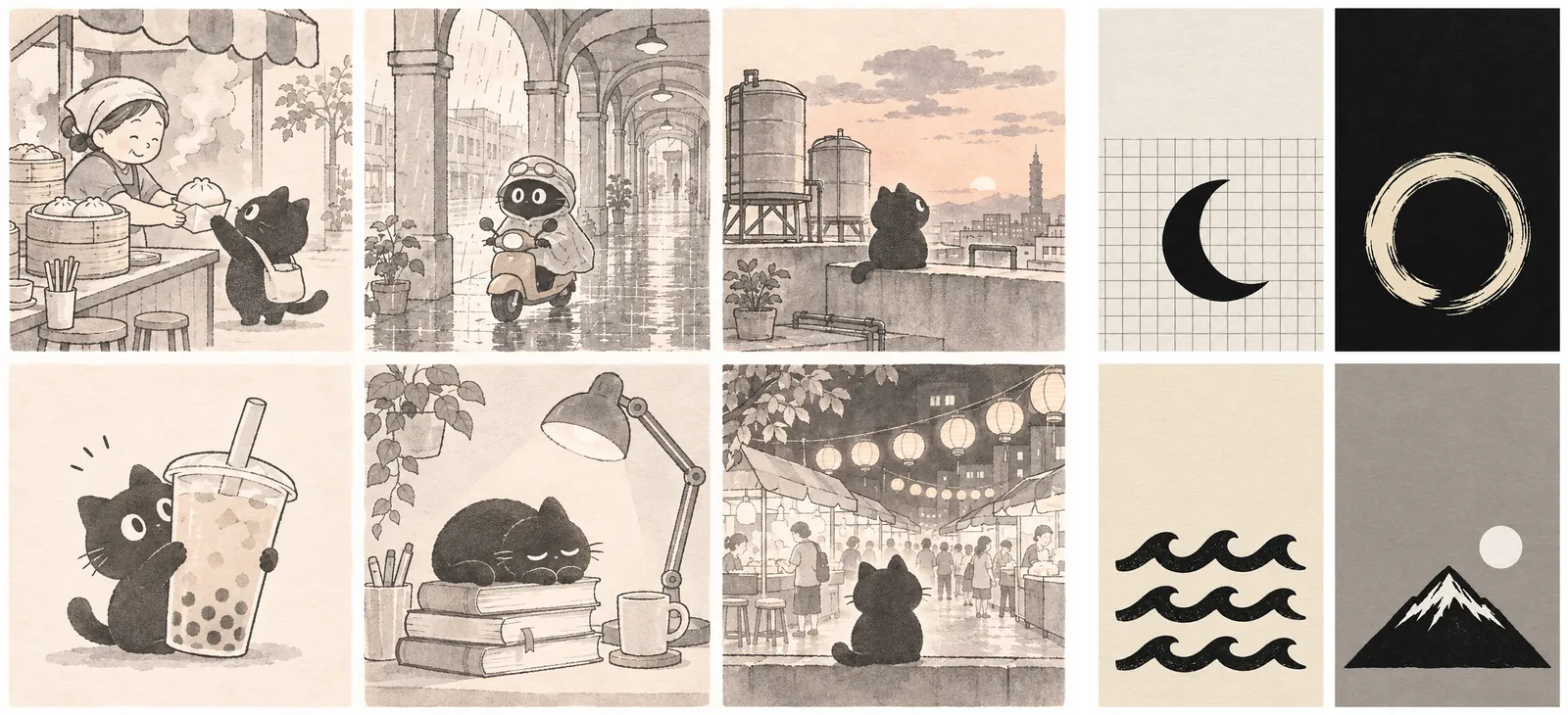
Create one image: a 3×2 grid of SIX separate square ink drawings from [an illustrator's daily sketchbook], with clear white gutters between them (each drawing in its own square, nothing crossing the gutters).
Style: [soft black ink line plus grey ink wash on warm off-white paper, cute and calm, lots of white space], with [a small round black cat] as the recurring character in every drawing.
Six scenes: 1) [buying a steamed bun at a breakfast stall] 2) [riding a scooter in the rain under an arcade] 3) [a rooftop with water tanks at dusk] 4) [holding a bubble tea bigger than itself] 5) [asleep on a stack of books under a desk lamp] 6) [watching night-market lanterns].
No text, no letters, no signatures, no logos.
Create one image: a 2×2 grid of FOUR separate sketchbook front covers, each a portrait rectangle (2:3) with a white gutter between them, shot straight on, flat, no perspective, no shadow.
Each cover is a minimal ink-print design on thick paper: 1) [off-white with a thin grey grid and one solid black crescent moon] 2) [black with one cream brush-stroke circle] 3) [cream with three stacked black linocut wave lines] 4) [warm grey with a black mountain triangle and a small white sun].
Leave the upper third of every cover empty (a year will be printed there later). No text, no numbers, no logos.
- Cut each grid along its white gutters, one image per cell. We only cropped; no other edits.
- Name them in order: drawings d2025_01, d2025_02…, covers cover_2019, cover_2020….
- Put them all in a folder called img.
- ChatGPT — For the inside drawings and covers
03Step 2: paste the bookshelf prompt into Claude Code
- Make an empty folder and put the img folder inside it.
- Open Claude Code in that folder.
- Paste the whole prompt below, replace the [ ] parts with your name, years and each book's drawing style, and press Enter.
- When it's done, run npx http-server in the folder and open the address it gives you in a desktop browser.
Build a personal "[sketchbook] bookshelf" website for me (a single-page index.html).

The artist: [A-Mo, a fictional illustrator in Taipei]. Every year she [draws an ink sketch a day for the 31 days of October], one [sketchbook] per year, [8 books from 2019 to 2026].
Assets (all in img/):
- Inside drawings from the [2025] book: [d2025_01 ~ d2025_06] ([grey ink wash, a small black cat])
- Inside drawings from the [2019] book: [d2019_01 ~ d2019_06] ([bold black lines, cross-hatching])
- [8] covers: [cover_2019 ~ cover_2026] (the top third of each cover is blank; please print the year there)

Layout:
1. An off-white page. Big title top left "[A-Mo's October Sketchbooks]", one line of small monospace text under it "[31 days · one sketchbook · one a year]", a small nav top right ([Sketchbooks / About]).
2. In the middle, two thin black wall shelves in a flat illustration style, drawn by you in SVG: spines standing upright in a row, one book per year, every spine a different colour and pattern ([black, off-white, grey, stripes, check]), each printed with its year and a small geometric symbol. Also on the shelves: [a hanging plant trailing down, a black desk lamp, an ink bottle, an October calendar], and [an orange cat asleep on the top shelf (tail hanging down, body slowly breathing)].
3. Under the shelves, a row of small year buttons ([2026 … 2019]).

Micro-animations (the most important part):
4. Mouse over a spine: that book lifts up a little and a small label appears above it, "Open [2025]" (the year follows the book).
5. Click a spine (or a year button): the book pulls out of the shelf, turns to face you and becomes a big centred cover; the shelf behind fades and dims.
6. Click the cover: the book opens into a two-page spread. Left page is the title page (year, name, one line); right page is the DAY 01 drawing. "Next" or clicking the right page must turn the page like real paper (a 3D page turn where you see the page on the back of the sheet). Each page has small "DAY 0X" text at the top plus a short title (look at each drawing and name it), and a page number at the bottom. Underneath: "Previous / Next" and the page count.
7. "Back to shelf": the book closes, turns back to its spine and slides back into its original place on the shelf.

Other: colours only [black, off-white and grey, plus the plant's green and the cat's orange]. Copy in Traditional Chinese with a little small English monospace text. It should look best on a 16:10 desktop screen.
This time Claude Code worked for about 24 minutes. When it finished writing, it opened a headless browser, took screenshots and fixed whatever looked wrong; we added no design instructions. The spines, lamp, plant, ink bottle and cat are all its own SVG, so no extra assets are needed.
- Claude Code — Terminal, desktop app or VS Code
04Step 3: write the 4 micro-animations one by one
The most important part of the prompt is the 4 micro-animation lines. Write "make a portfolio site" and you'll most likely get a row of cards; describe each action as "when I hover, this happens; when I click, this happens" and Claude builds them one by one.
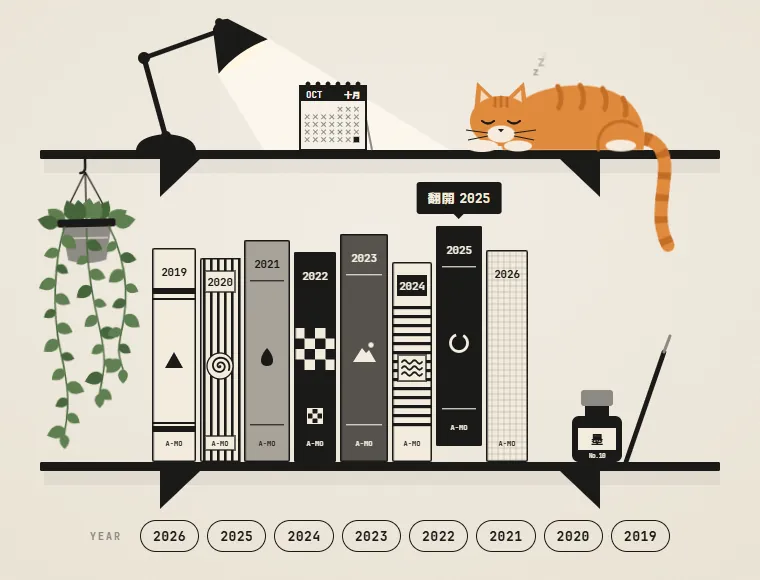
① Hover a spine: the book lifts and a small "Open 2025" label pops up above it, with the year following the book you're on.
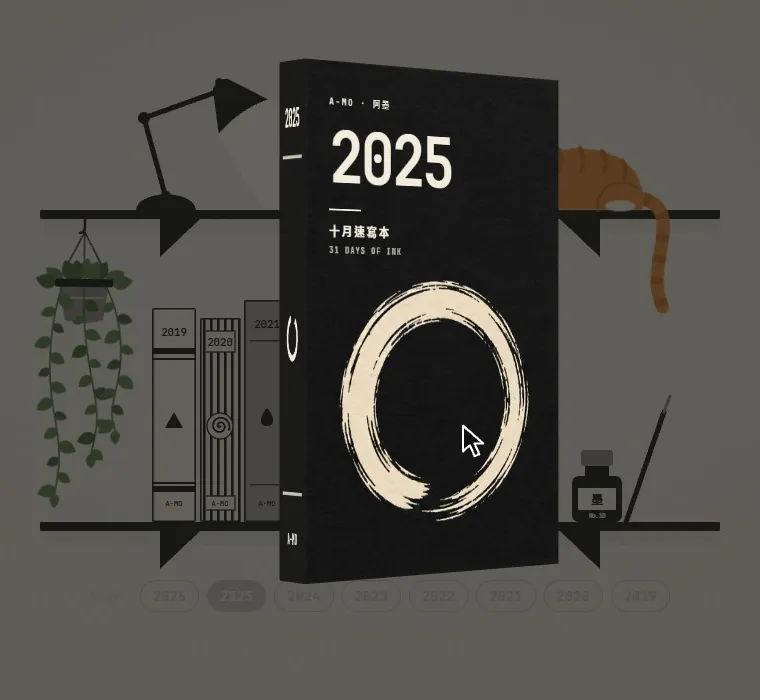
② Click: the book pulls out of the shelf, turning and growing until it becomes a centred cover, while the shelf behind dims.
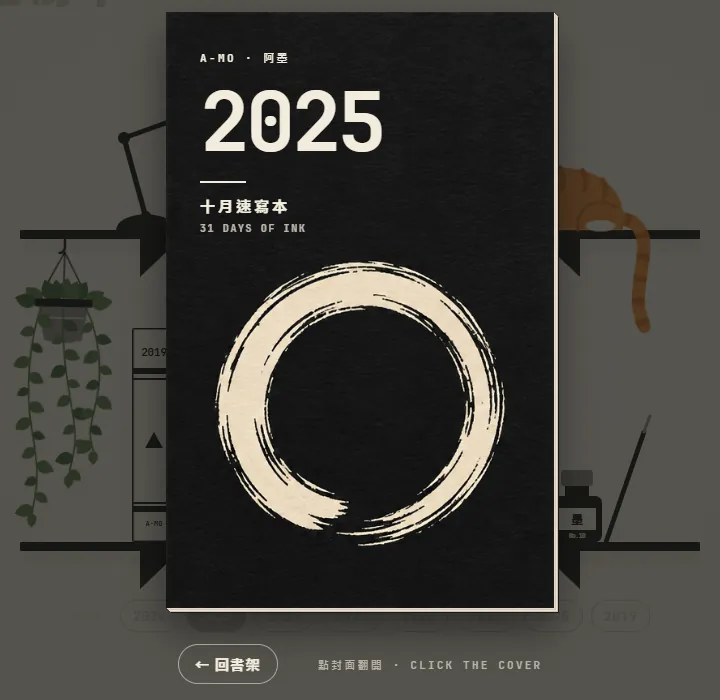
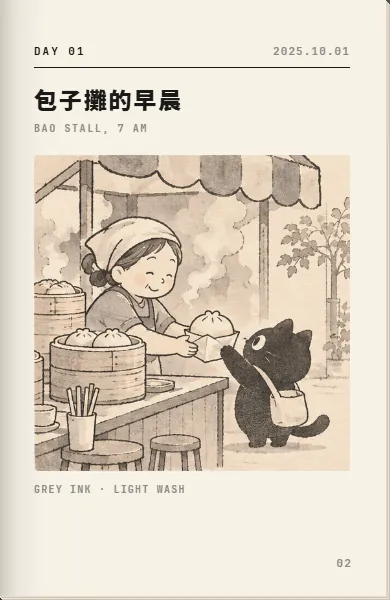
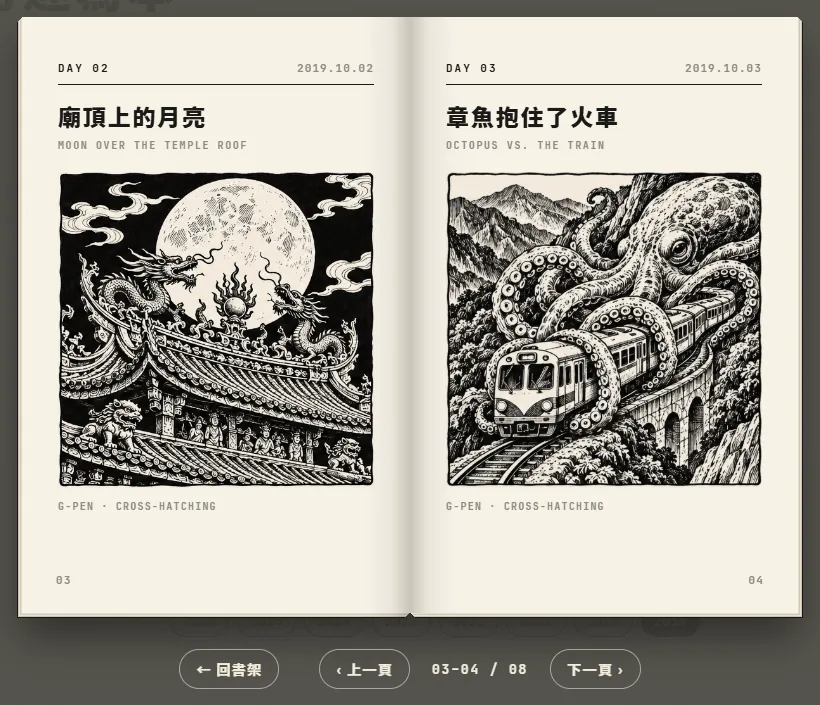
③ Click the cover: the book opens into a spread with DAY 01 on the right. Every page has a date and a short title at the top, and Claude named each drawing itself after looking at it, such as 包子攤的早晨 (bao stall in the morning), 騎樓下的雨 (rain under the arcade) and 頂樓的夕陽 (rooftop sunset).
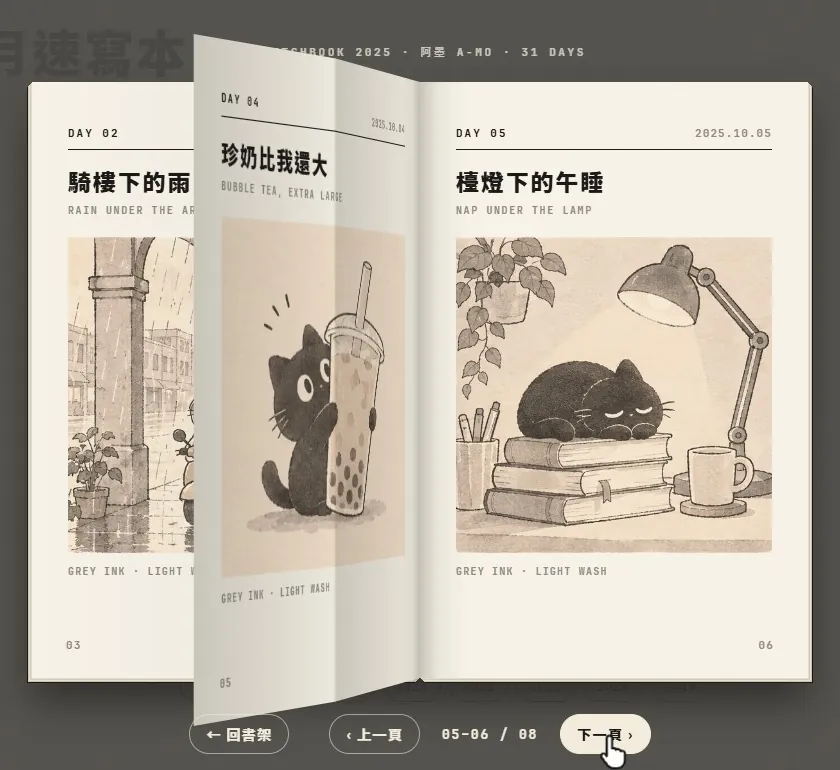
Press "Next" and the sheet turns over along the spine. Halfway through you can see the back of the sheet, which carries the next drawing, just like a real book.
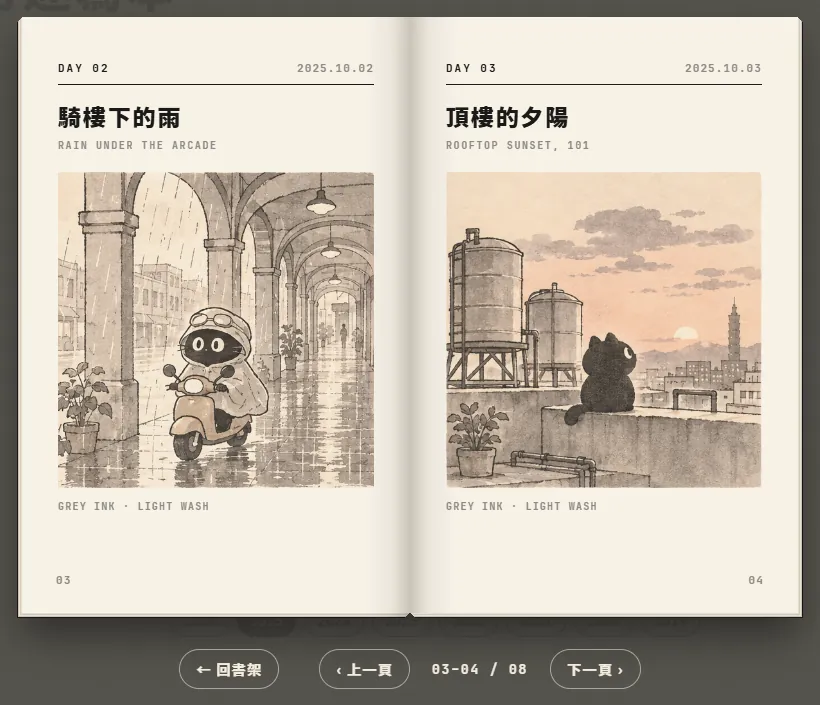
④ Press "Back to shelf": the book closes, turns back to its spine and slides into the gap it came from.
05Step 4: where there were no drawings, Claude filled the gaps
We only gave it inside drawings for 2025 and 2019. Instead of leaving blank pages, Claude decided for itself what the other pages should be:
- The 2019 book uses a different style (bold black line), and Claude named each of those drawings too, such as 廟頂上的月亮 (moon over the temple roof) and 章魚抱住了火車 (octopus vs. the train).
- Each book ends on a closing page: "+25 其餘 25 天,留在紙本裡" (the other 25 days stay in the paper book) with a row of 31 small squares, the first 6 filled in.
- The 2020 to 2024 and 2026 books have no inside drawings, so they open on a page saying "這一本畫滿了,還在慢慢掃描。先翻翻 2025 或 2019 吧" (this book is full and still being scanned; flip through 2025 or 2019 for now).
06Swap in your own work
- Work: sketchbooks, planners, photo books, travel journals or a monthly picture book all fit. "One book a year" or "one book a trip" suits a shelf best.
- Name and years: replace A-Mo, the years and the number of books in the prompt.
- Style notes: write one line about each book's style in the brackets; Claude uses it for the small English text and the titles.
- Shelf objects: the lamp, plant and cat can all become things that are yours.
- Going live: upload the whole folder to any static host, such as GitHub Pages.
Keep the current shelf, the 4 micro-animations and the page turn, and change the content to [my photo books].
[One book a year], [5] books in total: [2021 to 2025].
Inside photos for each book are in img/: [p2025_01 ~ p2025_08]…; covers are [cover_2021 ~ cover_2025].
Swap the shelf objects for [a film camera, a roll of film and a small cactus], and [the cat for a sleeping shiba inu].
Change the small text at the top of each page to [where and when it was shot]. I'll give you a short title for each photo later; leave [ ] for now.
Take screenshots and check it once more when you're done.
- GitHub Pages — Host a site straight from a GitHub repository
07Good to know
- "A-Mo" is a fictional illustrator. The drawings and the 8 covers are AI images we generated in ChatGPT, not anyone's real sketchbook. The people in the drawings are AI-drawn too, not real people.
- The site's copy, the drawing titles and numbers like "08 BOOKS · 248 DAYS" are demo content Claude wrote. Replace them with real details when you use your own work.
- Use your own work or images you have the right to use. Don't put other creators' drawings on your shelf.
- Besides the prompt, we gave Claude a few environment notes: local fonts only, no CDN, and a headless-Chrome screenshot self-check at the end. They were not design instructions.
- The site is designed for a 16:10 desktop screen. On a phone the whole page scales down and the text gets very small, so ask Claude for a mobile version before you go live.
- The two Noto Sans TC font files we put in the folder add up to about 35 MB. Before going live, ask Claude to subset the fonts or convert them to WOFF2.
- Open it through a local server (npx http-server) or upload it to a host to view it.
- Claude Code needs a Pro, Max, Ultra, Team or Enterprise plan, or a Claude Console (API) account.
- The laptop and desk in the video are an AI-generated photo; only the site on the screen is Claude Code's real output. The screenshots in this guide are the site itself.
- This guide was made in November 2026. The same prompt won't give exactly the same layout and animation details every time.