A portfolio home page that fires a toy gun: one prompt, and Claude Code builds a 3D gun that sprays skill tags
One prompt, and Claude Code builds a portfolio hero: a glossy three.js toy gun fires skill tags that pile up with matter.js physics. Prompt, tweaks, going live.
Watch the reel on InstagramComment #自介 to get this guide
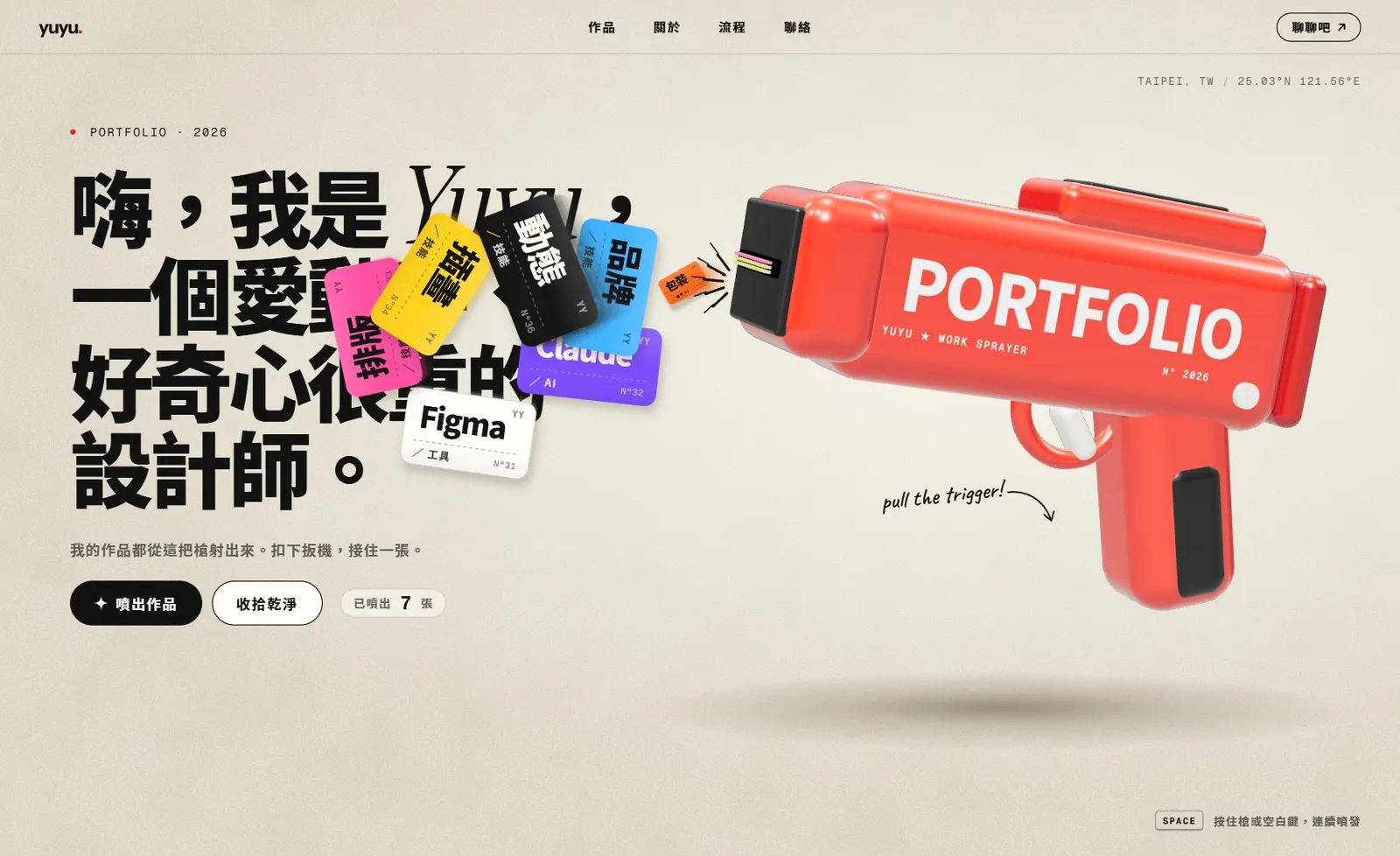
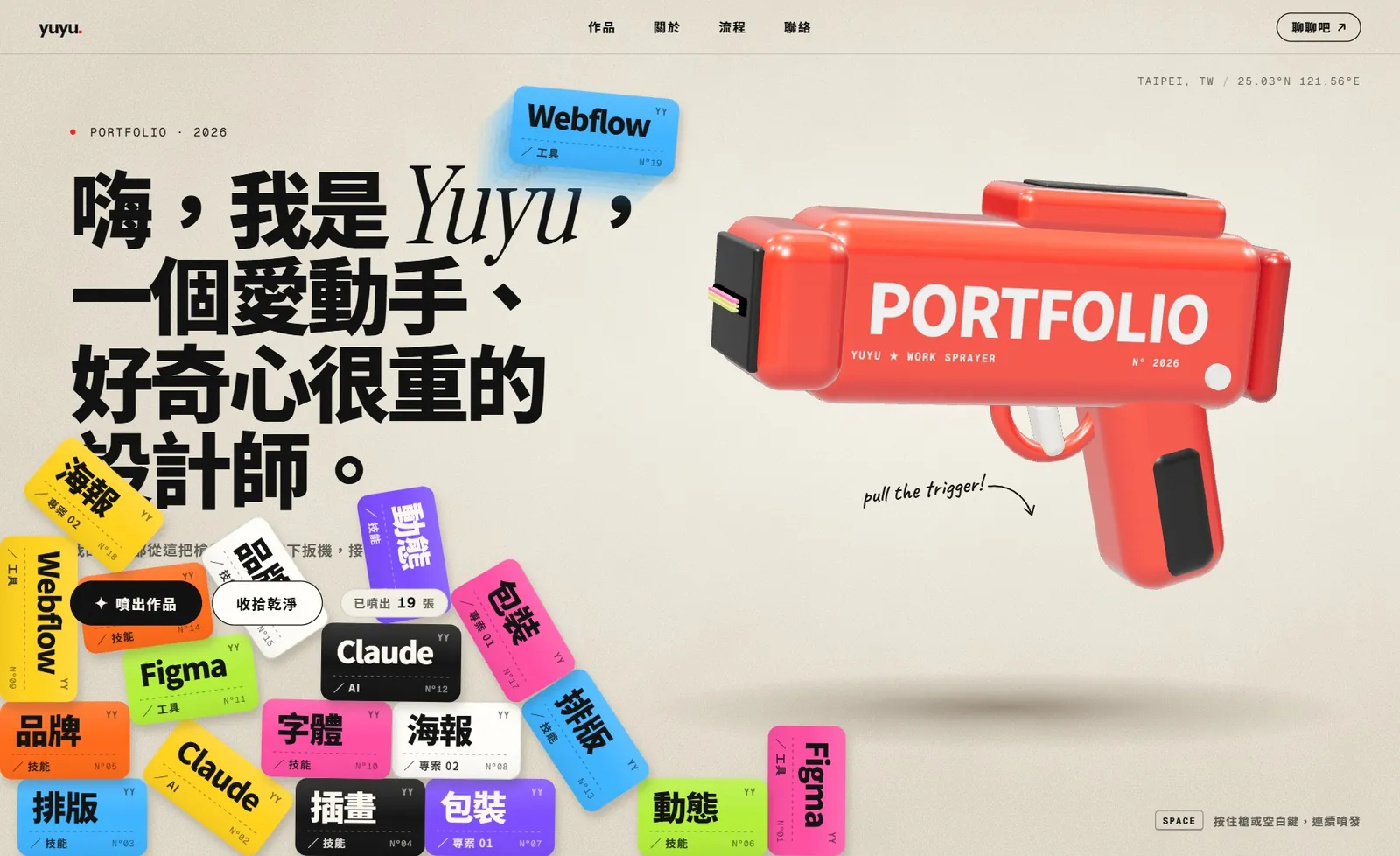
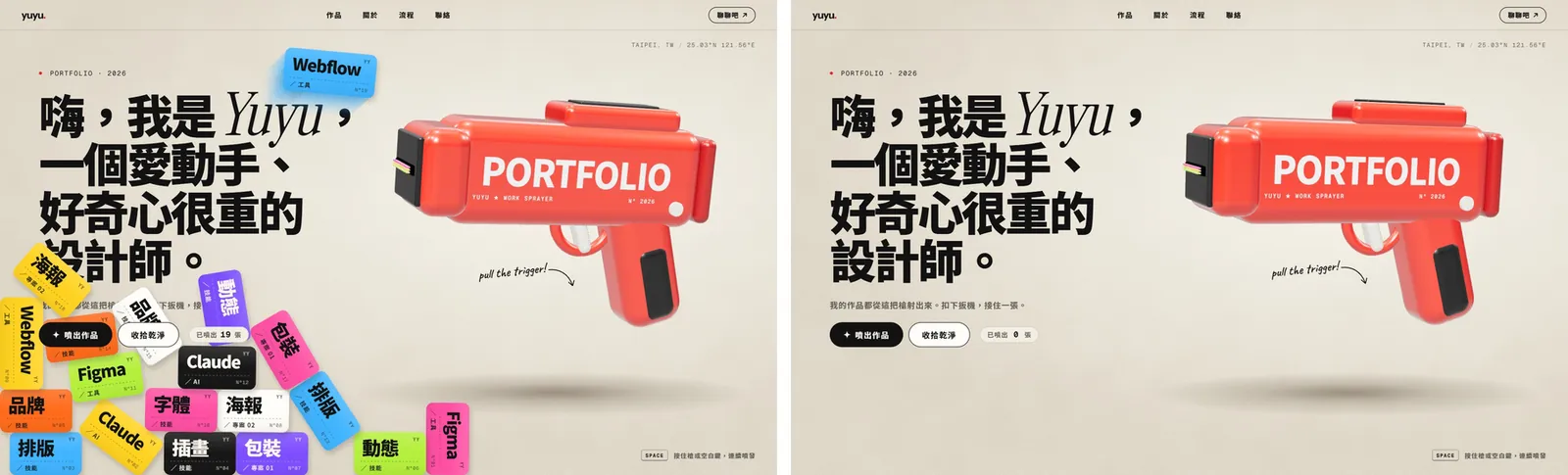
Does a portfolio home page have to be thumbnails and a CV? We asked Claude Code to build a first screen for a fictional designer, Yuyu: a shiny red toy gun on the right fires a skill tag with every click, the tags land with real physics in the bottom-left corner, and you can grab them and throw them. The whole page came from one prompt given to a fresh Claude Code agent, and we didn't change a single line. Every image below is a real screenshot of that page. You get the full prompt, how to make it yours and how to put it online.
01See it first: what this home page does
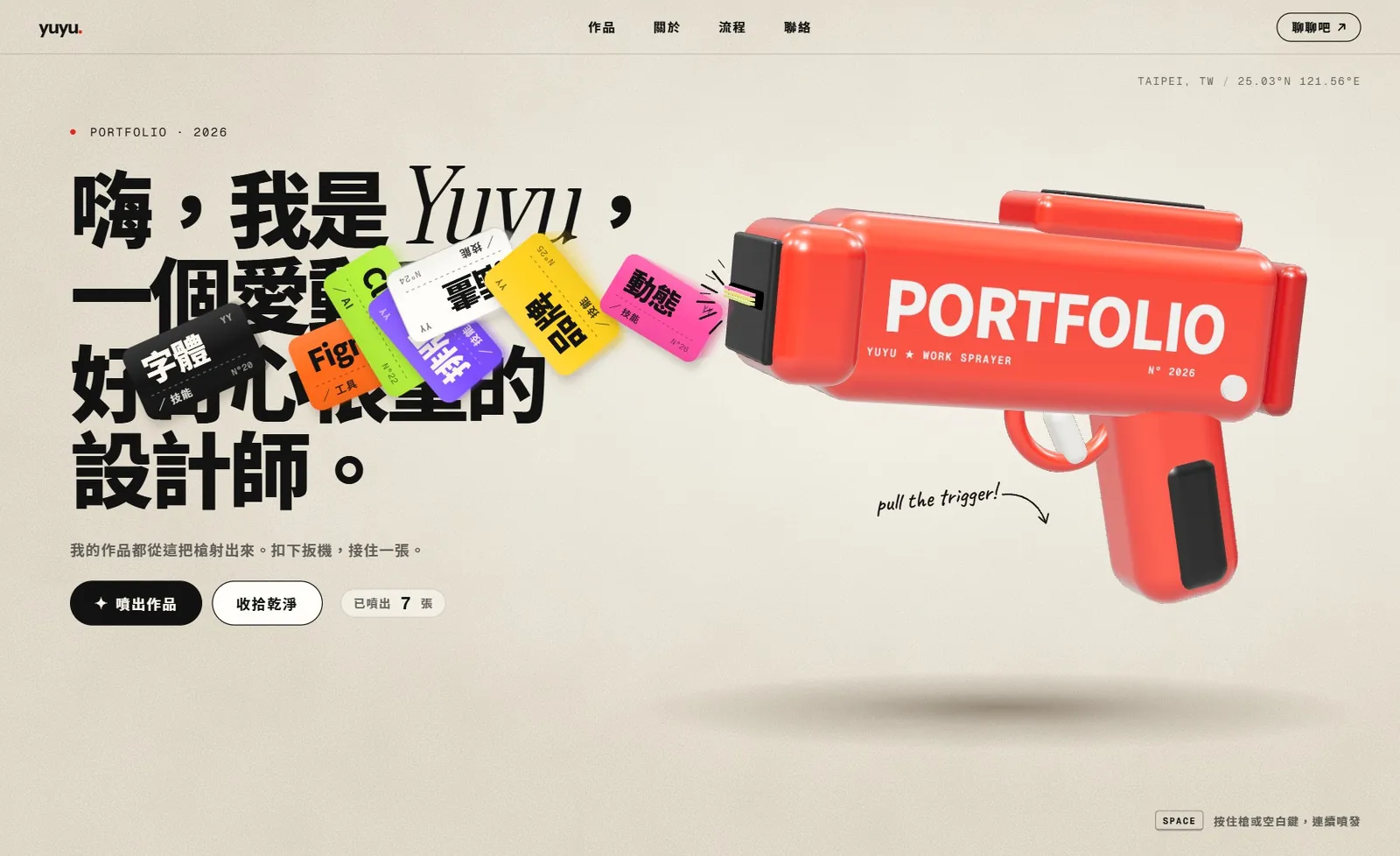
When it opens, a huge heavy black headline on the left says "Hi, I'm Yuyu, a hands-on designer with lots of curiosity" (in Chinese on the page). The name Yuyu is in a slim italic serif. On the right floats a red toy money gun with PORTFOLIO printed on its side.
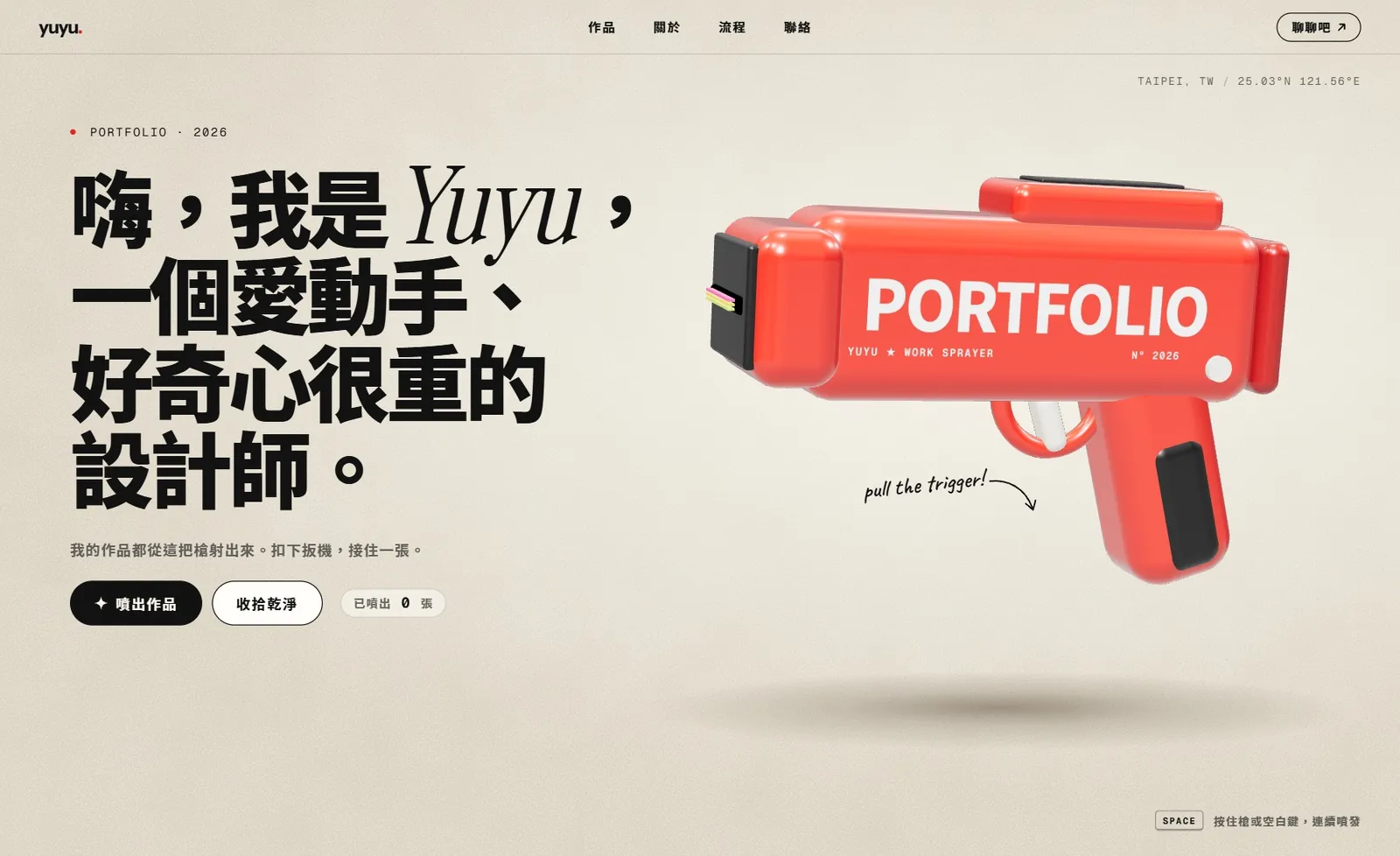
- As soon as it opens, the gun fires a burst on its own (11 tags) as an intro.
- Click the gun: one skill tag shoots out.
- Hold the gun or the space bar: rapid fire.
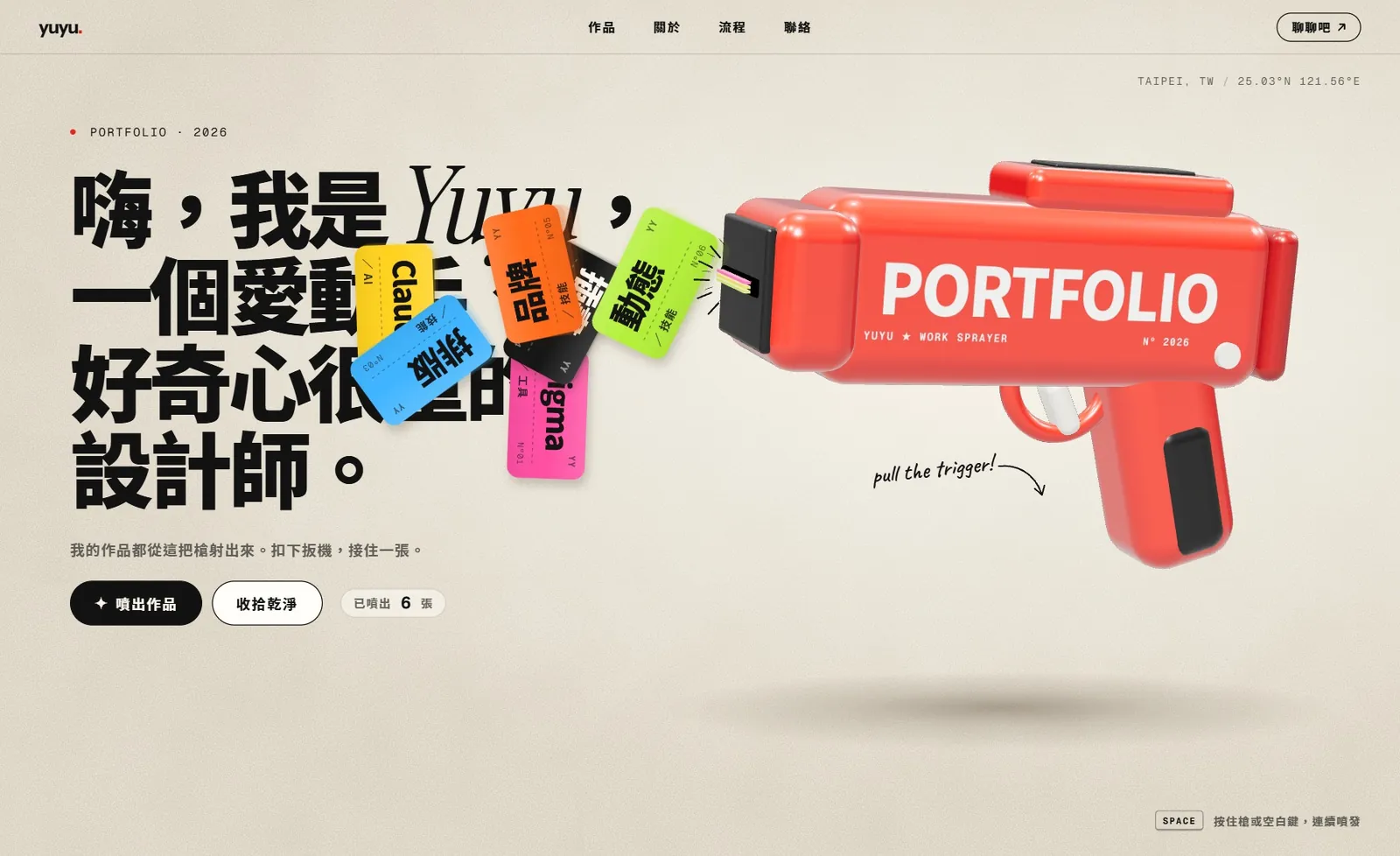
- Tags land in the bottom-left corner, collide with 2D physics and pile up.
- Grab a tag and throw it: it hits other tags and bounces off.
- "噴出作品" (Spray my work) fires 8 at once; "收拾乾淨" (Clean up) clears them all and resets the counter.
02Get ready: an empty folder and Claude Code
- Install Claude Code (link below).
- Make an empty folder, for example yuyu-portfolio.
- Open Claude Code in that folder.
The page uses two free JavaScript libraries: three.js does the 3D (the gun) and matter.js is a 2D physics engine (the tags colliding and piling up). Name them in the prompt and Claude knows which to use.
For our run we put the three.js (r160) and matter.js (0.20.0) files and the font files into the folder first, so Claude needed no internet at all. The prompt below loads them from a CDN and Google Fonts instead, so you don't have to download anything. We didn't run that version, so test it with step 3 afterwards.
- Claude Code — Official, by Anthropic
- three.js — 3D library, MIT licence
- matter.js — 2D physics engine, MIT licence
03Step 1: paste this prompt
This is the prompt we gave Claude Code (ours was in Chinese), with the name, the self-intro, the skills and the colours turned into [ ]. We rewrote the final "Tech" paragraph for you: the original one was set-up for our screen recording (a fixed clock and hooks for the recorder), which you don't need.
Build the home page of a designer portfolio site (only the first screen, the hero, as a single page). It's for [your name].

1. Layout: an off-white background with a little paper grain. A very thin nav bar at the top: a small logo "[logo text]" on the left, "Work, About, Process, Contact" in the middle, and a small "Let's talk" button on the right.
2. Left side: one small line in a monospace font, "● PORTFOLIO · 2026", and under it a huge, tightly spaced, heavy black headline: "Hi, I'm [name], [one line about yourself]." Set the name in a slim italic serif or a handwritten font, so it contrasts with the heavy black type. Under the headline, one small line: "All my work comes out of this gun. Pull the trigger and catch one." Below that, two buttons: a black "Spray my work" and a white "Clean up", with a counter next to them: "N sprayed".
3. Right side: a big [red] toy money gun (the party kind), made in 3D with three.js: glossy painted, reflective plastic, slightly rounded corners, soft shadows, with "PORTFOLIO" printed in big bold white letters on its side, muzzle pointing left. While idle it floats gently and turns a little.
4. Firing: click the gun (or press the space bar) and it shoots out one colourful rounded tag; hold it down for rapid fire. Tags fly out of the muzzle with spin and a sense of speed (motion blur when they're fast), fly to the left, and when they land in the bottom-left corner they collide with real 2D physics (matter.js), bounce a little and pile up one by one. When the page opens, the gun fires a small burst on its own as an intro.
5. The tags are my skills and projects, like little banknotes: one big word on top and a small category line below, for example [Figma / tool, Claude / AI, Layout / skill, Illustration / skill, Branding / skill, Packaging / project 01, Poster / project 02]. Each one gets a saturated colour ([hot pink, orange, yellow, lime green, sky blue, purple, black, white]).
6. Tags in the pile can be grabbed with the mouse and thrown; they hit other tags and bounce off. "Clean up" clears them all.
7. A tiny hint in the bottom-right corner: "Hold the gun or the space bar to keep spraying".
8. Overall it should feel like an award-winning portfolio site: clean, lots of white space, refined type pairing (heavy black sans + italic serif name + small monospace), with only off-white and black, plus the colours of the tags and the [red] of the gun.

Tech: plain HTML/CSS/JS, no build tools. Load three.js and matter.js from a CDN, and use Google Fonts (Noto Sans TC for Chinese). When you're done, open it yourself on a local server, try the intro, a click on the gun, hold-to-spray, grabbing and throwing a tag, and clean-up, then look at the screenshots and fix what's off.
The key is to spell out three details that make it look expensive:
- The gun: glossy, reflective, rounded corners, soft shadows.
- The tags: real 2D physics, colliding and piling up one by one.
- The name: a different typeface (slim italic serif) that contrasts with the heavy black headline.
- Why does your Claude-made portfolio look AI-made? — The same prompt with and without 5 settings
04Step 2: see what Claude built
Claude Code worked for about 90 minutes and 67 tool calls. It wrote three files, index.html, style.css and app.js, then opened headless Chrome itself and tested the intro, clicking the gun, rapid fire, dragging a tag and clean-up, checking its own screenshots.
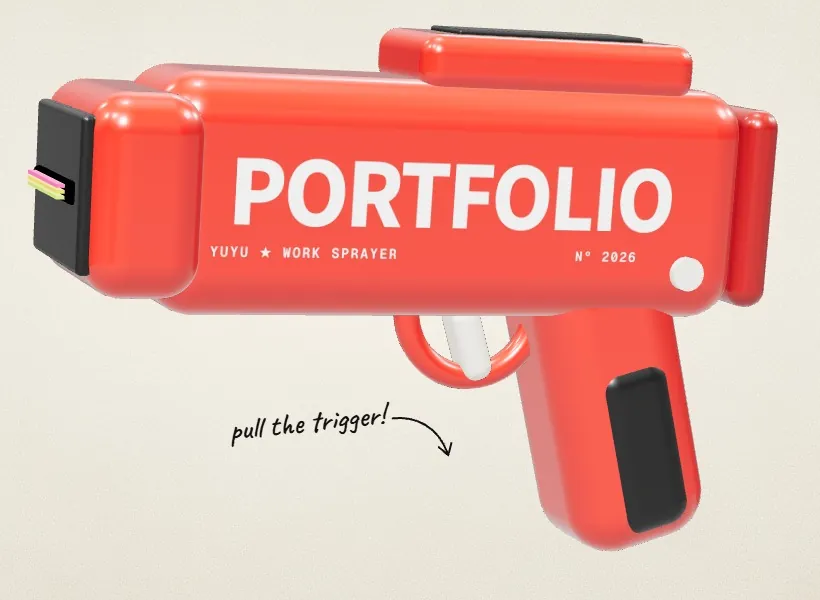
- The body: rounded boxes make the housing, muzzle, top hatch, grip and trigger, in a glossy plastic material with a clear coat.
- The feel of firing: with every shot the gun kicks back (recoil) and the trigger pulls in.
- The muzzle: three coloured paper edges peek out of a black face plate, as if it's loaded with tags.
Details Claude added that the prompt never asked for: the small print "YUYU ★ WORK SPRAYER" and "Nº 2026" on the gun, a handwritten "pull the trigger!" note with an arrow, Taipei coordinates in the top-right corner, a number and "YY" initials on every tag, and a SPACE key icon in the bottom-right corner.
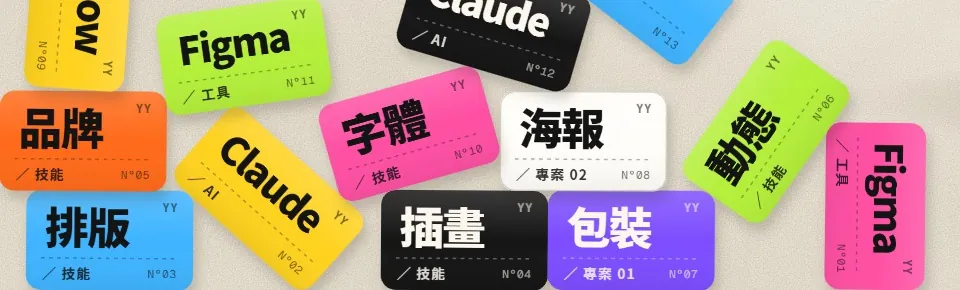
The italic name is a nice trick: Claude used the Instrument Serif typeface and slanted it 13 degrees with CSS, next to the heaviest weight of Noto Sans TC, and that's where the contrast comes from.
05Step 3: open it and play
- Run npx serve in the folder (you need Node.js), or simply ask Claude Code to start a local server for you.
- Open the localhost address it gives you in your browser.
- Wait for the gun to finish its intro burst.
- Click the gun to fire one tag; hold the mouse button or the space bar for rapid fire.
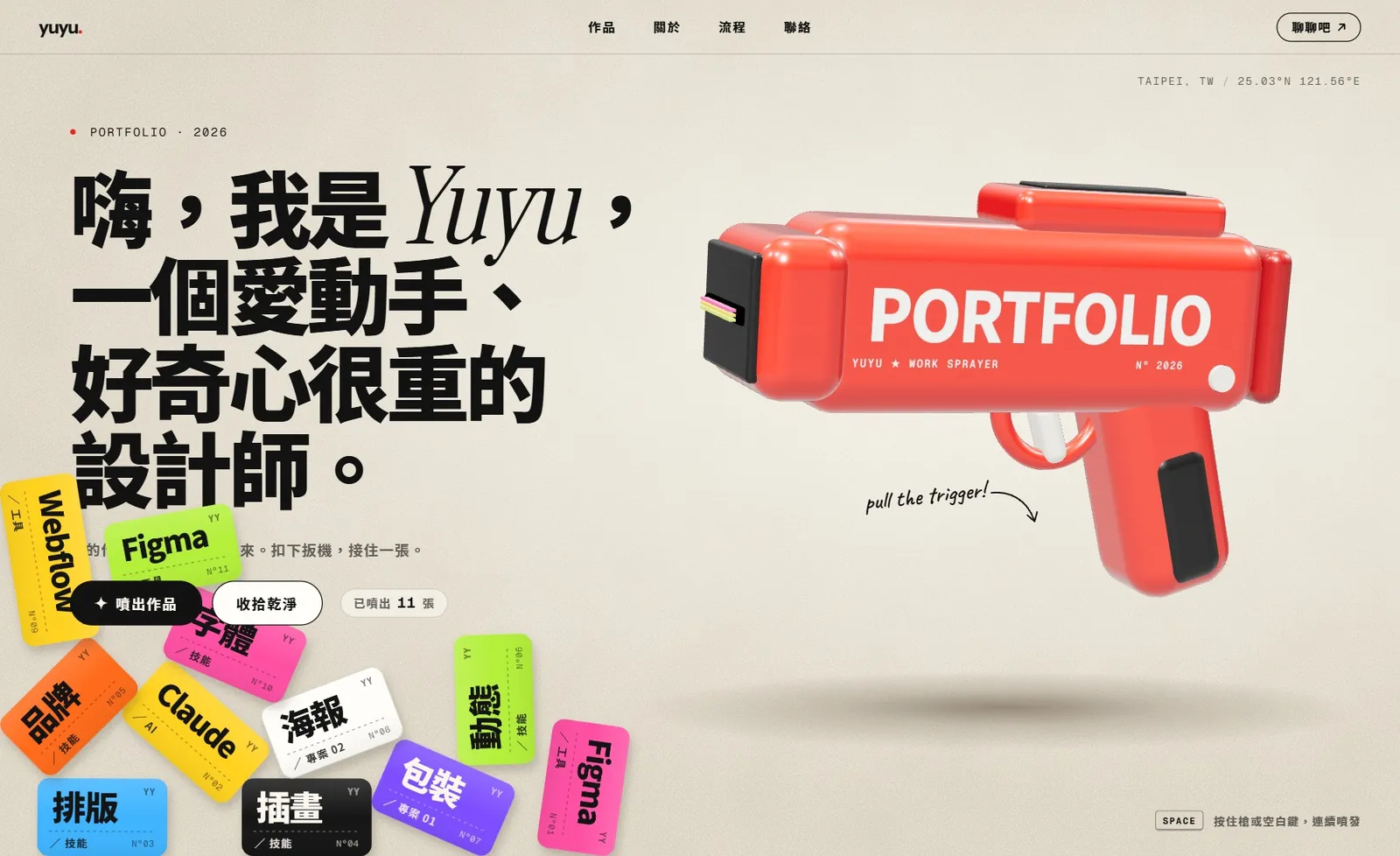
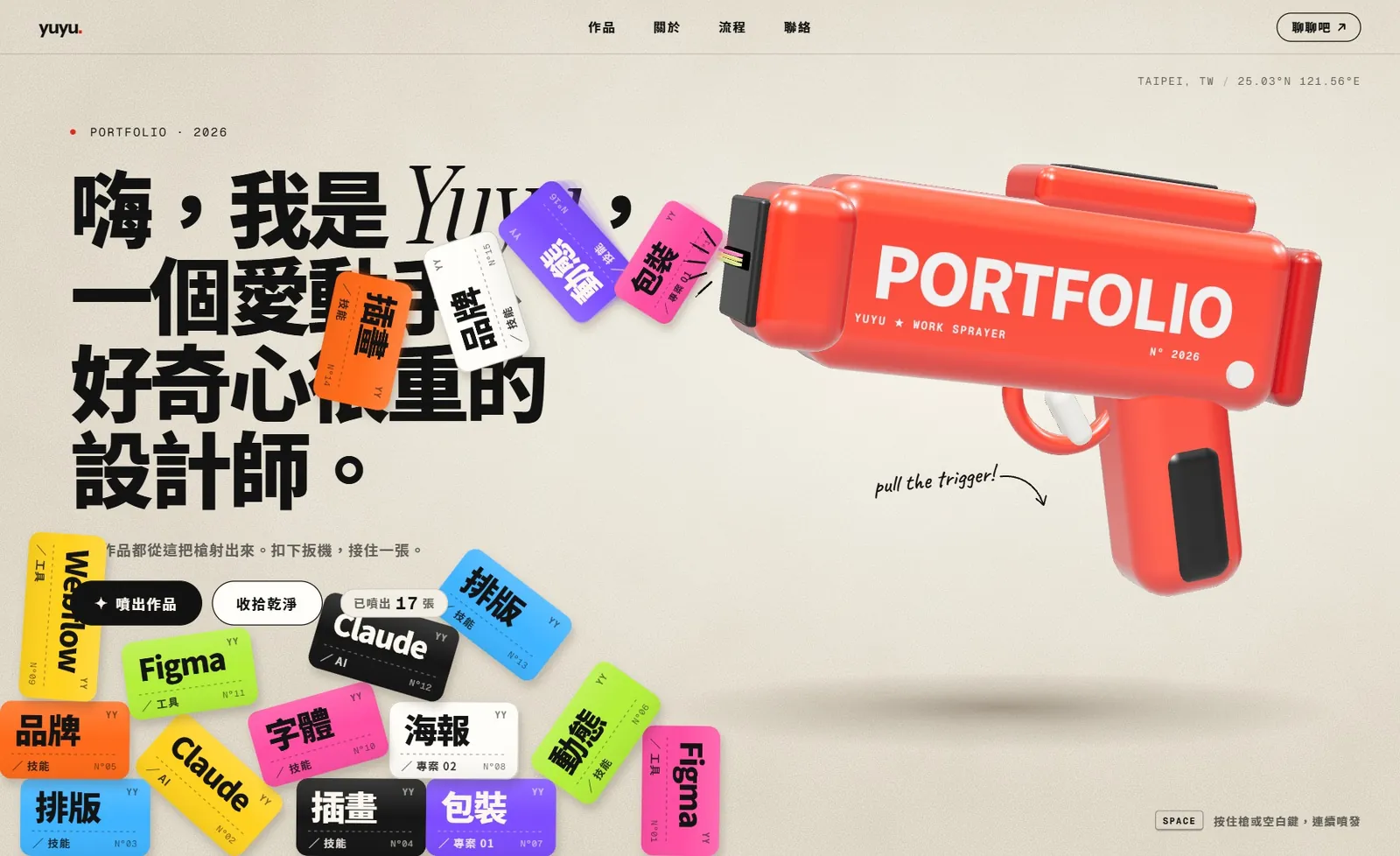
- Move the mouse over a tag, press and drag, then let go with a flick.
- Press "噴出作品" (Spray my work) to fire 8 at once.
- Press "收拾乾淨" (Clean up): the tags vanish from the top of the pile down and the counter resets.
06Step 4: make it yours (words, colours, gun, physics)
The easiest way is to tell Claude Code what to change, one thing at a time:
Change the tags to these: [Figma / tool, Procreate / tool, Illustration / skill, Picture book / project 01…].
Make the gun [navy blue] and change the big word on its side to "[WORKS]".
Make the tags a bit bouncier and slide less after they land.
Don't change anything else, and test it yourself when you're done.
If you'd rather edit it yourself, in our version the settings are all in app.js:
- Tag words: LABELS, each pair is [big word, category], e.g. ['Figma', '工具'].
- Tag colours: SWATCHES, each pair is [background, text colour].
- Gun colour: the red material's color: 0xd4120b (the darker red at the back is redDeep).
- Lettering on the gun: 'PORTFOLIO' and 'YUYU ★ WORK SPRAYER' inside printTexture().
- Bounce and friction: the tags' restitution is 0.3 (higher = bouncier), friction 0.42 (higher = less sliding), frictionAir 0.034 (higher = they slow down faster in the air).
- Gravity: engine.gravity.y = 1. At most 36 tags stay on screen (MAX_TAGS); beyond that the oldest ones disappear.
07Step 5: put it online
- Open Netlify Drop and drag the whole folder onto the page; you get a URL (free).
- Or put it on a static host such as GitHub Pages.
- Once it's live, open it on a computer and try the gun, rapid fire and throwing a tag.
- Paste the URL into the link field of your Instagram profile.
- Netlify Drop — Drag a folder, get a live site
- GitHub Pages — Free static hosting
- Google Fonts: Noto Sans TC — Free Chinese typeface
08Good to know
- Yuyu is a fictional designer. The page is Claude Code's first build, shown as a demo, and we didn't change a line.
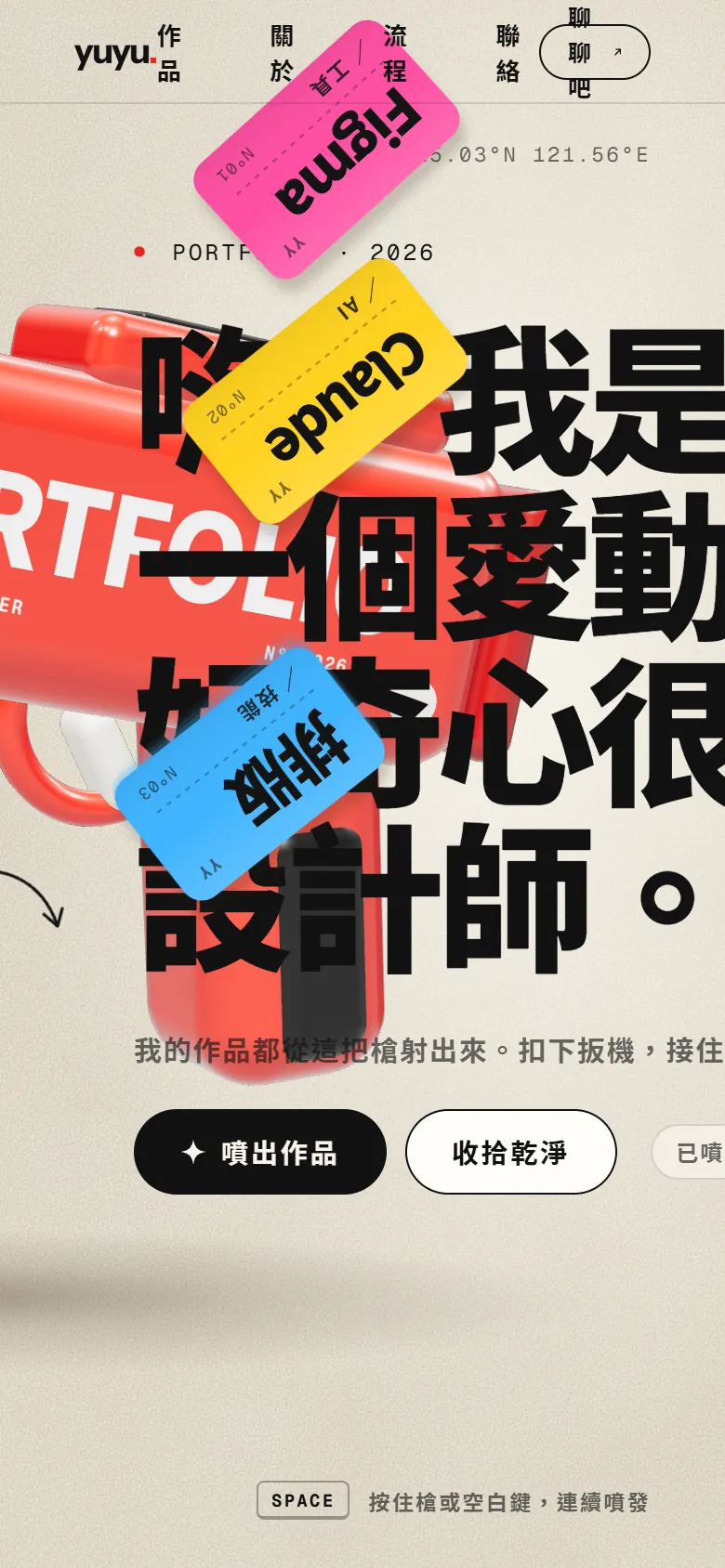
- This version is desktop only: the layout is fixed to a 1440×880 screen (an 86px headline that never wraps, no phone styles). At phone width (390px) the headline is cut off on the right, the gun is pushed left behind the headline and the nav labels stack vertically (below). For a phone version, ask Claude to build one.
- When the pile grows, tags cover the sub-line and the buttons (in the screenshots above, "Spray my work" is half hidden). Claude didn't add a barrier around the buttons; to avoid it, tell it "tags must not pile onto the headline or the buttons".
- At most 36 tags stay on screen; keep firing and the oldest disappear.
- We only tested with a mouse, not grabbing tags or rapid fire on a touch screen.
- The "Tech" paragraph at the end of step 1 is our rewrite for you and differs from our actual set-up (we put the libraries and fonts in the folder first), so test it with step 3.