8 free design skills for Claude Code, tested: Stageshow, Oil UI, Dimensional Drawing and more (with install commands)
We ran 8 free design skills on one fictional bike app: product motion, spec drawings, side-by-side directions, a pre-launch review, award-site references.
Watch the reel on InstagramComment #技能包 to get this guide
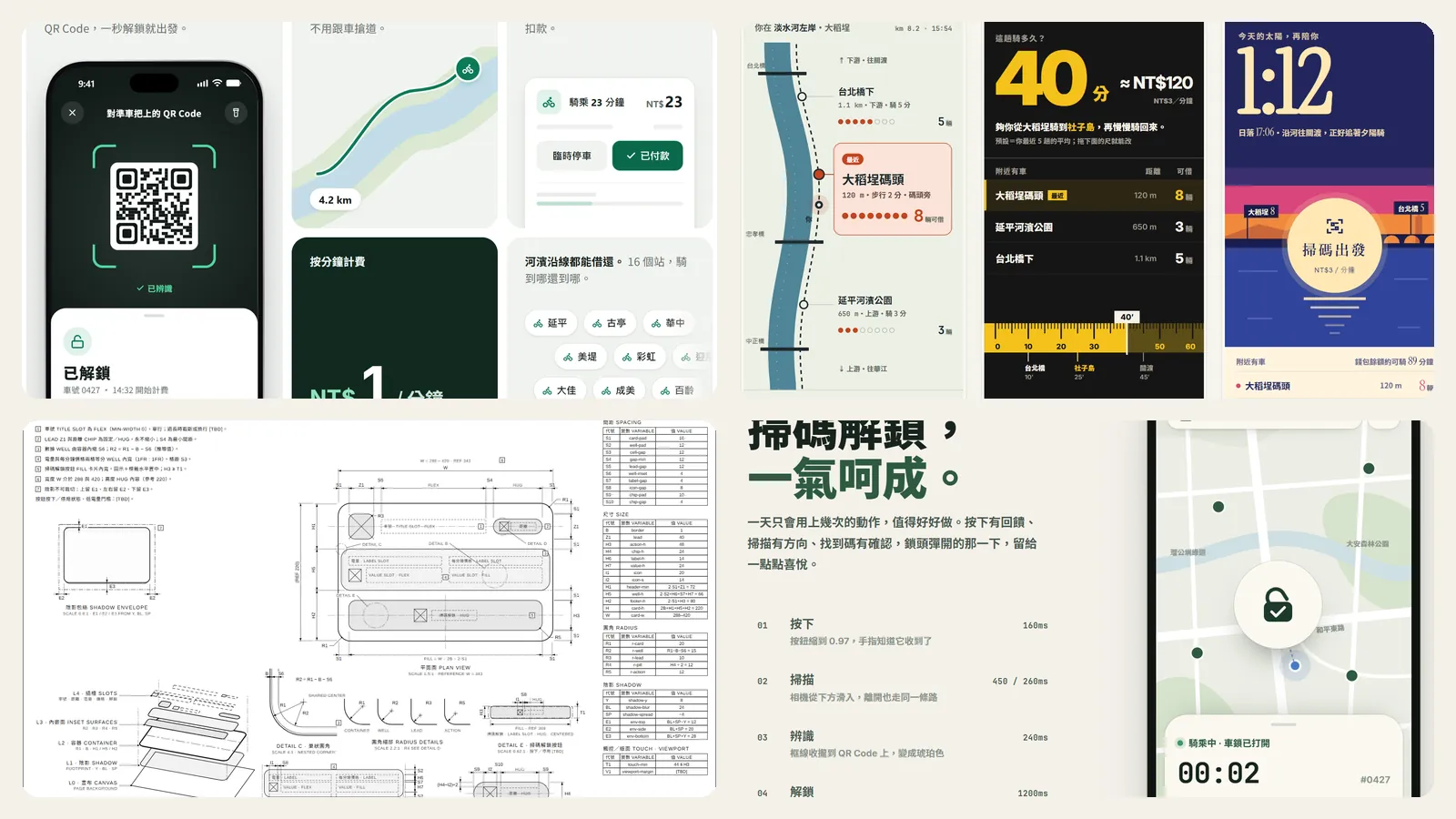
Without skills, sites made by Claude Code often look obviously AI-made. Add skills written by real designers and the result changes a lot. In this guide we tested 8 free design skills on a fictional Taipei riverside bike-rental app, Slow Ride (a fictional brand): Stageshow, Dimensional Drawing, Oil UI, design.how and Awwwards MCP, plus Impeccable, Taste Skill and Emil Kowalski. We installed and ran every one for real, and every image below is a page Claude Code made, with no edits from us. You get each skill's install command, the prompts we used and a way to combine them.
01First, the baseline: the homepage Claude makes with no skill
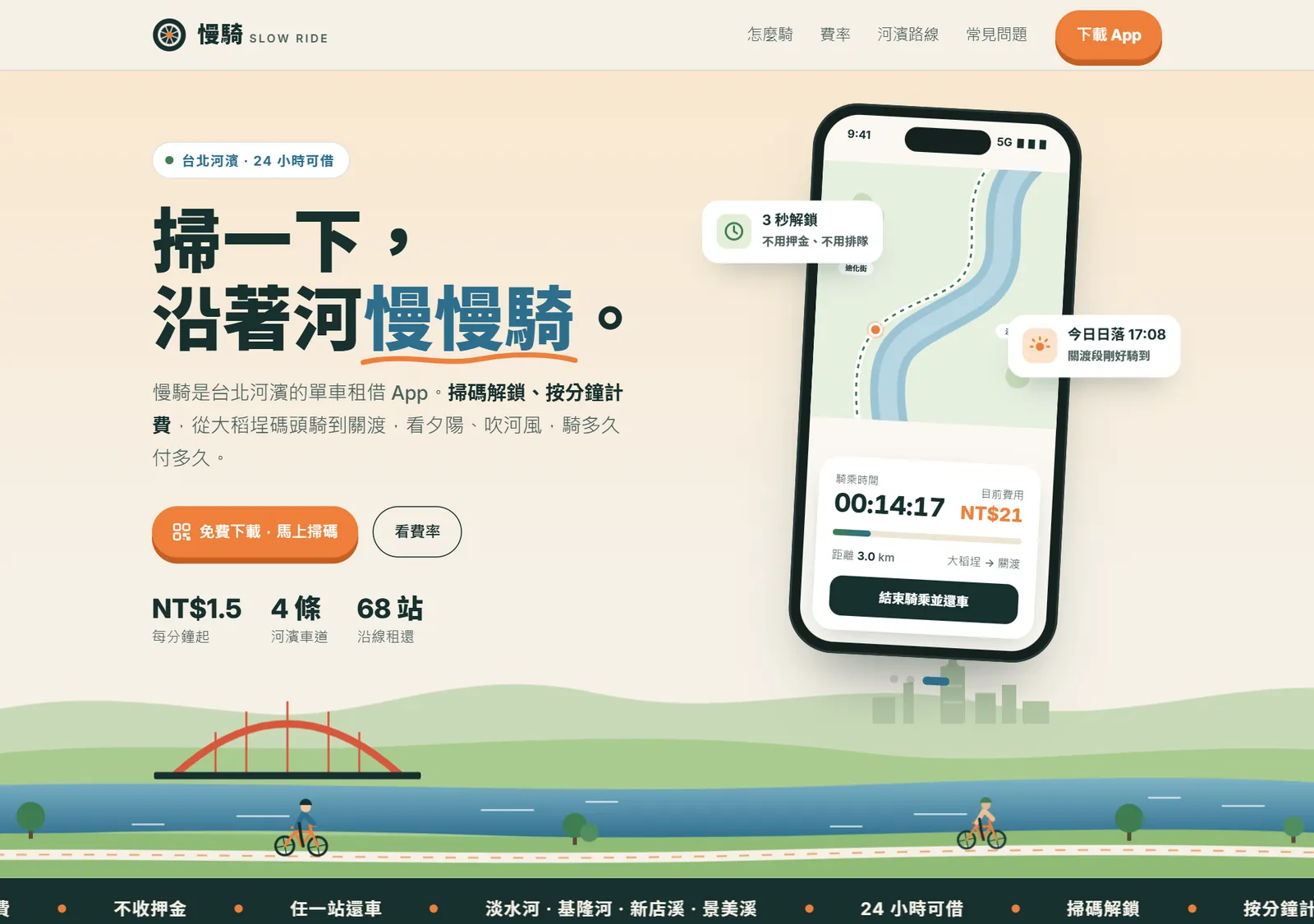
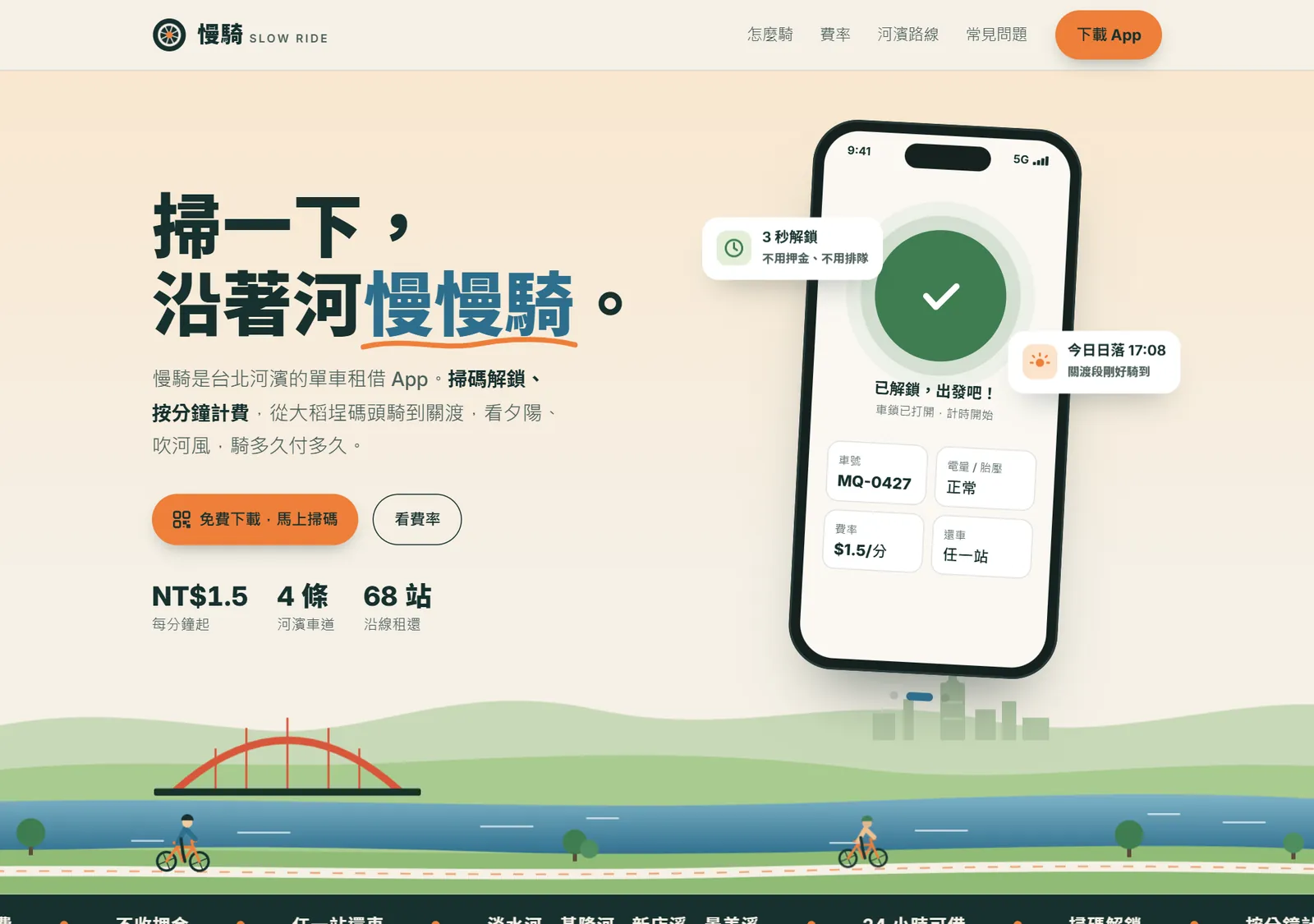
Honestly, it is not ugly: the layout is tidy and the text is easy to read. But it has the usual AI-page tells: a small pill above the headline, an English label above every section (HOW IT WORKS, PRICING), three identical step cards, three price cards with a "most popular" tag, and white text on orange at only 2.7:1 contrast.
Build the website homepage for an app called "[brand name]": [one line on what the app does, how it charges, where it is used].
Build the website homepage for an app called "Slow Ride": a bike-rental app for Taipei's riverside, scan a QR code to unlock, pay by the minute, ride along the riverside bike paths.
Every skill below was run for real on the same Slow Ride app:
- ① Stageshow: product UI motion and bento showcases
- ② Dimensional Drawing: turns a component into a spec drawing
- ③ Oil UI: several design directions, side by side
- ④ design.how: a UI review before you ship
- ⑤ Awwwards MCP: award-winning sites as references
- Plus Impeccable, Taste Skill and Emil Kowalski: removing the AI look, art direction and motion detail
02Before you start: one command per skill
- Have Node.js and an AI coding tool that reads skills: Claude Code, Codex, Cursor or Gemini CLI.
- Open a terminal, go to your project folder, then paste the install command from each section below (npx skills add …).
- The installer asks "Which agents do you want to install to?". Tick the tool you use.
- By default a skill is installed for this project only; add -g at the end to make it available in every project.
- Restart Claude Code, then type a slash and the skill name (for example /stageshow) followed by your request.
npx skills is the open-source skills installer (vercel-labs/skills); it supports Claude Code, Codex, Cursor and dozens of other agents. Awwwards MCP is different: it is an MCP server, not a skill, and its install is in section ⑤.
- Stageshow (benjitaylor/skills) — by Benji Taylor; each skill ships its own licence
- Dimensional Drawing (enesozturk/dimensional-drawing) — MIT
- Oil UI (oil-oil/oil-ui) — MIT
- design.how (arla6ka/design.how) — MIT; 6 skills
- Awwwards MCP (INSANE0777/Awwwards-mcp) — MIT; MCP server, no API key
- skills installer (vercel-labs/skills) — this is what npx skills add runs
03① Stageshow: product UI motion and bento showcases
Stageshow is a skill by Benji Taylor, whose own site says he is Head of Design for X and SpaceXSI at SpaceX. It makes faux product UI that looks like the real product: stills, feature cards, cursor demos and bento grids. It comes with composition and motion guidance, a kit and examples to copy from, and tools that film the result so the agent can check its own work.
- Install: npx skills add benjitaylor/skills --skill stageshow
- Type the prompt below in Claude Code; the /stageshow at the start calls the skill.
/stageshow Make a product-demo bento animation for "[brand name]": [what the app is, its 2–3 most important features].
/stageshow Make a product-demo bento animation for "Slow Ride": a bike-rental app for Taipei's riverside, scan a QR code to unlock, pay by the minute, ride along the riverside bike paths.
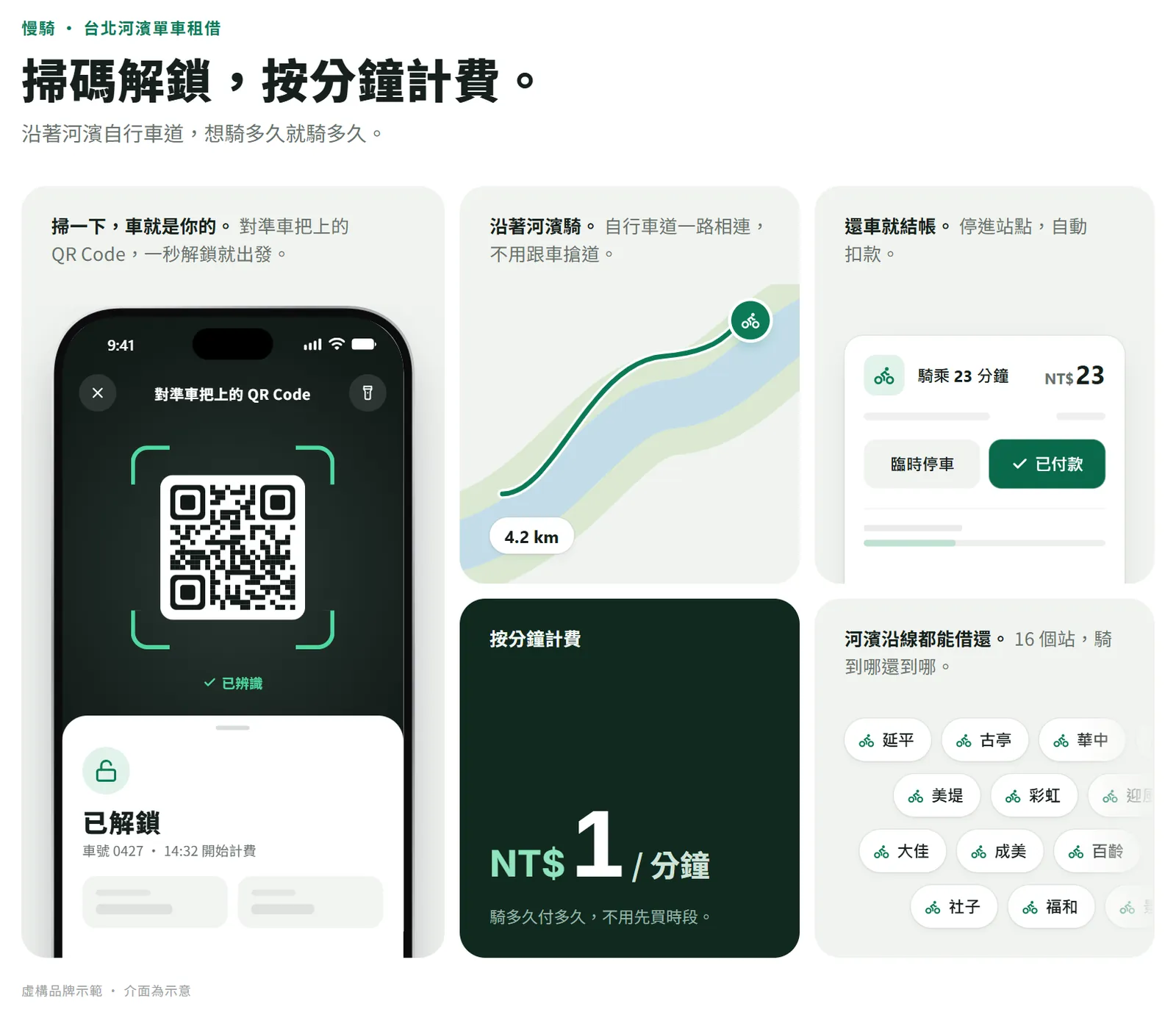
It had Claude write a plan first, film the bento example that ships with the skill, and copy its structure: one tall phone as the hero, with route, payment, price and station tiles around it.
04② Dimensional Drawing: Apple-style spec drawings of your components
Dimensional Drawing is a skill by enesozturk that draws UI components the way Apple draws accessory dimensions: spacing, radii, heights and layers, all labelled. Handy for handing a component to engineers or documenting a design system.
- Install: npx skills add enesozturk/dimensional-drawing (it installs dimensional-drawing plus dimensional-drawing-motion, the animated version)
- Type the prompt and list everything that is on the component.
/dimensional-drawing Draw a dimensional drawing of the [component name, for example: product card] in "[brand name]": the card has [list everything on the component].
/dimensional-drawing Draw a dimensional drawing of the bike-rental card in the "Slow Ride" app: the card shows the bike number, battery, distance, price per minute and a "scan to unlock" button.
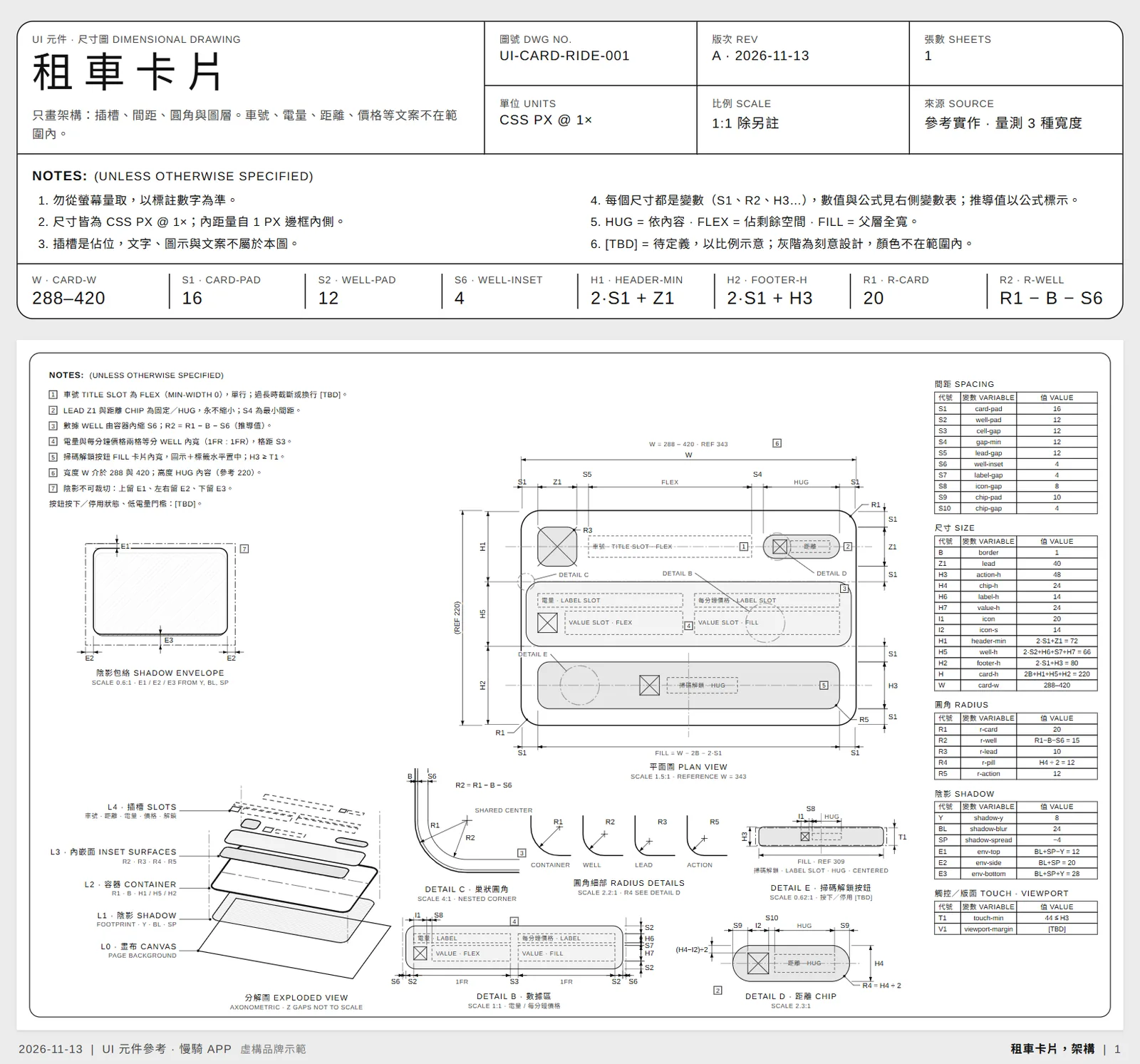
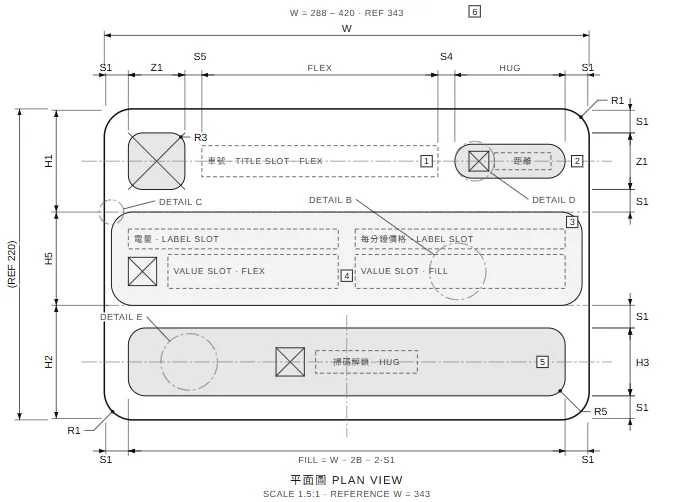
The skill says never to invent values. So Claude first built a plain wireframe card, measured it at 375, 320 and 600 px, and drew from those measurements. The drawing shows structure only; the bike number, battery and other copy are out of scope.
05③ Oil UI: three design directions, side by side
Oil UI is an interface design skill by oil-oil. By default it recommends one direction and refines it against real screenshots; when you ask to compare, it explores several and puts them on one page for you to pick. It works for websites, apps, dashboards and single components.
- Install: npx skills add oil-oil/oil-ui
- Say "side by side" or "compare" in the prompt, or it will recommend just one direction.
/oil-ui Explore a few different design directions for the [homepage / a screen] of "[brand name]" and compare them side by side: [what the app is, how it charges, where it is used].
/oil-ui Explore a few different design directions for the "Slow Ride" app homepage and compare them side by side: a bike-rental app for Taipei's riverside, scan a QR code to unlock, pay by the minute, ride along the riverside bike paths.
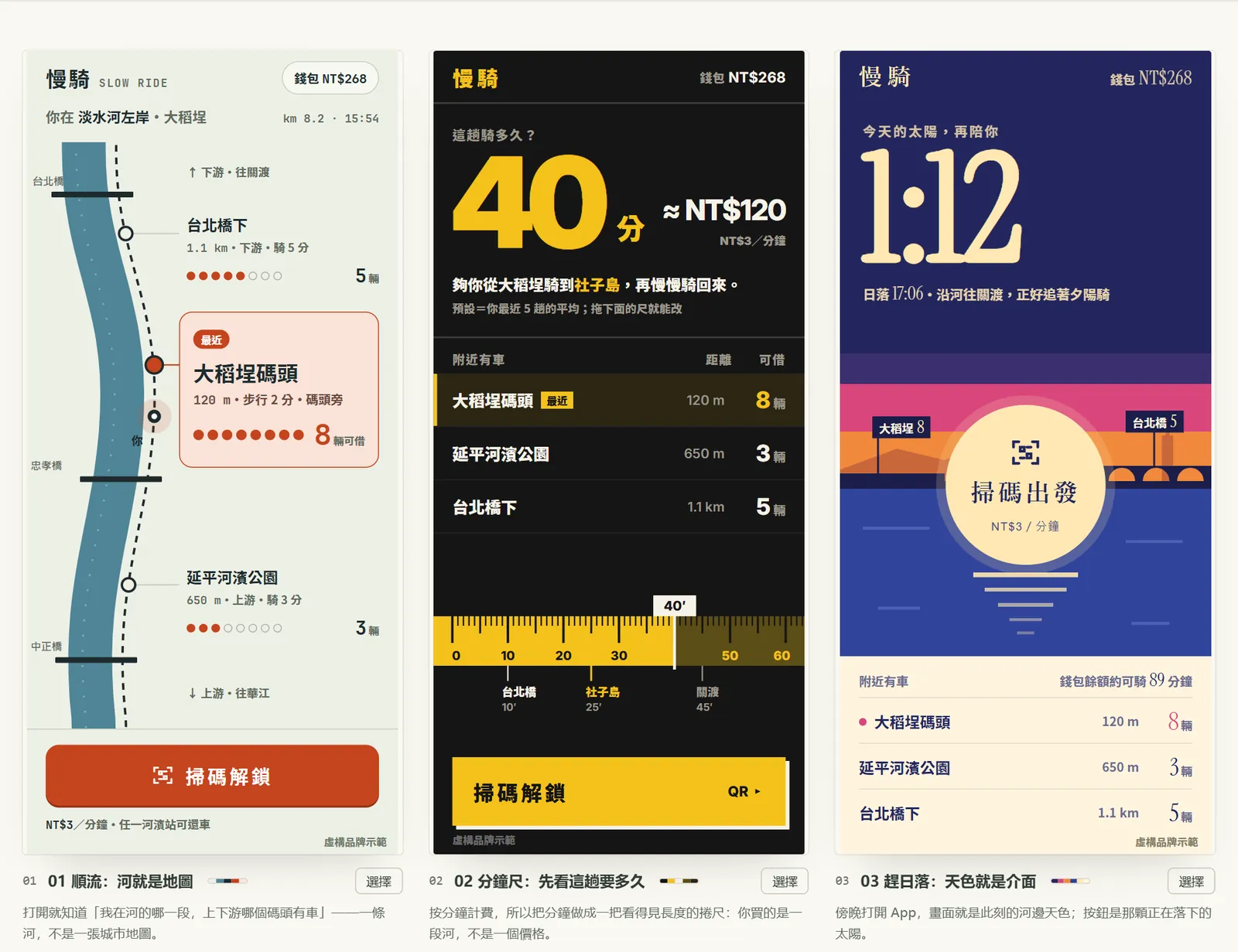
Its process: a shared product-fact sheet, then a fresh sub-agent wrote 4 concepts, 3 were kept, a separate reviewer passed them, and each direction got one first screen. Its rule is that any two directions may share at most one of layout, typography, colour and key imagery, so the three look nothing alike.
06④ design.how: a UI review before you ship
design.how is a set of 6 skills by arla6ka for design systems and UI review. We used ui-review: it opens your page in a browser, takes screenshots at several widths, tests the keyboard and contrast, and answers "ready to ship?", sorting problems into blocking, should-fix and note.
- Install: npx skills@latest add arla6ka/design.how (or npx skills@latest add https://design.how, which installs the same 6 skills)
- Point it at a finished page with the prompt below.
/ui-review Is this [page, for example: homepage] ready to ship?
We had it review the no-skill page (about 25 minutes). The answer was "not yet":
- 1 blocking: every "Download the app" button only jumps to #download on the same page, and the QR code is a random pattern that scans to nothing.
- Should-fix: white text on orange is only 2.7:1 (body text needs 4.5:1).
- Should-fix: the fare slider keeps moving by itself while it has keyboard focus.
- Should-fix: the route cards only work with a mouse; the keyboard cannot reach them.
- Should-fix: with "reduce motion" on, most animations still run, and on a slowed-down CPU taps take over 100 ms to respond.
- Plus 8 notes, such as the mobile headline being squeezed onto 4 lines.
07⑤ Awwwards MCP: let the AI browse award-winning sites for references
Awwwards MCP is not a skill: it is a free, open-source MCP server that needs no API key. Once connected, Claude Code, Codex, Cursor and similar tools can search award-winning sites (with real screenshots) and read their design traits, scrolling and motion. Version 1.19.0, the one we started, has 41 tools, such as search_sites, get_site_details, analyze_page_structure and get_motion_dna.
- Claude Code: claude mcp add awwwards -- npx -y awwwards-mcp
- Codex: codex mcp add awwwards -- npx -y awwwards-mcp
- Restart the tool, then ask for references in plain words; it calls the tools itself.
Use awwwards to find 3 award-winning sites related to [your industry or style, for example: outdoors, map apps], explain their colours, type and motion, then suggest one idea my [page] could borrow.
We only tested its search for real: a search for "bike" found nothing on the first page. So keep your keywords broad, or search by style or a bigger category.
08The other 3: Impeccable, Taste Skill, Emil Kowalski
We tested these 3 in full in our "same prompt, 3 design skills" guide, so here we ran each once on Slow Ride for a quick look.
- Same prompt, 3 design skills: Impeccable, Taste Skill, Emil Kowalski tested — full before/after and install details
Impeccable (Paul Bakaus): fixes the AI look until a page is ready to ship. We copied the no-skill page and asked it to polish. It kept the look and fixed details: dark text on the orange (contrast 2.7:1 → 5.2:1), the English section labels and the headline pill removed, softer shadows, route cards usable by keyboard. Its own detector found 33 issues before and 13 after. The official install is npx impeccable install; we used npx skills add pbakaus/impeccable.
/impeccable polish [your file, for example index.html]
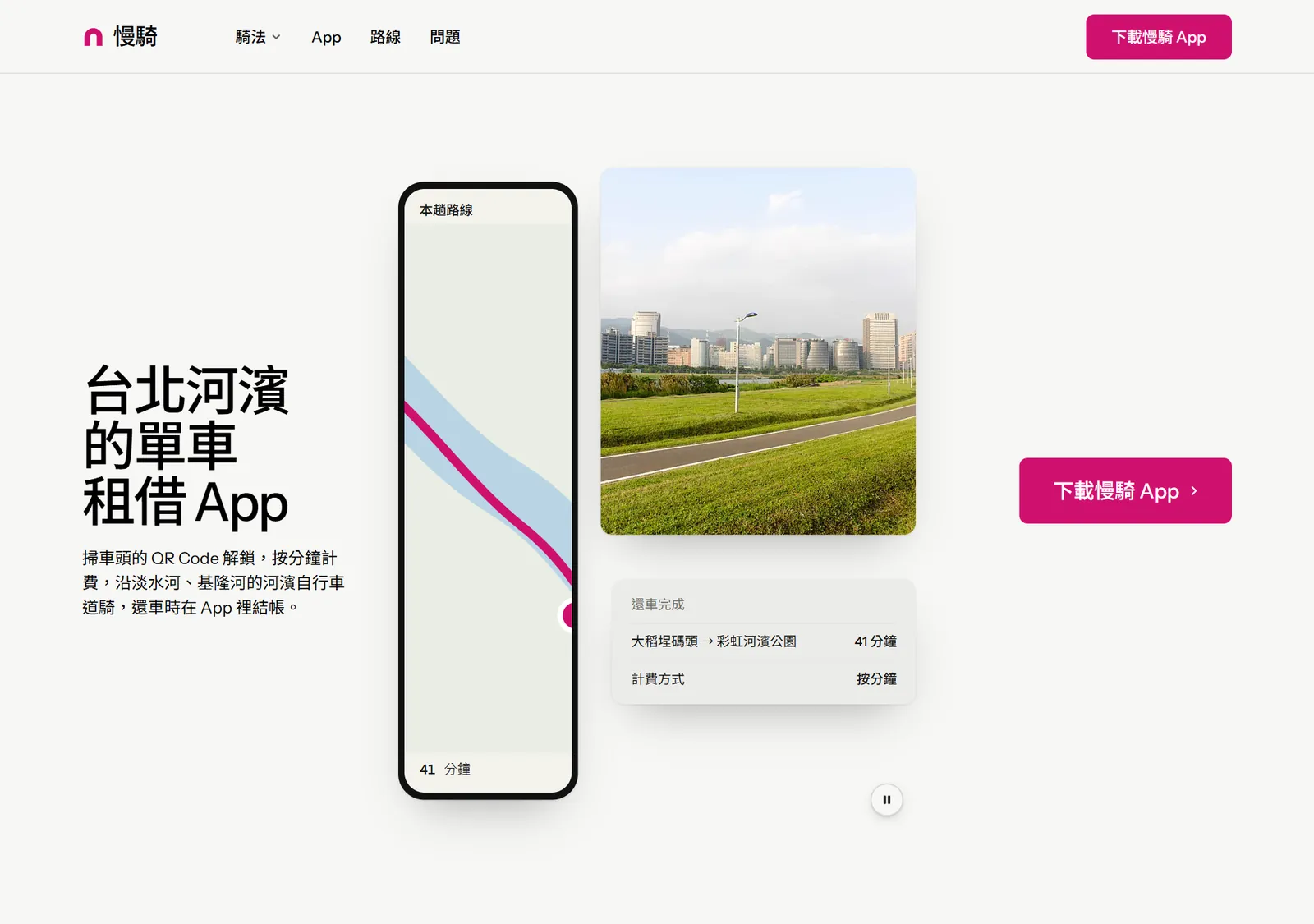
Taste Skill (Leonxlnx): sets an art direction, then checks the page in a real browser. Its scripts chose the layout and look: off-white background, a pink accent, Instrument Sans, headline on the left, a photo and app-screen collage on the right, one big button. Its copy rule keeps to facts in the brief, so no price is shown. The photos are openly licensed Wikimedia Commons images its own search found, credited on the page. Install: npx skills add https://github.com/Leonxlnx/taste-skill --skill "design-taste-frontend" (needs Node 22+ and Chrome / Edge).
/design-taste-frontend Build the website homepage for "[brand name]": [what the app is, how it charges, where it is used].
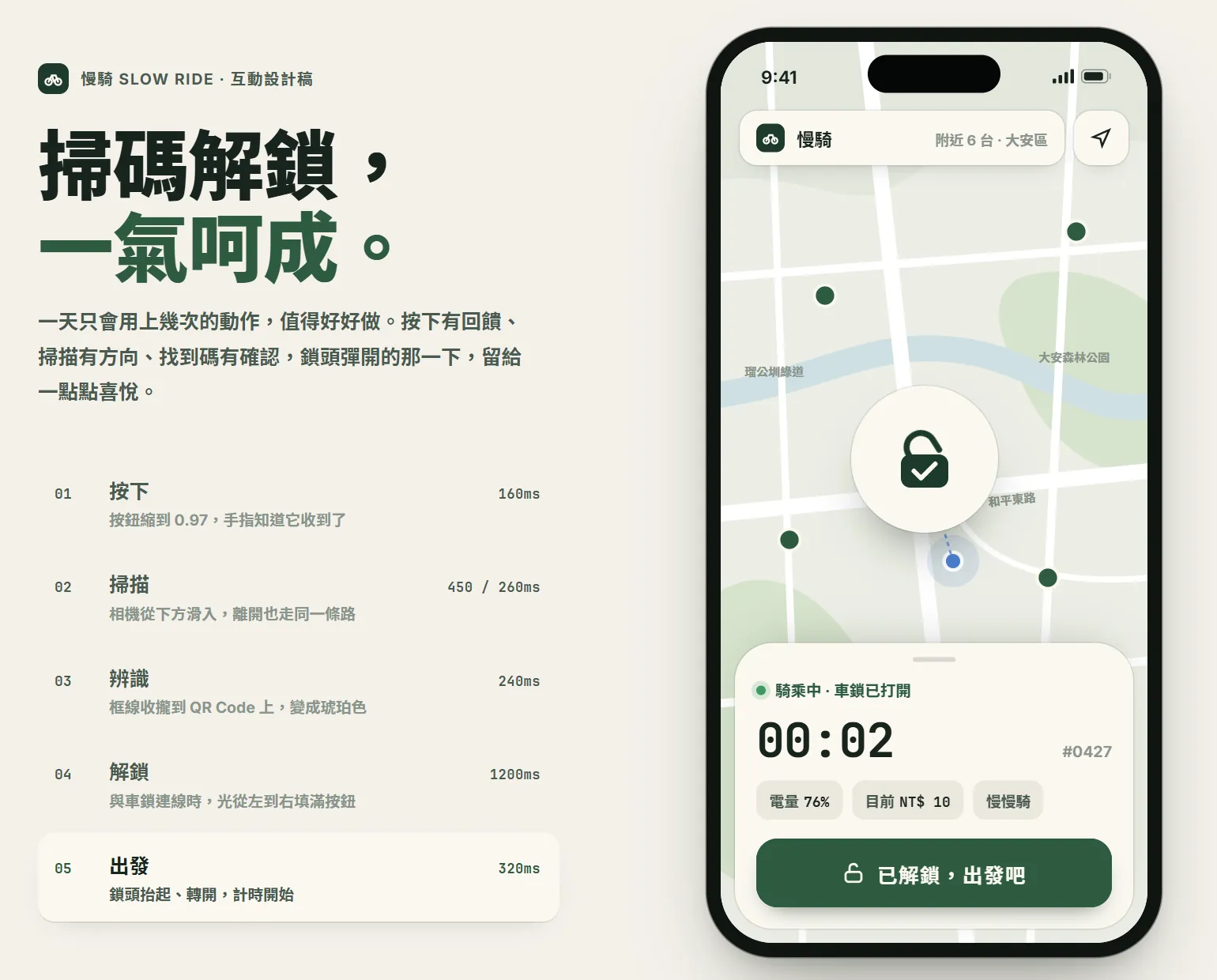
Emil Kowalski: motion and interface detail. We used emil-design-eng for the "scan to unlock" button: a 160 ms press, the camera sheet sliding in over 450 ms and out over 260 ms, only smooth properties like transform and opacity animated, the success badge growing from 90% size, and a 2 px blur hiding the button-label swap. Install: npx skills@latest add emilkowalski/skills (we got a set of 19 skills).
/emil-design-eng Animate the "[button name]" button and the [success state] in the "[brand name]" app, and make it feel polished.
09Combine them: one for looks, one for motion, one for detail
Don't stop at one. Each skill is good at something different, and they work best as a team:
- Art direction: Taste Skill, or Oil UI if you want to see a few directions first
- Motion: Emil Kowalski; Stageshow for product showcase animations
- Detail: Impeccable to fix, design.how to review before launch
- Handing off to engineers: Dimensional Drawing for spec drawings
- Out of ideas: start with Awwwards MCP for references
/oil-ui Explore 3 different design directions for the homepage of "[brand name]" and compare them side by side: [what the app is, how it charges, where it is used].
/emil-design-eng Animate the [most important button] in the direction I picked, and make it feel polished.
/impeccable polish [your file, for example index.html]
10Good to know
- Slow Ride is a fictional brand; the prices, stations and bike numbers on the pages are demo content Claude made up.
- These skills are made by third parties, not by Anthropic. Before installing, read the README and SKILL.md on GitHub to see what commands it runs.
- We ran each skill once; the same prompt will give a different result next time. Each run took about 13–65 minutes.
- Some skills' own checks (Stageshow's filming check, Taste Skill's final gate) timed out in our setup, so your results may differ.
- Skills change fast, and commands or file names may change. Everything here was read on the GitHub pages on 13 Nov 2026.
- Licences: Dimensional Drawing, Oil UI, design.how, Emil Kowalski, Taste Skill and Awwwards MCP are MIT, Impeccable is Apache-2.0, and each Stageshow skill ships its own licence. This is not legal advice.
- The photos Taste Skill finds each have their own author and licence; credit them as the licence says before you use them.
- Not affiliated with any skill author or with Anthropic.
Sources
- benjitaylor/skills: Stageshow (GitHub)
- Stageshow write-up (benji.org)
- enesozturk/dimensional-drawing (GitHub)
- oil-oil/oil-ui (GitHub)
- arla6ka/design.how (GitHub)
- INSANE0777/Awwwards-mcp (GitHub)
- pbakaus/impeccable (GitHub)
- Leonxlnx/taste-skill (GitHub)
- emilkowalski/skills (GitHub)
- vercel-labs/skills: the skills installer (GitHub)
- Wikimedia Commons: Guanshan Riverside Park and Minquan Bridge West Side